# TreeCUA: Efficiently Scaling GUI Automation with Tree-Structured Verifiable Evolution
[](https://opensource.org/licenses/Apache-2.0)
[](https://huggingface.co/datasets/jdy18/TreeCUA-Datasets/)
[](https://arxiv.org/abs/2602.09662)
## 📖 Introduction
**TreeCUA** is a novel framework for efficiently scaling GUI automation agents through **Tree-Structured Verifiable Evolution**.
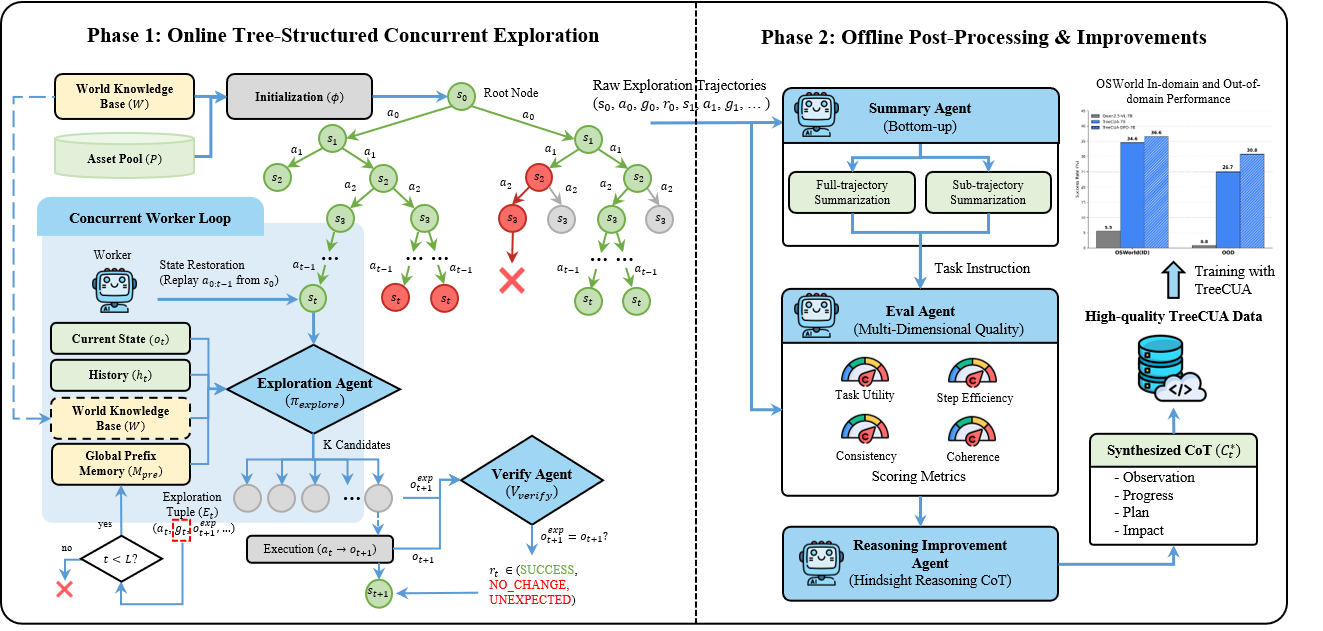
Unlike traditional linear data synthesis methods that suffer from redundancy and lack of diversity, TreeCUA reformulates trajectory synthesis as a tree-structured exploration process. By leveraging a multi-agent framework (Exploration, Verification, Summary, and Evaluation agents), we generate high-quality, diverse, and verifiable GUI trajectories.
Key features include:
- **🌲 Tree-Structured Exploration:** Maximizes node reuse and eliminates redundant exploration of shallow functional entry points.
- **✅ Step-Level Verification:** Ensures every action is valid and aligns with the expected visual outcome.
- **🌍 World Knowledge Guidance:** Utilizes official documentation to guide agents toward long-tail, professional functionalities.
- **🔄 Scalable Replay Mechanism:** Enables asynchronous concurrent generation on standard OS environments without native snapshotting.
- **🚀 TreeCUA-DPO:** A novel alignment strategy that uses branching nodes as natural preference pairs for Direct Preference Optimization (DPO).
## 🚀 Open-source Roadmap
- [x] **Tree-Structured Action Trajectories**
- [x] Paper
- [x] Code
## 🔧 Environment Setup
### 1. Get the Code
```bash
git clone https://github.com/UITron-hub/TreeCUA.git
cd TreeCUA
```
All subsequent commands assume you are in the project root directory.
### 2. OSWorld Environment
Follow the official [OSWorld setup guide](https://github.com/xlang-ai/OSWorld) to prepare your VM and environment.
- **Resolution Requirement:** Set desktop resolution to **1024×768** to match the coordinate space.
- **Conda Environment:** Create and activate the OSWorld conda environment with required dependencies.
- **VM Image:** You need a VM image (e.g., `Ubuntu.qcow2`) compatible with your chosen provider (`docker`, `vmware`, `virtualbox`, etc.).
### 3. Project Configuration
```bash
cp config/env.template.sh config/env.local.sh
# Edit config/env.local.sh with your API keys and paths
source config/env.local.sh
```
`env.local.sh` sets `PYTHONPATH` so that `from exploration.xxx import yyy` works from any directory. The template provides sensible defaults — you only need to fill in API keys and paths.
### 4. API Configuration
Two separate API backends are used — they use **different protocols** and must not be mixed:
| Module | Format | Env Var Prefix | Typical Model |
|---|---|---|---|
| ExplorationAgent | **Anthropic Messages** (`x-api-key`) | `LLM_API_*` | claude-sonnet-4-5 |
| VerificationAgent | **OpenAI Completions** (`Bearer`) | `VERIFIER_API_*` | gpt-4o-mini |
| Post-processing | **OpenAI Completions** (`Bearer`) | `POSTPROCESS_*` | gpt-4o-mini |
| Env Variable | Description |
|---|---|
| `TREE_CUA_ROOT` | Path to the TreeCUA project root directory |
| `PYTHONPATH` | Must include `$TREE_CUA_ROOT` for `exploration.*` imports |
| `LLM_API_URL` | Anthropic Messages API endpoint (`/v1/messages`) |
| `LLM_API_KEY` | Anthropic API key (`x-api-key` header) |
| `LLM_MODEL` | Claude model name |
| `VERIFIER_API_URL` | OpenAI-compatible endpoint (`/v1/chat/completions`) |
| `VERIFIER_API_KEY` | OpenAI-compatible API key (`Bearer` header) |
| `VERIFIER_MODEL` | Model for verification (e.g. `gpt-4o-mini`) |
| `POSTPROCESS_API_URL` | OpenAI-compatible endpoint for post-processing |
| `POSTPROCESS_API_KEY` | API key for post-processing |
| `POSTPROCESS_MODEL` | Model for post-processing (e.g. `gpt-4o-mini`) |
| `WORLD_KNOWLEDGE_PATH` | Path to world knowledge JSON. A simplified version is provided at `data_resource/world_knowledge.json`. |
| `RESOURCE_DIR` | Path to test resources (images, docs, etc.) |
### 5. Download Dataset
Download the TreeCUA-Datasets from [Hugging Face](https://huggingface.co/datasets/jdy18/TreeCUA-Datasets) and place it under `data_cache/TreeCUA_Datasets/`.
The dataset has two parts:
| Part | Path | Purpose |
|---|---|---|
| **Static assets** | `data_resource/` | Images, documents, code project zips, etc. Required by both exploration and replay to set up VM initial states. |
| **Exploration trees** | `trees/` | Pre-generated action sequences (`config.json` + `nodes.jsonl`). Use the replay script to reconstruct our full trajectories with screenshots. |
```bash
mkdir -p data_cache
ln -s /path/to/TreeCUA_Datasets data_cache/TreeCUA_Datasets
```
The expected layout:
```text
data_cache/TreeCUA_Datasets/
├── trees/ # Exploration trees (for replay)
│ ├── chrome/
│ ├── .../
└── data_resource/ # Static assets (for exploration & replay)
```
The dataset path is configurable — pass `--dataset_dir` to the replay script, or symlink to `data_cache/TreeCUA_Datasets/`.
## 🔧 Exploration Code Usage
The pipeline has two phases: an **online** explore-verify loop that generates tree-structured trajectories on a VM, and **offline** post-processing that scores and annotates the results.
### Online Phase — Exploration
[`scripts/exploration/run_exploration_template.sh`](scripts/exploration/run_exploration_template.sh) is the recommended entry point for batch exploration. It iterates over configured workload categories, invoking [`exploration/run_tree_exploration.py`](exploration/run_tree_exploration.py) for each. The Python script spawns N parallel workers, each running an explore-verify loop on a VM: the `ExplorationAgent` proposes candidate actions, actions are executed, and the `VerificationAgent` validates before/after screenshots.
```bash
# Batch: edit WORKLOADS in the script, then run
source config/env.local.sh
./scripts/exploration/run_exploration_template.sh
# Or run a single domain directly
python exploration/run_tree_exploration.py \
--domain gimp \
--sub_category "Image Editing" \
--model "$LLM_MODEL" \
--api_base_url "$LLM_API_URL" \
--api_key "$LLM_API_KEY" \
--path_to_vm /path/to/Ubuntu.qcow2 \
--provider_name docker \
--num_envs 2 \
--max_trajectories 500 \
--max_steps_exploration 20 \
--results_base_dir ./exploration_results
```
### Offline Phase — Post-Processing
[`scripts/post_process/run_post_processing.py`](scripts/post_process/run_post_processing.py) runs four steps over a completed session directory: quality scoring, overall task summarization, stage breakdown (`EFFECTIVE`/`NAVIGATION`/`NOISE`), and per-step reason synthesis.
```bash
python scripts/post_process/run_post_processing.py \
--session_dir ./exploration_results/
```
## Trajectory Dataset
The [**TreeCUA-Datasets**](https://huggingface.co/datasets/jdy18/TreeCUA-Datasets) provides a portion of our exploration tree data covering classic OSWorld desktop applications — each tree captures a structured exploration of an app's functionality, branching from a shared initial state into diverse user goals. We provide the **environment configurations** and **action sequences** (exploration trees). To obtain visual observations (screenshots) and full trajectories, users need to **replay** these actions within the OSWorld environment.
### File Descriptions
* **`trees/`**: The core logic of the exploration.
* **`config.json`**: Defines the initial state of the virtual machine. **Note:** This file references external assets (e.g., codebases, documents) located in the `data_resource/` directory. You must ensure `data_resource/` is accessible when initializing the environment.
* **`nodes.jsonl`**: A JSON Lines file where each line represents a node (state) in the exploration tree. It contains the action taken to reach this state and verification results.
* **`data_resource/`**: Contains static assets required to set up the tasks (e.g., zip files of code projects for VS Code tasks, images for GIMP tasks).
### Data Format Example (`nodes.jsonl`)
```json
{"node_id": "node_03_0349c777", "parent_node_id": "node_02_80671614", "root_node_id": "root_001_4bb91e98", "depth": 3, "step_action": [{"action": "left_click", "coordinate": [97, 140]}, {"action": "wait", "duration": 1}], "step_goal": "Navigate to 'You and Google' settings to manage user profile and account information", "verification_result": "SUCCESS", "meta": {"app": "chrome", "category": "Browser Configuration & Personalization"}}
```
* `node_id`: Unique identifier for the current state.
* `parent_node_id`: The ID of the previous state.
* `step_action`: The action executed to transition from the parent node to the current node.
* `step_goal`: A natural language description of the specific objective or intent for the action performed at this step.
* `verification_result`: Whether the action was executed successfully as verified by our verifier.
---
### Usage & Replay Guide
To reconstruct the full dataset (including screenshots), you need to replay the action sequences within an OSWorld environment. We provide the `scripts/replay.py` tool to automate this process.
### 1. Running the Replay
The replay script uses OSWorld's `DesktopEnv` to initialize each task configuration, then replays every root-to-leaf path in the exploration tree, capturing screenshots at each step.
```bash
# Replay all trees for all apps
python scripts/replay.py \
--dataset_dir ./data_cache/TreeCUA_Datasets \
--output_dir ./replay_output \
--provider_name docker \
--path_to_vm /path/to/Ubuntu.qcow2
# Replay a specific app
python scripts/replay.py \
--dataset_dir ./data_cache/TreeCUA_Datasets \
--output_dir ./replay_output/chrome \
--app chrome
# Replay a single tree
python scripts/replay.py \
--dataset_dir ./data_cache/TreeCUA_Datasets \
--output_dir ./replay_output \
--tree_id root_001_4bb91e98 \
--headless
```
**CLI arguments:**
| Argument | Description |
|---|---|
| `--dataset_dir` | Path to the downloaded TreeCUA_Datasets root (contains `trees/` and `data_resource/`). |
| `--output_dir` | Directory to save replayed trajectories and screenshots. |
| `--provider_name` | OSWorld provider: `docker`, `vmware`, `virtualbox`, `aws`, `azure`, `gcp`, `aliyun`, `volcengine`, `fastvm` (default: `docker`). |
| `--path_to_vm` | Path to the VM image (required for vmware/virtualbox). |
| `--app` | Filter: only replay trees for this app (e.g., `chrome`, `gimp`). |
| `--tree_id` | Filter: only replay this specific tree. |
| `--headless` / `--no-headless` | Run the VM GUI-less or visible (default: headless). |
| `--sleep_after_execution` | Seconds to wait after each action (default: `2.0`). |
### 2. Output Structure
The replay output matches the exploration pipeline's session directory layout, so you can run post-processing on it directly:
```
replay_output/
├── nodes/ # Node JSONs (Node.to_dict() format)
│ ├── root_001_xxx.json
│ ├── node_01_xxx.json
│ └── ...
├── screenshots/ # Screenshot per node
│ ├── root_001_xxx.png
│ ├── node_01_xxx.png
│ └── ...
└── trajectories/ # One manifest per root-to-leaf path
└── traj_a1b2c3d4e5f6/
└── traj_a1b2c3d4e5f6.json
```
Each trajectory manifest follows the same format as `create_trajectory_manifest()`, with:
- **`node_path`**: Ordered node IDs from root to leaf.
- **`traj_detail`**: Per-step entries with `{step, goal, action, reason, verification_result}`.
- **`final_task`**: Empty (`{}`) — to be populated by post-processing.
After replay, run the post-processing pipeline:
```bash
python scripts/post_process/run_post_processing.py \
--session_dir ./replay_output
```
### 3. Action Space
The `step_action` format in `nodes.jsonl` follows the **Anthropic Computer Use** action specification. Coordinates are in **1024×768** screen space.
## 🏆 Model Zoo & Performance
We provide models trained on TreeCUA data, based on **Qwen2.5-VL-7B**.
| Model | Base Model | Method | OSWorld (ID) | OOD Benchmark |
| :--- | :--- | :--- | :---: | :---: |
| **Qwen2.5-VL-7B** | | | **5.5%** | **0.8%** |
| **TreeCUA-7B** | Qwen2.5-VL-7B | SFT (2-Stage) | **34.6%** | **26.1%** |
| **TreeCUA-DPO-7B** | Qwen2.5-VL-7B | SFT + DPO | **36.6%** | **28.1%** |
*Detailed benchmark results and analysis are available in the paper.*
---
## 📧 Citation
If you find this work useful, please cite our paper:
```bibtex
@article{jiang2025treecua,
title={TreeCUA: Efficiently Scaling GUI Automation with Tree-Structured Verifiable Evolution},
author={Jiang, Deyang and Huang, Jing and Zhao, Xuanle and Chen, Lei and Zheng, Liming and Liu, Fanfan and Qiu, Haibo and Shi, Peng and Zeng, Zhixiong},
journal={arXiv preprint arXiv:2602.09662},
year={2025}
}
```
***