- [Git Commit Patterns](#git-commit-patterns)
- [Example with Emoji](#example-with-emoji)
- [Git Commands](#git-commands)
- [NVM](#nvm)
- [NPM](#npm)
- [Bun](#bun)
- [Angular Cli](#angular-cli)
- [.NET Cli](#net-cli)
# Git Commit Patterns
 - [gitmoji](https://gitmoji.dev/)
-
- [gitmoji](https://gitmoji.dev/)
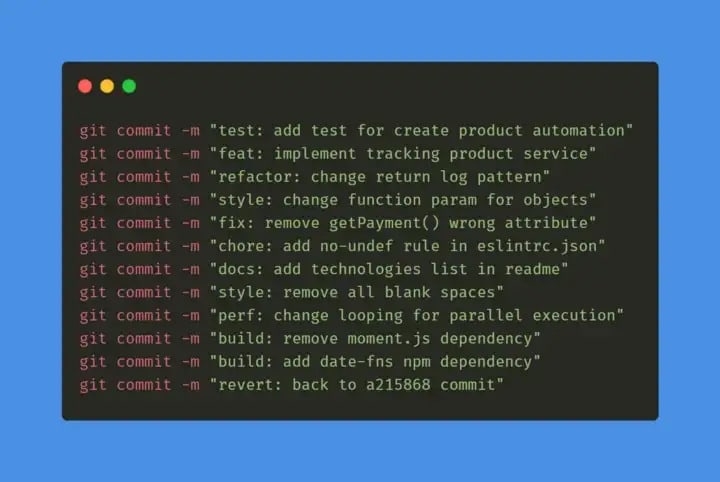
- 🧪test: indicates any type of creation or alteration of test codes.
**Example:** Creation of unit tests.
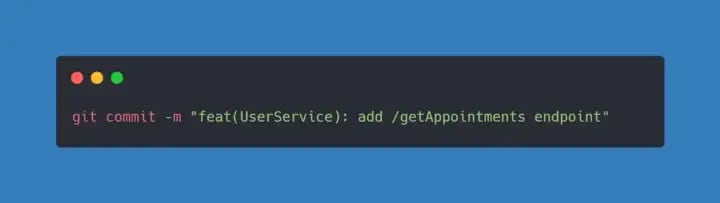
- ✨feat: indicates the development of a new feature for the project.
**Example:** Adding a service, functionality, endpoint, etc.
- ♻️refactor: used when there is a code refactoring that does not have any impact on the system logic/rules.
**Example:** Code changes after a code review
- 🎨style: used when there are code formatting and style changes that do not change the system in any way.
**Example:** Change the style-guide, change the lint convention, fix indentations, remove white spaces, remove comments, etc…
- 🛠️fix: used when correcting errors that are generating bugs in the system.
**Example:** Apply a handling for a function that is not behaving as expected and returning an error.
- 🧹chore: indicates changes to the project that do not affect the system or test files. These are developmental changes.
**Example:** Change rules for eslint, add prettier, add more file extensions to .gitignore
- 📝docs: used when there are changes in the project documentation.
**Example:** add information in the API documentation, change the README, etc.
- 🏗️build: used to indicate changes that affect the project build process or external dependencies.
**Example:** Gulp, add/remove npm dependencies, etc…
- ⚡️perf: indicates a change that improved system performance.
**Example:** change ForEach to While, etc…
- 👷ci/cd: used for changes in CI configuration files.
**Example:** Circle, Travis, BrowserStack, etc…
- ⏪️revert: indicates the reversal of a previous commit.
## Example with Emoji
| Commit type | Emoji |
| :-------------------------------------- | :-------------------------------------------------------- |
| Initial commit | :tada: `:tada:` |
| Version tag | :bookmark: `:bookmark:` |
| New feature | :sparkles: `:sparkles:` |
| Bugfix | :bug: `:bug:` |
| Metadata | :card_index: `:card_index:` |
| Documentation | :books: `:books:` |
| Documenting source code | :bulb: `:bulb:` |
| Performance | :zap: `:zap:` |
| Style | :lipstick: `:lipstick:` |
| Fix Lint Error | :rotating_light: `:rotating_light:` |
| Adding a test | :white_check_mark: `:white_check_mark:` |
| Make a test pass | :heavy_check_mark: `:heavy_check_mark:` |
| Improve format/structure | :art: `:art:` |
| Refactor code | :recycle: `:recycle:` |
| Removing code/files | :fire: `:fire:` |
| Continuous Integration | :green_heart: `:green_heart:` |
| Security | :lock: `:lock:` |
| Upgrading dependencies | :arrow_up: `:arrow_up:` |
| Downgrading dependencies | :arrow_down: `:arrow_down:` |
| Update code due to external API changes | :alien: `:alien:` |
| Typos Fix | :pencil: `:pencil:` |
| Critical hotfix | :ambulance: `:ambulance:` |
| Deploying stuff | :rocket: `:rocket:` |
| Fixing on MacOS | :apple: `:apple:` |
| Fixing on Linux | :penguin: `:penguin:` |
| Fixing on Windows | :window: `:window:` |
| Work in progress | :construction: `:construction:` |
| Adding CI build system | :construction_worker: `:construction_worker:` |
| Analytics or tracking code | :chart_with_upwards_trend: `:chart_with_upwards_trend:` |
| Removing a dependency | :heavy_minus_sign: `:heavy_minus_sign:` |
| Adding a dependency | :heavy_plus_sign: `:heavy_plus_sign:` |
| Docker | :whale: `:whale:` |
| Configuration files | :wrench: `:wrench:` |
| Package.json in JS | :package: `:package:` |
| Merging branches | :twisted_rightwards_arrows: `:twisted_rightwards_arrows:` |
| Bad code / need improv. | :hankey: `:hankey:` |
| Reverting changes | :rewind: `:rewind:` |
| Breaking changes | :boom: `:boom:` |
| Code review changes | :ok_hand: `:ok_hand:` |
| Accessibility | :wheelchair: `:wheelchair:` |
| Move/rename repository | :truck: `:truck:` |
## Rewrite Git History
- Open your `.gitconfig` file in `C:\Users\\.gitconfig`
- Paste the bellow file at the end to make `notepad++` as your default editor for git
```properties
[core]
editor = 'C:/Program Files/Notepad++/notepad++.exe' -multiInst -notabbar
```
- Then open your local repository in terminal and run bellow command
```properties
git checkout main
git rebase -i --root
```
- It will open the commit history in `notepad++`
- Remove the commit you want to remove or sort then close the file
- Then run the below command in the terminal
```properties
git push --force
```
## Cache clear
- If after adding .env to gitignore still it gets added to the commit then try this command
`git rm .env --cached`
# Git Commands
1. git config -> Purpose: Configure Git settings, such as user name and email.
```properties
Example: git config --global user.name "Your Name"
```
2. git init -> Purpose: Initialize a new Git repository.
```properties
Example: git init
```
3. git clone -> Purpose: Clone an existing repository.
```properties
Example: git clone https://github.com/user/repo.git
```
4. git status -> Purpose: Show the working directory and staging area status.
```properties
Example: git status
```
5. git add -> Purpose: Add file contents to the index (staging area).
```properties
Example: git add . (add all files)
```
6. git commit -> Purpose: Record changes to the repository.
```properties
Example: git commit -m "Commit message"
```
7. git push -> Purpose: Update remote refs along with associated objects.
```properties
Example: git push origin main
```
8. git pull -> Purpose: Fetch from and integrate with another repository or local branch.
```properties
Example: git pull origin main
```
9. git branch -> Purpose: List, create, or delete branches.
```properties
Example: git branch new-branch (create new branch)
```
10. git checkout -> Purpose: Switch branches or restore working tree files.
```properties
Example: git checkout new-branch (switch to branch)
```
11. git switch -> Purpose: Switch branches.
```properties
Example: git switch new-branch
```
12. git merge -> Purpose: Join two or more development histories together.
```properties
Example: git merge new-branch (merge new-branch into current branch)
```
13. git rebase -> Purpose: Reapply commits on top of another base tip.
```properties
Example: git rebase main
```
14. git log -> Purpose: Show commit logs.
```properties
Example: git log --oneline
```
15. git diff -> Purpose: Show changes between commits, commit and working tree, etc.
```properties
Example: git diff (show unstaged changes)
```
16. git show -> Purpose: Show various types of objects.
```properties
Example: git show HEAD (show changes in the last commit)
```
17. git stash -> Purpose: Stash the changes in a dirty working directory away.
```properties
Example: git stash
```
18. git stash pop -> Purpose: Apply the changes recorded in the stash to the working directory.
```properties
Example: git stash pop
```
19. git clean -> Purpose: Remove untracked files from the working directory.
```properties
Example: git clean -fd
```
20. git remote -> Purpose: Manage set of tracked repositories.
```properties
Example: git remote add origin https://github.com/user/repo.git
```
21. git fetch -> Purpose: Download objects and refs from another repository.
```properties
Example: git fetch origin
```
22. git remote -v -> Purpose: Show the URLs that a remote name corresponds to.
```properties
Example: git remote -v
```
23. git tag -> Purpose: Create, list, delete, or verify a tag object.
```properties
Example: git tag -a v1.0 -m "Version 1.0"
```
24. git push origin --tags -> Purpose: Push all tags to the remote repository.
```properties
Example: git push origin --tags
```
25. git reset -> Purpose: Reset current HEAD to the specified state.
```properties
Example: git reset --hard HEAD~1 (reset to previous commit)
```
26. git revert -> Purpose: Create a new commit that undoes the changes from a previous commit.
```properties
Example: git revert HEAD
```
27. git checkout -- -> Purpose: Discard changes in the working directory.
```properties
Example: git checkout -- file.txt (discard changes in file.txt)
```
28. git cherry-pick -> Purpose: Apply the changes introduced by some existing commits.
```properties
Example: git cherry-pick
```
29. git branch -d -> Purpose: Delete a branch.
```properties
Example: git branch -d branch-name
```
30. git branch -D -> Purpose: Force delete a branch.
```properties
Example: git branch -D branch-name
```
31. git merge --no-ff -> Purpose: Create a merge commit even when the merge resolves as a fast-forward.
```properties
Example: git merge --no-ff new-branch
```
32. git rebase -i -> Purpose: Start an interactive rebase.
```properties
Example: git rebase -i HEAD~3
```
33. git diff --staged -> Purpose: Show changes between the index and the last commit.
```properties
Example: git diff --staged
```
34. git blame ->
Purpose: Show what revision and author last modified each line of a file.
```properties
Example: git blame file.txt
```
35. git log --graph -> Purpose: Show a graph of the commit history.
```properties
Example: git log --graph --oneline
```
36. git reflog -> Purpose: Show a log of all references.
```properties
Example: git reflog
```
37. git stash list -> Purpose: List all stashes.
```properties
Example: git stash list
```
38. git stash apply -> Purpose: Apply a stash to the working directory.
```properties
Example: git stash apply stash@{1}
```
39. git stash drop -> Purpose: Remove a single stash entry from the list of stashes.
```properties
Example: git stash drop stash@{1}
```
40. git remote show -> Purpose: Show information about the remote repository.
```properties
Example: git remote show origin
```
41. git remote rm -> Purpose: Remove a remote.
```properties
Example: git remote rm origin
```
42. git pull --rebase -> Purpose: Fetch and rebase the current branch on top of the upstream branch.
```properties
Example: git pull --rebase origin main
```
43. git fetch --all -> Purpose: Fetch all remotes.
```properties
Example: git fetch --all
```
44. git bisect -> Purpose: Use binary search to find the commit that introduced a bug.
```properties
Example: git bisect start
```
45. git submodule -> Purpose: Initialize, update, or inspect submodules.
```properties
Example: git submodule update --init
```
46. git archive -> Purpose: Create an archive of files from a named tree.
```properties
Example: git archive --format=tar HEAD > archive.tar
```
47. git shortlog -> Purpose: Summarize git log output.
```properties
Example: git shortlog -s -n
```
48. git describe ->
Purpose: Give an object a human-readable name based on an available ref.
```properties
Example: git describe --tags
```
49. git rev-parse -> Purpose: Parse revision (or other objects) and retrieve its hash.
```properties
Example: git rev-parse HEAD
```
50. git tag -d -> Purpose: Delete a tag from the local repository.
```properties
Example: git tag -d v1.0
```
51. git checkout -b -> Purpose: Create and switch to a new branch.
```properties
Example: git checkout -b new-branch
```
52. git push origin --delete -> Purpose: Delete a remote branch.
```properties
Example: git push origin --delete branch-name
```
53. git cherry -> Purpose: Find commits not merged upstream.
```properties
Example: git cherry -v
```
54. git rm -> Purpose: Remove files from the working tree and from the index.
```properties
Example: git rm file.txt
```
55. git mv -> Purpose: Move or rename a file, directory, or symlink.
```properties
Example: git mv oldname.txt newname.txt
```
56. git reset HEAD -> Purpose: Unstage changes.
```properties
Example: git reset HEAD file.txt
```
57. git log -p -> Purpose: Show changes over time for a specific file.
```properties
Example: git log -p file.txt
```
58. git diff --cached -> Purpose: Show changes between the index and the last commit (same as --staged).
```properties
Example: git diff --cached
```
59. git apply -> Purpose: Apply a patch to files and/or to the index.
```properties
Example: git apply patch.diff
```
60. git format-patch -> Purpose: Prepare patches for e-mail submission.
```properties
Example: git format-patch -1 HEAD
```
61. git am -> Purpose: Apply a series of patches from a mailbox.
```properties
Example: git am < patch.mbox
```
62. git cherry-pick --continue -> Purpose: Resume cherry-picking after resolving conflicts.
```properties
Example: git cherry-pick --continue
```
63. git fsck -> Purpose: Verify the connectivity and validity of objects in the database.
```properties
Example: git fsck
```
64. git gc -> Purpose: Cleanup unnecessary files and optimize the local repository.
```properties
Example: git gc
```
65. git prune -> Purpose: Remove unreachable objects from the object database.
```properties
Example: git prune
```
66. git notes -> Purpose: Add or inspect object notes.
```properties
Example: git notes add -m "Note message"
```
67. git whatchanged -> Purpose: Show what changed, similar to git log.
```properties
Example: git whatchanged
```
68. git show-branch \_ -> Purpose: Show branches and their commits.
```properties
Example: git show-branch
```
69. git verify-tag -> Purpose: Check the GPG signature of tags.
```properties
Example: git verify-tag v1.0
```
70. git show-ref -> Purpose: List references in a local repository.
```properties
Example: git show-ref
```
# NVM
## NVM (Node Version Manager for using multiple node version in same machine)
- Download from [here](https://github.com/coreybutler/nvm-windows)
- To see version of nvm.
```properties
nvm version
nvm v
```
- Show if node is running in 32 or 64 bit mode. Specify 32 or 64 to override the default architecture.
```properties
nvm arch [32|64]
```
- To see all the node versions available for installation.
```properties
nvm list available
```
- To install the latest version of node.
```properties
nvm install latest
```
- To install the LTS version of node.
```properties
nvm install lts
```
- Install a specific version of node.
```properties
nvm install
```
example
```properties
nvm install 18.3.0
```
- Uninstall a specific version.
```properties
nvm uninstall
```
example
```properties
nvm uninstall 18.3.0
```
- See all the installed node version.
```properties
nvm ls
```
- To specify or change the current active version.
```properties
nvm use
```
example
```properties
nvm use 18.3.0
```
- To see active version name/no.
```properties
nvm current
```
# NPM
## 8 Useful Npm Commands
### 1. Open a package’s documentation page
```properties
npm docs [package-name] // npm docs lodash
```
### 2. Open a package’s GitHub repo
```properties
npm repo [package-name] // npm repo lodash
```
### 3. Check packages for outdated dependencies
```properties
npm outdated // run it in a project
```
### 4. View all historical versions of a package
```properties
npm v [package-name] versions // npm v lodash versions
```
### 5. Find risky packages in your project
```properties
npm audit // run it in a project
```
### 6. View details of a package
```properties
npm v [package-name] // npm v lodash
```
### 7. npm xmas (For Fun)
```properties
npm xmas
```
### 8. npm visnup (For Fun)
```properties
npm visnup
```
## Npm Commands For Global Execution
1. Get list of all globally installed npm packages
```properties
npm list -g
```
2. Check if the package is globally installed
```properties
npm list -g
```
3. Uninstall global package
```properties
npm uninstall -g
```
4. Check which packages are outdated
```properties
npm outdated -g
```
5. Update all global packages
```properties
npm update -g
```
6. Update a global package
```properties
npm update -g
```
## Npm Commands For updating dependency versions
1. Check all the upgradable dependency lists
```properties
npx npm-check-updates
```
or
```properties
npm outdated
```
2. Update all dependency version in `package.json` file
```properties
npx npm-check-updates -u
```
or
```properties
npm update
```
# Bun
### Show outdated packages
```properties
bun outdated
```
### Update all packages to the newest versions compatible with your ranges
```properties
bun update
```
### Force-update to the absolute latest versions (ignores ranges)
```properties
bun update --latest
```
### Add a dev dependency
```properties
bun add -d
```
### Remove a package
```properties
bun remove
```
### Remove a global package
```properties
bun remove -g
```
### List all installed packages (tree view)
```properties
bun pm ls
```
### List all globally installed packages (tree view)
```properties
bun pm ls -g
```
### View package info from registry
```properties
bun pm view
```
### Show package cache location
```properties
bun pm cache
```
### Show global bin directory (where executables are linked)
```properties
bun pm bin
```
### Check where global packages are stored
```properties
bun pm bin -g
```
### Run a script defined in `package.json`
```properties
bun run