WiFiAnalyzer 
[ ](https://play.google.com/store/apps/details?id=com.vrem.wifianalyzer)
[
](https://play.google.com/store/apps/details?id=com.vrem.wifianalyzer)
[ ](https://f-droid.org/repository/browse/?fdid=com.vrem.wifianalyzer)
[
](https://f-droid.org/repository/browse/?fdid=com.vrem.wifianalyzer)
[ ](https://github.com/VREMSoftwareDevelopment/WiFiAnalyzer/releases/latest)
This is the official repository of WiFiAnalyzer.
](https://github.com/VREMSoftwareDevelopment/WiFiAnalyzer/releases/latest)
This is the official repository of WiFiAnalyzer.
 ## Table of Contents
- [Features](#features)
- [Documentation](#documentation)
- [How-to](#how-to)
- [FAQ](#faq)
- [Feedback](#feedback)
- [License](#license)
- [Privacy policy](#privacy-policy)
- [WiFiAnalyzer Build](#wifianalyzer-build)
- [Verification](#verification)
- [Contribute](#contribute)
- [Build project](#build-project)
- [Running various Gradle commands](#running-various-gradle-commands)
- [Continuous Integration](#continuous-integration)
- [Translation](#translation)
## Features
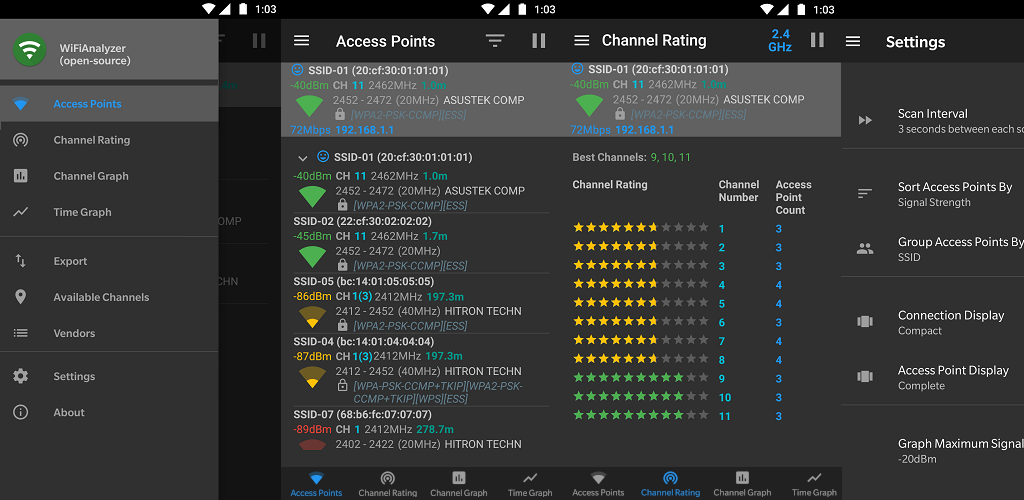
* Identify nearby Access Points
* Graph channels signal strength
* Graph Access Point signal strength over time
* Analyze Wi-Fi networks to rate channels
* HT/VHT Detection - 40/80/160/320 MHz (Requires hardware/software support)
* 2.4 GHz, 5 GHz and 6 GHz Wi-Fi bands (Requires hardware/software support)
* Access Point view: complete or compact
* Estimated Distance to the Access Points
* Export access points details
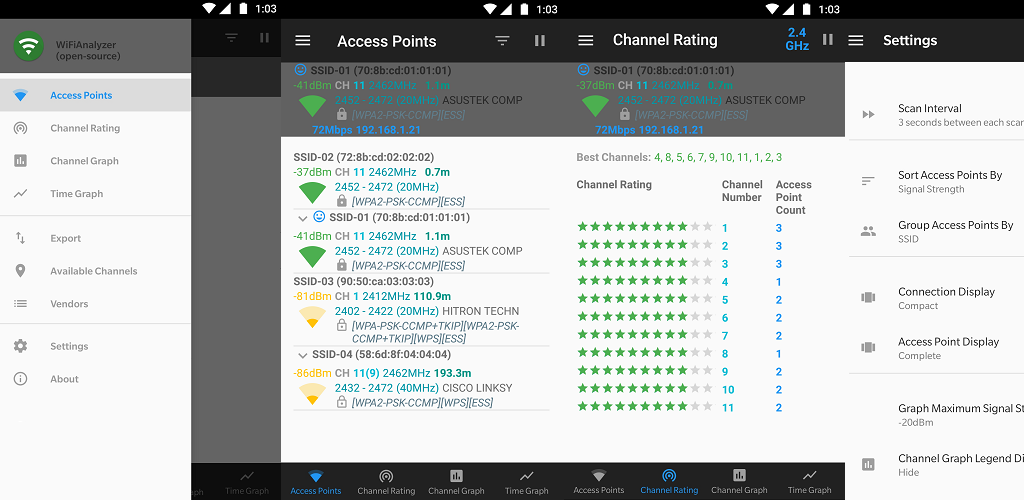
* Dark, Light and System theme available
* Pause/Resume scanning
* Available filters: Wi-Fi band, Signal strength, Security and SSID
* Vendor/OUI Database Lookup
* The application has too many features to mention them all
**Please note WiFiAnalyzer is not a Wi-Fi password cracking or phishing tool.**
## Documentation
The complete guide to using WiFiAnalyzer can be found in the [User Manual](USER_MANUAL.md). For quick access to specific topics, see:
## How-to
* [How to video](https://youtu.be/JJVKja0VDR0)
* [How to find the best 5 GHz Wi-Fi Channel](https://www.maketecheasier.com/best-wifi-channel-for-5ghz-frequency/)
* [Understand Wi-Fi 4/5/6/6E/7 (802.11 n/ac/ax/be) - Make educated wireless router/AP upgrade decisions](https://www.duckware.com/tech/wifi-in-the-us.html)
* [Why Wi-Fi stinks and how to fix it](http://spectrum.ieee.org/telecom/wireless/why-wifi-stinksand-how-to-fix-it)
* [Wi-Fi channels list](https://en.wikipedia.org/wiki/List_of_WLAN_channels)
* [How is distance calculated to Access Point](https://en.wikipedia.org/wiki/Free-space_path_loss)
## FAQ
* [Android Wi-Fi scanning throttling](https://github.com/VREMSoftwareDevelopment/WiFiAnalyzer/wiki/Android-Wi%E2%80%90Fi-scanning-throttling)
* [Location Service Permission Requirements](https://github.com/VREMSoftwareDevelopment/WiFiAnalyzer/wiki/Location-Service-Permission-Requirements)
* [WiFiAnalyzer on secondary user accounts](https://github.com/VREMSoftwareDevelopment/WiFiAnalyzer/wiki/WiFiAnalyzer-on-secondary-user-accounts)
* [How does the channel graph display...](https://github.com/VREMSoftwareDevelopment/WiFiAnalyzer/issues/64)
* [How to use SSID filter?](https://github.com/VREMSoftwareDevelopment/WiFiAnalyzer/issues/125)
* [WiFiAnalyzer equivalent on iOS](https://github.com/VREMSoftwareDevelopment/WiFiAnalyzer/issues/69)
## Feedback
* Bug reports can be submitted [here](https://github.com/VREMSoftwareDevelopment/WiFiAnalyzer/issues).
* To learn how to submit a bug [click here](https://github.com/VREMSoftwareDevelopment/WiFiAnalyzer/wiki/Feedback).
* [Discussions](https://github.com/VREMSoftwareDevelopment/WiFiAnalyzer/discussions)
## License
[
## Table of Contents
- [Features](#features)
- [Documentation](#documentation)
- [How-to](#how-to)
- [FAQ](#faq)
- [Feedback](#feedback)
- [License](#license)
- [Privacy policy](#privacy-policy)
- [WiFiAnalyzer Build](#wifianalyzer-build)
- [Verification](#verification)
- [Contribute](#contribute)
- [Build project](#build-project)
- [Running various Gradle commands](#running-various-gradle-commands)
- [Continuous Integration](#continuous-integration)
- [Translation](#translation)
## Features
* Identify nearby Access Points
* Graph channels signal strength
* Graph Access Point signal strength over time
* Analyze Wi-Fi networks to rate channels
* HT/VHT Detection - 40/80/160/320 MHz (Requires hardware/software support)
* 2.4 GHz, 5 GHz and 6 GHz Wi-Fi bands (Requires hardware/software support)
* Access Point view: complete or compact
* Estimated Distance to the Access Points
* Export access points details
* Dark, Light and System theme available
* Pause/Resume scanning
* Available filters: Wi-Fi band, Signal strength, Security and SSID
* Vendor/OUI Database Lookup
* The application has too many features to mention them all
**Please note WiFiAnalyzer is not a Wi-Fi password cracking or phishing tool.**
## Documentation
The complete guide to using WiFiAnalyzer can be found in the [User Manual](USER_MANUAL.md). For quick access to specific topics, see:
## How-to
* [How to video](https://youtu.be/JJVKja0VDR0)
* [How to find the best 5 GHz Wi-Fi Channel](https://www.maketecheasier.com/best-wifi-channel-for-5ghz-frequency/)
* [Understand Wi-Fi 4/5/6/6E/7 (802.11 n/ac/ax/be) - Make educated wireless router/AP upgrade decisions](https://www.duckware.com/tech/wifi-in-the-us.html)
* [Why Wi-Fi stinks and how to fix it](http://spectrum.ieee.org/telecom/wireless/why-wifi-stinksand-how-to-fix-it)
* [Wi-Fi channels list](https://en.wikipedia.org/wiki/List_of_WLAN_channels)
* [How is distance calculated to Access Point](https://en.wikipedia.org/wiki/Free-space_path_loss)
## FAQ
* [Android Wi-Fi scanning throttling](https://github.com/VREMSoftwareDevelopment/WiFiAnalyzer/wiki/Android-Wi%E2%80%90Fi-scanning-throttling)
* [Location Service Permission Requirements](https://github.com/VREMSoftwareDevelopment/WiFiAnalyzer/wiki/Location-Service-Permission-Requirements)
* [WiFiAnalyzer on secondary user accounts](https://github.com/VREMSoftwareDevelopment/WiFiAnalyzer/wiki/WiFiAnalyzer-on-secondary-user-accounts)
* [How does the channel graph display...](https://github.com/VREMSoftwareDevelopment/WiFiAnalyzer/issues/64)
* [How to use SSID filter?](https://github.com/VREMSoftwareDevelopment/WiFiAnalyzer/issues/125)
* [WiFiAnalyzer equivalent on iOS](https://github.com/VREMSoftwareDevelopment/WiFiAnalyzer/issues/69)
## Feedback
* Bug reports can be submitted [here](https://github.com/VREMSoftwareDevelopment/WiFiAnalyzer/issues).
* To learn how to submit a bug [click here](https://github.com/VREMSoftwareDevelopment/WiFiAnalyzer/wiki/Feedback).
* [Discussions](https://github.com/VREMSoftwareDevelopment/WiFiAnalyzer/discussions)
## License
[ ](http://www.gnu.org/licenses/gpl-3.0.html)
WiFiAnalyzer is licensed under the GNU General Public License v3.0 (GPLv3).
### GPLv3 License key requirements:
* Disclose Source
* License and Copyright Notice
* Same License
* State Changes
[GNU General Public License v3.0 (GPLv3) Explained in Plain English](https://tldrlegal.com/license/gnu-general-public-license-v3-(gpl-3))
[GNU General Public License v3.0 (GPLv3)](http://www.gnu.org/licenses/gpl-3.0.html).
## Privacy policy
* WiFiAnalyzer does not collect any personal/device information.
* WiFiAnalyzer is designed to use as few permissions as possible. It asks for just enough to perform the analysis.
* Plus, it is all open source so nothing is hidden!
* Most notably, this application does not require access to the internet, so you can be sure it does not send any personal/device information to any other source and it does not receive any information from other sources.
## WiFiAnalyzer Build
[](https://github.com/VREMSoftwareDevelopment/WiFiAnalyzer/actions/workflows/android-ci.yml)
[](https://github.com/VREMSoftwareDevelopment/WiFiAnalyzer/actions/workflows/codeql-analysis.yml)
[](https://app.codacy.com/gh/VREMSoftwareDevelopment/WiFiAnalyzer/dashboard?utm_source=gh&utm_medium=referral&utm_content=&utm_campaign=Badge_grade)
[](https://codecov.io/gh/VREMSoftwareDevelopment/WiFiAnalyzer)
[](https://hosted.weblate.org/engage/wifianalyzer/)
[](https://hosted.weblate.org/engage/wifianalyzer/)
[](https://snyk.io/test/github/vremsoftwaredevelopment/wifianalyzer)
[](https://app.fossa.io/projects/git%2Bgithub.com%2FVREMSoftwareDevelopment%2FWiFiAnalyzer?ref=badge_shield)
[](https://github.com/VREMSoftwareDevelopment/WiFiAnalyzer/issues)
[](https://github.com/VREMSoftwareDevelopment/WiFiAnalyzer/stargazers)
[](https://github.com/VREMSoftwareDevelopment/WiFiAnalyzer/network)
## Verification
- Verify APK signatures using the SHA‑256 fingerprint in [SECURITY.md](SECURITY.md).
- Validate all downloads against the assets on the official [Releases Page](https://github.com/VREMSoftwareDevelopment/WiFiAnalyzer/releases).
## Contribute
* Want to contribute? Check out our [CONTRIBUTING.md](CONTRIBUTING.md) to see how you can help.
* We want to express our gratitude to all [contributors](https://github.com/VREMSoftwareDevelopment/WiFiAnalyzer/graphs/contributors) for their contributions, such as patches, bug fixes, updates, and more.
* If you would like to contribute financially to the project, please feel free to send any amount through PayPal.
* [](https://www.paypal.com/cgi-bin/webscr?cmd=_s-xclick&hosted_button_id=62PA6HJ3BZL3E)
* Thanks to everyone who has already donated!
## Build project
1. Install Android Studio
2. Import the project into Android Studio
* In the Welcome to Android Studio screen, select "Import project ..."
* Select the root directory of the WiFiAnalyzer repository and click "OK".
* WiFiAnalyzer will build automatically.
## Running various Gradle commands
### Check Kotlin code style
`./gradlew ktlintCheck`
### Apply Kotlin code style
`./gradlew ktlintFormat`
### Run lint analysis
`./gradlew lintDebug`
This command generates the following report:
- Lint report: `app/build/reports/lint-results.html`
### Run unit tests
`./gradlew testDebugUnitTest`
This command generates the following report:
- Unit test report: `app/build/reports/tests/testDebugUnitTest/index.html`
### Run unit tests with coverage
`./gradlew jacocoTestCoverageVerification`
This command generates the following report:
- Code coverage report: `app/build/reports/jacoco/jacocoTestReport/html/index.html`
### Run instrumented tests
`./gradlew connectedDebugAndroidTest`
This command generates the following report:
- Instrumented test report: `app/build/reports/androidTests/connected/debug/index.html`
## Continuous Integration
This project uses GitHub Actions for CI/CD. On every push and pull request, the following checks are performed automatically:
- Code style check with ktlint
- Lint analysis
- Unit tests with coverage (uploaded to Codecov)
- APK build (debug)
- Instrumented tests on Android emulator
- Artifacts (reports and APK) are available for download in the workflow run
## Translation
We support many languages, all done by people like you! We make use of free [Weblate's Libre hosting](https://weblate.org/en/donate/) to allow this.
This means if you don't like how a translation was done for your language, you can change it!
Or, you can add a whole new language! Visit [our Weblate project](https://hosted.weblate.org/engage/wifianalyzer/) to help.
[](https://hosted.weblate.org/engage/wifianalyzer/)
](http://www.gnu.org/licenses/gpl-3.0.html)
WiFiAnalyzer is licensed under the GNU General Public License v3.0 (GPLv3).
### GPLv3 License key requirements:
* Disclose Source
* License and Copyright Notice
* Same License
* State Changes
[GNU General Public License v3.0 (GPLv3) Explained in Plain English](https://tldrlegal.com/license/gnu-general-public-license-v3-(gpl-3))
[GNU General Public License v3.0 (GPLv3)](http://www.gnu.org/licenses/gpl-3.0.html).
## Privacy policy
* WiFiAnalyzer does not collect any personal/device information.
* WiFiAnalyzer is designed to use as few permissions as possible. It asks for just enough to perform the analysis.
* Plus, it is all open source so nothing is hidden!
* Most notably, this application does not require access to the internet, so you can be sure it does not send any personal/device information to any other source and it does not receive any information from other sources.
## WiFiAnalyzer Build
[](https://github.com/VREMSoftwareDevelopment/WiFiAnalyzer/actions/workflows/android-ci.yml)
[](https://github.com/VREMSoftwareDevelopment/WiFiAnalyzer/actions/workflows/codeql-analysis.yml)
[](https://app.codacy.com/gh/VREMSoftwareDevelopment/WiFiAnalyzer/dashboard?utm_source=gh&utm_medium=referral&utm_content=&utm_campaign=Badge_grade)
[](https://codecov.io/gh/VREMSoftwareDevelopment/WiFiAnalyzer)
[](https://hosted.weblate.org/engage/wifianalyzer/)
[](https://hosted.weblate.org/engage/wifianalyzer/)
[](https://snyk.io/test/github/vremsoftwaredevelopment/wifianalyzer)
[](https://app.fossa.io/projects/git%2Bgithub.com%2FVREMSoftwareDevelopment%2FWiFiAnalyzer?ref=badge_shield)
[](https://github.com/VREMSoftwareDevelopment/WiFiAnalyzer/issues)
[](https://github.com/VREMSoftwareDevelopment/WiFiAnalyzer/stargazers)
[](https://github.com/VREMSoftwareDevelopment/WiFiAnalyzer/network)
## Verification
- Verify APK signatures using the SHA‑256 fingerprint in [SECURITY.md](SECURITY.md).
- Validate all downloads against the assets on the official [Releases Page](https://github.com/VREMSoftwareDevelopment/WiFiAnalyzer/releases).
## Contribute
* Want to contribute? Check out our [CONTRIBUTING.md](CONTRIBUTING.md) to see how you can help.
* We want to express our gratitude to all [contributors](https://github.com/VREMSoftwareDevelopment/WiFiAnalyzer/graphs/contributors) for their contributions, such as patches, bug fixes, updates, and more.
* If you would like to contribute financially to the project, please feel free to send any amount through PayPal.
* [](https://www.paypal.com/cgi-bin/webscr?cmd=_s-xclick&hosted_button_id=62PA6HJ3BZL3E)
* Thanks to everyone who has already donated!
## Build project
1. Install Android Studio
2. Import the project into Android Studio
* In the Welcome to Android Studio screen, select "Import project ..."
* Select the root directory of the WiFiAnalyzer repository and click "OK".
* WiFiAnalyzer will build automatically.
## Running various Gradle commands
### Check Kotlin code style
`./gradlew ktlintCheck`
### Apply Kotlin code style
`./gradlew ktlintFormat`
### Run lint analysis
`./gradlew lintDebug`
This command generates the following report:
- Lint report: `app/build/reports/lint-results.html`
### Run unit tests
`./gradlew testDebugUnitTest`
This command generates the following report:
- Unit test report: `app/build/reports/tests/testDebugUnitTest/index.html`
### Run unit tests with coverage
`./gradlew jacocoTestCoverageVerification`
This command generates the following report:
- Code coverage report: `app/build/reports/jacoco/jacocoTestReport/html/index.html`
### Run instrumented tests
`./gradlew connectedDebugAndroidTest`
This command generates the following report:
- Instrumented test report: `app/build/reports/androidTests/connected/debug/index.html`
## Continuous Integration
This project uses GitHub Actions for CI/CD. On every push and pull request, the following checks are performed automatically:
- Code style check with ktlint
- Lint analysis
- Unit tests with coverage (uploaded to Codecov)
- APK build (debug)
- Instrumented tests on Android emulator
- Artifacts (reports and APK) are available for download in the workflow run
## Translation
We support many languages, all done by people like you! We make use of free [Weblate's Libre hosting](https://weblate.org/en/donate/) to allow this.
This means if you don't like how a translation was done for your language, you can change it!
Or, you can add a whole new language! Visit [our Weblate project](https://hosted.weblate.org/engage/wifianalyzer/) to help.
[](https://hosted.weblate.org/engage/wifianalyzer/)