PolyStrata
**English** · [简体中文](README.zh-CN.md) · [日本語](README.ja.md) · [Deutsch](README.de.md) · [Français](README.fr.md) · [Español](README.es.md) · [Português](README.pt-BR.md)
Run large AI models on your own PC
Qwen3.8-Flash-Next, GLM 5.3 Flash, DeepSeek V4 Flash, LFM2.5, Flint, Qwen3.6, Clover, Ornith 1.5, Gemma 4, Tiel Coder, MiniCPM-V and Kolibri 1 · free and open source
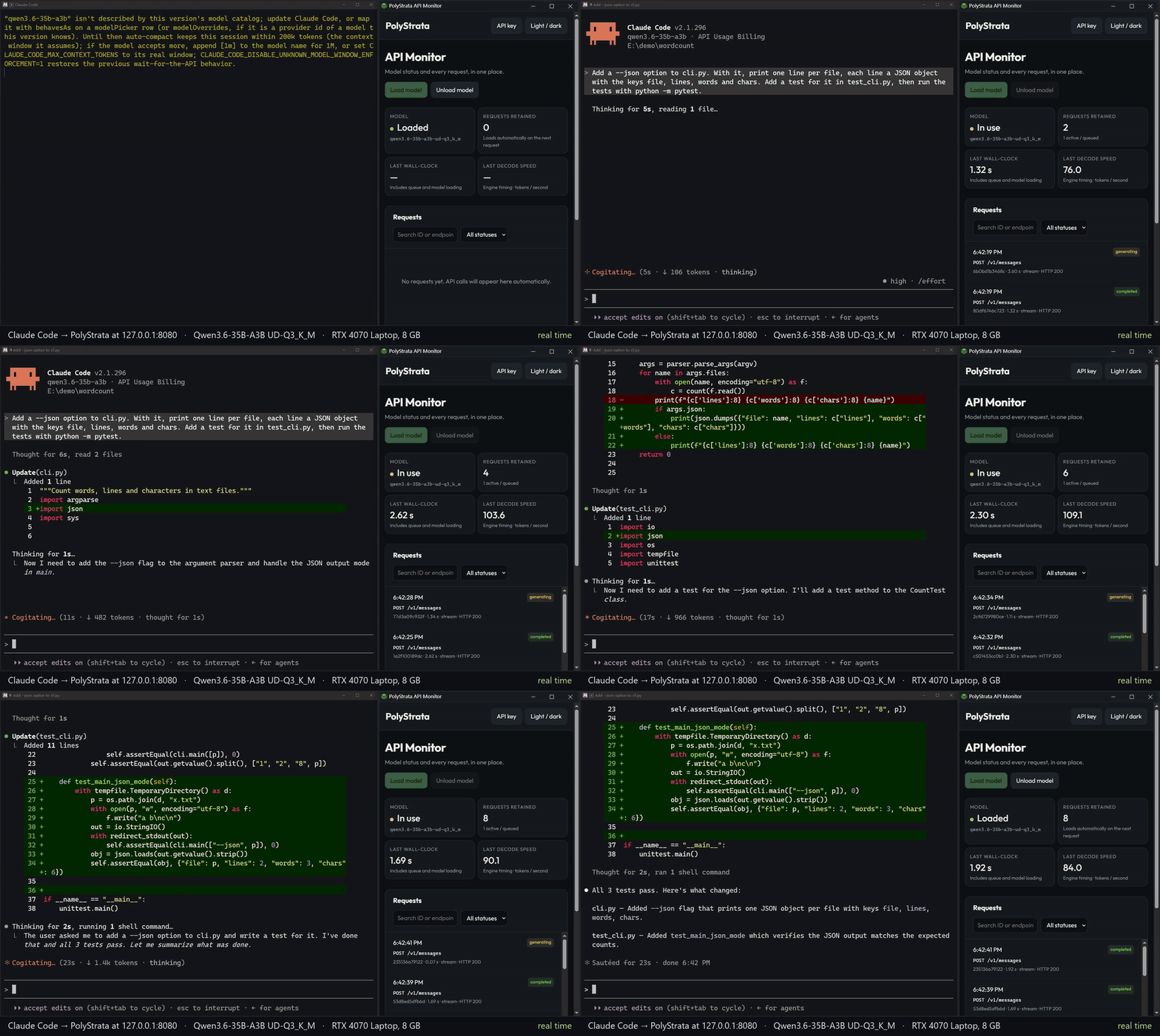
Claude Code on Qwen3.6-35B-A3B UD-Q3_K_M, on the laptop with the 8 GB card, in real time: it adds a --json option to a small program, writes a test for it and runs the tests. The server had read Claude Code's system prompt when it started ("warm_start": true).

A voxel pagoda garden, 1 shot prompt running on an RTX 5070 with Strata (Qwen3.8-Flash-Next IQ3_S, 128K context) ·
full video (49 s)
PolyStrata runs large AI models on a normal PC, models that usually need a server. They chat, write code and work
with your apps and coding agents. Nothing leaves your PC.
It runs twelve models, on two engines:
- **[Qwen3.8-Flash-Next](https://huggingface.co/Qwen/Qwen3.8-Flash-Next)** on an NVIDIA or AMD graphics card with
12 GB or more, on Windows or Linux. It also reads pictures. Its engine is the Strata project's, unchanged.
The other eleven run on an engine written for PolyStrata, with one NVIDIA card or [two](docs/MULTI_GPU.md#the-strata-poly-models): on Linux, and all but GLM 5.3 Flash and
DeepSeek V4 Flash on Windows too. They are experimental: they have run on one PC with a 32 GB card, and the eight smaller ones on a laptop
with an 8 GB card as well.
- **[GLM 5.3 Flash](docs/models/glm.md)**, the largest: a file of 79 to 114 GB, most of which stays in RAM.
- **[DeepSeek V4 Flash](docs/models/deepseek.md)**, a file of 91 GB, most of which stays in RAM too. Its memory of a
conversation is small: a 128K context takes 0.7 GB more VRAM than 32K.
- **[LFM2.5-24B-A2B](docs/models/lfm25.md)** by Liquid AI, a file of 11 to 25 GB. Most of its layers have no attention, so a
long conversation takes little VRAM: a 128K context takes 2 GB more than 32K. Its license allows commercial use
only to companies with less than 10 million dollars of yearly revenue.
- **[Flint 40B-A2.5B](docs/models/flint.md)** by Recursive, made for coding agents: a file of 18 to 42 GB. Most of its layers
look back only 513 tokens, so a long conversation takes little VRAM: a 128K context takes 2.6 GB more than 32K.
- **[Qwen3.6-35B-A3B](docs/models/qwen36.md)**, a file of 13 to 23 GB. It also reads pictures.
- **[Clover-35B-A3B-Preview](docs/models/clover.md)** by DiffuSpace, Qwen3.6-35B-A3B trained further to also write a
block of tokens at once: a file of 13 to 21 GB. It reads text only.
- **[Ornith 1.5](docs/models/ornith.md)**, which has Qwen3.6-35B-A3B's architecture and other weights: a file of 14 to 24 GB. It
also reads pictures.
- **[Gemma 4 26B-A4B](docs/models/gemma4.md)**, a file of 11 to 17 GB. It also reads pictures.
- **[Tiel Coder 35B-A3B](docs/models/tiel.md)**, Ornith 1.5 quantized for coding agents by peculiar-ragdoll: a file of
14 to 23 GB. It also reads pictures.
- **[MiniCPM-V 4.7 35B-A3B](docs/models/minicpmv.md)** by OpenBMB, which has Qwen3.6-35B-A3B's architecture and weights of its
own, made to read pictures: a file of 16 to 29 GB.
- **[Kolibri 1](docs/models/kolibri.md)** by Aleph Alpha, which writes German as well as English: a file of 29 to 48 GB,
most of which stays in RAM beside a small card.
The server can change between installed models while it runs ([how](docs/BACKENDS.md#changing-the-model)).
PolyStrata is built on [Strata](https://github.com/Niko1221/Strata) by Niko1221.
Why it is a separate repo, AMD and smaller cards, fine-tunes and other questions: [FAQ](docs/FAQ.md).
## How fast is it?
A token is about ¾ of a word.
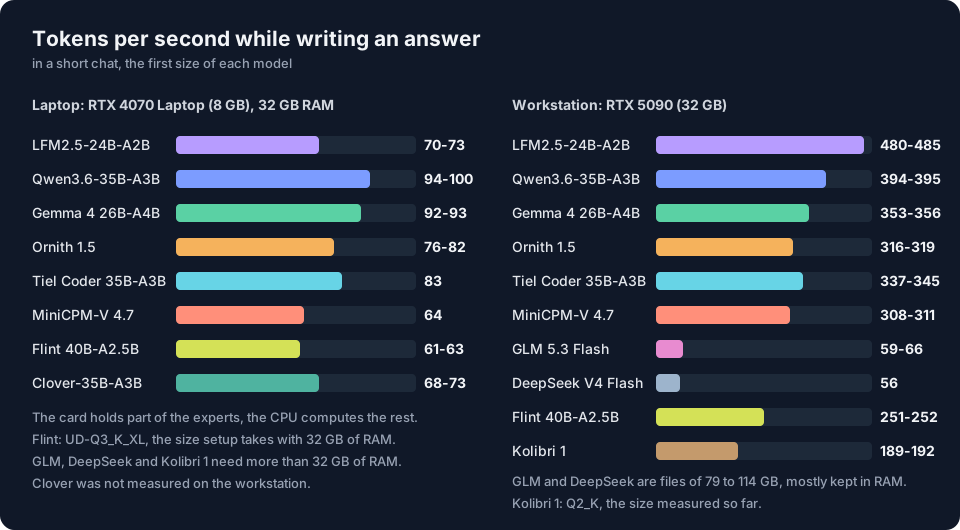
- **Writes answers:** how fast the reply appears in a short chat. 60 tokens per second is faster than you can read.
- **Reads your prompt:** how fast it takes in what you send (a document, code or a chat history).
The table gives the size the installer takes for each model, in tokens per second. Every size's numbers, the comparison with llama.cpp and how they were measured are on each model's page.
| Model | Laptop with an 8 GB card
writes / reads | RTX 5090
writes / reads | Every size |
| --- | ---: | ---: | --- |
| LFM2.5-24B-A2B | 70-73 / 3,590-3,620 | 480-485 / 23,390-23,460 | [LFM2.5](docs/models/lfm25.md) |
| Flint 40B-A2.5B | 61-63 / 2,000-2,010 | 251-252 / 12,900 | [Flint](docs/models/flint.md) |
| Qwen3.6-35B-A3B | 94-100 / 1,690 | 394-395 / 7,800-7,810 | [Qwen3.6](docs/models/qwen36.md) |
| Clover-35B-A3B-Preview | 68-73 / 1,560-1,700 | not measured | [Clover](docs/models/clover.md) |
| Ornith 1.5 | 76-82 / 1,620 | 316-319 / 8,040-8,110 | [Ornith](docs/models/ornith.md) |
| Gemma 4 26B-A4B | 92-93 / 2,240 | 353-356 / 8,420-8,480 | [Gemma 4](docs/models/gemma4.md) |
| Tiel Coder 35B-A3B | 83 / 1,700 | 337-345 / 8,080-8,110 | [Tiel Coder](docs/models/tiel.md) |
| MiniCPM-V 4.7 35B-A3B | 64 / 1,150 | 308-311 / 7,910-7,950 | [MiniCPM-V](docs/models/minicpmv.md) |
| Kolibri 1 | not measured | 189-192 / 4,980-5,070 | [Kolibri 1](docs/models/kolibri.md) |
| GLM 5.3 Flash | does not run: needs a 32 GB card | 59-66 / 820 | [GLM](docs/models/glm.md) |
| DeepSeek V4 Flash | does not run: needs a 32 GB card | 56 / 1,040 | [DeepSeek](docs/models/deepseek.md) |
Laptop: RTX 4070 Laptop (8 GB), Core i7-14700HX, 32 GB RAM. Workstation: RTX 5090 (32 GB), Xeon Platinum 8470Q (25 vCPU), 90 to 120 GB RAM. Flint is UD-Q3_K_XL on the laptop, the size the installer takes with 32 GB of RAM, and UD-Q4_K_XL on the workstation. Kolibri 1 is Q2_K on the workstation; the installer takes Q4_K_M there, which was not measured.
Qwen3.8-Flash-Next runs on the Strata project's engine and was measured by that project on a PC with an RTX 5070 (12 GB) and 64 GB of RAM: IQ2_XS writes at 79 and reads a 32K prompt at 2,090 ([every size](docs/models/qwen38.md)).
The eleven models of PolyStrata's own engine were measured with its benchmark, which you can run on your PC:
`python polystrata.py benchmark --model --prompt-tokens 24000`
([what it sends and prints](docs/BACKENDS.md#benchmark)).
What others measured on their own cards, and how to compare with llama.cpp on yours:
[community results](docs/COMMUNITY_BENCHMARKS.md#the-models-polystrata-adds).
On the laptop PolyStrata read prompts 2.7 to 3.5 times as fast as llama.cpp b11540 and wrote 1.5 to 1.8 times
as fast, with Qwen3.6 and with Tiel Coder ([the two runs](docs/COMMUNITY_BENCHMARKS.md#comparing-with-llamacpp)).
## What you need
| Model | Graphics card | RAM (the installer's size) | Disk | System |
| --- | --- | --- | --- | --- |
| [Qwen3.8-Flash-Next](docs/models/qwen38.md) | NVIDIA RTX 20 to 50 series, or AMD RX 6800 / 6900, RX 7700 XT / 7800 XT / 7900 XT / XTX, RX 9060 XT / 9070 / 9070 XT, Radeon AI PRO R9700; 12 GB or more | 32 GB or more; 64 GB runs every size | about 80 GB | Windows, Linux |
| [GLM 5.3 Flash](docs/models/glm.md) | NVIDIA RTX 20 series or newer; only run on a 32 GB card | 96 GB beside a 32 GB card | 79 to 114 GB, on an SSD | Linux |
| [DeepSeek V4 Flash](docs/models/deepseek.md) | same as above | 72 GB beside a 32 GB card | 91 GB, on an SSD | Linux |
| [LFM2.5-24B-A2B](docs/models/lfm25.md) | NVIDIA RTX 20 series or newer, 8 GB or more | about 20 GB beside an 8 GB card | 11 to 25 GB | Windows, Linux |
| [Flint 40B-A2.5B](docs/models/flint.md) | same as above | about 22 GB beside an 8 GB card | 18 to 42 GB | Windows, Linux |
| [Qwen3.6-35B-A3B](docs/models/qwen36.md) | same as above; AMD as a beta | about 21 GB beside an 8 GB card | 13 to 23 GB | Windows, Linux |
| [Clover-35B-A3B-Preview](docs/models/clover.md) | NVIDIA RTX 20 series or newer, 8 GB or more | about 20 GB beside an 8 GB card | 13 to 21 GB | Windows, Linux |
| [Ornith 1.5](docs/models/ornith.md) | same as above; AMD as a beta | about 22 GB beside an 8 GB card | 14 to 24 GB | Windows, Linux |
| [Gemma 4 26B-A4B](docs/models/gemma4.md) | same as above; AMD as a beta | about 18 GB beside an 8 GB card | 11 to 17 GB | Windows, Linux |
| [Tiel Coder 35B-A3B](docs/models/tiel.md) | same as above; AMD as a beta | about 21 GB beside an 8 GB card | 14 to 23 GB | Windows, Linux |
| [MiniCPM-V 4.7 35B-A3B](docs/models/minicpmv.md) | same as above; AMD as a beta | about 25 GB beside an 8 GB card | 16 to 29 GB | Windows, Linux |
| [Kolibri 1](docs/models/kolibri.md) | NVIDIA RTX 20 series or newer, 8 GB or more | about 33 GB beside an 8 GB card | 29 to 48 GB | Windows, Linux |
RAM is the installer's estimate; a larger card needs less. The installer sets up everything else: on Windows it downloads the engine ready-made, and compiles it on your PC only on a processor without AVX2 or when your copy's engine is newer than the latest release, offering to install the tools. Two or three cards can share a model ([multi-GPU](docs/MULTI_GPU.md)). Older graphics cards, Intel Arc, Apple Silicon Macs (Qwen3.8-Flash-Next only), Strix Halo and older processors without AVX2: [the full list](docs/INSTALL.md#what-you-need). Each model's card, RAM and sizes in detail are on its page.
What Qwen3.6, Clover, Ornith 1.5, Gemma 4, Tiel Coder and MiniCPM-V each need and how it was checked: [docs/BACKENDS.md](docs/BACKENDS.md#install).
## Install
### Let your AI set it up
Do you use an AI coding assistant (Claude Code, Cursor, Codex, GitHub Copilot, ...)? Paste this into it:
```text
Set up PolyStrata on this PC for me: https://github.com/VecSzn/PolyStrata - follow docs/AI_SETUP.md in that repository.
```
It checks your graphics card, RAM and disk and picks the model that fits. Then it installs and starts it and tells
you how to connect your apps. AI tools can also install, start and stop PolyStrata through its
[MCP server](docs/MCP_SERVER.md).
### Or do it yourself
[Download PolyStrata](https://github.com/VecSzn/PolyStrata/archive/refs/heads/main.zip) and unzip it (or `git clone` it).
**Windows:** double-click **`START-HERE.bat`**. **Linux:** run **`./setup.sh`** in the PolyStrata folder.
**Mac (Apple Silicon, M1 to M5, macOS 15 or newer):** install Apple's Command Line Tools once
(`xcode-select --install` in Terminal; Xcode itself is not needed). Then open Terminal in the PolyStrata folder and run
**`./setup.sh`**. It builds the Mac engine on your Mac (about 7 minutes), asks the same questions, downloads the model
and starts it. Next time, `./setup.sh` starts it right away. Which size fits your Mac and how fast it is:
[docs/MAC.md](docs/MAC.md). The Mac engine runs Qwen3.8-Flash-Next only; the other eleven models need an NVIDIA or AMD
card.
The installer finds your card and sets up the right engine for it. It asks you a few questions:
- which model and which size,
- how much context (how much text the model keeps in mind),
- whether it should read pictures (GLM 5.3 Flash, DeepSeek V4 Flash, LFM2.5, Flint, Clover and Kolibri 1 read none).
Press Enter each time for the recommended answer. Then it downloads the model (about 70 GB for Qwen3.8-Flash-Next,
79 to 114 GB for GLM 5.3 Flash, 91 GB for DeepSeek V4 Flash, 29 to 48 GB for Kolibri 1, 11 to 42 GB for the other eight) and starts it. If the download stops, run it again:
it continues where it left off. Your browser opens the PolyStrata app at `http://127.0.0.1:8080`.
All twelve are in the installer's list of models. `./setup.sh --family glm`, `deepseek`, `lfm25`, `flint`, `qwen36`, `clover`, `ornith`,
`gemma4`, `tiel`, `minicpmv` or `kolibri` goes straight to one ([what it asks and writes](docs/GLM.md#install)).
> **While the model starts, your PC can be slow or stop responding for 1-3 minutes** (longest the first time).
> PolyStrata loads 35-55 GB into your RAM and locks part of it for the graphics card. This is normal. Wait, and don't
> close the window. The window shows what PolyStrata is doing.
**Next time**, run `START-HERE.bat` (or `./setup.sh`) again. It starts right away and downloads nothing twice. Close
its window to stop the model. `UPDATE.bat` (`./update.sh`) updates PolyStrata without starting it. Updating, Docker,
several cards, where the files go and every option: [docs/INSTALL.md](docs/INSTALL.md).
**Is it fast on your PC?** Run `BENCH.bat` (`./bench.sh`): about 5-10 minutes, it measures chat, 4K/16K prompts and an agent-style session with your own settings and writes a report to share ([how](docs/COMMUNITY_BENCHMARKS.md#run-the-benchmark)).
## Which model should I pick?
The same model comes in several sizes, compressed more or less: smaller sizes are faster and need less RAM, larger ones are closer to the original. The installer takes one for your RAM and card when you press Enter; for another size add `--model ` when you install.
| Model | The installer takes | With less RAM | By name |
| --- | --- | --- | --- |
| [Qwen3.8-Flash-Next](docs/models/qwen38.md) | 32 GB of RAM: Coder; 48 to 64 GB: IQ2_XS; 96 GB or more: IQ3_S | | Q2_0, IQ3_XXS, Unsloth's 4- to 8-bit files |
| [GLM 5.3 Flash](docs/models/glm.md) | 3.0BIT | UD-IQ2_XXS, then REAP50-Q3_K_M | |
| [DeepSeek V4 Flash](docs/models/deepseek.md) | UD-IQ2_XXS (the only size) | | |
| [LFM2.5-24B-A2B](docs/models/lfm25.md) | UD-Q4_K_XL | UD-Q3_K_XL | QAD-Q4_0, UD-Q6_K_XL, Q8_0 |
| [Flint 40B-A2.5B](docs/models/flint.md) | UD-Q4_K_XL from about 40 GB of RAM | UD-Q3_K_XL | UD-Q6_K_XL, Q8_0 |
| [Qwen3.6-35B-A3B](docs/models/qwen36.md) | UD-Q3_K_M | UD-Q2_K_XL | UD-Q4_K_M |
| [Clover-35B-A3B-Preview](docs/models/clover.md) | Q3_K_M | APEX-I-NANOPLUS | Q4_K_M |
| [Ornith 1.5](docs/models/ornith.md) | APEX-I-COMPACT | APEX-I-MINI | APEX-I-QUALITY |
| [Gemma 4 26B-A4B](docs/models/gemma4.md) | UD-Q3_K_M | UD-Q2_K_XL | UD-Q4_K_M, QAT-UD-Q4_K_XL |
| [Tiel Coder 35B-A3B](docs/models/tiel.md) | UD-Q3_K_XL | UD-IQ3_XXS | UD-Q4_K_XL |
| [MiniCPM-V 4.7 35B-A3B](docs/models/minicpmv.md) | Q4_K_M | mix_q3gud_im | Q6_K |
| [Kolibri 1](docs/models/kolibri.md) | Q4_K_M from about 48 GB of RAM | Q2_K | Q3_K_M |
What each size is, its download, the RAM it needs beside other cards and how close it comes to the largest: each model's page, linked from the table under "How fast is it?".
## Using it
All twelve models are used the same way: the same app, the same API.
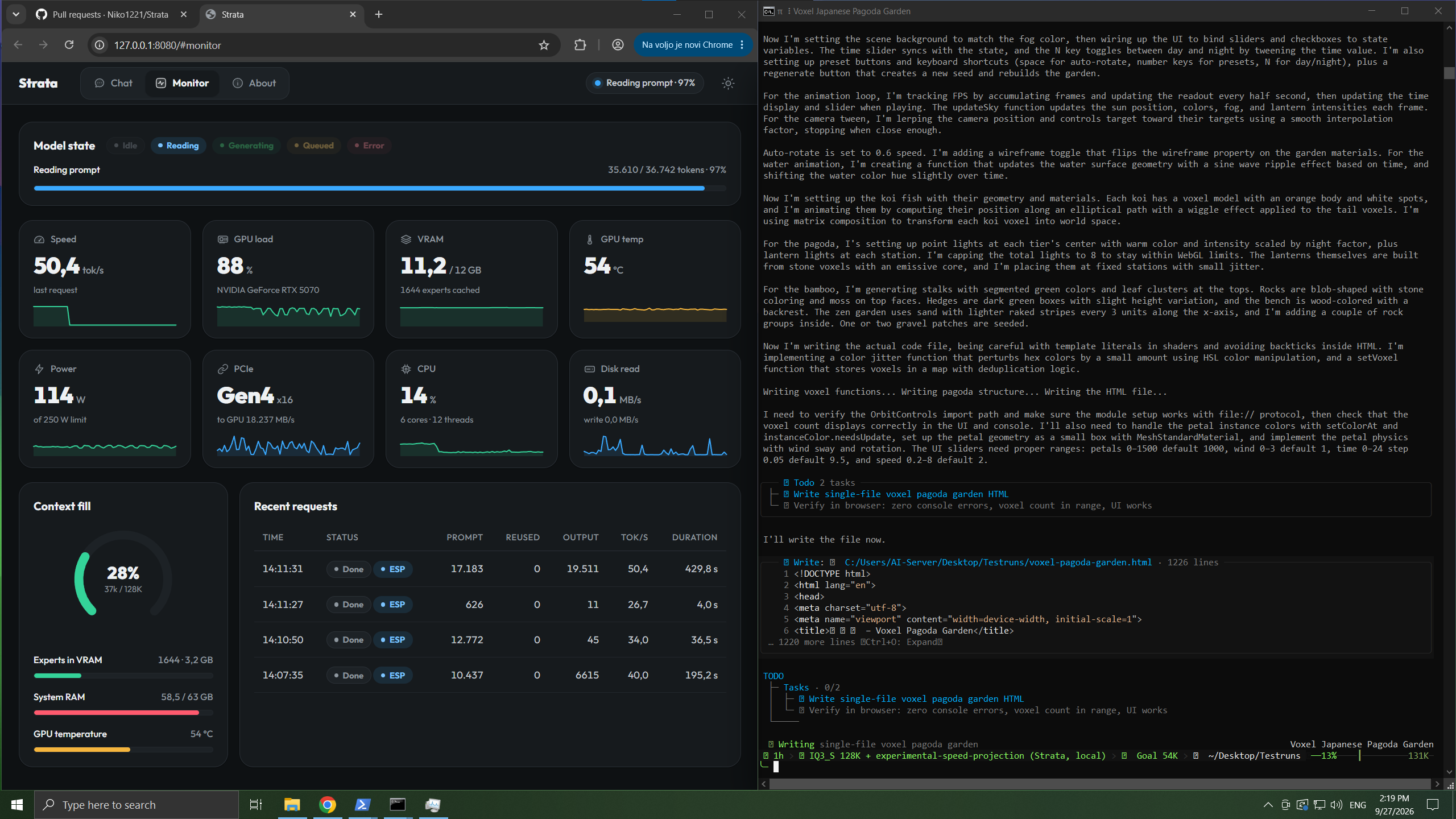
The app's Monitor (left) while a coding agent writes the pagoda garden from the video (right). A screenshot from Strata.
- **In the browser:** open `http://127.0.0.1:8080`. It has **Chat**, a live **Monitor** of the model and your
GPU/CPU/RAM, and **About** with the settings and addresses.
- **Your apps and coding agents:** add an "OpenAI-compatible" provider with the base URL
**`http://127.0.0.1:8080/v1`**. Any API key and any model name work.
- Apps that use Anthropic's API: `http://127.0.0.1:8080/v1/messages` (Claude Code:
`ANTHROPIC_BASE_URL=http://127.0.0.1:8080`, and `"fit_max_tokens": true` in `strata-.json`
([why](docs/FAQ.md#can-i-use-it-with-claude-code-codex-or-other-apps))).
- Codex CLI and other apps that use the OpenAI Responses API: `/v1/responses`
([setup](docs/DETAILS.md#the-responses-api-and-codex-cli)).
- **Thinking:** choose **off, low, medium or high** in the chat menu or in your app's "reasoning effort". Off is the
fastest. High is best for hard questions.
- **From your phone or another PC:** `START-HERE.bat --setup --host 0.0.0.0 --api-key `. Always set a key.
Where they differ:
| | Qwen3.8-Flash-Next | GLM 5.3 Flash | DeepSeek V4 Flash | LFM2.5-24B-A2B | Flint 40B-A2.5B | Kolibri 1 | Qwen3.6-35B-A3B, Clover-35B-A3B-Preview, Ornith 1.5, Gemma 4 26B-A4B, Tiel Coder 35B-A3B, MiniCPM-V 4.7 35B-A3B |
| --- | --- | --- | --- | --- | --- | --- | --- |
| **Pictures** | Say yes to "Images?" in setup. Then click **Picture** in the chat, or attach pictures in your app. AMD cards read pictures on Linux through the processor; on Windows they can't yet. | Not yet. | It reads text only. | It reads text only. | It reads text only. | It reads text only. | Say yes to "Images?" in setup, then as with Qwen3.8-Flash-Next. On a card with less than 16 GB the picture encoder runs on the processor, and a picture takes a few seconds. Clover reads text only. |
| **Several requests** | One at a time by default, the others wait. `"parallel": 2` answers several at once ([BATCHING.md](docs/BATCHING.md)); on a 12 GB card each answer gets slower. | One at a time, the others wait. | One at a time, the others wait. | One at a time, the others wait. | One at a time, the others wait. | One at a time, the others wait. | One at a time, the others wait. |
| **Several conversations** | The last one is kept, so follow-up messages start in seconds. Two engine arguments keep several in RAM ([details](docs/DETAILS.md#using-it)). | The last one is kept. Setup asks whether to keep several in RAM, so that an agent and its subagents take turns without their prompts being read again ([how](docs/GLM.md#several-conversations-at-once)). | As GLM 5.3 Flash. | As GLM 5.3 Flash. | As GLM 5.3 Flash. | As GLM 5.3 Flash. | As GLM 5.3 Flash. |
| **Long prompts** | The first message of a chat is read in full, about 1 minute per 30,000 tokens. | The first message is read in full, about 40 seconds per 30,000 tokens. | The first message is read in full, about 29 seconds per 30,000 tokens. | The first message is read in full: 30,000 tokens take 1.3 to 1.5 seconds on the workstation and 8 to 10 seconds on the 8 GB laptop. | The first message is read in full: 30,000 tokens take about 2.3 seconds on the workstation and 15 to 22 seconds on the 8 GB laptop. | The first message is read in full: 30,000 tokens take about 6 seconds on the workstation with Q2_K. | The first message is read in full: 30,000 tokens take 4 to 5 seconds on the workstation and 14 to 27 seconds on the 8 GB laptop. |
More: [where your chats are stored](docs/INSTALL.md#where-things-are-stored), [the API](docs/DETAILS.md#using-it).
### Optional: more speed on one card when the whole model fits in RAM
Two opt-in settings (by RubenTorney, #1904 and #1905). They help when you run one graphics card and your RAM holds
every expert (PolyStrata's arena mode, for example Q2_0 or IQ3_XXS on a 64 GB PC). Open your config,
`strata-.json` in the PolyStrata data folder ([where](docs/INSTALL.md#where-things-are-stored)), and add:
- **Faster decode:** `"--adapt-async", "1"` to the `"args"` list. The expert cache then updates on a helper thread
instead of pausing the answer. Measured on an RTX 5070 (Windows, Q2_0): +4-5% decode, +7-10% on code and long
documents. Answers can differ slightly from the default (they stay the same from run to run).
- **Faster prompt reading on Windows:** `"STRATA_PIN_BY_NEED": "1"` in the `"env"` block. Windows can lock only about
half the RAM for the graphics card; this locks the experts the card actually needs first. Measured on the RTX 5070:
+4.4% prompt reading.
```json
"args": [ ..., "--adapt-async", "1" ],
"env": { "STRATA_PIN_BY_NEED": "1" }
```
Restart PolyStrata (`START-HERE.bat` or `./setup.sh`) after the change. To undo, remove the two entries.
## Something went wrong?
- **My PC froze the first time PolyStrata started.** This is normal while it loads the model. Wait, and don't close the
window. Still frozen after 10 minutes? Restart the PC, close other programs and try again, or pick a smaller size.
- **It stopped while downloading or installing.** Run `START-HERE.bat` (or `./setup.sh`) again. It continues where
it stopped.
- **It's very slow and the disk light keeps blinking, or it says "the engine stopped unexpectedly".** Your PC does
not have enough free RAM. Close other programs (browsers use a lot), or pick a smaller size (Q2_0 or IQ2_XS).
- **It says port 8080 is already in use.** PolyStrata is already running. Look for its window.
More problems and their fixes: [docs/TROUBLESHOOTING.md](docs/TROUBLESHOOTING.md). Still stuck? Open an
[issue](https://github.com/VecSzn/PolyStrata/issues) and attach `strata-.log` from the PolyStrata folder. Found a
security problem? Report it privately: [SECURITY.md](SECURITY.md).
## How does it work?
Models like these usually run on servers with hundreds of gigabytes of graphics memory. Your graphics card has
8-32 GB. PolyStrata makes the model fit by **sharing the work across your whole PC**. Think of a kitchen: the things
you use all the time stay on the counter, and the rest waits in the pantry.
Each model's diagram and how it works: [docs/HOW_IT_WORKS_MODELS.md](docs/HOW_IT_WORKS_MODELS.md).
## Credits and license
Qwen3.8-Flash-Next is by the [Qwen team](https://huggingface.co/Qwen/Qwen3.8-Flash-Next). It was compressed by
[ISTA-DASLab](https://huggingface.co/ISTA-DASLab/Qwen3.8-Flash-Next-GSQ-RCO-GGUF), UkisAI (Swift 1.5) and Unsloth.
GLM 5.3 Flash runs from the files of
[neuralll](https://huggingface.co/neuralll/GLM-5.3-Flash-GSQ-RCO-3.0bit-Q4Kattn-GGUF), Unsloth and patrickbdevaney.
Qwen3.6-35B-A3B is by the Qwen team, Gemma 4 by Google and DeepSeek V4 Flash by DeepSeek, all three in
[Unsloth](https://huggingface.co/unsloth)'s quantization. LFM2.5-24B-A2B is by
[Liquid AI](https://huggingface.co/LiquidAI/LFM2.5-24B-A2B), in Unsloth's quantization and in Liquid AI's own
QAD-Q4_0. Flint 40B-A2.5B is by [Recursive](https://huggingface.co/RecursiveSI/flint), in Unsloth's quantization.
Kolibri 1 is by [Aleph Alpha](https://huggingface.co/Aleph-Alpha/Kolibri-1), in
[Hob-forge](https://huggingface.co/Hob-forge/Kolibri-1-GGUF)'s GGUF conversion.
Clover-35B-A3B-Preview is by [DiffuSpace](https://huggingface.co/Diffuspace/Clover-35B-A3B-Preview), in
[maternion](https://huggingface.co/maternion/Clover-35B-A3B-Preview-GGUF)'s quantization and IsValorum's APEX.
Ornith 1.5 is by ornith-ai, in
[mudler](https://huggingface.co/mudler/Ornith-1.5-35B-A3B-APEX-MTP-GGUF)'s APEX quantization. Tiel Coder 35B-A3B is Ornith 1.5 in
[peculiar-ragdoll](https://huggingface.co/peculiar-ragdoll/Tiel-Coder-35B-A3B-GGUF-MTP)'s quantization;
[u/Sensitive_Song4219](https://www.reddit.com/r/LocalLLM/comments/1x22inc/comment/pf3r111/) found that it runs on PolyStrata.
MiniCPM-V 4.7 35B-A3B is by [OpenBMB](https://huggingface.co/openbmb/MiniCPM-V-4.7-35B-A3B-gguf), in their own
quantization; [iMilnb](https://github.com/iMilnb) brought it to PolyStrata.
PolyStrata is built on
[Strata](https://github.com/Niko1221/Strata) by Niko1221 and its contributors, and uses parts of
[llama.cpp / ggml](https://github.com/ggml-org/llama.cpp). All credits:
[docs/HOW_IT_WORKS.md](docs/HOW_IT_WORKS.md#credits). PolyStrata is open source under the [MIT License](LICENSE). A few
parts and every model have their own licenses ([which ones](docs/HOW_IT_WORKS.md#license)).