Scale to long documents • Reasoning-based retrieval • Native multi-modality • No Vector DB
Scale to long documents • Reasoning-based retrieval • Native multi-modality • No Vector DB
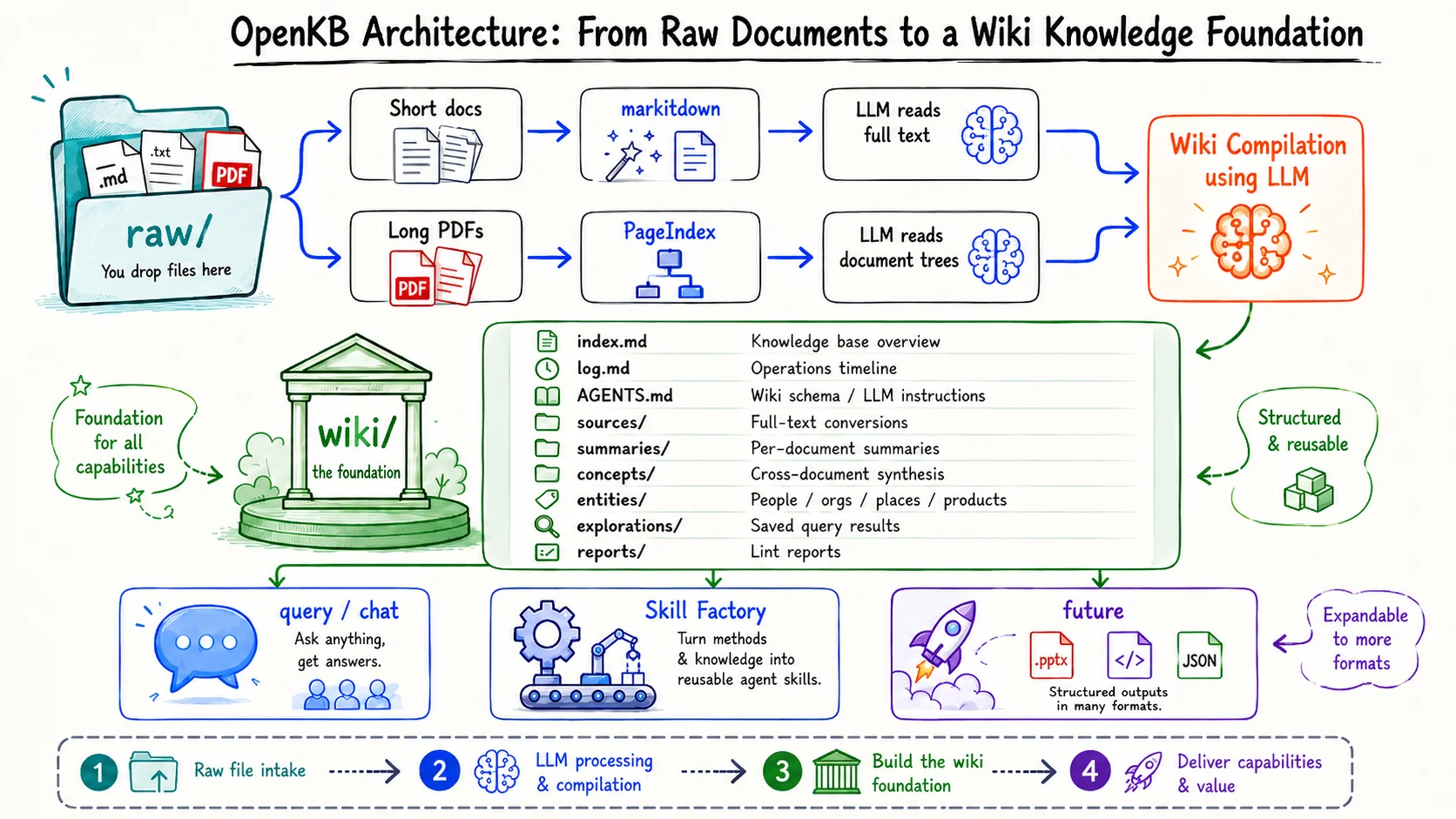
openkb add <file_or_dir_or_URL> | Add files, directories, or URLs and compile to wiki (URL content type is auto-detected) |
| `openkb list` | List indexed documents and concepts |
| `openkb status` | Show knowledge base stats |
| `openkb watch` | Watch `raw/` and auto-compile new files |
| `openkb lint` | Run structural and knowledge health checks |
openkb remove <doc> | Remove a document and clean up its wiki pages, images, registry, and PageIndex state (`--dry-run` to preview, `--keep-raw` / `--keep-empty` to retain artifacts) |
| openkb recompile [<doc>] [--all] | Re-run the compile pipeline on already-indexed docs without re-indexing. Regenerates summaries and rewrites concept pages; manual edits are overwritten (`--dry-run` to preview, `--refresh-schema` to also update `wiki/AGENTS.md`) |
| openkb feedback ["msg"] | File feedback by opening a prefilled GitHub issue (`--type bug/feature/question` to tag it) |
openkb query "question" | A grounded answer with citations (`--save` to persist to `wiki/explorations/`) | [query & save](examples/commands/) |
| openkb chat | Interactive multi-turn session over the wiki (`--resume`, `--list`, `--delete` to manage sessions) | [chat](examples/chat/) |
| openkb visualize | A self-contained interactive knowledge graph at `output/visualize/graph.html` — 3D, mind-map, and radial views | [visualize](examples/visualize/) |
| openkb skill new <skill-name> "<intent>" | Distill a redistributable agent skill from your wiki (see [Skill Factory](#skill-factory) below) | [skills](examples/skills/) |
| openkb deck new <name> "<intent>" | Generate a single-file HTML slide deck (`--skill` picks a theme, `--critique` runs a quality pass) | [slides](examples/slides/) |
### (i) 💬 Query & Chat — *ask the wiki*
`openkb query "..."` answers a single question with a grounded, cited answer from your wiki. `openkb chat` is interactive, an ongoing multi-turn session over the same wiki (`--resume`, `--list`, `--delete` to manage sessions). → Walked through with real saved output in **[`examples/commands/`](examples/commands/)** (query) and **[`examples/chat/`](examples/chat/)** (chat).
Inside a chat, type `/` to access slash commands (Tab to complete).
openkb skill validate [name] | Validate compiled skills (auto-runs after `skill new`) |
| openkb skill eval <name> | Check the skill triggers on the right prompts |
| openkb skill history <name> / openkb skill rollback <name> | Version history + rollback for skills |