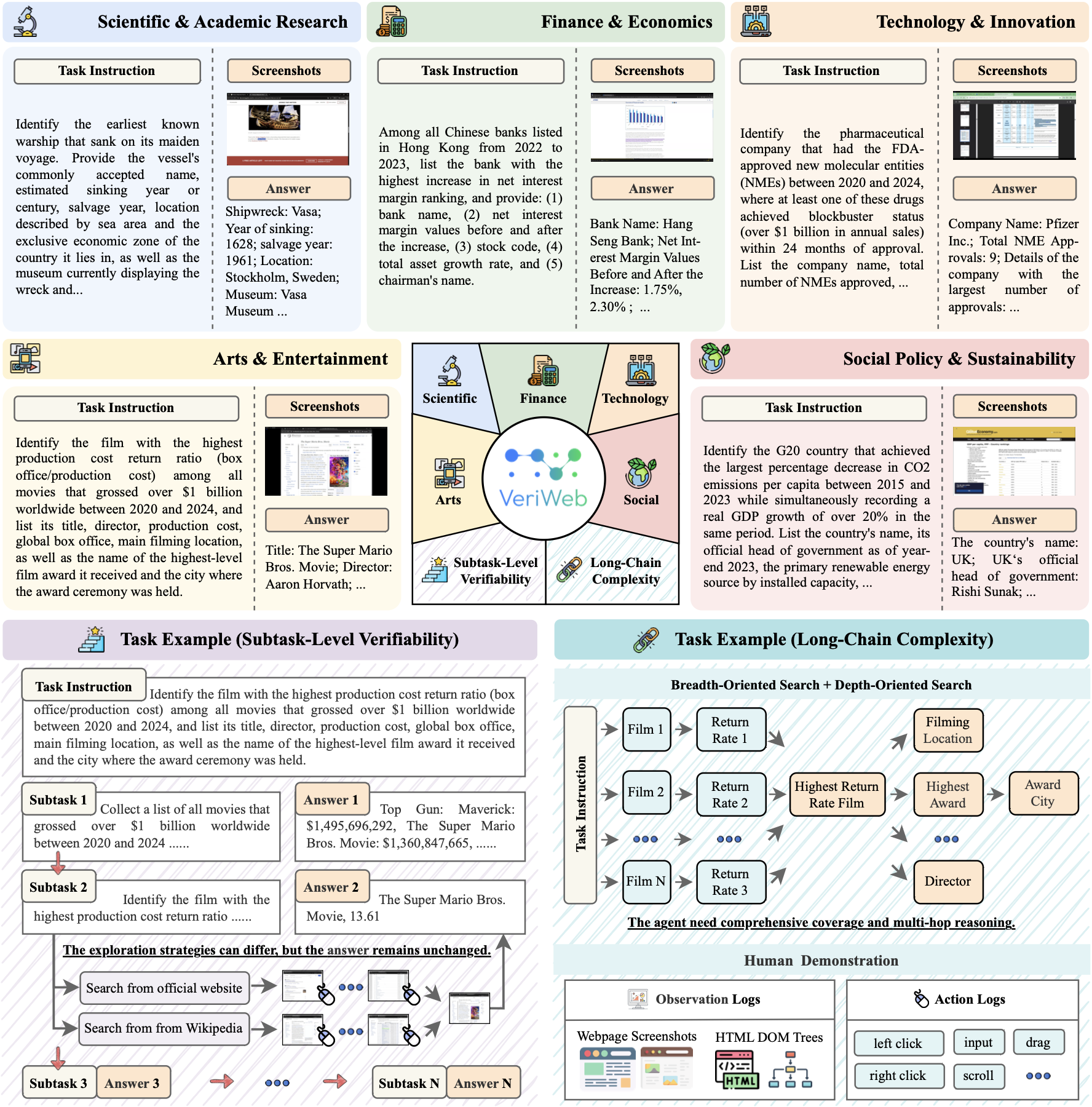
An overview of the VeriWeb benchmark across five domain-specific scenarios.
## ✨ Key Features
### 🔗 Long-Chain Complexity
- 302 realistic information-seeking tasks across 5 real-world domains
- Long-chain web trajectories decomposed into multiple interdependent subtasks
- Tasks combine breadth-oriented search and depth-oriented search
- Agents must retrieve, reason, and synthesize evidence from diverse web pages
### ✅ Subtask-Level Verifiability
- Fine-grained evaluation at each intermediate subtask, not only the final outcome
- Fixed, verifiable target outputs for every subtask while supporting diverse exploration strategies
- Each subtask can serve as an independent starting point, enabling evaluation at different stages of a task
- Rich supervision signals for diagnosing failure modes
### 🧑🎨 Human-Expert Annotation
- All tasks and trajectories carefully created and annotated by human experts
- High-quality task instructions, subtask decompositions, and answer annotations
- Each task includes a complete human demonstration with detailed observation and action logs
## 🚀 Installation
```bash
# For evaluation scripts
pip install openai requests tqdm
# For agent examples (optional)
pip install openai tqdm camel-ai[all] browser-use
```
## 🤖 Running Agents
We provide some example agents under the `agents` directory. These scripts expect you to configure API keys and input data paths (`data/original-xxx.json`) inside the script before running.
```shell
python agents/some_agent.py
```
## 📊 Evaluation
The dataset of VeriWeb is located at [data](data). Example files:
- `data/original-20260121.json`: original data
- `data/data-20260121.json`: global tasks
- `data/data-only-sub1-20260121.json`: only-subtask-1 tasks
- `data/data-with-sub1-result-20260121.json`: tasks with subtask-1 results
Each item for `data-xxx.json` uses the following format:
```json
[
{
"id": "1", // index id
"name": "V1_3", // name of the task
"type": "global", // type of the task, global or only_sub1 or with_sub1_result
"instruction": "xxxxx", // instruction for the task
"answer": "xxxxx", // expected answer for the task, in JSON format
},
......
]
```
The evaluation script `evaluate.py` can be used to evaluate the performance of agents using LLM-as-a-judge. The evaluation script expects a JSON format file with the following format:
```json
[
{
"id": "1", // index id
"name": "V1_3", // name of the task
"type": "global", // type of the task, global or only_sub1 or with_sub1_result
"instruction": "xxxxx", // instruction for the task
"answer": "xxxxx", // expected answer for the task, in JSON format
"prediction": "xxxxx", // agent's predicted result
"nsteps": 10, // number of steps taken by the agent
},
......
]
```
With this file, you can run the evaluation script to get the performance of the agent:
```shell
python evaluate.py --input_file prediction.json --output_file output.json --base_url YOUR_BASE_URL --api_key YOUR_API_KEY --model_version o3
```
Then, you can use `calc_avg.py` to calculate the average score of the evaluation results:
```shell
python calc_avg.py --input_file output.json
```
To evaluate all files in `predictions/` at once:
```shell
python batch_evaluate.py --base_url YOUR_BASE_URL --api_key YOUR_API_KEY --model_version o3
```
## 🗂️ Project Structure
The directory structure of the project is defined as follows:
```
VeriWeb/
├── agents/ # Agent implementations
│ └── browseruse.py # Browser-use agent example
│ └── deepresearch.py # Deepresearch agent example
│ └── owl.py # Multi-agent system example
├── data/ # Dataset files
│ └── data-20260121.json
│ └── data-only-sub1-20260121.json
│ └── data-with-sub1-result-20260121.json
│ └── original-20260121.json
├── evaluated/ # Evaluation results
├── predictions/ # Model predictions
├── evaluate.py # Evaluation script
├── batch_evaluate.py # Batch evaluation
├── benchmark_construction.py # Benchmark construction helpers
├── calc_avg.py # Calculate averages
├── category.json # Category mapping for analysis
├── images/ # Figures for README/paper
├── prompt.py # Scoring prompt template
└── utils.py # Utility functions
```
## 💻 Visualize Tool
### Usage
- Open [VeriGUI.2077ai.org](https://VeriGUI.2077ai.org)
- Select the corresponding task data folder
- View the visualization results
### Features
- Interactive event timeline visualization
- Support for various event types (MOUSE_DRAG, MOUSE_UP, TAB_CHANGE, etc.)
- Video playback synchronization
- Jump to specific actions functionality
## 🎓 Citation
If you find VeriWeb useful in your research, please cite our paper:
```bibtex
@article{verigui2025,
title={VeriGUI: Verifiable Long-Chain GUI Dataset},
author={Shunyu Liu, Minghao Liu, Huichi Zhou, Zhenyu Cui, Yang Zhou, Yuhao Zhou, Wendong Fan, Ge Zhang, Jiajun Shi, Weihao Xuan, Jiaxing Huang, Shuang Luo, Fang Wu, Heli Qi, Qingcheng Zeng, Ziqi Ren, Jialiang Gao, Jindi Lv, Junjie Wang, Aosong Feng, Heng Zhou, Wangchunshu Zhou, Zhenfei Yin, Wenlong Zhang, Guohao Li, Wenhao Yu, Irene Li, Lei Ma, Lei Bai, Qunshu Lin, Mingli Song, Dacheng Tao},
journal={arXiv preprint arXiv:2508.04026},
year={2025}
}
```
## 📞 Contact
For questions, suggestions, or collaborations, please feel free to:
- 🐛 Issues: [GitHub Issues](https://github.com/VeriTeam/VeriWeb/issues)
## 👥 Contributors
We thank all contributors who have helped make VeriWeb possible. Special thanks to the research team and community members who provided valuable feedback and improvements.
## 📄 License
This project is licensed under the Apache 2.0 License.


