# Vexa
**Open-source, self-hosted meeting bot & transcription API.**
A bot joins your Google Meet, Microsoft Teams, Zoom, and Jitsi calls and streams speaker-attributed
transcripts in real time through an API *you* host — then feeds sandboxed agents that build a
Markdown knowledge base your team owns. Self-hosted, Apache-2.0, air-gap-ready.
[](LICENSE)
[](#-status--roadmap)
[](#-quickstart)
[](https://discord.gg/Ga9duGkVz9)
**[vexa.ai](https://vexa.ai)** still runs the 0.10.6.13 line — it will host **0.12**.
---
## Why Vexa
Every meeting-AI tool you can buy sends your conversations to *their* cloud and rents you
access back. Vexa inverts that: run the stack yourself, point it at your own models, own what
your meetings become.
No one else has all three:
1. **Vexa is *in* the meeting.** A real bot joins Meet, Teams, Zoom, and Jitsi and streams
speaker-attributed transcripts live. That bot fleet is the genuinely hard part — every
"chat with your docs" tool starts *after* a transcript exists. Vexa produces it.
2. **Your knowledge is files you own.** Meetings compile into Markdown in a git repo —
portable, diffable, greppable. Knowledge as code.
3. **Agents work it, safely.** Sandboxed coding agents read and write that repo like
developers — isolated ephemeral containers, no egress, thousands in parallel, on Docker
or your Kubernetes.
> **Only here for the transcription API?** It's a complete standalone product — send a bot,
> read the stream, ignore the agent lane entirely.
---
## Table of contents
- [Quickstart](#-quickstart)
- [How it works](#-how-it-works)
- [The agentic runtime](#-the-agentic-runtime)
- [Agents & your workspace](#-agents--your-workspace)
- [The Terminal: AI-augmented meetings](#️-the-terminal-ai-augmented-meetings)
- [How-to recipes](#-how-to-recipes)
- [Deployment options](#-deployment-options)
- [Deploy & configure](#-deploy--configure)
- [How Vexa is different](#-how-vexa-is-different)
- [For regulated enterprises](#-for-regulated-enterprises)
- [API reference](#-api-reference)
- [Status & roadmap](#-status--roadmap)
- [Community & contributing](#-community--contributing)
- [License](#-license)
---
## ⚡ Quickstart
Self-host the whole stack on one host, then explore it in the Terminal or drive it over the API.
Linux (Ubuntu 24.04) is the production target; a Mac with Docker Desktop works fine for a local
evaluation — everything runs in containers either way.
**Prerequisites** — `make`, **Docker engine ≥ v26** (`make all` checks), and transcription: a free token at
[vexa.ai/account](https://vexa.ai/account), or self-host the (GPU) transcription unit for a fully
air-gapped setup. Without transcription, bots still join and record — they just produce no text
(`make all` warns when the credentials block in `.env` is empty).
> **Build machine:** The full stack (`make all`) requires at least **8 vCPUs and 16 GB RAM**. A smaller
> box can run `make lite` (the single-container all-in-one image) but `make all` (Docker Compose) will
> likely fail or timeout. `make lite` is the lighter path for resource-constrained hosts.
```bash
git clone https://github.com/Vexa-ai/vexa.git && cd vexa
make all # full Docker Compose stack — seeds .env, builds, prints your API key + URLs
make bot # build the meeting bot from source (required before a bot can join)
```
When `make all` finishes it prints your key and URLs:
```text
Terminal UI : http://localhost:13000 # the web workbench
API gateway : http://localhost:18056 # the API
API key : vxa_…
```
### Explore in the Terminal (the fast path)
**The Terminal is the way to see what Vexa can do.** Open **`http://localhost:13000`** — you're
already signed in to a self-host account. From the
workbench you can, with no curl:
- **Send a bot** — paste a Meet / Zoom / Teams / Jitsi URL; a bot joins as a participant.
- **Watch the transcript** stream in live, speaker-attributed, draft-then-confirmed.
- **Chat with your workspace** — ask an agent that has every captured meeting as context, and watch it
commit what you decide.
### Or drive it over the API
```bash
export API_KEY=vxa_...
export API_BASE=http://localhost:18056
# WIN 1 — send a bot into a live call, then read the transcript as it streams
curl -X POST "$API_BASE/bots" \
-H "X-API-Key: $API_KEY" -H "Content-Type: application/json" \
-d '{"platform":"google_meet","native_meeting_id":"abc-defg-hij","bot_name":"Vexa"}'
curl -H "X-API-Key: $API_KEY" "$API_BASE/transcripts/google_meet/abc-defg-hij"
# WIN 2 — ask an agent that has your whole workspace as context (answer streams back as SSE)
curl -N -X POST "$API_BASE/agent/chat" \
-H "X-API-Key: $API_KEY" -H "Content-Type: application/json" \
-d '{"prompt":"What did we decide in my last meeting?"}'
```
`platform` is `google_meet` · `teams` · `zoom` · `jitsi`; `native_meeting_id` is the code from the join URL. The
agent reply streams as Server-Sent Events — `message-delta` frames carry the text, `commit` frames mark
anything it recorded into your workspace.
---
## 🧩 How it works
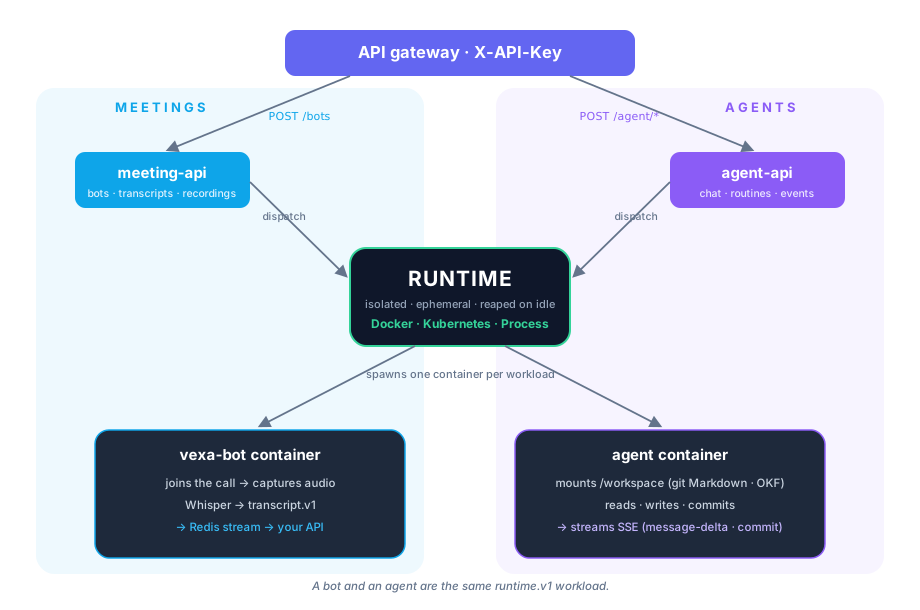
One gateway, two domains — **Meetings** (capture) and **Agents** (work the knowledge) — both running on
the same **runtime**: the engine that spawns every bot and every agent in its own sandboxed container.