
# Winload  > Linuxの「nload」にインスパイアされた、軽量でリアルタイムなネットワーク帯域幅およびトラフィック監視用CLIツールです。
> **[📖 English](readme.md)**
> **[📖 简体中文(大陆)](readme.zh-cn.md)**
> **[📖 繁體中文(台灣)](readme.zh-tw.md)**
> **[📖 文言文](readme.lzh.md)**
> **[📖 日本語](readme.jp.md)**
> **[📖 한국어](readme.ko.md)**
[](https://github.com/VincentZyuApps/winload)
[](https://gitee.com/vincent-zyu/winload)
[](https://github.com/VincentZyuApps/winload/releases)
[](https://github.com/VincentZyuApps/winload/releases)
[](https://github.com/VincentZyuApps/winload/releases)
[](https://github.com/VincentZyuApps/winload/releases)
[](https://pypi.org/project/winload/)
[](https://crates.io/crates/winload)
[](https://www.npmjs.com/package/@vincentzyuapps/winload)
[](https://scoop.sh/#/apps?q=%22https%3A%2F%2Fgithub.com%2FVincentZyuApps%2Fscoop-bucket%22&o=false)
[](https://aur.archlinux.org/packages/winload-rust-bin)
[](https://github.com/VincentZyuApps/winload/releases)
[](https://github.com/VincentZyuApps/winload/releases)
[](https://github.com/VincentZyuApps/homebrew-tap/blob/main/Formula/winload.rb)
> **[📖 ビルドドキュメント](.github/workflows/build.md)**
## 🚀 はじめに
`Winload`は、直感的で視覚的なネットワークモニターをモダンなターミナルにもたらします。もともとはWindowsにおける`nload`の代替ツールとして開発が始まりましたが、現在はLinuxやmacOSもサポートしています。
## 🙏 謝辞
Winloadは、Roland Riegel氏によるクラシックなプロジェクト「[nload](https://github.com/rolandriegel/nload)」にインスパイアされています。素晴らしいアイデアとユーザー体験に深く感謝いたします。
https://github.com/rolandriegel/nload
## ✨ 主な特徴
- **2つの実装エディション**
- **Rust版**: 高速、メモリ安全、単一の静的バイナリ。日常的な監視に最適です。
- **Python版**: プロトタイプ作成や統合のために、ハックや拡張が容易です。
- **クロスプラットフォーム**: Windows、Linux、macOS (x64 & ARM64) に対応。
- **リアルタイムの可視化**: 送受信トラフィックのライブグラフとスループット統計を表示。
- **ミニマルなUI**: nloadの使い勝手を踏襲したクリーンなTUI(テキストユーザインターフェース)。
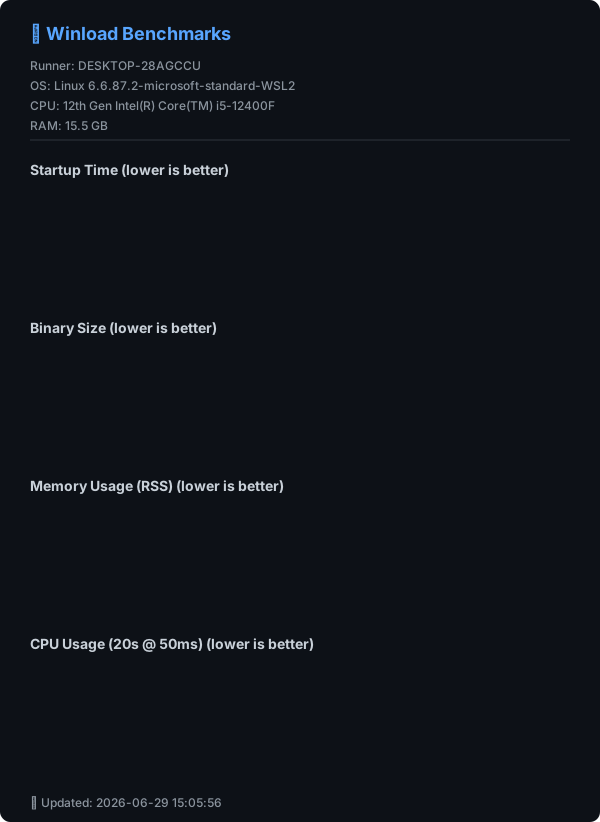
## 📊 パフォーマンスベンチマーク
> ⚡ Winload (Rust) は **~10ms の起動時間** と **2MB未満のバイナリサイズ** を達成し、Python版を大幅に上回り、C++製 nload と同等の効率を実現しています。
## 🔧 ソースから実行
### Python
```bash
git clone https://github.com/VincentZyuApps/winload.git
# または Gitee からクローン(中国本土で高速):
# git clone https://gitee.com/vincent-zyu/winload.git
cd winload/python
uv venv --python 3.13
uv pip install -r requirements.txt
uv run python main.py
```
### Rust
```bash
git clone https://github.com/VincentZyuApps/winload.git
cd winload/rust
cargo run --release
cargo run --release -- --help # ヘルプを表示
cargo run --release -- --version # バージョンを表示
```
## 🐍 Python 版 インストール
> 💡 **実装に関する注記**: PyPI および GitHub/Gitee のソースコードのみが Python 版です。
> Cargo のみが Rust ソースコードのローカルビルドを提供します。
> すべて他方のパッケージマネージャー(Scoop、AUR、npm、APT、RPM)および GitHub Releases は **Rust バイナリ** を提供しています。
### Python (pip)
```bash
pip install winload
# uv の使用を推奨:
# https://docs.astral.sh/uv/getting-started/installation/
# https://gitee.com/wangnov/uv-custom/releases
uv venv --python 3.13
uv pip install winload
uv run winload
uv run python -c "import shutil; print(shutil.which('winload'))"
```
## 📥 Rust 版 インストール(推奨)
### npm (クロスプラットフォーム)
```bash
# 推奨(scoped)
npm install -g @vincentzyuapps/winload
# 代替(unscoped)
npm install -g winload-rust-bin
# 代替(GitHub Packages)
npm install -g @vincentzyuapps/winload --registry https://npm.pkg.github.com
# Windows では System32\winload.exe との競合を避けるため win-nload を使用
# Linux/macOS では winload と win-nload のどちらも使用可能
# または npx を直接使用
npx @vincentzyuapps/winload
```
> 4つのプリコンパイル済みバイナリを含む:x86_64 & ARM64 対応、Windows・Linux・macOS に対応。
### Cargo (ソースからビルド)
```bash
cargo install winload
cargo install --list
```
### Windows (Scoop)
> 📄 [Scoop Bucket (GitHub)](https://github.com/VincentZyuApps/scoop-bucket/blob/main/bucket/winload.json)
> 📄 [Scoop Bucket (Gitee)](https://gitee.com/vincent-zyu/scoop-bucket/blob/main/bucket/winload.json)
```powershell
scoop bucket add vincentzyu https://github.com/VincentZyuApps/scoop-bucket
# または Gitee から:
# scoop bucket add vincentzyu https://gitee.com/vincent-zyu/scoop-bucket
scoop update # optional: インストール前に bucket を手動更新
scoop install winload
# バイナリファイルを実行
win-nload
Get-Command win-nload # Powershell
where win-nload # CMD
```
> 💡 レガシーの Windows Console ではなく、[Windows Terminal](https://github.com/microsoft/terminal) の使用を推奨します。CJK 文字の正確なレンダリングとより良い TUI 体験が得られます。
> ```powershell
> scoop bucket add versions
> scoop install windows-terminal-preview
> wtp
> ```
> 💡 **すべてのビルドに Windows 10+ が必要です**(Rust 1.77+ は Windows 7/8 をサポートしなくなりました)。Scoop と npm は既定で **x86_64** および **ARM64** 向けの **MSVC + Npcap** ビルドを提供します。これらのビルドは `wpcap.dll` を遅延読み込みするようになったため、`--npcap` を使う前の起動失敗リスクは下がりましたが、ループバック取得には引き続きシステムに Npcap が必要です。
### Arch Linux (AUR):
```bash
paru -S winload-rust-bin
which winload
```
### Debian & RedHat 系ディストロ / Termux (ワンライナー)
> Debian/Ubuntu およびその派生版(Linux Mint, Pop!_OS, Deepin, UOS等)をサポート (apt)
> Fedora/RHEL およびその派生版(Rocky Linux, AlmaLinux, CentOS Stream等)をサポート (dnf)
> Android の Termux (aarch64) もサポート
```bash
curl -fsSL https://raw.githubusercontent.com/VincentZyuApps/winload/main/docs/install_scripts/install.sh | bash
which winload
```
> 📄 [インストールスクリプトのソースを表示](https://github.com/VincentZyuApps/winload/blob/main/docs/install_scripts/install.sh)
**🇨🇳 Giteeミラー(中国本土内での高速ダウンロード):**
```bash
curl -fsSL https://gitee.com/vincent-zyu/winload/raw/main/docs/install_scripts/install_gitee.sh | bash
which winload
```
> 📄 [Giteeインストールスクリプトを表示](https://gitee.com/vincent-zyu/winload/blob/main/docs/install_scripts/install_gitee.sh)
> ⚠️ 上記の2つの `curl ... | bash` インストールスクリプトは、**x86_64 / aarch64** アーキテクチャ上で **apt**(Debian/Ubuntu)、**dnf**(Fedora/RHEL)、または **Termux**(Android)を使用するシステムをサポートしています。その他のプラットフォームでは **npm**(`npm install -g @vincentzyuapps/winload`)または **Cargo**(`cargo install winload`)をご利用ください。
### macOS / Linux(Homebrew)
> 📄 [Homebrew Formula (GitHub)](https://github.com/VincentZyuApps/homebrew-tap/blob/main/Formula/winload.rb)
> 📄 [Homebrew Formula (Gitee)](https://gitee.com/vincent-zyu/homebrew-tap/blob/main/Formula/winload.rb)
> 最近の Homebrew では、インストール前にサードパーティ tap の formula を信頼する必要がある場合があります。
```bash
brew tap vincentzyuapps/tap
brew trust vincentzyuapps/tap
# または Gitee から(手動クローン):
# git clone https://gitee.com/vincent-zyu/homebrew-tap.git "$(brew --prefix)/Library/Taps/vincentzyuapps/homebrew-tap"
brew update && brew install winload
which winload
```
> 💡 Homebrew は **macOS**(Intel および Apple Silicon)と **Linux**(x86_64 および ARM64)をサポートしています。
> Linuxの「nload」にインスパイアされた、軽量でリアルタイムなネットワーク帯域幅およびトラフィック監視用CLIツールです。
> **[📖 English](readme.md)**
> **[📖 简体中文(大陆)](readme.zh-cn.md)**
> **[📖 繁體中文(台灣)](readme.zh-tw.md)**
> **[📖 文言文](readme.lzh.md)**
> **[📖 日本語](readme.jp.md)**
> **[📖 한국어](readme.ko.md)**
[](https://github.com/VincentZyuApps/winload)
[](https://gitee.com/vincent-zyu/winload)
[](https://github.com/VincentZyuApps/winload/releases)
[](https://github.com/VincentZyuApps/winload/releases)
[](https://github.com/VincentZyuApps/winload/releases)
[](https://github.com/VincentZyuApps/winload/releases)
[](https://pypi.org/project/winload/)
[](https://crates.io/crates/winload)
[](https://www.npmjs.com/package/@vincentzyuapps/winload)
[](https://scoop.sh/#/apps?q=%22https%3A%2F%2Fgithub.com%2FVincentZyuApps%2Fscoop-bucket%22&o=false)
[](https://aur.archlinux.org/packages/winload-rust-bin)
[](https://github.com/VincentZyuApps/winload/releases)
[](https://github.com/VincentZyuApps/winload/releases)
[](https://github.com/VincentZyuApps/homebrew-tap/blob/main/Formula/winload.rb)
> **[📖 ビルドドキュメント](.github/workflows/build.md)**
## 🚀 はじめに
`Winload`は、直感的で視覚的なネットワークモニターをモダンなターミナルにもたらします。もともとはWindowsにおける`nload`の代替ツールとして開発が始まりましたが、現在はLinuxやmacOSもサポートしています。
## 🙏 謝辞
Winloadは、Roland Riegel氏によるクラシックなプロジェクト「[nload](https://github.com/rolandriegel/nload)」にインスパイアされています。素晴らしいアイデアとユーザー体験に深く感謝いたします。
https://github.com/rolandriegel/nload
## ✨ 主な特徴
- **2つの実装エディション**
- **Rust版**: 高速、メモリ安全、単一の静的バイナリ。日常的な監視に最適です。
- **Python版**: プロトタイプ作成や統合のために、ハックや拡張が容易です。
- **クロスプラットフォーム**: Windows、Linux、macOS (x64 & ARM64) に対応。
- **リアルタイムの可視化**: 送受信トラフィックのライブグラフとスループット統計を表示。
- **ミニマルなUI**: nloadの使い勝手を踏襲したクリーンなTUI(テキストユーザインターフェース)。
## 📊 パフォーマンスベンチマーク
> ⚡ Winload (Rust) は **~10ms の起動時間** と **2MB未満のバイナリサイズ** を達成し、Python版を大幅に上回り、C++製 nload と同等の効率を実現しています。

## 🔧 ソースから実行
### Python
```bash
git clone https://github.com/VincentZyuApps/winload.git
# または Gitee からクローン(中国本土で高速):
# git clone https://gitee.com/vincent-zyu/winload.git
cd winload/python
uv venv --python 3.13
uv pip install -r requirements.txt
uv run python main.py
```
### Rust
```bash
git clone https://github.com/VincentZyuApps/winload.git
cd winload/rust
cargo run --release
cargo run --release -- --help # ヘルプを表示
cargo run --release -- --version # バージョンを表示
```
## 🐍 Python 版 インストール
> 💡 **実装に関する注記**: PyPI および GitHub/Gitee のソースコードのみが Python 版です。
> Cargo のみが Rust ソースコードのローカルビルドを提供します。
> すべて他方のパッケージマネージャー(Scoop、AUR、npm、APT、RPM)および GitHub Releases は **Rust バイナリ** を提供しています。
### Python (pip)
```bash
pip install winload
# uv の使用を推奨:
# https://docs.astral.sh/uv/getting-started/installation/
# https://gitee.com/wangnov/uv-custom/releases
uv venv --python 3.13
uv pip install winload
uv run winload
uv run python -c "import shutil; print(shutil.which('winload'))"
```
## 📥 Rust 版 インストール(推奨)
### npm (クロスプラットフォーム)
```bash
# 推奨(scoped)
npm install -g @vincentzyuapps/winload
# 代替(unscoped)
npm install -g winload-rust-bin
# 代替(GitHub Packages)
npm install -g @vincentzyuapps/winload --registry https://npm.pkg.github.com
# Windows では System32\winload.exe との競合を避けるため win-nload を使用
# Linux/macOS では winload と win-nload のどちらも使用可能
# または npx を直接使用
npx @vincentzyuapps/winload
```
> 4つのプリコンパイル済みバイナリを含む:x86_64 & ARM64 対応、Windows・Linux・macOS に対応。
### Cargo (ソースからビルド)
```bash
cargo install winload
cargo install --list
```
### Windows (Scoop)
> 📄 [Scoop Bucket (GitHub)](https://github.com/VincentZyuApps/scoop-bucket/blob/main/bucket/winload.json)
> 📄 [Scoop Bucket (Gitee)](https://gitee.com/vincent-zyu/scoop-bucket/blob/main/bucket/winload.json)
```powershell
scoop bucket add vincentzyu https://github.com/VincentZyuApps/scoop-bucket
# または Gitee から:
# scoop bucket add vincentzyu https://gitee.com/vincent-zyu/scoop-bucket
scoop update # optional: インストール前に bucket を手動更新
scoop install winload
# バイナリファイルを実行
win-nload
Get-Command win-nload # Powershell
where win-nload # CMD
```
> 💡 レガシーの Windows Console ではなく、[Windows Terminal](https://github.com/microsoft/terminal) の使用を推奨します。CJK 文字の正確なレンダリングとより良い TUI 体験が得られます。
> ```powershell
> scoop bucket add versions
> scoop install windows-terminal-preview
> wtp
> ```
> 💡 **すべてのビルドに Windows 10+ が必要です**(Rust 1.77+ は Windows 7/8 をサポートしなくなりました)。Scoop と npm は既定で **x86_64** および **ARM64** 向けの **MSVC + Npcap** ビルドを提供します。これらのビルドは `wpcap.dll` を遅延読み込みするようになったため、`--npcap` を使う前の起動失敗リスクは下がりましたが、ループバック取得には引き続きシステムに Npcap が必要です。
### Arch Linux (AUR):
```bash
paru -S winload-rust-bin
which winload
```
### Debian & RedHat 系ディストロ / Termux (ワンライナー)
> Debian/Ubuntu およびその派生版(Linux Mint, Pop!_OS, Deepin, UOS等)をサポート (apt)
> Fedora/RHEL およびその派生版(Rocky Linux, AlmaLinux, CentOS Stream等)をサポート (dnf)
> Android の Termux (aarch64) もサポート
```bash
curl -fsSL https://raw.githubusercontent.com/VincentZyuApps/winload/main/docs/install_scripts/install.sh | bash
which winload
```
> 📄 [インストールスクリプトのソースを表示](https://github.com/VincentZyuApps/winload/blob/main/docs/install_scripts/install.sh)
**🇨🇳 Giteeミラー(中国本土内での高速ダウンロード):**
```bash
curl -fsSL https://gitee.com/vincent-zyu/winload/raw/main/docs/install_scripts/install_gitee.sh | bash
which winload
```
> 📄 [Giteeインストールスクリプトを表示](https://gitee.com/vincent-zyu/winload/blob/main/docs/install_scripts/install_gitee.sh)
> ⚠️ 上記の2つの `curl ... | bash` インストールスクリプトは、**x86_64 / aarch64** アーキテクチャ上で **apt**(Debian/Ubuntu)、**dnf**(Fedora/RHEL)、または **Termux**(Android)を使用するシステムをサポートしています。その他のプラットフォームでは **npm**(`npm install -g @vincentzyuapps/winload`)または **Cargo**(`cargo install winload`)をご利用ください。
### macOS / Linux(Homebrew)
> 📄 [Homebrew Formula (GitHub)](https://github.com/VincentZyuApps/homebrew-tap/blob/main/Formula/winload.rb)
> 📄 [Homebrew Formula (Gitee)](https://gitee.com/vincent-zyu/homebrew-tap/blob/main/Formula/winload.rb)
> 最近の Homebrew では、インストール前にサードパーティ tap の formula を信頼する必要がある場合があります。
```bash
brew tap vincentzyuapps/tap
brew trust vincentzyuapps/tap
# または Gitee から(手動クローン):
# git clone https://gitee.com/vincent-zyu/homebrew-tap.git "$(brew --prefix)/Library/Taps/vincentzyuapps/homebrew-tap"
brew update && brew install winload
which winload
```
> 💡 Homebrew は **macOS**(Intel および Apple Silicon)と **Linux**(x86_64 および ARM64)をサポートしています。
手動インストール
**DEB (Debian/Ubuntu):**
```bash
# GitHub Releasesから最新の .deb をダウンロード
sudo dpkg -i ./winload*.deb
# または apt を使用(依存関係を自動解決)
sudo apt install ./winload*.deb
which winload
```
**RPM (Fedora/RHEL):**
```bash
sudo dnf install ./winload*.rpm
which winload
```
**または、[GitHub Releases](https://github.com/VincentZyuApps/winload/releases) からバイナリを直接ダウンロードしてください。**
## ⌨️ 使い方
```bash
winload # すべてのアクティブなネットワークインターフェースを監視
winload -t 200 # 更新間隔を200ミリ秒に設定
winload -d "Wi-Fi" # 特定のデバイス名で開始
winload --title "My Monitor" # カスタムヘッダータイトルを使う
winload -e # 絵文字装飾を有効にする 🎉
winload --max-mode smart --max-half-life 10 # スムーズな適応型 Y 軸(既定)
winload --max-mode legacy # nload 風の表示履歴ピークスケーリング
winload --max-mode fixed --max-y-value 10M # Y 軸上限を固定
winload --npcap # 127.0.0.1 ループバックトラフィックをキャプチャ (Windows, Npcapが必要)
winload --netlink # RTNETLINK を手動で有効化(Linux/Android、既定はオフ)
```
### オプション
| フラグ | 説明 | デフォルト |
|------|-------------|---------|
| `-t`, `--interval ` | 更新間隔(ミリ秒) | `500` |
| `-a`, `--average ` | 平均値計算のウィンドウ時間(秒) | `300` |
| `-d`, `--device ` | デフォルトのデバイス名(部分一致可) | — |
| `--title [TITLE]` | デバイスヘッダーの上にタイトル行を追加。値なしは `winload `、空文字列(または省略)は既定のデバイスヘッダーのみ表示 | — |
| `-e`, `--emoji` | TUIで絵文字装飾を有効にする 🎉 | オフ |
| `-U`, `--unicode` | グラフにUnicodeブロック文字を使用 (█▓░·) | オフ |
| `-u`, `--unit ` | 表示単位: `bit` または `byte` | `bit` |
| `-b`, `--bar-style