# MCP / Skills 整合目錄
> **繁體中文** | [简体中文](./mcp-skills-catalog.zh-Hans.md) | [English](./mcp-skills-catalog.en.md)
> 這是「需要時來找工具」的分類目錄,不是安裝清單。先選一個官方起點;只有工作真的需要時,才展開一類。
## 📌 怎麼使用這份目錄
1. 先說清楚你要讀資料,還是要寫入真實服務。
2. 優先選官方 hosted/reference 入口,再檢查維護、授權與權限。
3. 先連測試資料、read-only 和最小權限。write、send、delete 前保留人工核准。
完整安裝與測試放在 [Stage 5](../stages/05-claude-code-ecosystem.md);這一頁只幫你找到候選項目。
## 🧩 先分清五個詞
- **MCP Server**:把資料或動作變成 MCP 工具的程式或 hosted service。
- **Skill**:可重複使用的指令、腳本、範本與參考資料;不同 host 的載入方式可能不同。
- **Plugin**:某個 host 的安裝包,可以一起帶入 Skill、指令、hook 或 MCP 設定;不是 MCP 規格本身。
- **Remote MCP**:由服務商運行的 MCP Server。通常用 OAuth 登入,不需要你在本機啟動程式。
- **Permission Boundary(權限邊界)**:Agent 真正能讀、寫、傳送或刪除的範圍。工具能做,不代表每次都應該做。
## 📚 五個安全起點
| 起點 | 先學什麼 | 編輯評分 |
|:---|:---|:---|
| [Official MCP Registry](https://registry.modelcontextprotocol.io/) | 找已發布的 MCP Server;安裝前仍要查維護者與權限 | ⭐⭐⭐⭐⭐ |
| [servers](https://github.com/modelcontextprotocol/servers) | 學協定功能;這些是教學 reference servers,不等於 production 推薦 | ⭐⭐⭐⭐⭐ |
| [Notion MCP](https://developers.notion.com/guides/mcp/overview) | 看 hosted OAuth MCP 如何沿用使用者 workspace 權限 | ⭐⭐⭐⭐⭐ |
| [GitHub MCP Server](https://github.com/github/github-mcp-server) | 看官方 OAuth、工具組與 repository 權限 | ⭐⭐⭐⭐⭐ |
| [skills](https://github.com/anthropics/skills) | 看 Agent Skill 的資料夾、指令與資源怎麼組合 | ⭐⭐⭐⭐⭐ |
> ⚠️ MCP Server 可能碰到真實資料。即使來源是官方,也要確認登入帳號、scope、可寫工具與核准畫面。
### 新增工具怎麼選
新增項目查核:2026-10-15 UTC
| 需求 | 建議入口 | 編輯評分 | 先確認 |
|:---|:---|:---|:---|
| 尋找、安裝或更新 Agent Skills | [Vercel Skills](#vercel-skills) | ⭐⭐⭐⭐ | 它不是 MCP server 或模型;安裝前檢查來源、權限與 host 支援 |
### 目錄
1. [筆記 / 知識庫](#1-筆記--知識庫)
2. [辦公文件(Word / Excel / PowerPoint / PDF)](#2-辦公文件word--excel--powerpoint--pdf)
3. [Google Workspace](#3-google-workspace)
4. [Microsoft 365](#4-microsoft-365)
5. [開發協作(GitHub / Atlassian / Slack…)](#5-開發協作github--atlassian--slack)
6. [資料庫](#6-資料庫)
7. [瀏覽器自動化 / 網頁抓取](#7-瀏覽器自動化--網頁抓取)
8. [設計(Figma / Excalidraw)](#8-設計figma--excalidraw)
9. [監控 / Observability](#9-監控--observability)
10. [媒體 / 串流(YouTube / Spotify)](#10-媒體--串流youtube--spotify)
11. [中文圈專用](#11-中文圈專用)
12. [其他常用(Cloudflare / Stripe…)](#12-其他常用cloudflare--stripe)
13. [研究工作流 Skills(學術 / paper / 文獻)](#13-研究工作流-skills學術--paper--文獻)
14. [Multi-LLM Delegation Skills](#14-multi-llm-delegation-skills)
15. [金融 / 交易 Agents](#15-金融--交易-agents)
16. [網頁搜尋 / 檢索(Web Search / Retrieval)](#16-網頁搜尋--檢索web-search--retrieval)
17. [資安 / MCP 安全治理](#17-資安--mcp-安全治理)
---
## 1. 筆記 / 知識庫
要讓 Agent 查筆記或知識庫,先確認它能看到哪些頁面,以及是否真的需要寫入。
展開第 1 類精選項目
### [Notion MCP](https://developers.notion.com/guides/mcp/overview) ⭐⭐⭐⭐⭐
| 欄位 | 內容 |
|:---|:---|
| 提供方式 | Notion hosted remote MCP;OAuth |
| 推薦度 | ⭐⭐⭐⭐⭐(**官方**) |
**教什麼**:Notion 官方 hosted MCP,可搜尋、讀取、建立與更新使用者本來就能存取的內容。
**適合誰**:日常用 Notion 寫筆記、管專案或維護 wiki,想從支援 MCP 的 client 操作 workspace 的人。
**備註**:用 OAuth 登入並沿用使用者權限;寫入前仍要看清核准畫面。舊的開源 `makenotion/notion-mcp-server` 已不再積極維護,不列作新安裝起點。
### [MarkusPfundstein/mcp-obsidian](https://github.com/MarkusPfundstein/mcp-obsidian) ⭐⭐⭐⭐
| 欄位 | 內容 |
|:---|:---|
| License | MIT |
| 推薦度 | ⭐⭐⭐⭐(社群維護) |
**教什麼**:透過 Obsidian REST API community plugin 讓 LLM 讀寫你的 Obsidian vault。
**適合誰**:Obsidian 重度使用者,想用 Claude Code 整理 daily note、自動 link、跨檔搜尋。
**備註**:要先在 Obsidian 裝 [Local REST API](https://github.com/coddingtonbear/obsidian-local-rest-api) plugin。
### [PleasePrompto/notebooklm-skill](https://github.com/PleasePrompto/notebooklm-skill) ⭐⭐⭐⭐
**狀態(2026-09-10 UTC)**:已封存,作者不再提供更新或支援。保留作歷史學習範例;新流程不要從它開始。
| 欄位 | 內容 |
|:---|:---|
| License | MIT |
| 推薦度 | ⭐⭐⭐⭐ |
**教什麼**:Claude Code Skill,用瀏覽器自動化操作 Gemini Notebook(舊名 NotebookLM)、查詢上傳文件,回覆帶 citation。
**適合誰**:想研究早期瀏覽器自動化 Skill 設計的人;實際使用請先看官方網頁或下方仍需自行評估的 `notebooklm-py`。
**備註**:需要 Google 帳號登入授權。
### [teng-lin/notebooklm-py](https://github.com/teng-lin/notebooklm-py) ⭐⭐⭐⭐
| 欄位 | 內容 |
|:---|:---|
| License | MIT |
| 推薦度 | ⭐⭐⭐⭐ |
**教什麼**:非官方 Gemini Notebook(舊名 NotebookLM)Python API、CLI 與 agentic skill;包含批次建立 notebook、匯入來源與查詢等能力。
**適合誰**:要程式化批次操作 Gemini Notebook(舊名 NotebookLM)的人。
**備註**:非官方、Google 政策變動可能會壞;用前看一下 issue tracker。
### [ergut/mcp-logseq](https://github.com/ergut/mcp-logseq) ⭐⭐⭐
| 欄位 | 內容 |
|:---|:---|
| License | MIT |
| 推薦度 | ⭐⭐⭐ |
**教什麼**:透過 Logseq Local HTTP API 讓 LLM 讀寫 Logseq graph。
**適合誰**:Logseq 使用者要自動化 daily journal、跨頁 link、查詢 backlinks。
**備註**:需要 Logseq 開啟 HTTP API(Settings → Features → HTTP API)。
### skridlevsky/graphthulhu ⭐⭐⭐(已封存/歷史範例)
| 欄位 | 內容 |
|:---|:---|
| License | 先前記錄為 MIT;目前無法重新核對 |
| 推薦度 | ⭐⭐⭐(歷史評分;目前無法公開取得) |
**教什麼**:把 navigation、search、analysis、writing、journals、flashcards 與 whiteboards 等操作包成工具。
**適合誰**:想研究早期 Logseq + Obsidian MCP 設計的人;新專案應改找仍在維護的替代方案。
**備註(2026-09-10 UTC)**:原 GitHub 入口回傳 404,已移除失效連結。不推測它是刪除、轉為私人或搬家;此處只保留歷史名稱與評分,不再當作可取得的學習資源。
### [ankimcp/anki-mcp-server](https://github.com/ankimcp/anki-mcp-server) ⭐⭐⭐
| 欄位 | 內容 |
|:---|:---|
| License | MIT |
| 推薦度 | ⭐⭐⭐ |
**教什麼**:透過 AnkiConnect 讓 LLM 建卡、查卡、批改 deck。
**適合誰**:用 Anki 學語言 / 醫學 / 法律的人——叫 LLM 從教材自動產卡。
**備註**:需要 Anki 桌面版裝 [AnkiConnect](https://ankiweb.net/shared/info/2055492159) addon。
---
## 2. 辦公文件(Word / Excel / PowerPoint / PDF)
要建立或修改文件,先備份原檔並核對輸出;格式正確不代表內容正確。
展開第 2 類精選項目
### [anthropics/skills](https://github.com/anthropics/skills) ⭐⭐⭐⭐⭐
| 欄位 | 內容 |
|:---|:---|
| License | 各 Skill 分別授權;許多為 Apache-2.0,docx/pdf/pptx/xlsx 為 source-available,依各資料夾條款 |
| 推薦度 | ⭐⭐⭐⭐⭐(**官方範例**) |
**教什麼**:Anthropic 官方 Agent Skills 範例 repo,包含 docx、xlsx、pptx 與 pdf 等文件處理 skill。
**適合誰**:想看標準 Skill 資料夾、`SKILL.md`、scripts 與 resources 如何合作的人。
**備註**:這是 Skills 集合,不是 MCP。不同 Claude/Agent surface 的預載、安裝與支援方式不完全相同;使用前先看 repo 與目前 host 文件。
### [haris-musa/excel-mcp-server](https://github.com/haris-musa/excel-mcp-server) ⭐⭐⭐⭐⭐
| 欄位 | 內容 |
|:---|:---|
| License | MIT |
| 推薦度 | ⭐⭐⭐⭐⭐(社群維護的 Excel MCP) |
**教什麼**:Excel 檔操作 MCP server——讀 / 寫 / 改 cell、formula、sheet。
**適合誰**:日常處理 Excel 報表、要 LLM 自動填表 / 整理資料的人。
**備註**:Python 寫的,依賴 openpyxl。
### [GongRzhe/Office-PowerPoint-MCP-Server](https://github.com/GongRzhe/Office-PowerPoint-MCP-Server) ⭐⭐⭐(⚠️ 已封存 2025-12、可改用 anthropics/skills pptx)
| 欄位 | 內容 |
|:---|:---|
| License | MIT |
| 推薦度 | ⭐⭐⭐(⚠️ 已封存) |
**教什麼**:用 python-pptx 操作 PPT——建簡報、改 slide、插圖、改 layout。
**適合誰**:要 LLM 從大綱 / Markdown 自動生 PPT 的人(顧問、講師、學生)。
**備註**:跟 anthropics/skills 的 pptx skill 重疊;那邊不夠用再來這邊。
### [open-slide/open-slide](https://github.com/open-slide/open-slide) ⭐⭐⭐⭐
| 欄位 | 內容 |
|:---|:---|
| License | MIT |
| 推薦度 | ⭐⭐⭐⭐(agent-native 簡報框架) |
**教什麼**:為 coding agent 打造的 React 簡報框架——用自然語言描述簡報、讓 Claude Code / Codex / Cursor 寫出 React slides;內附 `/create-slide`、`/slide-authoring` 兩個 Claude Code Skill。
**適合誰**:想讓 agent 直接產出「程式碼即簡報、可進 git 版控」的人,跟 PowerPoint-MCP 走 .pptx 不同路。
**備註**:TypeScript / React / Vite,`npx @open-slide/cli init` 起手。它是 agent-native 工具(agent 來寫),不是 Stage 4 那種建構 agent 的編排框架。
### [tfriedel/claude-office-skills](https://github.com/tfriedel/claude-office-skills) ⭐⭐⭐
| 欄位 | 內容 |
|:---|:---|
| License | NOASSERTION |
| 推薦度 | ⭐⭐⭐(補強版 Office skill) |
**教什麼**:補強 anthropics/skills 沒覆蓋到的 Office workflow(automation、進階格式)。
**適合誰**:覺得官方 docx/xlsx/pptx skill 不夠細的人。
**備註**:跟 anthropics/skills 是補充關係,不是替代。
### [xberg-io/xberg](https://github.com/xberg-io/xberg) ⭐⭐⭐⭐
| 欄位 | 內容 |
|:---|:---|
| License | NOASSERTION |
| 推薦度 | ⭐⭐⭐⭐ |
**教什麼**:解析 PDF、Office、圖片與其他常見文件格式的 Rust 框架,提供 MCP server、REST API 與 CLI。
**適合誰**:跨格式批次處理檔案、要 throughput 的工程師。
**備註**:不只是 PDF / Office——還支援冷門格式如 HWP、ODT 等。
---
## 3. Google Workspace
Google Workspace 會碰到郵件、雲端硬碟與行事曆;先從測試帳號或 read-only 開始。
展開第 3 類精選項目
### [Google Workspace MCP](https://developers.google.com/workspace/guides/configure-mcp-servers) ⭐⭐⭐⭐
| 欄位 | 內容 |
|:---|:---|
| 提供方式 | Google hosted remote MCP;Developer Preview |
| 推薦度 | ⭐⭐⭐⭐(**Google 官方**) |
**教什麼**:Google 為 Gmail、Drive、Docs、Sheets、Slides、Calendar、Chat 與 People 提供的 remote MCP server。
**適合誰**:想用官方入口讓 Agent 讀取 Workspace 資料,或建立草稿、更新文件與安排會議的人。
**備註**:目前是 **Developer Preview**。使用 OAuth 2.0,沿用使用者與組織的資料治理;只啟用工作真的需要的 API 與 scope。
### [taylorwilsdon/google_workspace_mcp](https://github.com/taylorwilsdon/google_workspace_mcp) ⭐⭐⭐⭐⭐
| 欄位 | 內容 |
|:---|:---|
| License | MIT |
| 推薦度 | ⭐⭐⭐⭐⭐(社群維護的廣泛 Workspace MCP) |
**教什麼**:把 Gmail、Calendar、Docs、Sheets、Slides、Drive、Chat、Forms、Tasks 與 Search 放進一個社群 MCP server。
**適合誰**:需要官方 Preview 尚未涵蓋的社群功能,並願意自行維護 OAuth 設定的人。
**備註**:社群維護;功能面較廣也代表權限面較大,先開 read-only 與最小 scope。
### [xing5/mcp-google-sheets](https://github.com/xing5/mcp-google-sheets) ⭐⭐⭐⭐
| 欄位 | 內容 |
|:---|:---|
| License | MIT |
| 推薦度 | ⭐⭐⭐⭐(單純 Sheets 用) |
**教什麼**:專門 Google Sheets / Drive 整合,建 sheet、改 cell、查 formula。
**適合誰**:只用 Google Sheets、不想裝整套 Workspace MCP 的人。
**備註**:scope 比 google_workspace_mcp 窄,但設定簡單。
---
## 4. Microsoft 365
Microsoft 365 整合會沿用組織權限;公司帳號先問管理員的政策。
展開第 4 類精選項目
### [Softeria/ms-365-mcp-server](https://github.com/Softeria/ms-365-mcp-server) ⭐⭐⭐⭐
| 欄位 | 內容 |
|:---|:---|
| License | MIT |
| 推薦度 | ⭐⭐⭐⭐(M365 全套) |
**教什麼**:透過 Microsoft Graph API 操作 M365——Outlook、Teams、OneDrive、SharePoint。
**適合誰**:用 M365 的企業使用者——要 LLM 回信、查行事曆、撈 OneDrive 檔。
**備註**:需要 Azure AD app registration;公司 IT 政策可能擋。
### [ryaker/outlook-mcp](https://github.com/ryaker/outlook-mcp) ⭐⭐⭐
| 欄位 | 內容 |
|:---|:---|
| License | NOASSERTION |
| 推薦度 | ⭐⭐⭐(只 Outlook) |
**教什麼**:透過 Graph API 讀寫 Outlook mail / calendar。
**適合誰**:只要操作 Outlook 不需要其他 M365 服務的人。
**備註**:scope 比上面的 ms-365 server 窄。
### [merill/lokka](https://github.com/merill/lokka) ⭐⭐⭐
| 欄位 | 內容 |
|:---|:---|
| License | MIT |
| 推薦度 | ⭐⭐⭐ |
**教什麼**:M365 + Microsoft Graph 全套,含 Entra(AD)、Intune 等管理用 API。
**適合誰**:M365 系統管理員、要操作 Tenant / 使用者 / 政策的人。
**備註**:對 IT admin 比 end user 更有用。
---
## 5. 開發協作(GitHub / Atlassian / Slack…)
開發協作工具可能建立 issue、更新 PR 或傳訊息;高影響動作保留人工核准。
展開第 5 類精選項目
### [github/github-mcp-server](https://github.com/github/github-mcp-server) ⭐⭐⭐⭐⭐
| 欄位 | 內容 |
|:---|:---|
| License | MIT |
| 推薦度 | ⭐⭐⭐⭐⭐(**官方**) |
**教什麼**:GitHub 官方 MCP——issue / PR / repo / Actions / Codespaces 操作。
**適合誰**:需要查 repository、整理 issue 或協助 PR review 的 GitHub 使用者。
**備註**:優先使用 OAuth 或最小權限 token;建立 issue、修改 PR 與觸發 workflow 前保留人工核准。Track A 的 A3 動手練習 CLI-9 會使用這個入口。
### [sooperset/mcp-atlassian](https://github.com/sooperset/mcp-atlassian) ⭐⭐⭐⭐⭐
| 欄位 | 內容 |
|:---|:---|
| License | MIT |
| 推薦度 | ⭐⭐⭐⭐⭐(社群維護的 Atlassian MCP) |
**教什麼**:把 Confluence 與 Jira 接成可自行部署的社群 MCP server。
**適合誰**:需要 self-hosted、自訂認證或官方 remote MCP 尚未支援之部署形狀的團隊。
**備註**:社群維護;與下方 Atlassian 官方 remote MCP 擇一,先看公司 IT 政策與權限需求。
### [Atlassian Rovo MCP](https://support.atlassian.com/atlassian-rovo-mcp-server/docs/getting-started-with-the-atlassian-remote-mcp-server/) ⭐⭐⭐⭐⭐
| 欄位 | 內容 |
|:---|:---|
| 提供方式 | Atlassian hosted remote MCP;OAuth 2.1 |
| 推薦度 | ⭐⭐⭐⭐⭐(**Atlassian 官方**) |
**教什麼**:讓支援 MCP 的 client 依使用者權限讀寫 Jira、Confluence 與 Bitbucket Cloud。
**適合誰**:公司使用 Atlassian Cloud,並希望由 Atlassian 託管連線與授權的人。
**備註**:使用 OAuth 2.1;能看到或修改什麼取決於登入者原有權限。建立或更新 issue、page 與 repository 前要看核准內容。
### [Slack MCP Server](https://docs.slack.dev/ai/mcp-overview/) ⭐⭐⭐⭐⭐
| 欄位 | 內容 |
|:---|:---|
| 提供方式 | Slack 官方 MCP Server |
| 推薦度 | ⭐⭐⭐⭐⭐(**Slack 官方**) |
**教什麼**:讓 AI app 搜尋 Slack 頻道、傳送訊息、管理 canvas,並執行其他 Slack 動作。
**適合誰**:想從支援 MCP 的 client 查找團隊討論或協助處理 Slack 工作的人。
**備註**:這不是只讀搜尋工具;傳訊息與修改 canvas 會影響真實 workspace,先確認組織政策並保留人工核准。
### [Linear MCP](https://linear.app/docs/mcp) ⭐⭐⭐⭐⭐
| 欄位 | 內容 |
|:---|:---|
| 提供方式 | Linear hosted remote MCP |
| 推薦度 | ⭐⭐⭐⭐⭐(**Linear 官方**) |
**教什麼**:用 Streamable HTTP 連到 Linear,查詢或更新 issue、project 與 comment。
**適合誰**:用 Linear 管 sprint 或 backlog,想從 Agent 查找與整理工作的人。
**備註**:需要只讀時使用官方 read-only 入口;寫入模式會沿用登入者權限,改狀態或留言前要核准。
### [SaseQ/discord-mcp](https://github.com/SaseQ/discord-mcp) ⭐⭐⭐
| 欄位 | 內容 |
|:---|:---|
| License | MIT |
| 推薦度 | ⭐⭐⭐ |
**教什麼**:Discord MCP——讀寫頻道訊息、管理伺服器。
**適合誰**:用 Discord 跑社群 / 開源專案的 maintainer。
**備註**:要 Discord bot token;要小心 rate limit。
### [Graphify-Labs/graphify](https://github.com/Graphify-Labs/graphify) ⭐⭐⭐⭐⭐
| 欄位 | 內容 |
|:---|:---|
| License | Apache-2.0 |
| 推薦度 | ⭐⭐⭐⭐⭐ |
**教什麼**:把 codebase / SQL schemas / R scripts / shell scripts / docs / papers / images / videos 變成 queryable knowledge graph 的 AI coding skill。Claude Code、Codex、OpenCode、Cursor、Gemini CLI 都能接。
**適合誰**:要對大型 codebase 做架構分析、跨檔追 reference、把「app code + DB schema + infra」放一起問的工程師 / 研究者。
**備註**:跨界——既是 dev collab tool(理解既有 codebase)也算 research workflow(把任意素材轉成 graph)。撞牆時用 graphify 抽結構、再丟回 Claude 推論。
### [upstash/context7](https://github.com/upstash/context7) ⭐⭐⭐⭐⭐
| 欄位 | 內容 |
|:---|:---|
| License | MIT |
| 推薦度 | ⭐⭐⭐⭐⭐(coding context) |
**教什麼**:按函式庫與版本查找文件片段,放進 Agent 當下的 context,減少套用舊 API 的機會。
**適合誰**:常跨不同版本的函式庫寫 code,想先找到相關文件再動手的開發者。
**備註**:檢索結果仍要核對版本與原始官方文件;它能幫你找資料,不保證每一段都是最新或完整答案。
### [DeusData/codebase-memory-mcp](https://github.com/DeusData/codebase-memory-mcp) ⭐⭐⭐⭐⭐
| 欄位 | 內容 |
|:---|:---|
| License | MIT |
| 推薦度 | ⭐⭐⭐⭐⭐(code intelligence) |
**教什麼**:把 codebase 索引成可查詢的 knowledge graph,讓 coding agent 先查結構、符號與呼叫路徑,再回到實際程式碼驗證。
**適合誰**:在大型或不熟的 repo 上跑 coding agent、想快速定位又想省 token 的人。
**備註**:大改後要重新索引(graph 會 stale);把它的回答當「快速第一手」、load-bearing 的結論(誰呼叫 X / 這段是不是死碼)再用實際程式碼驗證。
---
## 6. 資料庫
資料庫工具先用唯讀帳號、限制 schema,並把查詢與寫入分開授權。
展開第 6 類精選項目
### [googleapis/mcp-toolbox](https://github.com/googleapis/mcp-toolbox) ⭐⭐⭐⭐⭐
| 欄位 | 內容 |
|:---|:---|
| License | Apache-2.0 |
| 推薦度 | ⭐⭐⭐⭐⭐(**Google 官方**,多 DB) |
**教什麼**:跨 DB 的 MCP server——MySQL / PostgreSQL / Cloud SQL / Spanner / BigQuery 一次包。
**適合誰**:在 Google Cloud 上跑 DB 的工程師、要支援多 DB 引擎的開發者。
**備註**:開源 + Google 官方維護,是可上線使用的選擇。
### [bytebase/dbhub](https://github.com/bytebase/dbhub) ⭐⭐⭐⭐⭐
| 欄位 | 內容 |
|:---|:---|
| License | MIT |
| 推薦度 | ⭐⭐⭐⭐⭐(社群多 DB MCP) |
**教什麼**:zero-dependency、token-efficient 的多 DB MCP——Postgres、MySQL、SQL Server、MariaDB、SQLite。
**適合誰**:不想裝 Google Cloud SDK、要跨多種 OSS DB 的工程師。
**備註**:跟 googleapis/mcp-toolbox 重疊,但更輕量。
### [supabase/mcp](https://github.com/supabase/mcp) ⭐⭐⭐⭐⭐
| 欄位 | 內容 |
|:---|:---|
| License | Apache-2.0 |
| 推薦度 | ⭐⭐⭐⭐⭐(**Supabase 官方社群**) |
**教什麼**:把 Supabase(含 Postgres、Auth、Storage、Edge Functions)接到 LLM。
**適合誰**:用 Supabase 跑後端的全端開發者。
**備註**:官方 community 維護。
### [timescale/pg-aiguide](https://github.com/timescale/pg-aiguide) ⭐⭐⭐⭐
| 欄位 | 內容 |
|:---|:---|
| License | Apache-2.0 |
| 推薦度 | ⭐⭐⭐⭐(Postgres 寫程式輔助) |
**教什麼**:MCP server + Claude plugin,幫 LLM 生成更好的 PostgreSQL 程式碼。
**適合誰**:寫 Postgres heavy SQL / DBA 工程師。
**備註**:偏「LLM 寫 SQL 輔助」,不只是 query 執行。
### [benborla/mcp-server-mysql](https://github.com/benborla/mcp-server-mysql) ⭐⭐⭐⭐
| 欄位 | 內容 |
|:---|:---|
| License | MIT |
| 推薦度 | ⭐⭐⭐⭐(read-only MySQL) |
**教什麼**:read-only MySQL MCP,讓 LLM 看 schema、跑 query。
**適合誰**:要讓 LLM 分析 production DB 但不能改的場景。
**備註**:故意 read-only 是 safety feature,不是限制。
### [mongodb-js/mongodb-mcp-server](https://github.com/mongodb-js/mongodb-mcp-server) ⭐⭐⭐⭐
| 欄位 | 內容 |
|:---|:---|
| License | Apache-2.0 |
| 推薦度 | ⭐⭐⭐⭐(**MongoDB 官方**) |
**教什麼**:MongoDB 跟 MongoDB Atlas Cluster MCP server。
**適合誰**:用 MongoDB / Atlas 的工程師。
**備註**:mongodb-js 是 MongoDB 官方 GitHub org。
### [redis/mcp-redis](https://github.com/redis/mcp-redis) ⭐⭐⭐⭐
| 欄位 | 內容 |
|:---|:---|
| License | MIT |
| 推薦度 | ⭐⭐⭐⭐(**Redis 官方**) |
**教什麼**:Redis 官方 MCP,自然語言操作 Redis 跟 Redis Stack(Vector / Search / JSON)。
**適合誰**:用 Redis 當 cache / vector DB / queue 的人。
**備註**:官方維護;包含 vector search 整合。
### [awslabs/mcp](https://github.com/awslabs/mcp) ⭐⭐⭐⭐
| 欄位 | 內容 |
|:---|:---|
| License | Apache-2.0 |
| 推薦度 | ⭐⭐⭐⭐(**AWS 官方**) |
**教什麼**:AWS 官方 MCP server(Lambda / S3 / DynamoDB / CloudWatch / Cost Explorer 等)。
**適合誰**:在 AWS 上、想讓 agent 查詢 / 操作雲端資源的團隊。
**備註**:AWS 官方維護;沿用你現有的 AWS 登入(CLI profile / IAM role),不用另外管 token。
---
## 7. 瀏覽器自動化 / 網頁抓取
瀏覽器工具能操作真實網站;登入、付款、發布與下載檔案要額外設限。
展開第 7 類精選項目
### [microsoft/playwright-mcp](https://github.com/microsoft/playwright-mcp) ⭐⭐⭐⭐⭐
| 欄位 | 內容 |
|:---|:---|
| License | Apache-2.0 |
| 推薦度 | ⭐⭐⭐⭐⭐(**Microsoft 官方**) |
**教什麼**:Playwright MCP server——讓 LLM 開瀏覽器、點按鈕、填表單、抓網頁。
**適合誰**:要做 E2E 自動化、跨網站整合、抓需要登入的網頁的人。
**備註**:Playwright 官方出,最 robust。**Claude Code 接 web 自動化的不錯選項**。
### [ChromeDevTools/chrome-devtools-mcp](https://github.com/ChromeDevTools/chrome-devtools-mcp) ⭐⭐⭐⭐⭐
| 欄位 | 內容 |
|:---|:---|
| License | Apache-2.0 |
| 推薦度 | ⭐⭐⭐⭐⭐(**Chrome 官方**) |
**教什麼**:把 Chrome DevTools 接給 coding agent——performance、network、console 直接給 LLM 看。
**適合誰**:除錯前端 bug、做 web performance 分析的開發者。
**備註**:搭配 Playwright MCP 用最強——一個跑、一個觀察。
### [firecrawl/firecrawl-mcp-server](https://github.com/firecrawl/firecrawl-mcp-server) ⭐⭐⭐⭐⭐
| 欄位 | 內容 |
|:---|:---|
| License | MIT |
| 推薦度 | ⭐⭐⭐⭐⭐(**Firecrawl 官方**) |
**教什麼**:Firecrawl 官方 MCP——大規模網頁抓取 + search + 結構化萃取。
**適合誰**:要抓大量網頁當訓練資料 / 做 RAG / 做研究的人。
**備註**:需要 Firecrawl API key(有 free tier)。
### [browserbase/mcp-server-browserbase](https://github.com/browserbase/mcp-server-browserbase) ⭐⭐⭐⭐(⚠️ 已封存)
| 欄位 | 內容 |
|:---|:---|
| License | Apache-2.0 |
| 推薦度 | ⭐⭐⭐⭐(**Browserbase 官方**、⚠️ 已封存) |
**教什麼**:Browserbase 官方 MCP,配 Stagehand 跑 cloud-based 瀏覽器。
**適合誰**:本地跑瀏覽器太重 / 要在 cloud 平行跑多個 session 的人。
**備註**:商業服務(有免費額度),跟 Playwright MCP 互補(local vs cloud)。
---
## 8. 設計(Figma / Excalidraw)
設計工具可能改動真實資產;先複製測試稿,再讓 Agent 編輯。
展開第 8 類精選項目
### [Canva MCP](https://www.canva.dev/docs/mcp/) ⭐⭐⭐⭐⭐
| 欄位 | 內容 |
|:---|:---|
| 提供方式 | Canva hosted remote MCP;`https://mcp.canva.com/mcp` |
| 推薦度 | ⭐⭐⭐⭐⭐(**Canva 官方**) |
**教什麼**:讓 AI assistant 建立、編輯、搜尋、匯出 Canva 設計,也能處理 asset、brand 與 comment。
**適合誰**:想從支援 MCP 的工具操作 Canva,又希望沿用每位使用者既有設計權限的人。
**備註**:每位使用者都要登入;可用操作取決於該使用者對設計與資產的權限,部分功能也取決於 Canva plan。高影響編輯先看核准畫面。
### [GLips/Figma-Context-MCP](https://github.com/GLips/Figma-Context-MCP) ⭐⭐⭐⭐⭐
| 欄位 | 內容 |
|:---|:---|
| License | MIT |
| 推薦度 | ⭐⭐⭐⭐⭐(社群維護的 design-to-code MCP) |
**教什麼**:把 Figma layout 資訊送給 coding agent——讀設計稿、提元件結構,給 Cursor / Claude Code 寫對應的 React component。
**適合誰**:前端開發者,要 LLM 從 Figma 設計稿生成 component code。
**備註**:要 Figma access token;先用測試檔案與最小權限評估是否符合你的 design-to-code workflow。
### [excalidraw/excalidraw-mcp](https://github.com/excalidraw/excalidraw-mcp) ⭐⭐⭐⭐⭐
| 欄位 | 內容 |
|:---|:---|
| License | NOASSERTION |
| 推薦度 | ⭐⭐⭐⭐⭐(**Excalidraw 官方**) |
**教什麼**:streamable Excalidraw MCP,讓 LLM 直接畫架構圖、流程圖。
**適合誰**:寫設計文件 / 系統架構 / 流程圖的人——叫 Claude 從文字描述畫圖。
**備註**:Excalidraw 官方出,輸出可直接匯入 Excalidraw 編輯。
### [yctimlin/mcp_excalidraw](https://github.com/yctimlin/mcp_excalidraw) ⭐⭐⭐⭐
| 欄位 | 內容 |
|:---|:---|
| License | MIT |
| 推薦度 | ⭐⭐⭐⭐(替代版 Excalidraw) |
**教什麼**:MCP server + Claude Code Skill,real-time canvas sync,可建立 / 編輯 / 匯出。
**適合誰**:需要 real-time canvas sync 跟程式化操作的人。
**備註**:跟官方版互補,社群維護。
### [pbakaus/impeccable](https://github.com/pbakaus/impeccable) ⭐⭐⭐⭐⭐
| 欄位 | 內容 |
|:---|:---|
| License | Apache-2.0 |
| 推薦度 | ⭐⭐⭐⭐⭐ |
**教什麼**:「**讓你 AI harness 在 design 上更強的 design language**」——一套設計 vocabulary / pattern,幫 AI 在生成 UI / 視覺成品時跳出常見的「AI 感」生硬風格。
**適合誰**:用 AI 生 UI / mockup / visual design 但結果都很 generic 的開發者;前端 + AI workflow。
**備註**:不是 MCP server 也不是 Skill 包——是一份「**design language**」reference。讓 AI 看到比較高品質的設計詞彙才生得出比較好的東西。
---
## 9. 監控 / Observability
Observability 工具能看見 trace 與 log;不要把 secret、個資或完整客戶內容直接送出。
展開第 9 類精選項目
### [grafana/mcp-grafana](https://github.com/grafana/mcp-grafana) ⭐⭐⭐⭐⭐
| 欄位 | 內容 |
|:---|:---|
| License | Apache-2.0 |
| 推薦度 | ⭐⭐⭐⭐⭐(**Grafana 官方**) |
**教什麼**:Grafana 官方 MCP,從 LLM 直接查 dashboard、metric、alert。
**適合誰**:用 Grafana 看 metric 的 SRE / DevOps。
**備註**:「dashboard 那條線為什麼掉?」直接問,LLM 撈 metric 給答案。
### [getsentry/toolkit](https://github.com/getsentry/toolkit) ⭐⭐⭐⭐
| 欄位 | 內容 |
|:---|:---|
| License | FSL-1.1-Apache-2.0 |
| 推薦度 | ⭐⭐⭐⭐(**Sentry 官方**) |
**教什麼**:從 LLM 查 Sentry error event、issue、trace。
**適合誰**:用 Sentry 接 production error 的工程師。
**備註**:「上週這個 error 的 stack trace 給我看」直接問 Claude Code。
原 `getsentry/sentry-mcp` 已改名為 `getsentry/toolkit`。這是同一個專案(2026-10-02 核對)。Sentry MCP 的名稱仍是 `sentry-mcp`,套件仍是 `@sentry/mcp-server`。
授權限制 Competing Use;不是目前全面採 Apache-2.0,須按該版本 LICENSE 判斷。
### [winor30/mcp-server-datadog](https://github.com/winor30/mcp-server-datadog) ⭐⭐⭐
| 欄位 | 內容 |
|:---|:---|
| License | Apache-2.0 |
| 推薦度 | ⭐⭐⭐(社群版 Datadog) |
**教什麼**:Datadog API MCP——查 monitor、log、metric。
**適合誰**:用 Datadog 但 Datadog 還沒出官方 MCP 的人。
**備註**:等 Datadog 官方 MCP 出來可能換掉這個。
---
## 10. 媒體 / 串流(YouTube / Spotify)
媒體工具常受帳號、地區、版權與 API 配額限制;先核對服務條款。
展開第 10 類精選項目
### [varunneal/spotify-mcp](https://github.com/varunneal/spotify-mcp) ⭐⭐⭐⭐
| 欄位 | 內容 |
|:---|:---|
| License | MIT |
| 推薦度 | ⭐⭐⭐⭐ |
**教什麼**:把 LLM 接到 Spotify——播歌、加歌單、查歷史。
**適合誰**:想用 Claude Code 控播放清單、做語音 / 文字 → 音樂的整合者。
**備註**:要 Spotify Premium 帳號(API 限制)。
### [kimtaeyoon83/mcp-server-youtube-transcript](https://github.com/kimtaeyoon83/mcp-server-youtube-transcript) ⭐⭐⭐⭐
| 欄位 | 內容 |
|:---|:---|
| License | MIT |
| 推薦度 | ⭐⭐⭐⭐(YouTube 字幕) |
**教什麼**:直接抓 YouTube 影片字幕給 LLM 摘要、翻譯、做 RAG。
**適合誰**:用影片當學習材料、要批次摘要 YouTube 內容的人。
**備註**:依賴 YouTube auto-caption;非英文影片字幕品質參差。
### [ZubeidHendricks/youtube-mcp-server](https://github.com/ZubeidHendricks/youtube-mcp-server) ⭐⭐⭐⭐
| 欄位 | 內容 |
|:---|:---|
| License | MIT |
| 推薦度 | ⭐⭐⭐⭐(YouTube 完整 API) |
**教什麼**:完整 YouTube API MCP——除了 transcript,還能管 video、Shorts、analytics。
**適合誰**:YouTube 創作者要自動化頻道管理。
**備註**:需要 YouTube Data API key + OAuth。
---
## 11. 中文圈專用
中文社群項目解決在地平台與語言需求;小型專案也要檢查最近維護和授權。
展開第 11 類精選項目
### [leemysw/feishu-docx](https://github.com/leemysw/feishu-docx) ⭐⭐⭐
| 欄位 | 內容 |
|:---|:---|
| License | MIT |
| 推薦度 | ⭐⭐⭐ |
**教什麼**:飛書(Lark)docs / sheet / bitable ↔ Markdown 雙向轉換,含 OAuth 2.0、CLI、TUI、Claude Skills。
**適合誰**:用飛書 / Lark 寫文件的中文使用者,要把 Lark 內容跟 Claude Code 串起來。
**備註**:社群維護;飛書/Lark API、OAuth scope 與支援功能可能改變,使用前先看現行文件並從測試空間開始。
### [netease-youdao/LobsterAI](https://github.com/netease-youdao/LobsterAI) ⭐⭐⭐⭐
| 欄位 | 內容 |
|:---|:---|
| License | MIT |
| 推薦度 | ⭐⭐⭐⭐ |
**教什麼**:網易有道的產品式 Agent,示範工作流自動化、跨應用協作與檔案處理。
**適合誰**:想評估中文介面與中國大陸服務整合的使用者。
**備註**:它是完整 Agent 產品,不是 Skill 或 MCP server;支援的整合、權限與部署方式以專案現行文件為準。
### [QwenLM/Qwen-Agent](https://github.com/QwenLM/Qwen-Agent) ⭐⭐⭐⭐⭐
| 欄位 | 內容 |
|:---|:---|
| License | Apache-2.0 |
| 推薦度 | ⭐⭐⭐⭐⭐ |
**教什麼**:阿里巴巴官方 Qwen agent framework——RAG、tool use、code interpreter、multi-agent、MCP 相容,預設搭配 Qwen 系列模型但可換其他 LLM。
**適合誰**:用 Qwen / 通義千問 為主 LLM 的開發者;想要中文 native 的 agent framework(範例、文件都中文齊全)。
**備註**:MCP 相容與可替換模型是主要教學點;採用前核對目前 release、範例與支援的 host。
### [coze-dev/coze-studio](https://github.com/coze-dev/coze-studio) ⭐⭐⭐⭐⭐
| 欄位 | 內容 |
|:---|:---|
| License | Apache-2.0 |
| 推薦度 | ⭐⭐⭐⭐⭐ |
**教什麼**:字節跳動 Coze 的開源版——no-code agent builder(workflow / plugin / knowledge / memory),可自部署或上雲。
**適合誰**:不想寫 code 但要做 agent 的團隊;想看 enterprise agent platform 內部設計(RAG、工作流、Memory、Plugin 系統的 reference 實作)。
**備註**:底層 framework 是 Coze 自家的 Eino;可接 OpenAI / Claude / Qwen / 國產 LLM。國際版(coze.com)跟中國版(coze.cn)共用此 codebase。
### [coze-dev/coze-loop](https://github.com/coze-dev/coze-loop) ⭐⭐⭐⭐
| 欄位 | 內容 |
|:---|:---|
| License | Apache-2.0 |
| 推薦度 | ⭐⭐⭐⭐ |
**教什麼**:Coze 出的 agent observability + evaluation 平台——trace、debug、eval、prompt management,agent dev lifecycle 的下半場。
**適合誰**:agent 已經跑起來、要 production 監控的團隊;想看「agent eval / observability」可以怎麼做的人。
**備註**:跟 LangSmith / Arize Phoenix 同類;開源版可自部署。
### [liaokongVFX/LangChain-Chinese-Getting-Started-Guide](https://github.com/liaokongVFX/LangChain-Chinese-Getting-Started-Guide) ⭐⭐⭐⭐
| 欄位 | 內容 |
|:---|:---|
| License | 未標註 |
| 推薦度 | ⭐⭐⭐⭐ |
**教什麼**:LangChain 中文入門指南,從基礎、Prompt、Memory、Agent、Chains 到實作應用。
**適合誰**:想用 LangChain 但英文文件吃不下去的中文使用者;想理解 LangChain 設計脈絡再決定要不要走這條路的人。
**備註**:沒有正式 license(內容開放閱讀);LangChain 框架本身演進很快,書中部分 API 可能跟最新版有出入。
### [chatchat-space/Langchain-Chatchat](https://github.com/chatchat-space/Langchain-Chatchat) ⭐⭐⭐⭐
| 欄位 | 內容 |
|:---|:---|
| License | Apache-2.0 |
| 推薦度 | ⭐⭐⭐⭐ |
**教什麼**:基於 LangChain 的開源知識庫問答系統——本地化部署、支援多種向量資料庫、RAG 端到端範例。
**適合誰**:想做 RAG 又不想全部自己刻的中文團隊;要本地部署(不能用雲端 LLM)的場景。
**備註**:適合讀本地化 RAG 的端到端結構;維護節奏放緩,新專案使用前先核對目前 branch、依賴與 issue,優先當參考實作。
### [usewhale/whale](https://github.com/usewhale/whale) ⭐⭐⭐
| 欄位 | 內容 |
|:---|:---|
| License | MIT |
| 推薦度 | ⭐⭐⭐ |
**教什麼**:專為 DeepSeek 模型優化的終端 AI 編碼助手——支援 MCP server 接入、Claude-style Skills、對話快取優化,Go 實作。
**適合誰**:以 DeepSeek 為主力 LLM 的中文開發者;想用終端工具但不需要 Claude Code 全家桶的人。
**備註**:開源同類中少見的 DeepSeek 專屬優化;MCP + Skills 雙支援讓它可以逐步擴充能力。
### [simonlin1212/a-stock-data](https://github.com/simonlin1212/a-stock-data) ⭐⭐⭐⭐
| 欄位 | 內容 |
|:---|:---|
| License | Apache-2.0 |
| 推薦度 | ⭐⭐⭐⭐ |
**教什麼**:A 股資料 Skill,把 mootdx、東財、akshare、iwencai 等來源包成 AI 編碼助手可呼叫的資料入口。
**適合誰**:用 Claude Code / Codex / OpenClaw 做投研或量化分析的中文開發者;不想自己刻資料抓取邏輯的人。
**備註**:社群實作;資料來源的條款、穩定性與欄位可能改變,投研前要驗證原始資料與授權。相容 host 以專案現行文件為準。
> 想找微信 / 釘釘整合?目前主流是用 chat bot framework(如 zhayujie/CowAgent)而不是純 MCP server。等正規 MCP 出現再加進來。
### [MoonshotAI/Kimi-K2](https://github.com/MoonshotAI/Kimi-K2) ⭐⭐⭐
| 欄位 | 內容 |
|:---|:---|
| License | Modified MIT |
| 推薦度 | ⭐⭐⭐ |
**教什麼**:月之暗面 Moonshot 的 Kimi K2 開源大模型系列——開源權重 + OpenAI / Anthropic 相容 API,主打 agentic / coding / 長程任務,可當 agent stack 的後端模型。
**適合誰**:想用國產開源模型跑 agent / coding 工作流、或要在自架環境跑開源權重的中文開發者。
**備註**:License 是 Modified MIT(標準 MIT + 大規模商用附加條款)——商用前先讀原始 LICENSE;weights 另在 Hugging Face。
### [zai-org/GLM-4.5](https://github.com/zai-org/GLM-4.5) ⭐⭐⭐
| 欄位 | 內容 |
|:---|:---|
| License | Apache-2.0 |
| 推薦度 | ⭐⭐⭐ |
**教什麼**:智譜 Zhipu(Z.ai)的 GLM-4.5 開源模型——定位 Agentic / Reasoning / Coding(ARC)基礎模型,開源權重 + API,可當 agent / tool use / coding 的後端。
**適合誰**:想評估國產開源 agentic 模型、或需要 Apache-2.0 寬鬆授權權重的中文開發者。
**備註**:zai-org 是智譜開源 org;同系列與 weights 的現行入口以官方 repo 和 Hugging Face 組織頁為準。
---
## 12. 其他常用(Cloudflare / Stripe…)
這組跨多種服務;先按工作選,不要因為『常用』就一次全部安裝。
展開第 12 類精選項目
### [cloudflare/mcp-server-cloudflare](https://github.com/cloudflare/mcp-server-cloudflare) ⭐⭐⭐⭐⭐
| 欄位 | 內容 |
|:---|:---|
| License | Apache-2.0 |
| 推薦度 | ⭐⭐⭐⭐⭐(**Cloudflare 官方**) |
**教什麼**:Cloudflare 官方 MCP——Workers、Pages、R2、KV、D1、DNS、Zero Trust 全包。
**適合誰**:用 Cloudflare 跑 edge / serverless 的人。
**備註**:官方維護;適合先從測試帳號與最小權限評估 edge platform 操作。
### [stripe/ai](https://github.com/stripe/ai) ⭐⭐⭐⭐
| 欄位 | 內容 |
|:---|:---|
| License | MIT |
| 推薦度 | ⭐⭐⭐⭐(**Stripe 官方**) |
**教什麼**:Stripe 官方 AI agent toolkit,含 MCP server,操作付款、訂閱、退款、客戶。
**適合誰**:要在 agent 內處理付款 / billing 的開發者。
**備註**:⚠️ 涉及金流,務必用 sandbox 測試夠了再接 production。
### [ComposioHQ/composio](https://github.com/ComposioHQ/composio) ⭐⭐⭐⭐⭐
| 欄位 | 內容 |
|:---|:---|
| License | MIT |
| 推薦度 | ⭐⭐⭐⭐⭐(多服務整合樞紐) |
**教什麼**:一個用 SDK 與 MCP server 把 Agent 連到多種應用的平台,並集中處理服務登入,不用每個服務都自行寫連接器。
**適合誰**:agent 要跨大量工具、但不想維護幾十個獨立 MCP server 的團隊。
**備註**:提供 MCP server + Python / TypeScript SDK;可透過 MCP 接到 Claude Code。屬「工具聚合器」(跟 n8n / Zapier 自動化平台同類)。
### [Vercel Skills](https://github.com/vercel-labs/skills) ⭐⭐⭐⭐
| 欄位 | 內容 |
|:---|:---|
| License | MIT |
| 推薦度 | ⭐⭐⭐⭐ |
**教什麼**:**CLI(命令列介面)** 讓你在終端機用文字指令操作程式。
Vercel Skills 用這種方式管理 skills。
你可用 `npx skills find`、`add` 與 `update` 尋找、安裝和更新 Agent Skills。
它不是 MCP server 或模型。
**適合誰**:需要在支援的 coding agent 間管理 skills,並願意逐項檢查來源與權限的人。
**備註**:安裝或更新不等於完成安全審查。也不保證每個 host 都支援。
本頁查核釘在以下 commit:
[13e4063a1cf913f5606d57d42ab83a86f5001e04](https://github.com/vercel-labs/skills/commit/13e4063a1cf913f5606d57d42ab83a86f5001e04)。
更新後要重新審查。
CLI 依官方 README 會收集匿名使用紀錄(usage telemetry)。
可用 `DISABLE_TELEMETRY=1` 或 `DO_NOT_TRACK=1` 關閉。
---
### [morluto/jacobian](https://github.com/morluto/jacobian) ⭐⭐⭐(⚠️ 作者本人投稿)
| 欄位 | 內容 |
|:---|:---|
| License | MIT |
| 推薦度 | ⭐⭐⭐ |
**教什麼**:用一個可直接安裝的數學 MCP server,練習讓 agent 呼叫可組合的精確計算工具;涵蓋 polynomial maps、linear algebra 與 graph algorithms。
**適合誰**:想在 MCP 工作流中加入數學計算、或需要讓 agent 處理結構化數學問題的研究者與開發者。
**備註**:Python 專案,但透過 npm 發佈啟動器,所以用 `npx` 起 server。同時提供 MCP server、CLI 與 Python library;可從一個簡單的本地 MCP 設定開始,再按需使用原生 Python API。
**怎麼跑**:
```bash
npx -y jacobian mcp
```
---
## 13. 研究工作流 Skills(學術 / paper / 文獻)
研究 Skill 能整理文獻與寫作流程;引用、資料來源和學術誠信仍由研究者負責。
展開第 13 類精選項目
> ⚠️ **maintainer 自家專案區**:以下是本 repo 維護者 [@WenyuChiou](https://github.com/WenyuChiou) 日常使用並公開的研究工具。選收理由是「能解決哪一段研究流程」,不是 popularity;請依你的研究規範、資料與 host 自行評估。
### [WenyuChiou/ai-research-skills](https://github.com/WenyuChiou/ai-research-skills) ⭐⭐⭐⭐⭐
| 欄位 | 內容 |
|:---|:---|
| License | MIT |
| 推薦度 | ⭐⭐⭐⭐⭐(研究流程一整套) |
**教什麼**:用一組研究 Skills 涵蓋文獻分流、研究設計、project context、論文撰寫與 multi-AI delegation,並以 marketplace 方式提供。
**適合誰**:研究生 / 博後想一次取得「研究全流程」skill set。
**備註**:marketplace 形式,跟 Stage 5.4 教的 plugin/marketplace 概念對位。
### [WenyuChiou/academic-writing-skills](https://github.com/WenyuChiou/academic-writing-skills) ⭐⭐⭐
| 欄位 | 內容 |
|:---|:---|
| License | MIT |
| 推薦度 | ⭐⭐⭐(窄但深) |
**教什麼**:嚴謹學術論文寫作 / 修改 / 投稿的 Claude Code skill。Field-agnostic,可用 per-paper journal_format.md 跟 style_overrides.md 客製規則。
**適合誰**:在寫 / 改 paper 的研究者,想把 banned-word audit、figure-text coupling、submission checklist 自動化。
**備註**:可從完整 marketplace 使用,也可依現行官方說明單獨安裝。
### [WenyuChiou/zotero-skills](https://github.com/WenyuChiou/zotero-skills) ⭐⭐⭐⭐
| 欄位 | 內容 |
|:---|:---|
| License | MIT |
| 推薦度 | ⭐⭐⭐⭐ |
**教什麼**:Zotero CLI skill——程式化搜尋 / 加 / 分類 / 標記文獻。
**適合誰**:用 Zotero 管文獻、想讓 Claude Code 直接整理 library 的研究者。
**備註**:跟 [`MuiseDestiny/zotero-gpt`](https://github.com/MuiseDestiny/zotero-gpt) 的差別——後者是 Zotero plugin(在 Zotero 裡 chat),這份是 CLI / Skill(從 Claude Code 操作 Zotero)。
### [WenyuChiou/research-hub](https://github.com/WenyuChiou/research-hub) ⭐⭐⭐⭐
| 欄位 | 內容 |
|:---|:---|
| License | MIT |
| 推薦度 | ⭐⭐⭐⭐ |
**教什麼**:AI-operable research workspace,整合 Zotero、Obsidian 與 Gemini Notebook(舊名 NotebookLM),並提供多種操作介面。
**適合誰**:同時用 Zotero、Obsidian 與 Gemini Notebook(舊名 NotebookLM)的研究者,想把它們綁成一個 workspace 給 LLM 操作。
**備註**:跟單一工具的 MCP(mcp-obsidian、notion-mcp 等)互補——這份是 hub,可整合多個工具。
---
## 14. Multi-LLM Delegation Skills
委派工具要鎖定檔案、預算、驗收與停止條件;另一個模型不會自動變成正確答案。
展開第 14 類精選項目
> ⚠️ **maintainer 自家專案區**:以下是維護者把 daily workflow 抽出來公開的 delegation skills。選收標準是能否鎖定責任、輸入、輸出與驗收,不看 popularity。Multi-LLM 工具變化快,請和 Stage 7 的 production framework 一起評估。
### Delegation skills 的組合(composition)
底下的 skill 可以組合,但每一個都要有清楚的任務邊界與驗收:
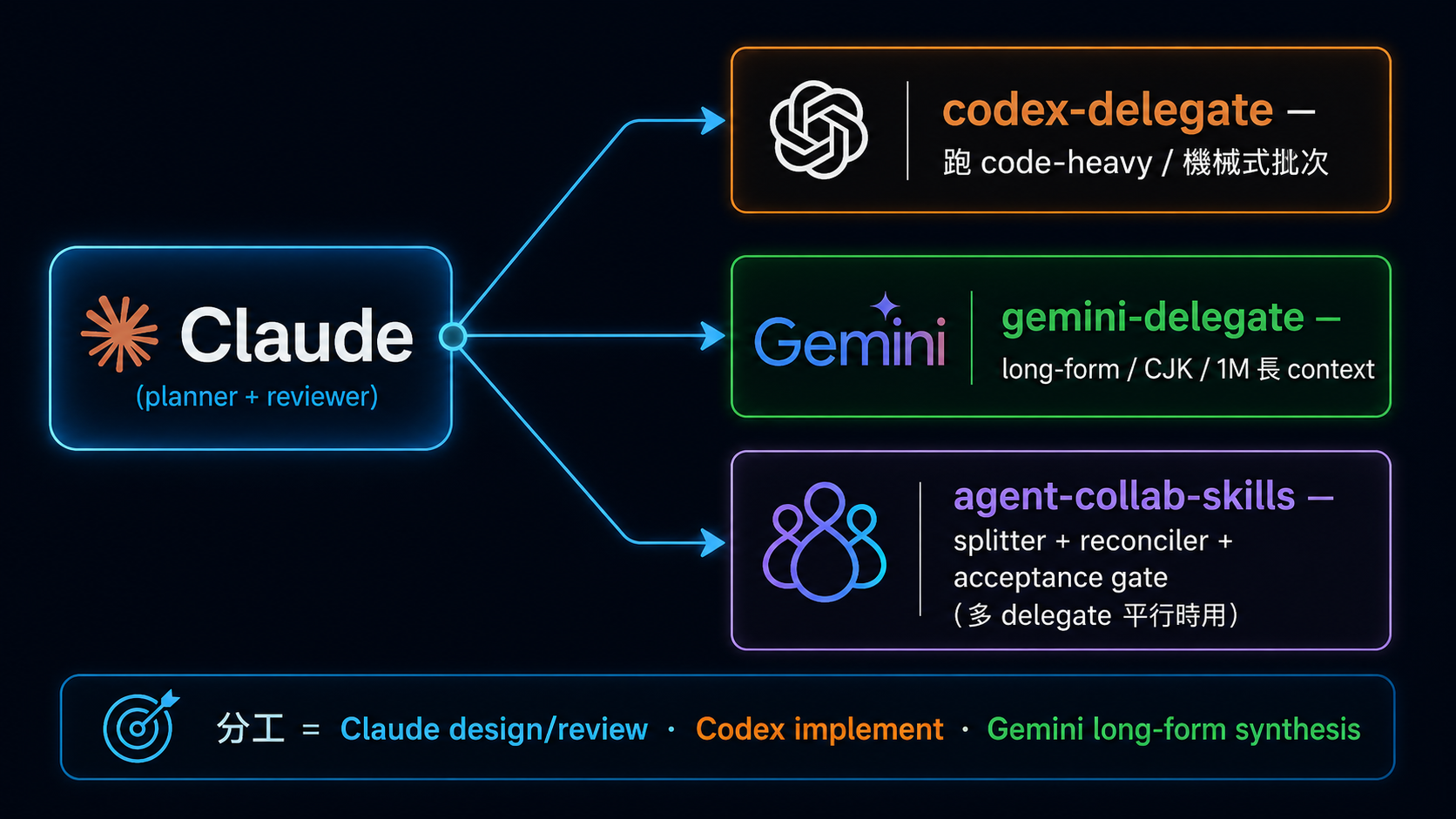
不要把模型名稱當固定職位。先看當下模型、工具與成本,再把 **design/review、implementation、long-form synthesis** 分給適合的執行者;最後仍由同一份 acceptance criteria 驗收。
### [WenyuChiou/codex-delegate](https://github.com/WenyuChiou/codex-delegate) ⭐⭐⭐⭐⭐
| 欄位 | 內容 |
|:---|:---|
| License | MIT |
| 推薦度 | ⭐⭐⭐⭐⭐ |
**教什麼**:Claude Code skill 把 Codex CLI 當 execution specialist——大量檔案 refactor、batch edits、boilerplate 生成、wrapper-based 實作密集任務。Claude 寫 plan + review,Codex 執行。
**適合誰**:要省 token / 提速大規模機械式編輯的開發者;想驗證「multi-agent 不只是 buzzword」的學習者。
**何時用**:跨多個檔案做同一種 transform、生成 test scaffold、移植既有 pattern 或寫 migration script。
**何時不用**:責任範圍不清、沒有 acceptance criteria,或需要獨立 security review 的任務。
**備註**:把它當有界 executor,不要把模型名稱當永久職位;最後仍要由同一份 acceptance criteria 驗收。
### [WenyuChiou/gemini-delegate-skill](https://github.com/WenyuChiou/gemini-delegate-skill) ⭐⭐⭐(⚠️ 已封存 2026-07)
| 欄位 | 內容 |
|:---|:---|
| License | MIT |
| 推薦度 | ⭐⭐⭐(⚠️ 已封存) |
**教什麼**:歷史上的 Claude Code delegation skill,示範把長文、跨文件或 CJK 任務交給另一個 CLI executor。
**適合誰**:維護舊設定、研究早期 multi-LLM delegation pattern 的讀者。
**何時用**:只作歷史與遷移參考。
**何時不用**:新工作;repo 已封存,不能當現行安裝起點。
**備註**:不要沿用舊的固定模型分工;改用目前仍維護、可驗收且符合 host 的 delegation 入口。
### [WenyuChiou/agent-collab-skills](https://github.com/WenyuChiou/agent-collab-skills) ⭐⭐
| 欄位 | 內容 |
|:---|:---|
| License | MIT |
| 推薦度 | ⭐⭐(experimental,當 reference 看就好) |
**教什麼**:Claude Code marketplace for multi-agent collaboration——task splitter、output reconciler、adversarial debate、shared memory、acceptance gate。
**適合誰**:要協調多個 delegate、想看 multi-agent coordination 怎麼包成 marketplace 的人。
**備註**:experimental——別把它當生產級 framework,當作維護者把自己 setup 公開的 reference 看就好。要可上線部署的請看 Stage 7 的 LangGraph / Microsoft Agent Framework / CrewAI。
---
## 15. 金融 / 交易 Agents
金融工具可能碰到真實資產與高風險決策;本目錄只提供研究入口,不構成投資建議。
展開第 15 類精選項目
> ⚠️ **應用領域區**:agent 在量化交易 / hedge fund 模擬 / 自動下單的應用。本節兩個 entry 分別是 Apache-2.0 與 MIT,但這類 repo 授權狀態普遍混雜,使用前仍請自行查清楚。**警示**:trading agent 跑真實資金有顯著風險,本目錄列入是為了學習 agent 設計模式、不是投資建議。
### [TauricResearch/TradingAgents](https://github.com/TauricResearch/TradingAgents) ⭐⭐⭐
| 欄位 | 內容 |
|:---|:---|
| License | Apache-2.0 |
| 推薦度 | ⭐⭐⭐ |
**教什麼**:多 agent LLM 框架做金融交易決策,bull / bear / fundamentals / technicals / risk 各 agent 分工。
**適合誰**:想看 multi-agent 在分析性任務怎麼分工的學習者;量化研究者想實驗 LLM 增強既有 pipeline。
**備註**:Apache-2.0、允許修改與商用(保留授權聲明);**非投資建議,別直接拿來下實單**。
### [virattt/ai-hedge-fund](https://github.com/virattt/ai-hedge-fund) ⭐⭐⭐
| 欄位 | 內容 |
|:---|:---|
| License | MIT |
| 推薦度 | ⭐⭐⭐ |
**教什麼**:多角色 AI hedge fund 模擬,bull / bear / 基本面 / 技術面 / 風控 agent 協作產生 trade recommendation。
**適合誰**:看過 Stage 7 multi-agent 想要一個完整應用案例的學習者;對 agent + 金融交叉領域有興趣的人。
**備註**:MIT 授權;**模擬性質、非投資建議**。
---
## 16. 網頁搜尋 / 檢索(Web Search / Retrieval)
搜尋工具會把查詢送到外部服務;機密字詞、配額與來源品質都要先考慮。
展開第 16 類精選項目
### [exa-labs/exa-mcp-server](https://github.com/exa-labs/exa-mcp-server) ⭐⭐⭐⭐
| 欄位 | 內容 |
|:---|:---|
| License | MIT |
| 推薦度 | ⭐⭐⭐⭐(**Exa 官方**) |
**教什麼**:Exa 官方 MCP,專為 LLM / agent 設計的網頁搜尋(neural + keyword),回傳乾淨結果直接餵進 prompt。
**適合誰**:要做 research / fact-check / 線上 RAG 檢索的人;semantic search 對「概念相關」特別強,純關鍵字搜尋反而沒那麼吃香。
**備註**:需要 Exa API key。
### [tavily-ai/tavily-mcp](https://github.com/tavily-ai/tavily-mcp) ⭐⭐⭐⭐
| 欄位 | 內容 |
|:---|:---|
| License | MIT |
| 推薦度 | ⭐⭐⭐⭐(LLM 搜尋 MCP) |
**教什麼**:把 Tavily search API 包成 MCP,讓 Agent 取得搜尋結果與來源。
**適合誰**:想練習讓 Agent 搜尋網頁,並另外核對來源內容的新手。
**備註**:需要 Tavily API key;方案與額度可能改變,使用前看現行官方文件。
---
## 17. 資安 / MCP 安全治理
安全治理工具用來縮小 Agent 權限和執行範圍;正式依賴前仍要做自己的威脅模型。
展開第 17 類精選項目
### [trailofbits/skills](https://github.com/trailofbits/skills) ⭐⭐⭐⭐⭐
| 欄位 | 內容 |
|:---|:---|
| License | CC-BY-SA-4.0 |
| 推薦度 | ⭐⭐⭐⭐⭐(**Trail of Bits 官方**) |
**教什麼**:資安公司 Trail of Bits 官方的 Claude Code plugin marketplace,收的是他們自己在用的資安分析、測試與漏洞研究 skills。
**適合誰**:想讓 agent 幫忙做 code audit、漏洞分析、安全測試的人;也適合想看「專業資安團隊怎麼把方法論寫成 skill」的人。
**備註**:用 `/plugin marketplace add trailofbits/skills` 安裝,Codex 也直接支援同一套 marketplace。授權是 **CC-BY-SA-4.0**(share-alike),改作後要用相同授權釋出,商用整合前先確認。注意它跟 Stage 5 那張表裡的 [`trailofbits/skills-curated`](https://github.com/trailofbits/skills-curated) 是**兩個不同的 repo**:後者是由 Trail of Bits 審核、內容來自社群貢獻的策展 marketplace,這一個是 Trail of Bits 自家的資安 skills。
### [stacklok/toolhive](https://github.com/stacklok/toolhive) ⭐⭐⭐⭐
| 欄位 | 內容 |
|:---|:---|
| License | Apache-2.0 |
| 推薦度 | ⭐⭐⭐⭐ |
**教什麼**:把每一個 MCP server 跑在隔離容器裡,用最小權限檔取代本機憑證,並提供 audit log 與可設定的身分/存取政策;另附 Kubernetes operator。
**適合誰**:團隊裡已經有人各自裝了一堆 MCP server,開始需要回答「誰裝了什麼、它拿得到哪些憑證」的人。
**備註**:Go 專案,桌面版與 CLI 都有。開源的 ToolHive 與 Stacklok 的企業版是分開的,評估功能時注意分界在哪。
### [NVIDIA/OpenShell](https://github.com/NVIDIA/OpenShell) ⭐⭐⭐⭐
| 欄位 | 內容 |
|:---|:---|
| License | Apache-2.0 |
| 推薦度 | ⭐⭐⭐⭐(**NVIDIA 官方**) |
**教什麼**:給自動化 agent 用的沙箱化執行環境,用宣告式政策管住檔案、網路與行程;Claude Code 與 Codex 不改任何程式碼就能跑在裡面(OpenClaw 要另外透過下面那則 NemoClaw)。
**適合誰**:要讓 agent 真的能執行指令、但不想把整台機器交出去的人。
**備註**:Rust 專案。需要 Docker / Podman 或主機虛擬化(MicroVM sandbox 用);Windows 走 WSL 2 且標為 experimental。**⚠️ 專案自述仍是 alpha**,拿來讀與試可以,正式倚賴前先自行評估。與 `toolhive` 的分工是:toolhive 管 MCP server,這個管 Agent 本身的執行邊界。
### [nolabs-ai/nono](https://github.com/nolabs-ai/nono) ⭐⭐⭐⭐
| 欄位 | 內容 |
|:---|:---|
| License | Apache-2.0 |
| 推薦度 | ⭐⭐⭐⭐ |
**教什麼**:用作業系統自己的隔離機制(Linux Landlock、macOS Seatbelt)擋住 agent,不需要 daemon 也不需要容器。
**適合誰**:想要沙箱但不想為此裝一整套 container runtime 的人。
**備註**:Rust 專案,由做 Sigstore 的團隊維護。零容器是它跟 OpenShell 最大的取捨差異:啟動快、但隔離強度受限於作業系統提供的機制。
---
## 還有什麼沒收錄?
如果你需要的整合不在上面,先看這些 catalog:
- [Official MCP Registry](https://registry.modelcontextprotocol.io/) — 先找已發布的 MCP Server,再檢查 maintainer、權限、授權與目前狀態
- [`wong2/awesome-mcp-servers`](https://github.com/wong2/awesome-mcp-servers) — 社群分類清單;適合找候選,不代表每個項目都已審核
- [`punkpeye/awesome-mcp-servers`](https://github.com/punkpeye/awesome-mcp-servers) — 另一份社群清單,可用來交叉找候選
- [`modelcontextprotocol/servers`](https://github.com/modelcontextprotocol/servers) — 官方教學 reference implementations;不是 production 推薦榜
- [`travisvn/awesome-claude-skills`](https://github.com/travisvn/awesome-claude-skills) — Claude Skills 清單
### 要加新的?
1. 開 issue,附 repo 連結 + 為什麼要加 + 屬於哪個分類
2. 或直接送 PR:在對應分類下加一個 entry,寫清楚來源/授權或服務狀態、推薦度、教什麼、適合誰、權限與限制
3. 說明它補上哪個教學缺口;只提供 popularity 數字不能證明品質或安全
PR 送出前看一下 [`resources/style-guide.md`](style-guide.md) 跟 [`CONTRIBUTING.md`](../CONTRIBUTING.md)。
---
## 維護備註(給未來想幫忙的人)
不是 SLA,是「能做就做」的方向:
- 官方狀態、授權、權限與 hosted endpoint 以供應商文件或 canonical repo 為準
- CI 定期掃 repository redirect、archive、HTTP error 與 freshness 訊號;警告後仍要人工判斷,不能只因很久沒 release 就刪除穩定工具
- 新分類先說清楚讀者工作與安全邊界,再收錄可核對的官方或優質社群入口
- 中文社群工具也用同一套規則:新收錄的第三方 GitHub repo 至少要有 1,000 stars,並繼續檢查教學價值、維護、授權與權限;官方文件、標準規格與不可替代的 canonical source 不套這個門檻
- 用詞與格式先修到五歲也能理解,同時保留精確術語、限制與來源