# Stage 6 — RAG and Memory: find the source first, then remember what matters
**RAG** (Retrieval-Augmented Generation): retrieve relevant material, then answer using it.
> [繁體中文](./06-memory-rag.md) | [简体中文](./06-memory-rag.zh-Hans.md) | **English**
Models do not know everything. **RAG** asks a model to consult a book before it answers; **Memory** gives it a notebook for things it will need next time. This stage separates the two and then builds both step by step.
## 📌 Learning goals
By the end of this stage, you can:
1. State the difference between RAG and Memory in one sentence.
2. Explain how data becomes **chunks** and **embeddings**, then gets retrieved.
3. Build a minimal RAG pipeline whose answers include sources.
4. Know what data is worth remembering and what should not be stored.
5. Compare two approaches with a small test instead of relying on “it feels better.”
## 🧩 Meet seven core terms first
| Core term | Plain-language picture | Precise meaning |
|:---|:---|:---|
| **Retrieval** | Find pages that may contain an answer | Find relevant content from external data after receiving a question. |
| **RAG (Retrieval-Augmented Generation)** | Look in a book, then answer | Retrieve first, then give the found content to the model to generate an answer. |
| **Embedding** | A coordinate card for a sentence’s meaning | A sequence of numbers that places semantically similar text near each other in vector space. |
| **Vector Store / Vector Database** | A drawer that finds cards by meaning | Stores embeddings and retrieves related data by similarity. |
| **Chunk** | A small card cut from a large book | A smaller piece of a long document for search and for fitting into context. |
| **Reranking** | Reorder first-pass cards | Score candidates again so more useful chunks rank first. |
| **Memory** | The assistant’s notebook | State needed across messages or sessions; it is not another name for chat history. |
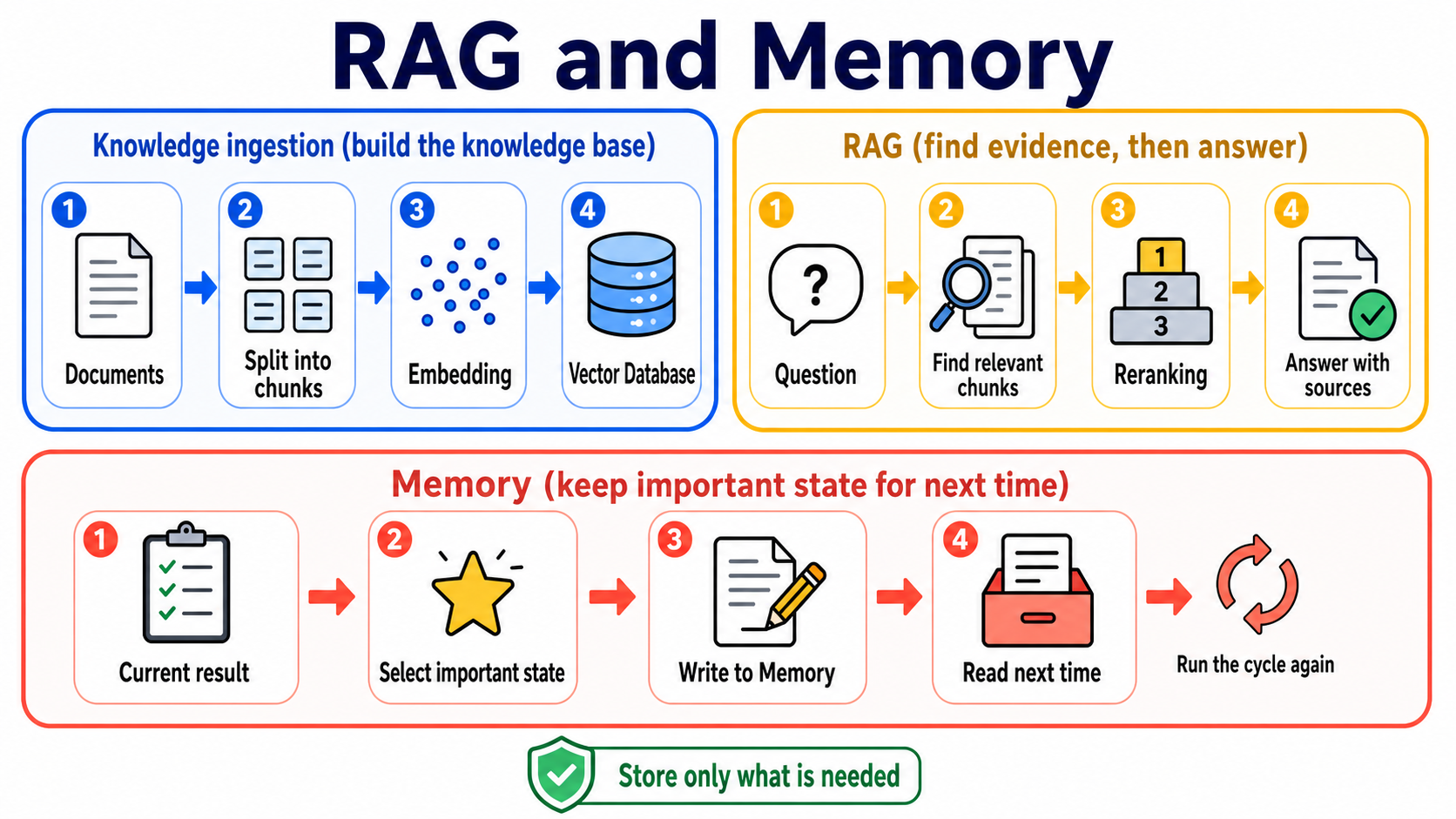
### Choose the right method with one table
| Problem | Consider first | Why |
|:---|:---|:---|
| The data is short and needed only for this answer | **Long context** | Put it directly in this request for the shortest flow. |
| There are many documents and you only know which passages matter after the question arrives | **RAG** | Retrieve relevant passages instead of sending every document every time. |
| The assistant must remember preferences, task state, or results next time | **Memory** | Write reusable information to a storage layer that can be read again. |
| You want to consistently change model behavior or a capability | [**Fine-tuning**](../resources/model-training-guide.en.md) | It adjusts model weights and behavior; it does not automatically provide current documents. |
No option is always best. Evaluate using your own data, questions, and success criteria.
## 🚪 Entry requirements and reading paths
- **First time learning:** read the seven terms, complete Exercises 1–4, then do the short self-check.
- **Building a long-term assistant:** complete Exercise 5, then open the Memory design path.
- **Researching or deploying:** finally explore advanced RAG, chunking, evaluation, and research entry points.
Time, environment, cost, and data safety
- Plan two or three sessions; complete one runnable exercise each time.
- You need Python, Git, and a terminal. Follow each exercise README for installation.
- Path A uses OpenAI-compatible examples; Path B uses Anthropic. Model and embedding calls can cost money.
- Test with small documents. Do not send passwords, tokens, medical data, or unauthorized company documents to external services.
- Keep API keys in environment variables, never in code or commits.
## 📚 Required reading
1. [LangChain Retrieval](https://docs.langchain.com/oss/python/deepagents/retrieval) — see how loaders, splitters, embeddings, vector stores, and retrievers work together.
2. [LlamaIndex concepts](https://developers.llamaindex.ai/python/framework/getting_started/concepts/) — understand indexing and querying from a document-oriented view.
3. [Chroma getting started](https://docs.trychroma.com/docs/overview/getting-started) — see the smallest local vector-database workflow.
4. [LangGraph Agentic RAG](https://docs.langchain.com/oss/python/langgraph/agentic-rag) — after basic RAG, see how an agent decides whether to retrieve.
## 🛠 Hands-on exercises
Before each exercise, return to the repository root (the folder with README.md). The commands below enter the exercise folder, install its packages, then run local Path A. For exercises 4 and 5, first follow their guides to set up Ollama, download `qwen2.5:3b`, and start the service. Path B is optional; check whether it uses cloud services, its provider, key setup, and costs first.
### Exercise 1: Turn two sentences into embeddings
**Result:** semantically similar sentences appear closer than unrelated ones.
```powershell
cd examples/stage-6/01-embeddings
python -m pip install -r requirements.txt
python starter.py
```
[Open setup, checks, and optional Path B](../examples/stage-6/01-embeddings/README.en.md). Start with only a few sentences to avoid unnecessary API costs.
### Exercise 2: Put embeddings in a vector database
**Result:** store text in Chroma, then retrieve a relevant chunk with one question.
```powershell
cd examples/stage-6/02-vector-db
python -m pip install -r requirements.txt
python starter.py
```
[Open setup, checks, and optional Path B](../examples/stage-6/02-vector-db/README.en.md). Exercise data must not contain secrets or personal information.
### Exercise 3: Compare three chunking methods
**Result:** see what happens when chunks are too large, too small, or overlap too much.
```powershell
cd examples/stage-6/03-chunking-comparison
python -m pip install -r requirements.txt
python starter.py
```
[Open setup, checks, and optional Path B](../examples/stage-6/03-chunking-comparison/README.en.md). Do not memorize a “standard size”; begin with document structure and test results.
### Exercise 4: Connect a complete RAG pipeline
**Result:** the program retrieves information, answers, and shows the source chunks it used.
```powershell
cd examples/stage-6/04-full-rag-pipeline
python -m pip install -r requirements.txt
python starter.py
```
[Open setup, checks, and optional Path B](../examples/stage-6/04-full-rag-pipeline/README.en.md). Start with a small dataset; “the program runs” does not mean the answer is correct.
### Exercise 5: Remember a preference
**Result:** This exercise only adds, searches, and reads one preference while the program is running; temporary storage is not long-term persistence.
```powershell
cd examples/stage-6/05-long-term-memory
python -m pip install -r requirements.txt
python starter.py
```
[Open setup, checks, and optional Path B](../examples/stage-6/05-long-term-memory/README.en.md). Save only data needed to finish a task and provide ways to view, change, and delete it.
### Recommended mini-project: an assistant that retrieves and remembers
Choose three to five small documents you are allowed to use. Have the assistant list sources when it answers, then remember one non-sensitive preference, such as “give the short answer first.” It succeeds when it says it does not know without evidence, reads the preference after a restart, and lets you delete it.
## 🌐 Basic RAG pipeline
Basic RAG pipeline: how data goes in and answers come out
RAG has two paths: one prepares the data, and the other retrieves it when a question arrives.
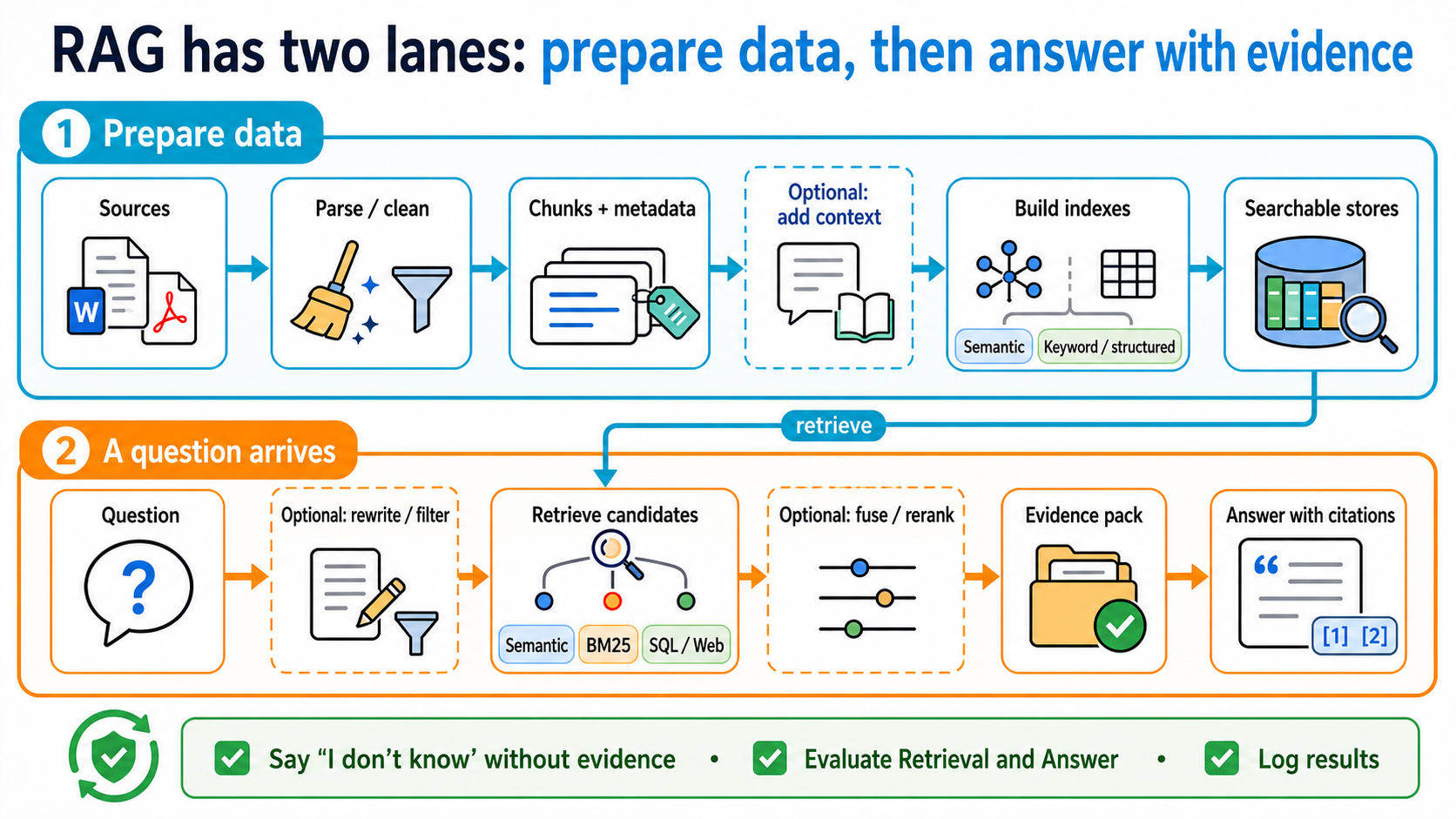
Start with **2-step RAG**: every question retrieves first and answers second, so it is easiest to test. **Agentic RAG** lets the model decide whether to retrieve, rewrite a question, or search again. **Hybrid RAG** combines fixed steps with agent decisions. It differs from **Hybrid Search**, which only combines candidate sets during retrieval.
| Stage | What it does | Plain-language picture |
|:---|:---|:---|
| Load | Read PDFs, web pages, or database content | Bring books to the table |
| Split | Divide into chunks | Cut books into cards |
| Embed | Turn each card into a vector | Give meanings coordinates |
| Store | Save vectors and source metadata | Put labelled cards in drawers |
| Retrieve | Find candidate chunks for a question | Take out cards that may answer it |
| Rerank (optional) | Reorder candidates | Check which card is most useful |
| Generate | Give the model the question and evidence | Answer while looking at the cards |
| Cite/Evaluate | Show sources and inspect results | Tell people where the answer came from |
A **Retriever** finds documents for a question. It need not use a vector database: **BM25 (keyword ranking method)** can find product IDs; **SQL (a language for querying databases)** can search tables. Web search and hybrid search are other options.
**Citations** show which sources support the answer.
## 🧭 Want to go deeper? Learn RAG and Memory separately
These are advanced Stage 6 branches, not new prerequisites. Complete the basic exercises above, then choose the path that fits your problem.
### [Advanced RAG: find the broken step before adding new techniques](../resources/advanced-rag.en.md)
Built a minimal RAG system, but documents are missing, ranked badly, or hard to connect across sources? Start with the symptom, then choose a method. The advanced page keeps the full technical terms, required reading, and rated resources.
### [Agent Memory: save only what is useful, permitted, and removable](../resources/agent-memory.en.md)
For cross-session assistants, personalization, or long-running tasks. It explains short-term/long-term memory plus **Semantic**, **Episodic**, and **Procedural Memory**, then covers write, search, update, deletion, expiry, and user isolation; Mem0, Letta Code, LangMem, Graphiti, and research resources stay directly visible.
**How to choose:** if an answer needs better external evidence, take the Advanced RAG path; if an assistant must read its own state next time, take the Agent Memory path. When you need both, test them separately before connecting them.
## 🎯 Curated projects and learning resources
This table keeps only the tools needed for a Stage 6 baseline. Advanced techniques and memory projects have moved to the two separate pages above so one table does not mix them.
Verified: 2026-08-30 UTC
| Group | Project / document | Rating | Use | Limits |
|---|
| RAG framework | | ⭐⭐⭐⭐⭐ | Best for: Beginners building document applications What you can learn: indexes, retrievers, query engines | Status/limits: MIT; use the official starter first |
|---|
| ⭐⭐⭐⭐ | Best for: People comparing modular pipelines What you can learn: components, pipelines, routing | Status/limits: Apache-2.0; choose one framework to practice first |
| ⭐⭐⭐⭐ | Best for: Teams studying a complete web product What you can learn: document parsing, retrieval, UI | Status/limits: Apache-2.0; heavier than a teaching example |
| Vector data | | ⭐⭐⭐⭐⭐ | Best for: First local vector search What you can learn: collections, add, query | Status/limits: Apache-2.0; practice and production settings differ |
|---|
| ⭐⭐⭐⭐⭐ | Best for: Teams needing self-hosted or managed service What you can learn: dense, sparse, hybrid queries | Status/limits: Apache-2.0; plan service operation and backups |
| ⭐⭐⭐⭐ | Best for: Teams needing schema and hybrid search What you can learn: BM25 + vector search | Status/limits: BSD-3-Clause outside wl/; wl/ requires a separate enterprise license; start small |
| ⭐⭐⭐⭐ | Best for: Teams already using PostgreSQL What you can learn: SQL and vectors in one database | Status/limits: PostgreSQL extension; still needs indexes and tuning |
| Evaluation and complete products | | ⭐⭐⭐⭐⭐ | Best for: Teams building rerunnable evaluations What you can learn: datasets, metrics, experiments | Status/limits: Apache-2.0; metrics still need human calibration |
|---|
| ⭐⭐⭐⭐ | Best for: People studying a complete AI assistant architecture What you can learn: ingest, retrieval, chat, administration | Status/limits: Large product; use as an architecture reference, not a starter |
## ✅ Self-check before Stage 7
- [ ] I can state what Retrieval, RAG, and Memory each do.
- [ ] I can explain how chunks, embeddings, and a vector database fit together.
- [ ] My RAG answers show sources and say they do not know when no evidence exists.
- [ ] I can compare changes with a small question set instead of one attractive answer.
- [ ] Memory saves only necessary, permitted data and lets users view, change, and delete it.
When you can do these, go to [Stage 7 — Agent Production Engineering: Testable, Observable, Stoppable, and Recoverable](07-multi-agent-production.en.md).