dsh-dialogue-cleanup

English · 简体中文

npm version npm downloads GitHub release GitHub stars License: MIT DeepSeek Harness 0.2.0-rc.2

Delete DeepSeek Harness sessions from the running Web GUI — without restarting, without leaving the window.

One row in the session ... menu for a single delete, plus a bulk management page inside Settings.
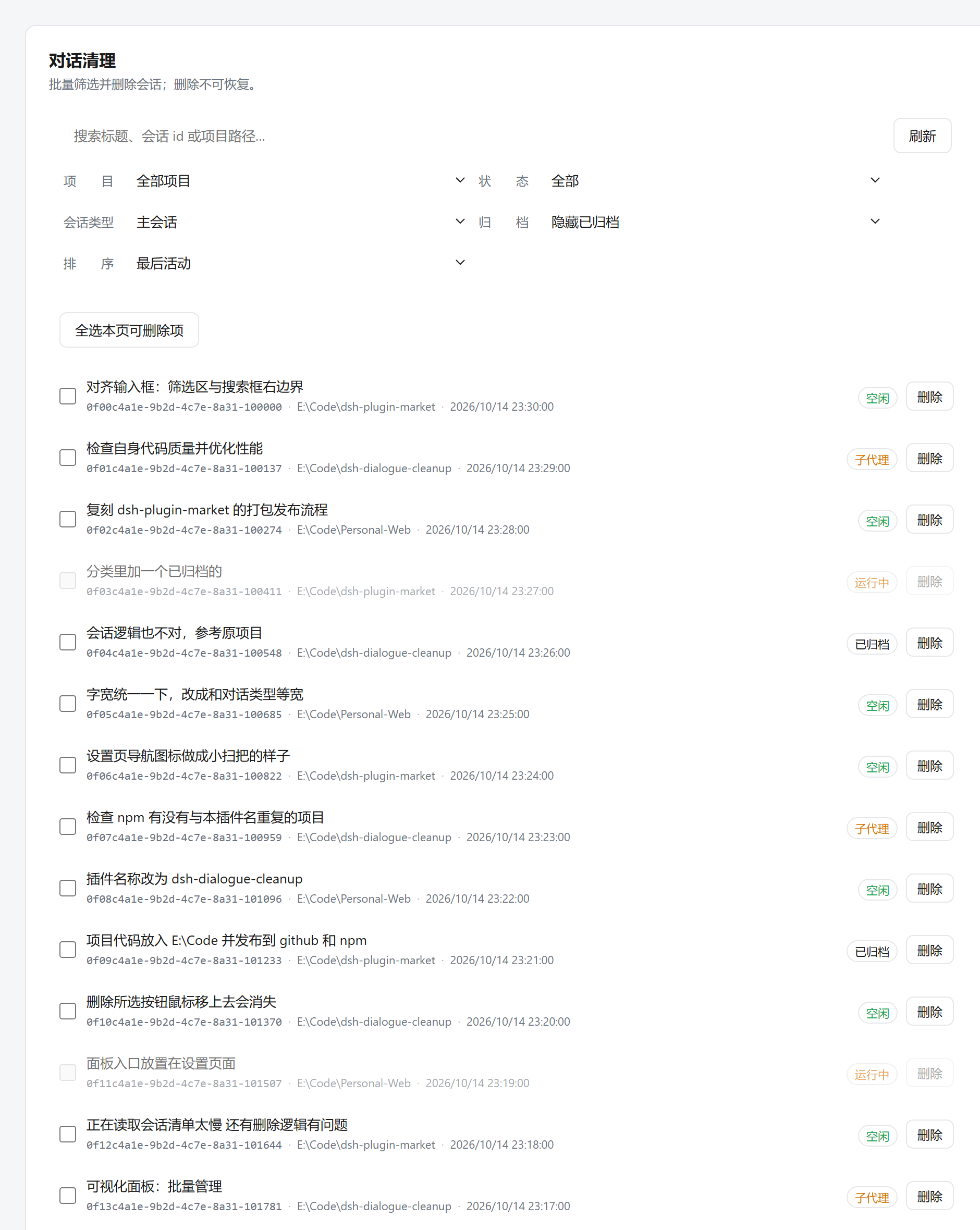
Bulk management panel in Settings: search, filters, per-row status badges and 16 session rows

Install · Gallery · How it works · Releasing · Releases

## Why it exists **One-line positioning: deleting a session should actually delete it.** DeepSeek Harness keeps a session in four places at once — the live store, the workspace records, the registry leftovers (pin / archive), and the files on disk. Removing one of them leaves a ghost row, a stale workspace, or a directory that silently keeps occupying disk. Everything below is that positioning made concrete: - **One irreversible operation, implemented once.** `deleteSession` lives in the Host (`lib/service.js`) and is reached through two thin adapters — the HTTP contract and the slot UI — so the single-delete path and the bulk path **cannot drift apart**. - **A running session is refused, not guessed at.** The Host decides `deletable` and the UI simply does not offer what the Host would reject. The panel never decides by itself whether something is safe to delete. - **Archived sessions are still shown by default.** Archiving is *not* deleting: an archived session still occupies disk, so hiding it by default would hide exactly the files you came to clean up. (The official sidebar hides them; here it is a tri-state filter — `hide archived` / `all` / `archived only` — and **archived are shown by default**.) - **Subagent rows are labelled.** The official sidebar hides `origin: 'subagent'` rows entirely, so whenever those rows do appear (kind = subagent / all) each one is explicitly badged — a subagent session must never look like an ordinary conversation. - **It says what it actually did.** The result line reports ok / failed / degraded / directories removed, and each failure keeps its own reason verbatim. When the live store entry cannot be detached, the plugin reports `detached: false` rather than claiming success. - **Errors are semantically truthful.** Unlike the upstream package (which always answered `200`), this one uses real status codes: 400 / 403 / 404 / 405 / 409 / 429 / 500. ## UI at a glance **The confirmation overlay: irreversible, and it says so.** Two closing paths only — an explicit Cancel button, or `Esc`. Clicking the scrim deliberately does **not** dismiss it, because a mis-click on an irreversible delete should not cost you your chance to confirm:
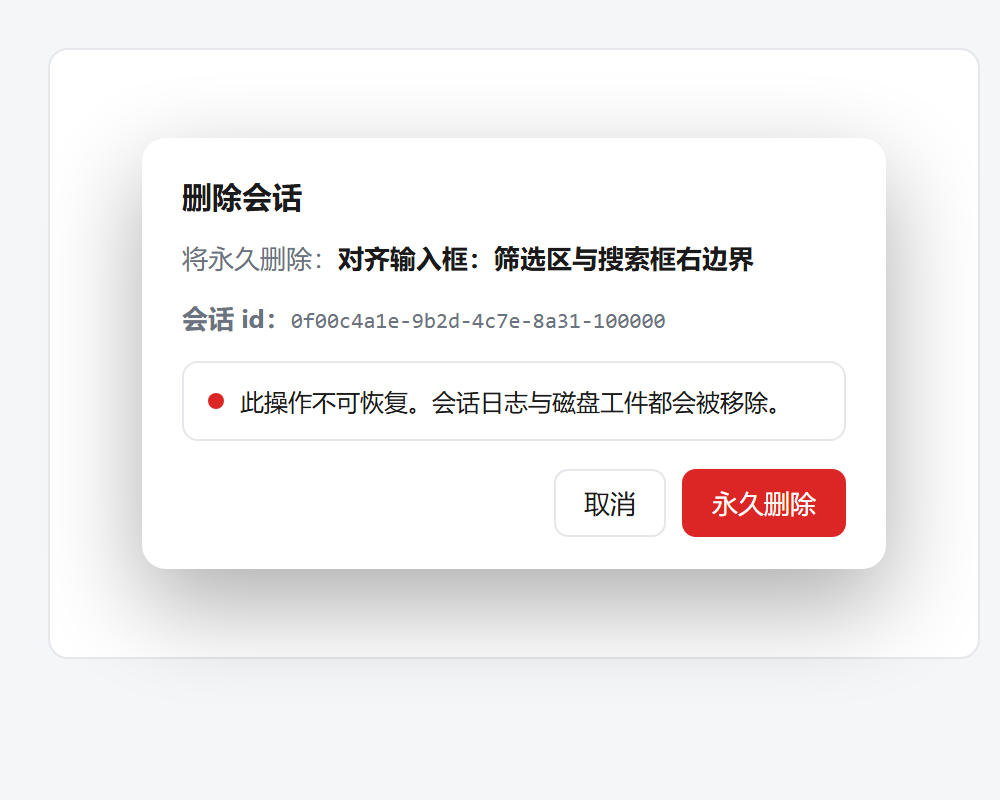
Delete confirmation: permanent deletion warning, session id, and Cancel / 永久删除 buttons

The overlay is a **native `` driven by `showModal()`**, so it enters the browser's *top layer* and therefore stacks above the Settings panel it was opened from (a plain positioned element could not). That also brings a real focus trap and correct `Esc` semantics for free — and it needs no portal outside the component tree. **The bulk panel (inside Settings)** — search, project / state / session-kind / archive filters, sort, paging, and per-row status badges. The badges in the screenshot above come from real render output: `空闲` (idle) / `运行中` (running, not selectable) / `子代理` (subagent) / `已归档` (archived). > The two screenshots are generated from the **actual component tree and the actual CSS** by > `scripts/render-shot.mjs` (the same React stand-in the render tests use), rasterised with headless > Edge. They are not hand-drawn mockups; they are also not a photograph of a live GUI — see > [Honest limitations](#honest-limitations). ## Quick Start ```sh dsh plugin --profile web add dsh-dialogue-cleanup ``` 1. **Single delete** — hover a session row in the sidebar, open the `...` menu and pick **Delete session** (registered at `order: 500`, right after the shipped Archive entry at 400). A themed confirmation appears; confirming removes the live entry, the workspace records, the registry leftovers and the on-disk artifacts. 2. **Bulk delete** — open **Settings → Dialogue Cleanup**. Tick rows (or *Select all deletable*), then delete them in one request. 3. Host-side changes need a **restart** of the DSH process; client-side changes do not (see the table in [docs/RELEASING.md](docs/RELEASING.md)). > Compatible with DSH **0.2.0-rc.2**. The npm package and the GitHub Release are published together; > versioning rules and the release chain live in [docs/RELEASING.md](docs/RELEASING.md). ## How it works One npm package carries both halves, installed into the host per the official plugin spec: - **Host half (repo process)** — `lib/index.js` is a Cordis function plugin exporting only `name` / `inject` / `apply`. It registers a single `ctx.webServer` prefix route and keeps the entire deletion implementation in `lib/service.js`. Filesystem removal and path containment live in `lib/artifacts.js`; the audit trail in `lib/audit.js`. - **Client half (browser)** — `client.js`, a single-file bundle registered through `window.__ModuleLoader__.load({ id, factory })`, with **zero dependencies beyond `require("react")`**. - **Both entry points are official slots; neither touches the DOM:** - `sidebar.workspaces.session.menu.item` at `order: 500` → the single-delete row. - `settings.section` (`id: dialogue-cleanup`, `order: 25`, after the shipped `account(-10) / general(0) / models(10) / plugins(15) / agent-presets(20)`) → entry **and** panel. One registration is one Settings page, whose content renders in the panel's content column. - **Because the panel lives in Settings it needs no `layout` service** and does not compete for space in `main` or the sidebar — one fewer optional dependency and one fewer degradation branch. - **The stylesheet travels with the component.** The menu item renders its own `


