# InspectorControls
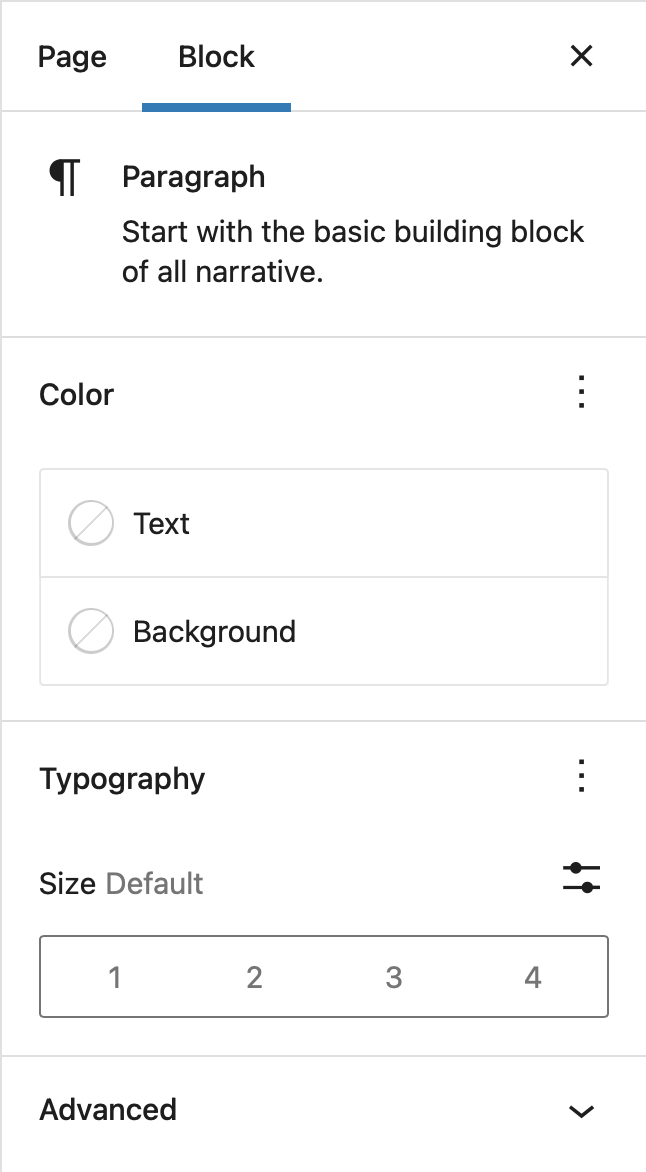 Inspector Controls appear in the post settings sidebar when a block is being edited. The controls appear in both HTML and visual editing modes, and thus should contain settings that affect the entire block.
## Usage
```js
import { registerBlockType } from '@wordpress/blocks';
import {
CheckboxControl,
RadioControl,
TextControl,
ToggleControl,
SelectControl,
PanelBody,
} from '@wordpress/components';
import {
RichText,
InspectorControls,
useBlockProps,
} from '@wordpress/block-editor';
registerBlockType( 'my-plugin/inspector-controls-example', {
apiVersion: 3,
title: 'Inspector controls example',
icon: 'universal-access-alt',
category: 'design',
attributes: {
content: {
type: 'string',
source: 'html',
selector: 'p',
},
checkboxField: {
type: 'boolean',
default: true,
},
radioField: {
type: 'string',
default: 'yes',
},
textField: {
type: 'string',
},
toggleField: {
type: 'boolean',
},
selectField: {
type: 'string',
},
},
edit( { attributes, setAttributes } ) {
const blockProps = useBlockProps();
const {
content,
checkboxField,
radioField,
textField,
toggleField,
selectField,
} = attributes;
function onChangeContent( newContent ) {
setAttributes( { content: newContent } );
}
function onChangeCheckboxField( newValue ) {
setAttributes( { checkboxField: newValue } );
}
function onChangeRadioField( newValue ) {
setAttributes( { radioField: newValue } );
}
function onChangeTextField( newValue ) {
setAttributes( { textField: newValue } );
}
function onChangeToggleField( newValue ) {
setAttributes( { toggleField: newValue } );
}
function onChangeSelectField( newValue ) {
setAttributes( { selectField: newValue } );
}
return (
<>
);
},
save( { attributes } ) {
const {
content,
checkboxField,
radioField,
textField,
toggleField,
selectField,
} = attributes;
const blockProps = useBlockProps.save();
return (
Inspector Control Fields
- Checkbox Field: { checkboxField }
- Radio Field: { radioField }
- Text Field: { textField }
- Toggle Field: { toggleField }
- Select Field: { selectField }
);
},
} );
```
## InspectorAdvancedControls
 Inspector Advanced Controls appear under the _Advanced_ panel of a block's [InspectorControls](https://github.com/WordPress/gutenberg/blob/HEAD/packages/block-editor/src/components/inspector-controls/README.md) -- that is, they appear as a specific set of controls within a block's settings panels. As the name suggests, `InspectorAdvancedControls` is meant for controls that most users aren't meant to interact with most of the time, such as adding an HTML anchor or custom CSS classes to a block.
### Usage
```js
import { TextControl } from '@wordpress/components';
import {
InspectorControls,
InspectorAdvancedControls,
} from '@wordpress/block-editor';
function MyBlockEdit( { attributes, setAttributes } ) {
return (
<>
{ /* Block markup goes here */ }
{ /* Regular control goes here */ }
{
setAttributes( {
anchor: nextValue,
} );
} }
/>
);
}
```