


## OS-Kairos: Adaptive Interaction for MLLM-Powered GUI Agents
Research code for the paper *"OS-Kairos: Adaptive Interaction for MLLM-Powered GUI Agents"*, accepted at **Findings of ACL 2025**.
This code implements our human-in-the-loop interaction method on Android, and enables fully automated agent control via `test_mode` on real devices or emulators.
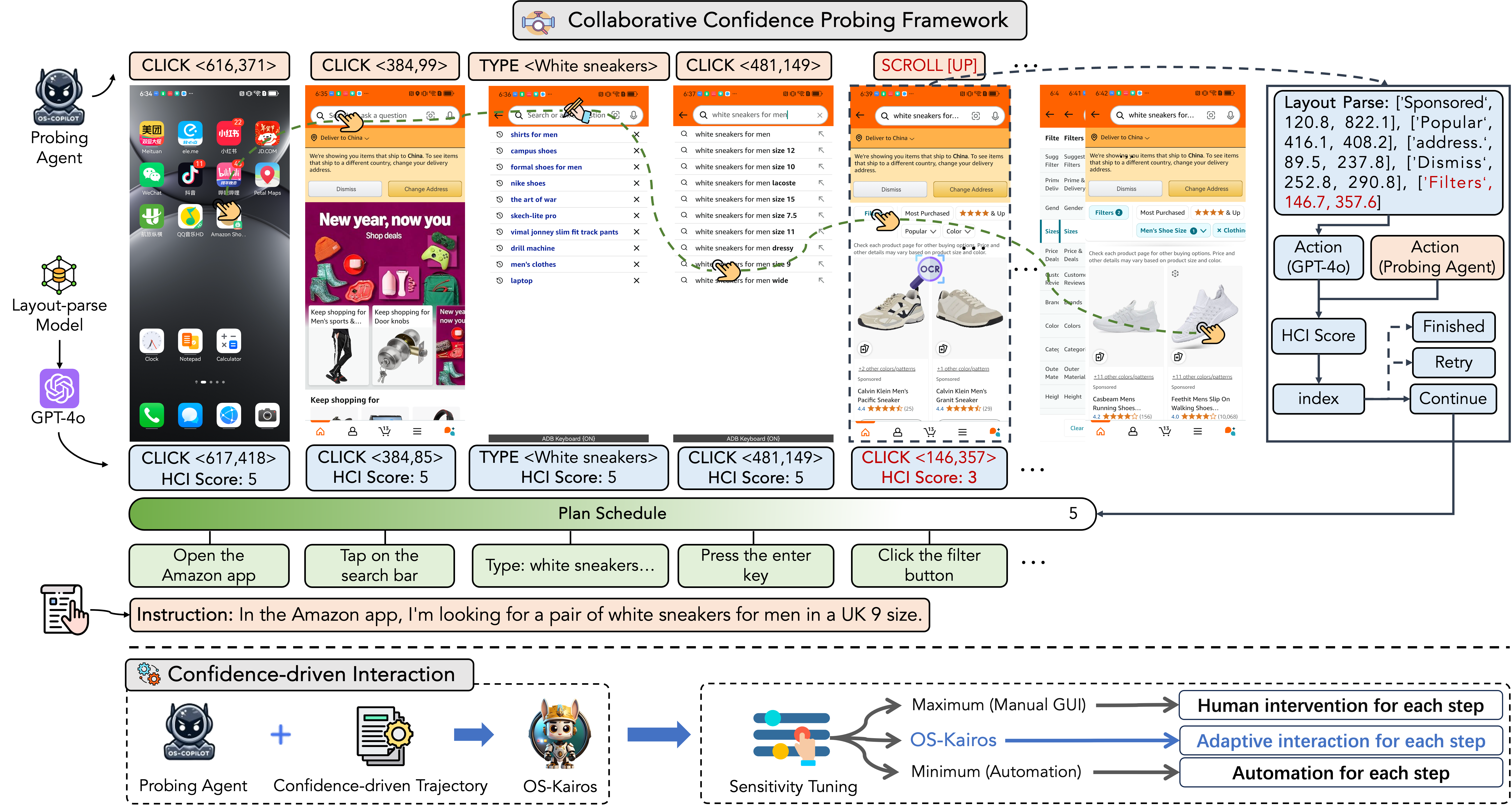
## 🧠 Methodology
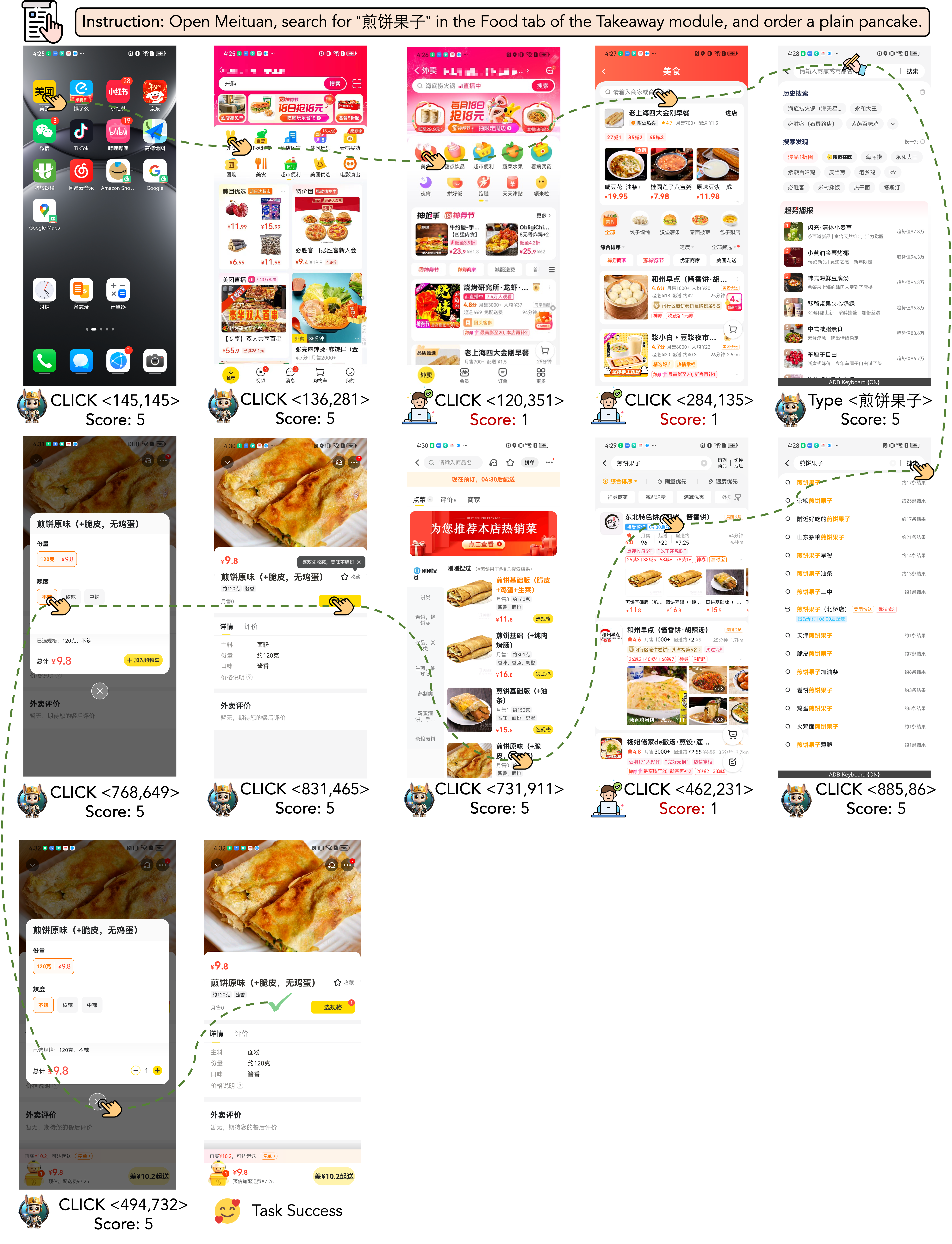
## 📺 Demo
## 🛠️ Setup Before Starting
Before you begin, ensure your environment meets the following requirements:
#### System Requirements
- **Operating System**: Linux / macOS / Windows
- **Hardware**:
- A device with at least 32GB GPU memory is required for inference (64GB recommended).
- For SFT (Supervised Fine-Tuning), at least 3 * 80GB A100 GPUs are recommended.
- **Android Device**: A physical Android device connected to your computer, or an Android Virtual Device (AVD) installed on your machine.
## 🚀 Quick Start
### 1. Environment Setup
1. Clone the repository:
```bash
git clone https://github.com/Wuzheng02/OS-Kairos
```
2. Navigate into the project directory:
```bash
cd OS-Kairos
```
3. Install the required dependencies:
```bash
pip install -r requirements.txt
```
4. Dataset link: [Google Drive](https://drive.google.com/drive/folders/1LPmzxVPE7JAhRjaKjfe8qLA_d8M0RUgG?usp=drive_link)
5. Model link:[Hugging Face](https://huggingface.co/wuuuuuz/OS-Kairos/tree/main)
### 2. Reproducing the Main Results of Static Experiments(Ignore 3)
1. Navigate to the test script directory:
```bash
cd test_script
```
2. After modifying any test file in the `test_script` folder, update the `test_path` and `agent` paths, then run the script.
3. Before running, make sure to update the absolute paths of the `image_path` key in the JSON file located in `test_path`.
### 3. Generating Data or Testing the Model on Real Android Devices(Ignore 2)
#### 3.1 Modify the `config/config.yaml` as follows:
- `max_steps` determines the maximum steps for a particular instruction.
- `policy_llm` is the path to the base model used in `makedata_mode`.
- `sft_llm` is the path to the model with scoring ability for use in `test_mode`.
- `save_path` and `json_name` are where you store the execution traces and related information. Modify them as shown in the example.
- `asset_path` is the path to the instruction file. Please modify according to the example.
- `eval_nums` specifies the number of instructions to read in one run.
- `mode` can be set to either `makedata_mode` or `test_mode`.
- In `test_mode`, there are four sub-modes:
- `single_step`: Essentially static testing (can be replaced by the scripts in the `test_script` folder).
- `the_entire_trajectory`: Real dynamic testing using only the `policy_lm` model.
- `gpt_test`: Uses the `sft_lm` model and simulates human behavior through GPT-4 for human-machine interaction testing.
- `realworld_test`: Uses the `sft_lm` model and involves actual human interaction with the device.
#### 3.2 Modify the `env.py` file:
- Adjust the functions related to `adb` commands. The current code is a reference because we need two SSH hops to connect the `adb` command from the server hosting the base model to the actual device.
- If your machine supports local deployment of the base model, you don't need an SSH connection. If you can connect directly to the server hosting the model, you won't need `sshpass`.
#### 3.3 Android Device Setup:
1. Connect an Android device to your computer via Developer Mode.
2. Ensure you can control the Android device using `adb` commands through the command line.
#### 3.4 (If unable to deploy the base model locally):
- You must configure the local machine, which is connected to the Android device, as the server, and the machine hosting the model will be the client for SSH communication.
#### 3.5 Run the project:
```bash
python run.py
```
### 4. (Optional) If your instructions include Chinese, refer to the installation of Android Keyboard:
- Install [Android Keyboard](https://github.com/senzhk/ADBKeyBoard).
- Modify the `adb_input_text` function in `env.py` as instructed in the comments.
## 🔮 What's Coming Up
We have further expanded the OS-Kairos work using reinforcement learning methods. Stay tuned!
Let me know if you'd like more options!
## 📑 Citation
Please cite our [paper]() if you use this toolkit:
```
@article{cheng2025kairos,
title={OS-Kairos: Adaptive Interaction for MLLM-Powered GUI Agents},
author={Cheng, Pengzhou and Wu, Zheng and Wu, Zongru and Zhang, Aston and Zhang, Zhuosheng and Liu, Gongshen},
journal={arXiv preprint arXiv:2503.16465},
year={2025}
}
```