[English](README.md) · [中文](README-zh.md) · [日本語](README-ja.md) · [한국어](README-ko.md) · [Español](README-es.md) · [Français](README-fr.md) · [Русский](README-ru.md) · [Deutsch](README-de.md) · [Português](README-pt-br.md)
███████╗██████╗  ██████╗  ██████╗ ██╗████████╗
██╔════╝██╔══██╗██╔═══██╗██╔═══██╗██║╚══██╔══╝
█████╗  ██║  ██║██║   ██║██║   ██║██║   ██║
██╔══╝  ██║  ██║██║   ██║██║   ██║██║   ██║
██║     ██████╔╝╚██████╔╝╚██████╔╝██║   ██║
╚═╝     ╚═════╝  ╚═════╝  ╚═════╝ ╚═╝   ╚═╝
faster-dooit
TODO アプリが開くのに2秒かかる? これはかかりません。
vim スタイルのターミナル TODO マネージャー · Go + Bubble Tea · 1万件の TODO を約34msで




> **公式 [dooit](https://github.com/dooit-org/dooit) プロジェクトとは無関係** — これは独立したスクラッチからの移植です。AI 支援の趣味プロジェクト。
## なぜ
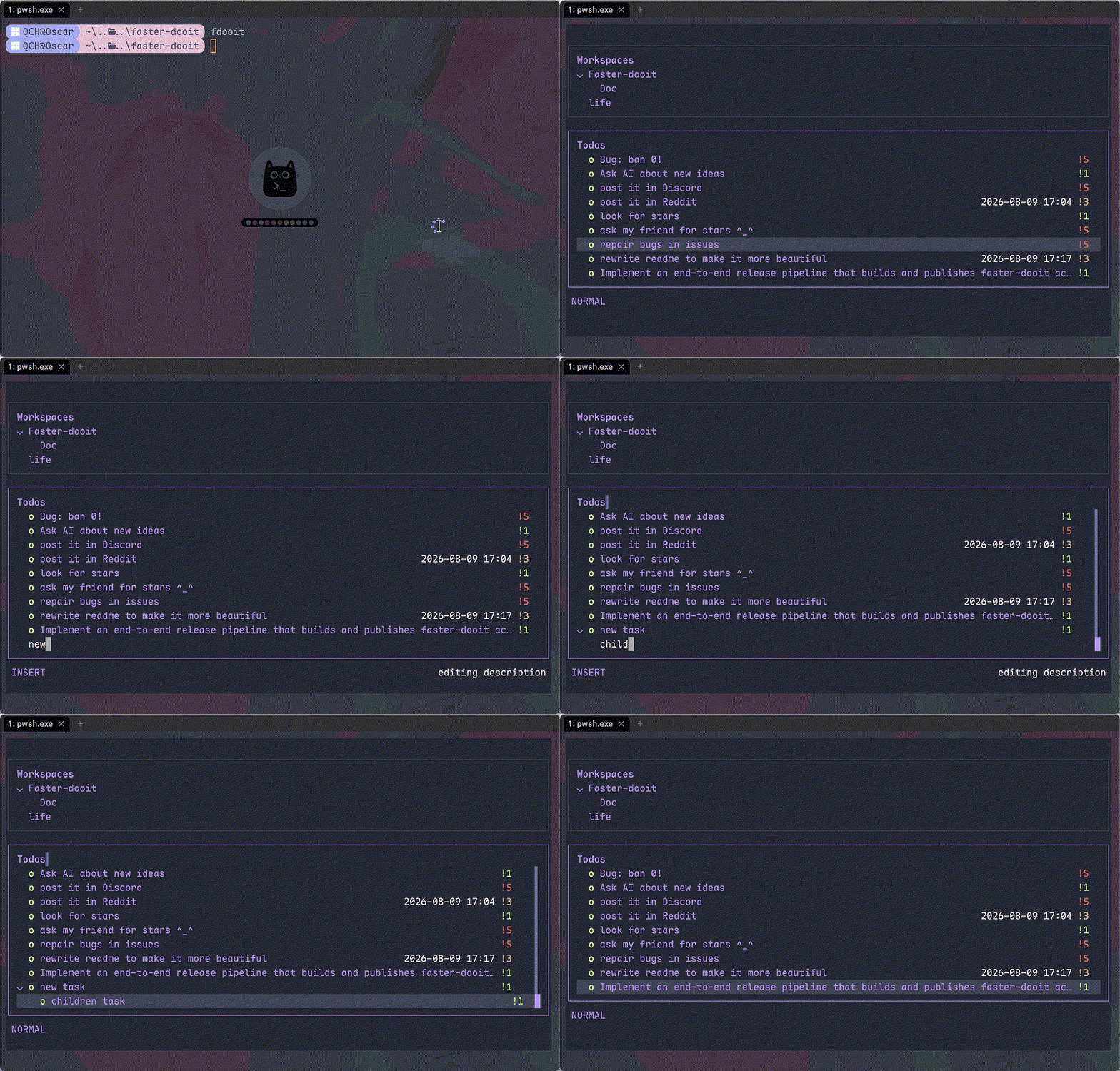
TODO ツールに待たされるべきではありません。オリジナルの dooit は**1.9 秒**のコールドスタートと、毎フレームのツリー再構築を強いられます。faster-dooit は**1万件の TODO を約34msで**読み込み、表示部分だけをレンダリングし、データベースをポーリングしません。TODO に vim を。
## 機能
- ⚡ **瞬時に感じられる速さ** — 1万件を約34msでコールドロード(同機のオリジナルは約1.9秒)
- 🎯 **vim の筋肉記憶** — `j`/`k` 移動、`a` 追加、`d 3d` 期限設定、`c` 完了
- 🗂️ **折りたたみ対応の2ペインツリー** — ネストしたワークスペース + TODO、`z`/`Z` で折りたたみ、`collapse_depth` で深いノードを自動折りたたみ
- 🎨 **フィットするテーマ** — 7つのプリセット(`nord`、`dracula`、`catppuccin_mocha`…)+ 色の上書きと透明背景
- 🔌 **クリーンな Lua 設定** — `api.` プレフィックスなし:`theme.name`、`keys.set`、`vars.urgency_colors`
- 📦 **単一の静的バイナリ** — 純粋な Go、CGO なし、ランタイムなし、監査不要の依存ツリー
## クイックスタート
```bash
# macOS / Linux
curl -fsSL https://raw.githubusercontent.com/XiaTian-AC/faster-dooit/main/install.sh | bash
```
```powershell
# Windows
iwr -useb https://raw.githubusercontent.com/XiaTian-AC/faster-dooit/main/install.ps1 | iex
```
またはパッケージマネージャーで:
```bash
brew tap XiaTian-AC/XiaTian-AC-bucket && brew install faster-dooit # macOS/Linux
scoop bucket add faster-dooit https://github.com/XiaTian-AC/XiaTian-AC-bucket && scoop install faster-dooit # Windows
```
コマンドは `fdooit` です。ソースからビルドするには Go ≥ 1.22 のみ。
## 使い方
```bash
fdooit
```
```text
┌─ Workspaces ────────────────┐ ┌─ Todos ───────────────────────────────┐
│ ⌄ Work │ │ ⌄ o finish release notes @today │
│ > Personal │ │ o write the spec │
└─────────────────────────────┘ └───────────────────────────────────────┘
```
- `a` TODO追加 · `A` 子項目追加 · `c` 完了切替 · `d` 期限設定(`tomorrow`、`3d`、`next monday`)
- `z`/`Z` ノード / 親を折りたたみ · `o` 長い説明を展開
- `S` 検索 · `ctrl+s` ソート · `y`/`Y` コピー · `p`/`P` ペースト · `?` ヘルプ
- 空の列(due/recurrence なし)は自動で非表示;短いターミナルではスクロールバーが自動表示
## アーキテクチャ
```mermaid
graph LR
A[ターミナル
fdooit] --> B[アプリ
Bubble Tea model]
B --> C[ストア
SQLite ロードワンス]
B --> D[Lua
config.lua ランタイム]
B --> E[テーマ
プリセット + 上書き]
C --> F[(todo.db)]
style A fill:#E6A23C,color:#fff
style B fill:#409EFF,color:#fff
style C fill:#67C23A,color:#fff
style D fill:#F56C6C,color:#fff
style E fill:#9B59B6,color:#fff
style F fill:#909399,color:#fff
```
パフォーマンスモデルは3つの意図的な選択:**ロードワンス**(起動時に DB をメモリへ、編集は即書き込み)、**ビューポートのみレンダリング**(`pane,id,version` で行キャッシュ)、**直接 SQLite**(純 Go、CGO なし、単一接続)。
## 設定
`config.lua` は `~/.config/faster-dooit/config.lua` に置きます(全プラットフォーム共通)。無効な設定は `file:line` エラーを表示して終了します。
| 設定 | 例 |
|---|---|
| テーマ | `theme.name = "dracula"` |
| 色の上書き | `theme.primary = "#FF79C6"` |
| 透明背景 | `theme.background = "transparent"` |
| 折りたたみ深度 | `vars.collapse_depth = 0` |
| 長い説明の行数 | `vars.max_description_lines = 3` |
| キー再マップ | `keys.set("i", add_sibling)` |
| ステータスバー | `bar.set({ fn, fn, ... })` |
プリセット:`nord`、`catppuccin_mocha`、`catppuccin_latte`、`dracula`、`gruvbox_dark`、`solarized_light`、`tokyo_night`。12色の上書き可能な色と `urgency_colors`。
## API
faster-dooit はカスタマイズ用の **Lua API**(元の Python API の意図的なサブセット)を提供します:
| API | 用途 |
|---|---|
| `keys.set(key\|{keys}, action)` | キー再マップ |
| `formatter.todos..add(fn)` | 列スタイル |
| `bar.set({fn, ...})` | カスタムステータスバー |
| `dashboard.set({line, ...})` | ウェルカム画面 |
| `theme` / `vars` | 色、プリセット、折りたたみ深度、最大行数 |
| `notify(msg, level)` / `now(fmt)` | フィードバックと時間 |
| `subscribe(event, fn)` / `timer(sec, fn)` | イベント & 定期コールバック |
## ディレクトリ構造
```
faster-dooit/
├── main.go # エントリ:フラグ、パス、TUI 起動
├── internal/
│ ├── app/ # Bubble Tea model:モード、キー、描画、スクロールバー
│ ├── model/ # メモリ内ツリー:Workspace/Todo、カスケード
│ ├── store/ # SQLite 永続化:ロードワンス、ライトスルー
│ ├── lua/ # サンドボックス化された config.lua
│ ├── theme/ # 解決済みテーマ + 7 プリセット
│ └── dateparse/ # 自然言語日付("tomorrow"、"3d")
├── install.sh / install.ps1 # ワンラインインストーラー
└── config.lua # デフォルトユーザー設定
```
## 技術スタック
| 層 | 技術 |
|---|---|
| 言語 | Go |
| TUI | [Bubble Tea](https://github.com/charmbracelet/bubbletea)、lipgloss |
| データベース | SQLite(`modernc.org/sqlite`、純 Go) |
| 設定 | gopher-lua(サンドボックス) |
| リリース | GoReleaser + GitHub Actions |
## コントリビュート
1. リポジトリをフォーク
2. ブランチを作成(`git checkout -b feat/amazing`)
3. 変更をコミット
4. Push して Pull Request を開く
```bash
go test ./... # unit + parity + e2e
go vet ./...
go test ./internal/app/ -bench . -benchmem # パフォーマンスゲート
```
## ライセンス
[MIT](LICENSE)