[English](README.md) · [中文](README-zh.md) · [日本語](README-ja.md) · [한국어](README-ko.md) · [Español](README-es.md) · [Français](README-fr.md) · [Русский](README-ru.md) · [Deutsch](README-de.md) · [Português](README-pt-br.md)
███████╗██████╗  ██████╗  ██████╗ ██╗████████╗
██╔════╝██╔══██╗██╔═══██╗██╔═══██╗██║╚══██╔══╝
█████╗  ██║  ██║██║   ██║██║   ██║██║   ██║
██╔══╝  ██║  ██║██║   ██║██║   ██║██║   ██║
██║     ██████╔╝╚██████╔╝╚██████╔╝██║   ██║
╚═╝     ╚═════╝  ╚═════╝  ╚═════╝ ╚═╝   ╚═╝
faster-dooit
你的待办工具要等两秒才打开。这个不用。
vim 风格终端待办管理器 · Go + Bubble Tea · 1 万个待办只需 ~34 ms




> **与官方 [dooit](https://github.com/dooit-org/dooit) 项目无关**——这是独立的从零重写移植。AI 协作的个人爱好项目。
## 为什么
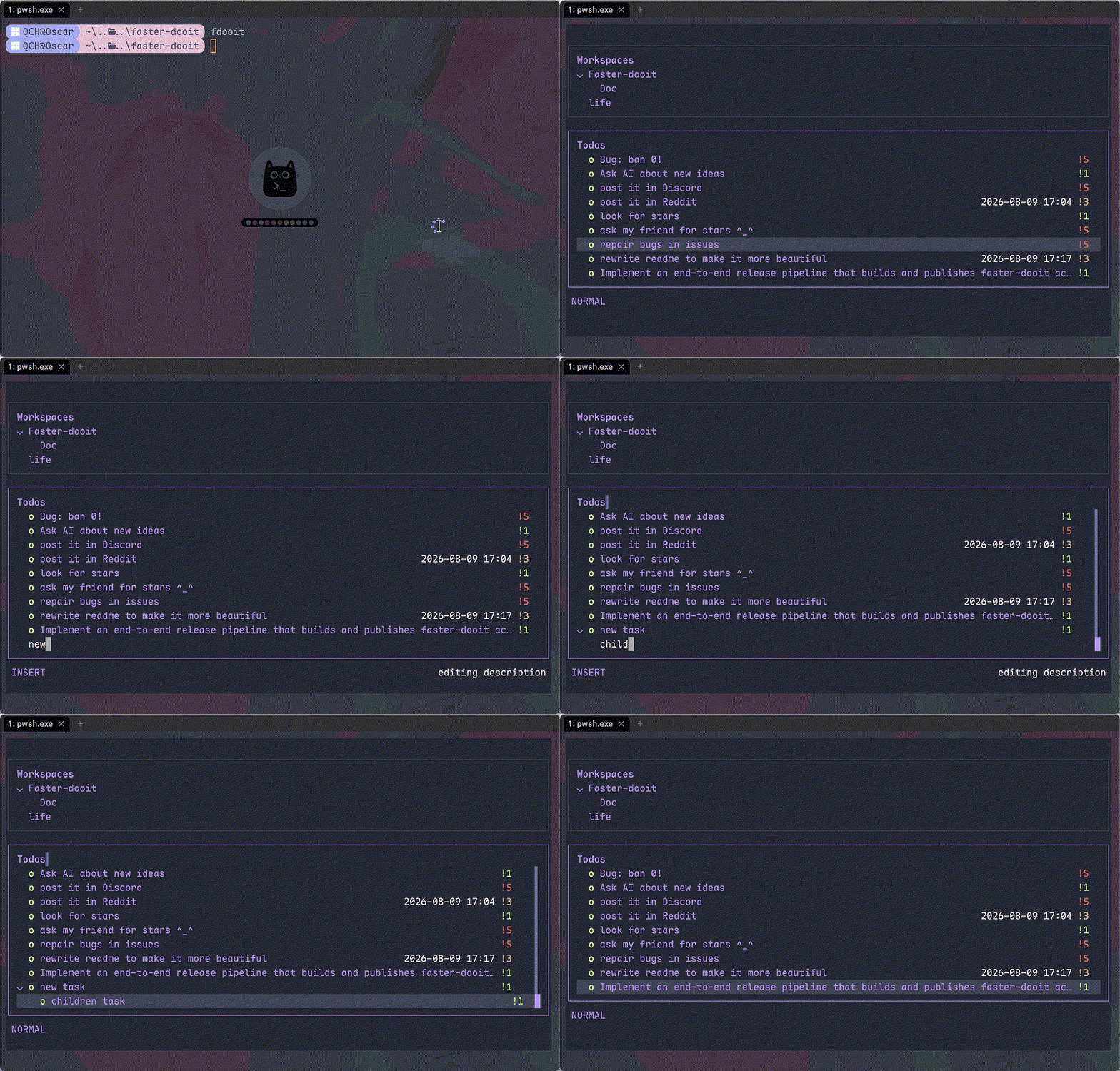
待办工具不该让你等。原版 dooit 冷启动要 **1.9 s**,而且每一帧重建整棵树。faster-dooit 加载 **1 万个待办只需 ~34 ms**,只渲染可见部分,从不轮询数据库。这是 vim,用在你的待办上。
## 功能特性
- ⚡ **快得感觉不到** — 1 万个待办冷载入 ~34 ms;同机原版约 1.9 s
- 🎯 **vim 肌肉记忆** — `j`/`k` 移动,`a` 添加,`d 3d` 设截止日期,`c` 完成
- 🗂️ **带折叠的双栏树** — 嵌套工作区 + 待办,`z`/`Z` 折叠,`collapse_depth` 自动折叠深层节点
- 🎨 **真正合身的主题** — 7 套内置预设(`nord`、`dracula`、`catppuccin_mocha`…)加单色覆盖和透明背景
- 🔌 **干净的 Lua 配置** — 没有 `api.` 前缀:`theme.name`、`keys.set`、`vars.urgency_colors`
- 📦 **单个静态二进制** — 纯 Go、无 CGO、无运行时、无需审计的依赖树
## 快速开始
```bash
# macOS / Linux
curl -fsSL https://raw.githubusercontent.com/XiaTian-AC/faster-dooit/main/install.sh | bash
```
```powershell
# Windows
iwr -useb https://raw.githubusercontent.com/XiaTian-AC/faster-dooit/main/install.ps1 | iex
```
或者用包管理器:
```bash
brew tap XiaTian-AC/XiaTian-AC-bucket && brew install faster-dooit # macOS/Linux
scoop bucket add faster-dooit https://github.com/XiaTian-AC/XiaTian-AC-bucket && scoop install faster-dooit # Windows
```
命令是 `fdooit`。源码构建只需 Go ≥ 1.22。
## 使用方法
```bash
fdooit
```
```text
┌─ Workspaces ────────────────┐ ┌─ Todos ───────────────────────────────┐
│ ⌄ Work │ │ ⌄ o finish release notes @today │
│ > Personal │ │ o write the spec │
└─────────────────────────────┘ └───────────────────────────────────────┘
```
- `a` 添加待办 · `A` 添加子项 · `c` 切换完成 · `d` 设置截止日期(`tomorrow`、`3d`、`next monday`)
- `z`/`Z` 折叠节点 / 父级 · `o` 展开超长描述
- `S` 搜索 · `ctrl+s` 排序 · `y`/`Y` 复制 · `p`/`P` 粘贴 · `?` 帮助
- 空列(无 due/recurrence)自动隐藏;矮终端自动显示滚动条
## 架构
```mermaid
graph LR
A[终端
fdooit] --> B[应用层
Bubble Tea model]
B --> C[存储
SQLite 一次性载入]
B --> D[Lua
config.lua 运行时]
B --> E[主题
预设 + 覆盖]
C --> F[(todo.db)]
style A fill:#E6A23C,color:#fff
style B fill:#409EFF,color:#fff
style C fill:#67C23A,color:#fff
style D fill:#F56C6C,color:#fff
style E fill:#9B59B6,color:#fff
style F fill:#909399,color:#fff
```
性能模型是三处刻意的取舍:**一次性载入**(启动读库到内存、编辑即写回)、**仅视口渲染**(按 `pane,id,version` 缓存行)、**直接 SQLite**(纯 Go 无 CGO、单连接)。
## 配置
`config.lua` 位于 `~/.config/faster-dooit/config.lua`(全平台统一)。无效配置会打印 `file:line` 错误并退出。
| 设置 | 示例 |
|---|---|
| 主题 | `theme.name = "dracula"` |
| 颜色覆盖 | `theme.primary = "#FF79C6"` |
| 透明背景 | `theme.background = "transparent"` |
| 折叠深度 | `vars.collapse_depth = 0` |
| 超长描述行数 | `vars.max_description_lines = 3` |
| 重映射键位 | `keys.set("i", add_sibling)` |
| 状态栏 | `bar.set({ fn, fn, ... })` |
内置主题:`nord`、`catppuccin_mocha`、`catppuccin_latte`、`dracula`、`gruvbox_dark`、`solarized_light`、`tokyo_night`。12 种可覆盖颜色加 `urgency_colors`。
## API
faster-dooit 提供 **Lua API**(原版 Python 表面的刻意精简子集)用于定制:
| API | 用途 |
|---|---|
| `keys.set(key\|{keys}, action)` | 重映射键位 |
| `formatter.todos..add(fn)` | 定制待办列样式 |
| `bar.set({fn, ...})` | 自定义状态栏 |
| `dashboard.set({line, ...})` | 欢迎面板 |
| `theme` / `vars` | 颜色、预设、折叠深度、最大行数 |
| `notify(msg, level)` / `now(fmt)` | 反馈与时间 |
| `subscribe(event, fn)` / `timer(sec, fn)` | 事件与定时回调 |
## 目录结构
```
faster-dooit/
├── main.go # 入口:flags、路径、TUI 启动
├── internal/
│ ├── app/ # Bubble Tea model:模式、键位、渲染、滚动条
│ ├── model/ # 内存树:Workspace/Todo、级联规则
│ ├── store/ # SQLite 持久化:一次性载入、即写即存
│ ├── lua/ # 沙箱 config.lua 求值
│ ├── theme/ # 解析后的主题 + 7 套内置预设
│ └── dateparse/ # 自然语言日期("tomorrow"、"3d")
├── install.sh / install.ps1 # 一键安装脚本
└── config.lua # 默认用户配置
```
## 技术栈
| 层 | 技术 |
|---|---|
| 语言 | Go |
| TUI | [Bubble Tea](https://github.com/charmbracelet/bubbletea)、lipgloss |
| 数据库 | SQLite(`modernc.org/sqlite`,纯 Go) |
| 配置 | gopher-lua(沙箱) |
| 发布 | GoReleaser + GitHub Actions |
## 贡献
1. Fork 本仓库
2. 创建分支(`git checkout -b feat/amazing`)
3. 提交你的改动
4. Push 并打开 Pull Request
```bash
go test ./... # unit + parity + e2e
go vet ./...
go test ./internal/app/ -bench . -benchmem # 性能门禁
```
## 许可证
[MIT](LICENSE)