# dsh-commandcode-usage-monitor
中文 | English
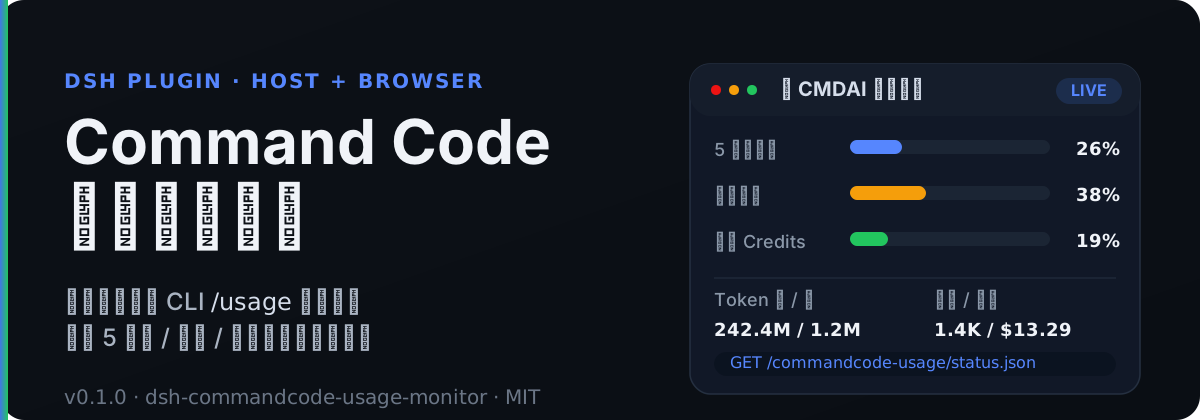
> A DSH (DeepSeek Harness) plugin that **monitors Command Code usage in real time**.
This plugin runs on the DSH Host side and calls the same Command Code account endpoints the official CLI's `/usage` command relies on (`/alpha/*`), fetching live data for:
- Rolling-window usage and reset times (5-hour / weekly windows) — your personal usage allowance
- Monthly quota / purchased / granted credits
- Cumulative request counts, spend, and tokens
- Plan information
- Per-turn consumption (derived from the real `usage` reported in session events)
Everything is then exposed as same-origin HTTP JSON endpoints on the DSH web server, ready to be consumed by the frontend widget, the settings page, and chat commands.
---
## 🚀 Quick Start
### Option 1: Install from npm (recommended)
The plugin is published on npm, so you can install it directly with the official DSH plugin command:
```bash
dsh plugin --profile web add dsh-commandcode-usage-monitor
```
### Option 2: Clone and build locally
```bash
# 1. Clone the repository
git clone https://github.com/XingPeng-Pixel/dsh-commandcode-usage.git
# 2. Enter the project directory
cd dsh-commandcode-usage
# 3. Install dependencies and build (required the first time; produces lib/)
npm install
npm run build
# 4. Add the local source via the official dsh plugin command
# link:$(pwd) expands to the absolute path of this repository
dsh plugin --profile web add "link:$(pwd)"
```
### Configure your API Key
Via an environment variable (the default reference name is `COMMANDCODE_API_KEY`):
```bash
export COMMANDCODE_API_KEY=user_xxx
```
Alternatively, you can fill it in on the **CMDAI Monitor** page in the DSH settings UI. The browser only ever calls the Host's credential route — it never touches the raw key.
### Verify the endpoints
```bash
curl http://127.0.0.1:3099/commandcode-usage/status.json
curl http://127.0.0.1:3099/commandcode-usage/turn-cost.json
curl http://127.0.0.1:3099/commandcode-usage/health
```
---
## ✨ Features
### 🔭 Host-side data fetching
- **Real-time usage snapshot**: normalized data from `/alpha/whoami`, `/alpha/usage/summary`, `/alpha/billing/credits`, and `/alpha/billing/subscriptions`.
- **Rolling-window allowance**: `used / cap / exceeded / resetAt` for both the 5-hour and weekly windows.
- **Conservative polling strategy**: 60s interval by default, serial multi-account polling, 15s per-request timeout, and at most one retry on network errors / 5xx responses.
- **Graceful degradation**: a failing endpoint degrades independently; a total failure is classified as `invalid-key`, `service-unavailable`, or `network`.
- **Multi-account support**: each account is fetched independently, with failures isolated per account.
- **Flexible API key resolution**: config literal → `ctx.credentials` → startup environment variable → the official CLI's `auth.json`.
### 🖥️ Browser side
- **Sidebar widget**: adapts to the sidebar footer width and shows 5-hour / weekly / monthly usage bars plus token and request statistics.
- **Settings-page dashboard**: a donut chart for usage, horizontal bars for the three windows, and cumulative stat cards; the color transitions smoothly from blue → orange → red as utilization rises.
- **Zero key exposure**: the browser only consumes same-origin Host routes and never sees the raw API key.
- **中文 / English locales**: `src/client/locales.ts` ships a complete bilingual key set.
### 🔌 Querying & consumption
- **Same-origin HTTP JSON endpoints**: `status.json`, `turn-cost.json`, `health`, `credential.json`, `refresh.json`, and more.
- **Chat slash command**: `/commandcode-usage` renders a usage dashboard straight from the current snapshot.
- **Per-turn cost push**: listens to the `assistant/message` usage in `session/event` events, settles at `turn/end`, and notifies the frontend through an incrementing `seq`.
- **Official plan quota table**: `src/plan.ts` bundles monthly / weekly / 5-hour quotas for official plans, enabling "used this month" calculations.
---
## 🧭 How It Works
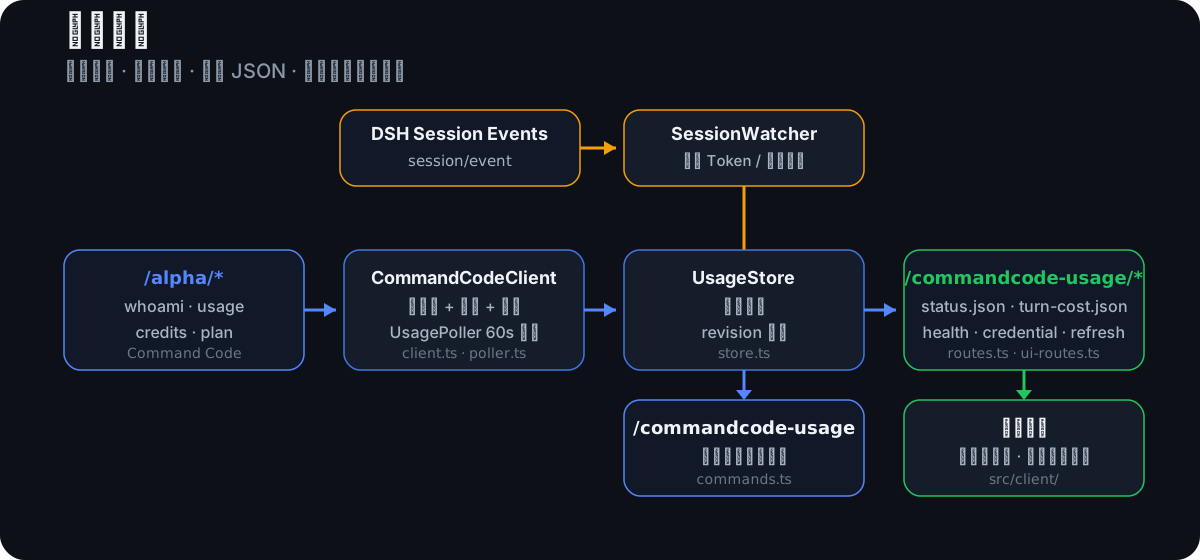
1. `UsagePoller` calls `CommandCodeClient` at the configured interval to fetch `/alpha/*`.
2. The fetched results are normalized and written into `UsageStore`.
3. `routes.ts` exposes `UsageStore` as same-origin JSON routes.
4. The browser side (`src/client/`) reads data from those JSON routes and renders the widget / settings page.
5. `SessionWatcher` listens to `session/event`, aggregates per-turn consumption, and publishes it to `turn-cost.json`.
**Key boundary**: all parsing, fetching, and error classification happen on the Host; the browser only receives aggregated JSON, and the API key never leaves the Host.
---
## 🔌 API Endpoints
All routes are same-origin JSON with `Cache-Control: no-store` and `Access-Control-Allow-Origin: *`.
| Route | Method | Description |
| --- | --- | --- |
| `/commandcode-usage/health` | GET | Health check |
| `/commandcode-usage/status.json` | GET | Full usage snapshot + `revision` + `lastError` |
| `/commandcode-usage/turn-cost.json` | GET | Latest turn consumption + `seq` (the frontend polls this to detect new turns) |
| `/commandcode-usage/credential.json` | GET / POST / DELETE | Query / write / clear Host-side credential state |
| `/commandcode-usage/credential-test.json` | POST | Test whether the currently resolved API key works |
| `/commandcode-usage/refresh.json` | POST | Trigger a Host fetch immediately and wait for it to complete |
Core fields in `status.json`:
| Field | Description |
| --- | --- |
| `updatedAt` | Timestamp (ms) of the last successful fetch |
| `stale` | Whether the last fetch had failures; `true` means the data may not be current |
| `accounts[].configured` | Whether an API key was resolved for this account |
| `accounts[].mark` | `ok` / `rate-limit` / `invalid-credential` / `unknown` |
| `accounts[].report.failures` | Per-endpoint failure details |
| `accounts[].report.blocked` | Total-failure reason: `invalid-key` / `service-unavailable` / `network` |
| `credits.fiveHour/weekly` | Core personal allowance data: `used`, `cap`, `exceeded`, `resetAt` |
For complete examples and the full field reference, see the [API docs](docs/api.md).
---
## ⚙️ Configuration
Plugin configuration is defined by a Schemastery schema in `src/config.ts`.
| Key | Type | Default | Description |
| --- | --- | --- | --- |
| `apiKeyEnv` | string | `COMMANDCODE_API_KEY` | Credential reference name (environment variable / credentials ref) |
| `apiKey` | string | empty | API key as a config literal (takes priority) |
| `apiBase` | string | `https://api.commandcode.ai` | Command Code API base URL |
| `pollIntervalMs` | number | `60000` | Poll interval (ms) |
| `errorBackoffMs` | number | `15000` | Backoff interval after failures (ms) |
| `requestTimeoutMs` | number | `15000` | Per-request timeout (ms) |
| `accountConcurrency` | number | `1` | Concurrent account fetches per round (conservative default of 1) |
| `accounts` | array | `[]` | Additional account list |
| `activeAccount` | string | empty | Fixed active account slot id (reserved; not yet part of runtime selection) |
| `enableSessionCost` | boolean | `true` | Enable per-turn consumption aggregation |
| `enableRoutes` | boolean | `true` | Register the webServer JSON routes |
| `storagePath` | string | empty | Optional state persistence path (not implemented yet; reserved) |
### Multi-account example
```yaml
config:
accounts:
- label: Account A
apiKeyEnv: COMMANDCODE_API_KEY
- label: Account B
apiKeyEnv: COMMANDCODE_API_KEY_2
```
### API key resolution order
1. `config.apiKey` (config literal)
2. The `ctx.credentials` service (if provided by the profile)
3. Startup environment variable (named by `apiKeyEnv`)
4. The official CLI login file `~/.commandcode/auth.json`
Implemented in `src/credentials.ts`. See the [configuration docs](docs/configuration.md) for the full reference.
---
## 🔒 Security
- The browser never touches the raw Command Code API key.
- Credentials are written through the DSH credentials service; the UI is read-only when no credentials service is mounted.
- Host-side resolution order: `config.apiKey` → `ctx.credentials` → startup environment variable → the official CLI's `auth.json`.
- No real keys, tokens, or personal account data are committed to this repository; all sample data is placeholder.
See the [security docs](docs/security.md) for more details.
### Current limitations
- The `amount` field in `turn-cost.json` is currently `null` (no built-in price table yet); `tokens` holds the real token counts. A `costFor` price conversion can be injected through `SessionWatcher` later.
- `storagePath` and `activeAccount` are reserved config keys that don't affect runtime behavior yet.
- The `/alpha/*` endpoints come from the same source as the official CLI's `/usage` and are not part of a public provider API contract; the plugin may need to be updated if the upstream API changes.
---
## 🛠 Development
- Requirements: Node.js `>=22`
```bash
npm install
npm run typecheck
npm test
npm run build
```
- `typecheck`: TypeScript type checking
- `test`: Node's built-in test runner + `tsx` for unit tests
- `build`: `tsc` generates type declarations + `tsdown` bundles the Host / Browser output
See the [development docs](docs/development.md), [testing docs](docs/testing.md), and [architecture docs](docs/architecture.md).
---
## 📚 Documentation
- [Installation](docs/installation.md)
- [Configuration](docs/configuration.md)
- [API Reference](docs/api.md)
- [Development](docs/development.md)
- [Testing](docs/testing.md)
- [Architecture](docs/architecture.md)
- [Security](docs/security.md)
---
## 📄 License
[MIT](LICENSE)