
One sentence, One living world.
English | 中文





AI Agents · LLM · Procedural Generation · Simulation · Emergent Narrative
---
## Powered by Atlas Cloud

[**Atlas Cloud**](https://www.atlascloud.ai/?utm_source=github&utm_medium=link&utm_campaign=WorldX) provides WorldX with a single OpenAI-compatible API for both LLM (story & character generation) and image generation (maps, character visuals) — 59 curated LLM models + 300+ image/video models under one key.
**Quick setup — all 4 WorldX roles via Atlas Cloud:**
```env
# Orchestrator — world design & character rules
ORCHESTRATOR_BASE_URL=https://api.atlascloud.ai/v1
ORCHESTRATOR_API_KEY=
ORCHESTRATOR_MODEL=deepseek-ai/deepseek-v4-pro # strong reasoning; max_tokens ≥ 512
# Image Generation — map art & character sprites (openai-compatible)
IMAGE_GEN_BASE_URL=https://api.atlascloud.ai/v1
IMAGE_GEN_PROVIDER=openai-compatible
IMAGE_GEN_API_KEY=
IMAGE_GEN_MODEL=black-forest-labs/FLUX.1-dev
# Vision Review — map quality & region detection
VISION_BASE_URL=https://api.atlascloud.ai/v1
VISION_API_KEY=
VISION_MODEL=qwen/qwen2.5-vl-72b-instruct
# Simulation Engine — character decisions & dialogue (any model works)
SIMULATION_BASE_URL=https://api.atlascloud.ai/v1
SIMULATION_API_KEY=
SIMULATION_MODEL=deepseek-ai/deepseek-v3-turbo # cost-effective for high-volume calls
```
> **Note:** Set `max_tokens ≥ 512` for Orchestrator and Vision calls to avoid truncated world designs.
Get your free key → [atlascloud.ai/console/coding-plan](https://www.atlascloud.ai/console/coding-plan) · Browse all models → [atlascloud.ai/models](https://www.atlascloud.ai/models)
59 LLM models available on Atlas Cloud
| Category | Models |
|----------|--------|
| **DeepSeek** | deepseek-v4-pro, deepseek-v3, deepseek-v3-turbo, deepseek-v3-0324, deepseek-r1, deepseek-r1-0528, deepseek-r1-distill-llama-70b, deepseek-r1-distill-qwen-32b |
| **Qwen** | qwen3-235b-a22b, qwen3-32b, qwen3-30b-a3b, qwen3-14b, qwen3-8b, qwen2.5-72b-instruct, qwen2.5-32b-instruct, qwen2.5-vl-72b-instruct, qwen2.5-vl-7b-instruct, qwq-32b |
| **Llama** | llama-4-scout, llama-4-maverick, llama-3.3-70b-instruct, llama-3.1-70b-instruct, llama-3.1-8b-instruct |
| **Gemma** | gemma-3-27b-it, gemma-3-12b-it, gemma-3-4b-it |
| **Mistral** | mistral-small-3.1, mistral-nemo, codestral-2501 |
| **Claude** | claude-opus-4, claude-sonnet-4, claude-sonnet-3-7, claude-haiku-3-5 |
| **GPT / o-series** | gpt-4.1, gpt-4.1-mini, gpt-4o, gpt-4o-mini, o3, o4-mini |
| **Gemini** | gemini-2.5-pro, gemini-2.5-flash, gemini-2.0-flash |
| **Other** | phi-4, phi-4-mini, internvl3-14b, glm-4-32b, yi-lightning, moonshot-v1-8k, step-2-16k, hunyuan-turbos, doubao-1-5-pro-32k, baichuan4-air, minimax-text-01 |
---
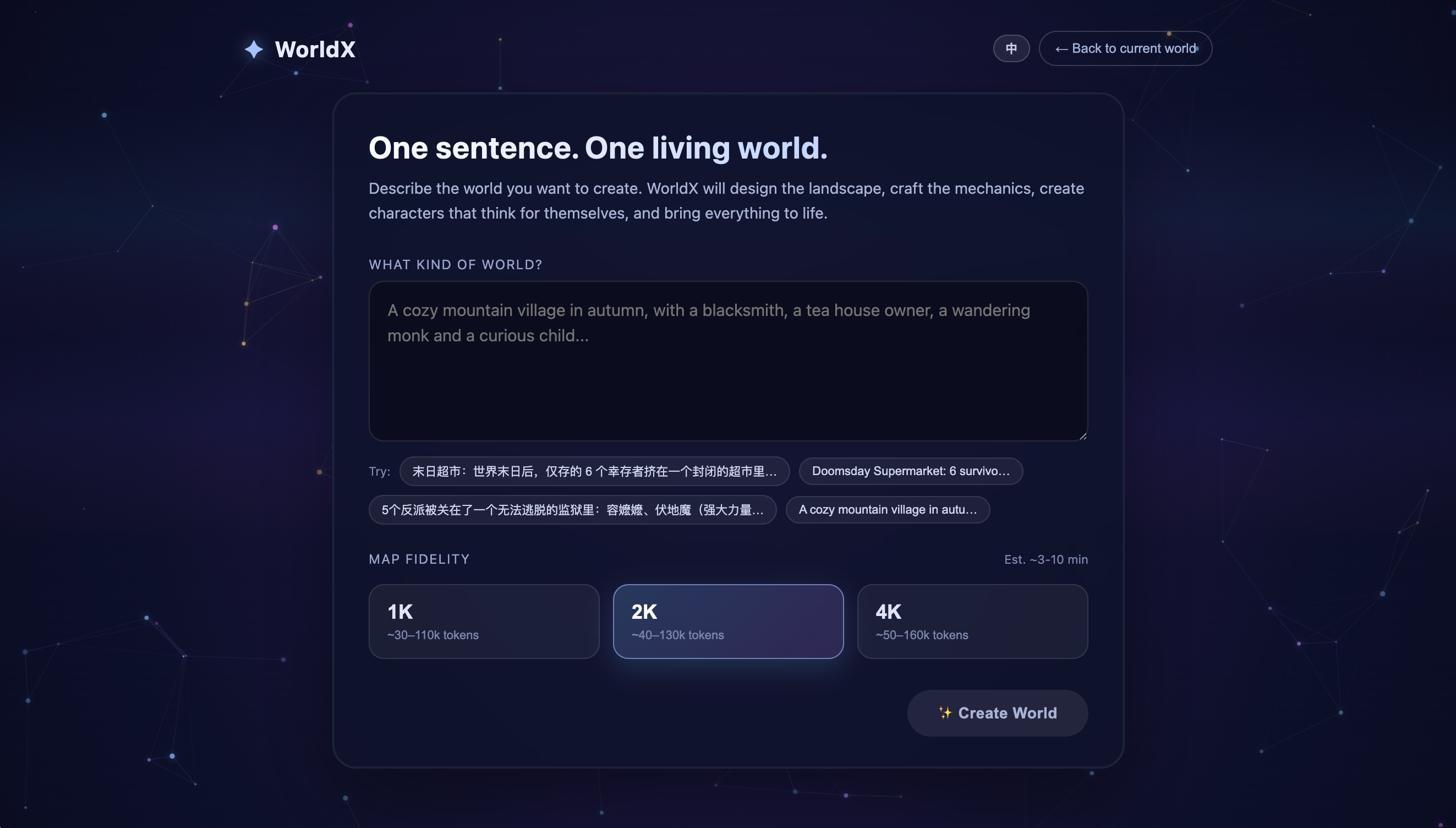
**WorldX** turns a single text prompt into a fully autonomous AI world. The system designs the world, generates original maps and character art, then runs a living simulation where AI agents make decisions, form relationships, have conversations, and create emergent narratives — all without human intervention.
> "A cozy autumn mountain village with a blacksmith, a tavern owner, a wandering monk, and a curious child"
That's all it takes. WorldX handles the rest.
## Highlights
- **One-sentence world creation** — describe any scenario and watch it materialize
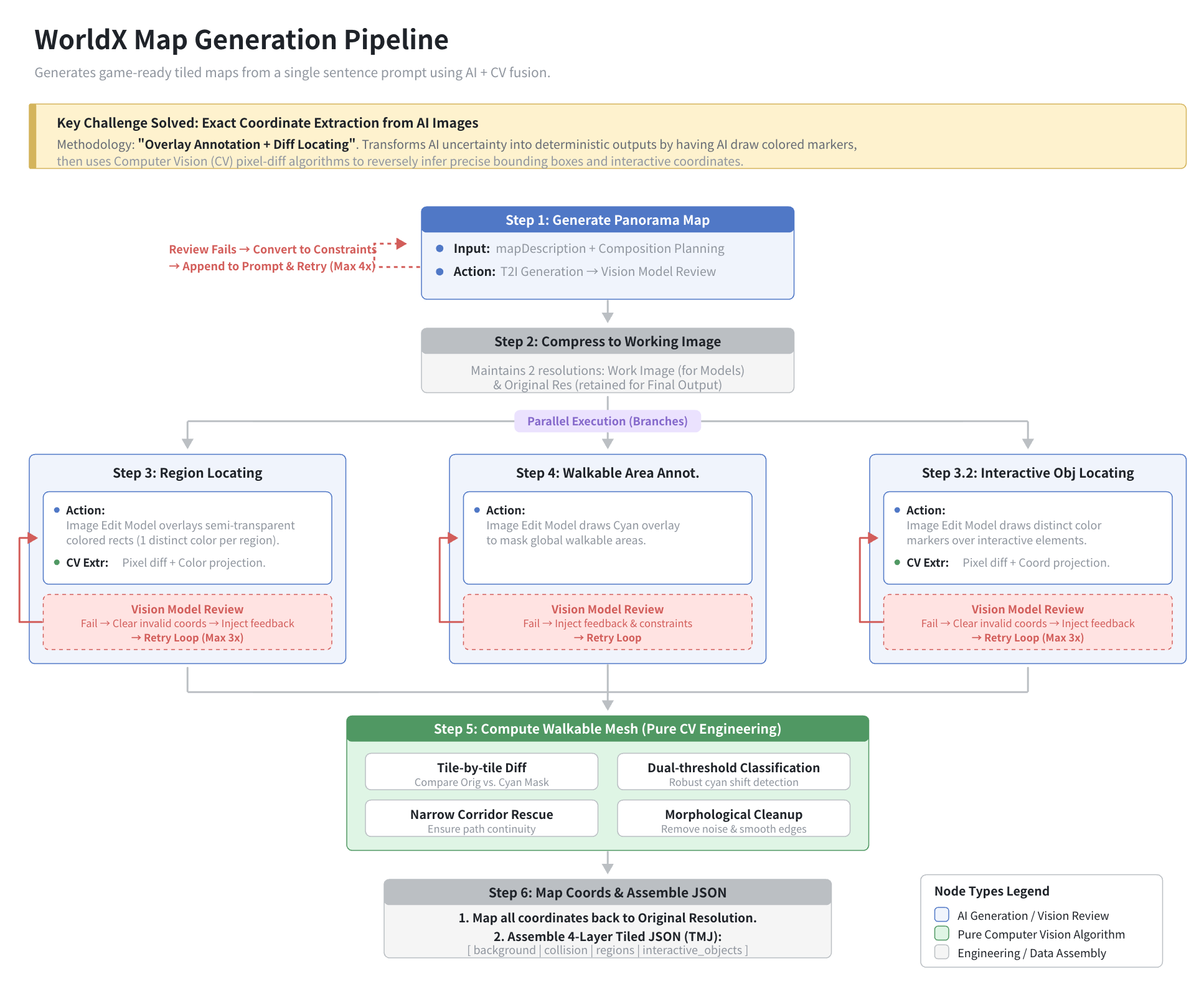
- **AI-generated maps & characters** — original art created to match your description, not templates
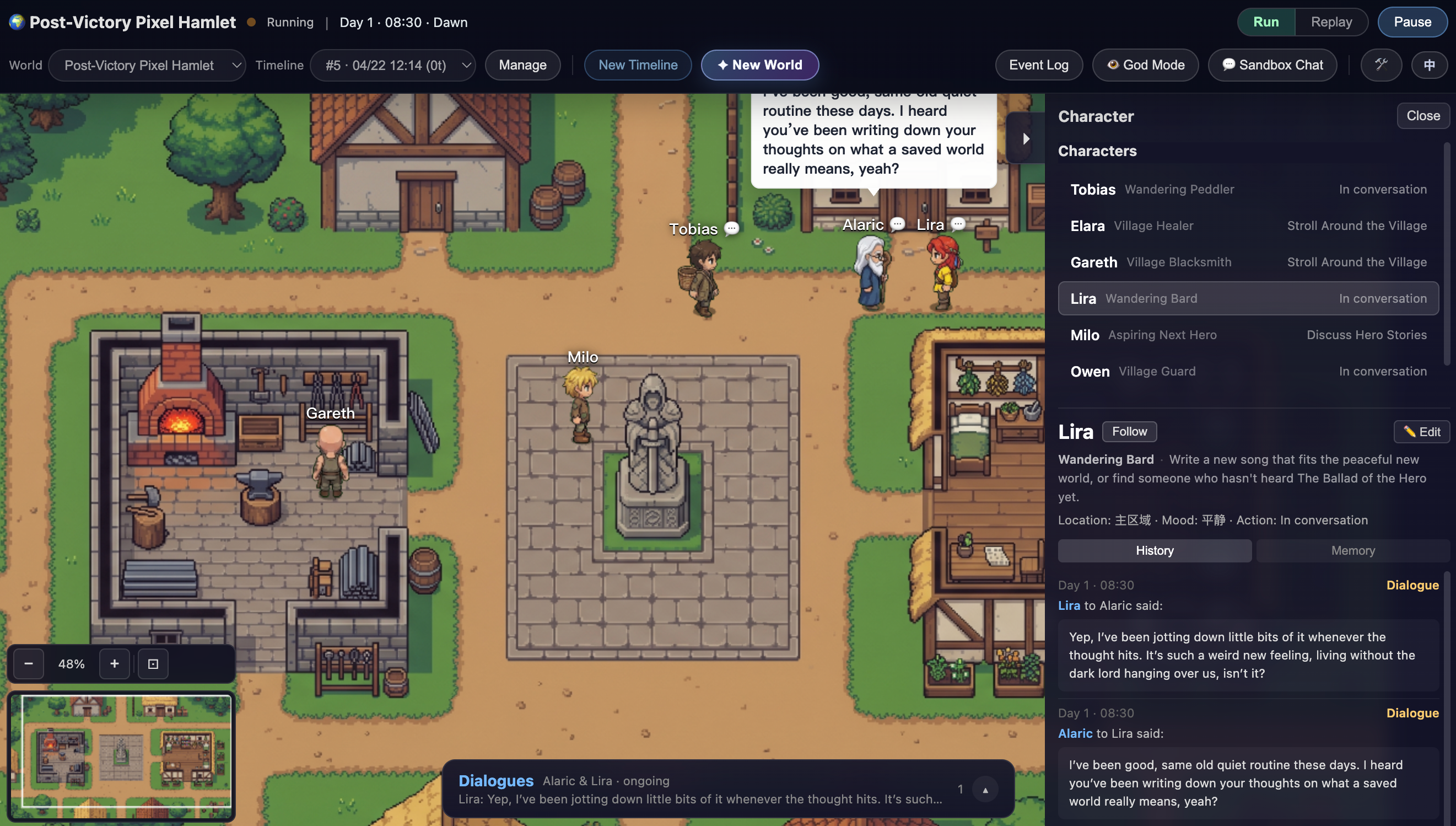
- **Autonomous agent simulation** — characters make decisions, form relationships, hold conversations
- **Memory & personality** — agents remember past events and act according to distinct personalities
- **Multi-day evolution** — worlds evolve across day/night cycles with scene transitions
- **God mode** — broadcast events, edit character profiles/memories, run sandbox chats with characters, and observe emergent developments
- **Timeline system** — branch, replay, and compare different simulation runs
- **Bilingual UI** — Chinese / English interface with one-click switching
 |
 |
> 🚧 The project is currently in Alpha — core features work, ongoing improvements ahead
## Quick Start
### Prerequisites
- **Node.js 18+**
- **API keys** — see [Model Configuration](#model-configuration) below
### Option A: Preview Mode (fastest)
Just want to see WorldX in action? Two pre-built worlds are included. You only need a **Simulation** model key.
```bash
git clone https://github.com/YGYOOO/WorldX.git
cd WorldX
cp .env.example .env
# Edit .env — fill in SIMULATION_* fields only
npm install
npm run dev
```
Open `http://localhost:3200` — pick a pre-built world and hit Play.
### Option B: Full Creation
Generate your own worlds from scratch. Requires all 4 model keys.
```bash
# Edit .env — fill in all 4 model sections
npm run dev
```
Open `http://localhost:3200/create`, type a sentence, and watch your world come to life.
Or use the CLI:
```bash
npm run create -- "A cyberpunk noodle shop where hackers and androids share rumors"
```
## Model Configuration
WorldX uses **4 model roles**, each configurable independently. All roles use the OpenAI-compatible `chat/completions` protocol except Image Gen, which can also use Google AI Studio's native image API.
| Role | Env Prefix | What It Does | Recommended |
|------|-----------|-------------|-------------|
| **Orchestrator** | `ORCHESTRATOR_` | Designs world structure, characters, rules | Strong reasoning model (e.g. `gemini-3.1-pro-preview`) |
| **Image Gen** | `IMAGE_GEN_` | Generates map art and character sprites | Image-capable model (e.g. `gemini-3.1-flash-image-preview`) |
| **Vision** | `VISION_` | Reviews map quality, locates regions/elements | Strong multimodal model (e.g. `gemini-3.1-pro-preview`) |
| **Simulation** | `SIMULATION_` | Drives runtime character behavior | Any model — cheaper is fine (e.g. `gemini-2.5-flash`) |
Each role usually needs 3 env vars:
```env
{ROLE}_BASE_URL=https://openrouter.ai/api/v1 # API base URL
{ROLE}_API_KEY=sk-or-v1-xxxx # API key
{ROLE}_MODEL=google/gemini-3.1-pro-preview # Model identifier
```
Image Gen can additionally set `IMAGE_GEN_PROVIDER`. `IMAGE_GEN_PROVIDER` can be `openai-compatible` (default, for OpenRouter) or `google-native` (for Google AI Studio image generation).
### Platform Examples
Atlas Cloud (OpenAI-compatible — LLM + image gen, one key)
Get a key at [atlascloud.ai/console/coding-plan](https://www.atlascloud.ai/console/coding-plan):
```env
ORCHESTRATOR_BASE_URL=https://api.atlascloud.ai/v1
ORCHESTRATOR_API_KEY=
ORCHESTRATOR_MODEL=deepseek-ai/deepseek-v4-pro
IMAGE_GEN_BASE_URL=https://api.atlascloud.ai/v1
IMAGE_GEN_PROVIDER=openai-compatible
IMAGE_GEN_API_KEY=
IMAGE_GEN_MODEL=black-forest-labs/FLUX.1-dev
VISION_BASE_URL=https://api.atlascloud.ai/v1
VISION_API_KEY=
VISION_MODEL=qwen/qwen2.5-vl-72b-instruct
SIMULATION_BASE_URL=https://api.atlascloud.ai/v1
SIMULATION_API_KEY=
SIMULATION_MODEL=deepseek-ai/deepseek-v3-turbo
```
OpenRouter (recommended — one key for all models)
Get a key at [openrouter.ai](https://openrouter.ai):
```env
ORCHESTRATOR_BASE_URL=https://openrouter.ai/api/v1
ORCHESTRATOR_API_KEY=sk-or-v1-xxxx
ORCHESTRATOR_MODEL=google/gemini-3.1-pro-preview
IMAGE_GEN_BASE_URL=https://openrouter.ai/api/v1
IMAGE_GEN_PROVIDER=openai-compatible
IMAGE_GEN_API_KEY=sk-or-v1-xxxx
IMAGE_GEN_MODEL=google/gemini-3.1-flash-image-preview
VISION_BASE_URL=https://openrouter.ai/api/v1
VISION_API_KEY=sk-or-v1-xxxx
VISION_MODEL=google/gemini-3.1-pro-preview
SIMULATION_BASE_URL=https://openrouter.ai/api/v1
SIMULATION_API_KEY=sk-or-v1-xxxx
SIMULATION_MODEL=google/gemini-2.5-flash-preview
```
Google AI Studio (free tier available)
Get a key at [aistudio.google.com](https://aistudio.google.com/apikey):
```env
ORCHESTRATOR_BASE_URL=https://generativelanguage.googleapis.com/v1beta/openai
ORCHESTRATOR_API_KEY=AIzaSy...
ORCHESTRATOR_MODEL=gemini-3.1-pro-preview
IMAGE_GEN_BASE_URL=https://generativelanguage.googleapis.com/v1beta/openai
IMAGE_GEN_PROVIDER=google-native
IMAGE_GEN_API_KEY=AIzaSy...
IMAGE_GEN_MODEL=gemini-3.1-flash-image-preview
VISION_BASE_URL=https://generativelanguage.googleapis.com/v1beta/openai
VISION_API_KEY=AIzaSy...
VISION_MODEL=gemini-3.1-pro-preview
SIMULATION_BASE_URL=https://generativelanguage.googleapis.com/v1beta/openai
SIMULATION_API_KEY=AIzaSy...
SIMULATION_MODEL=gemini-2.5-flash-preview
```
Mix & match (different platforms per role)
You can use a different platform for each role. For example, Google AI Studio for generation (free tier) and a cheaper provider for simulation:
```env
# World design — Google AI Studio
ORCHESTRATOR_BASE_URL=https://generativelanguage.googleapis.com/v1beta/openai
ORCHESTRATOR_API_KEY=AIzaSy...
ORCHESTRATOR_MODEL=gemini-3.1-pro-preview
# Art generation — Google AI Studio
IMAGE_GEN_BASE_URL=https://generativelanguage.googleapis.com/v1beta/openai
IMAGE_GEN_PROVIDER=google-native
IMAGE_GEN_API_KEY=AIzaSy...
IMAGE_GEN_MODEL=gemini-3.1-flash-image-preview
# Vision review — Google AI Studio
VISION_BASE_URL=https://generativelanguage.googleapis.com/v1beta/openai
VISION_API_KEY=AIzaSy...
VISION_MODEL=gemini-3.1-pro-preview
# Simulation — DeepSeek (cost-effective for high-volume runtime calls)
SIMULATION_BASE_URL=https://api.deepseek.com/v1
SIMULATION_API_KEY=sk-...
SIMULATION_MODEL=deepseek-chat
```
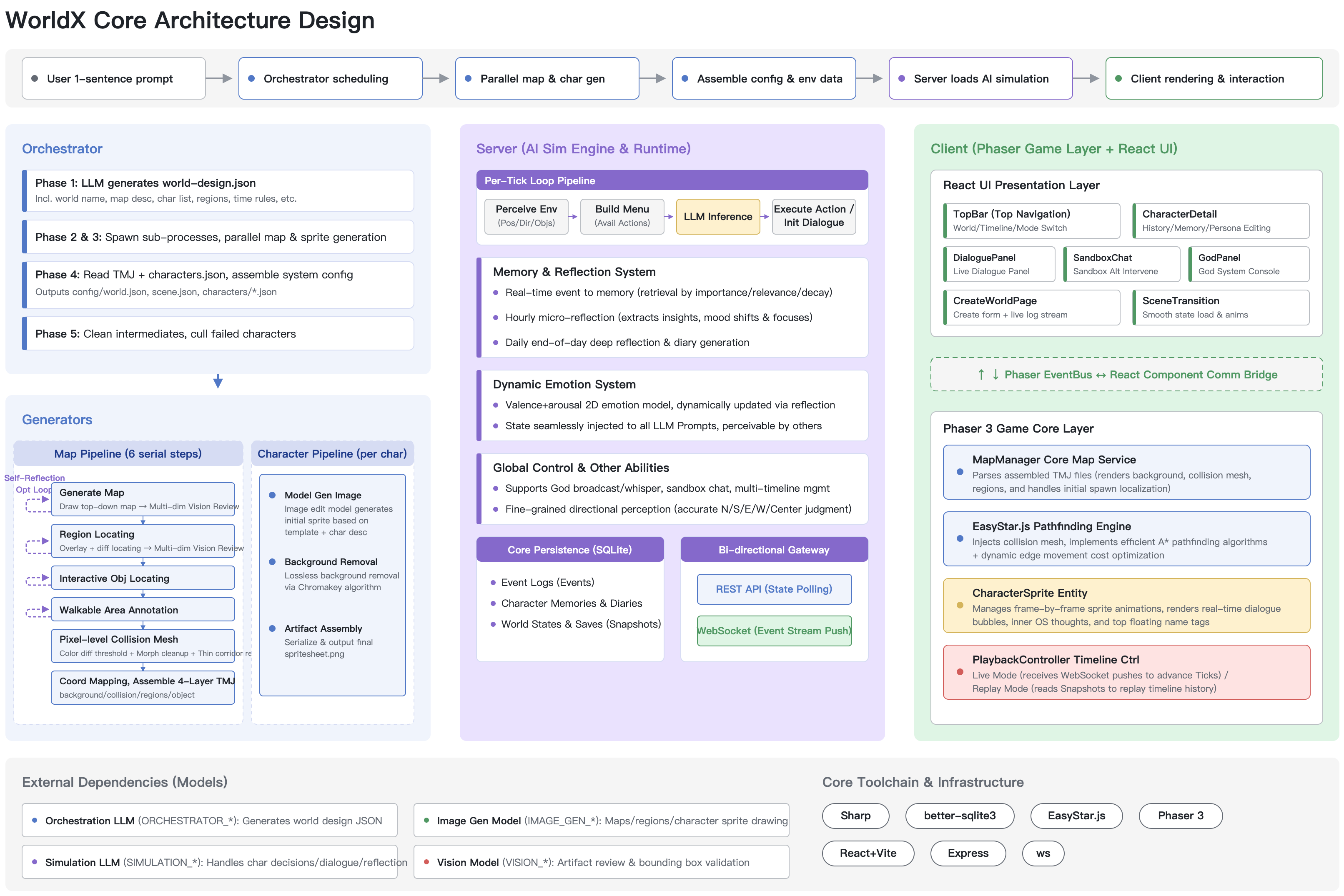
## Architecture
 ## Project Structure
```
WorldX/
├── orchestrator/ # LLM-driven world design & config generation
│ ├── src/
│ │ ├── index.mjs # Pipeline entry: sentence → world
│ │ ├── world-designer.mjs # LLM world design
│ │ └── config-generator.mjs
│ └── prompts/
│ └── design-world.md # World design prompt template
├── generators/ # Art generation pipelines
│ ├── map/ # Map generation (multi-step with review loop)
│ └── character/ # Spritesheet generation (with chromakey)
├── server/ # Simulation engine (Express + SQLite + LLM)
│ └── src/
│ ├── core/ # WorldManager, CharacterManager
│ ├── simulation/ # SimulationEngine, DecisionMaker, DialogueGenerator
│ ├── llm/ # LLMClient, PromptBuilder
│ └── store/ # SQLite persistence (per-timeline)
├── client/ # Game client (Phaser 3 + React 19)
│ └── src/
│ ├── scenes/ # BootScene, WorldScene
│ ├── ui/ # React overlay panels
│ └── systems/ # Camera, Pathfinding, Playback
├── shared/ # Shared utilities (structured output parsing)
├── library/worlds/ # Pre-built example worlds
├── output/worlds/ # Your generated worlds
└── .env.example # Configuration template
```
## Development
```bash
npm run dev # Start both client and server in dev mode
npm run create # Generate a new world via CLI
```
- Client: `http://localhost:3200`
- Server: `http://localhost:3100`
## Thanks
- [LinuxDO](https://linux.do/)
## License
MIT
## Project Structure
```
WorldX/
├── orchestrator/ # LLM-driven world design & config generation
│ ├── src/
│ │ ├── index.mjs # Pipeline entry: sentence → world
│ │ ├── world-designer.mjs # LLM world design
│ │ └── config-generator.mjs
│ └── prompts/
│ └── design-world.md # World design prompt template
├── generators/ # Art generation pipelines
│ ├── map/ # Map generation (multi-step with review loop)
│ └── character/ # Spritesheet generation (with chromakey)
├── server/ # Simulation engine (Express + SQLite + LLM)
│ └── src/
│ ├── core/ # WorldManager, CharacterManager
│ ├── simulation/ # SimulationEngine, DecisionMaker, DialogueGenerator
│ ├── llm/ # LLMClient, PromptBuilder
│ └── store/ # SQLite persistence (per-timeline)
├── client/ # Game client (Phaser 3 + React 19)
│ └── src/
│ ├── scenes/ # BootScene, WorldScene
│ ├── ui/ # React overlay panels
│ └── systems/ # Camera, Pathfinding, Playback
├── shared/ # Shared utilities (structured output parsing)
├── library/worlds/ # Pre-built example worlds
├── output/worlds/ # Your generated worlds
└── .env.example # Configuration template
```
## Development
```bash
npm run dev # Start both client and server in dev mode
npm run create # Generate a new world via CLI
```
- Client: `http://localhost:3200`
- Server: `http://localhost:3100`
## Thanks
- [LinuxDO](https://linux.do/)
## License
MIT