# react-multi-carousel 👋
[](https://opencollective.com/react-multi-carousel) [](#contributors)
Production-ready, lightweight fully customizable React carousel component that rocks supports multiple items and SSR(Server-side rendering).
[](https://packagequality.com/#?package=react-multi-carousel)
[](https://www.npmjs.com/package/react-multi-carousel)
[](https://travis-ci.org/YIZHUANG/react-multi-carousel)
[](https://app.fossa.io/projects/git%2Bgithub.com%2FYIZHUANG%2Freact-multi-carousel?ref=badge_shield)
[](https://david-dm.org/YIZHUANG/react-multi-carousel)
[](https://snyk.io/test/github/YIZHUANG/react-multi-carousel?targetFile=package.json)
### Hello world!
We are on a very excited journey towards version 3.0 of this component which will be rewritten in hooks/context completely. It means smaller bundle size, performance improvement and easier customization of the component and so many more benefits.
It would mean so much if you could provide help towards the further development of this project as we do this open source work in our own free time especially during this covid-19 crisis.
If you are using this component seriously, please donate or talk to your manager as this project increases your income too. It will help us make releases, fix bugs, fulfill new feature requests faster and better.
[Become a backer/sponsor](https://opencollective.com/react-multi-carousel) to get your logo/image on our README on Github with a link to your site.
### Features.
- Server-side rendering
- Infinite mode
- Dot mode
- Custom animation
- AutoPlay mode
- Auto play interval
- Supports images, videos, everything.
- Responsive
- Swipe to slide
- Mouse drag to slide
- Keyboard control to slide
- Multiple items
- Show / hide arrows
- Custom arrows / control buttons
- Custom dots
- Custom styling
- Accessibility support
- Center mode.
- Show next/previous set of items partially
- RTL support
### Shoutouts 🙏
Big thanks to [BrowserStack](https://www.browserstack.com) for letting the maintainers use their service to debug browser issues.
## [Documentation](https://react-multi-carousel.surge.sh)
## Other important links.
- [Code sandbox](https://codesandbox.io/embed/2omn67p8kj)
- [Contributing](https://github.com/YIZHUANG/react-multi-carousel/blob/master/contributing.md)
- [Changelog](https://github.com/YIZHUANG/react-multi-carousel/blob/master/CHANGELOG.md)
- [Releases](https://github.com/YIZHUANG/react-multi-carousel/releases)
- [TypeScript usage](https://github.com/YIZHUANG/react-multi-carousel/blob/master/TypeScriptUsage.md)
- [SSR demo](https://react-multi-carousel.now.sh/)
## Bundle size
[Bundle-size](https://bundlephobia.com/result?p=react-multi-carousel).
2.5kB
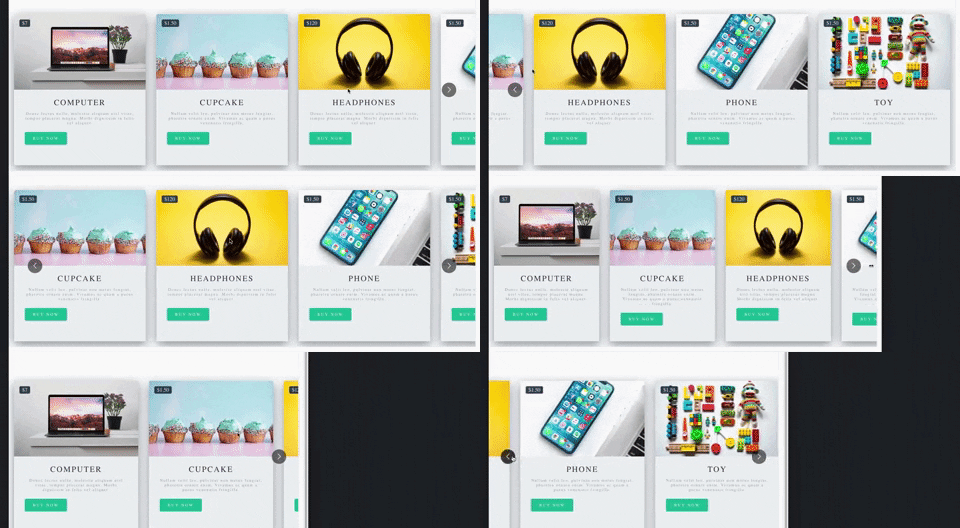
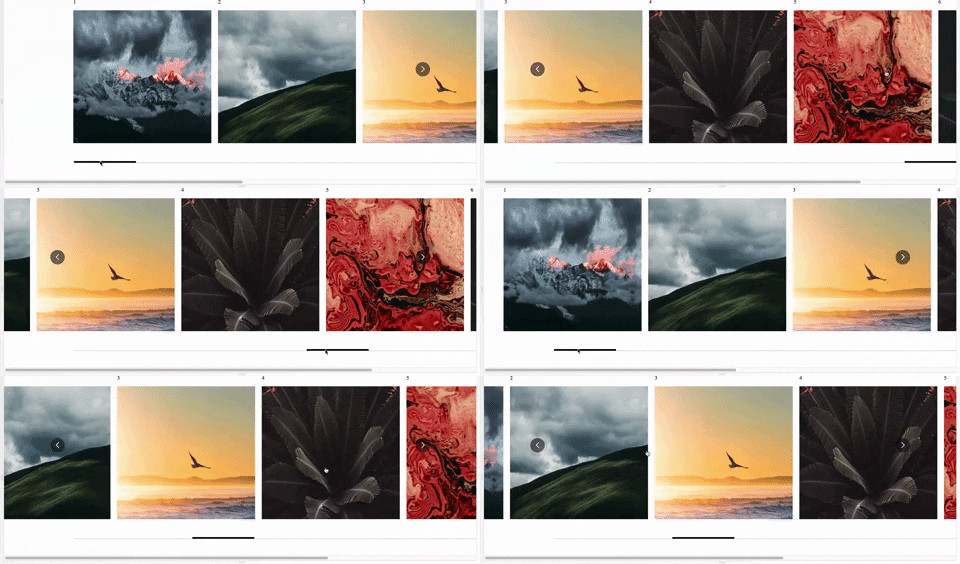
## Demo.
Documentation is [here](https://react-multi-carousel.surge.sh).
Demo for the SSR
Try to disable JavaScript to test if it renders on the server-side.
Codes for SSR at [github](https://github.com/YIZHUANG/react-multi-carousel/blob/master/examples/ssr/pages/index.js).
Codes for the documentation at [github](https://github.com/YIZHUANG/react-multi-carousel/blob/master/stories/index.stories.js).
## Install
```
$ npm install react-multi-carousel --save
import Carousel from 'react-multi-carousel';
import 'react-multi-carousel/lib/styles.css';
```
### How the SSR mode works?
Codes for SSR at [github](https://github.com/YIZHUANG/react-multi-carousel/blob/master/examples/ssr/pages/index.js).
- Demo for the SSR are at [here](https://react-multi-carousel.now.sh/)
- Try to disable JavaScript to test if it renders on the server-side.
Here is a lighter version of the library for detecting the user's device type [alternative](https://github.com/faisalman/ua-parser-js)
You can choose to only bundle it on the server-side.
## Minimum working set up.
```js
import Carousel from "react-multi-carousel";
import "react-multi-carousel/lib/styles.css";
const responsive = {
superLargeDesktop: {
// the naming can be any, depends on you.
breakpoint: { max: 4000, min: 3000 },
items: 5
},
desktop: {
breakpoint: { max: 3000, min: 1024 },
items: 3
},
tablet: {
breakpoint: { max: 1024, min: 464 },
items: 2
},
mobile: {
breakpoint: { max: 464, min: 0 },
items: 1
}
};
;
```
## Custom Arrows.
You can pass your own custom arrows to make it the way you want, the same for the position. For example, add media query for the arrows to go under when on smaller screens.
Your custom arrows will receive a list of props/state that's passed back by the carousel such as the currentSide, is dragging or swiping in progress.
[Code](https://github.com/YIZHUANG/react-multi-carousel/blob/master/stories/CustomArrows.js)
```js
const CustomRightArrow = ({ onClick, ...rest }) => {
const {
onMove,
carouselState: { currentSlide, deviceType }
} = rest;
// onMove means if dragging or swiping in progress.
return



 [](https://app.fossa.io/projects/git%2Bgithub.com%2FYIZHUANG%2Freact-multi-carousel?ref=badge_shield)
[](https://david-dm.org/YIZHUANG/react-multi-carousel)
[](https://snyk.io/test/github/YIZHUANG/react-multi-carousel?targetFile=package.json)


### Hello world!
We are on a very excited journey towards version 3.0 of this component which will be rewritten in hooks/context completely. It means smaller bundle size, performance improvement and easier customization of the component and so many more benefits.
It would mean so much if you could provide help towards the further development of this project as we do this open source work in our own free time especially during this covid-19 crisis.
If you are using this component seriously, please donate or talk to your manager as this project increases your income too. It will help us make releases, fix bugs, fulfill new feature requests faster and better.
[Become a backer/sponsor](https://opencollective.com/react-multi-carousel) to get your logo/image on our README on Github with a link to your site.
### Features.
- Server-side rendering
- Infinite mode
- Dot mode
- Custom animation
- AutoPlay mode
- Auto play interval
- Supports images, videos, everything.
- Responsive
- Swipe to slide
- Mouse drag to slide
- Keyboard control to slide
- Multiple items
- Show / hide arrows
- Custom arrows / control buttons
- Custom dots
- Custom styling
- Accessibility support
- Center mode.
- Show next/previous set of items partially
- RTL support
### Shoutouts 🙏
 Big thanks to [BrowserStack](https://www.browserstack.com) for letting the maintainers use their service to debug browser issues.
## [Documentation](https://react-multi-carousel.surge.sh)
## Other important links.
- [Code sandbox](https://codesandbox.io/embed/2omn67p8kj)
- [Contributing](https://github.com/YIZHUANG/react-multi-carousel/blob/master/contributing.md)
- [Changelog](https://github.com/YIZHUANG/react-multi-carousel/blob/master/CHANGELOG.md)
- [Releases](https://github.com/YIZHUANG/react-multi-carousel/releases)
- [TypeScript usage](https://github.com/YIZHUANG/react-multi-carousel/blob/master/TypeScriptUsage.md)
- [SSR demo](https://react-multi-carousel.now.sh/)
## Bundle size
[Bundle-size](https://bundlephobia.com/result?p=react-multi-carousel).
2.5kB
## Demo.
Documentation is [here](https://react-multi-carousel.surge.sh).
Demo for the SSR