OpenSurge for Mac is an open-source, Surge-style macOS gateway and control
plane. It turns a Mac into the proxy egress for an entire LAN: phones, TVs,
PS5 and other game consoles, VR headsets, VMs, and other devices on the same
network can obtain DHCP/DNS from the Mac and share policy-controlled
connectivity. Each device can also have its own egress policy—send the phone
through a proxy, keep the game console DIRECT—with no configuration required
on the device itself.
- Import an existing mihomo subscription. OpenSurge takes ownership only of
gateway-critical fields without replacing its nodes or rules.
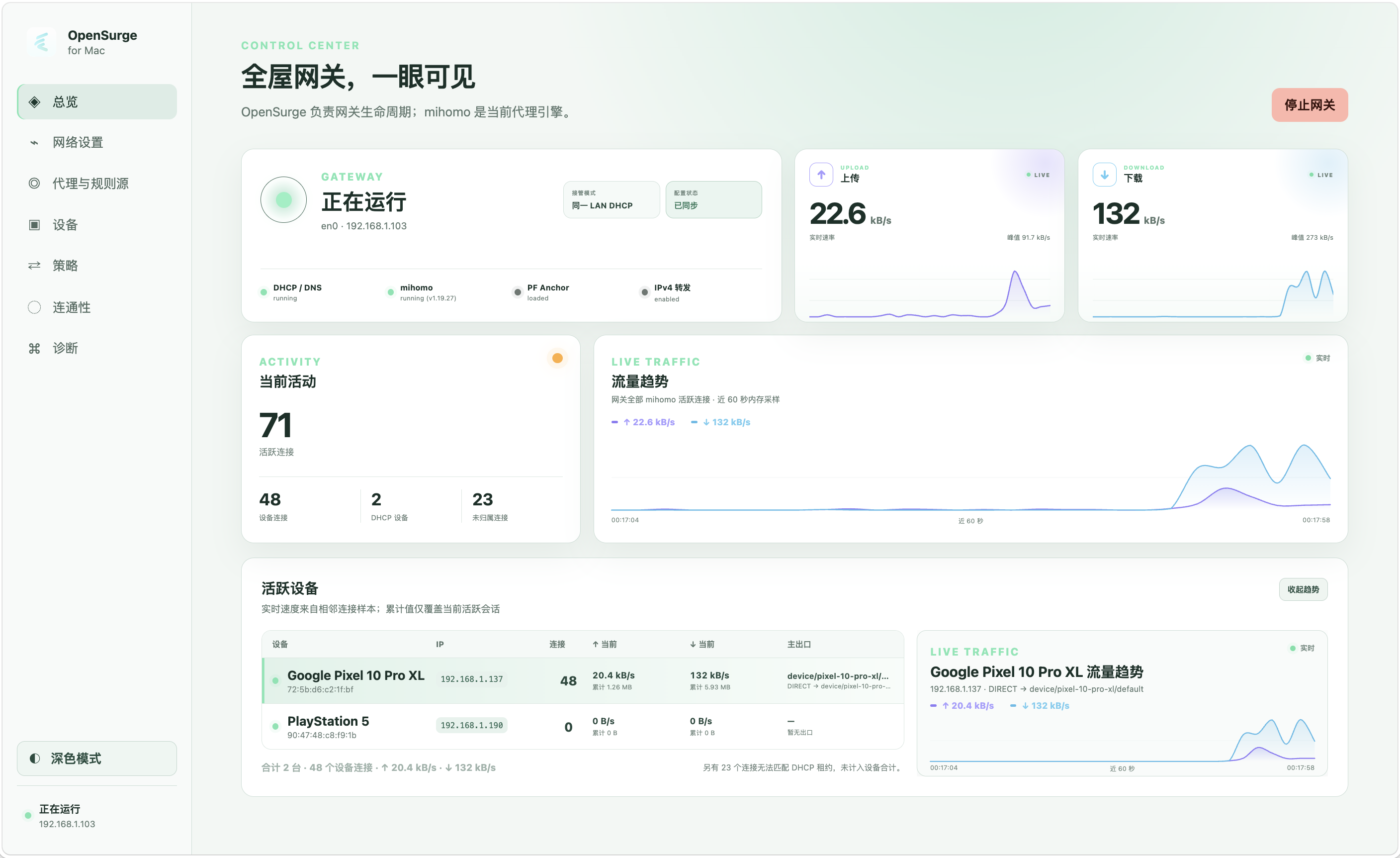
- Use the Web GUI and menu bar app to see which devices are active, how much
traffic they are moving, and which egress chain they use.
Under the hood, dnsmasq provides DHCP/DNS, mihomo serves as the proxy engine,
and macOS pf plus IPv4 forwarding provide the native gateway path.
The repository is also designed as an
[AI-agent-friendly engineering workspace](#an-ai-agent-friendly-engineering-workspace):
project knowledge is versioned beside the code, risky network behavior has
executable proof gates, and virtual-lab plus real-device evidence is fed back
into the next engineering loop.
## Capabilities
**Friendly App experience**
- Use the macOS menu bar app to check status, receive recovery warnings, and
open the local Web GUI.
- Import sources, configure the network, route individual devices, check proxy
health and connectivity, and inspect diagnostics from one control surface.
- Follow a recovery state machine through same-LAN DHCP takeover startup,
client validation, shutdown, and network restoration.
Start with the [OpenSurge for Mac App User Guide](docs/app-user-guide.md).
**Gateway and proxying**
- Start and stop DHCP/DNS, mihomo, pf NAT, and IPv4 forwarding with rollback.
- Provide explicit proxying through mihomo `mixed-port`.
- Provide transparent proxying through mihomo TUN on macOS.
- Generate a MAC-backed fixed IPv4 lease in DHCP takeover mode, or use a stable
main-router IPv4 in same-LAN manual-gateway mode, with an independent egress
policy available in either topology.
**Observability**
- Attribute active-session traffic to DHCP devices or same-LAN registered and
currently observed devices, showing per-device connection counts, live
upload/download rates, cumulative bytes, and the dominant mihomo egress chain.
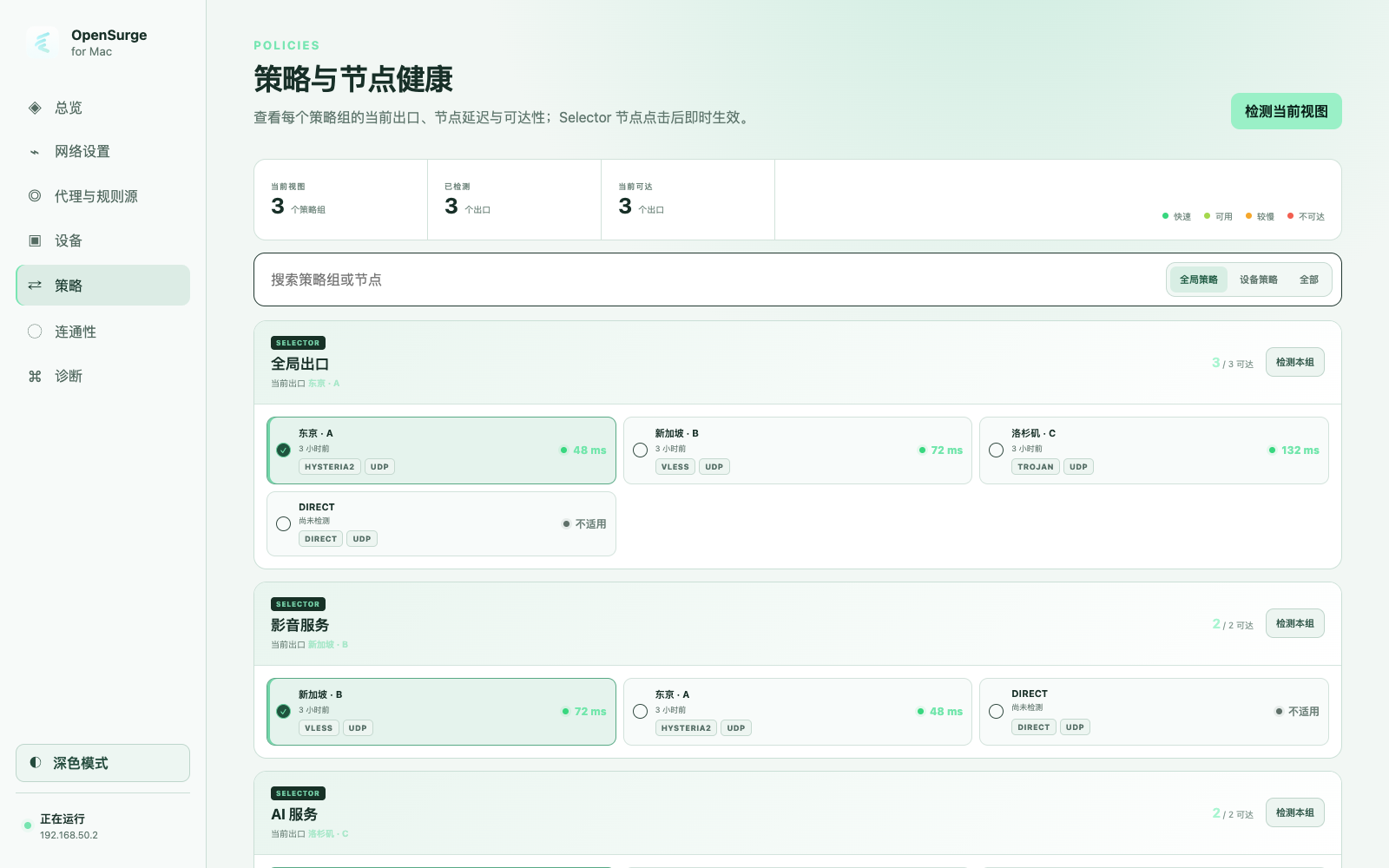
- Test proxy-node reachability and latency in one place, then switch an applied
Selector from the health view.
- Probe a fixed catalog of real services through the applied mihomo mixed-port
path, showing the three-round median latency, matched rule, and actual egress
chain.
- Inspect and switch policy groups, inspect imported proxy/rule provider
status, and view current connections.
- Produce text/JSON status, doctor, logs, and snapshot output, including a
partial-failure JSON snapshot for diagnostics and UI use.
**Safety and validation**
- Configuration validation, TUN-only transparent proxying, rollback, and an
explicit recovery contract.
- Isolated virtual-LAN validation of risky network behavior before touching a
normal LAN.
## Per-device policies
One mihomo process can apply independent policies to registered LAN devices.
DHCP takeover mode gives each device a MAC-backed fixed IPv4 lease. Same-LAN
manual-gateway mode instead uses an IPv4 kept stable by the main router and can
assist registration with current traffic plus ARP-neighbor observations. Both
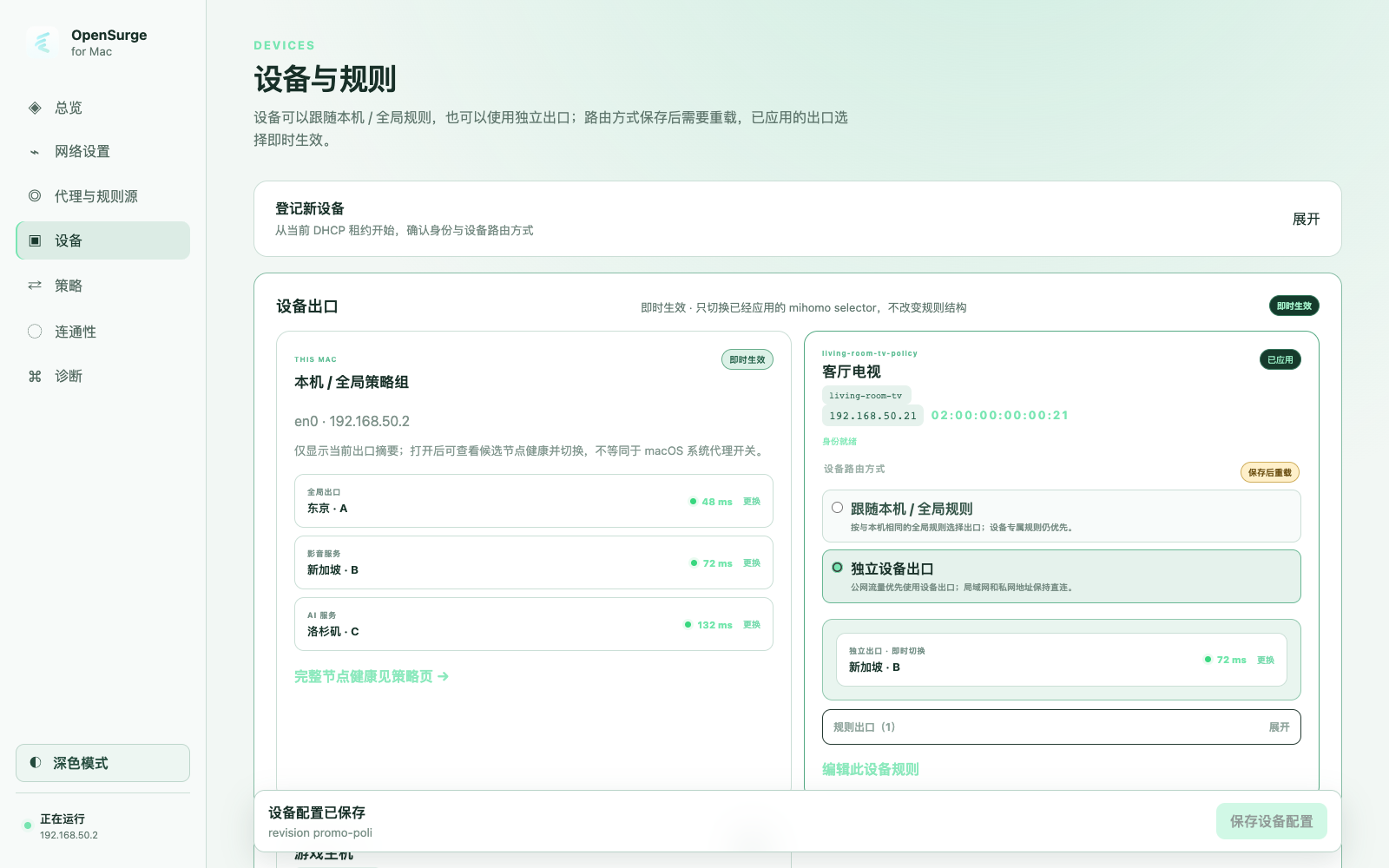
topologies emit per-device mihomo selector groups and `SRC-IP-CIDR` rules. The optional JSON
policy file lets each device either follow the Mac/global rules or take a
dedicated device selector before global rules. It also supports direct
device-specific actions such as `REJECT` and domain/IP/protocol/port/rule-provider
overlays. Local/private destinations remain direct in dedicated mode.
OpenSurge intentionally ships no household templates or third-party rule
lists. Operators supply their own policy content; the empty starter file is
valid. See [per-device policy overlays](docs/device-policy.md) for the JSON
model, precedence, CLI commands, and validation boundary.
## Web GUI and menu bar app
If you installed OpenSurge from a package, start with the
[OpenSurge for Mac App User Guide](docs/app-user-guide.md).
The repository now includes the loopback Go Control API, an embedded React Web
GUI, and a read-only native SwiftUI menu bar launcher. For a development build:
```sh
make web-install
make control-build
./bin/opensurge-control --config examples/config.example.yaml
make menubar-build
```
The control service listens only on `127.0.0.1` and prints a one-time Web GUI
bootstrap link. The menu bar app shows status and recovery warnings and opens
the Web GUI; it deliberately has no gateway start/stop or policy-selection
actions. It separates quitting only the menu bar app from quitting OpenSurge.
The latter is available only after the gateway data plane has stopped, and
quits the menu bar app plus the user-level Control Service. The launchd-managed
root Helper remains loaded and idle, so reopening OpenSurge needs no new
administrator authorization.
The menu bar also provides a separate Uninstall OpenSurge action. Once the
gateway is stopped, macOS administrator authorization can remove the app,
Control Service, and root Helper while either preserving configuration data
for reinstallation or deleting everything.
The Web GUI includes a native connectivity page for the applied gateway policy
path and links to Net.Coffee for a separate browser-local check. Neither result
is presented as proof of a downstream device's DHCP/DNS/TUN path.
See the [GUI architecture notes](docs/gui-architecture.zh-CN.md) for the current
security and packaging boundary.
`make gui-installer` builds a macOS package after requiring real mihomo and
dnsmasq binaries. Developer ID signing and notarization are opt-in through the
environment variables documented in the architecture notes. Stable GitHub releases
contain explicitly named `arm64-unsigned.pkg` and `x86_64-unsigned.pkg` builds;
a stable Release is never described as signed, notarized, or Gatekeeper-ready.
### Install an unsigned stable GitHub release
Stable releases provide packages for both Apple Silicon and Intel Macs. Download
`arm64-unsigned.pkg` for Apple Silicon or `x86_64-unsigned.pkg` for Intel, plus
`SHA256SUMS`, from the matching GitHub Release. You can verify downloaded files with
`shasum -a 256 -c SHA256SUMS` and the selected package's GitHub build provenance with:
```sh
gh attestation verify OpenSurge-for-Mac-*-arm64-unsigned.pkg \
-R YTwsy/OpenSurge-for-Mac
gh attestation verify OpenSurge-for-Mac-*-x86_64-unsigned.pkg \
-R YTwsy/OpenSurge-for-Mac
```
Double-click the package. If Gatekeeper blocks it, open **System Settings →
Privacy & Security**, choose **Open Anyway**, authenticate, and open the same
package again. Do not disable Gatekeeper globally or recursively remove
quarantine attributes. Finish Installer with an administrator account, then
open **OpenSurge** from `/Applications`. Installation starts the local
helper and Control Service, but the gateway remains stopped until you explicitly
start it from the control plane.
Package upgrades refuse to run while same-LAN DHCP recovery is incomplete.
Before replacing payload files, preinstall stops the user control service and
menu bar app, runs the installed `omg stop`, and unloads the root helper. The
existing config, imported sources, policy data, and runtime history are kept;
only a first installation seeds `config.yaml` from the packaged example.
## Transparent proxying
TUN is the supported transparent proxy path on macOS. Mihomo `redir-port` and
PF TCP redirection are intentionally unsupported because the current Darwin
build reports redir as unsupported at runtime. Keep `mihomo.redir_port` and
`pf.redirect_tcp_to` at `0`; enable transparent proxying with
`transparent.mode: "tun"`.
## Mihomo profiles
OpenSurge for Mac can render a managed mihomo config or import an existing
mihomo profile. In imported mode, OpenSurge keeps owning gateway-critical
fields such as LAN binding, `allow-lan`, the DNS listener/fake-IP range, TUN,
`external-controller`, and runtime paths. The imported profile contributes
`proxies`, `proxy-providers`, `proxy-groups`, `rule-providers`, and `rules`, plus
its non-gateway DNS resolver/filter fields. Preserving fields such as
`nameserver-policy`, `proxy-server-nameserver`, and `fake-ip-filter` keeps proxy
server hostnames resolvable without allowing the profile to replace the
gateway DNS listener or TUN DNS contract.
```yaml
mihomo:
profile_mode: "imported"
profile: "./profiles/home.yaml"
```
Relative `mihomo.profile` paths are resolved from the OpenSurge config file's
directory. Relative `path:` entries inside imported `proxy-providers` and
`rule-providers` are resolved from the imported mihomo profile's directory.
OpenSurge renders `profile.store-selected: true` so mihomo can persist policy
group choices across restarts.
Preview the final generated mihomo config before starting gateway services:
```sh
go run ./cmd/omg doctor --config examples/config.imported-profile.example.yaml
go run ./cmd/omg render-mihomo --config examples/config.example.yaml
go run ./cmd/omg render-mihomo --config examples/config.imported-profile.example.yaml
```
Use `validate-mihomo` when `mihomo.binary` points to an installed mihomo binary.
It renders the final config and runs mihomo's own `-t` validation without
starting gateway services.
```sh
go run ./cmd/omg validate-mihomo --config examples/config.imported-profile.example.yaml
```
## CLI usage
These commands are intended for development, automation, and diagnostics.
Package users can follow the graphical workflow in the
[App User Guide](docs/app-user-guide.md).
### Status and diagnostics
```sh
go run ./cmd/omg doctor --config examples/config.example.yaml
go run ./cmd/omg status --config examples/config.example.yaml
go run ./cmd/omg status --config examples/config.example.yaml --format json
go run ./cmd/omg logs --config examples/config.example.yaml --tail 50 --format json
go run ./cmd/omg snapshot --config examples/config.example.yaml --tail 50 --format json
```
### Policies, devices, and providers
```sh
go run ./cmd/omg policies --config examples/config.imported-profile.example.yaml
go run ./cmd/omg policy-select \
--config examples/config.imported-profile.example.yaml \
--group Proxy \
--policy DIRECT
# After configuring device_policy.file:
go run ./cmd/omg devices --config ./config.yaml --format json
go run ./cmd/omg device-policy-select \
--config ./config.yaml \
--device alice-phone \
--slot default \
--policy DIRECT
go run ./cmd/omg connections \
--config examples/config.imported-profile.example.yaml \
--format json
go run ./cmd/omg providers \
--config examples/config.imported-profile.example.yaml \
--format json
go run ./cmd/omg provider-update \
--config examples/config.imported-profile.example.yaml \
--provider demo-provider \
--format json
```
### Config rendering
```sh
go run ./cmd/omg render-mihomo --config examples/config.example.yaml
go run ./cmd/omg validate-mihomo \
--config examples/config.imported-profile.example.yaml
```
### Gateway lifecycle
The following commands modify DHCP, DNS, PF, IPv4 forwarding, or mihomo runtime
state and require `sudo`:
```sh
sudo go run ./cmd/omg start --config examples/config.example.yaml --format json
sudo go run ./cmd/omg reload --config examples/config.example.yaml --format json
sudo go run ./cmd/omg restart-mihomo --config examples/config.example.yaml --format json
sudo go run ./cmd/omg stop --config examples/config.example.yaml --format json
```
Additional behavior:
- `policy-select` reads live mihomo policy groups and rejects unknown groups or
policies before sending a selection change.
- `provider-update --provider ` asks mihomo to refresh the selected proxy
provider and returns its refreshed state.
- `logs --tail N --format json` returns recent dnsmasq and mihomo log lines with
per-file existence and read-error fields.
- `snapshot --format json` aggregates status, doctor checks, leases, logs,
policy groups, connections, and providers. Mihomo API failures do not prevent
the rest of the snapshot from being returned.
- `restart-mihomo` restarts only the proxy engine. It does not stop dnsmasq,
unload PF, restore IPv4 forwarding, or change host network settings.
- `--format json` preserves non-zero failure exit codes and emits structured
errors to stderr. Successful `start` and `stop` operations return `command`,
`ok`, and `config_path` in their payloads.
## An AI-agent-friendly engineering workspace
OpenSurge treats the repository as part of the engineering system, not merely a
place to store code. The goal is to make product intent, network safety rules,
runtime evidence, and accumulated project knowledge directly legible to both
human contributors and coding agents.
### Harness Engineering: engineer the environment around the agent
The workspace applies the practical idea behind
[Harness Engineering](https://openai.com/index/harness-engineering/): reliable
agent work depends on the context, constraints, tools, observability, and
acceptance gates around the model.
- `AGENTS.md` is the compact entry map: it states product identity, hard network
invariants, and which deeper documents an agent must read for a task.
- [`docs/agent-wiki/`](docs/agent-wiki/README.md) provides progressively
disclosed architecture, decision, and validation context instead of forcing
every task to rediscover the repository from scratch.
- Machine-readable CLI surfaces such as `status`, `doctor`, `logs`, and
`snapshot`, plus deterministic `make` targets and retained artifacts, make the
running system observable to agents.
- Config validation, TUN-only transparent routing, rollback behavior, isolated
labs, and explicit recovery contracts turn safety guidance into enforceable
boundaries.
### Loop Engineering: close the loop with executable evidence
OpenSurge follows the core of
[Loop Engineering](https://addyosmani.com/blog/loop-engineering/): design a
repeatable system that can act, observe, verify, recover, and carry the result
into the next iteration, rather than relying on a single clever prompt.
```text
intent + constraints
↓
AGENTS.md → Agent Wiki → source of truth
↓
implement → fast tests → Virtual LAN Lab
↓
ADB-assisted or manual real-device validation
↓
logs + artifacts + cleanup/recovery proof
↓
durable learning returns to sources/ and wiki/
↺
```
The verification layers are complementary:
- `make test` and focused UI/control-plane gates provide the fast inner loop.
- The Lima + socket_vmnet Virtual LAN Lab makes privileged DHCP, DNS, pf/NAT,
forwarding, TUN, policy, rollback, and cleanup behavior reproducible without
risking a normal LAN.
- Real-device and same-LAN/same-WiFi runners close the physical-topology loop.
ADB can collect Android route, DNS, and connectivity evidence while the Mac
side correlates dnsmasq/mihomo logs; manual phone checkpoints remain supported
when the operator needs to retain direct control.
- Recovery is part of acceptance for risky DHCP takeover flows. A successful
traffic probe alone is not enough if the router, Mac, or clients cannot be
returned to a known-good state.
Virtual Lab results do not stand in for real-device behavior, and one physical
smoke does not replace the deterministic Lab gates. See the
[validation contract](docs/agent-wiki/wiki/concepts/validation-gates.md) for the
exact claim each gate is allowed to support.
### Agent Wiki: externalized project memory
The [Agent Wiki](docs/agent-wiki/wiki/index.md) applies the LLM Wiki idea of
moving durable memory out of a transient context window and into a small,
versioned, source-backed knowledge layer:
- `docs/agent-wiki/sources/` records stable project briefs, decisions, and
validation contracts.
- `docs/agent-wiki/wiki/` distills those sources into short, linked pages that
an agent can load progressively for the task at hand.
- `.codex/hooks.json` integrates the local Session Wiki hook, when installed,
so session continuity and compaction can use project-local memory without
committing private session state.
Only reusable, verified knowledge belongs in this layer. One-off logs,
temporary output, unverified guesses, and ordinary TODOs do not.
## License
OpenSurge for Mac original code and assets without a separate notice are
licensed under the [GNU General Public License version 3 only](LICENSE)
(`GPL-3.0-only`). Bundled third-party programs and libraries retain their own
licenses; see [Third-Party Notices](THIRD_PARTY_NOTICES.md), including exact
corresponding-source links for the bundled mihomo and dnsmasq versions.
## Safety
`start` and `stop` are intended to run with `sudo` because they manage DHCP,
pf, and IPv4 forwarding. Runtime files are written under `runtime.dir` from the
config file.
## Development workflow
Use `make test` as the fast default gate. CI currently runs this unit-test gate
only, so ordinary pushes and pull requests do not need host networking,
passwordless sudo, Lima, or socket_vmnet.
Run `make lab-test` locally before committing or reviewing high-risk network
changes. This includes changes to DHCP, DNS, mihomo startup/config rendering,
pf rules, forwarding/rollback behavior, gateway lifecycle, lab scripts, and
example configs that affect runtime traffic. Keep the virtual LAN lab as a
local, nightly, or manual gate until a dedicated macOS runner can provide the
same controlled host privileges and network isolation.
Use `make lab-test-tun` for the supported transparent proxy path. That test
keeps clients proxy-free and requires mihomo to log the direct HTTPS connection
through its TUN inbound. Use `make lab-test-tun-imported-profile` when changing
mihomo profile import or overlay behavior; it runs the same TUN gate with an
imported profile fixture. Use `make lab-test-tun-imported-egress` when changing
imported provider or policy-selection behavior that should affect transparent
TUN traffic; it uses a local HTTP provider and controlled HTTP CONNECT proxy to
prove `policy-select` changes the TUN egress path between `DIRECT` and the
controlled proxy.
Use `make lab-test-tun-device-policy` when changing MAC reservations,
per-device selectors, or the device override data path. It proves that two
clients receive their own fixed leases, can independently select different TUN
egress paths, and enforce a device-level domain `REJECT`. Domain/protocol rule
compilation, templates, and HTTP/MRS rule-provider configuration are covered by
unit tests; they do not require one Lab run per operator-defined rule.
Use `make policy-control-test` for policy-control and machine-readable CLI
changes. It starts the real mihomo binary without sudo, dnsmasq, pf, or TUN and
checks `policies`, invalid and valid `policy-select`, persisted selection
restore after mihomo restart, local DIRECT-vs-proxy egress switching through
mihomo's mixed-port, `connections`, `providers`, `provider-update` for file and
HTTP proxy providers, and `snapshot` against the live external-controller API.
Use `make same-lan-start-tun` and `make same-lan-adb-check` for the narrow
same-LAN default-gateway smoke. This gate keeps DHCP disabled, requires TUN, and
uses ADB to inspect one Android test device whose gateway and DNS point at the
Mac's LAN IP. Use `make same-lan-start-tun-proxy` with `OMG_SAME_LAN_*`
upstream-proxy environment overrides to prove one-domain real proxy egress, such
as `api.ipify.org`, before importing a full subscription. Use
`make same-lan-start-tun-imported-egress` plus
`make same-lan-adb-check-imported-egress` for the closer-to-real-device smoke
that imports a provider-backed `TunEgress` group, then switches same-LAN TUN
traffic from `DIRECT` to a controlled local HTTP CONNECT proxy. These gates do
not claim whole-LAN rollout readiness or real remote subscription exits.
When ADB is intentionally unavailable, the same imported egress evidence can
be collected with manual Android browser probes; see
[`tests/same-lan/README.md`](tests/same-lan/README.md#manual-phone-check-without-adb).
For a dedicated test Wi-Fi where router DHCP is manually disabled, use
`make same-wifi-dhcp-start-imported-egress`, then reconnect the Android client
in DHCP mode and run `make same-wifi-dhcp-adb-check-imported-egress`. This
separate high-risk runner uses `gateway.mode: "same_wifi_dhcp"` and requires an
explicit protected-static-address list plus an operator confirmation that router
DHCP is disabled. Its stop gate verifies OpenSurge cleanup, but router DHCP and
client automatic addressing must still be restored manually; see
[`tests/same-lan/WIFI-DHCP-RUNNER.md`](tests/same-lan/WIFI-DHCP-RUNNER.md).
## Virtual LAN lab
The integration lab runs the real macOS gateway against two lightweight Linux
clients. Lima provides the clients, while socket_vmnet creates an isolated
Layer 2 host network without a competing DHCP server. The test covers DHCP,
DNS, ICMP/NAT, direct HTTPS, and explicit HTTPS through mihomo `mixed-port`.
```sh
make lab-install
make lab-up
sudo -v
make lab-test
make lab-test-tun
make lab-test-tun-imported-profile
make lab-test-tun-imported-egress
make lab-test-tun-device-policy
make lab-down
```
The one-time installer adds a root-owned, fixed-function network helper and a
narrow sudoers rule for starting, stopping, and inspecting the lab network. The
gateway binary itself is not granted passwordless root access; refresh the sudo
ticket with `sudo -v` before an end-to-end test. See `tests/lab/README.md` for
the topology, safety checks, and troubleshooting steps.