# dsh-account-usage
[](README.md)
[](README_en.md)
A DeepSeek Harness (DSH) web-GUI plugin: adds an "Account" page to the settings panel for a one-stop view of DeepSeek platform balance/usage and OpenCode Go quotas.
[](LICENSE)
[](package.json)
[](https://github.com/deepseek-ai/deepseek-harness)
---
## 📑 Table of Contents
- [📸 Preview](#-preview)
- [✨ Features](#-features)
- [🚀 Quick Start](#-quick-start)
- [⚙️ Configuration](#️-configuration)
- [📖 Usage](#-usage)
- [🔧 How It Works](#-how-it-works)
- [🧰 Environment Variables](#-environment-variables)
- [⚠️ Known Limitations](#️-known-limitations)
- [🛠️ Development](#️-development)
- [🤝 Contributing](#-contributing)
- [📄 License](#-license)
---
## 📸 Preview
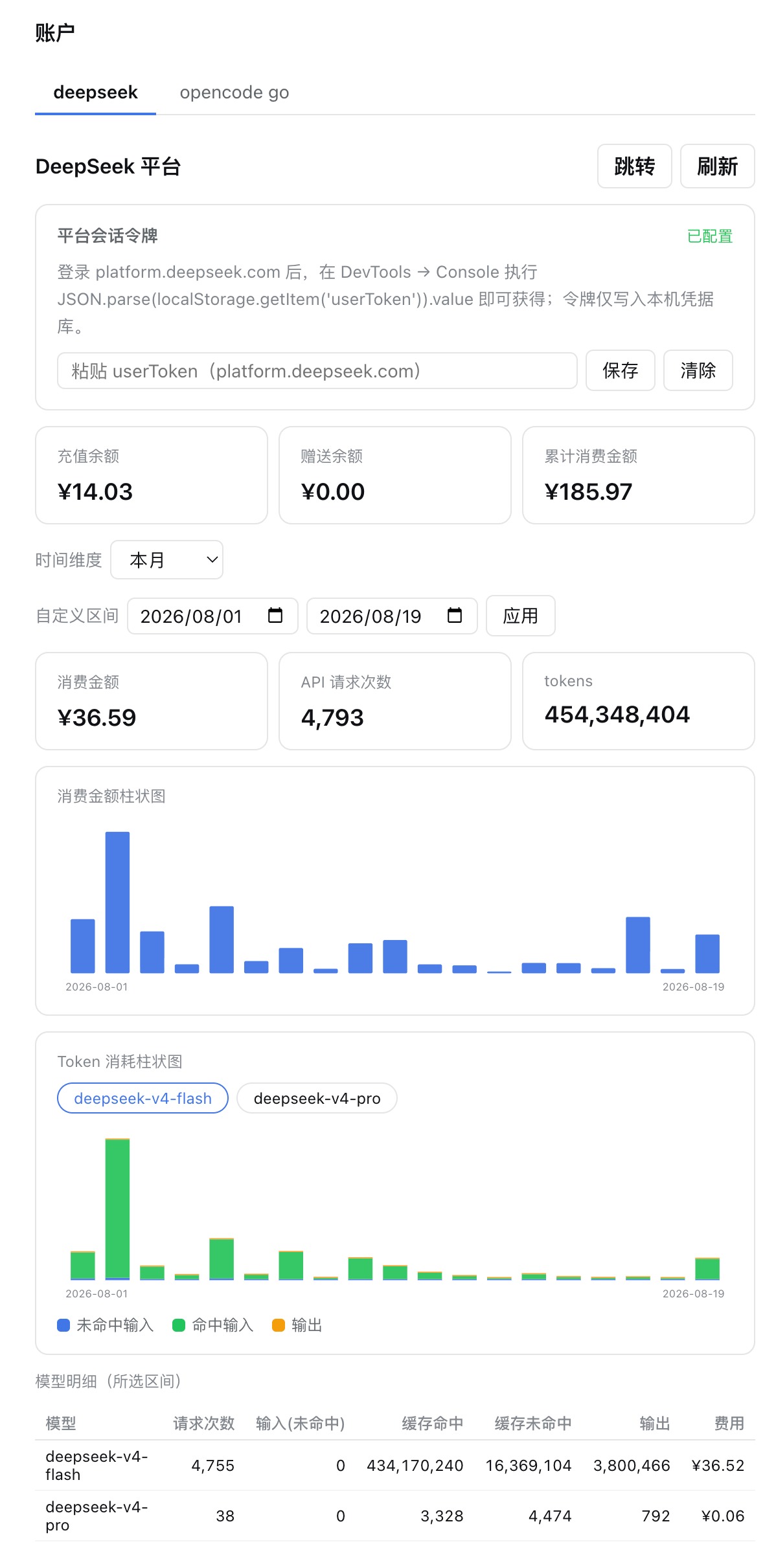
**DeepSeek platform tab**: balance overview, time-range selector with custom range, daily cost/token bar charts, per-model detail table.
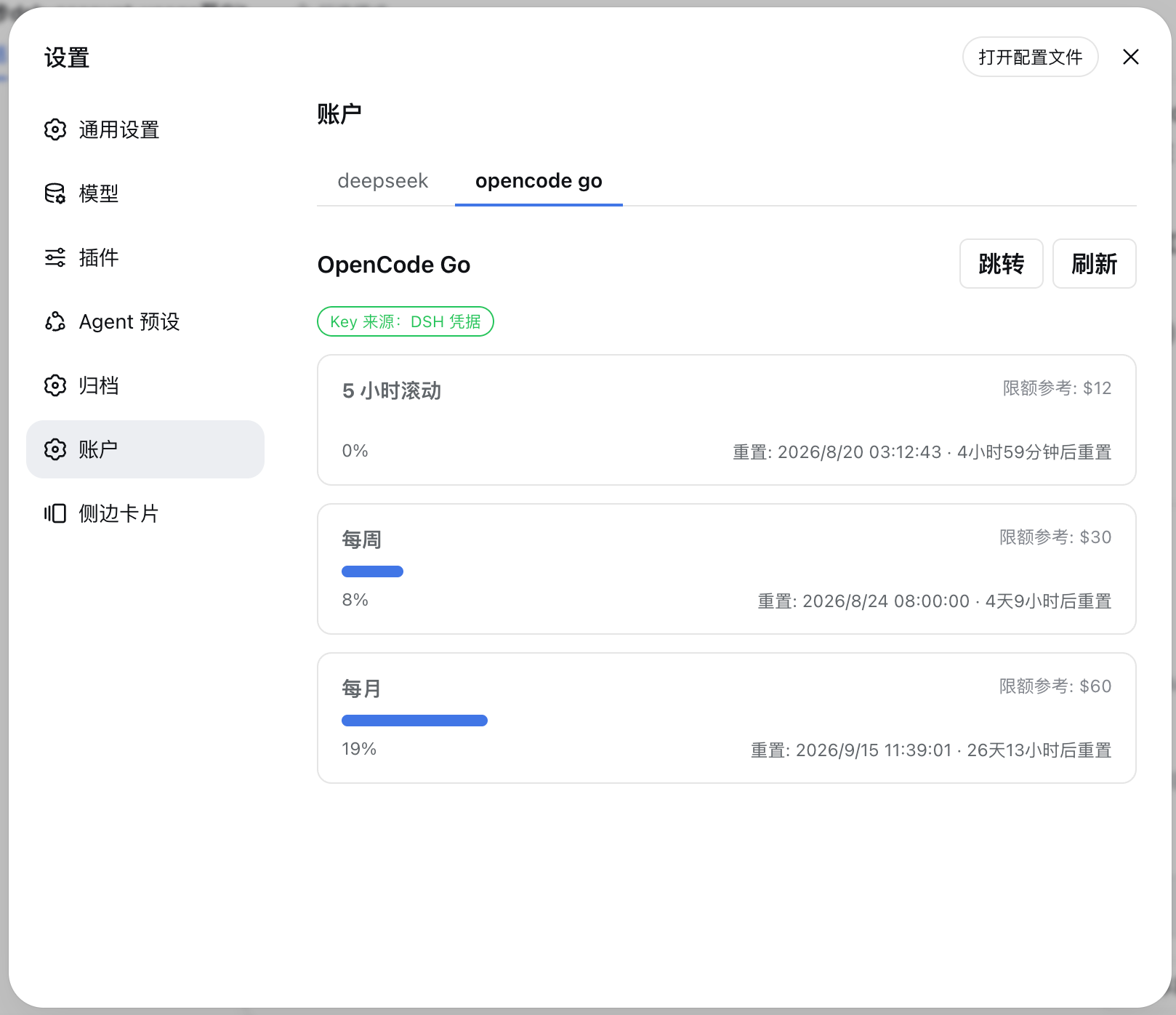
**OpenCode Go tab**: usage progress bars, reset times and reference limits for the 5-hour rolling / weekly / monthly windows.
---
## ✨ Features
| Feature | Description |
|---------|-------------|
| **DeepSeek platform overview** | Recharge balance, bonus balance, cumulative spending, current-month spending and tokens |
| **Daily bar charts** | Cost and token consumption charts, SVG-rendered, with hover tooltips per day |
| **Time-range switching** | Today / last 7 days / last 30 days / last 90 days / this month / last month / custom range |
| **Per-model table** | deepseek-v4-flash / deepseek-v4-pro / others: request count, input/cached/output tokens, cost |
| **OpenCode Go quotas** | Usage percentage and next reset time for the 5-hour rolling / weekly / monthly windows |
| **Auto refresh** | Polls for fresh data every 60 seconds while the page is mounted |
| **Bilingual UI** | Full Chinese/English switching |
---
## 🚀 Quick Start
### Prerequisites
- DSH CLI and pnpm installed (`dsh plugin` forwards to pnpm internally)
### Install
```sh
# Option 1: install from a local source directory (development)
dsh plugin --profile web add
# Option 2: install from GitHub
dsh plugin --profile web add github:Ycet/dsh-account-usage
```
The package declares a `dsh.bundle` patch layer; `dsh plugin` merges the loader entry into the profile's bundle layer automatically — no manual editing of `cordis.patch.yml` required.
Manual patch-layer merge (optional)
```yaml
# ~/.dsh/profiles/web/cordis.patch.yml
- insert:
- id: account-usage
name: dsh-account-usage
```
### Launch
1. Restart the web app: `dsh web`
2. Open http://127.0.0.1:3080 and refresh the page
3. The "Account" page appears in the settings panel
---
## ⚙️ Configuration
### DeepSeek platform token (required; only affects the DeepSeek tab)
The usage endpoints are private APIs of the platform console and need your login token:
1. Sign in at https://platform.deepseek.com
2. Open DevTools → Console and run:
```js
JSON.parse(localStorage.getItem('userToken')).value
```
3. Paste the token into the input on the plugin's "Account" page and save it (stored as `DEEPSEEK_PLATFORM_TOKEN` in `~/.dsh/.credentials.yaml`)
Write the credentials file manually (optional)
```yaml
# ~/.dsh/.credentials.yaml
DEEPSEEK_PLATFORM_TOKEN:
```
The token stays in your local credential store; the browser and network requests never carry it anywhere beyond the upstream.
### OpenCode Go key (usually no configuration needed)
The plugin looks it up automatically in this order:
1. DSH credential `OPENCODE_GO_API_KEY` (`~/.dsh/.credentials.yaml`; usually already present when opencode-go is configured in Settings → Models);
2. OpenCode's own `~/.local/share/opencode/auth.json` (the `opencode-go` entry with `type: api`).
---
## 📖 Usage
- Switch between the **deepseek / opencode go** tabs at the top of the "Account" page in the settings panel;
- On the DeepSeek tab, pick a time range (Today / last 7 days / last 30 days / last 90 days / this month / last month) or choose a custom range and click "Apply";
- Hover over the bar charts for daily details; the per-model table shows requests, tokens and cost for the selected range;
- On the OpenCode Go tab, view usage percentage, next reset time and reference limit for each quota window, with one-click "Go to opencode.ai" and "Refresh" buttons;
- Data auto-refreshes every 60 seconds while the page is mounted; "Open config file" locates your local DSH credentials file.
---
## 🔧 How It Works
A dual-half plugin (host + browser) with data flowing through same-origin HTTP routes registered by the host:
| Part | File | Role |
|------|------|------|
| Host | `index.js` | Registers three precise `GET /api/account-usage/*` routes (`deepseek-summary` / `deepseek-usage` / `opencode`); resolves keys via `ctx.credentials`, uses a fixed allow-listed upstream URL, 15s timeout + 30s cache |
| Parsing/aggregation | `lib/aggregate.js` | Pure functions: daily/per-model token, cost and request-count aggregation after unwrapping the platform envelope |
| Browser | `client.js` | Hand-written lazy CJS client bundle: registers `settings.section` (id `account`), renders the account page (SVG bar charts, range selector, model table, quota progress bars), auto-refreshes every 60s |
| Composition | `cordis.patch.yml` | `dsh.bundle` patch layer, merged automatically on install |
### Data sources
| Purpose | Endpoint | Auth |
|---------|----------|------|
| Account summary | `platform.deepseek.com/api/v0/users/get_user_summary` (+`/get_user_info`) | `Bearer ` |
| Daily token details | `platform.deepseek.com/api/v0/usage/amount?month=&year=` | `Bearer ` |
| Daily cost details | `platform.deepseek.com/api/v0/usage/cost?month=&year=` | `Bearer ` |
| OpenCode Go quota | `opencode.ai/zen/go/v1/usage` (official) | `Bearer ` |
---
## 🧰 Environment Variables
| Variable | Default | Description |
|----------|---------|-------------|
| `DSH_ACCOUNT_USAGE_TIMEOUT_MS` | `15000` | Upstream request timeout (ms) |
| `DSH_ACCOUNT_USAGE_CACHE_MS` | `30000` | Platform data cache TTL (ms) |
| `DSH_ACCOUNT_USAGE_MAX_MONTHS` | `3` | Max months a single query may span (truncated automatically) |
| `DSH_ACCOUNT_USAGE_OPENCODE_CACHE_MS` | `60000` | OpenCode quota cache TTL (ms) |
---
## ⚠️ Known Limitations
- The DeepSeek usage APIs are **undocumented private endpoints**; fields may change as the platform evolves. The plugin parses responses defensively and degrades missing fields to "—" instead of failing. If "—" persists, re-capture the API and report back.
- "Cumulative spending" and "API request count" are not in public docs: cumulative spending is located by a naming heuristic in the summary response (shows "—" if not found), and request count reads `count/requests/request_count/req_count/calls` fields on model entries. Both were calibrated against a real token.
- OpenCode Go limits ($12/$30/$60) are reference values for the plans; the endpoint does not return limits. Check opencode.ai when plans change.
- When bound to `0.0.0.0`, this plugin's routes are reachable on the LAN (the same pre-existing limitation as other local DSH plugins; the default `127.0.0.1` is unaffected).
---
## 🛠️ Development
```sh
node --check index.js # host syntax check
node --check lib/aggregate.js # aggregation module syntax check
# Local install (development iteration):
dsh plugin --profile web add
# After changing the source, reinstall (remove then add, or bump the version and add again), then restart dsh web
```
After modifying `client.js`, restart `dsh web` (the boot-graph hash is regenerated) and hard-refresh the page.
> [!NOTE]
> On Windows, `dsh plugin` forwards to pnpm through the shell, so the install path must not contain spaces; if your workspace path has spaces, create a junction (`mklink /J`) in a space-free path as an install gateway.
---
## 🤝 Contributing
Issues and pull requests are welcome: report problems with a screenshot and the plugin version at [Issues](https://github.com/Ycet/dsh-account-usage/issues); for improvements, follow Fork → branch → PR.
---
## 📄 License
This project is licensed under the [MIT](LICENSE) license.