# dsh-my-plugins
[](README.md)
[](README_en.md)
A DeepSeek Harness (DSH) plugin management panel: adds a "My Plugins" tab to the Settings → Plugins page for one-click installs (GitHub / link / file / npm), viewing versions, enabling/disabling, checking GitHub updates and removing plugins with confirmation.
[](LICENSE)
[](package.json)
[](https://github.com/deepseek-ai/deepseek-harness)
---
## 📑 Table of Contents
- [📸 Preview](#-preview)
- [✨ Features](#-features)
- [🚀 Quick Start](#-quick-start)
- [📖 Usage](#-usage)
- [🔧 How It Works](#-how-it-works)
- [🧪 Development & Testing](#-development--testing)
- [⚠️ Known Limitations](#️-known-limitations)
- [🤝 Contributing](#-contributing)
- [📄 License](#-license)
---
## 📸 Preview
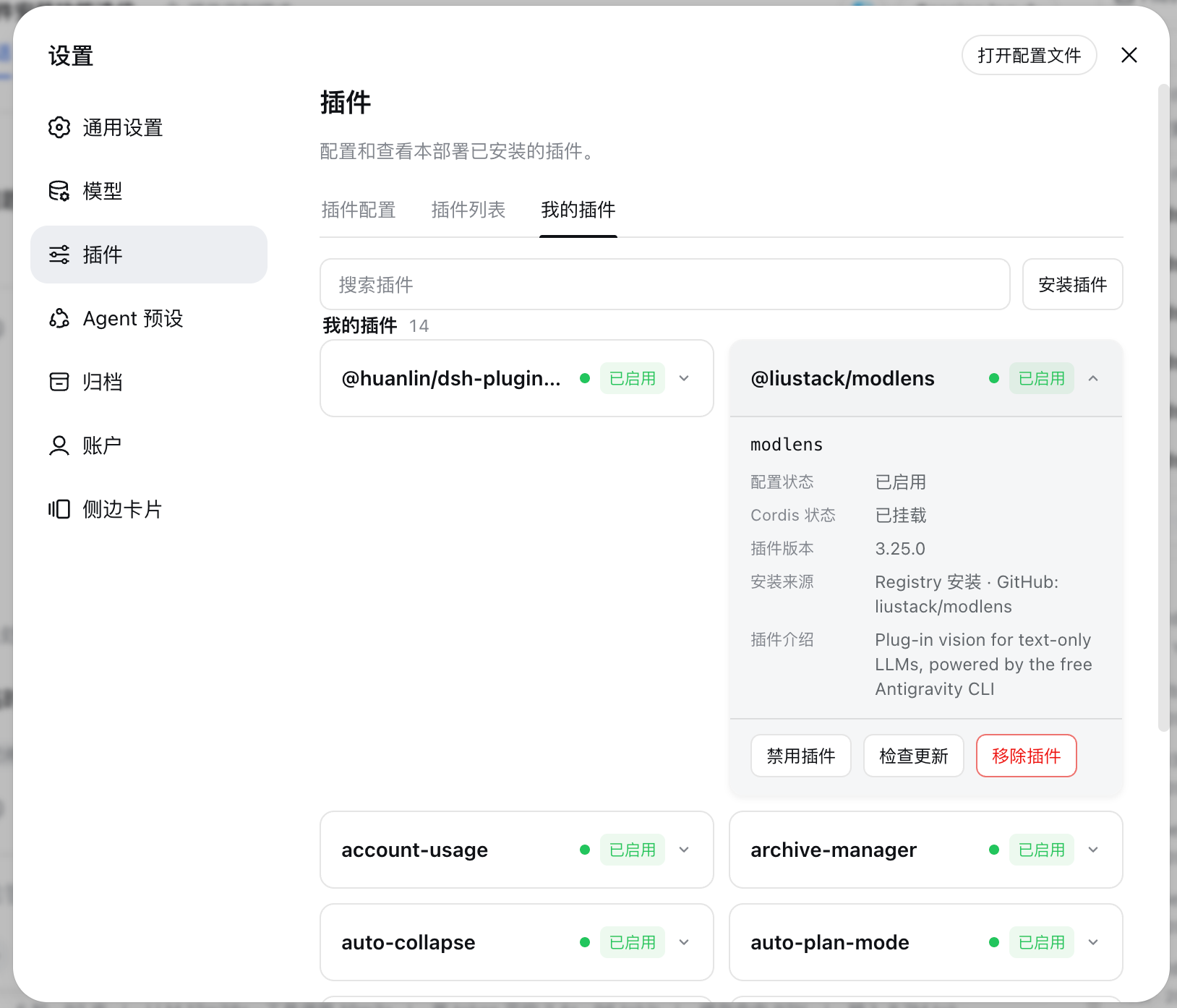
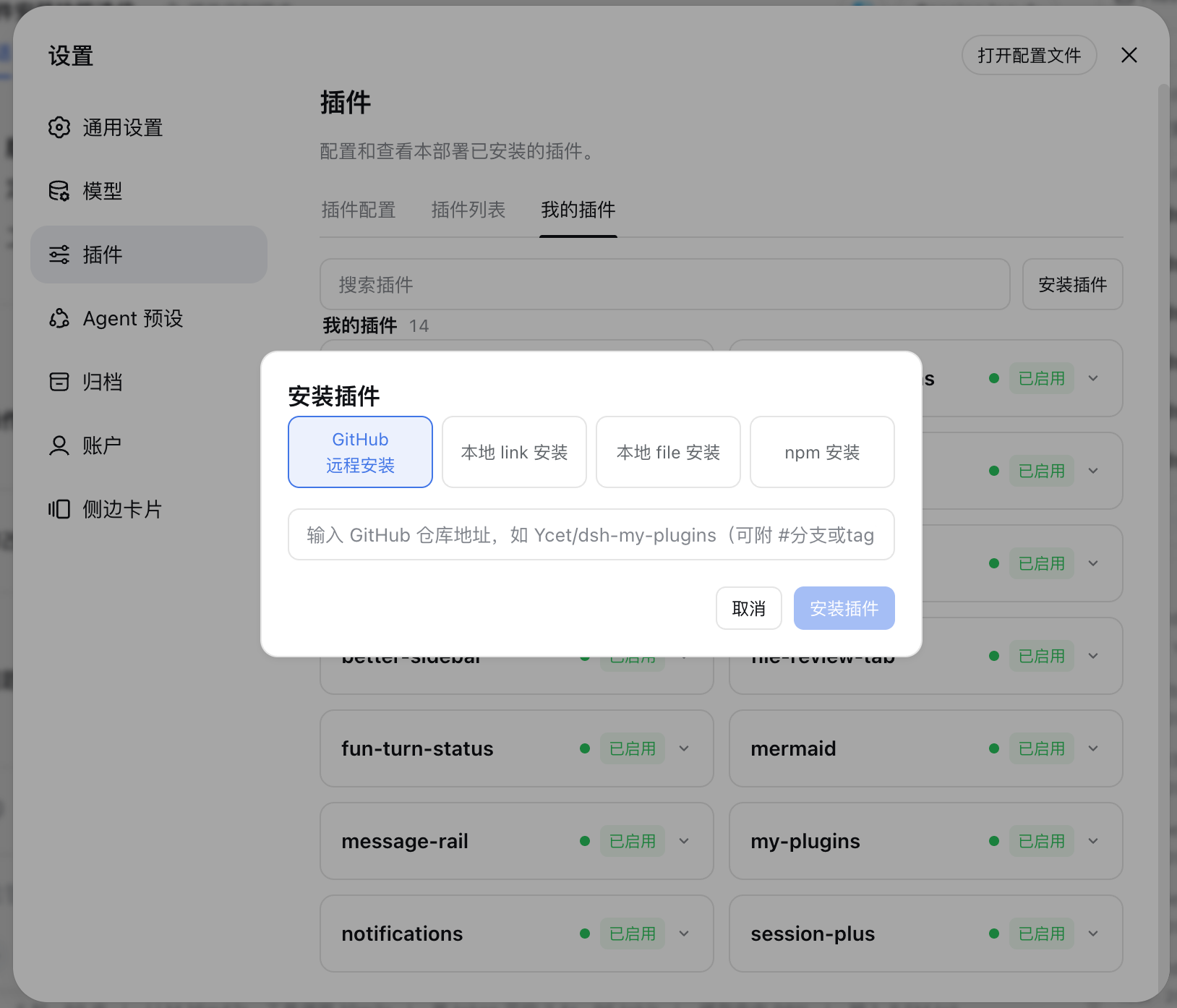
The "My Plugins" page (Settings → Plugins, v1.4.0): an "Install plugin" button added next to the search box opens a dialog with four install methods (GitHub / link / file / npm); plugin cards show version, install source, configuration and Cordis status.
---
## ✨ Features
| Feature | Description |
|---------|-------------|
| **"My Plugins" tab** | Adds a dedicated tab (`mine`) to the Settings → Plugins page listing all user-installed plugins |
| **One-click install** | An "Install plugin" button next to the search box opens a dialog with four methods: GitHub remote install, local link install, local file install and npm install (since v1.4.0); installing a package that is already present asks for confirmation before switching the install source |
| **Bulk update check** | A "Check updates" button next to the search box checks every installed plugin for available updates in one click (local installs and manual patches are skipped, since v1.6.0); plugins with updates get a yellow "Update pending" status tag, cleared after clicking "Update now" on the card |
| **Plugin cards** | One card per plugin: name, version, description and install source (GitHub / local / registry / manual patch); GitHub install sources and the GitHub upstream on registry cards render as clickable links that open the repository in a new tab (since v1.5.0) |
| **Status display** | Configuration status (enabled/disabled) and Cordis mount phase (not mounted / waiting for dependencies / loading / mounted / mount failed / unloading) |
| **Search** | Real-time filtering by plugin name or description |
| **Enable/disable** | One-click disable/enable; state is written to a managed patch override block in the profile and fully applies after restarting `dsh web` |
| **GitHub update check** | Checks upstream releases for GitHub-sourced plugins and decides whether an update is safe (version comparison + Git commit confirmation) |
| **Update now** | Updates GitHub-sourced plugins through the official `dsh plugin` CLI; before updating it validates that local dependencies in the profile are not stale (since v1.3.6), so an update can never break the install |
| **Remove with confirmation** | A confirmation dialog before removal; executed via the official `dsh plugin remove`, also cleaning up the managed disable-state block, completing after restart |
| **Bilingual UI** | Chinese and English UI, following DSH's active language |
---
## 🚀 Quick Start
### Prerequisites
- DSH CLI and pnpm installed (`dsh plugin` forwards to pnpm internally)
### Install
```sh
# Option 1: install from GitHub
dsh plugin --profile web add github:Ycet/dsh-my-plugins
# Option 2: install from a local source directory (development)
dsh plugin --profile web add dsh-my-plugins@file:
```
The package declares a `dsh.bundle` patch layer; `dsh plugin` merges the loader entry into the profile's bundle layer automatically — no manual editing of `cordis.patch.yml` required.
> [!NOTE]
> `file:` installation uses a snapshot: re-run the install command after updating the source, then restart `dsh web` for it to take effect (bundle-layer changes are not hot-reloaded).
### Launch
1. Restart the web app: `dsh web`
2. Open http://127.0.0.1:3080 and go to "Settings → Plugins"
3. Switch to the "My Plugins" tab to see all user-installed plugins
---
## 📖 Usage
1. Open "Settings → Plugins → My Plugins";
2. **Install**: click "Install plugin" next to the search box, pick a method in the dialog, enter the address/path/package name and click "Install". GitHub takes `owner/repo` (optional `#branch or tag`), link/file take an absolute local path (link reads the package name from the source `package.json` automatically), npm takes a package name (optional `@version`). Installing a plugin that already exists prompts for confirmation before switching sources. Restart `dsh web` after the install completes;
3. **Bulk check**: click "Check updates" next to the search box to check all installed plugins at once; plugins with available updates show a yellow "Update pending" status tag — expand the card and click "Update now" to upgrade them one by one;
4. **Search**: filter plugins by name or description in the input at the top;
5. **Enable/disable**: click "Disable plugin" / "Enable plugin" on a card, then restart `dsh web` as prompted;
6. **Update** (GitHub source): click "Check update" to see whether the upstream has a newer version; when available, click "Update now", then restart `dsh web` to apply;
7. **Remove**: click "Remove plugin", confirm in the dialog, and restart `dsh web` to finish the uninstall.
> [!NOTE]
> Installs, updates and removals are executed through the official `dsh plugin` CLI; completion is shown in a toast at the bottom right of the page, after which you need to restart `dsh web` in the terminal for the change to fully take effect.
---
## 🔧 How It Works
A dual-half plugin (host + browser). The host registers a `/my-plugins/api` prefix route on `webServer` (POST only, trusted same-origin requests, dispatched by path segment):
| Method | Path | Purpose |
| --- | --- | --- |
| `POST` | `/my-plugins/api/list` | Return all plugin cards (version, source, config status, Cordis mount phase, available actions) |
| `POST` | `/my-plugins/api/check-all` | Bulk-check every auto-updatable plugin for available updates (local installs and manual patches are skipped, since v1.6.0) |
| `POST` | `/my-plugins/api/install` | Install a plugin (`kind` is github/link/file/npm, `input` is the address/path/package name; when a package with the same name is already installed it first returns `needConfirm`, then executes after confirmation) |
| `POST` | `/my-plugins/api/toggle` | Disable/enable a plugin (writes the managed state block in the profile's `cordis.patch.yml`) |
| `POST` | `/my-plugins/api/check-update` | Check GitHub upstream releases and compare versions |
| `POST` | `/my-plugins/api/update` | Update a GitHub-sourced plugin via `dsh plugin` |
| `POST` | `/my-plugins/api/remove` | Remove a plugin via `dsh plugin remove` and clean up managed state |
Key mechanisms:
- **Install input validation**: GitHub `owner/repo` (optional `#ref`), npm package names/versions and absolute local paths are strictly validated on the host before assembling the `dsh plugin ... add ` arguments (link reads the package `name` from the source directory's `package.json` to build `@link:`);
- **Same-name install confirmation**: for npm/link the package name can be resolved, and when the profile already contains a package with the same name, the dialog asks for confirmation before overwriting the install (which also enables switching sources, e.g. `file:` → `github:`);
- **Managed state block**: enable/disable overrides are written to the profile's `cordis.patch.yml` inside the `# >>> dsh-my-plugins managed states >>>` markers, maintained by the host so they never mix with manual patches;
- **Source detection**: package metadata decides between GitHub (`git+https://github.com/…` etc.), local (`file:` paths), registry (npm version specs) and manual patch, which determines whether automatic updates are available; the `owner/repo` of GitHub sources and registry upstreams is validated client-side with the same rules and rendered as a link to `https://github.com//` (opened in a new tab), falling back to plain text for invalid metadata (since v1.5.0);
- **Update safety**: `check-update` performs semantic version comparison and confirms the installed commit; before `update`, the profile is validated for stale local packages referenced in dependencies (since v1.3.6) — the update is refused with a hint to fix the install source when a broken local package is found;
- **Remove cleanup**: after a successful `remove`, the managed disable-state entries for that plugin's loader entries are cleaned up, keeping the profile patch file tidy.
---
## 🧪 Development & Testing
```bash
npm test # node --test test/*.test.mjs
```
`test/metadata.test.mjs` covers the pure-function contracts: package-root parsing (`packageRootOf`), source detection (`sourceOf`), GitHub metadata and version comparison (`githubRepoOf` / `compareVersions`), patch insert-block scanning (`scanPatchInsertIds`), managed-state read/write (`readManagedStates` / `writeManagedStates`), update-argument construction (`updateArgsFor`) and stale-local-dependency detection (`missingLocalDependency`); since v1.4.0 it also covers install input validation (`resolveInstallSpec` / `splitNpmInput`), same-name dependency detection (`existingDependency`) and CLI error summarisation (`summarizeCliError`).
---
## ⚠️ Known Limitations
- **Automatic updates are GitHub-source only**: registry, local and manual-patch sources cannot be auto-updated; the card shows the corresponding reason (`upstreamAhead` means a newer GitHub Release exists, but the current npm install source has no installable update yet).
- **Pinned references cannot be tracked**: plugins pinned to a tag or commit cannot track branch updates; when the installed Git commit cannot be confirmed, no update is judged safe.
- **Operations require a restart**: installs, enable/disable, update and remove fully apply only after restarting `dsh web` (bundle layers are not hot-reloaded).
- **Same-name install overwrites after confirmation**: npm/link installs resolve an already-installed package name and ask for confirmation; github/file installs cannot know the package name in advance, so pnpm handles a repeated install directly.
- **Removal is an uninstall**: removing deletes the plugin dependency from the current profile — an irreversible operation, use with care.
---
## 🤝 Contributing
Issues and pull requests are welcome: report problems with the DSH version, plugin version and reproduction steps at [Issues](https://github.com/Ycet/dsh-my-plugins/issues); for improvements, follow Fork → branch → PR and run `npm test` before submitting so the contract tests pass.
---
## 📄 License
This project is licensed under the [MIT](LICENSE) license.