# dsh-notifications
[](README.md)
[](README_en.md)
A DeepSeek Harness (DSH) web notification plugin: reminds users via browser notifications when a session is waiting for approval, asks a structured question, completes successfully, or fails — click the notification to open the corresponding session. It also colors the tab's whale icon to show the aggregate status of your sessions at a glance.
[](LICENSE)
[](package.json)
[](https://github.com/deepseek-ai/deepseek-harness)
---
## 📑 Table of Contents
- [📸 Preview](#-preview)
- [✨ Features](#-features)
- [🚀 Quick Start](#-quick-start)
- [📖 Usage](#-usage)
- [⚙️ Configuration](#️-configuration)
- [🔧 How It Works](#-how-it-works)
- [🧪 Development & Testing](#-development--testing)
- [⚠️ Known Limitations](#️-known-limitations)
- [🤝 Contributing](#-contributing)
- [📄 License](#-license)
---
## 📸 Preview
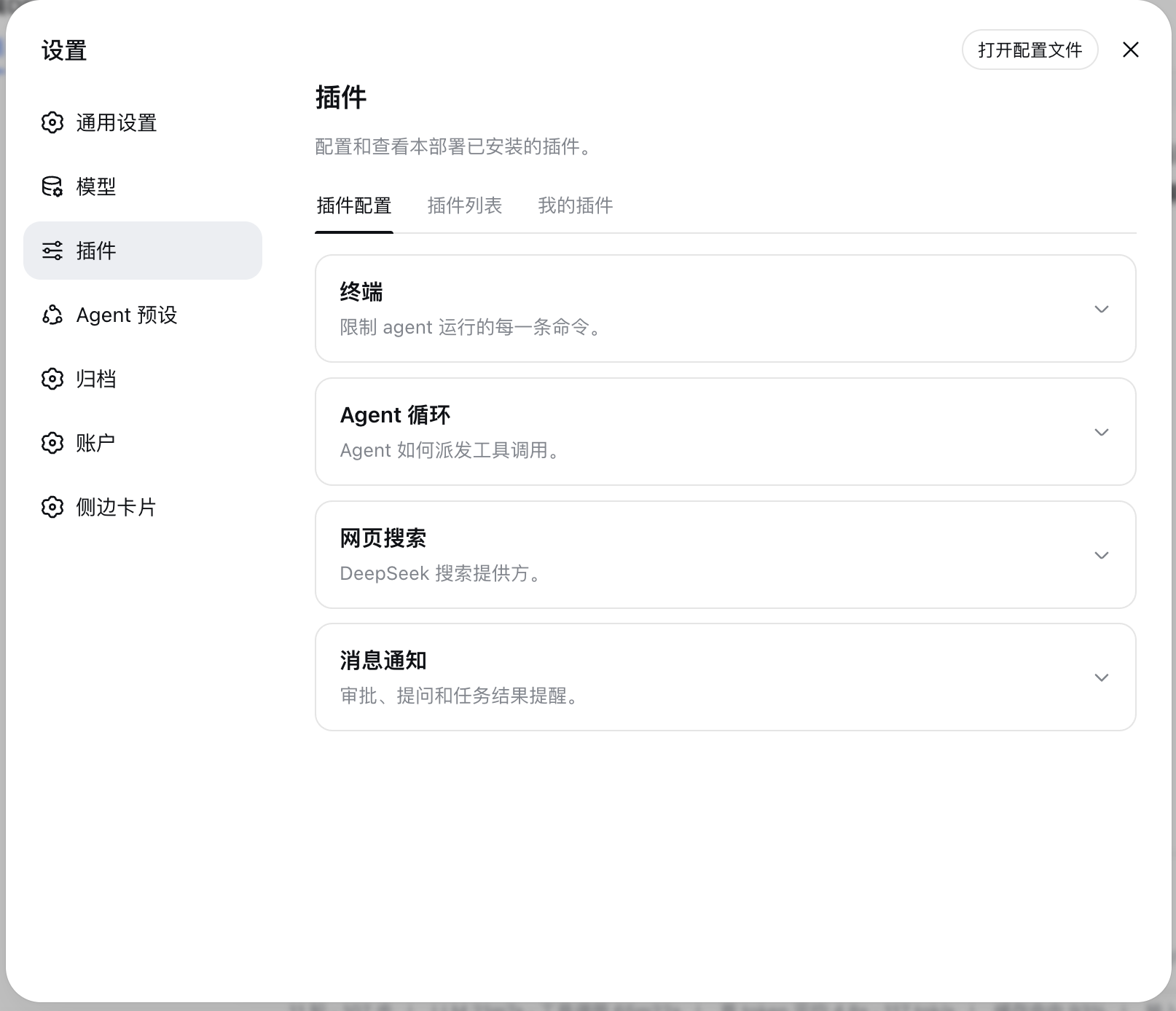
Plugin configuration list (the "Notifications" entry under Settings → Plugins → Plugin configuration):
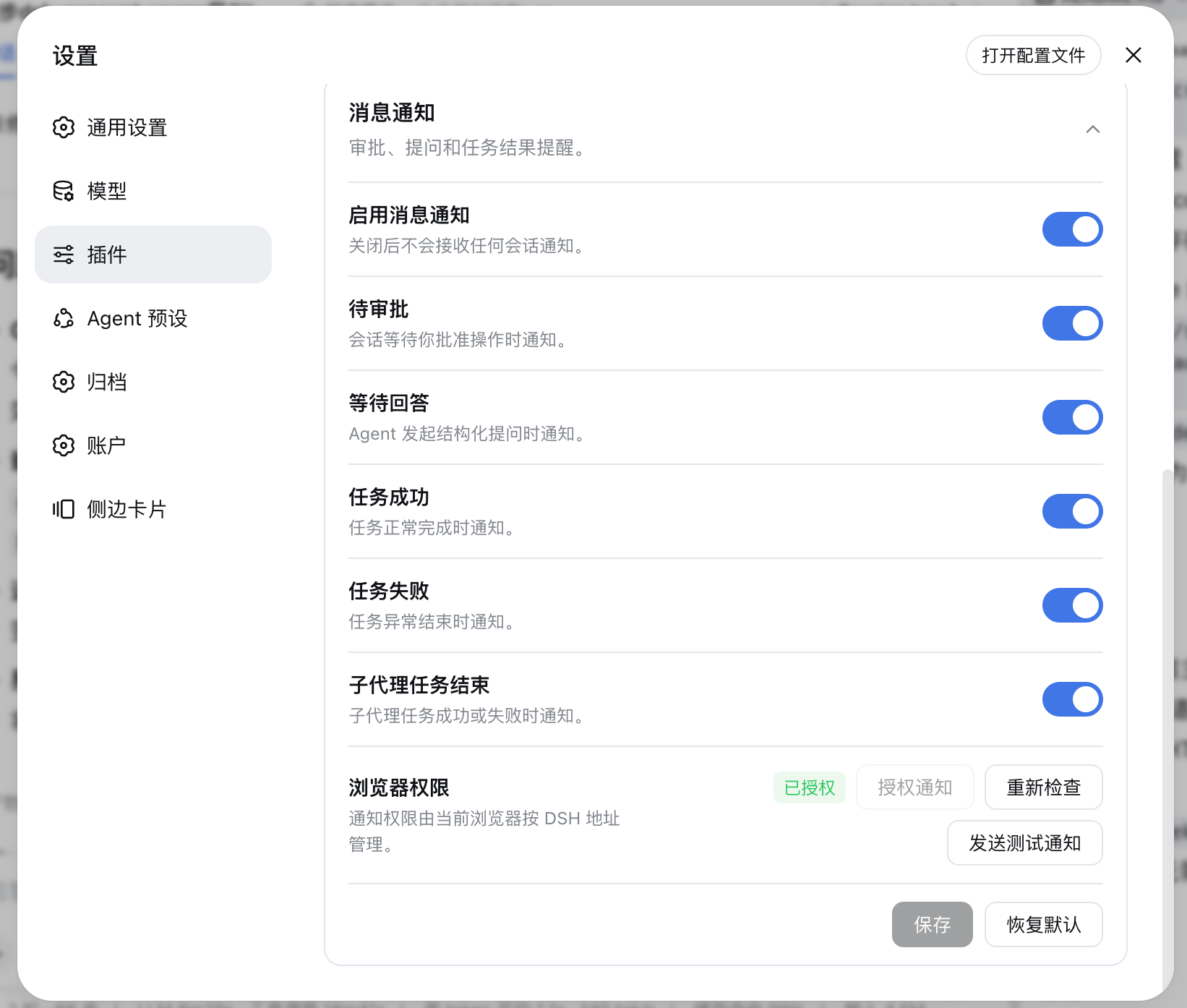
The expanded "Notifications" configuration panel (notification toggles, browser permission and action buttons):
---
## ✨ Features
| Feature | Description |
|---------|-------------|
| **All-session watching** | Watches all DSH sessions, not only the currently open session |
| **Four notification types** | Approval pending, question pending, task succeeded, task failed |
| **Independent subagent toggles** | Enable or disable subagent task-success and task-failure notifications independently |
| **Tab icon status colors** | The tab whale icon turns yellow/red/green when sessions are pending, failed, or completed (priority yellow > red > green); opening the matching conversation restores the default |
| **Independent icon toggle** | Favicon coloring is independent of the notification master switch and needs no browser permission |
| **Foreground suppression** | Suppresses duplicate alerts while the current session is being viewed in the foreground |
| **Single-tab delivery** | With multiple DSH tabs open, only one tab sends notifications |
| **Click to open** | Clicking a notification focuses DSH and opens the corresponding session (focuses the page only if the session no longer exists) |
| **Dedicated config module** | A dedicated configuration module under "Settings → Plugins → Plugin configuration" |
| **Privacy-safe** | Notification events contain no chat content, question content, approval parameters or tool parameters |
| **Bilingual UI** | Chinese and English UI, following DSH's active language |
---
## 🚀 Quick Start
### Prerequisites
- DSH CLI and pnpm installed (`dsh plugin` forwards to pnpm internally)
- Compatible with DeepSeek Harness `0.1.0-rc.6` / `0.1.0-rc.7` series; Windows / macOS / Linux; Chromium-based browsers (Chrome, Edge, Brave, etc.)
- The DSH page must stay open; notifications cannot be delivered after the browser closes
### Install
```sh
# Option 1: install from GitHub
dsh plugin --profile add github:Ycet/dsh-notifications
# Option 2: install from a local source directory (development)
dsh plugin --profile add dsh-notifications@file:
```
The package declares a `dsh.bundle` patch layer; `dsh plugin` merges the loader entry into the profile's bundle layer automatically — no manual editing of `cordis.patch.yml` required.
> [!NOTE]
> `file:` installation uses a snapshot: re-run the install command after updating the source, then restart `dsh web` for it to take effect (bundle-layer changes are not hot-reloaded).
Uninstall:
```sh
dsh plugin --profile remove dsh-notifications
```
### Launch
1. Restart the web app: `dsh web`
2. Open http://127.0.0.1:3080 and go to "Settings → Plugins → Plugin configuration"
3. Expand "Notifications", click "Grant notification access" and choose Allow in the browser permission prompt
---
## 📖 Usage
1. Install the plugin and restart `dsh web`;
2. Open "Settings → Plugins → Plugin configuration";
3. Expand the "Notifications" module;
4. Click "Grant notification access" and choose Allow in the browser permission prompt;
5. Click "Send test notification" to verify the browser setup;
6. Toggle the notification types and the subagent task-ended notifications as needed, then save.
By default, notifications fire only when the DSH tab is in the background or the event comes from a session other than the current one. Clicking a notification focuses DSH and opens the corresponding session; if the target session no longer exists, it only focuses the page.
> [!WARNING]
> The current DSH origin must be granted browser notification permission. Loopback addresses may use the Web Notification API; browsers may reject non-secure remote HTTP addresses.
### Tab whale icon status
The tab-title whale icon is recolored whenever any non-subagent session is in one of these states:
| Icon color | Condition | Back to default |
| --- | --- | --- |
| 🟡 Yellow | A session is waiting for approval / answering a structured question / plan-review | Open that session, or the pending state resolves (answered) |
| 🔴 Red | A session task failed (not cancelled) and is unviewed | Open that session, or it starts a new turn |
| 🟢 Green | A session completed and is unviewed | Open that session, or it starts a new turn |
- With multiple states present, **yellow > red > green** wins (e.g. completed + failed + pending sessions show yellow).
- Opening a session clears only *that session's* contribution; the color disappears only after **all** sessions of that color have been opened.
- Subagent sessions never affect the icon; manual cancellation (abort) is not a failure.
- Quick check: make any session wait for approval → the icon turns yellow; open it → the icon restores.
> [!NOTE]
> Color state lives in host memory: a page refresh restores the current state automatically; restarting `dsh web` clears the state machine and it rebuilds from new events.
---
## ⚙️ Configuration
Settings are stored in the `dsh-notifications` namespace of the DSH settings service:
| Field | Default | Description |
| --- | --- | --- |
| `enabled` | `true` | Master switch |
| `approvalPendingEnabled` | `true` | Approval-pending notifications |
| `questionPendingEnabled` | `true` | Structured-question notifications |
| `taskSucceededEnabled` | `true` | Task-succeeded notifications |
| `taskFailedEnabled` | `true` | Task-failed notifications |
| `subagentTaskEndedEnabled` | `true` | Subagent task success/failure notifications; turning this off does not affect top-level task notifications |
| `faviconEnabled` | `true` | Master switch for the tab whale icon status colors; independent of the notification master switch |
Browser permission is not stored in DSH configuration; the browser keeps it independently per DSH origin.
---
## 🔧 How It Works
```mermaid
flowchart LR
E["DSH session/event"] --> C["Host event classifier"]
C --> S["Same-origin SSE event stream"]
S --> F["Config & foreground filter"]
F --> L["Multi-tab leader election"]
L --> N["Web Notification API"]
N --> O["Click opens sessions.open"]
E --> T["Host state machine
(non-subagent only)"]
T --> S2["SSE state frame
(yellow/red aggregate)"]
S2 --> V["Client combine
yellow > red > green"]
B["session list completed"] --> V
V --> I["favicon recoloring"]
U["Open session (current change)"] --> P["POST /api/viewed"]
P --> T
```
The host subscribes to DSH `session/event` and normalizes every event into this safe structure:
```json
{
"eventId": "session-id:sequence:event-type",
"type": "approval_pending",
"sessionId": "session-id",
"occurredAt": 1786953600000
}
```
Same-origin endpoints:
| Method | Path | Purpose |
| --- | --- | --- |
| `GET` | `/dsh-notifications/api/config` | Read configuration and revision |
| `POST` | `/dsh-notifications/api/config` | Save or restore default configuration |
| `GET` | `/dsh-notifications/api/events` | SSE notification event stream |
| `POST` | `/dsh-notifications/api/viewed` | Report an opened session to clear its icon color contribution |
SSE re-delivers events only after a brief connection drop: the host keeps at most 256 events in memory for 5 minutes; no history is replayed on first connection or after a host restart.
The icon state machine keeps per-**non-subagent**-session "pending / failed / completed / viewed" state from the event stream: `approval/asked ↔ approval/decided`, question tools `tool/call ↔ tool/result`, `turn/start` (new round resets everything), `turn/end` (error → failed, completed → completed, aborted → neutral). The client reports the opened session via `viewed` when the page loads or the current session changes; the host computes the aggregate `state` frame with priority **yellow > red > green** and broadcasts it over SSE. The client adds "completed and unviewed" sessions from the live session list, recolors the whale SVG, and writes it back as the favicon.
---
## 🧪 Development & Testing
```bash
pnpm install
pnpm build
pnpm test
pnpm check
```
The event classifier uses an explicit structural contract: approvals or questions must be the corresponding pending/request events; structured questions also accept explicit tool names such as `request_user_input` inside `tool/call`; plain assistant text is never treated as a question based on question marks. `turn/end` defaults to success, explicit failure results map to failure, and cancellation/abort are not notified. Subagents are identified through official DSH session metadata (`origin: "subagent"` or a positive `delegationDepth`), never inferred from titles or DOM text.
The icon state machine (`lib/state.js`) uses the same keyed-idempotency and monotonic-sequence design: approvals and questions pair by id/callId, duplicate or out-of-order events are safe no-ops, and the sticky "viewed" mark resets only on the session's next `turn/start`.
---
## ⚠️ Known Limitations
- DSH does not yet expose a complete event schema. The plugin logs only the type and field names of unknown events in debug logs (never field values) for easier upgrade adaptation.
- If the target DSH version provides no official event for a certain state class, that notification will not fire; the plugin never guesses state from DOM text or CSS selectors.
- Icon coloring depends on the page favicon (`/favicon.svg`): a missing or failed favicon keeps the default icon without blocking anything else.
- Firefox and Safari are out of scope for the initial acceptance.
- No native Node notifications, push after browser close, custom notification sounds, or external messaging channels.
- Multi-tab delivery uses BroadcastChannel, with a short-lived localStorage lease as fallback; after an extreme browser crash, re-election takes at most about 6 seconds.
---
## 🤝 Contributing
Issues and pull requests are welcome: when filing an issue, provide the DSH version, browser and OS versions, the triggered event type, and sanitized debug logs (never chat content, approval parameters or credentials) at [Issues](https://github.com/Ycet/dsh-notifications/issues); for improvements, follow Fork → branch → PR and describe new event contracts and the compatible versions.
---
## 📄 License
This project is licensed under the [MIT](LICENSE) license.