# dsh-conversation-outline
> Conversation Outline — a static DSH Web plugin that adds a **"对话大纲"** tab to the
> [DSH-better-sidebar](https://github.com/omdsh-dev/DSH-better-sidebar) sidebar:
> the current session is rendered as a structured, per-turn outline with one-line
> LLM-generated titles, and every entry can jump straight to the message.
[](LICENSE)
[](https://github.com/YesSanSan/dsh-conversation-outline/releases)
[](https://github.com/topics/dsh-plugin)
[](https://github.com/omdsh-dev/DSH-better-sidebar)
[中文文档](README.md)
## Overview
For whom: users of **DeepSeek Harness Web** (`npx @deepseek-ai/dsh web`) who want a
quick navigable map of the ongoing conversation instead of scrolling a long chat
history.
What it solves:
- **Structured per-turn outline** — user messages, assistant replies, tool calls
(consecutive ones auto-merge into collapsible groups), compaction checkpoints
and error rows are grouped by turn.
- **One-click jump** — click any entry; the plugin loads older history as needed
and scrolls to the exact row in both the chat view and the trajectory view.
- **One-line LLM title per turn** — the Host calls `llm.stream` directly (no
subagent), caches by content fingerprint, and reuses titles across forked
sessions with the same prefix.
- **Fully parallel title generation** — ended turns generate immediately, even
while the agent is still working on a later turn; only the still-open current
turn waits for its own turn to finish.
- **Configurable** — title model, reasoning effort, concurrency, per-attempt
timeout, retry count and a master disable switch, persisted via the gear
settings panel.
- **Auto-collapse on narrow panels** — when the panel gets narrow (≤360px), the
per-row kind tags (user / assistant / tool, etc.) collapse from text into
icons (hover shows the full label), matching the trajectory view's behavior.
## Screenshot
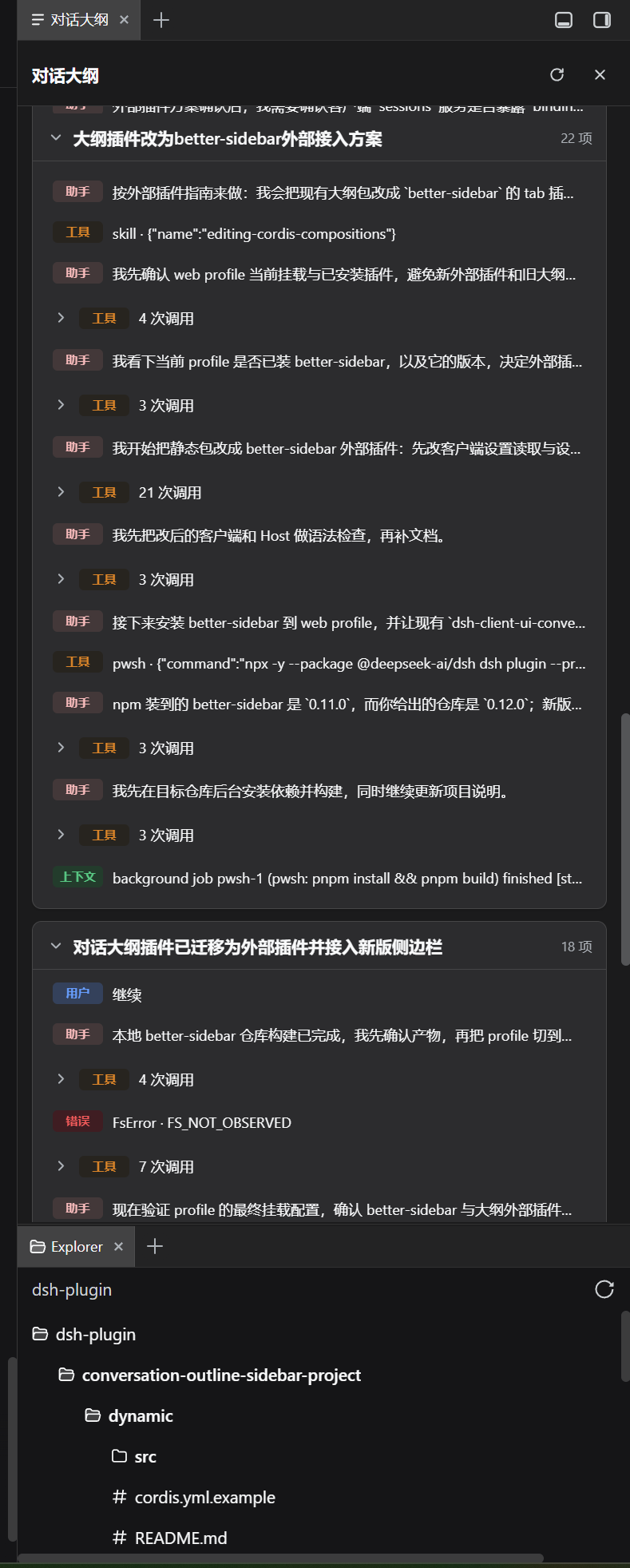
> The **对话大纲** panel in the right sidebar: per-turn collapsible outline with
> LLM titles; click any entry to jump to the matching message.
## Compatibility
| Item | Value |
|---|---|
| Platform | DSH web (`npx @deepseek-ai/dsh web`) |
| Client platform | `dsh.client.platform = "web"` |
| Depends on | [dsh-better-sidebar](https://github.com/omdsh-dev/DSH-better-sidebar) **v0.12.0+** (`settings.render` + `pluginSettings`) |
| Peer deps | `@deepseek-ai/dsh-client-runtime`, `@deepseek-ai/dsh-client-ui-primitives`, `dsh-better-sidebar` (optional peer) |
| Last verified | DSH web profile, better-sidebar v0.12.0 (local build), 2025 |
> npm's `dsh-better-sidebar` may still be `0.11.0`; build from source and link it
> into the profile for v0.12.0 features (see [README of better-sidebar](https://github.com/omdsh-dev/DSH-better-sidebar)).
## Install
### Option 1: one-liner (recommended)
Install straight into your web profile, no manual clone:
```powershell
npx @deepseek-ai/dsh plugin --profile web add github:YesSanSan/dsh-conversation-outline#main
```
> Git-hosted plugins may build on install via a prepare script, which pnpm
> blocks until allowed; if pnpm prints an allowBuilds hint, add the exact key to
> `/pnpm-workspace.yaml` and re-run. This plugin is a plain-JS static
> package and usually needs no build step.
### Option 2: clone and install locally
The repo root is the plugin package (`package.json` / `index.js` / `client.js` /
`cordis.patch.yml`):
```powershell
git clone https://github.com/YesSanSan/dsh-conversation-outline
cd dsh-conversation-outline
npx @deepseek-ai/dsh plugin --profile web add .
```
Restart DSH:
```powershell
npx @deepseek-ai/dsh web
```
Open the better-sidebar **+ menu** and pick **对话大纲**.
### Uninstall
```powershell
npx @deepseek-ai/dsh plugin --profile web remove dsh-client-ui-conversation-outline
```
## Quick start
1. Start `npx @deepseek-ai/dsh web` with the plugin installed.
2. Open any conversation; open the sidebar and add the **对话大纲** tab.
3. The outline shows every turn with its LLM title; click a row to jump.
4. Optional: open the gear settings to pick a title model / reasoning effort, or
tune timeout and retries.
## Configuration
Stored in better-sidebar `pluginSettings['conversation-outline']`
(`localStorage` `dsh-conversation-outline-settings:v1` is the legacy fallback).
| Key | Default | Range | Meaning |
| --- | --- | --- | --- |
| `model` | `''` | — | Title model; empty = follow the main session model |
| `reasoningEffort` | `''` | off / low / medium / high / max | Reasoning effort; empty = follow the session |
| `maxConcurrency` | `3` | 1–8 | Client-side parallel title workers |
| `timeoutSeconds` | `60` | 5–300 | Per-attempt timeout; enforced over the WHOLE attempt via `Promise.race` |
| `maxRetries` | `2` | 0–5 | Retry count on failure (backoff 0.8s → capped 5s) |
| `disabled` | `false` | — | Disable title generation entirely |
## Permissions & data
- **Session logs**: Host reads the live session log via `ctx.sessionQuery`
(`readSession` / `listEvents`) to build the outline; nothing is written back
to the session.
- **LLM call**: title generation sends only the current turn's visible text
(user + assistant blocks, tools removed, truncated) to the configured model
route; the prompt is a fixed short summarization instruction.
- **Browser storage**: generated titles are cached in `localStorage`
(`dsh-conversation-outline-titles:v1`); settings in
`pluginSettings` + `localStorage`.
- **No credentials / no network beyond the configured model provider.** The
plugin never reads API keys or other secrets.
## Troubleshooting
| Symptom | Meaning / fix |
| --- | --- |
| Title stays "等待本轮结束..." | The turn has no `turn/end` event yet; it is the currently-running turn. It generates automatically when the turn ends. |
| "未生成 · title timeout after ..." | An attempt exceeded `timeoutSeconds` (network/model stall). Raise the timeout or check the model route. |
| "未生成 · signals[0] is not of type AbortSignal" | Should not happen on the static host (Node provides a real `AbortController`); report it with logs. |
| Titles never appear after update | Static packages + Host half need a FULL restart of `npx @deepseek-ai/dsh web`, then refresh the browser. |
| No "对话大纲" tab | Confirm better-sidebar v0.12.0+ and that the plugin is installed (`dsh --profile web --dump-config`). |
| Failed title stays cached 60s | Transient errors cache 60s then auto-retry; deterministic errors (no text, no agent, no model) return permanently. |
## Development
See [docs/PLUGIN_DEV_NOTES.md](docs/PLUGIN_DEV_NOTES.md) for the WebUI seams
(slots, session snapshots, anchors), gotchas and verified behaviors.
`dev/dynamic/` holds the earlier dynamic-plugin prototype for reference; the
static package at the repo root is the deliverable.
```powershell
npm run check # node --check index.js && node --check client.js
```
Contributions: fork, change, `npm run check`, open a PR. No build step is
required — the client is a hand-written `window.__ModuleLoader__.load` bundle.
## License & security
[MIT](LICENSE). Security issues: please open a private issue
([Issues](https://github.com/YesSanSan/dsh-conversation-outline/issues)) or
contact the author via email before public disclosure.
---
Listed in the [awesome-dsh-plugins](https://github.com/AdamPlatin123/awesome-dsh-plugins)
ecosystem directory (`dsh-plugin` topic). Inclusion ≠ compatibility audit;
review the source before installing.