
NCurator
Building the most user-friendly AI assistant for working with local office documents
简体中文 · English



Website & demos ·
Manual ·
GitHub Releases ·
Author on X ·
QQ group
Download for Windows ·
Download for macOS (Apple silicon)
## Architecture Design
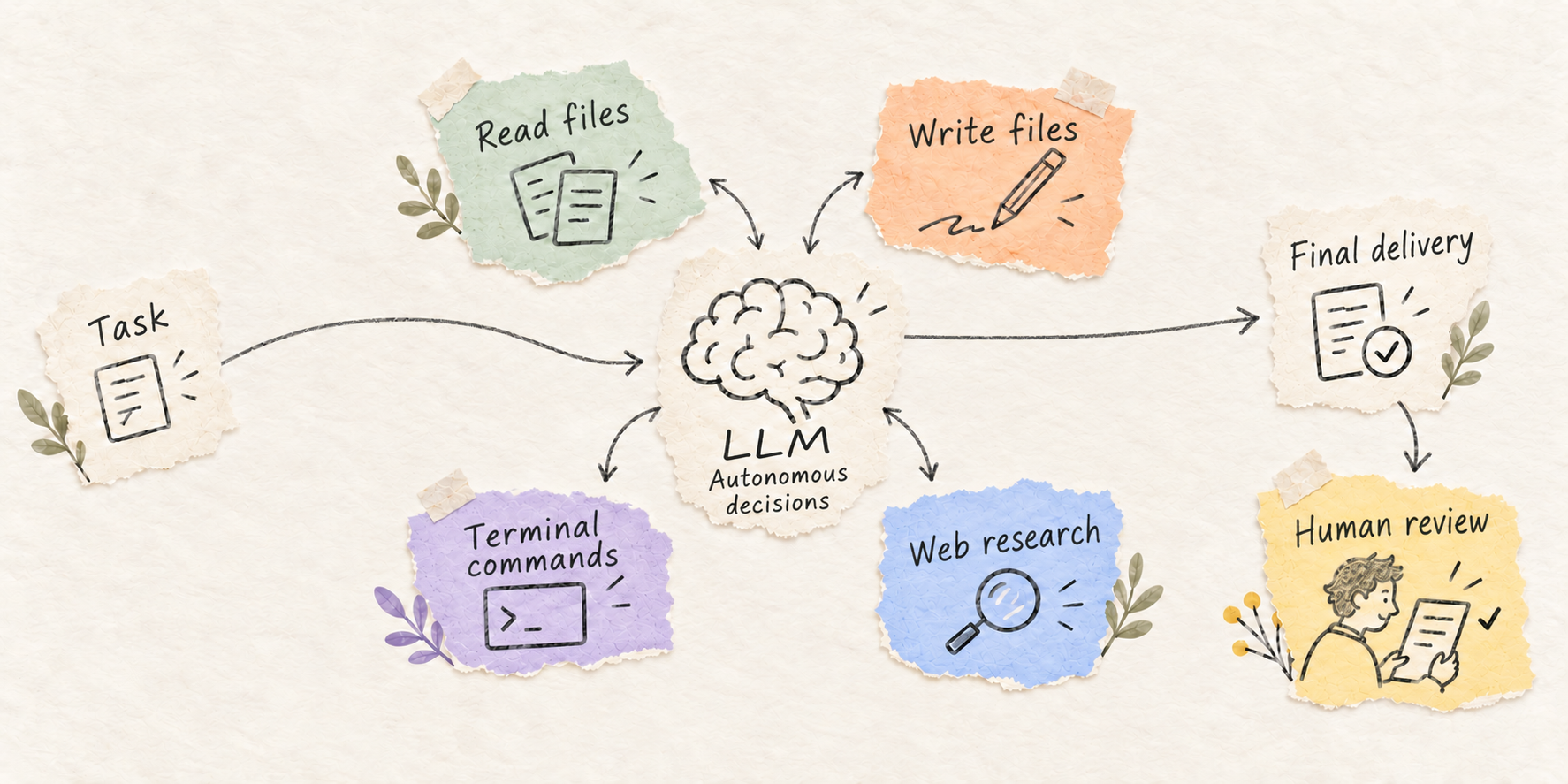
Both distributions include Simplified Chinese and English interfaces. Choose a language and official service region in General settings. The domestic installer is named 馆长 and updates from COS; the international installer is named NCurator and updates from R2. Changing the service region does not change the update channel.
## Capabilities
| Capability | What it does |
| ----------------------- | ------------------------------------------------------------------------------------------------------- |
| 📄 Office documents | Read, create, and edit DOCX, PPTX, XLSX, and plain text; read PDFs |
| 🧠 Local knowledge base | Index local folders and web material, retrieve content, and cite sources |
| 🔍 Web search | Search the web, read page content, and use the built-in browser |
| 💻 Local terminal | Run local commands and scripts for data processing and task automation |
| 🧩 Custom Skills | Create, import, and edit Skills; enable them per partner and load them as needed. Maintain reusable workflows and delivery requirements through chat |
| ✍️ Change review | Preview results, inspect changes, and revert supported file edits |
| 🔗 WPS integration | Click an AI change to open the document at that location in WPS; auto-refresh after AI edits or reverts |
| ⏰ Scheduled tasks | Run tasks on a schedule using a partner's material and model configuration |
WPS integration requires its add-in to be enabled. To jump to a change, set WPS as the default app for that file type. See the [setup guide](https://www.ncurator.com/en/manual#wps-integration).
See the [website](https://www.ncurator.com/en) for demos and real task examples.
## Get started
1. Download and install the Windows or macOS app.
2. Choose an available model or configure your own endpoint and API key.
3. Create a partner, add a working folder, and give it a task. To use the knowledge base, download an embedding model and build an index first.
## Roadmap
Current progress and planned work. Join the discussion and help shape what comes next:
| Direction | Description | Status |
| ---------------------------- | ------------------------------------------------------------------------------------------------------------- | ------------ |
| 🔤 English knowledge base | English embedding models and indexing | ⏳ Planned |
| 🧩 Skill integration | Connect and manage custom and third-party Skills. Implemented by [@AntonyLang](https://github.com/AntonyLang) | ✅ Completed |
| 📥 One-click Skill import | Import Skills from WorkBuddy and Doubao Work (豆包工作) into NCurator in one click | ⏳ Planned |
| 🔌 Integration ecosystem | Connect WeCom, email services, and other workplace platforms | ⏳ Planned |
| 📱 Mobile web access | Connect to your computer from a phone browser to use NCurator remotely | ⏳ Planned |
| 🧭 Browser data import | Import data from your browser, starting with bookmarks and history | ⏳ Planned |
| 🖼️ Multimodal knowledge base | Parse, index, and retrieve images and audio with source references | ⏳ Planned |
| 🧠 Partner memory | Build long-term memory | ⏳ Planned |
## Get involved
### Contact
- QQ group: **891209383** (Chinese)
- X: [@Yoan_Huang](https://x.com/Yoan_Huang)
### Feedback and contributions
- Bugs, feature requests, and questions: [Issues](https://github.com/Yoan98/Ncurator/issues)
- Code, tests, and documentation: [Contribution guide](./CONTRIBUTING.en.md)
### Development environment
Recommended: Node.js 22, pnpm 9.12.2, and Python 3.12.
## Browser extension
A separately maintained bookmark viewer and URL copying tool: [Source repository](https://github.com/Yoan98/Ncurator-Extension) · [Chrome](https://chromewebstore.google.com/detail/ncurator-knowledge-base-a/jdlfflbeekclkgcckcfombmfojmcdeio?hl=zh-CN) · [Microsoft Edge](https://microsoftedge.microsoft.com/addons/detail/hkdfdbpkmkpooopbkdghecbaipeoijpj).
## License
Licensed under [AGPL-3.0-only](./LICENSE). Commercial use is permitted subject to compliance with the license. Third-party components retain their own licenses.
## FAQ
### Mac installation issues
If macOS reports that the app is damaged or cannot be opened, see the [Mac installation troubleshooting guide](https://www.ncurator.com/en/manual#mac-download).
## Contributors
Thank you to everyone who contributes code, documentation, testing, and feedback to NCurator! The image below shows the repository's code contributors. Click it to see the full list.
[](https://github.com/Yoan98/Ncurator/graphs/contributors)