ClaudeBar for Windows
Español
A tiny Windows system-tray monitor for your Claude Code usage —
it reads your real 5h / 7d quota from the same endpoint Claude Code uses,
predicts when you'll run out, and charts your history. All local. Zero telemetry.




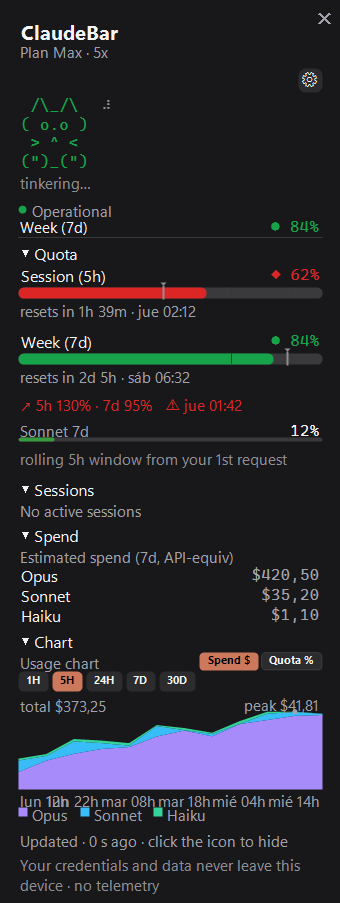
Not affiliated with Anthropic. ClaudeBar just reads the quota your own Claude Code session already has.
---
## What is ClaudeBar?
A small icon sits next to your clock and always shows how much of your Claude quota
you've burned. Click it and a clean panel slides open with the full picture: your **5-hour**
and **7-day** windows as **real percentages** (straight from Anthropic, not a guess), a
**burn-rate prediction** that warns you before you run dry, a per-model **spend estimate**, a
**usage chart**, and a little ASCII cat that reacts live to your running sessions.
Two numbers, two truths — and ClaudeBar is honest about which is which:
- **Quota % (5h / 7d) is REAL** — the exact figure Anthropic returns to Claude Code itself.
- **The $ spend is an ESTIMATE** — an API-equivalent cost computed locally from your transcripts. It is **not** your subscription bill.
It's **C# / .NET 9 + WinForms**, with `Microsoft.Data.Sqlite` as the only runtime dependency.
A Windows take on the macOS [ClaudeBar](https://github.com/tddworks/ClaudeBar), with data ideas
from [ccstatusline](https://github.com/sirmalloc/ccstatusline) and
[CodeZeno/Claude-Code-Usage-Monitor](https://github.com/CodeZeno/Claude-Code-Usage-Monitor), and
UI cues from [CodexBar](https://github.com/steipete/CodexBar) (full [credits](#credits) below).
---
## Screenshots
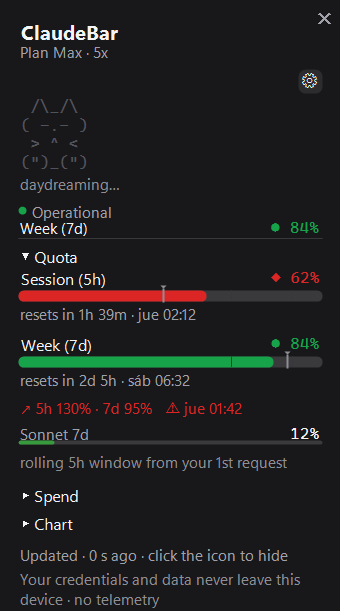
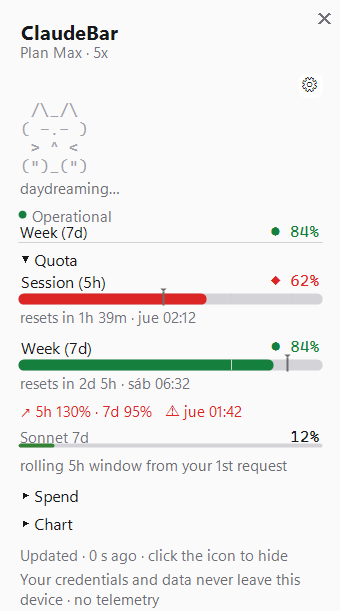
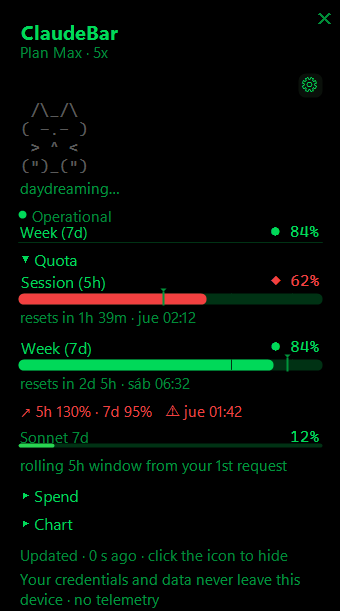
Three themes — **Dark**, **Light**, and **CLI** (the CLI shot is in `Quota %` chart mode):
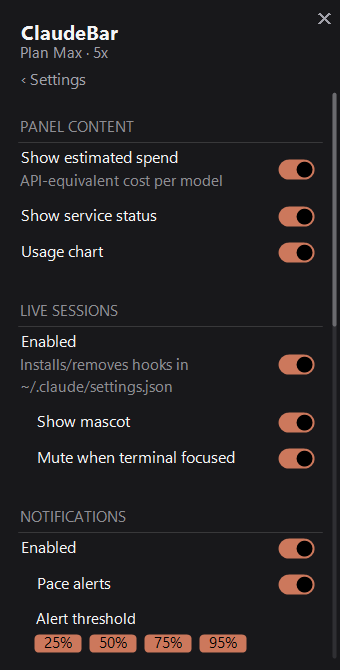
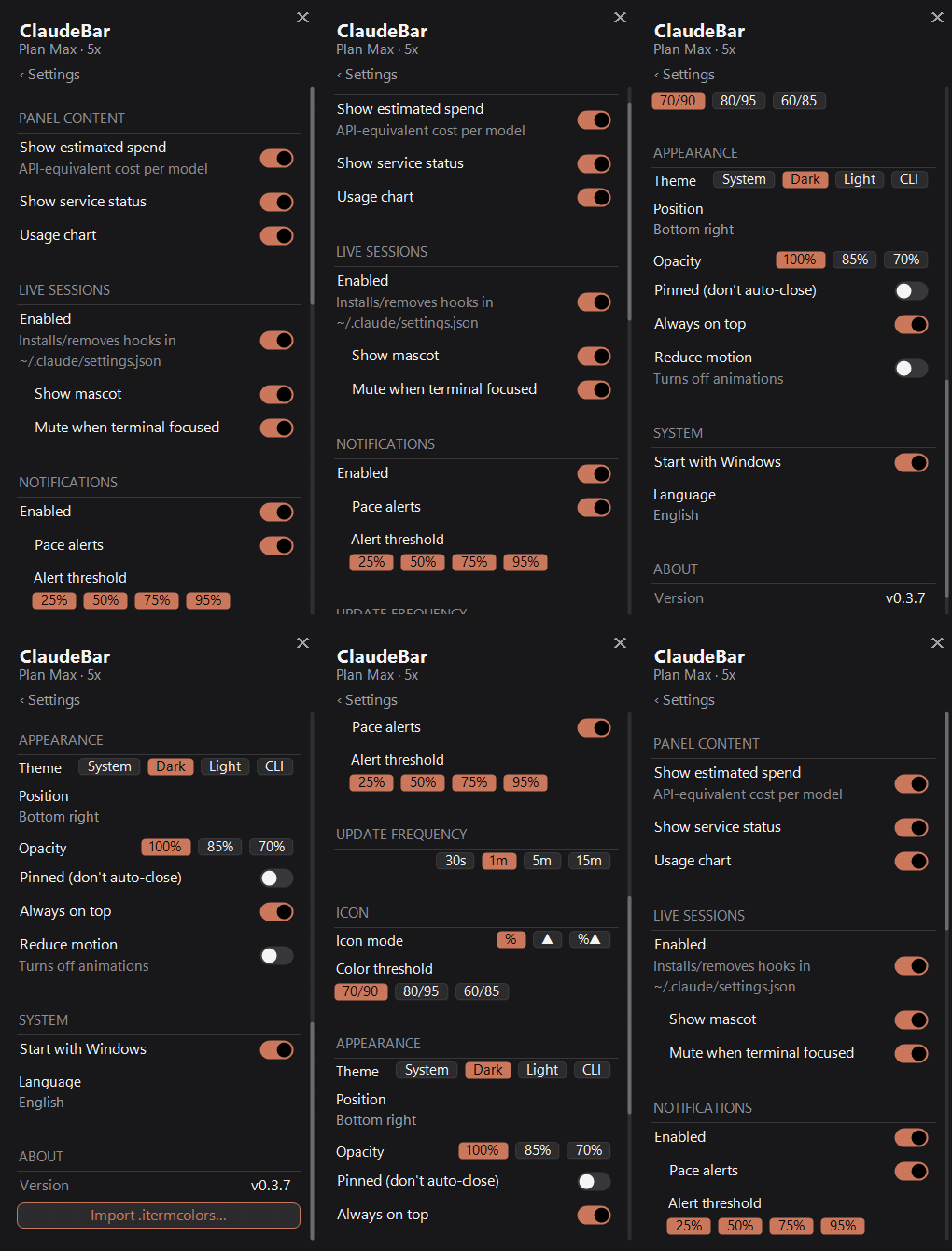
**One grouped settings screen** — every option on a single, clean page, with master rows that
gate their dependents (turn on live sessions, *then* the mascot control wakes up). The panel caps
its height at ~65% of your screen and **scrolls with the mouse wheel** (thin scrollbar on the right):
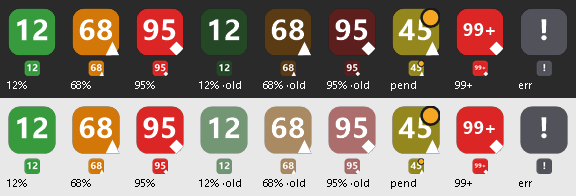
The **tray icon**, by status / pace — it shows the higher of your two windows and shades from
green to amber to red as you climb:

And the **degraded / accessibility** states, so you always know what a non-green icon means —
stale `·old`, error `!`, the warn-**triangle** / critical-**diamond** colorblind shapes, and the
amber attention dot (shown at 48px and at real 16px size on a light and a dark taskbar):
Screenshots/animations use synthetic demo data.
---
## Features
### Tray icon — readable at a glance, accessible by design
The badge by the clock shows the **higher of your two windows** (5h session / 7d weekly) so a
single number always reflects your tightest limit.
- **Three modes** (Settings → Icon): **`%`** percent used (default), **`▲`** pace (how far
ahead of the ideal burn-rate you are), or **`%▲`** both — number is the %, but the *color*
comes from pace, so you get an early warning even while the number is still low.
- **Continuous color gradient** — smoothly interpolates green → amber → red instead of hard
jumps, using two configurable thresholds (default **warn 70% / critical 90%**). Exact tones
come from the active theme.
- **Colorblind-safe shapes** — beyond color, a small shape rides in the corner: **triangle =
warn**, **diamond = critical** (none when you're OK). Drawn in the same auto-contrast color as
the number. The same `●/▲/◆` glyph repeats in the panel header. *Always on, by design.*
- **Auto-contrast text** — the number is **not** hard-coded white. ClaudeBar computes the
perceptual luminance of the badge color and flips the text black or white so it stays legible
on a light **or** dark taskbar.
- **Crisp at any DPI** — rendered internally at 48px and downscaled by Windows. At ≥100% it
shows `99+` (never a clipped `100`).
- **Amber attention dot** — when *live sessions* are on and a Claude Code session is waiting for
your OK or your input, a small amber dot appears in the corner. Your silent "Claude needs you,"
independent of the quota color.
- **Degraded states made legible** — if data goes stale (offline, rate-limited, or older than
3× your refresh interval) the icon **dims** rather than lying to you; if there are no
credentials / the token expired / you're rate-limited with nothing to show, it becomes a
neutral **`!`** badge.
- **Tooltip on hover** — two compact lines, e.g. `5h 41% (↻2h 13m)` / `7d 63% (↻4d 2h)`, with a
`⚠ previous data (offline)` line when the last fetch wasn't fresh, and a plain status message
(`not signed in` / `session expired` / `rate limited` / `offline`) when there's no data at all.
(Windows caps tray tooltips at 127 chars, so it's clipped to fit if needed.)

The badge climbing 5→99%: the green→amber→red gradient, the colorblind triangle/diamond shapes kicking in, and the amber attention dot blinking independently of the quota color.
> Click the icon to open/close the panel. Everything else lives in a deliberately minimal
> right-click menu: **Dashboard · Settings · Live sessions · Check for updates · Exit**.
### Dashboard — the full picture in a narrow panel
A borderless, drop-shadowed popup (~340px wide) that **auto-sizes** to whatever you enable.
Sections are a collapsible accordion (Quota → Sessions → Spend → Chart); collapse what you don't
need and the panel shrinks to fit.
- **5h (session)** and **7d (weekly)** quota bars — **real %**, each with its reset countdown
(`resets in 1h 40m · Wed 04:18`), colored by **pace**. A footnote reminds you the 5h window is
*rolling* — it counts from your first request, not a fixed clock hour.
- **Pace line with ETA** — `↗ 5h XX% · 7d XX%` (used% vs the ideal for how much of the window has
elapsed; over 100% = you're ahead of pace), colored by the worse of the two windows, with a
**`⚠` + estimated time** if you're projected to run out *before* the reset.
- **Per-model weekly limits** — compact `Opus 7d` / `Sonnet 7d` mini-bars when your plan breaks
them out.
- **Glance header** — the single most-utilized window in one line (`Session (5h) ◆ 87%`), plus
the **service-health** dot — without duplicating the full bar below.
- **Estimated spend by model** — `$` per model over a configurable window, biggest first.
*API-equivalent estimate, not your bill* (see [How the data works](#how-the-data-works)).
#### Usage chart — two modes, five ranges
A mini-chart you can flip between two views with a `Spend $ | Quota %` toggle:
- **`Spend $`** — stacked area of cost-equivalent by model (Opus / Sonnet / Haiku / other), with
a running `Total $X.XX` and a legend showing **only the series that have data**.
- **`Quota %`** — your *real* utilization over time, with a **`5h | 7d` window selector that only
appears in this mode**.
- Both modes **annotate the peak** with a labeled dot (`Peak $X.XX` / `Peak X%`).
- Ranges: **1H / 5H / 24H / 7D / 30D** (always the most recent window up to *now*).
### Live sessions & the mascot
Opt in, and ClaudeBar sees — in real time — what every open Claude Code session is doing, drawn
through a little **ASCII cat** that lives in the panel header. Full mechanics in
[Live sessions & hooks](#live-sessions--hooks); the short version:
- A **6-phase** state machine (idle · working · waiting for approval · waiting for input ·
compacting · ended) drives the cat's **face**, **mood color**, and the tray attention dot.
- **Playful, rotating, localized verbs** under the cat (`thinking…`, `cooking…`, `your turn…`),
a **natural blink** (jittered, not metronomic), a **braille spinner** while it works, an
**attention bounce** when a session needs you, and a **reset celebration** when your quota
renews.
- Toggle it on/off with **Show mascot** (a compact 4-line kitty, by design).
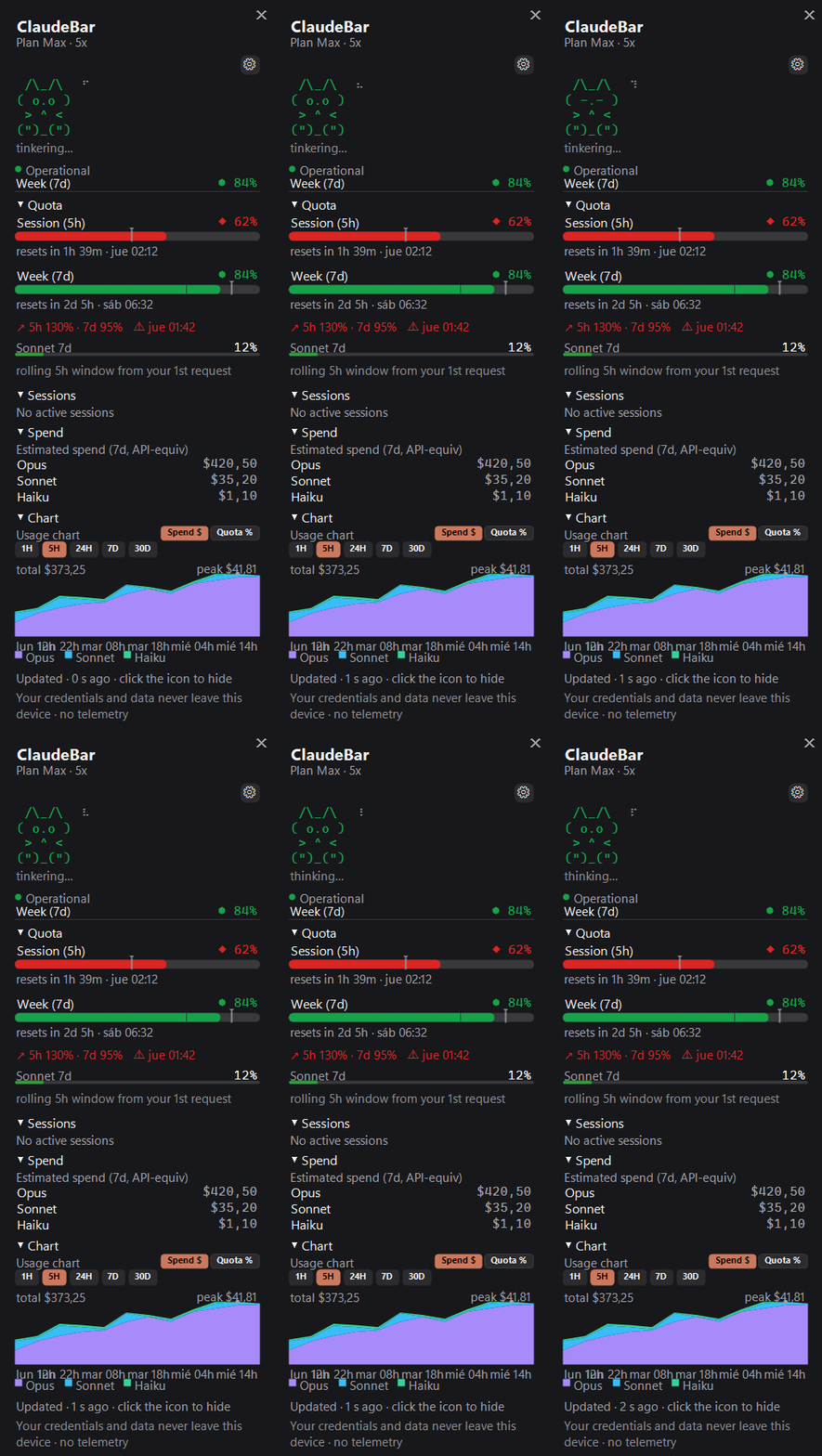
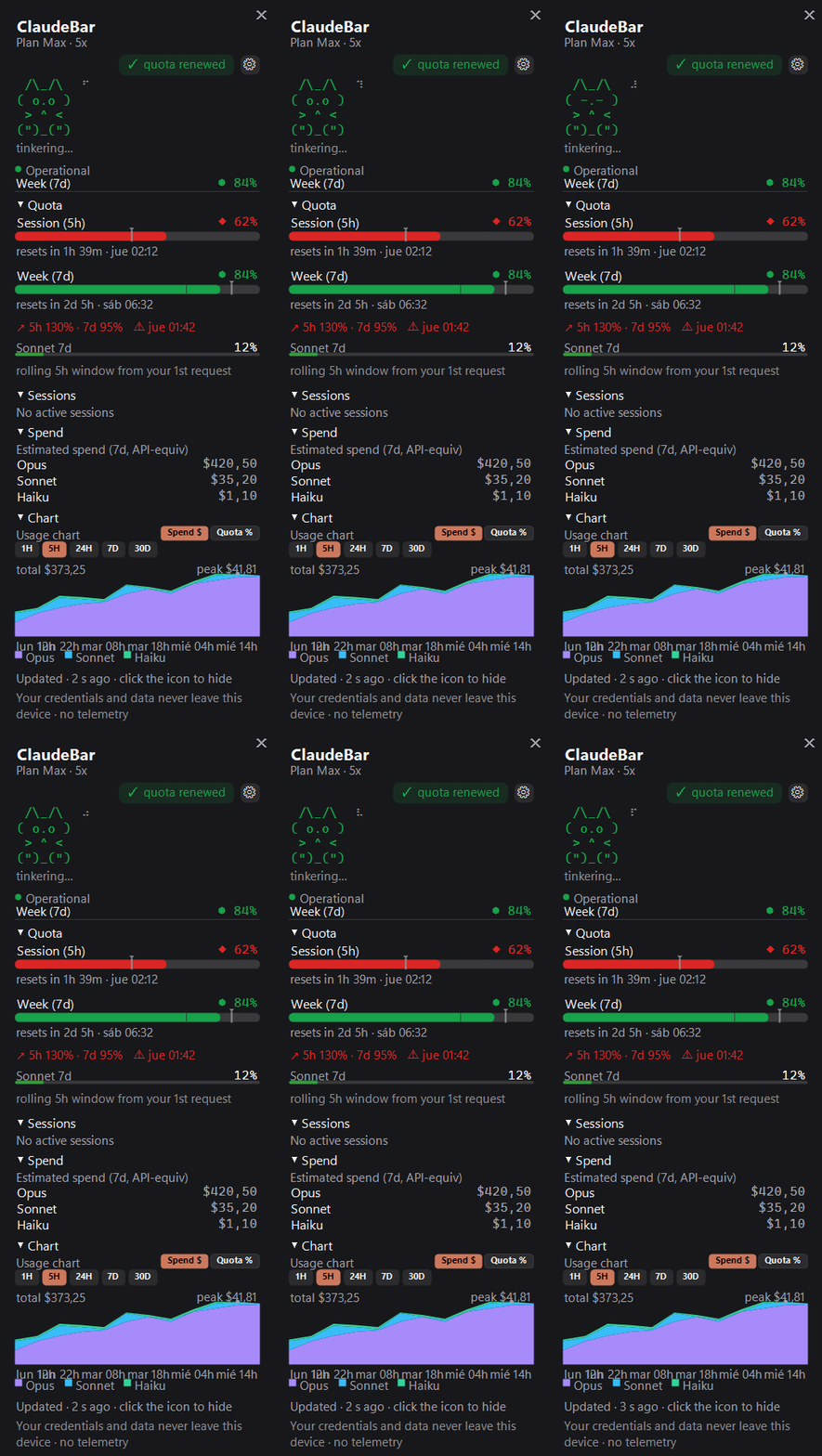
> With the mascot visible but live sessions **off**, you'll still see an ambient *idle* cat — it
> just doesn't come alive until the hooks are installed.
### Proactive notifications
Windows toasts from the tray icon, all under one **Notifications** master switch:
- **Milestone alerts** — `🟢🟡🟠🔴` when your usage **crosses up** through 25 / 50 / 75 / 95%
(each toggleable). Only fires on an upward crossing — a 40→80 jump notifies **once** (the 75) —
and **re-arms after a reset**. The first read just seeds state, so it never spams on launch.
- **Pace alerts** — `⚠ Quota pace`: if your burn-rate projects running out of a window *before*
its reset, you get the window (session 5h / weekly 7d) and the **estimated run-out time**. Once
per episode; re-arms when the projection clears.
- **Live-session toasts** — `Claude is waiting for your OK in {project}` / `Claude finished in
{project}` when a session changes, with **mute-when-terminal-focused** (on by default): if that
session's window is already in the foreground, ClaudeBar stays quiet — you're already looking.
### Look & feel
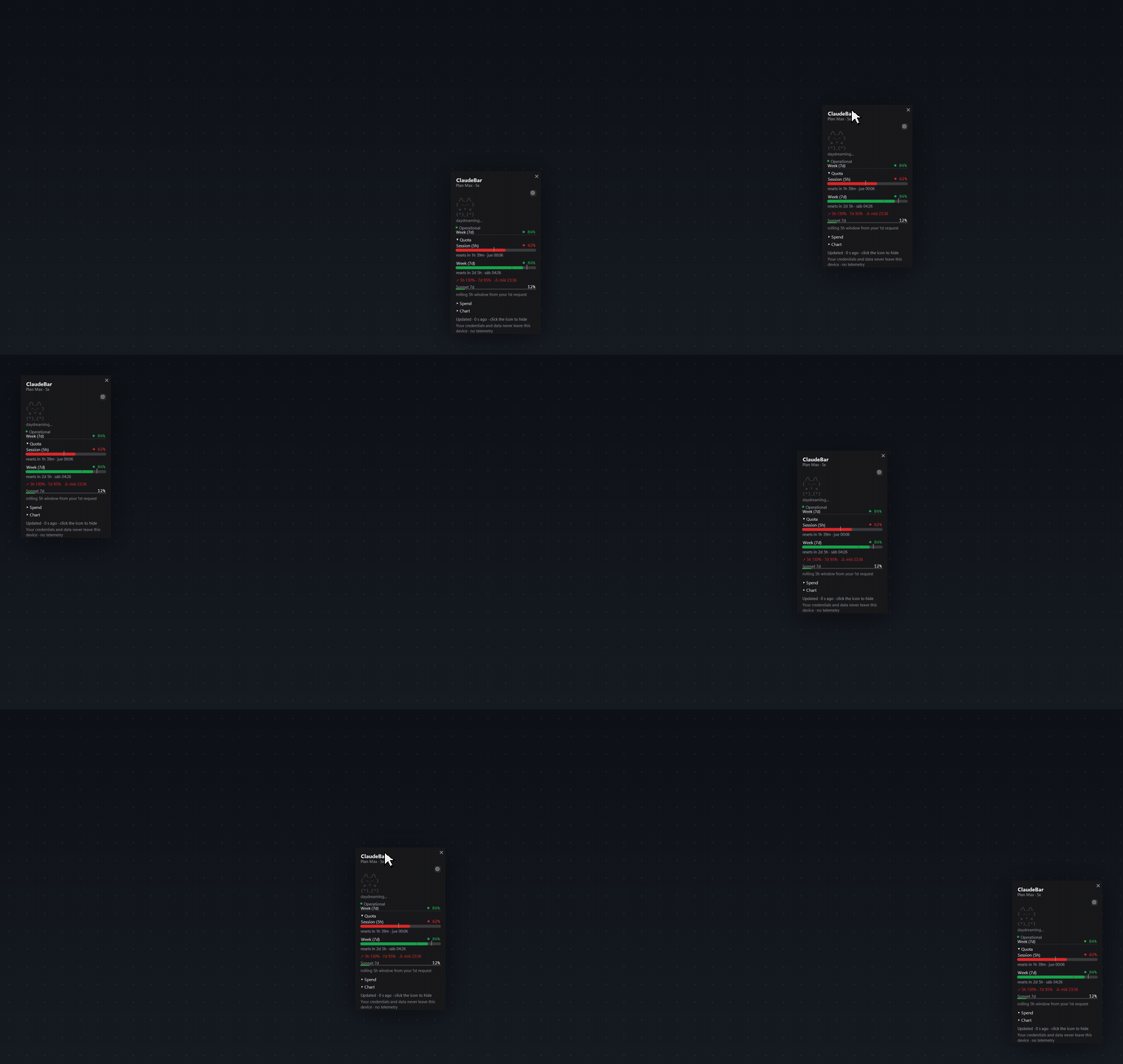
- **Drag it anywhere** — grab any empty part of the panel and drop it where you like; it remembers
the spot. Or pick a preset corner/center in Settings.
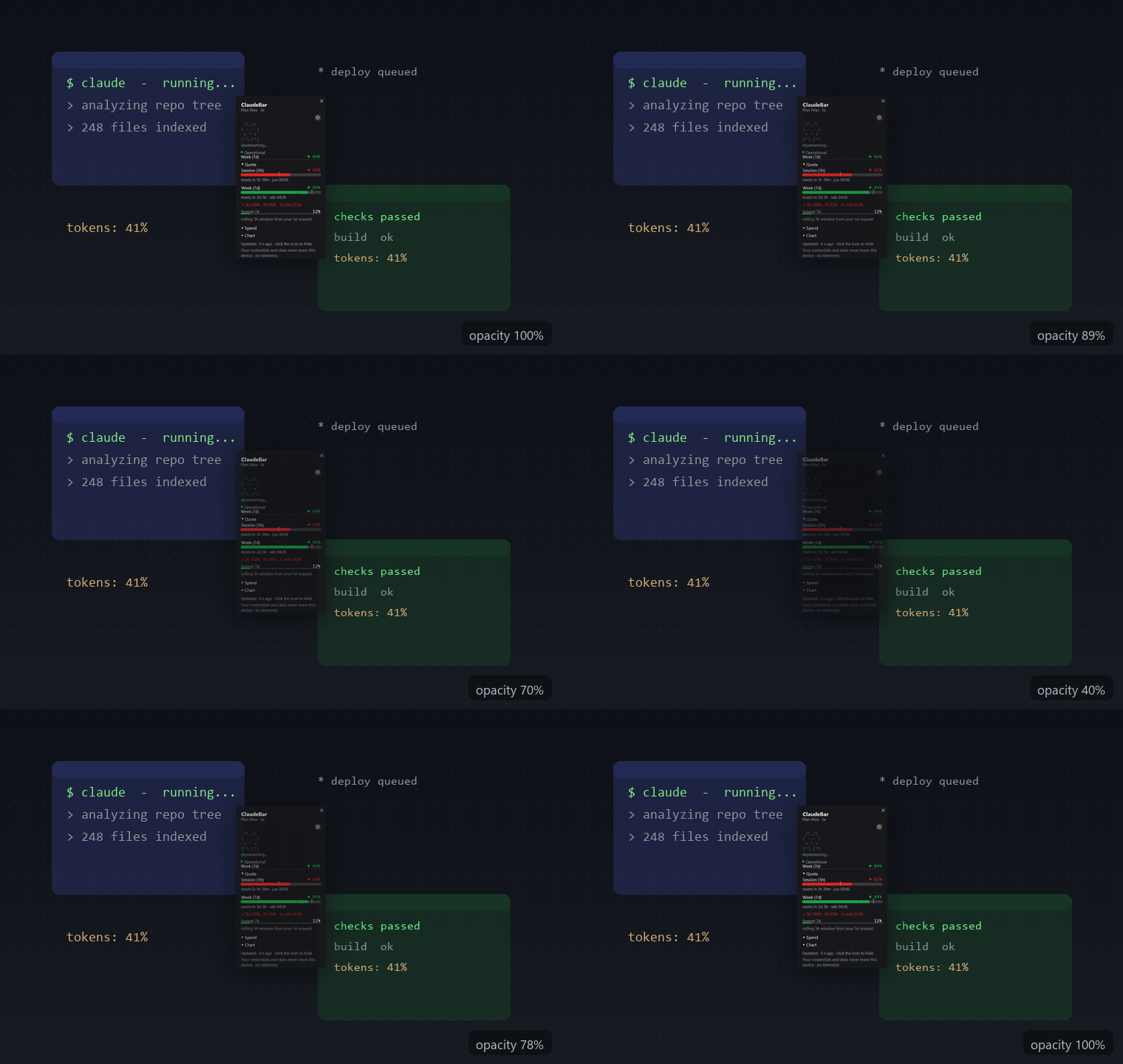
- **Adjustable opacity**, **Pinned** (won't auto-close on click-out), and **Always on top**.
- **Themes** — System / Dark / Light / CLI, plus **import a `.itermcolors`** palette.
- **9 languages** — System + English, Español, Nederlands, Français, Deutsch, 日本語, 한국어,
繁體中文 (both theme and language default to your Windows settings).
#### Microinteractions, reduce-motion, and ~0 CPU at rest
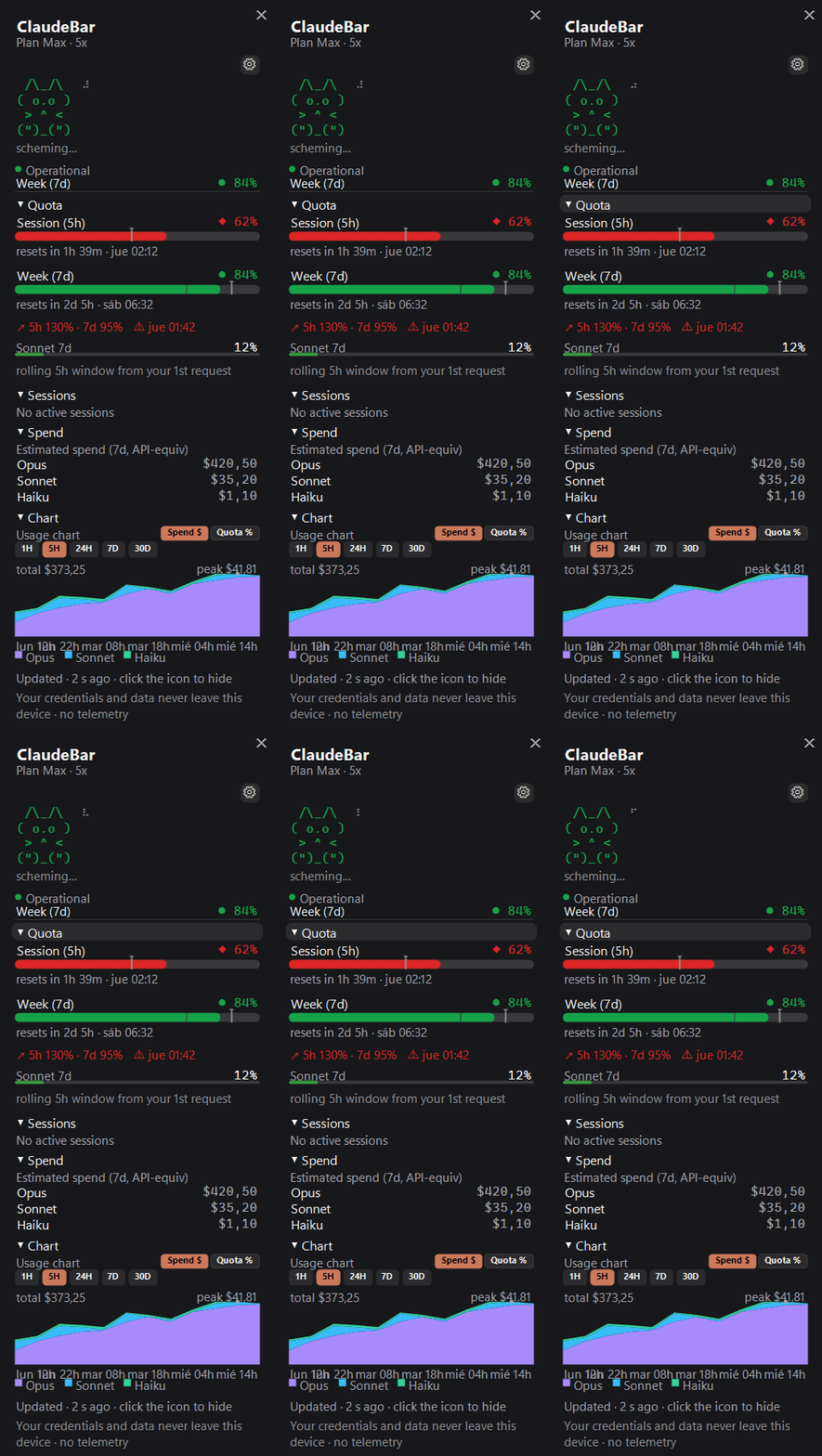
The panel **fades and staggers** in, bars and numbers **tween** to their targets (color snaps so
it never flickers), rows **light up on hover**, and a quota reset gets a little **flash**.

Two things matter for an app that runs all day:
- **Reduce motion** — one switch collapses **every** animation (fade, stagger, tween, hover,
bounce, spinner, celebration) to its static final state. It's a real accessibility/preference
toggle, **off by default**, and it does **not** auto-follow the OS setting (your choice, not
Windows').
- **~0 CPU when hidden** — the animation engine only spends cycles when the panel is **visible and
something is actually moving** (~33 ms tick). Panel visible but idle? ~1 s tick, just for the
reset countdown. **Panel hidden? The timer stops entirely.** No background animation tax for a
24/7 tray app.
---
## How the data works
```mermaid
flowchart TD
creds["~/.claude/.credentials.json
(OAuth token, read in-memory only)"]
usage["GET api.anthropic.com/api/oauth/usage
(anthropic-beta: oauth-2025-04-20)"]
refresh["Token refresh — only if expired
POST oauth/token → rewrite creds
(fallback: headless 'claude -p .')"]
db[("SQLite history.db
real-% samples over time")]
transcripts["~/.claude/projects/**/*.jsonl
(local transcripts)"]
health["GET status.claude.com
/api/v2/status.json (no auth)"]
panel(["Panel · tray icon · chart · pace ETA"])
creds -->|Bearer token| usage
creds -.->|expired?| refresh --> creds
usage -->|REAL 5h / 7d %| panel
usage -->|each poll sampled| db -->|Quota % chart + pace slope| panel
transcripts -->|ccusage-style estimate| panel
health -->|operational / degraded / outage| panel
style usage fill:#1f6feb,color:#fff
style db fill:#238636,color:#fff
style transcripts fill:#9e6a03,color:#fff
```
1. **Real quota (primary).** `GET https://api.anthropic.com/api/oauth/usage` with your local
OAuth token. Returns `five_hour` / `seven_day` (plus `seven_day_opus` / `seven_day_sonnet`)
with `utilization` (%) and `resets_at` — the **same limits Claude Code respects** — and a flag
for whether paid **extra usage** is enabled. On HTTP 429 it backs off (honoring `Retry-After`,
else ~300s) and serves the **last good value** instead of hammering the API.
2. **Real-% history.** The usage API only gives a *snapshot*, so each successful poll is sampled
into SQLite (`%APPDATA%\ClaudeBarWin\history.db`, throttled to once/60s, pruned after 40 days).
This is the **only** source of your `Quota %` chart line and the pace ETA — so it **starts
empty and fills in** as the app runs.
3. **Pace + ETA.** Pace = used% vs the ideal for how much of the window has elapsed (works from
minute one). The ETA extrapolates from the recent slope of your % history, ignoring the drops
caused by window resets.
4. **Token refresh — only when expired.** If the token has lapsed, ClaudeBar refreshes it itself
(`POST platform.claude.com/v1/oauth/token`) and rewrites `~/.claude/.credentials.json`
**preserving everything else**, with a headless `claude -p .` as fallback. It only acts when
the token is *already* expired, so it never fights Claude Code for the token.
5. **Service health.** `GET status.claude.com/api/v2/status.json` (public, no auth), cached ~2 min.
6. **Estimated spend (secondary).** Parses your local `.jsonl` transcripts (the `ccusage` method)
into a per-model USD figure using the **public Anthropic API list prices** (per 1M tokens:
**Opus** $15 in / $75 out, **Sonnet** $3 / $15, **Haiku** $1 / $5, plus the matching
cache-write / cache-read rates). It's an **API-equivalent estimate, not your subscription's
charge** — and it's labeled `API-equiv` everywhere. (Unknown/synthetic models count as $0 until
their pricing is known.)
### Privacy — and you can verify it
- **The token is used only to read *your own* usage**, and its only destination is Anthropic's own
API. It is **never stored, logged, or sent anywhere else**, and ClaudeBar **never persists** it.
- **Zero telemetry.** Nothing about you leaves your machine.
- The plan label (`Max · 5x`, `Pro`, …) is read **only from non-secret fields** of the
credentials file (`subscriptionType` / `rateLimitTier`) — the token is never touched for it.
- The **privacy seal is rendered inside the panel itself** — it's a statement you can read in the
app, not just a promise in this README.
---
## Install
### Option 1 — Download the installer (recommended)
Grab `ClaudeBarWin-Setup-x.y.z.exe` from the
**[latest release](https://github.com/Yovancas/claudebar-win/releases/latest)** and run it.
- **Per-user, no admin** (installs to `%LOCALAPPDATA%\Programs\ClaudeBarWin`), **self-contained —
no .NET needed**, built with Inno Setup.
- The icon lands in the system tray. On **Windows 11** a new icon hides in the `^` overflow —
drag it onto the taskbar to pin it.
- **Updates install themselves** (see below), or trigger one from the right-click menu →
*Check for updates*.
> **SmartScreen** may warn because the `.exe` is unsigned → **More info → Run anyway**.
### Option 2 — winget
```powershell
winget install Yovancas.ClaudeBarWin
```
*Available once the manifest is merged into the winget community repo. Heads-up: the published
manifest currently still declares an old `0.1.0` and is listed as `portable` — until it's bumped,
the installer download (Option 1) is the reliable route.*
### Option 3 — build from source
See [Build from source](#build-from-source).
**Auto-update** is silent and safe: a background check on launch and every 6h against an
**Ed25519-signed appcast** on GitHub (the private signing key is never in the repo). When you
accept, it downloads the signed installer, verifies the signature, swaps the running `.exe`, and
relaunches.
**Start with Windows** — Settings → System → *Start with Windows*. It creates/removes a shortcut
in the Startup folder — **no registry, no admin**, fully reversible.
---
## Requirements
- **Windows 10 / 11 (x64)**.
- **Claude Code** (CLI or app) installed and signed in — ClaudeBar reads your local OAuth token
(`~/.claude/.credentials.json`) and transcripts to show real quota and estimate spend. Nothing
leaves your machine. Without local credentials it shows `not signed in` and there's no quota to
display.
- Nothing else to run the release build. To **build from source**: **.NET SDK 9** (a user-local
install in `%USERPROFILE%\.dotnet` works, no admin).
---
## Configuration
Open the dashboard and click the **⚙** (top-right) — **every setting lives on one grouped
screen**. The panel never eats your display: it caps at ~65% of the screen height and the content
**scrolls with the mouse wheel**. Master rows gate their dependents: turn **Notifications** off and
pace/milestones grey out; turn **Live sessions** off and the mascot/suppress controls grey out.
| Group | What's in it |
|---|---|
| **Panel content** | Estimated spend · Service status · Usage chart |
| **Live sessions** | *master* Enabled (installs/removes Claude Code hooks) → **Show mascot** · Suppress when focused |
| **Notifications** | *master* Enabled → Pace alerts · Milestones 25 / 50 / 75 / 95 |
| **Update frequency** | 30s · 1min · 5min · 15min |
| **Icon** | Mode `%` / `▲` / `%▲` · Color threshold 70/90 · 80/95 · 60/85 |
| **Appearance** | Theme System/Dark/Light/CLI · Position · Opacity · Pinned · Always on top · Reduce motion |
| **System** | Start with Windows · Language (System + 8) |
| **About** | Version · Import `.itermcolors…` |
Two actions are **sensitive** — they prompt for confirmation and back things up first: enabling
**live sessions** (it writes `~/.claude/settings.json`) and **importing a theme**. The right-click
menu (tray icon or panel) stays minimal: *Dashboard · Settings · Live sessions · Check for updates
· Exit*. Settings persist to `%APPDATA%\ClaudeBarWin\config.json`.
---
## Live sessions & hooks
> **Opt-in and off by default.** This is the only feature that touches your Claude Code config,
> so it's the only one ClaudeBar asks permission for.
Turn it on and ClaudeBar gets a **real-time view of every open Claude Code session** — project
name and current phase — which drives the mascot and the tray attention dot.
**How it works.** Claude Code fires a hook → a tiny `claudebar-hook.ps1` reads the event from
stdin → forwards it as one JSON line over a local named pipe (`\\.\pipe\claudebar`) → ClaudeBar
updates the mascot and the session list. The hook script is **fire-and-forget**: if ClaudeBar
isn't open or the pipe doesn't answer in 200 ms, it exits silently (`exit 0`) and **never blocks
or breaks your session**. Multiple sessions are supported at once; project names come from each
session's working directory; sessions prune after 10 minutes of silence.
**The 6 phases** (each picks the cat's face, color, and whether you get a toast):
| Phase | Face | What the cat does |
|---|---|---|
| **Idle** | `-.-` | relaxed, static (no animation) |
| **Working** | `o.o` | attentive, blinks, braille spinner spins |
| **Waiting for approval** | `O.O` | wide eyes that pulse — *"approve this?"*, bounces, tray dot goes amber |
| **Waiting for input** | `^.^` | happy, your turn — winks to `^.-`, tray dot amber |
| **Compacting** | `@.@` | dizzy, compressing memory, spinner spins |
| **Ended** | `x.x` | KO, static |
The cat is hand-drawn ASCII (clean-room), a compact 4-line kitty:
```
/\_/\
( o.o )
> ^ <
(")_(")
```
Under the hood the mascot is fussier than it looks: **jittered blink** (slow when idle ~2.6s,
urgent ~0.5s when you're needed), a **braille spinner** (`⠋⠙⠹⠸⠼⠴⠦⠧⠇⠏`) only while it works,
**playful rotating verbs** localized to your language, a **mood** with hysteresis (Alert→amber,
Happy→green) so it doesn't flicker, an **attention bounce** (a 3-hop `OutBack` boing every ~3.2s
while a session waits), and a **reset celebration** (`✓ quota renewed` flash + Happy cat) when a
window renews. All of it is deterministic and respects **Reduce motion**.
### Is it safe? Yes — here's exactly what it does
Enabling/disabling live sessions edits `~/.claude/settings.json`, which may be in use by sessions
running 24/7. So ClaudeBar is careful:
- **Confirmation first**, with the dialog's default button on **No** (an accidental Enter does
nothing).
- **Timestamped backup** before any write: `settings.json.claudebar-bak-YYYYMMDD-HHmmss` (the
confirmation tells you the path).
- **Idempotent merge** — it hooks 10 events (`UserPromptSubmit`, `PreToolUse`, `PostToolUse`,
`PermissionRequest`, `Notification`, `Stop`, `SubagentStop`, `SessionStart`, `SessionEnd`,
`PreCompact`), never duplicates entries, and **never touches your other hooks** (it tags its own
by script name).
- **Clean uninstall** — removes **only** ClaudeBar's entries (drops the key if an event is left
empty), backs up again, deletes the script, and stops the pipe. Your other hooks stay byte-identical.
**Honest gotchas:** it runs a PowerShell per hook event (lightweight, but frequent); events are
**lost** if ClaudeBar isn't running (they aren't queued); and the focus-mute uses a process-tree
heuristic that can occasionally fall back to "not focused" (so you'd get the toast anyway).
---
## Build from source
Requires **.NET SDK 9** (a user-local install in `%USERPROFILE%\.dotnet` works, no admin):
```powershell
git clone https://github.com/Yovancas/claudebar-win.git
cd claudebar-win
.\run.ps1 # build + run (debug)
.\run.ps1 publish # self-contained single-file publish\ClaudeBarWin.exe (no .NET needed to run)
```
`scripts/release.ps1` runs the full pipeline — version bump → publish → Inno installer →
Ed25519-signed appcast → optional GitHub release. **Publishing is gated behind `-Publish`**
(otherwise it's a local dry-run that uploads nothing), and the Ed25519 **private key never lives in
the repo**.
---
## Useful commands
These are developer/diagnostic utilities; they all use **synthetic data** and never touch your
real quota.
| Command | What it does |
|---|---|
| `.\run.ps1` | Build and run (debug) |
| `.\run.ps1 publish` | Self-contained single-file `publish\ClaudeBarWin.exe` |
| `ClaudeBarWin.exe --report` | Print current quota + pace + spend to console and `%TEMP%\claudebar-report.txt` (no GUI) |
| `ClaudeBarWin.exe --render-demo` | Render the theme screenshots (`dashboard-dark` / `-light` / `-cli`, `tray-icons`) |
| `ClaudeBarWin.exe --render-test` | Render `data` / `settings` / `mascot` / `tray-badges` + microinteraction frames |
| `ClaudeBarWin.exe --render-gif` | Dump README GIF frame sequences to `%TEMP%\claudebar-gif` (6 folders: `apertura/` · `mascota/` · `hover/` · `celebracion/` · `ajustes/` · `bandeja/`), then assemble with ffmpeg (see [Building the GIFs](#building-the-gifs)). The settled "hold" frame of the `apertura/` sequence is the full expanded panel used for the `dashboard-full` hero. |
| `ClaudeBarWin.exe --notify-demo` | Fire the four milestone toasts 🟢🟡🟠🔴 in sequence, then exit |
| `ClaudeBarWin.exe --db-test` | Smoke-test the SQLite history store |
| `ClaudeBarWin.exe --dump-menu` | Print the right-click menu structure |
| `ClaudeBarWin.exe --hook-test` | Drive the live-session pipe with a fake event sequence *(needs a running instance with live sessions on)* |
State lives under `%APPDATA%\ClaudeBarWin\`: `config.json` (settings), `history.db` (real-%
history), `last-state.json` (last good reading, for instant startup and offline).
### Building the GIFs
`--render-gif` dumps numbered `frame_###.png` sequences (one folder per animation:
`apertura/` · `mascota/` · `hover/` · `celebracion/` · `ajustes/` · `bandeja/`) under
`%TEMP%\claudebar-gif`. Turn each folder into a looping `.gif` with ffmpeg (palette pass for clean
colors):
```powershell
$seq = "$env:TEMP\claudebar-gif\apertura" # repeat per folder
ffmpeg -y -framerate 30 -i "$seq\frame_%03d.png" -vf "palettegen" "$seq\pal.png"
ffmpeg -y -framerate 30 -i "$seq\frame_%03d.png" -i "$seq\pal.png" `
-lavfi "paletteuse" "assets\f3-apertura.gif"
```
Map the folders to their GIFs: `apertura/` → `assets/f3-apertura.gif`, `mascota/` →
`assets/f3-mascota.gif`, `hover/` → `assets/f3-hover.gif`, `celebracion/` →
`assets/f3-celebracion.gif`, `ajustes/` → `assets/settings-scroll.gif`, `bandeja/` →
`assets/tray-cycle.gif`. The **`dashboard-full` hero** is not its own command — grab a single
settled "hold" frame from the end of `apertura/` (the full expanded panel: mascot band + quota
bars + per-model spend + chart) and save it as `assets/dashboard-full.png`.
The **`move.gif` / `opacity.gif`** demos don't come from the app — they're synthetic. Generate
their frames with `python scripts/marketing-gifs.py` (Pillow), then assemble them into
`assets/move.gif` and `assets/opacity.gif` with the same ffmpeg palette pass shown above.
---
## Uninstall
- Quit from the tray menu (**Exit**), then remove the app (installer: Apps → uninstall, or delete
the `%LOCALAPPDATA%\Programs\ClaudeBarWin` folder; portable: delete `ClaudeBarWin.exe`).
- **Your data survives a normal uninstall by design** — config + history live in
`%APPDATA%\ClaudeBarWin\`, *not* in the app folder. To purge everything, delete that folder too.
- If you enabled *Start with Windows*, untick it first (or remove the shortcut from `shell:startup`).
- Installed via winget: `winget uninstall Yovancas.ClaudeBarWin`.
---
## Notes & FAQ
- **Windows 11 tray overflow** — a fresh icon goes to the `^` overflow; drag it onto the taskbar to pin it.
- **"Stale" / dimmed icon** — the data is older than 3× your refresh interval (offline, a 429
cooldown, or just no fresh read). The icon **dims and the tooltip says so** rather than showing
an old number as if it were live. The `·old` / `!` states are in the
[tray-badges](#screenshots) strip above.
- **`claude -p .` refresh** only fires if the token is **expired**; with Claude Code running it
stays fresh on its own and this rarely runs.
- **`extra usage`** (paid overflow) is read from the API and surfaced in `--report` (and the
cached `last-state.json`) — it's a diagnostic flag, not shown in the panel UI.
- **Real vs estimated, one more time** — the **5h/7d %** is real (Anthropic's own figure); the
**$ spend** is a local **API-equivalent estimate**, not your subscription bill.
- **SmartScreen** warning on first run is expected (the `.exe` is unsigned).
---
## Credits
A Windows port inspired by [ClaudeBar](https://github.com/tddworks/ClaudeBar) (macOS), with data
ideas from [CodeZeno/Claude-Code-Usage-Monitor](https://github.com/CodeZeno/Claude-Code-Usage-Monitor)
and [ccstatusline](https://github.com/sirmalloc/ccstatusline), and UI cues from
[CodexBar](https://github.com/steipete/CodexBar).
**Not affiliated with Anthropic.**
## License
[MIT](LICENSE)