GUI-G²: Gaussian Reward Modeling for GUI Grounding

A Gaussian dense reward framework for GUI grounding training

[![Huggingface Paper](https://img.shields.io/badge/Paper-2507.15846-ffcc00?style=for-the-badge&logo=huggingface&logoColor=black)](https://huggingface.co/papers/2507.15846) [![Paper](https://img.shields.io/badge/Paper-TBA-A42C25?style=for-the-badge)](https://arxiv.org/abs/2507.15846) [![alphaXiv](https://img.shields.io/badge/alphaXiv-2507.15846-1f8ceb?style=for-the-badge)](https://www.alphaxiv.org/abs/2507.15846) [![Project](https://img.shields.io/badge/Project-Page-007ec6?style=for-the-badge)](https://zju-real.github.io/GUI-G2) [![GitHub](https://img.shields.io/badge/Code-GUI--G2-000000?style=for-the-badge&logo=github)](https://github.com/zju-real/GUI-G2) GUI-G2 3B Model GUI-G2 7B Model



---
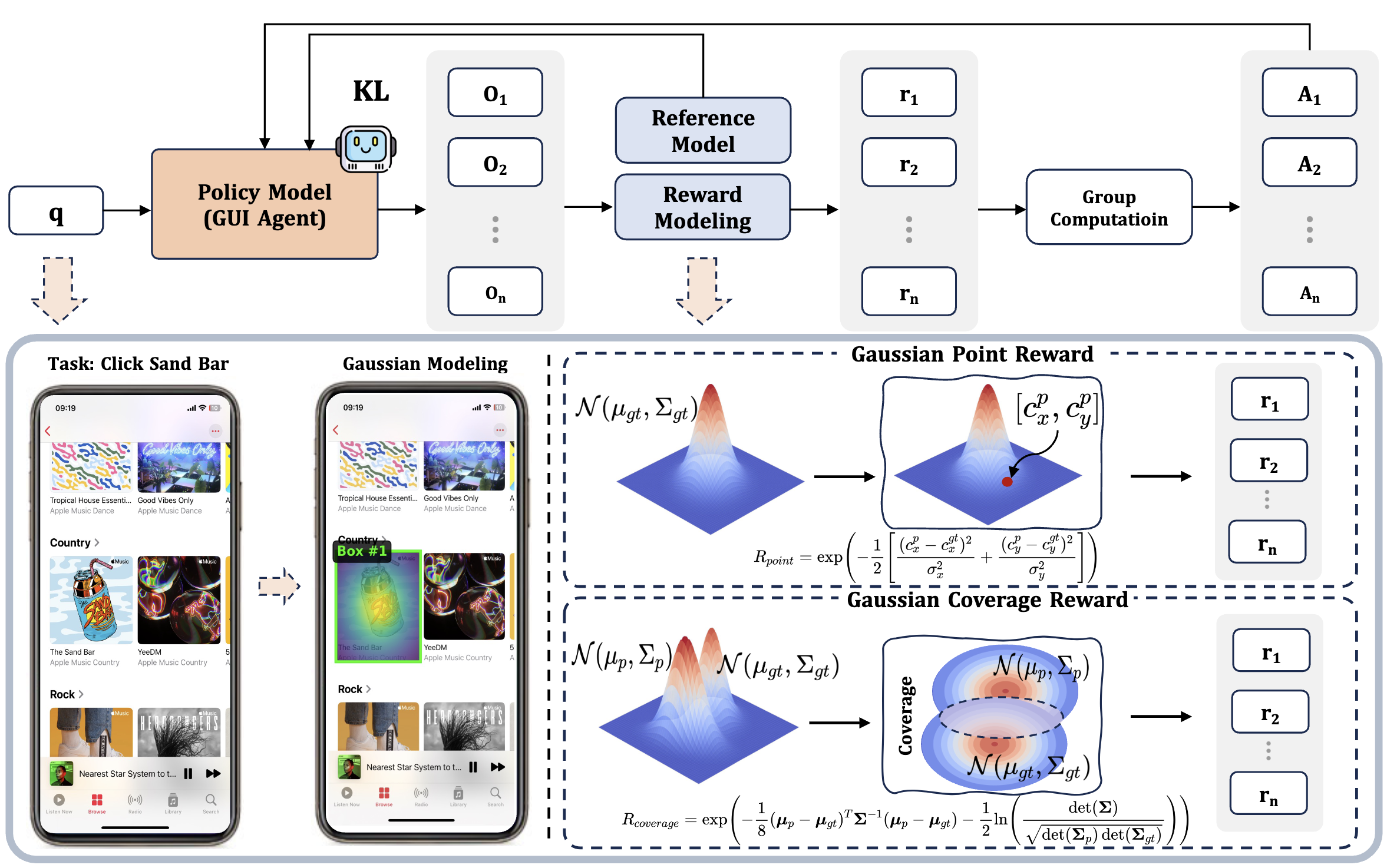
GUI-G2 Framework

GUI-G²: Gaussian rewards guide precise and robust GUI grounding.

--- # 🎉 News [2026-04-15] * We opensource 🦞 **ClawGUI**: **A Unified Framework for Training, Evaluating, and Deploying GUI Agents** - 📄 [![arXiv](https://img.shields.io/badge/arXiv-2604.11784-b31b1b?style=flat&logo=arxiv&logoColor=white)](https://arxiv.org/abs/2604.11784) - 💻 [![GitHub](https://img.shields.io/badge/GitHub-ZJU--REAL%2FClawGUI-181717?style=flat&logo=github&logoColor=white)](https://github.com/ZJU-REAL/ClawGUI) - 🌐 [![Project Page](https://img.shields.io/badge/Project-Page-4CAF50?style=flat&logo=googlechrome&logoColor=white)](https://zju-real.github.io/ClawGUI-Page/) - 🤗 [![HuggingFace](https://img.shields.io/badge/🤗%20HuggingFace-Daily%20Paper-FFD21E?style=flat)](https://huggingface.co/papers/2604.11784) [2026-2-02] **We released GUI-G2's poster and slides.** [2025-11-08] **We are happy our paper was accepted to AAAI 2026.** [2025-8-18] **We open-source our model: GUI-G2-3B, GUI-G2-7B.** Check it out on Huggingface. And we provide the inference code and example. Try it out. GUI-G2 3B Model GUI-G2 7B Model [2025-8-16] **We will upload our model (GUI-G2-3B, GUI-G2-7B) next week.** [2025-7-22] **We release our paper: GUI-G²: Gaussian Reward Modeling for GUI Grounding. We plan to open-source our model GUI-G²-7B around August.** --- # Overview * [Motivation](#motivation) * [Highlights](#highlights) * [Installation](#installation) * [Quick Start](#quick-start) * [Evaluation](#evaluation) * [Reward Customization](#reward-customization) * [Citation](#citation) --- # Motivation
AITW Click Behavior

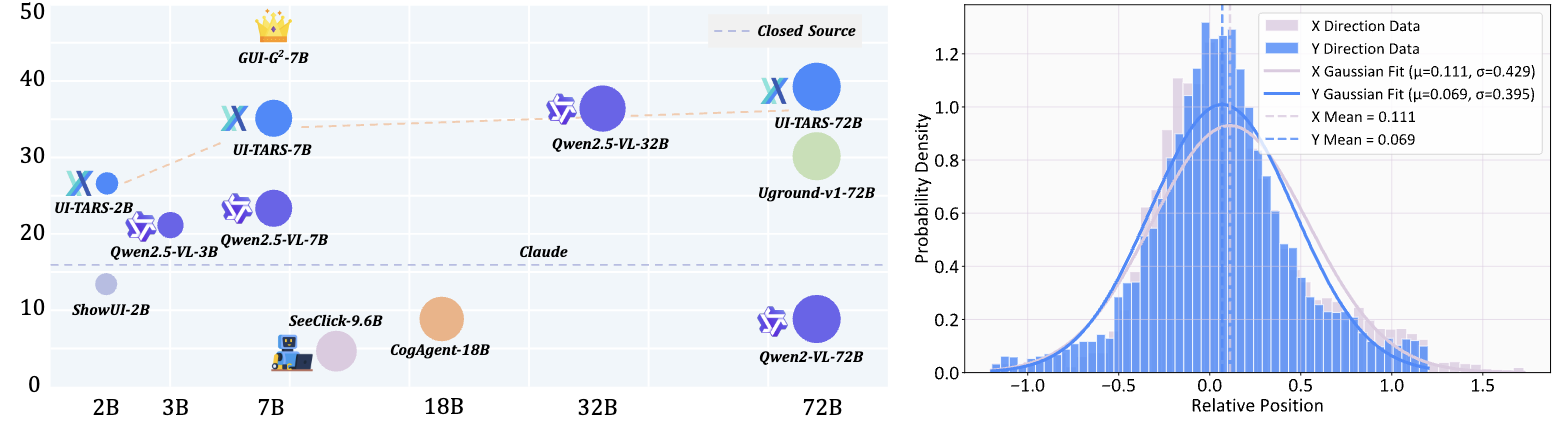
AITW: Human GUI clicks follow Gaussian-like spatial distributions centered on targets.

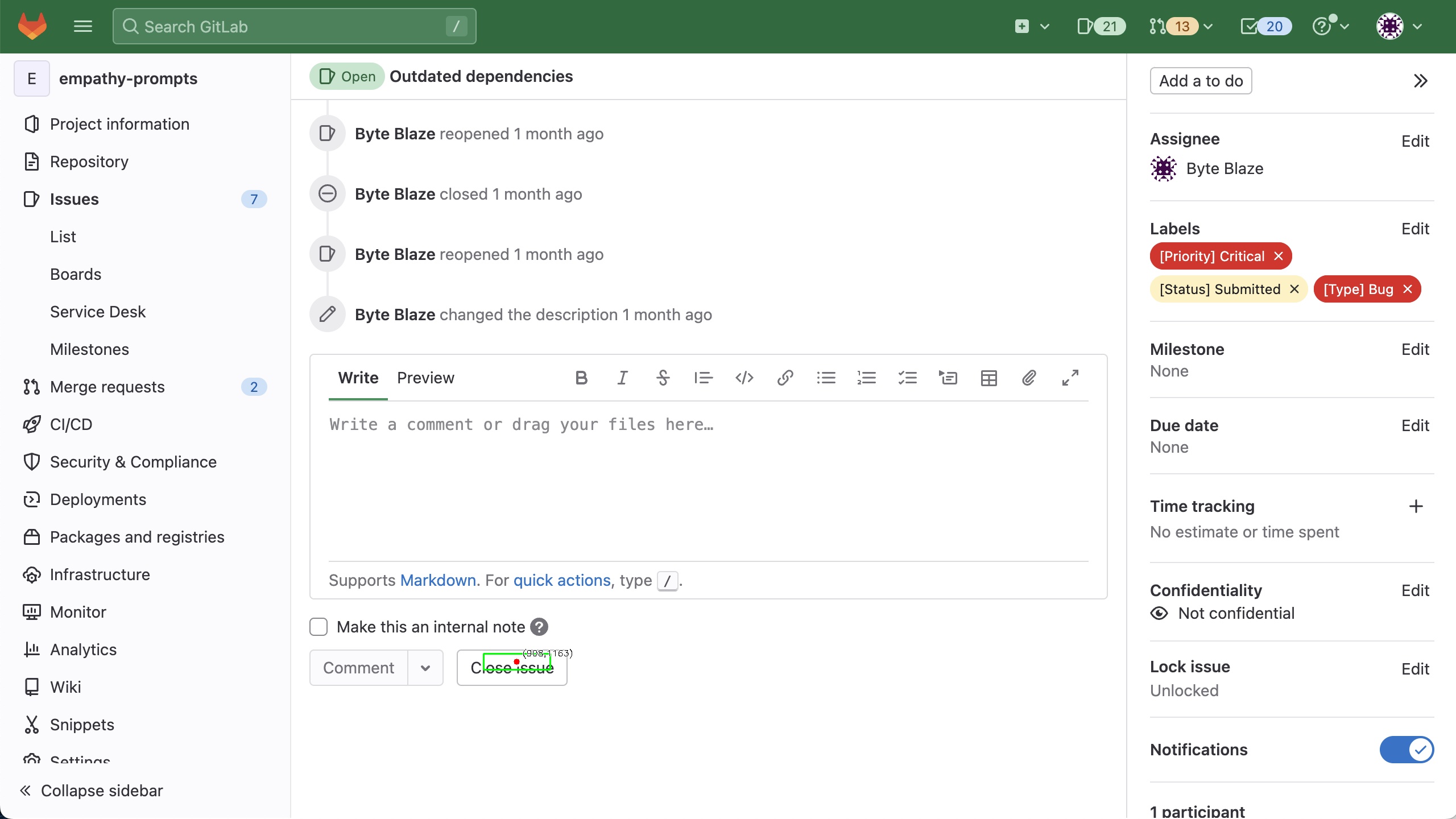
Recent studies on human interaction behavior—especially from the AITW dataset—demonstrate that GUI clicks are not random but instead form natural **Gaussian-like distributions** around the intended targets. Motivated by this, GUI-G² adopts a **gaussian reward framework** that reflects these real-world behaviors by: - Rewarding proximity to target centers (Gaussian Point Reward), - Encouraging spatial region alignment (Gaussian Coverage Reward), - Dynamically adjusting precision with element size (Adaptive Variance). --- # ✨ Highlights * 💡 **Gaussian Point & Coverage Rewards**: Encourage accurate, spatially-aligned clicks. * 📏 **Adaptive Variance Mechanism**: Adjusts reward granularity based on element scale. * 🌍 **Dense Learning Signals**: Smooth gradients outperform binary RL rewards in early-stage learning. * 📊 **State-of-the-art Performance** on ScreenSpot, ScreenSpot-v2, and ScreenSpot-Pro datasets. --- # 🛠 Installation ```bash conda create -n gui-g2 python=3.10 conda activate gui-g2 bash setup.sh ```` If needed, manually install the dependencies: ```bash pip install transformers==4.49.0 pip install deepspeed==0.15.4 pip install filelock pip install qwen_vl_utils ``` --- # 🚀 Quick Start Train GUI-G² on your own data: ```bash cd GUI-G2 bash run_grpo_gaussian.sh ``` You must configure: * `DATA_PATH`: Path to your dataset YAML config * `CKPT_PATH`: Model checkpoint path (e.g., Qwen2.5-VL) * `image_root`: Folder containing your screenshots * `LOG_DIR`, `SAVE_PATH`: Output folders Training data should follow the JSONL format demonstrated in: ``` example_training_json.json ``` Try this inference code. ```python # DOWNLOAD THE 3B MODEL huggingface-cli download --resume-download inclusionAI/GUI-G2-3B --local-dir ./models/GUI-G2-3B ``` ```python # DOWNLOAD THE 7B MODEL huggingface-cli download --resume-download inclusionAI/GUI-G2-7B --local-dir ./models/GUI-G2-7B ``` ```python import os import torch from transformers import AutoTokenizer, AutoProcessor, GenerationConfig from transformers import Qwen2_5_VLForConditionalGeneration from qwen_vl_utils import process_vision_info def infer(instruction, image_path, model_name_or_path): assert os.path.exists(image_path) and os.path.isfile(image_path), "Invalid input image path." model = Qwen2_5_VLForConditionalGeneration.from_pretrained( model_name_or_path, device_map="cuda", trust_remote_code=True, torch_dtype=torch.bfloat16, attn_implementation="flash_attention_2" ).eval() tokenizer = AutoTokenizer.from_pretrained(model_name_or_path, trust_remote_code=True) processor = AutoProcessor.from_pretrained(model_name_or_path) generation_config = GenerationConfig.from_pretrained(model_name_or_path, trust_remote_code=True).to_dict() generation_config.update({ 'max_length': 2048, 'do_sample': False, 'temperature': 0.0 }) model.generation_config = GenerationConfig(**generation_config) prompt_origin = 'Outline the position corresponding to the instruction: {}. The output should be only [x1,y1,x2,y2].' full_prompt = prompt_origin.format(instruction) messages = [ { "role": "user", "content": [ { "type": "image", "image": image_path, }, {"type": "text", "text": full_prompt}, ], } ] text = processor.apply_chat_template( messages, tokenize=False, add_generation_prompt=True ) image_inputs, video_inputs = process_vision_info(messages) inputs = processor( text=[text], images=image_inputs, videos=video_inputs, padding=True, return_tensors="pt", ) inputs = inputs.to(model.device) generated_ids = model.generate(**inputs, max_new_tokens=128) generated_ids_trimmed = [ out_ids[len(in_ids) :] for in_ids, out_ids in zip(inputs.input_ids, generated_ids) ] output_text = processor.batch_decode( generated_ids_trimmed, skip_special_tokens=True, clean_up_tokenization_spaces=False ) print(output_text) input_height = inputs['image_grid_thw'][0][1]*14 input_width = inputs['image_grid_thw'][0][2]*14 try: box = eval(output_text[0]) abs_y1 = float(box[1]/input_height) abs_x1 = float(box[0]/input_width) abs_y2 = float(box[3]/input_height) abs_x2 = float(box[2]/input_width) box = [abs_x1,abs_y1,abs_x2,abs_y2] except: box = [0,0,0,0] point = [(box[0]+box[2])/2,(box[1]+box[3])/2] result_dict = { "result": "positive", "format": "x1y1x2y2", "raw_response": output_text, "bbox": box, "point": point } return result_dict model_path = './models/GUI-G2-7B' image_path = './assets/example.png' instruction = 'close this issue' result = infer(instruction, image_path, model_path) print(result) ''' ['[850,1149,967,1177]'] {'result': 'positive', 'format': 'x1y1x2y2', 'raw_response': ['[850,1149,967,1177]'], 'bbox': [0.3335949778556824, 0.8046218752861023, 0.37951335310935974, 0.8242297172546387], 'point': [0.35655416548252106, 0.8144257962703705]} ''' ``` ```python # plot the result import cv2 import matplotlib.pyplot as plt def visualize_bbox(image_path, raw_response, save_path=None): image = cv2.imread(image_path) image = cv2.cvtColor(image, cv2.COLOR_BGR2RGB) bbox_str = raw_response[0] bbox = eval(bbox_str) x1, y1, x2, y2 = bbox center_x = (x1 + x2) // 2 center_y = (y1 + y2) // 2 cv2.rectangle(image, (x1, y1), (x2, y2), (0, 255, 0), 2) cv2.circle(image, (center_x, center_y), 5, (255, 0, 0), -1) cv2.circle(image, (center_x, center_y), 8, (255, 255, 255), 2) cv2.putText(image, f"({center_x},{center_y})", (center_x + 10, center_y - 10), cv2.FONT_HERSHEY_SIMPLEX, 0.5, (255, 255, 255), 2) cv2.putText(image, f"({center_x},{center_y})", (center_x + 10, center_y - 10), cv2.FONT_HERSHEY_SIMPLEX, 0.5, (0, 0, 0), 1) plt.figure(figsize=(12, 8)) plt.imshow(image) plt.title(f'Bbox: {bbox}') plt.axis('off') plt.tight_layout() plt.show() if save_path: result_image = cv2.cvtColor(image, cv2.COLOR_RGB2BGR) cv2.imwrite(save_path, result_image) print(f"save to : {save_path}") raw_response = result['raw_response'] visualize_bbox(image_path, raw_response, './result.jpg') ``` The green bbox is prediction.
--- # Evaluation Checkpoints will be released soon. Please stay tuned. If you want to evaluate your model on ScreenSpot, please refer to [ScreenSpot-Pro](https://github.com/likaixin2000/ScreenSpot-Pro-GUI-Grounding). ### 📊 Results on ScreenSpot-v2 | **Model** | **Mobile Text** | **Mobile Icon** | **Desktop Text** | **Desktop Icon** | **Web Text** | **Web Icon** | **Avg.** | | -------------------- | --------------- | --------------- | ---------------- | ---------------- | ------------ | ------------ | -------- | | GPT-4o | 26.6 | 24.2 | 24.2 | 19.3 | 12.8 | 11.8 | 20.1 | | Qwen2.5-VL-3B | 93.4 | 73.5 | 88.1 | 58.6 | 88.0 | 71.4 | 80.9 | | Qwen2.5-VL-7B | 97.6 | 87.2 | 90.2 | 74.2 | 93.2 | 81.3 | 88.8 | | SeeClick-9.6B | 78.4 | 50.7 | 70.1 | 29.3 | 55.2 | 32.5 | 55.1 | | UGround-7B | 75.1 | 84.5 | 85.1 | 61.4 | 84.6 | 71.9 | 76.3 | | OS-Atlas-7B | 95.2 | 75.8 | 90.7 | 63.6 | 90.6 | 77.3 | 84.1 | | UI-TARS-2B | 95.2 | 79.1 | 90.7 | 68.6 | 87.2 | 78.3 | 84.7 | | UI-TARS-7B | 96.9 | 89.1 | 95.4 | 85.0 | 93.6 | 85.2 | 91.6 | | UI-TARS-72B | 94.8 | 86.3 | 91.2 | 87.9 | 91.5 | 87.7 | 90.3 | | JEDI-7B | 96.9 | 87.2 | 95.9 | 87.9 | 94.4 | 84.2 | 91.7 | | GUI-Actor-7B | 97.6 | 88.2 | 96.9 | 85.7 | 93.2 | 86.7 | 92.1 | | UI-R1-3B | 96.2 | 84.3 | 92.3 | 63.6 | 89.2 | 75.4 | 85.4 | | UI-R1-E-3B | 98.2 | 83.9 | 94.8 | 75.0 | 93.2 | 83.7 | 89.5 | | SE-GUI-7B | - | - | - | - | - | - | 90.3 | | LPO | 97.9 | 82.9 | 95.9 | 86.4 | 95.6 | 84.2 | 90.5 | | **GUI-G²-7B (Ours)** | **98.3** | **91.9** | **95.4** | **89.3** | **94.0** | **87.7** | **93.3** | --- # Reward Customization To implement your own reward, modify: ``` src/open_r1/gaussian_grpo.py ``` Key components: * `Gaussian Point Reward` * `Gaussian Coverage Reward` * `Adaptive Variance Mechanism` --- # 🙏 Acknowledgement The RL Training code build from [VLM-R1 project](https://github.com/om-ai-lab/VLM-R1). --- # 📄 Citation If you use GUI-G², please cite our work: ```bibtex @misc{tang2025guig2gaussianrewardmodeling, title={GUI-G$^2$: Gaussian Reward Modeling for GUI Grounding}, author={Fei Tang and Zhangxuan Gu and Zhengxi Lu and Xuyang Liu and Shuheng Shen and Changhua Meng and Wen Wang and Wenqi Zhang and Yongliang Shen and Weiming Lu and Jun Xiao and Yueting Zhuang}, year={2025}, eprint={2507.15846}, archivePrefix={arXiv}, primaryClass={cs.LG}, url={https://arxiv.org/abs/2507.15846}, } ``` If you like our project, please give us a star ⭐ on GitHub for the latest update. [![Star History Chart](https://api.star-history.com/svg?repos=ZJU-REAL/GUI-G2&type=Timeline)](https://www.star-history.com/#ZJU-REAL/GUI-G2&Timeline)