Kivio Desktop # Kivio Desktop ### A screen-level AI assistant for macOS and Windows: an agentic client, plus translation, screenshot OCR, and visual Q&A [![Release](https://img.shields.io/github/v/release/ZMGID/kivio?style=flat-square&color=4f46e5&label=release)](https://github.com/ZMGID/kivio/releases/latest) [![Platform](https://img.shields.io/badge/platform-macOS%20%7C%20Windows-lightgrey?style=flat-square)](https://github.com/ZMGID/kivio/releases) [![Tauri](https://img.shields.io/badge/built%20with-Tauri%202-orange?style=flat-square)](https://tauri.app/) [![Downloads](https://img.shields.io/github/downloads/ZMGID/kivio/total?style=flat-square)](https://github.com/ZMGID/kivio/releases/latest) [![License](https://img.shields.io/badge/license-GPL--3.0-blue?style=flat-square)](LICENSE) [中文](README.md) · **English** · [Changelog](https://github.com/ZMGID/kivio/releases) [Download](https://github.com/ZMGID/kivio/releases/latest) · [Features](#features) · [Help](#help) · QQ **1104450740** Kivio QQ group 1104450740



Lives in the tray. Hotkeys translate typing, selection, or what's on screen; capture a region and ask. The client is a full agent: tools, sub-agents, Skills, MCP, knowledge base, multi-model replies. Bring your own keys. No account, no proxy, no telemetry. Data stays on disk. ## ❤️ Sponsor > Want to appear here? Reach us via [GitHub Issues](https://github.com/ZMGID/kivio/issues) or QQ group **1104450740**.

Click to collapse
Hezubus Thanks to Hezubus for sponsoring this project. Hezubus provides official, stable, high-speed API relay for GPT, Claude, and other models, with enterprise customization, invoicing, and 7×16h dedicated support. It also offers a purpose-built WebSocket connection for faster time-to-first-token. Codex subsidy rates go as low as 0.08×. Register here.
## Why Kivio Text on screen, a captured region, and coding CLIs you already installed do not need three apps. Kivio keeps them in one tray process: hotkeys anywhere, your own providers. - **One loop, many hosts** — built-in Agent, research-only Kivio Chat, and local external CLIs (Claude Code, Codex, Cursor, OpenCode, Gemini, Kimi, Pi, Hermes, Grok, DeepSeek Harness) share the same chat UI - **Screen tools** — quick, selection, screenshot, and in-place replace translation; Lens freezes the display, lets you ask and annotate, and can hand the thread back to chat - **Bring your own keys** — OpenAI Chat Completions / Responses, Anthropic, Gemini, Grok (xAI Responses). Translator, screenshot, Lens, and each conversation can use a different model - **Extensions** — Skills, MCP, knowledge base, sub-agents, plugins, connectors; a right dock with file tree, Git, and a terminal - **Cross-platform** — macOS (Apple Silicon) and Windows 10/11, built with Tauri 2 ## Screenshots | Chat | Settings | | :--: | :------: | | ![Chat](docs/screenshots/chat-client.png) | ![Settings](docs/screenshots/settings.png) |

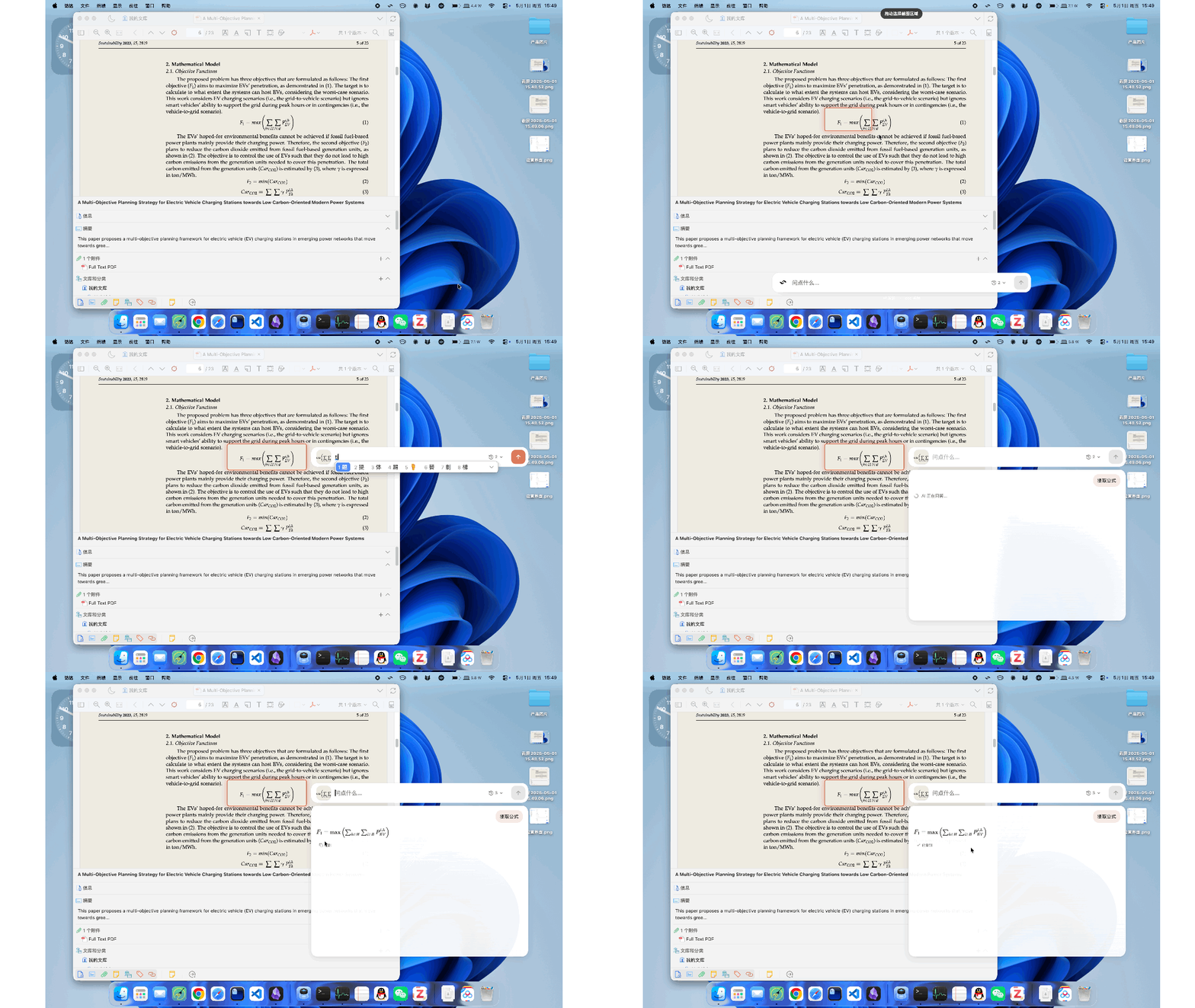
Lens formula extraction

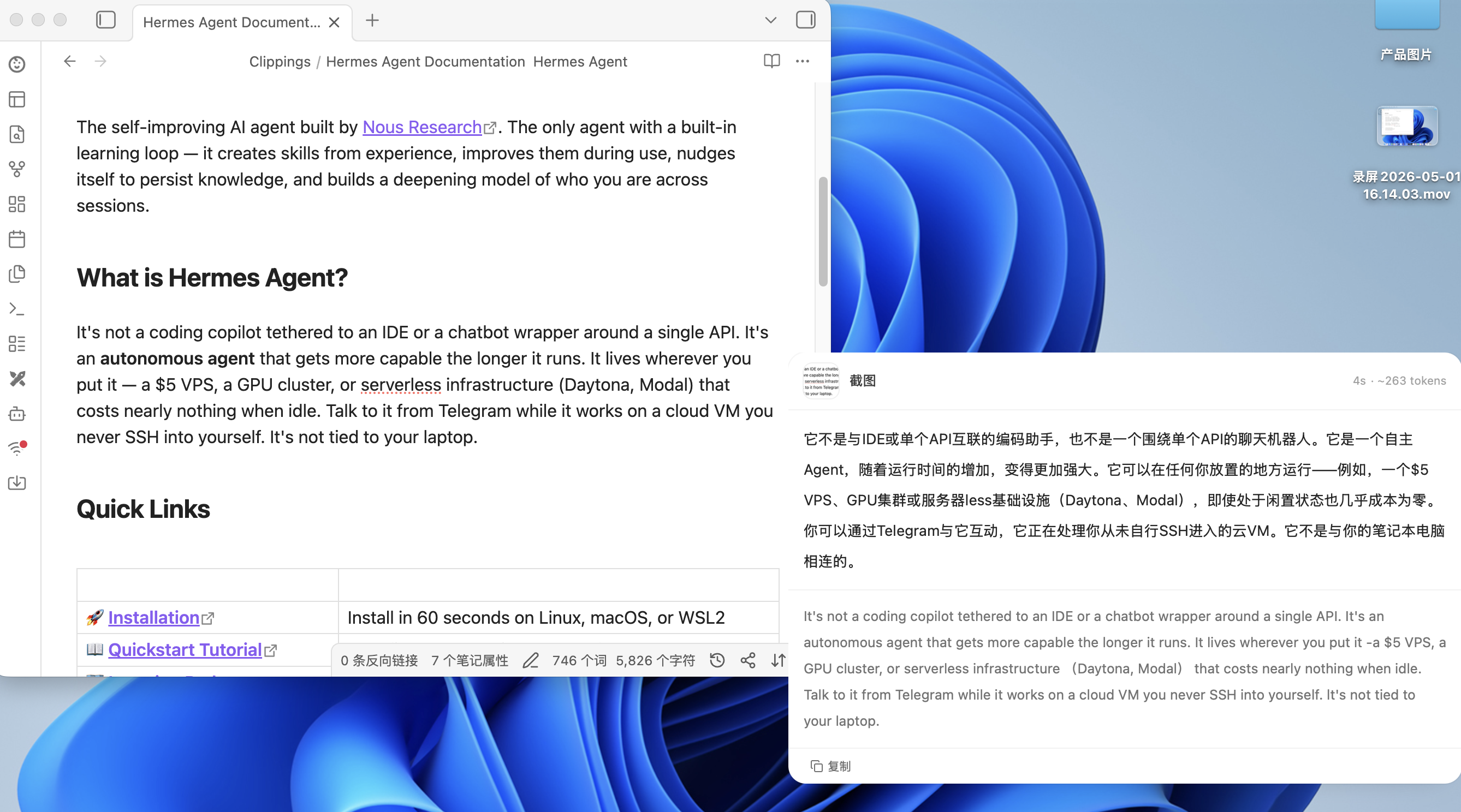
Screenshot translation

## Features Full history: [Releases](https://github.com/ZMGID/kivio/releases) · current notes: [v3.0.0](docs/releases/v3.0.0.md) ### Chat & agent - Tool loop, sub-agents, Skills, MCP, knowledge base, attachments; one question, many models - Three runtimes: Kivio Agent (full tools), Kivio Chat (search / fetch / knowledge base, read-only), external CLI - Hand a conversation to Claude Code, Codex, Cursor, OpenCode, Gemini, Kimi, Pi, Hermes, Grok, or DeepSeek Harness if they are installed - Import native CLI sessions (pinned to the original CLI and working directory) ### Translate & Lens - Quick, selection, screenshot OCR, and in-place replace translation - Lens: freeze the screen, select a region (or a window on macOS), ask, annotate (arrow / rect / mosaic), send the thread back to chat - OCR: system engines (Apple Vision / Windows OCR) or an optional offline RapidOCR pack ### System - Global hotkeys (remappable, conflict-aware), tray, light / dark - Usage stats, lifecycle hooks, optional chat-window keep-alive (hide instead of destroy) ## Hotkeys Toggles, remappable in Settings. | Action | macOS | Windows | |---|---|---| | Open chat | `⌘⇧K` | `Ctrl+Shift+K` | | Quick translate | `⌘⌥T` | `Ctrl+Alt+T` | | Screenshot translate | `⌘⇧A` | `Ctrl+Shift+A` | | Selection translate | `⌘⇧T` | `Ctrl+Shift+T` | | Replace translate | `⌘⇧R` | `Ctrl+Shift+R` | | Lens | `⌘⇧G` | `Ctrl+Shift+G` | ## Download ### Requirements - **macOS**: Apple Silicon (`.dmg` is unsigned) - **Windows**: Windows 10 / 11 (Edge WebView2; usually already installed) Get the latest from [Releases](https://github.com/ZMGID/kivio/releases/latest): - macOS: `Kivio.Desktop_*_aarch64.dmg` - Windows installer: `Kivio.Desktop_*_x64-setup.exe` - Windows portable: `Kivio.Desktop_*_x64-portable.zip` The DMG is unsigned. First launch: right-click → Open, or: ```bash xattr -cr "/Applications/Kivio Desktop.app" ``` macOS needs **Accessibility** and **Screen Recording**. Then follow the onboarding wizard. ## Help - [Changelog](https://github.com/ZMGID/kivio/releases) — downloads and highlights - [Issues](https://github.com/ZMGID/kivio/issues) - QQ group **1104450740** ## Quick start 1. Install Kivio and finish onboarding (provider + hotkeys). 2. **Add a provider**: Settings → Providers → Add → pick a preset (or custom) and paste an API key. 3. **Chat**: `⌘⇧K` / `Ctrl+Shift+K`, pick a model, send. Switch to a local CLI from the runtime picker when you need one. 4. **Screen**: use a translate hotkey or Lens; grant permissions in system settings. ## FAQ
Do I need an account? Where is my data? No account. Keys live in local `settings.json`. Conversations, knowledge bases, and notes live under the app data directory: - Windows: `%APPDATA%\com.zmair.kivio` - macOS: `~/Library/Application Support/com.zmair.kivio` No telemetry. Requests go only to the providers you configure.
Which external CLIs are supported? If they are installed: Claude Code, Codex, Cursor, OpenCode, Gemini, Kimi, Pi, Hermes, Grok, DeepSeek Harness. Availability is probed on the machine; model catalogs load lazily for the selected CLI.
macOS says the app is damaged / cannot be opened? The build is unsigned. Right-click → Open, or run `xattr -cr "/Applications/Kivio Desktop.app"`. Screenshot and replace translation also need Screen Recording.
Why can’t I continue an imported CLI chat on another model? Import is a display snapshot. The history still belongs to the original CLI. Continuation uses that CLI’s native session and stays on the original working directory. See [ADR-0001](docs/adr/0001-imported-cli-conversations-stay-on-their-cli.md) and [ADR-0002](docs/adr/0002-imported-history-is-a-snapshot.md).
## Development
Environment and commands You need Node.js, npm, Rust, and Tauri 2 platform deps. macOS also needs Swift for the OCR sidecar. ```bash npm install npm run dev # Rust + UI (builds Swift sidecar on macOS) npm run dev:ui # Vite only npm run lint npm run typecheck npm test ``` Rust tests: ```bash # macOS / Linux cargo test --manifest-path src-tauri/Cargo.toml # Windows (use the script; plain cargo test binaries may fail to launch) powershell -File scripts/win-cargo-test.ps1 ``` Chat-protocol types are generated from Rust. After a protocol change: ```bash npm run protocol:generate npm run protocol:check ```
Architecture ``` ┌─────────────────────────────────────────────────────────────┐ │ Frontend (React 18 + Vite + Tailwind) │ │ One bundle, four windows: main / chat / lens / translate │ └────────────────────────┬────────────────────────────────────┘ │ Tauri IPC · chat-protocol ┌────────────────────────▼────────────────────────────────────┐ │ Backend (Tauri 2 + Rust) │ │ AgentHost loop (prepare → planning → rounds → synthesis) │ │ ├─ GUI chat │ │ ├─ External CLI agents │ │ └─ Sub-agents │ └─────────────────────────────────────────────────────────────┘ ``` - Live chat uses the versioned `chat-protocol` (`npm run protocol:check` verifies generated types) - Provider adapters: OpenAI Chat, Anthropic Messages, Gemini, OpenAI Responses (including xAI Grok) - Settings in `settings.json` (including API keys); conversations under `conversations/`; crash drafts in a JSONL journal Development conventions: [Engineering standards](docs/engineering-standards.md).
## Contributing [Issues](https://github.com/ZMGID/kivio/issues) and PRs are welcome. Before a PR, please run: - `npm run lint` - `npm run typecheck` - `npm test` Open an issue first for larger features. Tracker conventions: [docs/agents/issue-tracker.md](docs/agents/issue-tracker.md). ## Star History [![Star History Chart](docs/star-history.svg)](https://github.com/ZMGID/kivio/stargazers) ## License [GPL-3.0-or-later](LICENSE) © ZM