
A Zone opens. A Stack blooms. The desktop goes quiet again. · play the 33-second MP4
## Files in reach. Noise out of sight.
I work from the desktop. The files are useful; the pile is not.
BentoDesk folds ordinary Windows files into small **Zones**. A Zone rests as a
capsule, opens into a grid where it already sits, then gets out of the way
again. Related Zones can become a **Stack** without losing their own layout or
style. Nothing is imported into a proprietary library: the files remain normal
Windows files.
Rest
A compact capsule leaves the desktop readable. |
Open
Search and work with items in place. |
Fold
Leave the Zone and the space returns. |
Version 2.0 is the native Rust rewrite of BentoDesk. It carries forward the
useful ideas from the Tauri-based 1.x releases, removes the web runtime, and
rebuilds motion, typography, file handling, settings, and system integration
around Windows itself.
## The motion is the interface
The capsule and the grid are the same native surface. Geometry, hit testing,
text, icons, and controls follow one animation state, so a reversal continues
from the current frame instead of cutting to a second layer.

Capsule → grid → search → context menu · play the MP4
A Zone can be narrow or wide, use five corner styles, and open on hover, click,
or remain expanded. Rapid movement between Zones does not discard an unfinished
animation.
## The rest of the desk
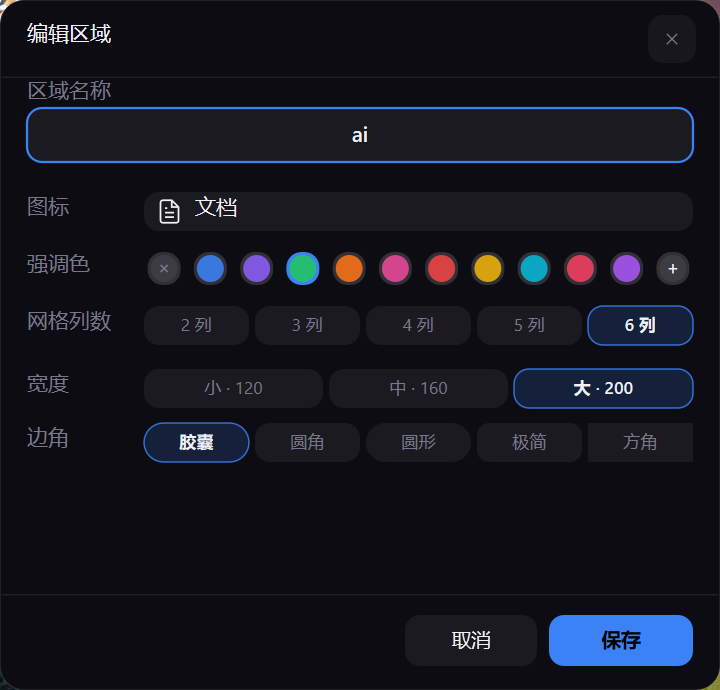
### 01 · Shape one Zone
Set its name, alias, icon, accent, grid columns, width, and corner style in a
native editor. No browser-backed settings window appears over the desktop.
### 02 · Move the whole layout
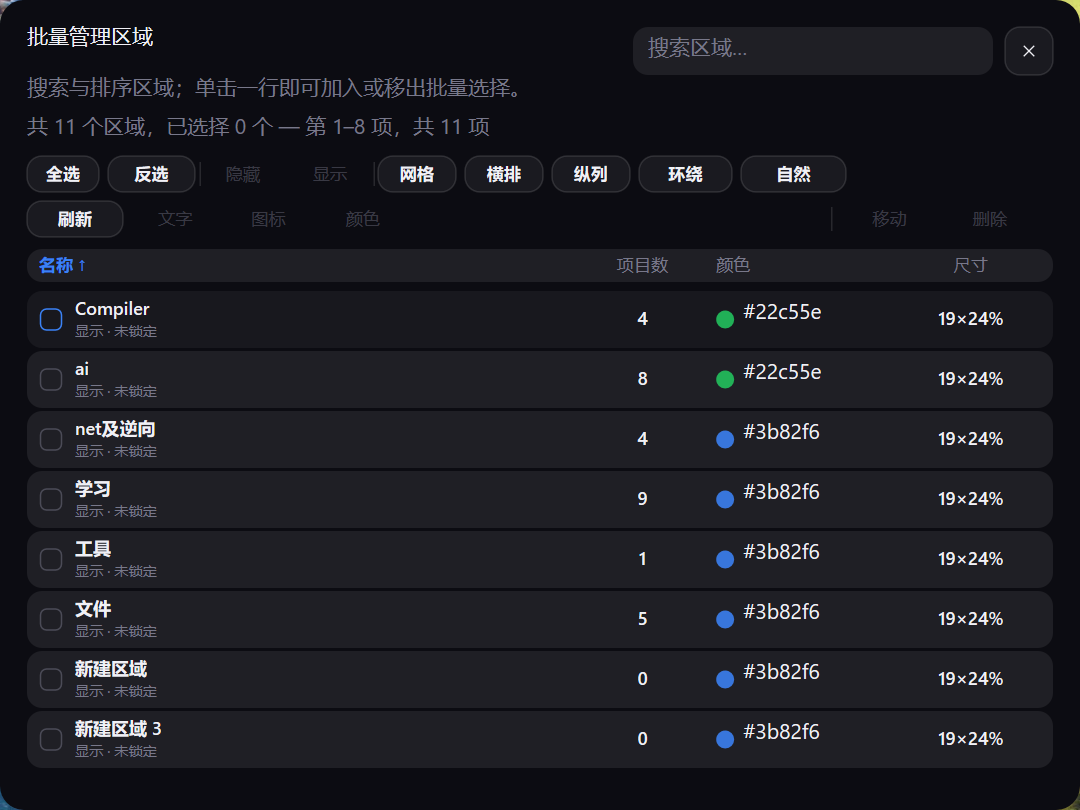
Select, show, hide, move, or delete Zones together. Grid, horizontal, vertical,
ring, and natural layouts are clamped to the usable display area.
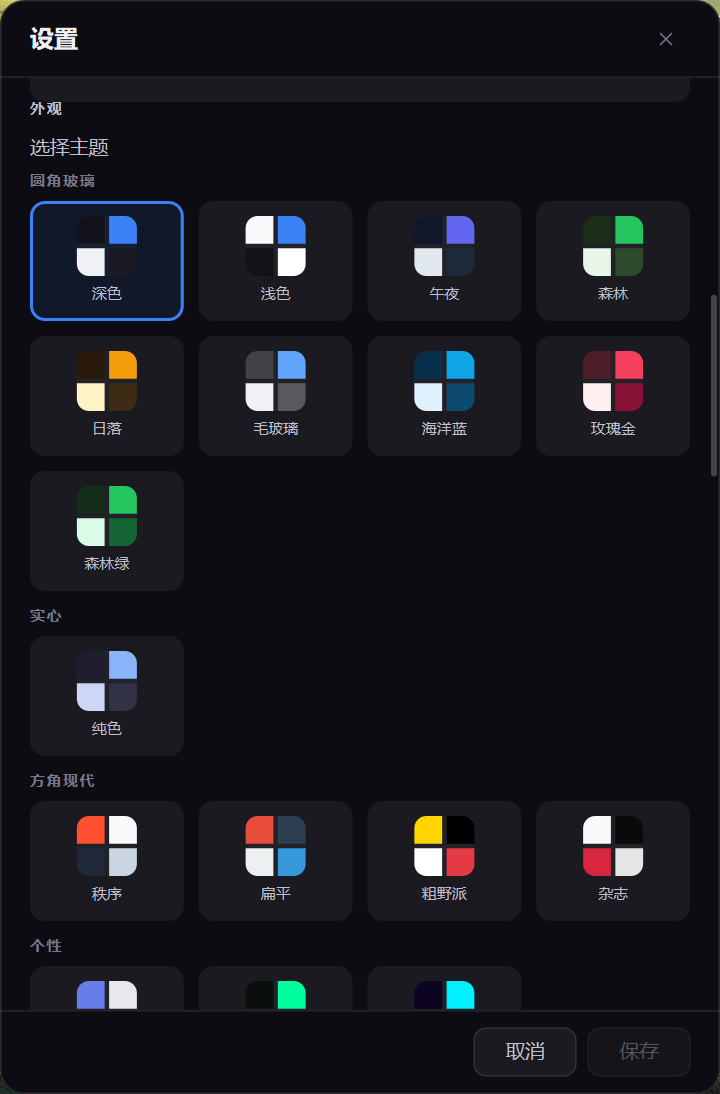
### 03 · Make it feel at home
Choose light or dark themes, accents, expansion behavior, performance controls,
startup options, backup, encryption, plugins, and updater settings. On first
launch, BentoDesk follows the Windows UI language; English and Simplified
Chinese can then be switched at any time.
## Small where it matters
2.39 MiB
release executable |
17.34 MiB
Private Bytes at t60 |
235 ms
full Zone collapse |
1 process
no browser runtime |
Those numbers come from one isolated five-Zone reference run, not a synthetic
claim. See [Reference measurement](#reference-measurement) for the exact scene
and limits.
## What BentoDesk handles
### Everyday flow
- Move or copy files, folders, and shortcuts with Windows Shell/OLE drag and
drop; drag an item back out to restore it to the desktop.
- Filter one Zone in place or search across all Zones.
- Combine Zones into a Stack, then bloom its members without flattening their
individual layout.
- Keep empty desktop space click-through while ordinary application windows
cover BentoDesk as expected.
### Automation with a review step
- **Smart grouping** turns current desktop files into selectable suggestions;
nothing moves until a suggestion is applied.
- **Live folders** keep a bound directory and its Zone in sync.
- **Plugins** install from validated local packages and can be enabled,
disabled, persisted, and removed with confirmation.
- **Rules** handle repeatable local organization without an online service.
### Recovery and file safety
Save and load layout snapshots, inspect structural changes on the timeline, and
restore an earlier arrangement. Settings backups, atomic persistence,
update-package validation, and DPAPI or passphrase encryption provide recovery
paths without a helper browser process.
Drag and drop follows Windows move/copy semantics. Failed or rejected transfers
are not recorded as completed. Snapshot deletion and bulk Zone deletion require
confirmation. Irreplaceable files should still have a backup, just as they
should with any desktop file tool.
## Choosing a desktop organizer
These tools solve different versions of “my desktop is full.” The comparison
uses each product's official description and focuses on workflow rather than a
synthetic benchmark.
| Start with | When it is the better fit |
| --- | --- |
| [Windows folders and desktop icons](https://support.microsoft.com/en-us/windows/experience/personalization/customize-the-desktop-icons-in-windows) | You want no extra software. Windows keeps the familiar icons, shortcuts, and Explorer folders. |
| [Stardock Fences 6](https://www.stardock.com/products/fences/) | You need extensive automation or managed-PC deployment, including sorting rules, tabs, Peek, Folder Portals, and business controls. |
| [Portals](https://portals-app.com/) | You want persistent folder panels, tabs, and precise per-panel styling or display-aware profiles. |
| [Nimi Places](https://mynimi.net/Projects/Nimi-Places/Features/) | Rich previews, labels, sorting rules, and media-oriented containers matter most. |
| **BentoDesk** | You want a local-first organizer whose resting state stays small: native capsule-to-grid motion, Stacks, direct desktop-item handling, layouts, snapshots, and timeline recovery. |
BentoDesk is intentionally focused. It is Windows-only, does not replace
Explorer, and does not provide cloud-account sync. A permanent folder portal,
rich media browser, or managed deployment is better served by a product built
around that job.
## Quick start
1. Download `BentoDesk-2.2.0-windows-x64-setup.exe` from
[Releases](https://github.com/ZRainbow1275/bentodesk/releases/latest), then
review and accept the User Agreement and Privacy Policy in Setup. The
portable ZIP remains available for a no-install workflow.
2. Check the chosen package against `SHA256SUMS.txt`, then install it or extract
the portable ZIP to a writable directory.
3. Create or manage Zones from the tray menu.
4. Drag files, folders, or shortcuts into a Zone.
5. Choose a theme, expansion mode, and language in Settings.
Neither package needs Node.js, Tauri, WebView2, or a separate browser runtime.
BentoDesk is local-first and has no account, project-operated server, telemetry,
analytics, advertising, cloud storage, or crash uploads. It does not upload
desktop file paths, names, icons, or contents.
The updater uses the default official GitHub endpoint
`https://api.github.com/repos/ZRainbow1275/bentodesk/releases/latest` over
HTTPS. A controlled `BENTODESK_UPDATE_MANIFEST_URL` may select an HTTPS, file, or
local override. With scheduled checks enabled, it checks immediately at startup
and then at the selected cadence (Weekly by default; Manual disables scheduled
checks).
Auto-download is enabled by default. On the default channel, it stages the exact
official Setup only after its GitHub SHA-256 digest is verified. A controlled
override stages its declared artifact only after the manifest SHA-256 or
embedded-key minisign signature is verified. Installation always requires an
explicit user action. GitHub, or the host selected by a controlled HTTPS
override, can receive ordinary HTTPS request metadata such as the source IP
address and BentoDesk User-Agent under its own policies.
Setup preserves local settings on uninstall by default; its separate, unchecked
removal option only deletes BentoDesk state. See the
[User Agreement](installer/legal/UserAgreement.en.txt) and
[Privacy Policy](installer/legal/PrivacyPolicy.en.txt).
### Requirements
- Windows 10 1809+ or Windows 11;
- x86-64 processor;
- current Windows updates and graphics drivers are recommended.
## Reference measurement
One isolated run of the public BentoDesk 2.0.2 Windows x64 release at
2560×1368 / 144 DPI, with five Zones, 50 items, and one BentoDesk process:
| Metric | Result |
| --- | ---: |
| Release EXE | 2,506,752 bytes (2.39 MiB) |
| Private Bytes at t10 / t30 / t60 | 17.80 / 17.38 / 17.34 MiB |
| Full Zone expand / collapse | 234 ms / 235 ms |
| Animation tick median / p95 | 16 ms / 16 ms |
## Technology
| Layer | Implementation |
| --- | --- |
| Language and runtime | Rust 2024, single process |
| Windows and input | Win32 / USER32 / DWM |
| Graphics | Direct2D, DirectWrite, DirectComposition, D3D11 |
| Icons and images | Windows Imaging Component, Windows Shell |
| File interaction | Shell/OLE, `ReadDirectoryChangesW` |
| Privacy and system security | Local-first, no telemetry, official GitHub HTTPS updater, DPAPI |
| Data | Atomic local persistence, encrypted settings vault |
| Build | MSVC x64, static CRT, size optimization, Fat LTO |
> [!NOTE]
> BentoDesk 2.0 does not ship Tauri, WebView2, Chromium, Node.js, or a
> third-party GUI framework in its runtime. The Tauri 1.x code remains at
> [`v1.3.0`](https://github.com/ZRainbow1275/bentodesk/tree/v1.3.0) and
> [`archive/tauri-1.x`](https://github.com/ZRainbow1275/bentodesk/tree/archive/tauri-1.x).
Primary crates:
```text
bentodesk-shell Process entry, Win32 message routing, system integration
bentodesk-app Application state, interaction, render projection
bentodesk-backend Settings, plugins, rules, recovery, updater
bentodesk-platform D2D/DWrite/DComp/WIC/Shell/OLE boundaries
bentodesk-zone Zone domain model
bentodesk-style Themes, typography, and visual tokens
```
## Building from source
You need Windows 10/11 x64, Rust 1.89 or newer, and Visual Studio 2022 Build
Tools with MSVC and the Windows SDK.
```powershell
git clone https://github.com/ZRainbow1275/bentodesk.git
cd bentodesk
$env:CARGO_BUILD_JOBS = "1"
$env:CARGO_INCREMENTAL = "0"
cargo build --locked --release --target x86_64-pc-windows-msvc -p bentodesk-shell --bin BentoDesk
```
Output:
```text
target\x86_64-pc-windows-msvc\release\BentoDesk.exe
```
Full local checks:
```powershell
cargo fmt --all -- --check
cargo test --locked --workspace --all-targets
cargo clippy --locked --workspace --all-targets -- -D warnings
cargo doc --locked --workspace --no-deps
cargo deny check
cargo audit
```
## Contributing
Code, tests, translations, themes, plugins, documentation, and focused bug
reports are welcome. Issues and pull requests may be written in English or
Chinese. Start with [CONTRIBUTING.md](CONTRIBUTING.md).
Report security issues through GitHub's private channel described in
[SECURITY.md](SECURITY.md), not in a public issue.
## Thanks
Thanks to GPT 5.6 SOL for the help, to
[Tibo](https://x.com/thsottiaux) for the frequent resets that sped up
BentoDesk's release and polish.
Thanks to [Linux Do](https://linux.do/), [NodeSeek](https://www.nodeseek.com/),
and other communities for their support.

BentoDesk is maintained by 方寒
([@ZRainbow1275](https://github.com/ZRainbow1275)).
## License
BentoDesk is released under the [GNU AGPL-3.0-or-later](LICENSE).
 # BentoDesk
**A next-generation bento-box organizer for the Windows desktop—powered by Rust, built for quiet elegance.**
[English](README.md) · [简体中文](README.zh-CN.md)
# BentoDesk
**A next-generation bento-box organizer for the Windows desktop—powered by Rust, built for quiet elegance.**
[English](README.md) · [简体中文](README.zh-CN.md)