 # dsh-intelligent-ui
[中文](README.md) | English
[](https://www.npmjs.com/package/@zephinel/dsh-intelligent-ui)
[](LICENSE)
[](https://www.npmjs.com/package/@deepseek-ai/dsh)
[](https://github.com/Zephinel/dsh-intelligent-ui/actions/workflows/publish.yml)
**Turn a DeepSeek Harness (DSH) model answer into a page you can actually use.** After installing and enabling the plugin, ask:
```text
Plan two days in Shanghai, with checkboxes and adjustments
```
The model calls the `render_ui` tool and writes its answer as an [OpenUI Lang 1.0](https://openui.com) program; at the end of the turn, DSH renders it into an interactive page — maps, photos, charts, checklists, forms, SVG drawings and mini-games are all real components, not screenshots.
Ported from [Open Intelligent UI](https://github.com/thesysdev/open-intelligent-ui) (MIT), with an Agent Skill (`intelligent-ui`) that the plugin registers automatically.
> [!NOTE]
> **Current status**: published on GitHub and npm as **`@zephinel/dsh-intelligent-ui@0.5.0`** (`latest`). Custom styles, on-demand generation, free layouts and template file import/export, plus the renderer-contract, Host-validation and export-semantics fixes, are all included in 0.5.0.
[Quick start](#quick-start) · [Getting the code](#getting-the-code) · [Build, test and deploy](#build-test-and-deploy)
## What it looks like
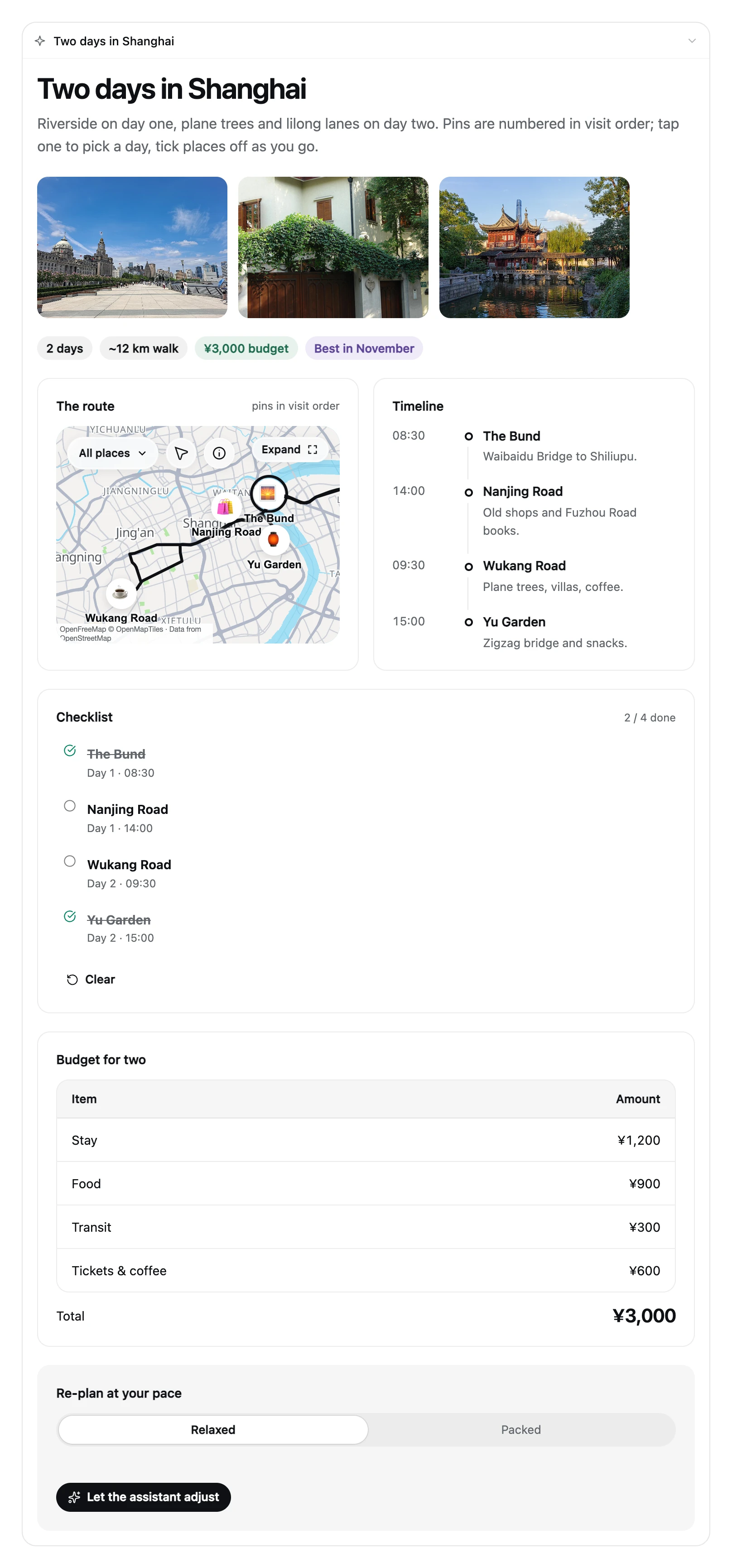
- When the user asks "plan two days in Shanghai", the model no longer replies with just a paragraph: it renders an itinerary page (map + photos + timeline + checklist + budget) at the end of the answer that can be clicked, checked off and dragged.
- The `$variables`, `@Set` and `@functions` inside the card all execute locally in the browser: checkboxes, sliders, steppers, timers and budget allocation never require another model request.
- Only actions that genuinely need to continue the conversation (`@ToAssistant`, such as a form submission) put a short message back into the composer and send it.
## Component tour
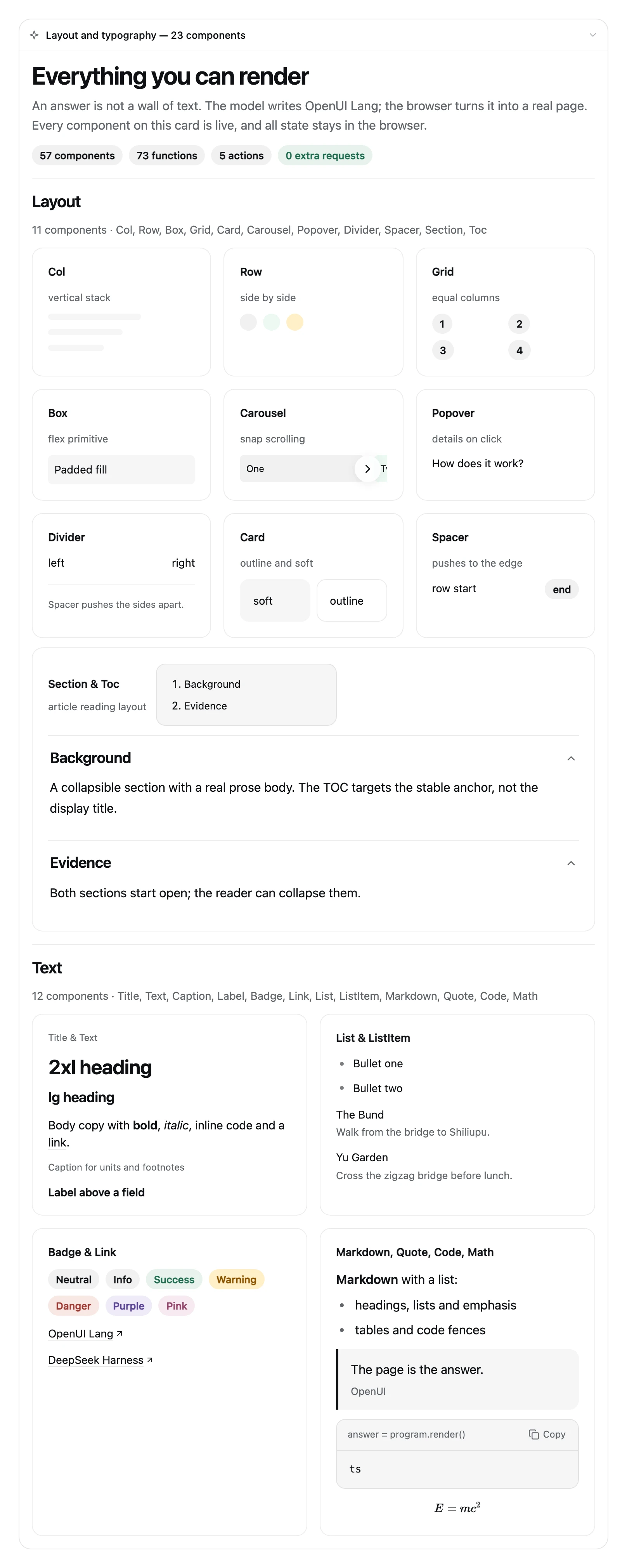
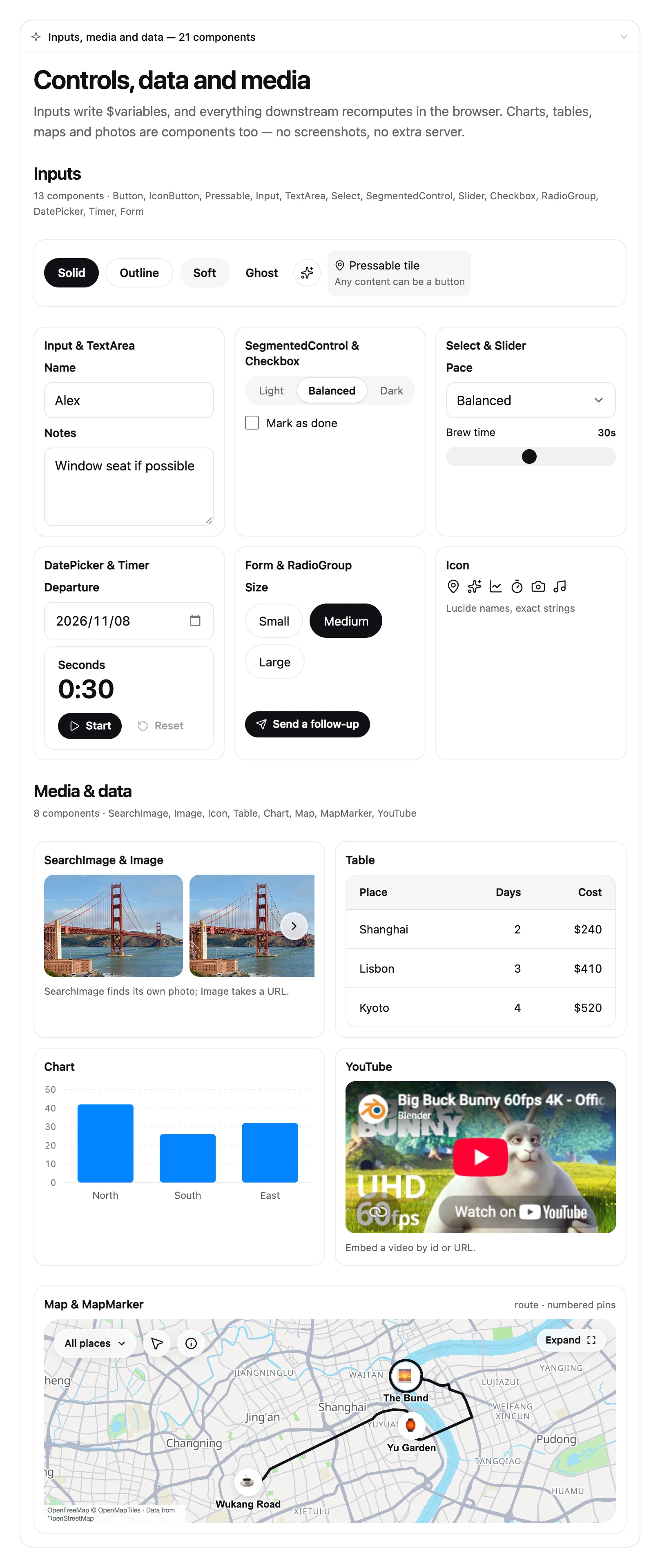
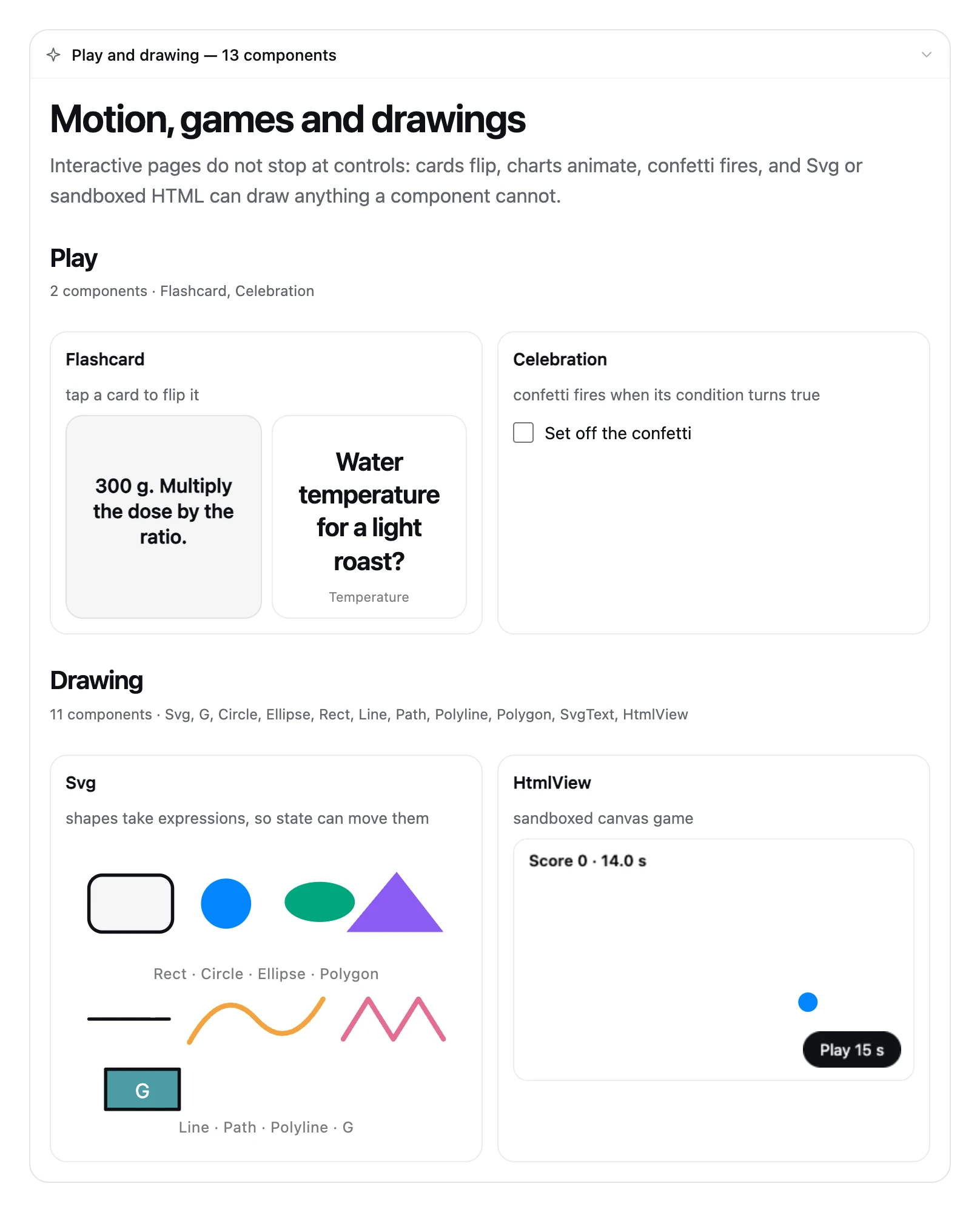
The renderer is not a chat bubble around a paragraph — it is a full component library: **57 components, 73 functions, 5 action steps**. The three cards below are real renders from the extension: same renderer, same DSH theme tokens, no mockups:
## More examples
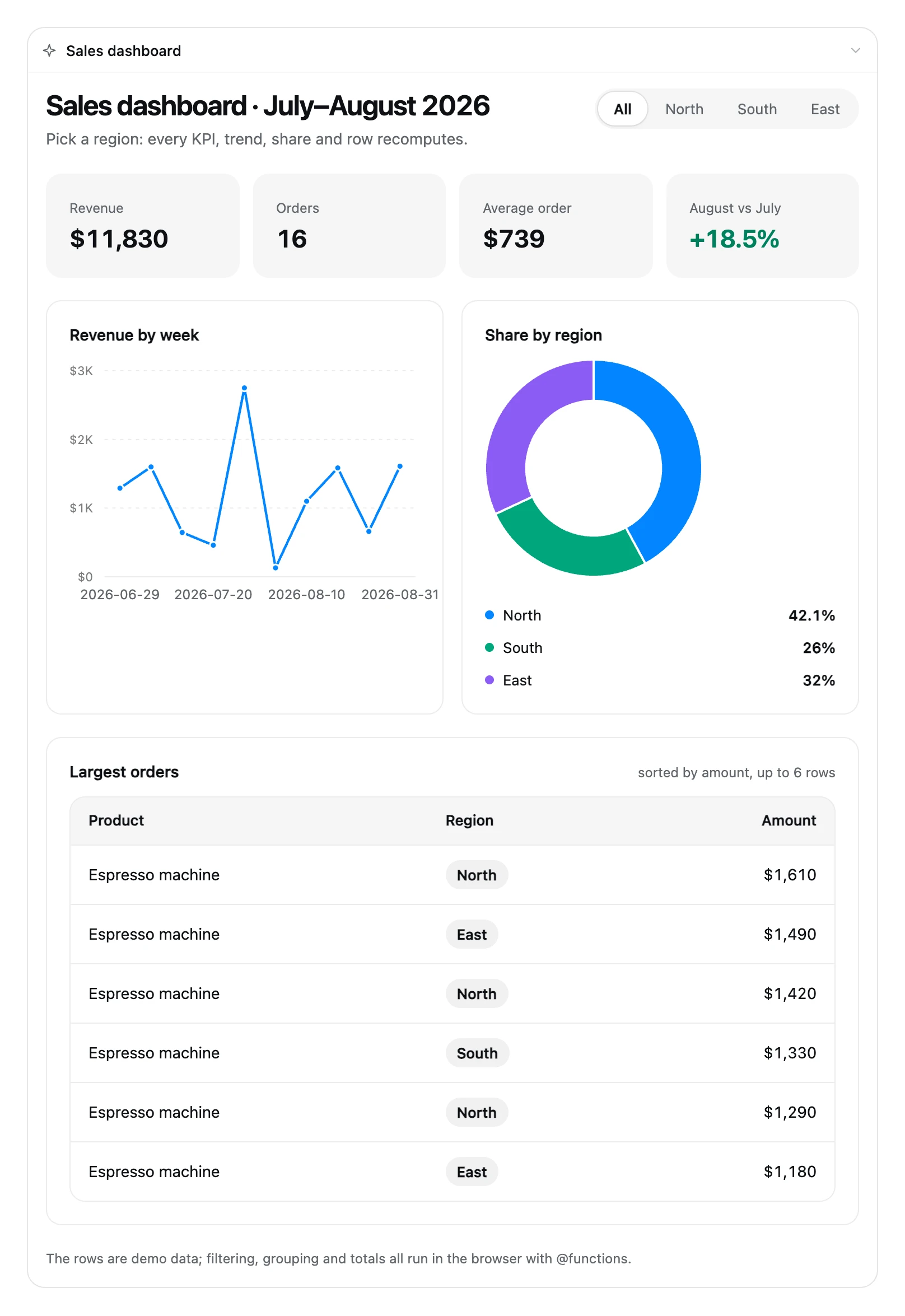
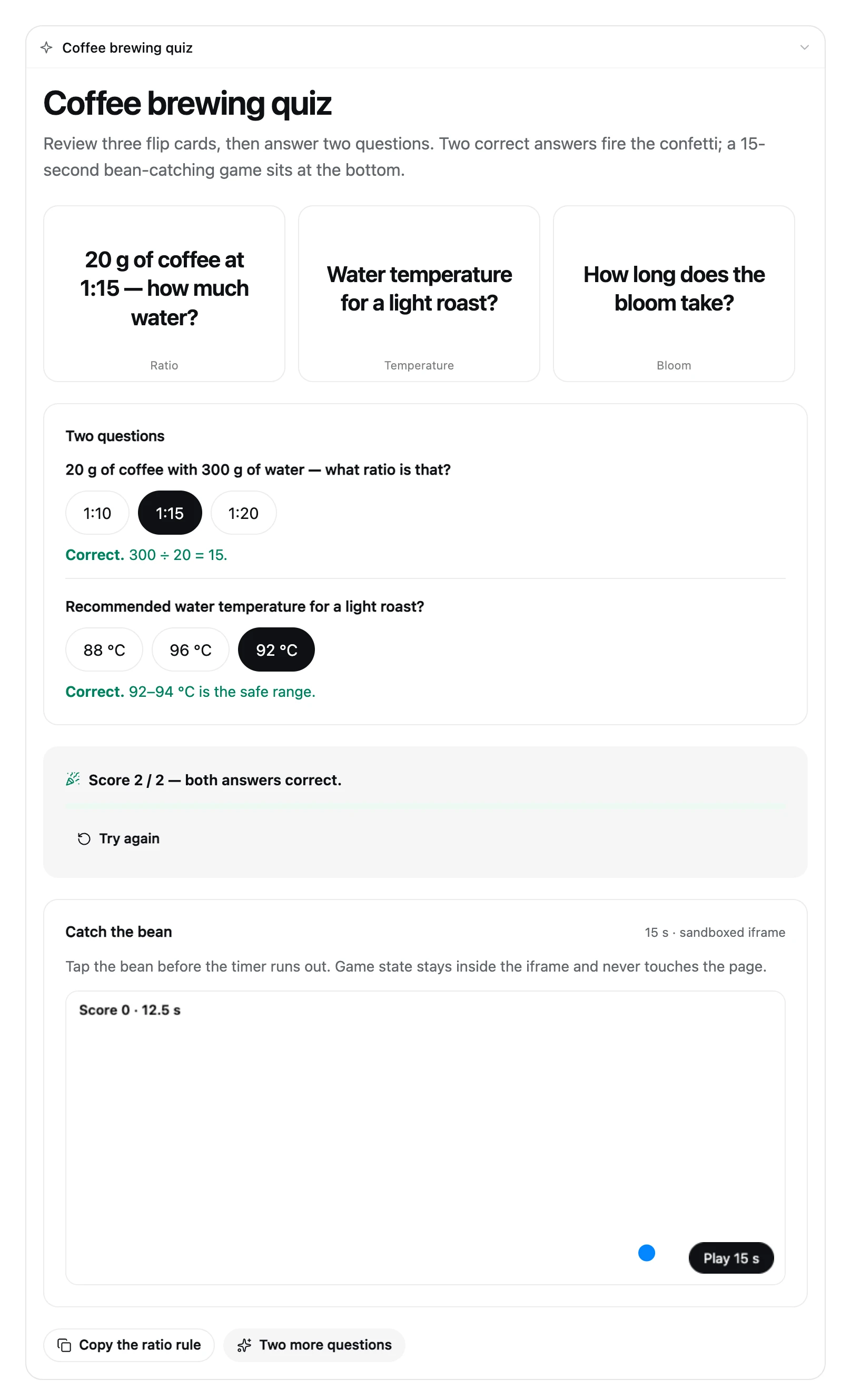
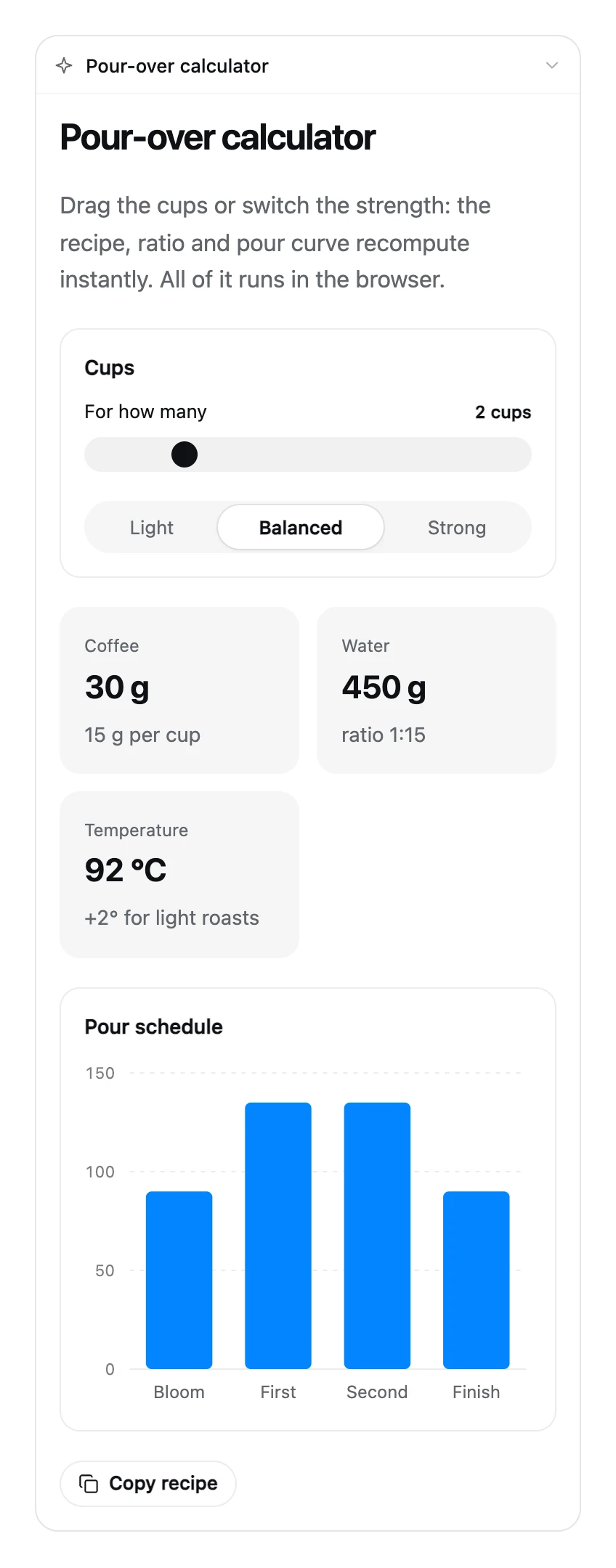
On a narrow screen (about 380 px) the card switches to a single column, and maps and charts fit the card width; over-long chart category labels are trimmed instead of overflowing:
## Capabilities
| Capability | What it gives you |
|---|---|
| Interactive pages | Maps, photos, charts, checklists, forms, SVG drawings and mini-games are real components, not screenshots |
| Image export | Saves the rendered result as one PNG with a raw, rounded or card frame; background color and 1x/2x live on the Plugin detail page |
| Interactive-page export | Saves every card from the turn as a single-file HTML page; open it in a browser to keep interacting, and `@ToAssistant` copies its message plus a paste-back-into-DSH hint |
| Local execution | `$variables`, `@Set` and `@functions` run in the browser; only `@ToAssistant` writes a message back |
| Switch and style | Global defaults on the Plugin detail page; composer overrides per session; built-in Auto / Card / Article and custom templates |
| Custom templates and visual themes | Reusable display preferences with light/dark palettes, font, radius, density and shadow; use, rename, edit or delete in My styles |
| Chat-native on-demand UI | No template required; choose On-demand UI in the UI panel, send a normal message, clarify with the built-in question tool when needed |
| Free on-demand layouts | Compose the page from the user's request; saved templates keep the free layout, preferences and theme without a Card/Article shell |
| Temporary results and optional saving | Inline style snapshots are ready to use, adjust or save later; no required preview, naming or saving |
| Bilingual UI | Follows DSH's Chinese or English UI language |
| Agent Skill | Registers `intelligent-ui` with the plugin so the model can load syntax, examples and troubleshooting on demand |
| Plugin detail page | Manage global enablement, default style, templates, composition and export preferences in one place |
| Replayable | Programs and temporary styles replay from recorded tool arguments; exported pages freeze the scheme at export time |
## Getting the code
Clone the repository from GitHub:
```bash
git clone https://github.com/Zephinel/dsh-intelligent-ui.git
cd dsh-intelligent-ui
```
To contribute, fork this repository and clone your fork. To use the plugin, install from npm without a checkout (see [Quick start](#quick-start)).
## Prerequisites
These commands are for DSH Web and source development; DSH Desktop users can follow the in-app steps in [Quick start](#quick-start).
- **DSH 0.2.1 plugin API** (the [`dsh` CLI](https://www.npmjs.com/package/@deepseek-ai/dsh)): the Host/Client halves and plugin protocol are developed against this version; the verified version is `0.2.1-rc.2`, and later versions are unverified. Pin the install to the verified version: `npm install -g @deepseek-ai/dsh@0.2.1-rc.2`.
- **[Node.js 24 and its bundled npm](https://nodejs.org/en/download)**: builds, tests and the publish workflow use Node 24. The repository has no `engines` or `.nvmrc` pin, so select Node 24 before running `npm install`; the Host's Node 22 build target does not verify the whole toolchain on Node 22.
- **[Git](https://git-scm.com/downloads)**: needed only to get the source; the repository sets no minimum version.
- **`@deepseek-ai/dsh-client-locale`**: the browser half requires a deployment that composes it; DSH Web 0.2.1 includes it by default, and without it the switch and card do not mount (the Host tool and prompt keep working).
Confirm the tools are present:
```bash
node --version # v24.x
npm --version
dsh --version # verified: 0.2.1-rc.2
git --version # only needed to get the source
```
The restart examples cover a foreground `dsh web`, macOS launchd and Linux systemd; for other supervisors restart the corresponding service. Verified platforms: macOS (Web + DSH Desktop) and Windows (DSH Desktop); Linux is unverified.
## Quick start
**DSH Web**: install the published 0.5.0 package and start the Web UI (first foreground run):
```bash
dsh plugin --profile web add @zephinel/dsh-intelligent-ui@0.5.0
dsh web
```
If Web is already running, restart that process after installing (foreground: Ctrl+C, then run `dsh web` again; launchd/systemd: restart the service). Open the printed URL and look for the **UI** control on the right of the composer; the DSH profile determines the address and port.
Alternative sources replace the install command above: use `dsh plugin --profile web add @zephinel/dsh-intelligent-ui` to follow npm's latest version, or `dsh plugin --profile web add github:Zephinel/dsh-intelligent-ui` for committed GitHub code. Neither installs uncommitted changes from your checkout.
**DSH Desktop** needs no terminal command — install it inside the app:
1. Open **Plugins** in the sidebar → **Add plugin** (or the arrow → **Install a third-party plugin**).
2. Enter `@zephinel/dsh-intelligent-ui@0.5.0` (or just the package name for the latest), then click **Install**.
3. When the install finishes, click **Enable now**; if the **UI** control does not appear, quit and reopen DSH Desktop.
The desktop profile is owned by the Electron app, so `dsh plugin --profile desktop` is rejected. A mainland-China mirror can lag behind the official npm registry for a fresh release; switch the install source back to npm if the version is not found.
After installing, click **UI**, choose **This session only** (or send `/iui on`), then send the itinerary example at the top. An interactive itinerary at the end of the turn confirms it works. Set the session Auto / Card / Article style in the same panel if needed.
See [Development and deployment](https://github.com/Zephinel/dsh-intelligent-ui/blob/main/docs/development.en.md) for the local-checkout development loop, uninstall and troubleshooting; the extension has no development server of its own.
## Switch and answer style
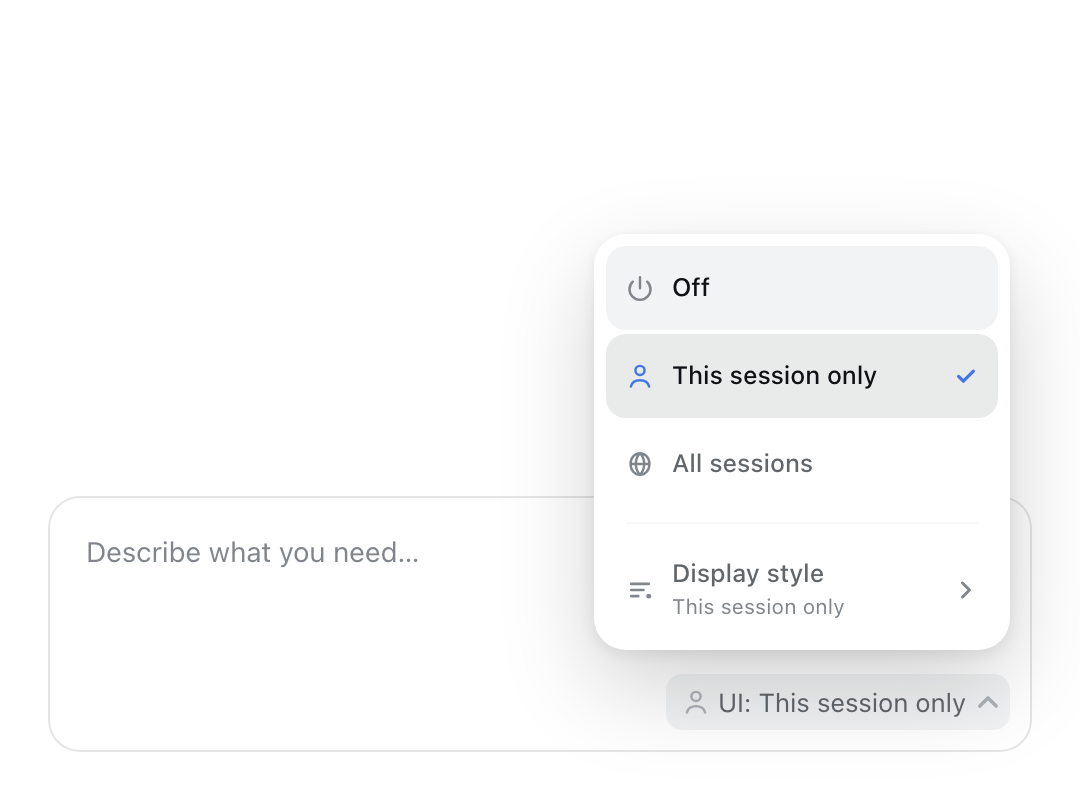
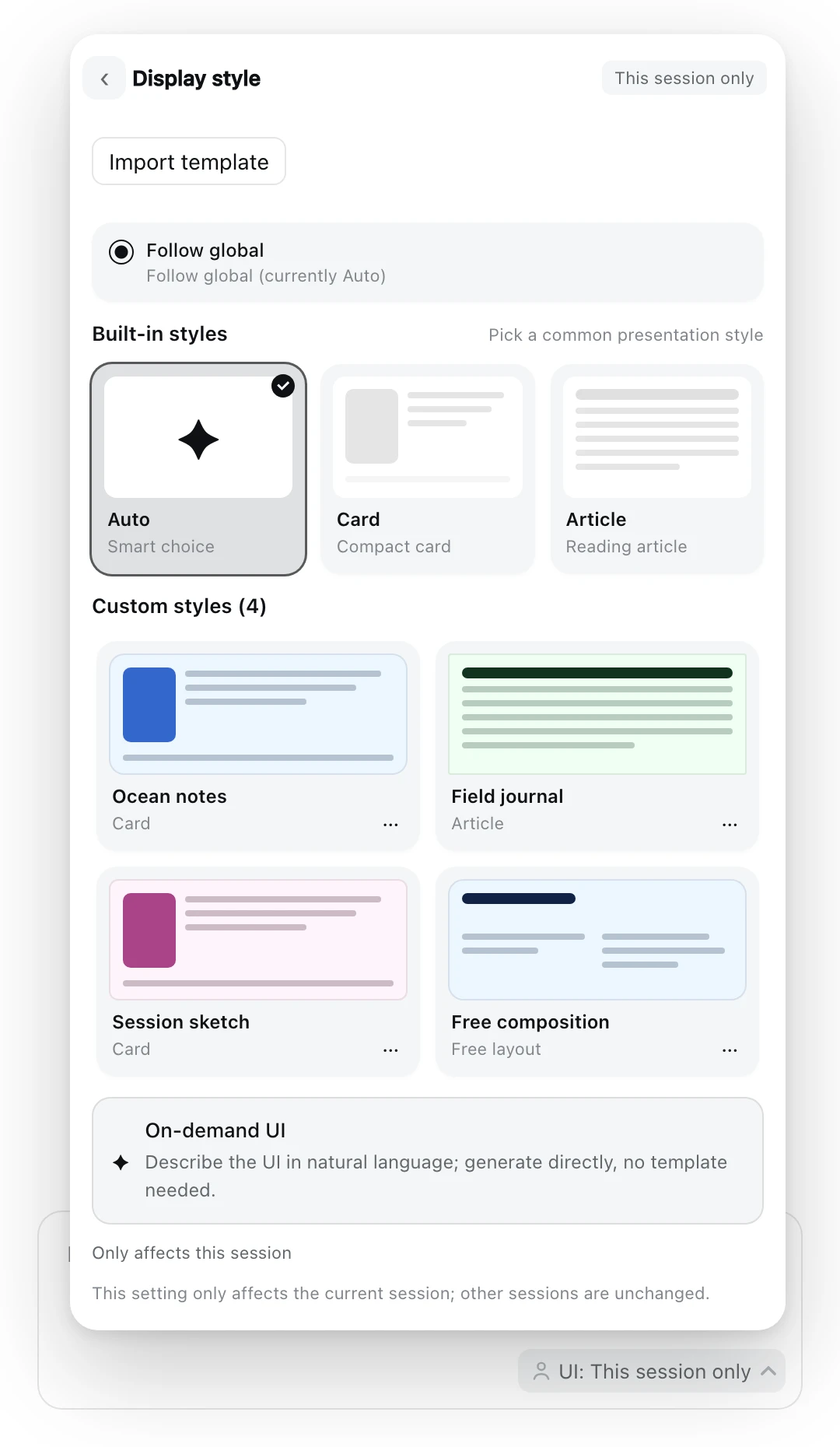
- **Global defaults:** the Plugin detail page sets **Enable in all sessions** and **Answer style** for new sessions; choose a built-in style or a saved global template.
- **Session overrides:** Composer **UI** chip → **This session only** or **Display style** opens the panel: built-in Auto / Card / Article preview cards, **Custom styles** (saved templates), then **On-demand UI** at the bottom. **All sessions** follows the global switch for this session without turning it on globally. Commands are `/iui on|off|inherit` and `/iui style auto|card|article|inherit|`.
- **Auto** chooses compact Card for interactive/structured answers and Article for detailed/long-form ones. Article needs a `Toc`, collapsible `Section`s and substantive prose.
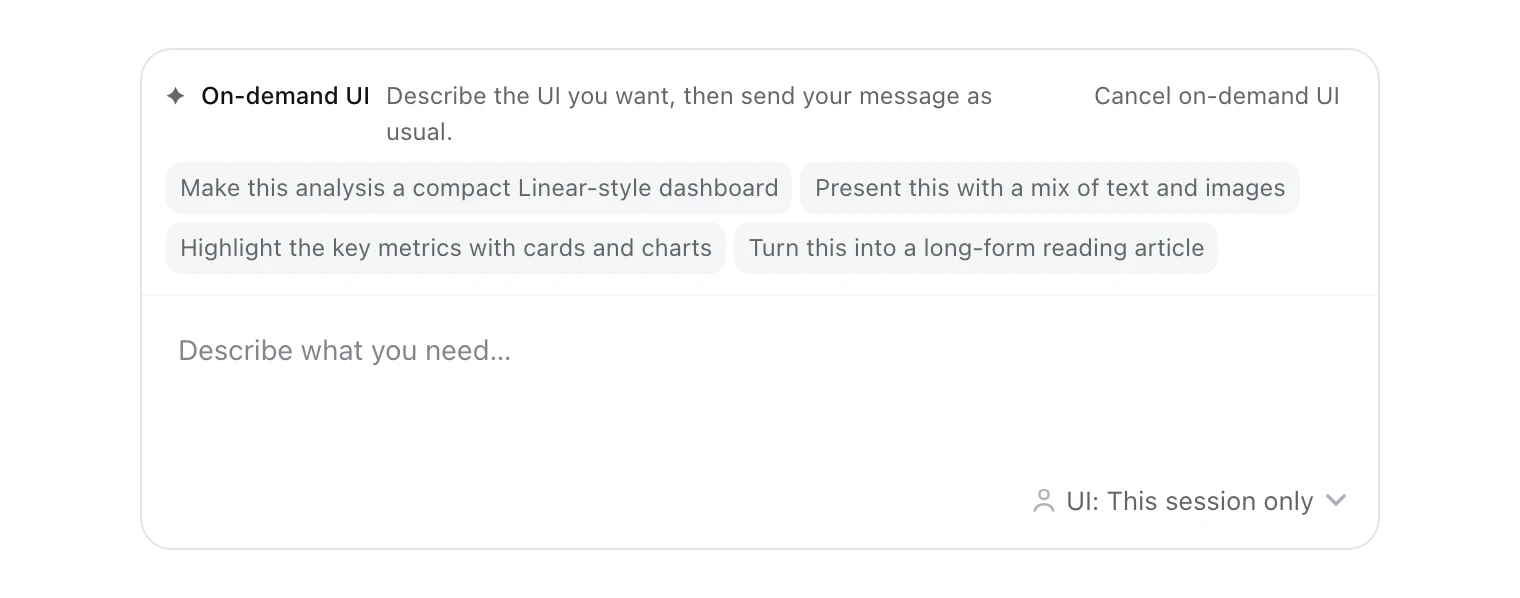
- **On-demand UI:** choosing it closes the panel, focuses the composer and shows a cancellable hint with examples. Examples fill without sending and preserve the existing draft. Send normally: clear requests render directly; material ambiguity uses the built-in `ask_user_question`, then generation continues after the answer.
- Session enable/style settings are written atomically to `/dsh-intelligent-ui.json`. An on-demand operation changes neither setting; a temporary style is not the selected style. See [Architecture and behavior](https://github.com/Zephinel/dsh-intelligent-ui/blob/main/docs/architecture.en.md) for the boundaries.
## Usage
With the switch on, just ask in natural language, for example:
- "Plan two days in Shanghai, with checkboxes and adjustments"
- "Build a gear-shifting simulator for a 7-speed bicycle"
- "Turn these tables into a sales dashboard I can filter"
- "Introduce Chinese history, expandable by dynasty"
- Choose On-demand UI, then send "Make this analysis a compact dashboard; highlight key metrics with cards and charts"
- Choose Adjust style on the result, then send "Keep the content and use a more spacious reading layout"
Once enabled, **any answer with structure defaults to a card** — including explanations, introductions, timelines, stages, comparisons and things to explore; Markdown is reserved for a single fact, a one- or two-sentence reply, an explicit request for text/document/code, or repeated render failures. When the switch is off the model cannot see `render_ui` and answers in plain text — that is not a failure; turn the switch on and ask again.
To guarantee a card (or when the model still replies in text), invoke the skill explicitly with `/intelligent-ui` in a session where the switch is on; explicit invocation is treated as a direct instruction. You can also say "read the intelligent-ui skill and then build ... with render_ui".
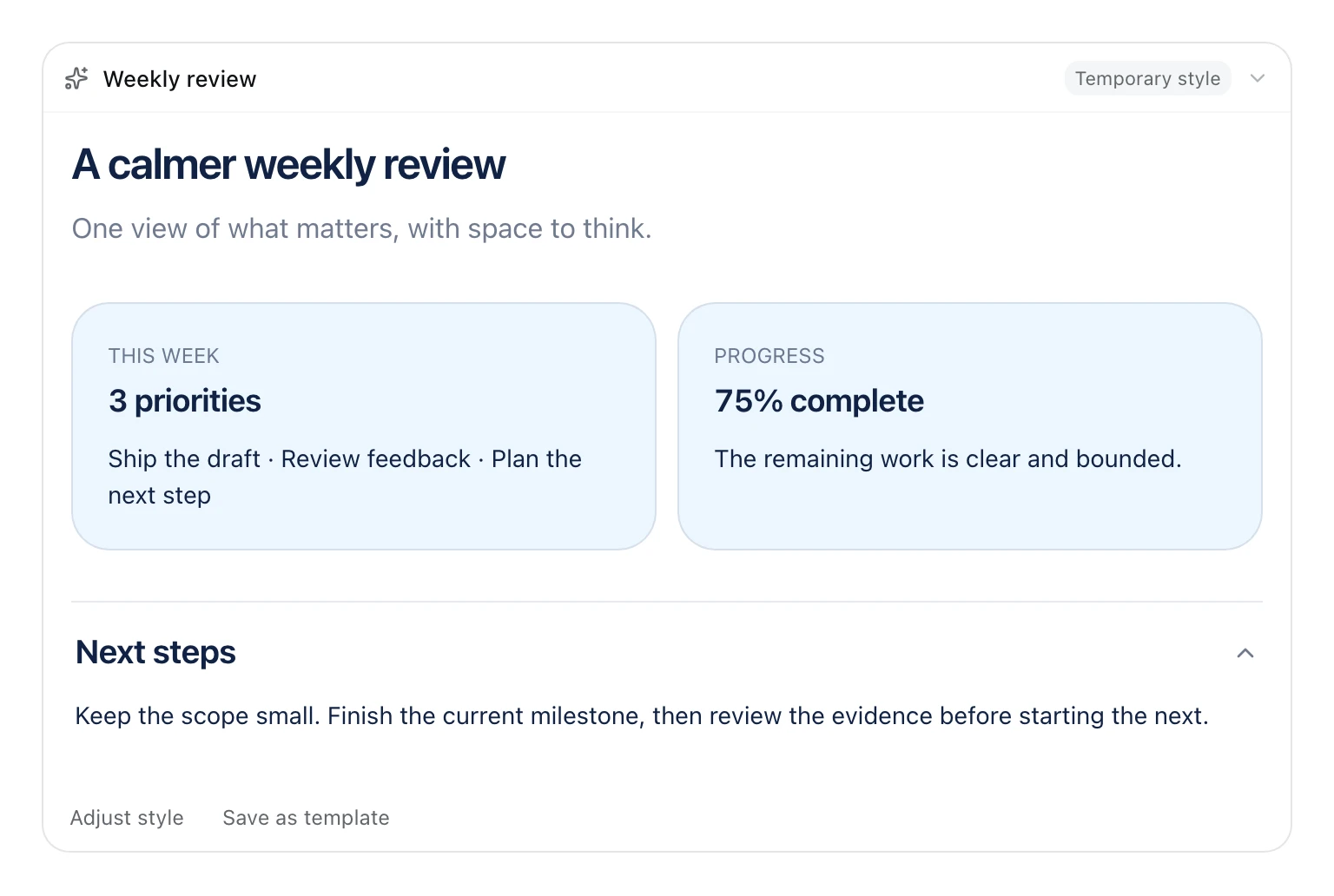
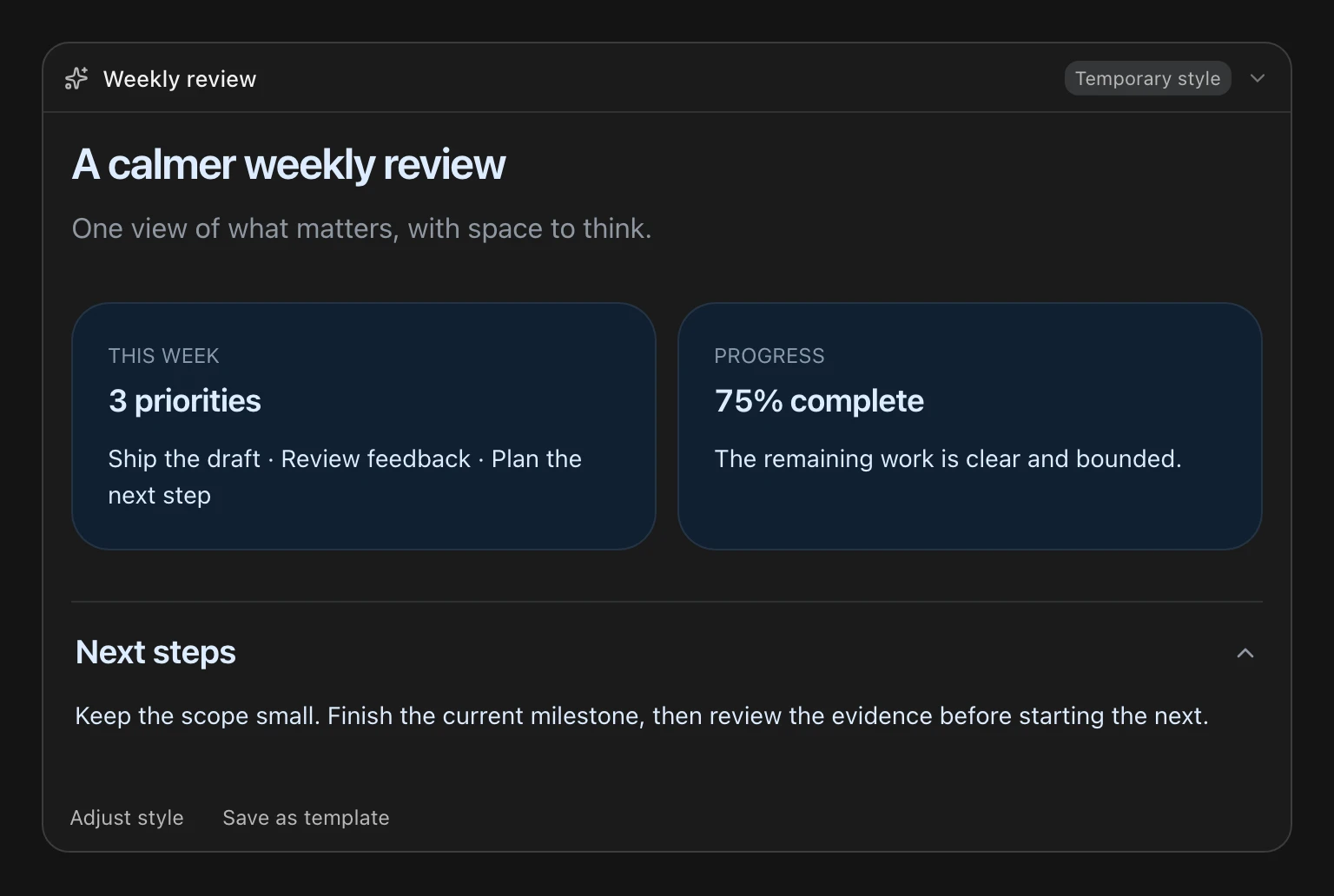
A temporary result is ready to use. **Adjust style** binds that result and fills an adjustment prompt while preserving your draft; send it normally. **Save as template** optionally asks for a name, description and availability (this session or global); saving preserves the result’s layout (free/card/article), preferences and explicit light/dark theme without a layout choice. A result without an explicit theme inherits the session theme and is not offered Save as template, because there is no palette to copy. Free templates have a local preview and **Free layout** hint; selecting one keeps the DSH card header without a Card/Article shell, with optional Toc/Section. Saving reuses the validated result style, makes no new model request, and neither selects the template nor changes the global default. No preview, naming or saving is required before use.
**Since 0.5.0**: the Host requires free layout for new on-demand generation; adjustments preserve the parent layout (free, legacy card or article). If the parent snapshot is absent from the latest-200 result registry, adjustment returns an error; cancel it and choose **On-demand UI** again. Historical results can still replay from tool arguments.
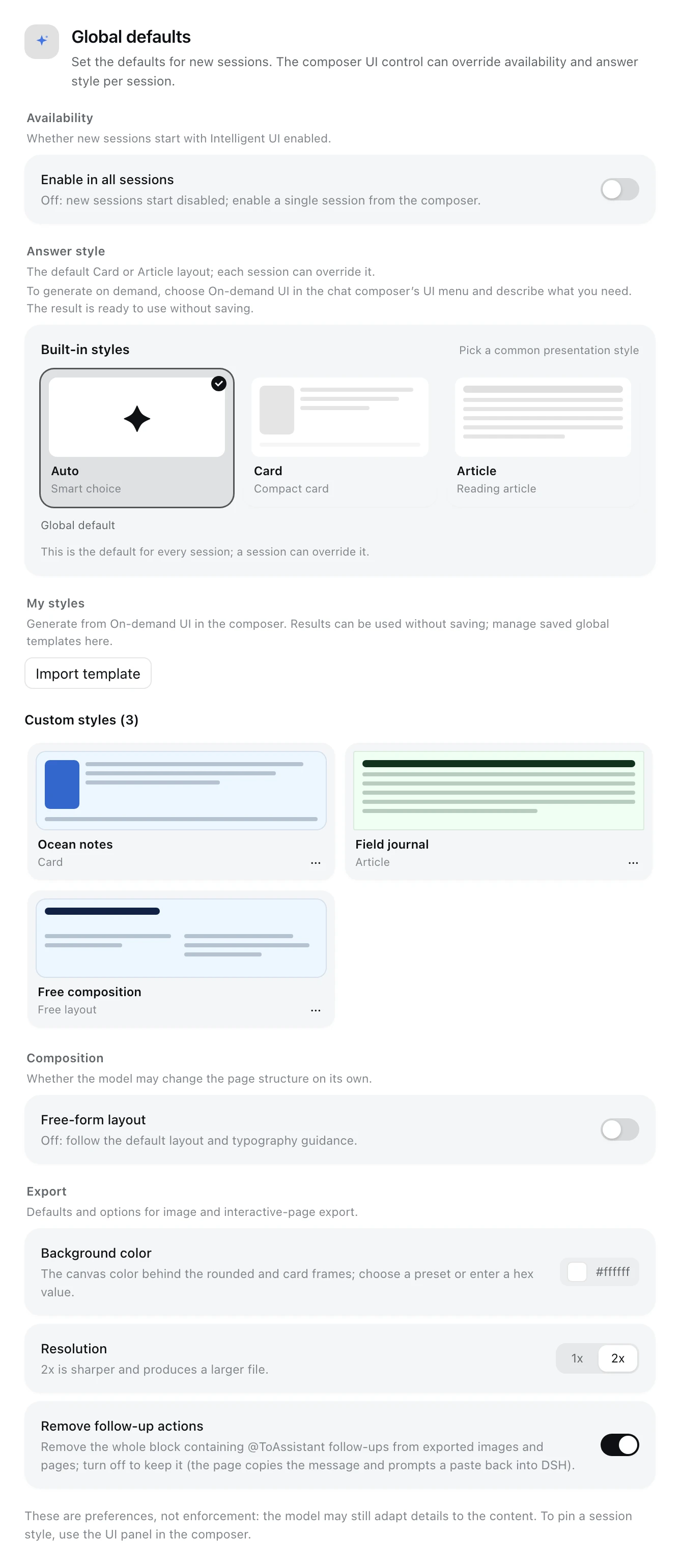
The Plugin detail page groups settings into **Availability**, **Answer style**, **My styles**, **Composition** and **Export**. My styles manages saved global templates: set as default, rename, edit description/display preferences, export file, import template or delete. The composer manages global and session templates visible in that session. Generation happens in the composer; settings explain the entry without providing a generation workbench. Global values are the defaults for new sessions; a session override in the composer wins. **Free-form layout** only changes how strongly the design guidance is advisory; it is orthogonal to the answer style. **Export** stores the default background color, the 1x/2x resolution, and whether images/pages remove the `@ToAssistant` follow-up control together with its form fields (a Card with prose keeps its prose; only a pure follow-up block disappears whole; on by default).
**Template file sharing**: in My styles, or in the composer’s **Display style** panel, choose a template’s `…` → **Export file**, review the sensitive-information notice, then **Download** to get `.iui-style.json`. The composer panel also covers session-scoped templates, so they need no separate global copy first. The file contains the name, description, base layout, full display preferences and theme. Check all of it for personal or internal information before sharing. The recipient chooses **Import template** in My styles or the composer’s **Display style** panel, selects a file or pastes JSON → **Preview**, then checks the name, description, layout, light/dark swatches and full preferences. Rename, edit or clear the preferences as needed. Importing always requires **I have read and understood the risks above; import this external template** before **Import template**. Import creates a new global template (the composer entry also writes global templates only; importing into the current session remains deferred until session authorization is checked), never applies it or changes the current selection/global default; afterwards use, edit, delete and export it normally.
Template exchange format v1 contains only portable style configuration, supports `card|article|free`, and excludes local IDs, scope, sessions and timestamps. Plugin versions supporting v1 can import it; unknown versions are rejected without downgrade guessing. Only this exchange format is accepted: raw template exports and library backups are rejected (no external users yet, so no legacy-format support is maintained). Exchange versions are independent of npm package versions. Future v2 implementations should retain v1 support; adding layouts or removing `baseLayout` requires explicit format evolution rather than silently accepting unknown layouts in v1.
Exchange is limited to one template and **32 KiB of UTF-8 input**. Files are size-checked before reading, regardless of extension or MIME. One Markdown code fence around the entire input is tolerated; JSON is never extracted from arbitrary prose. Unknown fields and library backups are rejected. The global limit is 40 templates; duplicate names get an `(Imported)` suggestion, remaining collisions require a rename, and a full library requires deleting unneeded templates. Share codes, online links, batch backups and session imports are unavailable; the composer import also writes global templates only.
**Security boundary**: an external template's name and display preferences enter the prompt and may affect model behavior; the description is stored/exported only and never enters the prompt. All three are treated as untrusted text. Preview, acknowledgement and no automatic application mitigate risk without eliminating prompt injection; DSH’s tool/permission layer controls execution authority. The current implementation follows the owner-approved approach (2026-10-24): a disclaimer plus acknowledgement before retaining external content. Real-deployment Origin/CSRF and tool-privilege auditing remain recommended pre-release hardening.
Once an answer has rendered, a labeled **export pill** appears at the **far right** of the message action strip (visually distinct from the native copy / like / branch icons); only answers rendered by the extension have it. It can save every card from that turn as one PNG — **Raw** (the answer alone), **Rounded** (background color and rounded padding) or **Card** (padding, rounded corners and a soft shadow) — or export them as a single-file HTML page, which opens in a browser with the interactions intact; in that page `@ToAssistant` copies the message and shows the paste-back-into-DSH hint instead of calling DSH. The image contains the rendered cards only, not the Markdown text around them and not the export control itself. See [Architecture and behavior](https://github.com/Zephinel/dsh-intelligent-ui/blob/main/docs/architecture.en.md) for the full flow.
## Build, test and deploy
Start at the checkout root from [Getting the code](#getting-the-code). `npm install` builds automatically through `prepare`; the local installer defaults to the `web` profile and backs up its patch. If that profile already has the npm/GitHub version, remove it first with `dsh plugin --profile web remove @zephinel/dsh-intelligent-ui` to avoid registering the plugin twice.
```bash
npm install
dsh plugin --profile web list # check the profile; initializes it on first use
node scripts/install.mjs
dsh web
```
If Web is already running, restart it after installing and open the printed URL. Once **UI** appears on the right of the composer, enable it and try a request as in [Quick start](#quick-start). There is no separate development server or watch mode; run `npm run build` and restart DSH after each change. See [Development and deployment](https://github.com/Zephinel/dsh-intelligent-ui/blob/main/docs/development.en.md) for uninstall and troubleshooting.
Everyday checks and packaging:
| Command | Purpose |
|---|---|
| `npm run build` | Generate the prompt, Host, Client and standalone export-page bundles |
| `npm test` | Run Host, Client and packaging Node tests after a build |
| `npm run typecheck` | Run `tsc --noEmit` (the browser `src/client` half is currently excluded: its DSH platform types are runtime-provided) |
| `npm run check` | Full pre-submit check: typecheck, build, Node tests and renderer checks |
| `npm run pack:check` | Preview the final npm package file list without publishing |
| `npm run test:browser` | Run 7 browser suites after a build; Chrome required |
- Current main-branch verification record: **247/247** Node tests (Host 117, Client 109, packaging 21); renderer parse/render **42/42** each, CSS/prop contract **50/50** and **63/63**, typography **22/22**, i18n **4** programs; **7/7** browser suites passed, including **101** settings template-exchange, **114** on-demand, **46** interactive-page and **65** image-export assertions. Browser tests cover components/contracts; real-model validation scope and remaining scenarios are in the [verification record](https://github.com/Zephinel/dsh-intelligent-ui/blob/main/docs/verification.en.md) (historical evidence).
- `node scripts/capture-screenshots.mjs` rebuilds panel, hint, temporary-result and settings captures at 2x in Chrome using fixed DSH tokens, production components and fake services. English UI; shell card glyphs use lucide stand-ins.
- The typography check inside `npm run check` needs a local Chrome; without one that check is skipped and the remaining tests still run. Use `CHROME_BIN` for a non-default Chrome executable location (also used by the browser suites).
The published artifact is a DSH bundle; deploying means installing the plugin into the target DSH profile. See [Development and deployment](https://github.com/Zephinel/dsh-intelligent-ui/blob/main/docs/development.en.md) for uninstall and version notes.
## Contributing
- Questions and feature requests: use [GitHub Issues](https://github.com/Zephinel/dsh-intelligent-ui/issues).
- Run `npm run check` before opening a PR; there is no PR CI, so the local command is the gate. Releases use the [GitHub Actions Trusted Publishing workflow](https://github.com/Zephinel/dsh-intelligent-ui/blob/main/.github/workflows/publish.yml); the development guide describes the process.
- Contributors and AI coding agents should follow the [doc-sync skill](https://github.com/Zephinel/dsh-intelligent-ui/blob/main/.agents/skills/sync-iui-docs/SKILL.md): when behavior, copy or counts change, update both READMEs, `CHANGELOG.md` and the matching documents under `docs/`. In a checkout, use the local `.agents/skills/sync-iui-docs/SKILL.md`.
- Maintainer: [@Zephinel](https://github.com/Zephinel).
## Known limitations
- The card appears **at the end** of the turn; during generation the process area shows one "Interactive answer" line (交互式回答 in a Chinese UI).
- The model occasionally generates invalid OpenUI Lang; Host validation returns precise errors, and it usually repairs them within the same turn (1–2 attempts in testing).
- The map basemap relies on OpenFreeMap tiles, routes on the OSRM demo, and photos on Wikipedia/Wikimedia; when offline, maps degrade to a list of places and photos to placeholder blocks.
- KaTeX uses global styles already loaded by the DSH shell; if those styles are removed, the Math component degrades to plain text.
- The generation prompt is about 10K tokens and is **sent only when the switch covers that session** (global on, or the session explicitly on); when off, that cost is zero (the tool schema is absent too). Article mode produces longer pages, so output tokens and render time increase accordingly.
- The extension's UI copy follows DSH's UI language; the `/iui` Host replies, the command palette's command description and the README screenshots stay in English (the first two are DSH platform behavior).
- Image export does not capture sandboxed iframes (`HtmlView` mini-games), so that region is missing from the image; maps are captured through the preserved WebGL drawing buffer, and a browser without WebGL falls back to the map's own place-list presentation.
- Every card rendered by one turn is combined into one image; the image captures **what is currently rendered**, so it includes the interaction state at export time (checked items, active filters and so on). The export waits for in-card photos and image searches to settle (at most about 12.5 seconds); offline or still-pending photos are recorded from the placeholder state shown on the page.
- The interactive-page export inlines the renderer, the current theme and every card into one HTML file (about 3.4–4.9 MB), so it is large but install-free; maps, photos and other components still need the network. `@ToAssistant` in that page tries the clipboard and shows a toast; when the clipboard is unavailable the toast keeps the message for manual copying.
- The browser half requires a deployment that composes `dsh-client-locale` (included by default in DSH Web 0.2.1); a minimal custom profile without it will not mount the switch or the card, while the Host tool and prompt keep working.
- The configuration on the Plugin detail page requires the DSH settings services: a minimal custom profile without `dsh-settings` / `dsh-client-ui-settings` does not show it, and a Host/Client version mismatch can leave the switch unavailable. Global enable/style and free-form layout only change the prompt and page shape; no model is guaranteed to follow them perfectly, and session style overrides still rely on the Host-injected prompt.
- The interactive-page export needs the `webServer` service (included by default in DSH Web 0.2.1); a minimal custom profile without it cannot build the exported page, while image export is unaffected.
- Temporary styles live in recorded tool arguments/result snapshots, outside the catalog. Replay needs the call arguments in the loaded history window. Saving later depends on the bounded result registry (latest 200 records); an evicted result may still replay but cannot be saved. Saved templates and result snapshots persist in separate JSON files under ``.
- Style creation/on-demand generation uses the deployment's default main-conversation model services; the extension supplies no separate generation model or draft interview service. `ask_user_question` is the structured clarification path; if unavailable, text questions are a degraded fallback — the hint stays and the next message continues the same operation without re-selecting On-demand UI (except after expiry, restart or failure).
- Operations are in memory: armed intent expires after 10 minutes; active operations cannot resume after restart and must be re-armed. Completed results survive. There is one active operation per session: re-arming replaces it while armed, while a bound running/clarifying operation rejects re-arming until explicitly cancelled. Clarification is limited to two rounds. A text-only completion without rendering returns to the pending/resume state and the next message continues; failed/interrupted turns show Retry/Dismiss guidance.
- Multi-tab binding is conservative: only the arming tab shows the hint, but the Host binds the next human message in the session without verifying its sending tab. Send from the arming tab and avoid concurrent messages in another tab.
- Custom themes apply to the renderer host; portaled popovers and sandboxed iframes keep the default theme, and semantic status colors remain renderer-owned. Exported pages freeze the light/dark scheme at export time.
- Saved-template directives are bounded display preferences (2,000 characters), with no authority over system, tool or safety rules. Limits are 40 global templates and 20 per session. Missing/deleted saved templates fall back to the default theme; a theme-less temporary result inherits the session template or built-in theme, while a snapshot with an explicit theme remains catalog-independent.
## FAQ
**Must I create a template, preview or name it first?** No. Choose On-demand UI and chat normally; use the result immediately. A name is needed only when you choose Save as template. Temporary results do not replace the selected session style.
**Can I save later or keep adjusting?** Yes. Use Adjust style or Save as template on that result. Saving uses the clicked result's version, not a later result. If the registry has evicted it, saving reports an unavailable snapshot.
**Why did clarification not continue generation?** A structured `ask_user_question` answer resumes the same operation; after a text question, the next message automatically continues it. Only expiry, restart, failure or interruption needs a re-arm/retry. Concurrent messages in multiple tabs may also consume the same intent.
**Why does an answer come back as plain text with no card?** First check that the switch is on for that session (the **UI** control in the composer, or `/iui on`). Even then the model may treat a single fact, a one- or two-sentence reply, or an explicit text/code request as a bounded exception. To force a card, invoke the skill explicitly with `/intelligent-ui` in a session where the switch is on. See [Usage](#usage).
**Why is there no export pill under an answer?** Only answers rendered by the extension have it; it is absent when the switch is off, the model replies in text, or rendering fails. See [Usage](#usage) and [Known limitations](#known-limitations).
**Why did the UI not change (or show an error) after rebuilding the plugin?** A page refresh may still load the old revision: restart the DSH process that serves the Web UI, then reopen the page. See [Development and deployment](https://github.com/Zephinel/dsh-intelligent-ui/blob/main/docs/development.en.md) for the exact errors and handling.
## Documentation
Detailed docs, the changelog and repository maintenance skills are excluded from the npm package, so their links use absolute GitHub URLs. For uncommitted features, use the corresponding files in the checkout.
- [Architecture and behavior](https://github.com/Zephinel/dsh-intelligent-ui/blob/main/docs/architecture.en.md): Host/Client component tree, the full switch and answer-style semantics, UI language, image and interactive-page export flows, and the Agent Skill.
- [Development and deployment](https://github.com/Zephinel/dsh-intelligent-ui/blob/main/docs/development.en.md): install and uninstall, development commands, the restart tip after renaming/rebuilding, Host/Client version mismatch, release layout and community marketplace maintenance.
- [Verification record](https://github.com/Zephinel/dsh-intelligent-ui/blob/main/docs/verification.en.md): end-to-end verification, test and packaging results (historical).
- [Changelog](https://github.com/Zephinel/dsh-intelligent-ui/blob/main/CHANGELOG.md): additions, changes and fixes per release.
- [GitHub Releases](https://github.com/Zephinel/dsh-intelligent-ui/releases): dated release pages with install notes.
## License
This project is [MIT](LICENSE). It is based on Open Intelligent UI (MIT, Copyright (c) 2026 Thesys Inc.) and the OpenUI ecosystem; the browser bundle contains lucide-react (ISC), KaTeX (MIT), MapLibre GL JS (BSD-3-Clause), zod (MIT) and SnapDOM (MIT); the standalone interactive-page bundle also inlines React / React DOM (MIT). Full notices and license texts are in [NOTICE](NOTICE) and [licenses/](licenses/).