Bilateral Reference for High-Resolution Dichotomous Image Segmentation
1 Nankai University 2 Northwestern Polytechnical University 3 National University of Defense Technology
4 Aalto University 5 Shanghai AI Laboratory 6 University of Trento
| *DIS-Sample_1* | *DIS-Sample_2* |
| :------------------------------: | :-------------------------------: |
|

|

|
Our BiRefNet has achieved SOTA on many similar HR tasks:
> Papers-with-code website has been shut down, but screenshots at that time have been kept.
**DIS**: [](https://paperswithcode.com/sota/dichotomous-image-segmentation-on-dis-te1?p=bilateral-reference-for-high-resolution) [](https://paperswithcode.com/sota/dichotomous-image-segmentation-on-dis-te2?p=bilateral-reference-for-high-resolution) [](https://paperswithcode.com/sota/dichotomous-image-segmentation-on-dis-te3?p=bilateral-reference-for-high-resolution) [](https://paperswithcode.com/sota/dichotomous-image-segmentation-on-dis-te4?p=bilateral-reference-for-high-resolution) [](https://paperswithcode.com/sota/dichotomous-image-segmentation-on-dis-vd?p=bilateral-reference-for-high-resolution)
Figure of Comparison on DIS Papers with Codes (by the time of this work):


**COD**:[](https://paperswithcode.com/sota/camouflaged-object-segmentation-on-cod?p=bilateral-reference-for-high-resolution) [](https://paperswithcode.com/sota/camouflaged-object-segmentation-on-nc4k?p=bilateral-reference-for-high-resolution) [](https://paperswithcode.com/sota/camouflaged-object-segmentation-on-camo?p=bilateral-reference-for-high-resolution) [](https://paperswithcode.com/sota/camouflaged-object-segmentation-on-chameleon?p=bilateral-reference-for-high-resolution)
Figure of Comparison on COD Papers with Codes (by the time of this work):
**HRSOD**: [](https://paperswithcode.com/sota/rgb-salient-object-detection-on-davis-s?p=bilateral-reference-for-high-resolution) [](https://paperswithcode.com/sota/rgb-salient-object-detection-on-hrsod?p=bilateral-reference-for-high-resolution) [](https://paperswithcode.com/sota/rgb-salient-object-detection-on-uhrsd?p=bilateral-reference-for-high-resolution) [](https://paperswithcode.com/sota/salient-object-detection-on-duts-te?p=bilateral-reference-for-high-resolution) [](https://paperswithcode.com/sota/salient-object-detection-on-dut-omron?p=bilateral-reference-for-high-resolution)
Figure of Comparison on HRSOD Papers with Codes (by the time of this work):


 ## Awards:
> Some great projects based on BiRefNet.
## Awards:
> Some great projects based on BiRefNet.
| *大创2024省金奖* |
| :------------------------------: |
|

|
Models in the original paper, for comparison on benchmarks:
| Task | Training Sets | Backbone | Download |
| :---: | :-------------------------: | :-----------: | :----------------------------------------------------------: |
| DIS | DIS5K-TR | swin_v1_large | [google-drive](https://drive.google.com/file/d/1J90LucvDQaS3R_-9E7QUh1mgJ8eQvccb/view) |
| COD | COD10K-TR, CAMO-TR | swin_v1_large | [google-drive](https://drive.google.com/file/d/1tM5M72k7a8aKF-dYy-QXaqvfEhbFaWkC/view) |
| HRSOD | DUTS-TR | swin_v1_large | [google-drive](https://drive.google.com/file/d/1f7L0Pb1Y3RkOMbqLCW_zO31dik9AiUFa/view) |
| HRSOD | DUTS-TR, HRSOD-TR | swin_v1_large | [google-drive](https://drive.google.com/file/d/1WJooyTkhoDLllaqwbpur_9Hle0XTHEs_/view) |
| HRSOD | DUTS-TR, UHRSD-TR | swin_v1_large | [google-drive](https://drive.google.com/file/d/1Pu1mv3ORobJatIuUoEuZaWDl2ylP3Gw7/view) |
| HRSOD | HRSOD-TR, UHRSD-TR | swin_v1_large | [google-drive](https://drive.google.com/file/d/1xEh7fsgWGaS5c3IffMswasv0_u-aVM9E/view) |
| HRSOD | DUTS-TR, HRSOD-TR, UHRSD-TR | swin_v1_large | [google-drive](https://drive.google.com/file/d/13FaxyyOwyCddfZn2vZo1xG1KNZ3cZ-6B/view) |
Models trained with customed data (general, matting), for general use in practical application:
| Task | Training Sets | Backbone | Test Set | Metric (S, wF[, HCE]) | Download |
| :-----------------------: | :----------------------------------------------------------: | :-----------: | :-------: | :-------------------: | :----------------------------------------------------------: |
| **general use (2048x2048)** | AIM-500, DIS-TR, DIS-TEs, HIM2K, PPM-100, TE-HRS10K, TE-Human-2k, TE-P3M-500-P, TR-AM-2k, TR-HRSOD, TR-UHRSD, Distinctions-646_BG-20k, Human-2k_BG-20k, TE-AM-2k, TE-HRSOD, TE-P3M-500-NP, TE-UHRSD, TR-HRS10K, TR-P3M-10k, [TR-humans](https://huggingface.co/datasets/schirrmacher/humans) | swin_v1_large | DIS-VD | 0.927, 0.894, 881 | [google-drive](https://drive.google.com/file/d/1lWVyimvxQ3bmDlaHeO1IOUbFZqUj9DYg/view) |
| **general use** | DIS5K-TR, DIS-TEs, DUTS-TR_TE, HRSOD-TR_TE, UHRSD-TR_TE, HRS10K-TR_TE, TR-P3M-10k, TE-P3M-500-NP, TE-P3M-500-P, [TR-humans](https://huggingface.co/datasets/schirrmacher/humans) | swin_v1_large | DIS-VD | 0.911, 0.875, 1069 | [google-drive](https://drive.google.com/file/d/1_IfUnu8Fpfn-nerB89FzdNXQ7zk6FKxc/view) |
| **general use** | DIS5K-TR, DIS-TEs, DUTS-TR_TE, HRSOD-TR_TE, UHRSD-TR_TE, HRS10K-TR_TE, TR-P3M-10k, TE-P3M-500-NP, TE-P3M-500-P, [TR-humans](https://huggingface.co/datasets/schirrmacher/humans) | swin_v1_tiny | DIS-VD | 0.882, 0.830, 1175 | [google-drive](https://drive.google.com/file/d/1fzInDWiE2n65tmjaHDSZpqhL0VME6-Yl/view) |
| **general use** | DIS5K-TR, DIS-TEs | swin_v1_large | DIS-VD | 0.907, 0.865, 1059 | [google-drive](https://drive.google.com/file/d/1P6NJzG3Jf1sl7js2q1CPC3yqvBn_O8UJ/view) |
| **general matting** | P3M-10k (except TE-P3M-500-NP), [TR-humans](https://huggingface.co/datasets/schirrmacher/humans), AM-2k, AIM-500, Human-2k (synthesized with BG-20k), Distinctions-646 (synthesized with BG-20k), HIM2K, PPM-100 | swin_v1_large | TE-P3M-500-NP | 0.979, 0.988 | [google-drive](https://drive.google.com/file/d/1Nlcg58d5bvE-Tbbm8su_eMQba10hdcwQ/view) |
| **portrait matting** | [P3M-10k](https://github.com/JizhiziLi/P3M), [humans](https://huggingface.co/datasets/schirrmacher/humans) | swin_v1_large | P3M-500-P | 0.983, 0.989 | [google-drive](https://drive.google.com/file/d/1uUeXjEUoD2XF_6YjD_fsct-TJp7TFiqh) |
Segmentation with box guidance:
+ Given box guidance: [](https://colab.research.google.com/drive/1B6aKZ3ekcvKMkSBn0N5mCASLUYMp0whK)
Model efficiency:
> Screenshot from the original paper. All tests here are conducted on a single A100 GPU.

 > The devices used in the below table differ from those in the original paper (the standard). So, it's only for reference.
| Runtime | *FP32* | *FP16* |
| :-----: | :----: | :----: |
| A100 | 86.8ms | 69.4ms |
| 4090 | 95.8ms | 57.7ms |
| V100 | 384ms | 152ms |
| GPU Memory | *FP32* | *FP16/BF16* |
| :--------: | :----: | :----: |
| Inference | 4.8GB | 3.5GB |
| Training (\#GPU=2, batch\_size=2, compile=False+PyTorch=2.8.0) | 38.2GB (A100) | 28.5GB (A100) |
| Training (\#GPU=2, batch\_size=2, compile=True+PyTorch=2.8.0) | 35.6GB (A100) | **23.5GB (4090), 23.9GB (A100)** |
> The devices used in the below table differ from those in the original paper (the standard). So, it's only for reference.
| Runtime | *FP32* | *FP16* |
| :-----: | :----: | :----: |
| A100 | 86.8ms | 69.4ms |
| 4090 | 95.8ms | 57.7ms |
| V100 | 384ms | 152ms |
| GPU Memory | *FP32* | *FP16/BF16* |
| :--------: | :----: | :----: |
| Inference | 4.8GB | 3.5GB |
| Training (\#GPU=2, batch\_size=2, compile=False+PyTorch=2.8.0) | 38.2GB (A100) | 28.5GB (A100) |
| Training (\#GPU=2, batch\_size=2, compile=True+PyTorch=2.8.0) | 35.6GB (A100) | **23.5GB (4090), 23.9GB (A100)** |
ONNX conversion:
> We converted from `.pth` weights files to `.onnx` files.
> We referred a lot to the [Kazuhito00/BiRefNet-ONNX-Sample](https://github.com/Kazuhito00/BiRefNet-ONNX-Sample), many thanks to @Kazuhito00.
+ Check our [Colab demo for ONNX conversion](https://colab.research.google.com/drive/1z6OruR52LOvDDpnp516F-N4EyPGrp5om) or the [notebook file for local running](https://drive.google.com/file/d/1cgL2qyvOO5q3ySfhytypX46swdQwZLrJ), where you can do the conversion/inference by yourself and find all relevant info.
+ As tested, BiRefNets with SwinL (default backbone) cost `~90%` more time (the inference costs `~165ms` on an A100 GPU) using ONNX files. Meanwhile, BiRefNets with SwinT (lightweight) cost `~75%` more time (the inference costs `~93.8ms` on an A100 GPU) using ONNX files. Input resolution is `1024x1024` by default.
+ The results of the original pth files and the converted ONNX files are slightly different, which is acceptable.
+ Pay attention to the compatibility among `onnxruntime-gpu, CUDA, and CUDNN` (we use `torch==2.0.1, cuda=11.8` here).

+ Thanks [Comfy-Org/BiRefNet](https://blog.comfy.org/p/new-open-source-models-now-in-comfyui): ComfyUI has provided their official integration of BiRefNet. You can check their [blog](https://blog.comfy.org/i/197285326/birefnet-high-resolution-background-and-object-segmentation) for a possibly easier way to use BiRefNet in ComfyUI.

+ Thanks [**unscreen.pro**](https://unscreen.pro): this project has deployed BiRefNet as the backend model for online video background removal service.
+ Thanks [**veeliks/invoke_birefnet**](https://github.com/veeliks/invoke_birefnet): this project integrates BiRefNet as a node into the **[Invoke framework](https://github.com/invoke-ai/InvokeAI)**.

+ Thanks [**tin2tin/2D_Asset_Generator**](https://github.com/tin2tin/2D_Asset_Generator): this project combined BiRefNet and FLUX as a **Blender add-on** for "AI generating 2D cutout assets for ex. previz".
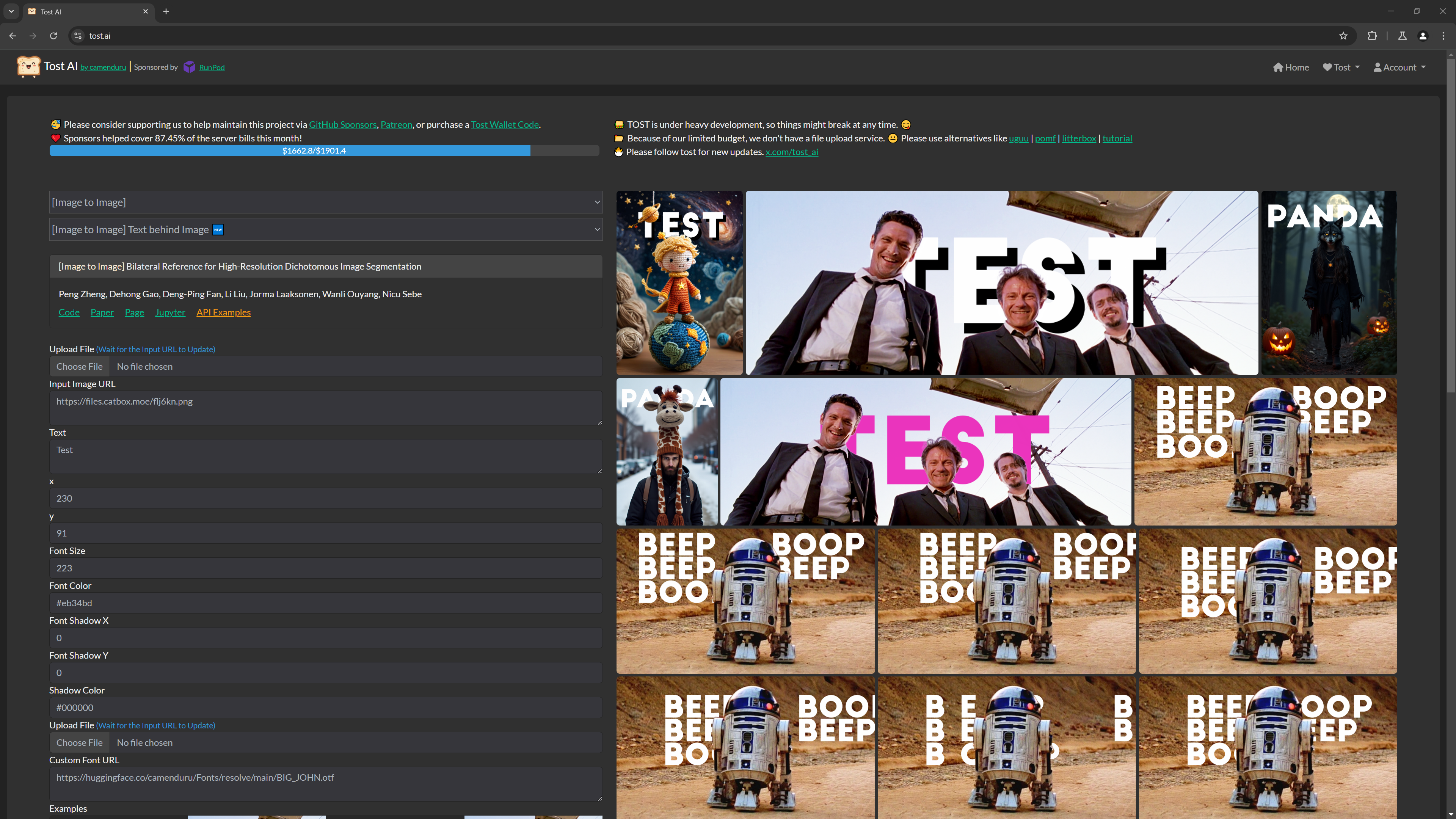
+ Thanks [**camenduru/text-behind-tost**](https://github.com/camenduru/text-behind-tost): this project employed BiRefNet to extract foreground subjects and **add texts between the subjects and background**, which looks amazing especially for videos. Check their [tweets](https://x.com/camenduru/status/1856290408294220010) for more examples.
+ Thanks [**lldacing/ComfyUI_BiRefNet_ll**](https://github.com/lldacing/ComfyUI_BiRefNet_ll): this project further upgrade the **ComfyUI node** for BiRefNet with both our **latest weights** and **the legacy ones**.

+ Thanks [**MoonHugo/ComfyUI-BiRefNet-Hugo**](https://github.com/MoonHugo/ComfyUI-BiRefNet-Hugo): this project further upgrade the **ComfyUI node** for BiRefNet with our **latest weights**.

+ Thanks [**dimitribarbot/sd-webui-birefnet**](https://github.com/dimitribarbot/sd-webui-birefnet): this project allows to add a BiRefNet section to the original **Stable Diffusion WebUI**'s Extras tab.

+ Thanks [**fal.ai/birefnet**](https://fal.ai/models/birefnet): this project on `fal.ai` encapsulates BiRefNet **online** with more useful options in **UI** and **API** to call the model.

+ Thanks [**ZHO-ZHO-ZHO/ComfyUI-BiRefNet-ZHO**](https://github.com/ZHO-ZHO-ZHO/ComfyUI-BiRefNet-ZHO): this project further improves the **UI** for BiRefNet in ComfyUI, especially for **video data**.

+ Thanks [**viperyl/ComfyUI-BiRefNet**](https://github.com/viperyl/ComfyUI-BiRefNet): this project packs BiRefNet as **ComfyUI nodes**, and makes this SOTA model easier use for everyone.

+ Thanks [**Rishabh**](https://github.com/rishabh063) for offering a demo for the [easier multiple images inference on colab](https://colab.research.google.com/drive/14Dqg7oeBkFEtchaHLNpig2BcdkZEogba).
3. **Model Extensions**
+ Thanks [**MatteoKartoon/BiRefNet**](https://github.com/MatteoKartoon/BiRefNet): this project fine-tuned BiRefNet with their **custom anime data** to obtain their model **ToonOut**, which brings improvement on the background-removal task for anime images. See [their paper on arXiv](https://arxiv.org/pdf/2509.06839). Check [link-1](https://replicate.com/sprited/birefnet) and [link-2](https://replicate.com/sprited/birefnet-toonout) if you need an endpoint for ToonOut.

+ Thanks [**nusu-github/BiRefNet-Burn**](https://github.com/nusu-github/BiRefNet-Burn): this project re-implemented BiRefNet with **Burn**, which is a new deep-learning framework in **Rust**.
+ Thanks [**Acly/BiRefNet-GGUF**](https://huggingface.co/Acly/BiRefNet-GGUF): this project converted BiRefNet to the GGUF format for lightweight inference on consumer hardware with vision.cpp in **C++**.
```C++
image_data image = image_load("input.png");
backend_device device = backend_init();
birefnet_model model = birefnet_load_model("BiRefNet-F16.gguf", device);
image_data mask = birefnet_compute(model, image);
image_save(mask, "mask.png");
```
+ Thanks [**briaai/RMBG-2.0**](https://huggingface.co/briaai/RMBG-2.0): this project trained BiRefNet with their **high-quality private data**, which brings improvement on the DIS task. Note that their weights are for only **non-commercial use** and are **not aware of transparency** due to training in the DIS task setting, which focuses only on predicting binary masks.

+ Thanks [**lbq779660843/BiRefNet-Tensorrt**](https://github.com/lbq779660843/BiRefNet-Tensorrt) and [**yuanyang1991/birefnet_tensorrt**](https://github.com/yuanyang1991/birefnet_tensorrt): they both provided the project to convert BiRefNet to **TensorRT**, which is faster and better for deployment. Their repos offer solid local establishment (Win and Linux) and [colab demo](https://colab.research.google.com/drive/1r8GkFPyMMO0OkMX6ih5FjZnUCQrl2SHV?usp=sharing), respectively. And @yuanyang1991 kindly offered the comparison among the inference efficiency of naive PyTorch, ONNX, and TensorRT on an RTX 4080S:
| Methods | [Pytorch](https://drive.google.com/file/d/1_IfUnu8Fpfn-nerB89FzdNXQ7zk6FKxc/view) | [ONNX](https://drive.google.com/drive/u/0/folders/1kZM55bwsRdS__bdnsXpkmH6QPyza-9-N) | TensorRT |
|:------------------------------------------------------------------------------------:|:--------------:|:--------------:|:--------------:|
| First Inference Time | 0.71s | 5.32s | **0.17s** |
| Methods | [Pytorch](https://drive.google.com/file/d/1_IfUnu8Fpfn-nerB89FzdNXQ7zk6FKxc/view) | [ONNX](https://drive.google.com/drive/u/0/folders/1kZM55bwsRdS__bdnsXpkmH6QPyza-9-N) | TensorRT |
|:------------------------------------------------------------------------------------:|:--------------:|:--------------:|:--------------:|
| Avg Inf Time (excluding 1st) | 0.15s | 4.43s | **0.11s** |
3. **More Visual Comparisons**
+ Thanks [**twitter.com/ZHOZHO672070**](https://twitter.com/ZHOZHO672070) for the comparison with more background-removal methods in images:
 + Thanks [**twitter.com/toyxyz3**](https://twitter.com/toyxyz3) for the comparison with more background-removal methods in videos:
## Usage
#### Environment Setup
```shell
# PyTorch>=2.5.0 (I try to make everything as latest as possible) is used for faster training (~40%) with compilation.
conda create -n birefnet python=3.11 -y && conda activate birefnet
pip install -r requirements.txt
```
#### Dataset Preparation
Download combined training / test sets I have organized well from: [DIS](https://drive.google.com/drive/folders/1hZW6tAGPJwo9mPS7qGGGdpxuvuXiyoMJ)--[COD](https://drive.google.com/drive/folders/1EyHmKWsXfaCR9O0BiZEc3roZbRcs4ECO)--[HRSOD](https://drive.google.com/drive/folders/18_hAE3QM4cwAzEAKXuSNtKjmgFXTQXZN) or the single official ones in the `single_ones` folder, or their official pages. You can also find the same ones on my **BaiduDisk**: [DIS](https://pan.baidu.com/s/1O_pQIGAE4DKqL93xOxHpxw?pwd=PSWD)--[COD](https://pan.baidu.com/s/1RnxAzaHSTGBC1N6r_RfeqQ?pwd=PSWD)--[HRSOD](https://pan.baidu.com/s/1_Del53_0lBuG0DKJJAk4UA?pwd=PSWD).
#### Weights Preparation
Download backbone weights from [my google-drive folder](https://drive.google.com/drive/folders/1s2Xe0cjq-2ctnJBR24563yMSCOu4CcxM) or their official pages.
## Run
```shell
# Train & Test & Evaluation
./train_test.sh RUN_NAME GPU_NUMBERS_FOR_TRAINING GPU_NUMBERS_FOR_TEST
# Example: ./train_test.sh tmp-proj 0,1,2,3,4,5,6,7 0
# See train.sh / test.sh for only training / test-evaluation.
# After the evaluation, run `gen_best_ep.py` to select the best ckpt from a specific metric (you choose it from Sm, wFm, HCE (DIS only)).
```
### :pen: Fine-tuning on Custom Data
> A video of the tutorial on BiRefNet fine-tuning has been released on my YouTube channel ⬇️
[](https://youtu.be/FwGT_0V9E-k)
> Suppose you have some custom data, fine-tuning on it tends to bring improvement.
1. **Pre-requisites**: you have put your datasets in the path `${data_root_dir}/TASK_NAME/DATASET_NAME`. For example, `${data_root_dir}/DIS5K/DIS-TR` and `${data_root_dir}/General/TR-HRSOD`, where `im` and `gt` are both in each dataset folder.
2. **Change an existing task to your custom one**: replace all `'General'` (with single quotes) in the whole project with `your custom task name` as the screenshot of vscode given below shows: 3. **Adapt settings**:
+ `sys_home_dir`: path to the root folder, which contains codes / datasets / weights / ... -- project folder / data folder / backbone weights folder are `${sys_home_dir}/codes/dis/BiRefNet / ${sys_home_dir}/datasets/dis/General / ${sys_home_dir}/weights/cv/swin_xxx`, respectively.
+ `testsets`: your validation set.
+ `training_set`: your training set.
+ `lambdas_pix_last`: adapt the weights of different losses if you want, especially for the difference between segmentation (classification task) and matting (regression task).
4. **Use existing weights**: if you want to use some existing weights to fine-tune that model, please refer to the `resume` argument in `train.py`. Attention: the epoch of training continues from the epochs the weights file name indicates (e.g., `244` in `BiRefNet-general-epoch_244.pth`), instead of `1`. So, if you want to fine-tune `50` more epochs, please specify the epochs as `294`. `\#Epochs, \#last epochs for validation, and validation step` are set in `train.sh`.
5. Good luck to your training :) If you still have questions, feel free to leave issues (recommended way) or contact me.
## Well-trained weights:
Download the `BiRefNet-{TASK}-{EPOCH}.pth` from [[**stuff**](https://drive.google.com/drive/folders/1s2Xe0cjq-2ctnJBR24563yMSCOu4CcxM)] and [the release page](https://github.com/ZhengPeng7/BiRefNet/releases) of this repo. Info of the corresponding (predicted\_maps/performance/training\_log) weights can be also found in folders like `exp-BiRefNet-{TASK_SETTINGS}` in the same directory.
You can also download the weights from the release of this repo.
The results might be a bit different from those in the original paper, you can see them in the `eval_results-BiRefNet-{TASK_SETTINGS}` folder in each `exp-xx`, we will update them in the following days. Due to the very high cost I used (A100-80G x 8), which many people cannot afford (including myself....), I re-trained BiRefNet on a single A100-40G only and achieved the performance on the same level (even better). It means you can directly train the model on a single GPU with 36.5G+ memory. BTW, 5.5G GPU memory is needed for inference in 1024x1024. (I personally paid a lot for renting an A100-40G to re-train BiRefNet on the three tasks... T_T. Hope it can help you.)
But if you have more and more powerful GPUs, you can set GPU IDs and increase the batch size in `config.py` to accelerate the training. We have made all these kinds of things adaptive in scripts to seamlessly switch between single-card training and multi-card training. Enjoy it :)
## Some of my messages:
This project was originally built for DIS only. But after the updates one by one, I made it larger and larger with many functions embedded together. Finally, you can **use it for any binary image segmentation tasks**, such as DIS/COD/SOD, medical image segmentation, anomaly segmentation, etc. You can eaily open/close below things (usually in `config.py`):
+ Multi-GPU training: open/close with one variable.
+ Backbone choices: Swin_v1, PVT_v2, ConvNets, ...
+ Weighted losses: BCE, IoU, SSIM, MAE, Reg, ...
+ Training tricks: multi-scale supervision, freezing backbone, multi-scale input...
+ Data collator: loading all in memory, smooth combination of different datasets for combined training and test.
+ ...
I really hope you enjoy this project and use it in more works to achieve new SOTAs.
### Quantitative Results
3. **Adapt settings**:
+ `sys_home_dir`: path to the root folder, which contains codes / datasets / weights / ... -- project folder / data folder / backbone weights folder are `${sys_home_dir}/codes/dis/BiRefNet / ${sys_home_dir}/datasets/dis/General / ${sys_home_dir}/weights/cv/swin_xxx`, respectively.
+ `testsets`: your validation set.
+ `training_set`: your training set.
+ `lambdas_pix_last`: adapt the weights of different losses if you want, especially for the difference between segmentation (classification task) and matting (regression task).
4. **Use existing weights**: if you want to use some existing weights to fine-tune that model, please refer to the `resume` argument in `train.py`. Attention: the epoch of training continues from the epochs the weights file name indicates (e.g., `244` in `BiRefNet-general-epoch_244.pth`), instead of `1`. So, if you want to fine-tune `50` more epochs, please specify the epochs as `294`. `\#Epochs, \#last epochs for validation, and validation step` are set in `train.sh`.
5. Good luck to your training :) If you still have questions, feel free to leave issues (recommended way) or contact me.
## Well-trained weights:
Download the `BiRefNet-{TASK}-{EPOCH}.pth` from [[**stuff**](https://drive.google.com/drive/folders/1s2Xe0cjq-2ctnJBR24563yMSCOu4CcxM)] and [the release page](https://github.com/ZhengPeng7/BiRefNet/releases) of this repo. Info of the corresponding (predicted\_maps/performance/training\_log) weights can be also found in folders like `exp-BiRefNet-{TASK_SETTINGS}` in the same directory.
You can also download the weights from the release of this repo.
The results might be a bit different from those in the original paper, you can see them in the `eval_results-BiRefNet-{TASK_SETTINGS}` folder in each `exp-xx`, we will update them in the following days. Due to the very high cost I used (A100-80G x 8), which many people cannot afford (including myself....), I re-trained BiRefNet on a single A100-40G only and achieved the performance on the same level (even better). It means you can directly train the model on a single GPU with 36.5G+ memory. BTW, 5.5G GPU memory is needed for inference in 1024x1024. (I personally paid a lot for renting an A100-40G to re-train BiRefNet on the three tasks... T_T. Hope it can help you.)
But if you have more and more powerful GPUs, you can set GPU IDs and increase the batch size in `config.py` to accelerate the training. We have made all these kinds of things adaptive in scripts to seamlessly switch between single-card training and multi-card training. Enjoy it :)
## Some of my messages:
This project was originally built for DIS only. But after the updates one by one, I made it larger and larger with many functions embedded together. Finally, you can **use it for any binary image segmentation tasks**, such as DIS/COD/SOD, medical image segmentation, anomaly segmentation, etc. You can eaily open/close below things (usually in `config.py`):
+ Multi-GPU training: open/close with one variable.
+ Backbone choices: Swin_v1, PVT_v2, ConvNets, ...
+ Weighted losses: BCE, IoU, SSIM, MAE, Reg, ...
+ Training tricks: multi-scale supervision, freezing backbone, multi-scale input...
+ Data collator: loading all in memory, smooth combination of different datasets for combined training and test.
+ ...
I really hope you enjoy this project and use it in more works to achieve new SOTAs.
### Quantitative Results


### Qualitative Results


## Acknowledgement:
Many of my thanks to the companies / institutes below.
+ [FAL](https://fal.ai).
+ [Freepik](https://www.freepik.com).
+ [Redmond.ai](https://redmond.ai).
+ [Alibaba-ICBU](https://www.alibaba.com).
### Citation
```
@article{zheng2024birefnet,
title={Bilateral Reference for High-Resolution Dichotomous Image Segmentation},
author={Zheng, Peng and Gao, Dehong and Fan, Deng-Ping and Liu, Li and Laaksonen, Jorma and Ouyang, Wanli and Sebe, Nicu},
journal={CAAI Artificial Intelligence Research},
volume = {3},
pages = {9150038},
year={2024}
}
```
## Contact
Any questions, discussions, or even complaints, feel free to leave issues here (recommended) or send me e-mails (zhengpeng0108@gmail.com) or book a meeting with me: [calendly.com/zhengpeng0108/30min](https://calendly.com/zhengpeng0108/30min). You can also join the Discord Group (https://discord.gg/d9NN5sgFrq) if you want to talk a lot publicly.


