
# 📢 Backplane
| ⚡ TL;DR (quick version) |
| -------- |
| In a multi-node scenario it's possible to use a backplane to allow FusionCache to communicate to all nodes about changes in cached entries, all automatically: this keeps the cache, as a whole, fully coherent. |
If we are in a scenario with multiple nodes, each with their own local memory level (L1), we typically also use a distributed cache as a [second level](CacheLevels.md) (L2).
Something like this:
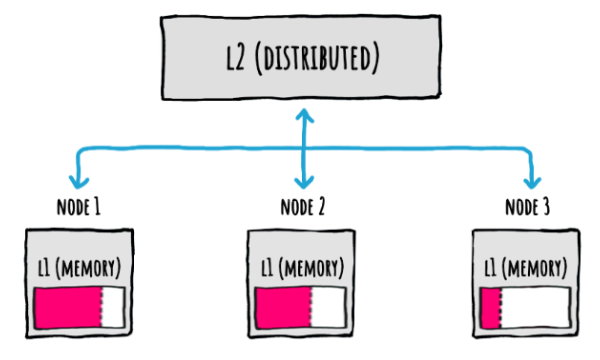
But even when using this L1+L2 setup, what happens when there's an update on a node?
FusionCache will of course update both the L1 (memory cache) and the L2 (distributed cache), like this:
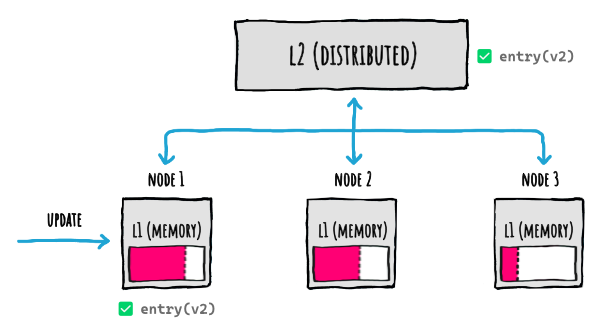
But... since the code (both our app code and FusionCache code) runs on the node that updated the entry, only the L1 where the update has been executed will be updated.
And what happens if the other nodes already had that entry cached? This happens:
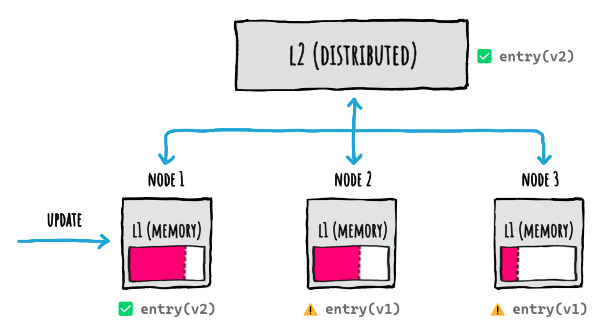
Basically the cache as a whole becomes **incoherent**, because depending on the node a request will land, it will receive a different result.
And this will last until the `Duration` elapses, and expiration occurs, on all those other nodes.
Is there a solution to this?
## 📢 Use a backplane
Luckily, there's an easy solution to this synchronization problem: we can use a **backplane**.
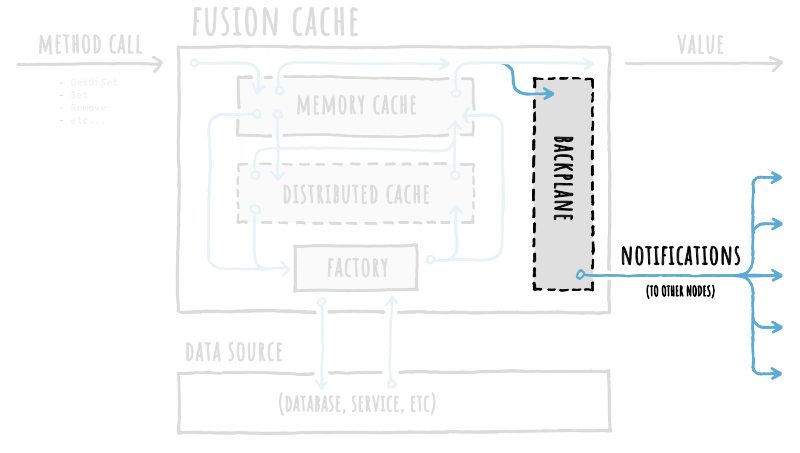
A backplane is like a slim message bus where change notifications will be published to all other connected nodes each time something happens to a cache entry, all automatically without us having to do anything.
By using a backplane, we'll get to this:
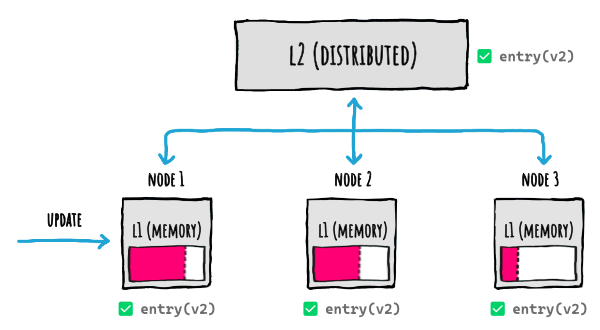
Everything is transparently handled for us: nice 🙂
## ✉️ Notifications: what they are
Each notifications contains the minimum set of informations needed for the system to be kept in-sync.
Since notifications for a cache entry may not be needed on all the other nodes, this means that each notification does NOT contain the entire payload for a cache entry, meaning the cache value is NOT included.
This is important, because it allows the backplane (and so, the network) to not be overloaded with potentialy big payloads for data that may not be used.
As an example using some **pseudo** code, a notifications is **NOT** something like this:
```json5
{
"timestamp": 123456789,
"key": "person/1",
"action": "set",
"value": {
"firstName": "Jon",
"lastName": "Doe",
"age": 42,
"address": {
// ...
}
}
}
```
but more something like this:
```json5
{
"timestamp": 123456789,
"key": "person/1",
"action": "set"
}
```
> [!NOTE]
> Again, the example above are in pseudo code, meaning the data structure is NOT the real one, it's just to explain the concept.
## 📩 Notifications: then what?
Ok so what happens when a notification is sent and received?
When we think about it, there are 3 _potential_ ways in which FusionCache could handle an update on 1 node, at least theoretically:
1. **ACTIVE:** send the notification, including the updated data
2. **PASSIVE:** send the notification, and each node will update its L1 immediately, getting the value from L2
3. **LAZY:** send the notification, and each node will remove their L1 copy (since it's old now) so the next request will get it from L2
The first approach (ACTIVE) is not really good, since it has these problems:
- requires an extra serialization step for the data to be transmitted
- requires a bigger payload for the notification, sent to all clients
- all of this would be useless in case the data is not actually needed on all the other nodes (realistic)
The second approach (PASSIVE) is not good either, since it has these problems:
- every node will request the data from L2 immediately, even if that cache key is not used on its own L1, generating useless traffic
- all of this would be useless in case the data is not actually needed on all the nodes (realistic)
The third approach (LAZY) seems like the best approach, because it does not involve extra network traffic and in general the problems of the ACTIVE or PASSIVE approaches.
Having said that, there's one extra optimization FusionCache does: if the receiving nodes already have the cache entry specified in the notification in their own L1, that means that those nodes already worked with that cache entry and potentially will do again. Without an immediate update to that cache entry, the next access will trigger a refresh, which could've been done earlier.
So what FusionCache does is a mixture of LAZY and (adaptive) PASSIVE, getting the best of both worlds: it sends the notification without sending the data and immediately updates the data in L1 (taken from L2) but ONLY on the nodes where the cache entry is already present on their L1. So, if cache key `"foo"` is in the L1 of only 2 nodes out of 10, only those 2 nodes will get the data from L2.
One final thing to notice is that FusionCache automatically differentiates between a notification for a change in a piece of data (eg: `Set()`), a notification for the removal of a piece of data (eg: `Remove()`) and one for the expire of a piece of data (eg: `Expire()`).
But why is that?
Because if something has been removed from the cache, it should be effectively removed on all the other nodes to avoid returning something that does not exist anymore, while if something has been marked as expired the other nodes will simply mark their local cached copies (if any) as expired so that subsequent calls for the same data may return the old version in case of problems (see [Fail-Safe](FailSafe.md)).
## 👩🏫 Example
As an example, let's look at the flow of a `GetOrSet` operation with 3 nodes (`N1`, `N2`, `N3`): each node has its own memory cache (L1) and is connected to the same distributed cache (L2).
Let's follow the sequence of operations:
- `GetOrSet` is called on `N1`
- no data is found in the memory cache on `N1` or in the distributed cache (or it is expired): call to the database to grab fresh data
- fresh data saved in memory cache on `N1` + distributed cache
- a backplane notification is sent to notify the other nodes
- the notification is received on `N2` and `N3`: they check their memory cache and see that the entry is not there
- as soon as a new request for the same cache entry arrives on `N2` or `N3`, the new version is taken from the distributed cache and saved locally on their memory cache
- `N1`, `N2`, `N3` live happily synchronized ever after
As we can see we didn't have to do anything more than usual: everything else is done automatically for us.
Finally, as a cherry on top, we can even execute the backplane operations in the background, to make things even faster: we can read more on the related [docs page](BackgroundDistributedOperations.md).
## ↩️ Auto-Recovery
Since the backplane is implemented on top of a distributed component (just like the distributed cache), most of the transient errors that may occur on it are also covered by the Auto-Recovery feature: you can read more on the related [docs page](AutoRecovery.md).
## 📦 Packages
Currently there are 2 official packages we can use:
| Package Name | Version | Downloads |
|--------------------------------|:---------------:|:---------:|
| [ZiggyCreatures.FusionCache.Backplane.Memory](https://www.nuget.org/packages/ZiggyCreatures.FusionCache.Backplane.Memory/)
A simple in-memory implementation (typically used only for testing) | [](https://www.nuget.org/packages/ZiggyCreatures.FusionCache.Backplane.Memory/) |  |
| [ZiggyCreatures.FusionCache.Backplane.StackExchangeRedis](https://www.nuget.org/packages/ZiggyCreatures.FusionCache.Backplane.StackExchangeRedis/)
A [Redis](https://redis.io/) implementation based on the awesome [StackExchange.Redis](https://github.com/StackExchange/StackExchange.Redis) library | [](https://www.nuget.org/packages/ZiggyCreatures.FusionCache.Backplane.StackExchangeRedis/) |  |
If we are already using a Redis instance as a distributed cache, we just have to point the backplane to the same instance and we'll be good to go (but if we share the same Redis instance with multiple caches, please read [some notes](RedisNotes.md)).
### 👩💻 Example
As an example, we'll use FusionCache with [Redis](https://redis.io/), as both a **distributed cache** and a **backplane**.
To start, we just install the Nuget packages:
```PowerShell
# CORE PACKAGE
PM> Install-Package ZiggyCreatures.FusionCache
# SERIALIZER
PM> Install-Package ZiggyCreatures.FusionCache.Serialization.NewtonsoftJson
# DISTRIBUTED CACHE
PM> Install-Package Microsoft.Extensions.Caching.StackExchangeRedis
# BACKPLANE
PM> Install-Package ZiggyCreatures.FusionCache.Backplane.StackExchangeRedis
```
Then, to create and setup the cache manually, we can do this:
```csharp
// INSTANTIATE FUSION CACHE
var cache = new FusionCache(new FusionCacheOptions());
// INSTANTIATE A REDIS DISTRIBUTED CACHE (IDistributedCache)
var redis = new RedisCache(new RedisCacheOptions() {
Configuration = "CONNECTION STRING"
});
// INSTANTIATE THE FUSION CACHE SERIALIZER
var serializer = new FusionCacheNewtonsoftJsonSerializer();
// SETUP THE DISTRIBUTED 2ND LEVEL
cache.SetupDistributedCache(redis, serializer);
// CREATE THE BACKPLANE
var backplane = new RedisBackplane(new RedisBackplaneOptions() {
Configuration = "CONNECTION STRING"
});
// SETUP THE BACKPLANE
cache.SetupBackplane(backplane);
```
Of course we can also use the **DI (Dependency Injection)** approach, thanks to the [Builder](DependencyInjection.md) support:
```csharp
services.AddFusionCache()
.WithSerializer(
new FusionCacheNewtonsoftJsonSerializer()
)
.WithDistributedCache(
new RedisCache(new RedisCacheOptions { Configuration = "CONNECTION STRING" })
)
.WithBackplane(
new RedisBackplane(new RedisBackplaneOptions { Configuration = "CONNECTION STRING" })
)
;
```
## ⚙️ Using a low `MemoryCacheDuration` as an alternative
If somehow we are not using a [Backplane](Backplane.md), the cache as a whole can become incoherent after a change operation like `Set`, `Remove`, etc.
So to lower the cache incoherency window, we can set a low `MemoryCacheDuration` so that the data in L1 will be refreshed more frequently from L2,something like this:
```c#
services.AddFusionCache()
.WithOptions(options =>
{
// KEEP DATA IN L1 FOR 5 SEC, THEN GET IT AGAIN FROM L2
options.DefaultEntryOptions.MemoryCacheDuration = TimeSpan.FromSeconds(5);
});
```
This is not a real _solution_, but more like a _mitigation_.
But when doing this we should consider ALL change operations, and that includes [Tagging](Tagging.md) operations, meaning `RemoveByTag(tag)` calls.
But as mentioned in the Tagging docs, what FusionCache does underneath to make it all work is saving a special entry for each tag used in a `RemoveByTag(tag)` call, containing the timestamp of the last execution, to check later.
But what entry options are used for these special entries? Meaning what `Duration` or timeouts or fail-safe options?
For these special cache entries, instead of relying on the common `DefaultEntryOptions`, FusionCache uses a separate `TagsDefaultEntryOptions`: they already have sensible defaults so that Tagging works best.
But if we want to "use a lower `Duration` for L1" we should do the same as above also for the `TagsDefaultEntryOptions`, like this:
```c#
services.AddFusionCache()
.WithOptions(options =>
{
// KEEP DATA IN L1 FOR 5 SEC, THEN GET IT AGAIN FROM L2
// THIS IS FOR NORMAL ENTRIES
options.DefaultEntryOptions.MemoryCacheDuration = TimeSpan.FromSeconds(5);
// THIS IS FOR TAGGING-RELATED ENTRIES
options.TagsDefaultEntryOptions.MemoryCacheDuration = TimeSpan.FromSeconds(5);
});
```
Pretty simple, and the Best Practices Advisor will automatically tell us about it if it detects such a scenario.
> [!IMPORTANT]
> It's important to reiterate: if you can you should always use the backplane, as that is **THE** way to solve cache coherence for good without out-of-sync windows or other issues.
## 🗃 Wire Format Versioning
When working with the memory cache, everything is easier: at every run of our apps or services everything starts clean, from scratch, so even if there's a change in the structure of the cache entries used by FusionCache there's no problem.
The backplane, instead, is different: when sending a notification to other nodes that data is shared between different instances of the same applications, between different applications altogether and maybe even with different applications that are using a different version of FusionCache.
So when the structure of the backplane notification need to change to evolve FusionCache, how can this be managed?
Easy, by using an additional channel name modifier for the backplane, so that if and when the version of the backplane message needs to change, there will be no issues sending or receiving different versions.
In practice this means that, when creating the name of the channel name for the backplane, a version modifier (eg: an extra piece of string) is used, something like `%CHANNEL_PREFIX%` + `.Backplane:` + `%VERSION%"`.
This is the way to manage changes in the wire format between updates: it has been designed in this way specifically to support FusionCache to be updated safely and transparently, without interruptions or problems.
So what happens when there are 2 version of FusionCache running on the same backplane instance, for example when two different apps share the same Redis instance, and one is updated and the other is not?
Since the old version will send messages to the backplane with a different channel name than the new version, this will not create conflicts during the update, and it means that we don't need to stop all the apps and services that works on it just to do the upgrade.
At the same time though, if we have different apps and services that use the same backplane shared between them, we need to understand that by updating only one app or service and not the others will mean that the ones updated will publish/receive messages on the new channel, while the non updated ones will keep publishing/receiving messages on the old channel.
Again, nothing catastrophic, but something to consider.
## 🤔 Distributed cache: is it really necessary?
The most common scenario is probably to use both a distributed cache and a backplane, working together: the former used as a shared state that all nodes can use, and the latter used to notify all the nodes about synchronization events so that every node is perfectly updated.
But is it really necessary to use a distributed cache at all?
The short answer is yes, that would be the suggested approach.
A longer answer is that we may even just use a backplane without a distributed cache, if we so choose.
The idea seems like a nice one: in a multi-node scenario we may want to use only memory caches on each node + the backplane for cache synchronization, without having to use a shared distributed cache.
But remember: when using a backplane, FusionCache automatically publish notifications everytime something "changes" in the cache, namely when we directly call `Set` or `Remove` (of course) but also when calling `GetOrSet` AND the factory actually go to the database (or whatever) to get the fresh piece of data.
So, without the distributed cache as a shared state, every notification would end up requiring a new call to the database, again and again, every single time a new request comes in.
Why? Let's look at an example flow of a `GetOrSet` operation with 3 nodes (`N1`, `N2`, `N3`), without a distributed cache:
- `GetOrSet` is called on `N1`
- no data is found in the memory on `N1` (or it is expired): call to the database to grab fresh data
- fresh data saved in memory cache on `N1`
- a backplane notification is sent to notify the other nodes
- the notification is received on `N2` and `N3` and they evict the entry from their own respective memory cache
- a new request for the same cache entry arrives on `N2` or `N3`
- no data is found in the memory on `N2`: call to the database to grab fresh data
- fresh data saved in memory cache on `N2`
- a backplane notification is sent to notify the other nodes
- the notification is received on `N1` and `N3` and they evict the entry from their own respective memory cache
- so `N1` just erased the entry in the memory cache
As we can see this would basically make the entire cache useless.
This is because not having a **shared state** means we don't know when something actually changed, since when we get fresh data from the database it may be changed since the last time, so we need to notify the other nodes, etc going into an infinite loop.
So how can we solve this?
## 🥳 Look ma: no distributed cache!
The solution is to **skip automatic backplane notifications** and publish them only when we want to signal an actual change.
And how can we do this, in practice?
By default notifications are published on the backplane (if any): to skip them we can just set the `SkipBackplaneNotifications` option on the `FusionCacheEntryOptions` object. This means that we can be granular and specify it for every single operation, but as we know this also means that we can set it to `true` in the global `DefaultEntryOptions` once, and not having to skip them every time.
But then, when we **want** to publish a notification, how can we do it? Easy peasy, simply enable them only for that specific operation.
Let's look at a concrete example.
### 👩💻 Example
```csharp
// INITIAL SETUP: SKIP AUTOMATIC NOTIFICATIONS
cache.DefaultEntryOptions.SkipBackplaneNotifications = true;
// [...]
// LATER ON, SUPPOSE WE JUST SAVED THE PRODUCT IN THE DATABASE, SO WE NEED TO UPDATE THE CACHE
cache.Set(
$"product:{product.Id}",
product,
options => options.SetDuration(TimeSpan.FromMinutes(5)).SetSkipBackplaneNotifications(false)
);
// LATER ON, SUPPOSE WE JUST REMOVED THE PRODUCT FROM THE DATABASE, SO WE NEED TO REMOVE IT FROM THE CACHE TOO
cache.Remove(
$"product:{product.Id}",
options => options.SetSkipBackplaneNotifications(false)
);
```
## ⚠️ External changes: be careful
Just to reiterate, because it's very important: when using the backplane **without** a distributed cache, any change not manually published by us would result in different nodes not being synched.
This means that, if we want to use the backplane without the distributed cache, we should be confident about the fact that **ALL** changes will be notified by us manually.
To better understand what would happen otherwise let's look at an example, again with a couple of `GetOrSet` operations on 3 nodes (`N1`, `N2`, `N3`):
- `GetOrSet` is called on `N1`
- no data is found in the memory on `N1` (or it is expired): call to the database to grab fresh data
- fresh data saved in memory cache on `N1` for `5 min`
- a background job/cron/whatever changes the data in the database
- a new request for the same cache entry arrives on `N2`
- no data is found in the memory on `N2`: call to the database to grab fresh data
- fresh data saved in memory cache on `N2` for `5 min`
Now `N1` and `N2` will have different data cached for `5 min`, see the problem?
So when using a backplane I would **really** suggest using a distributed cache too, otherwise the system may become a little bit too fragile.
If, on the other hand, we are comfortable with such a situation, by all means we can use it.
## Conclusion
As we saw there are basically 2 ways of using a backplane:
- **1️⃣ MEMORY + DISTRIBUTED + BACKPLANE**: probably the most common, where we don't have to do anything, everything just works and it's hard to have inconsistencies between different nodes
- **2️⃣ MEMORY + BACKPLANE (NO DISTRIBUTED)**: probably the less common, where we have to skip automatic notifications in the default entry options, and then we have to manually enable them on a call-by-call basis only when we actually want to notify the other nodes. It's easier to have inconsistencies between different nodes
⚠️ So remember: without a distributed cache we should **SKIP** backplane notifications by default, otherwise our system may suffer.