
# 🧬 Diagrams
Sometimes it's nice to be able to visualize the internal flow of a system.
This is true for any system, but even more so for such a complex beast as an hybrid cache, where the interplay between L1, an optional L2, an optional backplane and various features will come together to create a beautiful, but complex, result.
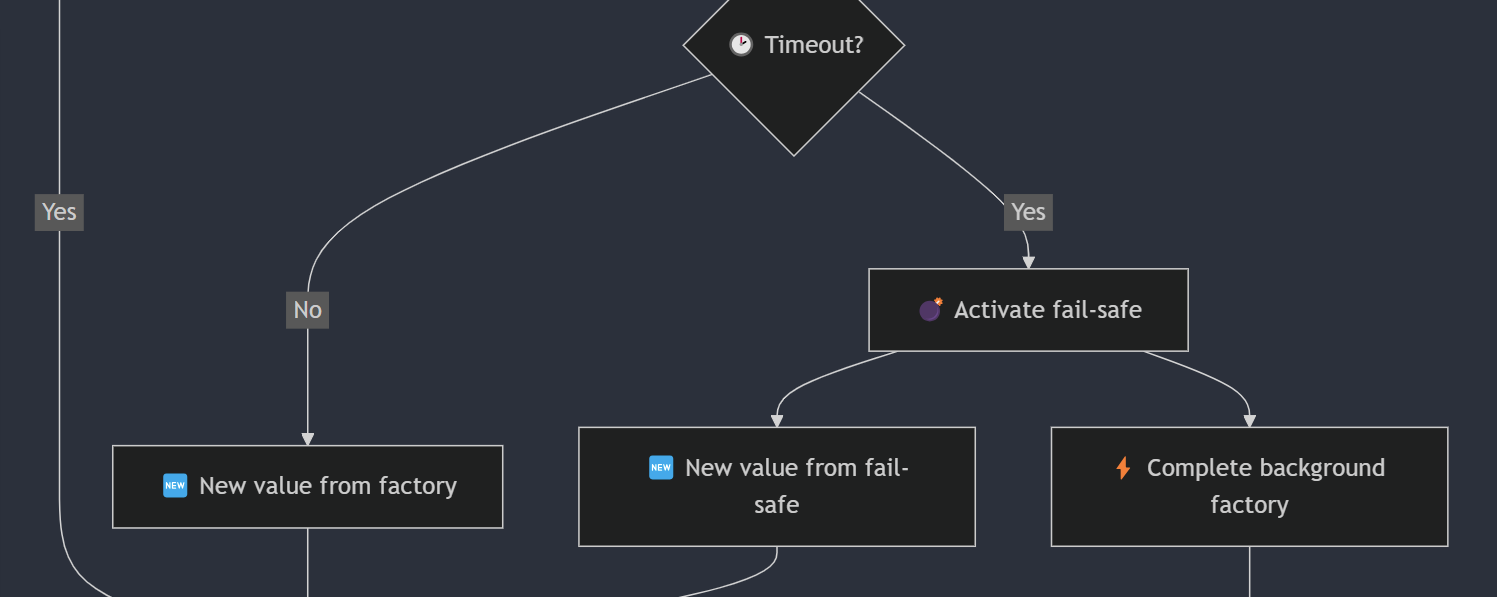
What follows are a couple of flow charts that tries to capture, from a more simplistic view to a comprehensive one, the main stages of what happens inside FusionCache for the main and most complex method: `GetOrSet`.
It should be noted that even the most complex one cannot capture the full extent of all the internal details such as background execution of distributed components, sync/async events, observability points (traces, metrics, etc) because visually representing such a big piece of complex code cannot be done in a reasonable way.
After a certain point we can just look directly at the code.
## L1 only (simplified)
This is a high level overview of the main parts when using only L1 (memory level): no L2 (distributed level) or backplane.
Also, the cache stampede protection is not shown here for simplicity, but rest assured **is always there**.
```mermaid
flowchart TD
START[GetOrSet] -->
CHECK_L1{✅ Value in L1?}
CHECK_L1 -->| Yes | RETURN
CHECK_L1 -->| No | FACTORY
FACTORY[⚡ Execute factory]
FACTORY --> SAVE_L1
SAVE_L1[💾 Save to L1]
SAVE_L1 --> RETURN
RETURN[Return value]
```
## L1 + L2 + Backplane (simplified)
The level of detail is the same as the one before, but here we include the optional L2 and the backplane for multi-node synchronization.
Again, for simplicify the cache stampede protection mechanism is not shown, but **is always there**.
```mermaid
flowchart TD
START[GetOrSet] -->
CHECK_L1{✅ Value in L1?}
CHECK_L1 -->| Yes | RETURN
CHECK_L1 -->| No | CHECK_L2
CHECK_L2{✅ Value in L2?}
CHECK_L2 -->| Yes | SAVE_L1
CHECK_L2 -->| No | FACTORY
SAVE_L1[💾 Save to L1]
SAVE_L1 --> RETURN
FACTORY[⚡ Execute factory]
FACTORY --> FACTORY_SAVE_L1
FACTORY_SAVE_L1[💾 Save to L1]
FACTORY_SAVE_L1 --> SAVE_L2
SAVE_L2[💾 Save to L2]
SAVE_L2 --> SEND_BACKPLANE
SEND_BACKPLANE[📢 Send backplane notification]
SEND_BACKPLANE --> RETURN
RETURN[Return value]
```
## L1 only (simplified, with stampede protection)
This is the same as the first one, but the cache stampede protection steps are also shown to have a better understanding of that part.
> [!NOTE]
> Note the use of the classic double checked lock: after we get the lock we check L1 again, since some other caller may have already updated L1 for us.
```mermaid
flowchart TD
START[GetOrSet] -->
CHECK_L1{✅ Value in L1?}
CHECK_L1 -->| Yes | RETURN
CHECK_L1 -->| No | STAMPEDE_LOCK_ACQUIRE
STAMPEDE_LOCK_ACQUIRE[🔒 Acquire stampede lock]
STAMPEDE_LOCK_ACQUIRE --> CHECK_L1_2
CHECK_L1_2{✅ Value in L1?}
CHECK_L1_2 -->| Yes | STAMPEDE_LOCK_RELEASE
CHECK_L1_2 -->| No | FACTORY
FACTORY[⚡ Execute factory]
FACTORY --> SAVE_L1
SAVE_L1[💾 Save to L1]
SAVE_L1 --> STAMPEDE_LOCK_RELEASE
STAMPEDE_LOCK_RELEASE[🔓 Release stampede lock]
STAMPEDE_LOCK_RELEASE --> RETURN
RETURN[Return value]
```
## L1 + L2 + Backplane + Eager Refresh + Soft Timeout
This is the most comprehensive one.
As said, it cannot contain every little detail of every little feature and every possible combination of options, otherwise it would be a gargantuan monster as big as Stephen Toub's annual perf [blogposts](https://devblogs.microsoft.com/dotnet/performance-improvements-in-net-9/) 😅.
Having said that, it should be a quite complete picture of the finer inner steps, enough for anyone to get familiar with how everything works.
> [!NOTE]
> It's possible to execute some distributed operations (L2 and Backplane) in the background to speed things up via the options `AllowBackgroundDistributedCacheOperations` and `AllowBackgroundBackplaneOperations`: in that case those parts will not be blocking, but I'm not showing both here to avoid the diagram becoming even bigger.
```mermaid
flowchart TD
START[GetOrSet] -->
CHECK_L1{✅ Value in L1?}
CHECK_L1 -->| Yes | EAGER_MAYBE
CHECK_L1 -->| No | STAMPEDE_LOCK_ACQUIRE
EAGER_MAYBE{✅ Eager refresh?}
EAGER_MAYBE -->| Yes | EAGER_STAMPEDE_LOCK_ACQUIRE
EAGER_MAYBE -->| No | RETURN
EAGER_STAMPEDE_LOCK_ACQUIRE[🔒 Acquire stampede lock]
EAGER_STAMPEDE_LOCK_ACQUIRE --> EAGER_FACTORY
EAGER_STAMPEDE_LOCK_ACQUIRE --> RETURN
EAGER_FACTORY[⚡ Execute background factory]
EAGER_FACTORY --> EAGER_NEW_VALUE_FACTORY
EAGER_NEW_VALUE_FACTORY[🆕 New value from factory]
EAGER_NEW_VALUE_FACTORY --> EAGER_SAVE_L1
EAGER_SAVE_L1[💾 Save to L1]
EAGER_SAVE_L1 --> EAGER_STAMPEDE_LOCK_RELEASE
EAGER_STAMPEDE_LOCK_RELEASE[🔓 Release stampede lock]
EAGER_STAMPEDE_LOCK_RELEASE --> EAGER_SAVE_L2
EAGER_SAVE_L2[💾 Save to L2]
EAGER_SAVE_L2 --> EAGER_SEND_BACKPLANE
EAGER_SEND_BACKPLANE[📢 Send backplane notification]
STAMPEDE_LOCK_ACQUIRE[🔒 Acquire stampede lock]
STAMPEDE_LOCK_ACQUIRE --> CHECK_L1_2
CHECK_L1_2{✅ Value in L1?}
CHECK_L1_2 -->| Yes | STAMPEDE_LOCK_RELEASE
CHECK_L1_2 -->| No | CHECK_L2
CHECK_L2{✅ Value in L2?}
CHECK_L2 -->| Yes | SAVE_L1
CHECK_L2 -->| No | FACTORY
FACTORY[⚡ Execute factory]
FACTORY --> MAYBE_TIMEOUT
MAYBE_TIMEOUT{🕑 Timeout?}
MAYBE_TIMEOUT -->| No | NEW_VALUE_FACTORY
MAYBE_TIMEOUT -->| Yes | FAILSAFE
FAILSAFE[💣 Activate fail-safe]
FAILSAFE --> NEW_VALUE_FAILSAFE
FAILSAFE --> TIMEOUT_FACTORY
TIMEOUT_FACTORY[⚡ Complete background factory]
TIMEOUT_FACTORY --> TIMEOUT_NEW_VALUE_FACTORY
TIMEOUT_NEW_VALUE_FACTORY[🆕 New value from factory]
TIMEOUT_NEW_VALUE_FACTORY --> TIMEOUT_SAVE_L1
TIMEOUT_SAVE_L1[💾 Save to L1]
TIMEOUT_SAVE_L1 --> TIMEOUT_SAVE_L2
TIMEOUT_SAVE_L2[💾 Save to L2]
TIMEOUT_SAVE_L2 --> TIMEOUT_SEND_BACKPLANE
TIMEOUT_SEND_BACKPLANE[📢 Send backplane notification]
NEW_VALUE_FACTORY[🆕 New value from factory]
NEW_VALUE_FACTORY --> SAVE_L1
NEW_VALUE_FAILSAFE[🆕 New value from fail-safe]
NEW_VALUE_FAILSAFE --> SAVE_L1
SAVE_L1[💾 Save to L1]
SAVE_L1 --> STAMPEDE_LOCK_RELEASE
STAMPEDE_LOCK_RELEASE[🔓 Release stampede lock]
STAMPEDE_LOCK_RELEASE --> MAYBE_NEW_VALUE
MAYBE_NEW_VALUE{✅ New value?}
MAYBE_NEW_VALUE -->| No | RETURN
MAYBE_NEW_VALUE -->| Yes | SAVE_L2
SAVE_L2[💾 Save to L2]
SAVE_L2 --> SEND_BACKPLANE
SEND_BACKPLANE[📢 Send backplane notification]
SEND_BACKPLANE --> RETURN
RETURN[Return value]
```