# ZONOS2

---
ZONOS2 is our latest text-to-speech model trained on more than 6 million hours of varied multilingual speech, delivering expressiveness and quality on par with—or even surpassing—top TTS providers at low latency with MoE. ZONOS2 excels at high-fidelity and naturalistic voice cloning.
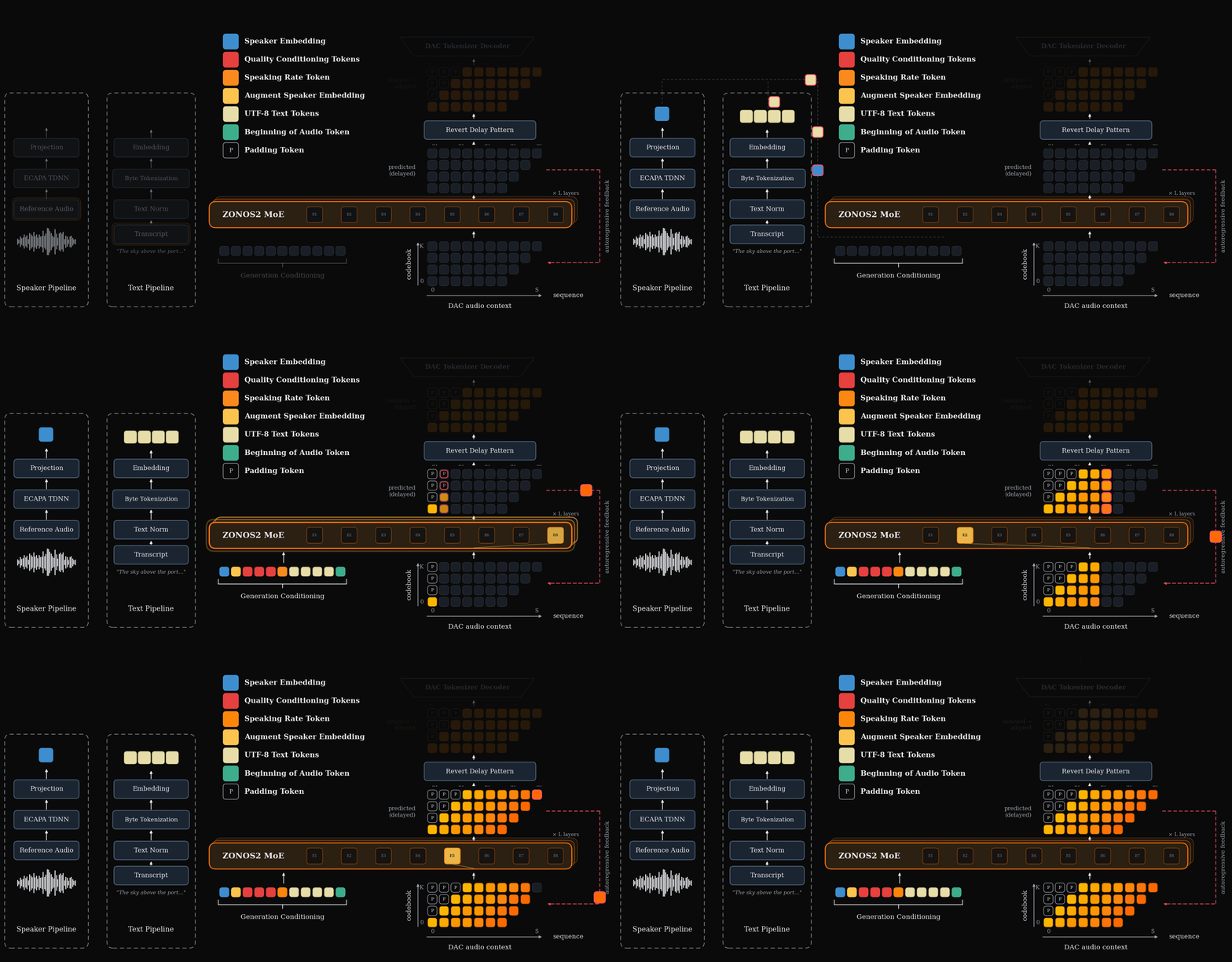
During inference we use nemo TN normalized UTF-8 bytes and an ECAPA-TDNN embedding to generate DAC tokens with our MoE backbone. An inference overview can be seen below.
Language support is as follows.
| Tier | Languages |
| ------ | ---------------------------------------------------------------------------------------------------------------------------------------------------------------------------------------------- |
| Tier 1 | English, Mandarin Chinese, Japanese |
| Tier 2 | Korean, Russian, Italian, Portuguese, French, Spanish, Vietnamese, German, Hebrew, Dutch |
| Tier 3 | Swedish, Hindi, Tamil, Telugu, Thai, Norwegian, Bengali, Tagalog, Arabic, Danish, Indonesian, Polish, Ukrainian, Romanian, Finnish, Hungarian, Lithuanian, Estonian, Slovak, Croatian, Latvian |
For high-performance local inference we provide a TTS inference server built on [Mini-SGLang](https://github.com/sgl-project/mini-sglang).
For cpu inference and cross platform support we provide a ggml implementation for ZONOS2 in this [repo](https://github.com/Zyphra/zonos2.cpp).
**For more details and speech samples, check out our [blog](https://www.zyphra.com/our-work/zonos2).**
**We also have a hosted version available at [cloud.zyphra.com/audio-playground](https://cloud.zyphra.com/audio-playground).**
---
## Quick Start
> **Platform Support**: Linux only (x86_64). Requires NVIDIA GPU with CUDA toolkit matching your driver version (`nvidia-smi` to check).
### 1. Installation
Requires [uv](https://docs.astral.sh/uv/getting-started/installation/).
```bash
git clone https://github.com/Zyphra/Zonos2.git
cd Zonos2
uv sync
```
### 2. Launch the TTS Server
```bash
uv run python -m zonos2 --model-path Zyphra/ZONOS2 --tts-default-voices-dir ./default_voices/
```
`uv run` always uses the project environment, so no venv activation is needed.
The server starts on `http://localhost:1919` by default. TTS mode is auto-detected for zonos2 models.
`--tts-default-voices-dir ` pre-populates the web UI with voice-clone
speakers from disk; the folder is scanned recursively for speaker audio
(`.wav`, `.mp3`, `.flac`, `.m4a`, `.ogg`, `.opus`, `.aac`, `.webm`) and saved
embeddings (`.npy`, `.npz`). The newest voice is selected automatically on
startup.
### 3. Generate Speech
**curl:**
```bash
curl -X POST http://localhost:1919/tts/generate \
-H "Content-Type: application/json" \
-d '{"text": "Hello world", "stream": true}' \
--output output.pcm
# Convert to WAV
ffmpeg -f f32le -ar 44100 -ac 1 -i output.pcm output.wav
```
**Web UI:** Open `http://localhost:1919/` in your browser.
## Python API (offline inference)
You can also run the engine directly in a Python script, without starting a
server, via `TTSLLM`. The offline path is at parity with the server: it applies
the same text normalization, supports voice cloning, and exposes the same
conditioning controls.
```python
from zonos2.message import TTSSamplingParams
from zonos2.tts import TTSLLM
tts = TTSLLM(model_path="Zyphra/ZONOS2")
results = tts.generate(
["Hello from the offline Python API.", "Batched prompts work too."],
TTSSamplingParams(seed=42),
)
for i, result in enumerate(results):
print(f"frames={len(result['audio_tokens'])}, eos_frame={result['eos_frame']}")
tts.save_audio(result["audio"], f"output_{i}.wav")
```
### Voice cloning
Compute a speaker embedding from a reference audio file (decoded with the same
ffmpeg path the server uses) and pass it to `generate()`:
```python
emb = tts.embed_speaker_file("default_voices/AmericanFemale.mp3")
result = tts.generate_one(
"This is spoken in the cloned voice.",
TTSSamplingParams(seed=42),
speaker_embedding=emb, # also: clean_speaker_background=..., accurate_mode=...
)
tts.save_audio(result["audio"], "cloned.wav")
```
### Conditioning controls (server parity)
`generate()` / `generate_one()` accept the same high-level controls as the
server and resolve them with the server's exact bucketing logic:
```python
tts.generate_one(
"Numbers like 123 are normalized to words.",
TTSSamplingParams(),
language="en_us", # text normalization is on by default
speed=1.1, # or speaking_rate=, or speaking_rate_bucket=
quality_values={"trailing_silence_s": 0.4}, # or quality_buckets=...
max_tokens=600, # clamped to the model limit
)
```
Set `text_normalization=False` to feed text through verbatim. The standalone
resolvers (`resolve_speaking_rate_bucket`, `resolve_quality_buckets`,
`resolve_max_tokens`) are also available if you want to precompute buckets.
For long passages, use `generate_long_one(text, TTSSamplingParams(prefix_cfg_scale=1.2), speaker_embedding=emb)`; it keeps whole prior chunks as acoustic context, optionally pins the first chunk, and applies the same speaker conditioning to every chunk. `chunk_chars`, `window_chunks`, `pin_anchor`, and `split_mode` control chunking and context.
## API Reference
### `POST /tts/generate`
Full-featured TTS endpoint with streaming support.
Long text is automatically split into overlapping chunks, each synthesized as a
teacher-forced continuation of prior audio. This avoids boundary discontinuities and
voice drift over long passages; see the `long_form_*` parameters below to tune or
disable it.
**Request body:**
| Parameter | Type | Default | Description |
|-----------|------|---------|-------------|
| `text` | string | required | Text to synthesize |
| `language` | string | `en_us` | Text-normalization language: `en_us`, `en_gb`, `fr_fr`, `de`, `es`, `it`, `pt_br`, `ja`, `cmn`, `ko` |
| `text_normalization` | bool | `true` | Verbalize numbers, dates and currency before synthesis (`false` = raw byte tokenization) |
| `temperature` | float | `1.15` | Sampling temperature |
| `topk` | int | `106` | Top-k sampling |
| `top_p` | float | `0.0` | Nucleus (top-p) sampling threshold; `0` disables |
| `min_p` | float | `0.18` | Min-p probability filter; `0` disables |
| `max_tokens` | int \| null | model max | Maximum audio tokens. Omit or set `null` to use the model context limit; long prompts are clamped to remaining context. |
| `fade_out_ms` | float | `0.0` | Cosine fade-out applied to the audio tail; `0` disables |
| `repetition_window` | int | `50` | Recent generated frames to check per codebook; `0` disables |
| `repetition_penalty` | float | `1.2` | Per-codebook repetition penalty strength; `1.0` disables |
| `repetition_codebooks` | int | `8` | Number of codebooks from CB0 upward to penalize; negative means all |
| `seed` | int \| null | `null` | Random seed for reproducibility |
| `speaking_rate_enabled` | bool | `false` | Set `true` to use model speaking-rate conditioning when another speaking-rate field is present |
| `speaking_rate_bucket` | int \| null | `null` | Exact model speaking-rate bucket to prepend before text |
| `speaking_rate` | float \| null | `null` | Target speaking rate in cleaned UTF-8 bytes per second; mapped to a bucket |
| `speed` | float \| null | `null` | OpenAI-style multiplier; `1.0` maps to the model's neutral speaking-rate bucket |
| `quality_enabled` | bool | `true` | Enable quality-bin conditioning on supported models |
| `quality_buckets` | object \| list \| null | `{"trailing_silence_s": 3}` | Per-feature quality bucket indices (keyed by feature name, or a list in feature order) |
| `quality_values` | object \| list \| null | `null` | Raw quality metric values, mapped to buckets server-side (alternative to `quality_buckets`) |
| `clean_speaker_background` | bool | `false` | Mark the reference voice as having a clean background (supported models) |
| `accurate_mode` | bool | `true` | `true` = accurate mode (closer voice match), `false` = expressive mode |
| `emotion_enabled` | bool | `false` | Enable emotion-control conditioning (requires loaded emotion directions) |
| `emotion_sliders` | object \| null | `null` | Per-emotion weights, e.g. `{"happy": 1.0, "sad": 0.5}` (available names from `/tts/capabilities`) |
| `emotion_valence` | float | `0.0` | Valence axis (−1 negative … +1 positive) |
| `emotion_arousal` | float | `0.0` | Arousal axis (−1 calm … +1 excited) |
| `emotion_strength` | float | `1.0` | Multiplier on the calibrated strength; `1.0` = calibrated, higher exaggerates |
| `emotion_cfg_scale` | float | `1.0` | Emotion guidance; `1.0` = off, ~1.5 strongly amplifies emotion (best with expressive mode), ~2× compute |
| `cfg_scale` | float | `1.0` | Speaker-embedding classifier-free guidance; `1.0` disables, `>1` pushes generation toward the target speaker |
| `prefix_cfg_scale` | float | `1.0` | Acoustic-prefix classifier-free guidance for long-form continuation chunks; `1.0` disables, `>1` sharpens continuity across chunk joins, `<1`/negative downweights the prefix. No effect on the first chunk |
| `long_form` | bool \| null | `null` | `null` = auto (engage when text exceeds the chunk size), `true`/`false` force long-form on/off |
| `long_form_chunk_chars` | int | `150` | New text generated per step, in characters |
| `long_form_window_chunks` | int | `2` | Total chunks fed per step; `window-1` prior chunks are teacher-forced context. `1` disables teacher forcing |
| `long_form_pin_anchor` | bool | `true` | Pin the whole first chunk into every continuation prefix to prevent timbre drift over long passages |
| `long_form_split_mode` | string | `"word"` | Chunking strategy: `"word"` (greedy word packing) or `"sentence"` (sentence boundaries, falling back to words for over-long sentences) |
| `stream` | bool | `true` | Stream audio chunks |
**Response:** Raw PCM audio (`audio/pcm`, float32, 44.1 kHz, mono). Headers include `X-Audio-Sample-Rate`, `X-Audio-Channels`, `X-Audio-Format`.
### `POST /v1/audio/speech`
OpenAI-compatible endpoint.
**Request body:**
```json
{
"model": "zonos2",
"input": "Hello world",
"voice": "alloy",
"response_format": "pcm"
}
```
For speaking-rate-enabled checkpoints, set `speaking_rate_enabled` to `true`
and use `speaking_rate_bucket` for exact bucket control, `speaking_rate` for
bytes-per-second control, or `speed` for OpenAI-style multiplier control.
## Emotion Control
You can nudge a voice toward an emotion (happy, sad, angry, surprised) or along
the valence/arousal axes **without changing speaker identity**. Emotion is
applied as additive *direction* vectors on the speaker conditioning — no model
or checkpoint changes — so the timbre is preserved while prosody shifts.
Direction vectors ship in `./emotion_directions/`, and the server **auto-loads
them on startup when that folder is present** — emotion sliders appear in the
web UI automatically, no extra flags. Point elsewhere (or disable) with
`--tts-emotion-directions-dir ` (pass an empty string to turn it off).
```bash
curl -X POST http://localhost:1919/tts/generate \
-H "Content-Type: application/json" \
-d '{
"text": "I cannot believe you did that!",
"emotion_enabled": true,
"emotion_sliders": {"happy": 1.0},
"accurate_mode": false,
"emotion_cfg_scale": 1.5,
"stream": true
}' \
--output happy.pcm
```
`GET /tts/capabilities` reports what the loaded directions expose:
`emotion_enabled`, `emotion_names`, `emotion_axes`, and `emotion_calibrated`
(whether a per-speaker strength calibration is loaded). The shipped directions
include a `calibration.json` so `emotion_strength: 1.0` is already a sensible
per-emotion default; raise it to exaggerate. For strong, reliable effects use
**expressive mode** (`accurate_mode: false`) together with
`emotion_cfg_scale` around `1.5`.
**Building your own directions.** Use `scripts/build_emotion_directions.py` to
encode an emotion-labelled corpus (e.g. ESD) into a new `emotion_directions/`
set, and `scripts/calibrate_emotion_strength.py` to auto-tune per-speaker,
per-emotion strength against the emotion2vec recognizer. See each script's
`--help`.
## Citation
If you find this model useful in an academic context please cite as:
```
@misc{zyphra2025zonos,
title = {Zonos V2 Technical Report},
author = {Gabriel Clark, Sofian Mejjoute, Mohamed Osman, George Close, Beren Millidge},
year = {2026},
}
```
## License
ZONOS2 is released under the [MIT License](LICENSE).
It incorporates third-party components under their own licenses — see
[`NOTICE`](NOTICE) and [`licenses/`](licenses/):
- The TTS inference server and runtime are derived from
[Mini-SGLang](https://github.com/sgl-project/mini-sglang) (MIT).
- `python/zonos2/vendor/nemo_text_processing/` is vendored from
[NVIDIA NeMo-text-processing](https://github.com/NVIDIA/NeMo-text-processing)
(Apache-2.0).