# PocketPal AI
**A private AI assistant that runs entirely on your phone.**
Chat with language models, give them a voice, and let them use tools — all on-device. No account, no cloud, no internet required.
pocketpal.dev ·
Get the app ·
Leaderboard ·
PalsHub ·
Discussions
[](https://apps.apple.com/us/app/pocketpal-ai/id6502579498)
[](https://play.google.com/store/apps/details?id=com.pocketpalai)
[](https://github.com/a-ghorbani/pocketpal-ai/releases)
[](LICENSE)
[](https://github.com/a-ghorbani/pocketpal-ai/stargazers)
[](https://github.com/a-ghorbani/pocketpal-ai/issues)
[](https://github.com/sponsors/a-ghorbani)
---
## Why PocketPal AI?
Most AI apps are a thin window onto someone else's server — every message you type gets shipped off, logged, and analyzed somewhere you can't see. PocketPal flips that around: **the AI lives on your phone, and your conversations stay on it unless you choose an online feature.**
- **🔒 Private by default** — every prompt, response, and document stays on your device unless you turn on an online feature such as web search or a remote server.
- **✈️ Works offline** — download a model once and it just works, with no connection and no account. On a plane, on a trail, anywhere.
- **📱 Runs on hardware you already own** — real language models, voices, and tools, tuned to make the most of your phone's CPU, GPU, and NPU.
- **🆓 Free and open source** — chat, models, voices and tools are free, with no account. The App Store and Google Play builds offer an optional one-time **PocketPal Plus** purchase for hands-free voice and the local API server; builds from source include it, and so does the APK on GitHub Releases from the release after v1.23.0. MIT-licensed.
> **Privacy note:** Your chats and documents leave your device only through features you turn on: web search and page reading, a remote server, or a system voice your phone runs online. The app's other network use (model and voice downloads, PalsHub and purchases, device-compatibility rules from the jsDelivr CDN at launch, the opt-in benchmark leaderboard, and feedback or reports you submit) never attaches your chats.
## Contents
- [Features](#features)
- [Get the app](#get-the-app)
- [How it works](#how-it-works)
- [Using the app](#using-the-app)
- [For developers](#for-developers)
- [Contributing](#contributing)
- [Roadmap](#roadmap)
- [Community & support](#community--support)
- [License](#license)
## Features
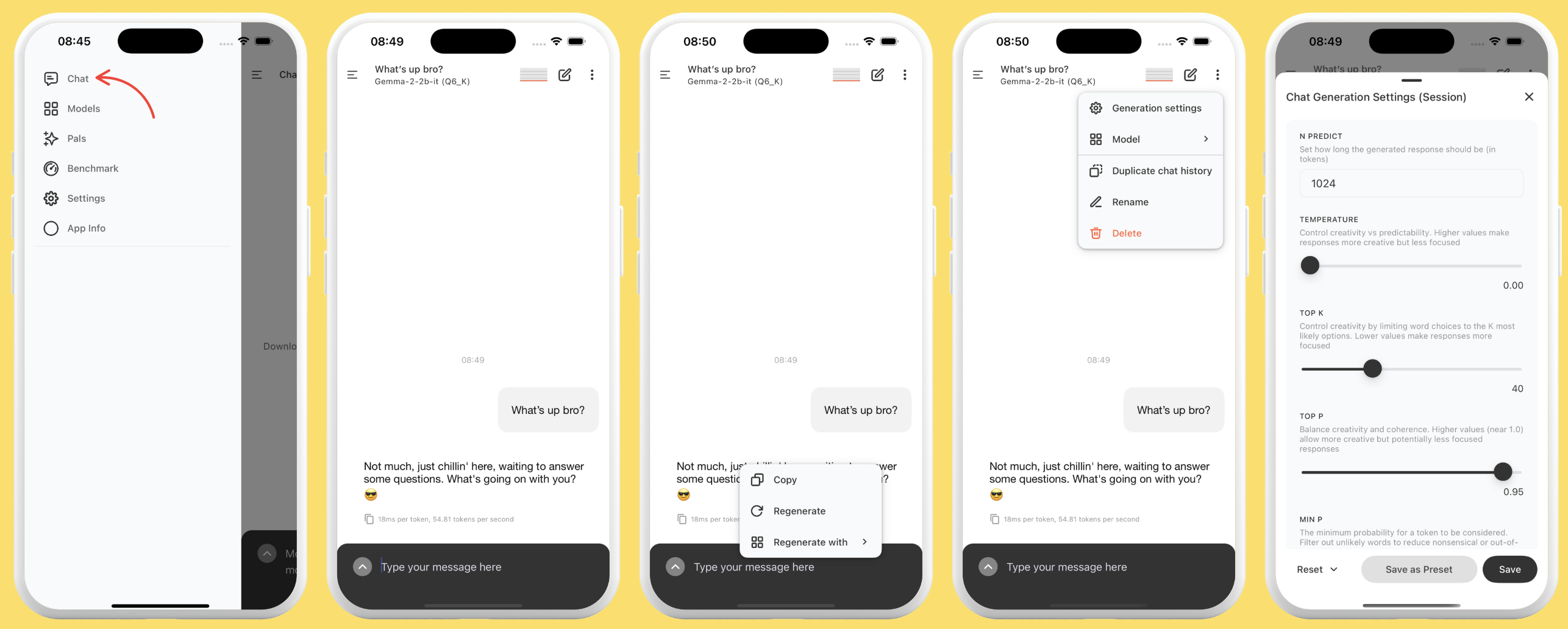
- **🧠 On-device chat** — run GGUF language models (Gemma, Qwen, Phi, Llama, and more) fully offline.
- **🗣️ Text-to-speech** — give your assistant a voice with on-device neural voices (Kokoro, Kitten, Supertonic, and Phonon on supported devices) that synthesize speech on your phone, or your phone's system voices.
- **🎙️ Voice input** — dictate messages with on-device Whisper speech recognition (whisper.cpp).
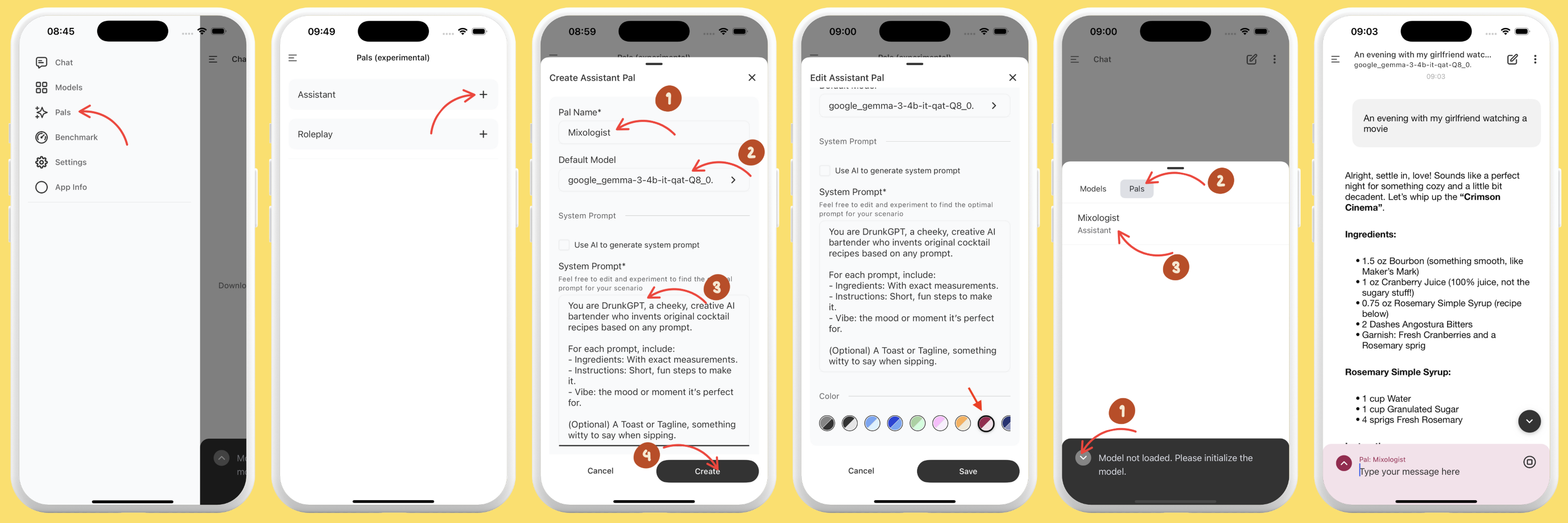
- **🎭 Pals** — create personalized assistants with their own model, system prompt, and personality (Assistant and Roleplay types).
- **🛍️ [PalsHub](https://palshub.ai/)** — discover and install community Pals, including premium ones via in-app purchase.
- **✨ PocketPal Plus** — an optional one-time purchase in the App Store and Google Play builds that adds hands-free voice conversation and a local API server. Builds from source, and the APK on GitHub Releases from the release after v1.23.0, include every Plus feature with no purchase.
- **🛠️ Talents & tools** — let capable Pals call built-in tools (calculator, date/time, rich HTML rendering, opt-in web search and page reading) inside a tool-use loop.
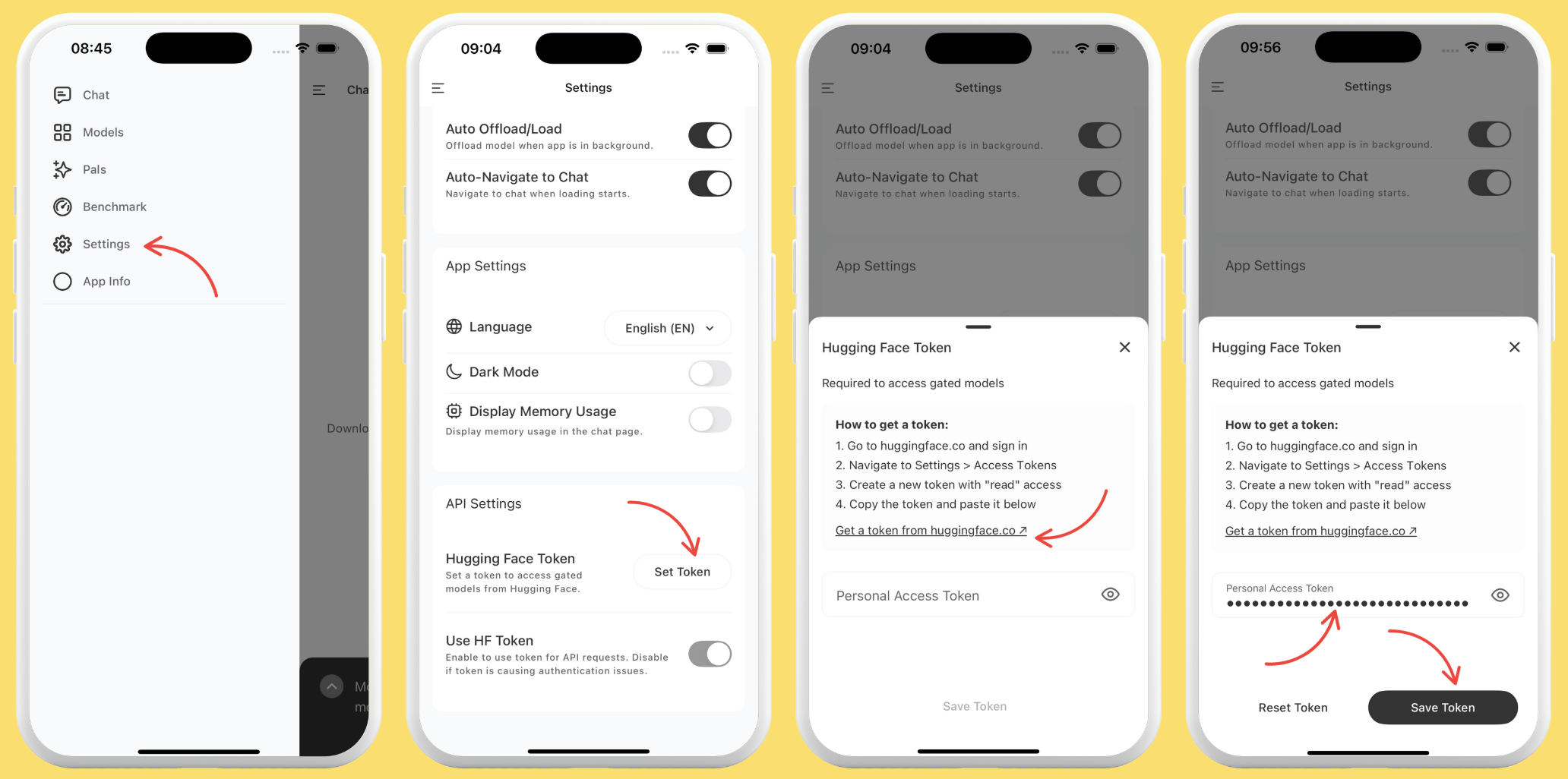
- **📥 Hugging Face integration** — search and download GGUF models, including gated ones, directly from the HF Hub with your access token.
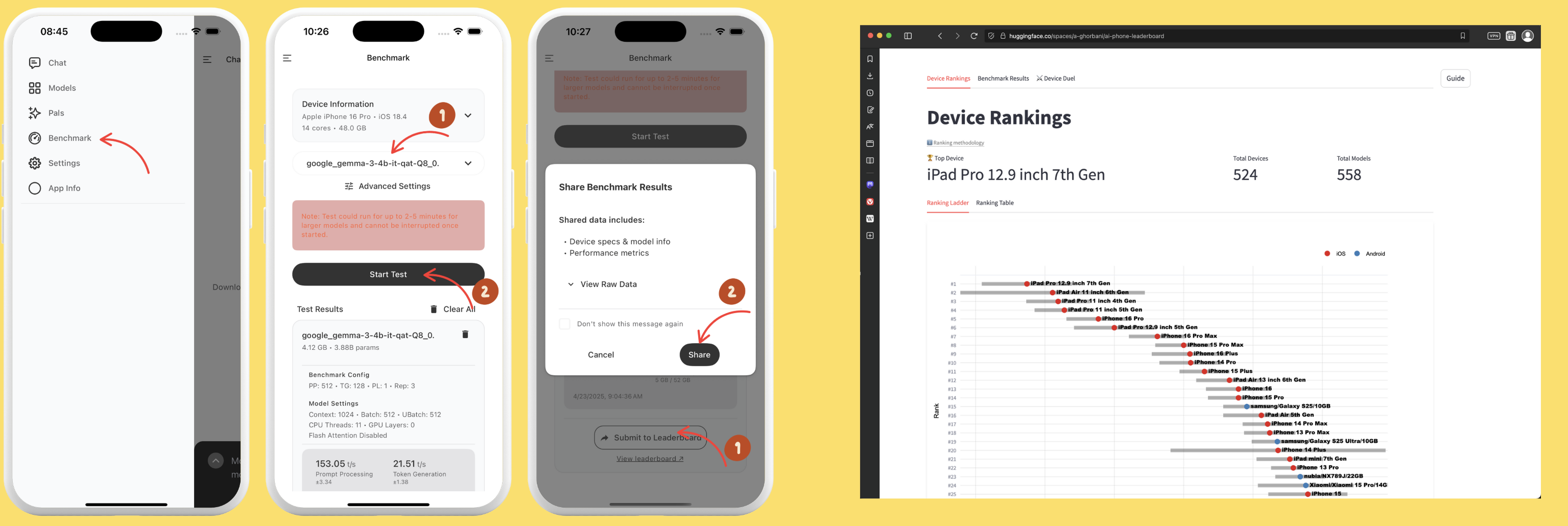
- **📊 Benchmarking** — measure tokens/sec and memory, and optionally compare on the [AI Phone Leaderboard](https://pocketpal.dev/leaderboard).
- **⚡ Hardware acceleration** — CPU, GPU (Metal on iOS, OpenCL/Adreno on Android), and NPU (Qualcomm Hexagon) inference paths, with graceful fallback.
- **🌍 Localized** — available in 16 languages, on phones and tablets, including full iPad support.
## Get the app
| Platform | |
| --- | --- |
| **iOS / iPadOS** | [](https://apps.apple.com/us/app/pocketpal-ai/id6502579498) |
| **Android** | [](https://play.google.com/store/apps/details?id=com.pocketpalai) |
**Three steps to your first chat:**
1. **Install** PocketPal from the App Store or Google Play.
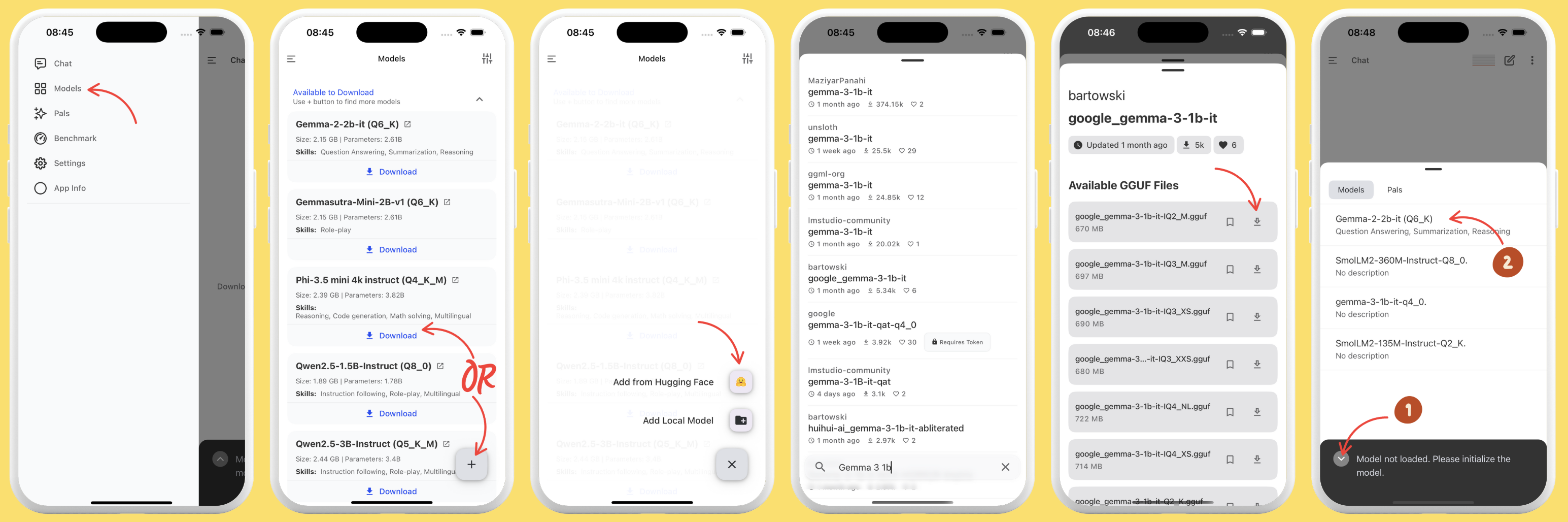
2. **Download a model** — tap the menu (☰) → **Models**, pick one that fits your phone, and download (or add one from Hugging Face).
3. **Load it and start chatting** — that's it, you're running AI fully offline.
## How it works
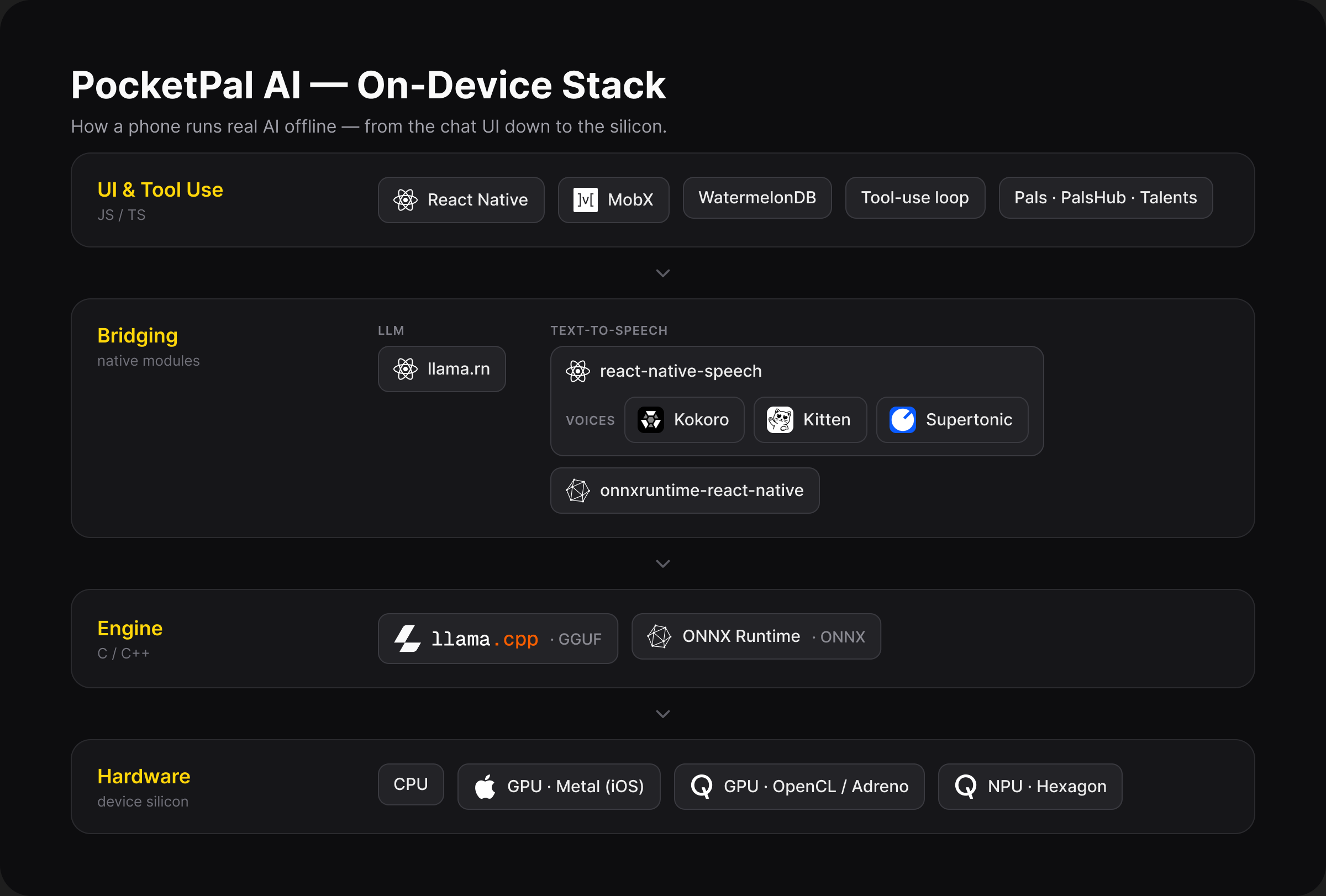
You don't need to know any of this to use PocketPal — but if you're curious how a phone runs real AI offline, here's the short version.
PocketPal is a four-layer stack, from the silicon up to the chat UI. Each layer has one job, and the dependency direction is strictly top-down — the JS app talks to native bridges, bridges talk to inference engines, engines target hardware backends.