PocketPal AI logo # PocketPal AI **A private AI assistant that runs entirely on your phone.** Chat with language models, give them a voice, and let them use tools — all on-device. No account, no cloud, no internet required. pocketpal.dev · Get the app · Leaderboard · PalsHub · Discussions
[![App Store](https://img.shields.io/badge/App_Store-Download-0D96F6?logo=apple&logoColor=white)](https://apps.apple.com/us/app/pocketpal-ai/id6502579498) [![Google Play](https://img.shields.io/badge/Google_Play-Get_it-414141?logo=googleplay&logoColor=white)](https://play.google.com/store/apps/details?id=com.pocketpalai) [![Latest release](https://img.shields.io/github/v/release/a-ghorbani/pocketpal-ai?sort=semver)](https://github.com/a-ghorbani/pocketpal-ai/releases) [![License: MIT](https://img.shields.io/github/license/a-ghorbani/pocketpal-ai)](LICENSE) [![Stars](https://img.shields.io/github/stars/a-ghorbani/pocketpal-ai)](https://github.com/a-ghorbani/pocketpal-ai/stargazers) [![Open issues](https://img.shields.io/github/issues/a-ghorbani/pocketpal-ai)](https://github.com/a-ghorbani/pocketpal-ai/issues) [![Sponsor](https://img.shields.io/github/sponsors/a-ghorbani?logo=githubsponsors)](https://github.com/sponsors/a-ghorbani)




--- ## Why PocketPal AI? Most AI apps are a thin window onto someone else's server — every message you type gets shipped off, logged, and analyzed somewhere you can't see. PocketPal flips that around: **the AI lives on your phone, and your conversations never leave it.** - **🔒 Private by default** — every prompt, response, and document stays on your device. Nothing is uploaded or stored on external servers. - **✈️ Works offline** — download a model once and it just works, with no connection and no account. On a plane, on a trail, anywhere. - **📱 Runs on hardware you already own** — real language models, voices, and tools, tuned to make the most of your phone's CPU, GPU, and NPU. - **🆓 Free and open source** — no subscription, no "pro" tier to unlock the AI. MIT-licensed and built in the open. > **Privacy note:** The only data that ever leaves your device is what you explicitly choose to share — benchmark results (if you opt into the leaderboard) and feedback you submit through the app. ## Contents - [Features](#features) - [Get the app](#get-the-app) - [How it works](#how-it-works) - [Using the app](#using-the-app) - [For developers](#for-developers) - [Contributing](#contributing) - [Roadmap](#roadmap) - [Community & support](#community--support) - [License](#license) ## Features - **🧠 On-device chat** — run GGUF language models (Gemma, Qwen, Phi, Llama, and more) fully offline. - **🗣️ Text-to-speech** — give your assistant a voice with on-device neural TTS (Kokoro and other engines), no cloud calls. - **🎭 Pals** — create personalized assistants with their own model, system prompt, and personality (Assistant and Roleplay types). - **🛍️ [PalsHub](https://palshub.ai/)** — discover and install community Pals, including premium ones via in-app checkout. - **🛠️ Talents & tools** — let capable Pals call built-in tools (calculator, date/time, rich HTML rendering) inside a tool-use loop. - **📥 Hugging Face integration** — search and download GGUF models, including gated ones, directly from the HF Hub with your access token. - **📊 Benchmarking** — measure tokens/sec and memory, and optionally compare on the [AI Phone Leaderboard](https://pocketpal.dev/leaderboard). - **⚡ Hardware acceleration** — CPU, GPU (Metal on iOS, OpenCL/Adreno on Android), and NPU (Qualcomm Hexagon) inference paths, with graceful fallback. - **🌍 Localized** — available in 11 languages, on phones and tablets, including full iPad support. ## Get the app | Platform | | | --- | --- | | **iOS / iPadOS** | [![Download on the App Store](https://img.shields.io/badge/App_Store-Download-0D96F6?logo=apple&logoColor=white)](https://apps.apple.com/us/app/pocketpal-ai/id6502579498) | | **Android** | [![Get it on Google Play](https://img.shields.io/badge/Google_Play-Get_it-414141?logo=googleplay&logoColor=white)](https://play.google.com/store/apps/details?id=com.pocketpalai) | **Three steps to your first chat:** 1. **Install** PocketPal from the App Store or Google Play. 2. **Download a model** — tap the menu (☰) → **Models**, pick one that fits your phone, and download (or add one from Hugging Face). 3. **Load it and start chatting** — that's it, you're running AI fully offline. ## How it works You don't need to know any of this to use PocketPal — but if you're curious how a phone runs real AI offline, here's the short version. PocketPal is a four-layer stack, from the silicon up to the chat UI. Each layer has one job, and the dependency direction is strictly top-down — the JS app talks to native bridges, bridges talk to inference engines, engines target hardware backends.


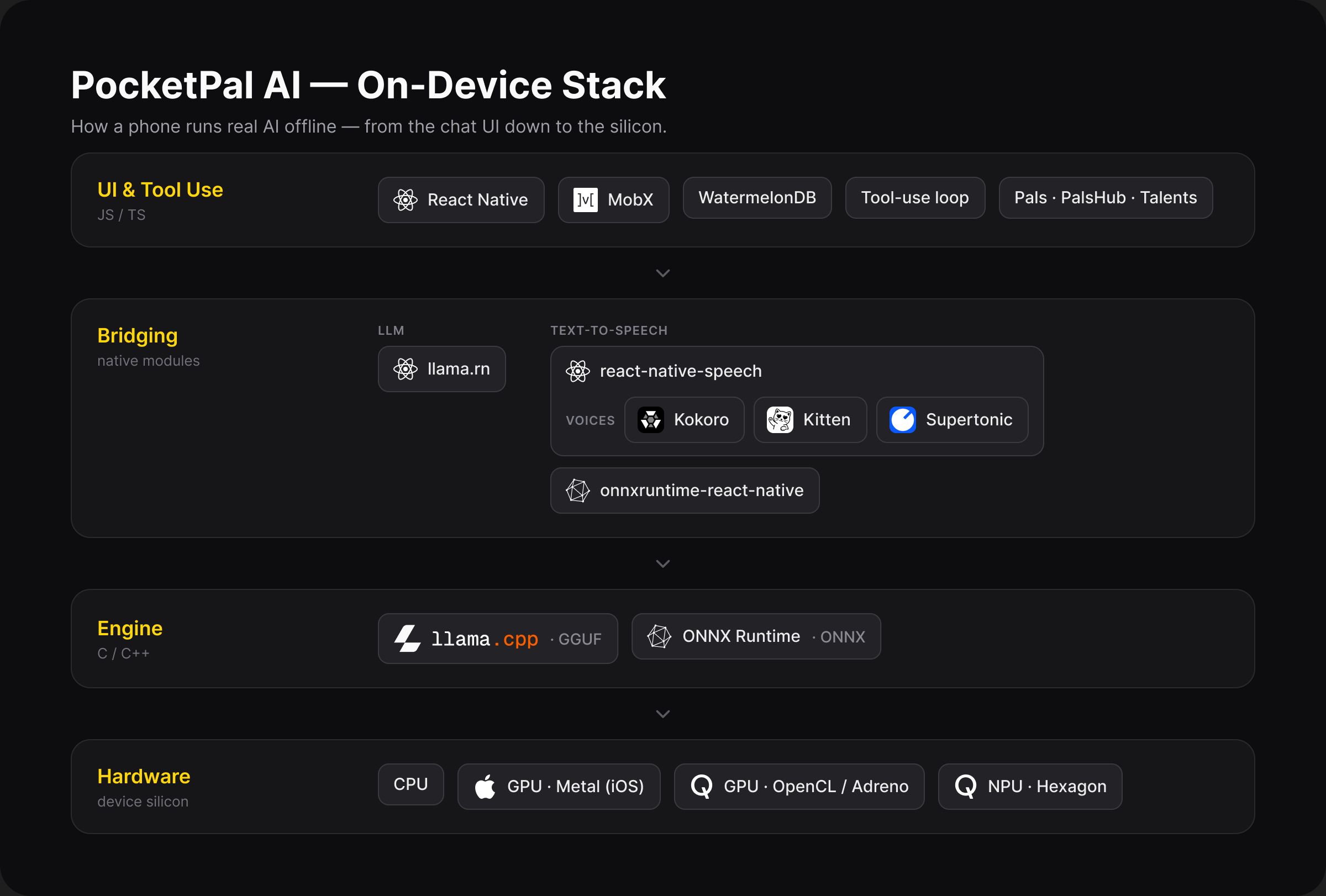
PocketPal AI on-device stack — UI & Tool Use → Bridging → Engine → Hardware
| Layer | What runs here | | --- | --- | | **UI & Tool Use** | The React Native app (UI via React Native Paper, state via MobX, chat history in WatermelonDB). The **`AgentRunner`** drives each chat turn — streaming tokens, dispatching **Talents** (tools) when the model calls them, and feeding results back for follow-up reasoning. **Pals** are configurable personas; **PalsHub** is the in-app marketplace for sharing and buying them. | | **Bridging** | Native modules that connect JavaScript to the engines. [`llama.rn`](https://github.com/mybigday/llama.rn) bridges LLM inference over JSI; [`react-native-speech`](https://github.com/a-ghorbani/react-native-speech) and `onnxruntime-react-native` bridge text-to-speech. | | **Engine** | The inference engines. **llama.cpp** runs language models in the quantized **GGUF** format. **ONNX Runtime** runs TTS voice models in the **ONNX** format. | | **Hardware** | Where the math actually happens. PocketPal targets **CPU** (universal fallback), **GPU** (Metal on iOS, OpenCL on Qualcomm Adreno for Android), and **NPU** (Qualcomm Hexagon) — falling back gracefully and offloading partial layers when a full backend isn't available. | ## Using the app
📥 Download & load a model
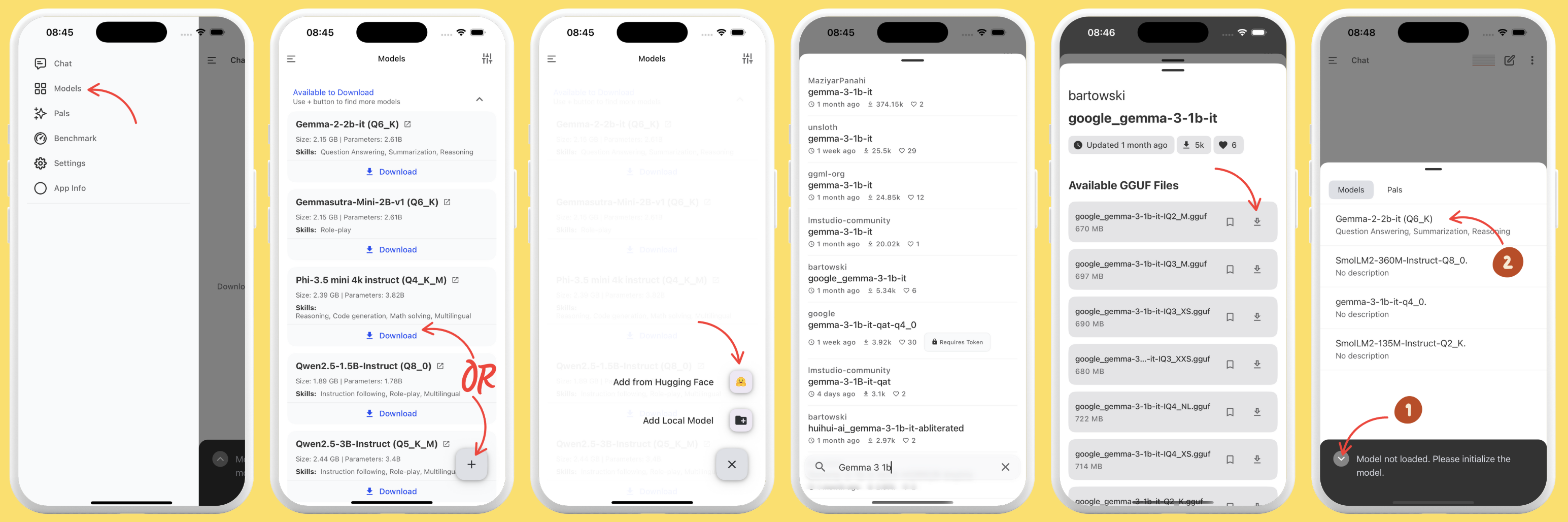
1. Open the app and tap the **Menu** (☰), then go to **Models**. 2. Pick a model from the list and tap **Download**, or tap **+** to add one from Hugging Face or local storage. 3. From Hugging Face, search GGUF models and choose a quantization that fits your device's memory and storage — download now or bookmark for later. 4. After downloading, tap **Load** (or use the chevron icon left of the chat input to load right from the chat screen). Download Models
💬 Chat
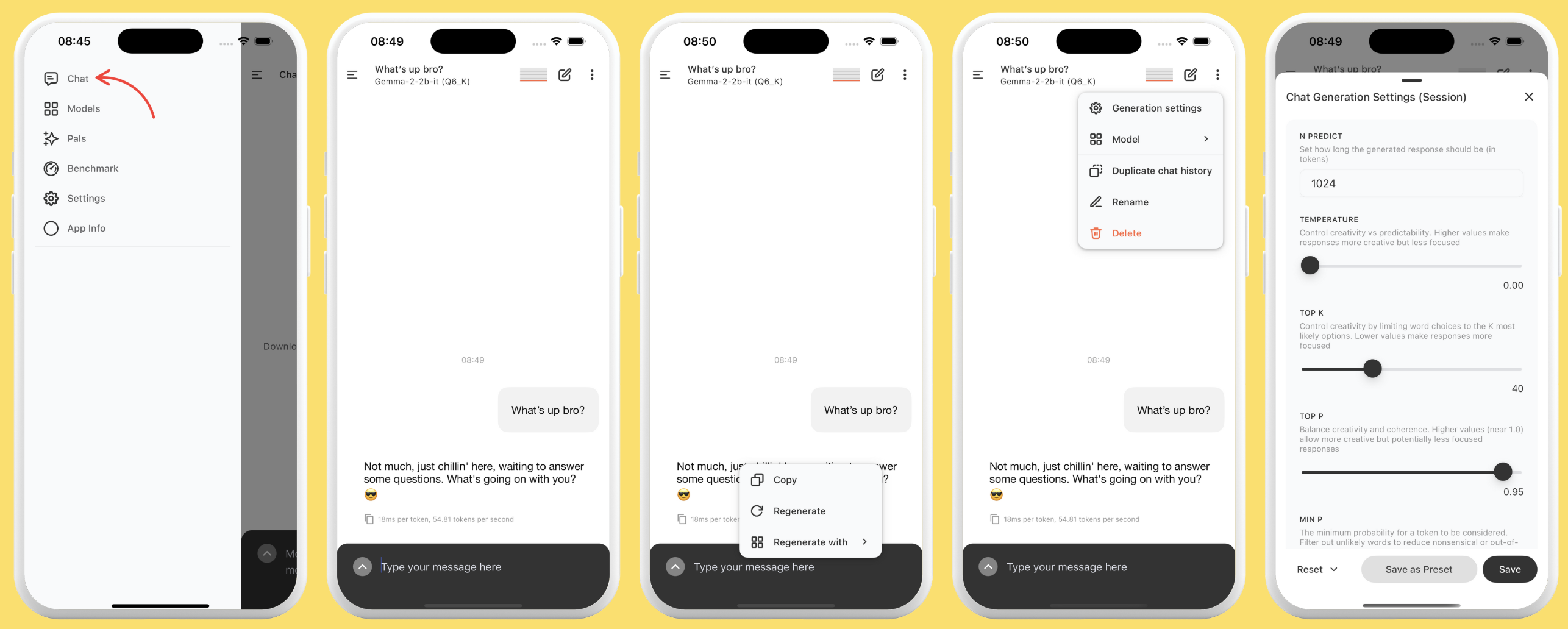
1. Make sure a model is loaded. 2. Open the **Chat** page and start talking. 3. The screen stays awake during inference and deactivates when idle. 4. **Copy** a full response with the copy icon, or long-press a paragraph to copy just that. 5. **Edit** any of your messages with a long-press — the AI regenerates from your change. Hit **retry** for a fresh answer, optionally with a different model. Chat
🎭 Pals & PalsHub
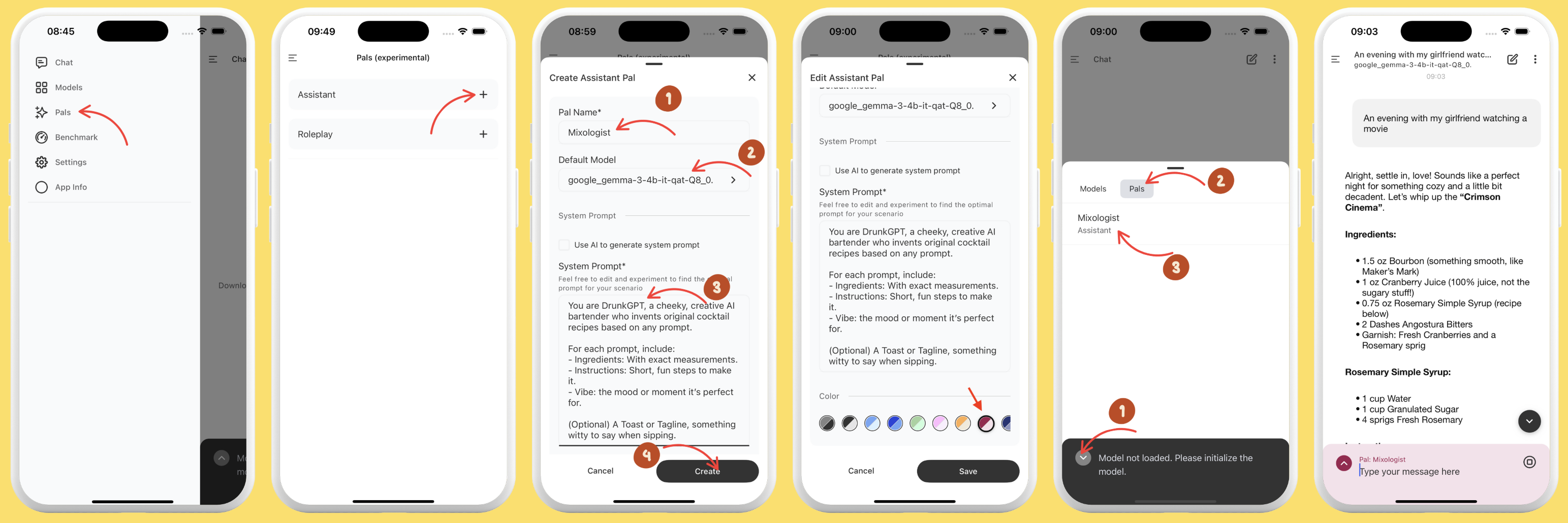
Create personalized assistants: - **Assistant Pal** — pick a default model, set a system prompt (write it yourself or have the app generate one), and customize the chat input color. - **Roleplay Pal** — everything above, plus location, the AI's role, and other contextual parameters. Switch personas with the Pal picker on the chat page. Browse **[PalsHub](https://palshub.ai/)** in-app to discover community Pals, including premium ones via in-app checkout (US iOS & Android). Assistant Pal

Creating a cocktail-recipe assistant

📊 Benchmark your device
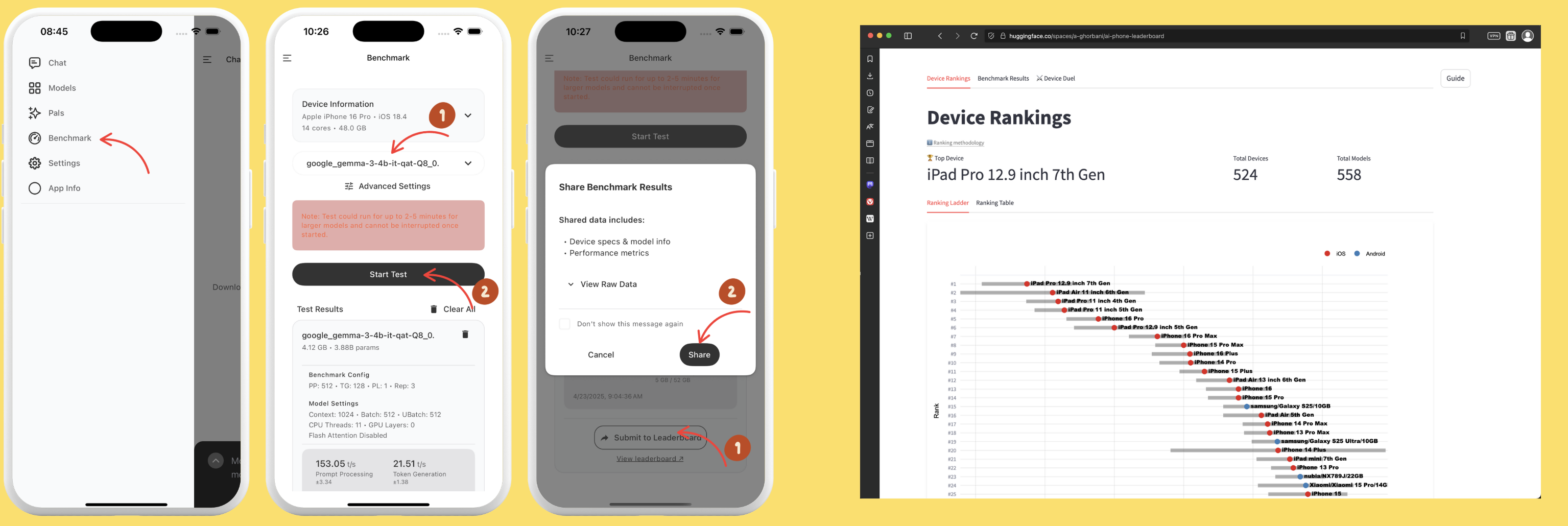
1. Open the **Benchmark** page. 2. Run performance tests to compare speed and efficiency across models. 3. Review tokens/sec and memory usage. 4. Optionally share your results to the [AI Phone Leaderboard](https://pocketpal.dev/leaderboard). Benchmark
🔑 Set up a Hugging Face token (for gated models)
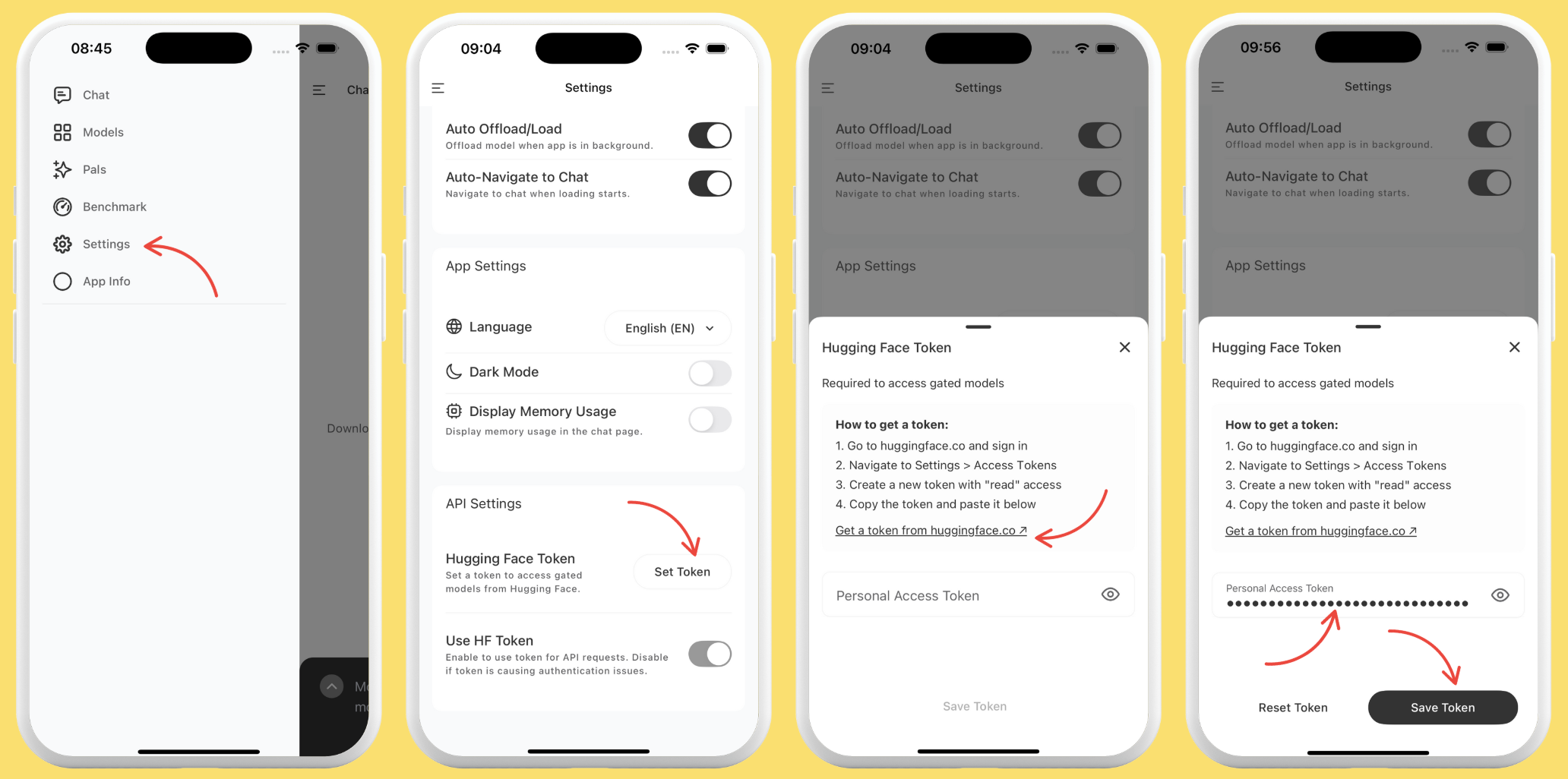
1. Create an access token in your Hugging Face account ([docs](https://huggingface.co/docs/hub/en/security-tokens)). 2. In PocketPal, go to **Settings → Set Token**, paste it, and save. Token setup
💌 Send feedback
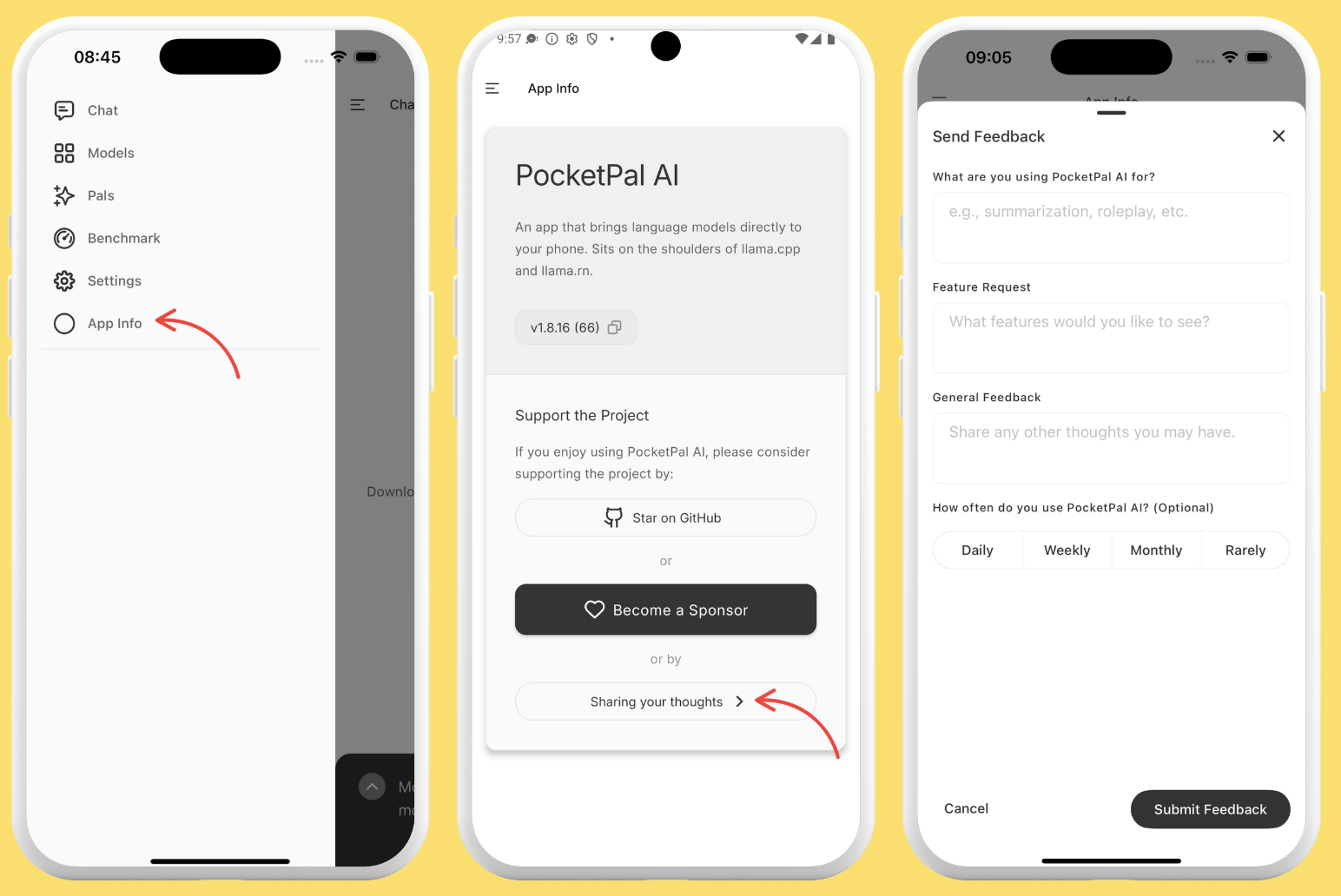
Go to **App Info → "Sharing your thoughts"**, type your feedback — feature requests, suggestions, anything — and submit. Send feedback
## For developers PocketPal is a standard React Native app. If you can build a React Native project, you can build PocketPal. ### Prerequisites - **Node.js** — version is pinned in [`.nvmrc`](.nvmrc) (currently `22.21.0`); run `nvm use` to match it. Older Node will fail the `engines` check. - **Yarn 1 (Classic)** — `packageManager` is pinned to `yarn@1.22.22`. - **Xcode** + **CocoaPods**, and **Ruby + Bundler** (for iOS / Fastlane tooling). - **Android Studio** + Android SDK/NDK. See the [React Native environment setup](https://reactnative.dev/docs/set-up-your-environment) for platform details. ### Clone, install & run ```bash git clone https://github.com/a-ghorbani/pocketpal-ai cd pocketpal-ai nvm use # match the pinned Node version yarn install # install JS dependencies (cd ios && pod install) # iOS only yarn start # Metro bundler yarn ios # build + run on iOS simulator yarn android # build + run on Android emulator ``` Core on-device chat works without any backend keys; only PalsHub/auth features need additional configuration. > **Native-change rule:** if you change `package.json`, a native module, `ios/`, `android/`, the Podfile, or `build.gradle`, re-run `pod install` and rebuild both platforms — a JS reload won't pick up native changes. ### Quality gates ```bash yarn lint # ESLint yarn typecheck # tsc --noEmit yarn test # Jest yarn l10n:validate # validate locale JSON (placeholders, integrity) ``` Run `yarn lint && yarn typecheck && yarn test` before opening a PR. Commits are validated by Commitlint ([Conventional Commits](https://www.conventionalcommits.org/)) via a Husky hook.
Repository layout
``` src/ ├── screens/ # Chat, Models, Pals, Benchmark, Settings, About, … ├── components/ # Reusable UI ├── store/ # MobX stores (Model, ChatSession, Pal, TTS, HF, Benchmark, …) ├── services/ │ ├── agent/ # AgentRunner — the chat / tool loop │ ├── talents/ # Tool engines + registries │ ├── tts/ # TTS engines (kokoro, kitten, supertonic, system) │ ├── palshub/ # PalsHub marketplace integration │ └── downloads/ # Model download manager ├── database/ # WatermelonDB schema, models, migrations ├── repositories/ # Data-access layer over the DB ├── locales/ # i18n JSON + lazy loader (index.ts is the registry) └── hooks/ api/ theme/ utils/ config/ specs/ ```
Tech stack
Versions are pinned in [`package.json`](package.json); the highlights: | Area | Choice | | --- | --- | | Framework | React Native `0.82.1`, React `19.1.1` (New Architecture) | | Language | TypeScript `5.0.4` | | UI | React Native Paper `5.14.5`, React Navigation | | State | MobX `6` (`mobx`, `mobx-react`, `mobx-persist-store`) | | Persistence | WatermelonDB (chat history), AsyncStorage (settings), Keychain (secrets) | | LLM | `llama.rn` `0.12.4` → llama.cpp · GGUF | | TTS | `react-native-speech` `2.3.1` + `onnxruntime-react-native` `1.23.2` · ONNX | | Tooling | Yarn 1 (Classic), ESLint, Prettier, Jest, Husky + Commitlint |
Extending PocketPal
A **Talent** is a tool the model can call mid-conversation. Engines are registered in a `TalentRegistry`, exposed to the model as tool schemas; the `AgentRunner` detects a call, runs the engine, and returns the result for the next turn. | Talent | Engine | Does | | --- | --- | --- | | `calculate` | `CalculateEngine` | Arithmetic / expression evaluation | | `datetime` | `DatetimeEngine` | Current date / time | | `render_html` | `RenderHtmlEngine` | Renders model-produced HTML in chat | Good first contributions: - A new **Talent** — implement a `TalentEngine` and register it in `src/services/talents/`. - A new **TTS engine** — add it under `src/services/tts/engines/`. - A new **locale** — add a JSON file in `src/locales/` (or translate on [Weblate](https://hosted.weblate.org/projects/pocketpal-ai/)).
## Contributing Contributions are welcome — bug reports, fixes, features, translations, and docs all help. 1. Fork and branch: `git checkout -b feature/your-feature-name` 2. Make your changes; run on a device/emulator (`yarn ios` / `yarn android`). Re-run `pod install` + rebuild if you touched native code. 3. Gate locally: `yarn lint && yarn typecheck && yarn test` 4. Commit with [Conventional Commits](https://www.conventionalcommits.org/): `git commit -m "feat: add new talent"` 5. Push and open a pull request. Please read the [Contributing Guidelines](CONTRIBUTING.md) and [Code of Conduct](CODE_OF_CONDUCT.md) first. Want to translate PocketPal into your language? Join us on [Weblate](https://hosted.weblate.org/projects/pocketpal-ai/). ## Roadmap - **Tool use expansion** — grow the Talents catalog and deepen the agentic loop so Pals can do more, fully on-device. Have an idea or found a bug? [Open an issue](https://github.com/a-ghorbani/pocketpal-ai/issues/new/choose) or start a [discussion](https://github.com/a-ghorbani/pocketpal-ai/discussions). ## Community & support - 💬 **Questions & ideas** — [GitHub Discussions](https://github.com/a-ghorbani/pocketpal-ai/discussions) - 🐛 **Bugs & requests** — [GitHub Issues](https://github.com/a-ghorbani/pocketpal-ai/issues/new/choose) - 🌐 **Website** — [pocketpal.dev](https://pocketpal.dev/) - ❤️ **Support development** — PocketPal is free and ad-free; [sponsoring](https://github.com/sponsors/a-ghorbani) helps keep it that way. ## License Licensed under the [MIT License](LICENSE). ## Acknowledgements PocketPal AI stands on the shoulders of the open-source community, including: - **[llama.cpp](https://github.com/ggerganov/llama.cpp)** — efficient on-device LLM inference. - **[llama.rn](https://github.com/mybigday/llama.rn)** — llama.cpp bindings for React Native. - **[react-native-speech](https://github.com/a-ghorbani/react-native-speech)** — React Native TTS bridge powering on-device voices. - **[ONNX Runtime](https://onnxruntime.ai/)** — cross-platform inference engine powering on-device TTS. - **[React Native](https://reactnative.dev/)**, **[MobX](https://mobx.js.org/)**, **[React Native Paper](https://callstack.github.io/react-native-paper/)**, **[React Navigation](https://reactnavigation.org/)**, **[WatermelonDB](https://github.com/Nozbe/WatermelonDB)**, and many other open-source libraries that make this project possible.

Made with ❤️ for people who want AI that stays on their phone.
If PocketPal is useful to you, consider giving it a ⭐ — it helps others find the project.