# ️🎞️ Subs AI 🎞️
Subtitles generation tool (Web-UI + CLI + Python package) powered by OpenAI's Whisper and its variants
* [Subs AI](#subs-ai)
* [Features](#features)
* [Installation](#installation)
* [Usage](#usage)
* [Web-UI](#web-ui)
* [CLI](#cli)
* [From Python](#from-python)
* [Examples](#examples)
* [Docker](#docker)
* [Notes](#notes)
* [Contributing](#contributing)
* [License](#license)
# Features
* Supported Models
* [x] [openai/whisper](https://github.com/openai/whisper)
* > Whisper is a general-purpose speech recognition model. It is trained on a large dataset of diverse audio and is also a multi-task model that can perform multilingual speech recognition as well as speech translation and language identification.
* [x] [linto-ai/whisper-timestamped](https://github.com/linto-ai/whisper-timestamped)
* > Multilingual Automatic Speech Recognition with word-level timestamps and confidence
* [x] [ggerganov/whisper.cpp](https://github.com/ggerganov/whisper.cpp) (using [ absadiki/pywhispercpp](https://github.com/absadiki/pywhispercpp))
* > High-performance inference of OpenAI's Whisper automatic speech recognition (ASR) model
> * Plain C/C++ implementation without dependencies
> * Runs on the CPU
* [x] [guillaumekln/faster-whisper](https://github.com/guillaumekln/faster-whisper)
* > faster-whisper is a reimplementation of OpenAI's Whisper model using [CTranslate2](https://github.com/OpenNMT/CTranslate2/), which is a fast inference engine for Transformer models.
>
> This implementation is up to 4 times faster than [openai/whisper](https://github.com/openai/whisper) for the same accuracy while using less memory. The efficiency can be further improved with 8-bit quantization on both CPU and GPU.
* [x] [m-bain/whisperX](https://github.com/m-bain/whisperX)
* >fast automatic speech recognition (70x realtime with large-v2) with word-level timestamps and speaker diarization.
> - ⚡️ Batched inference for 70x realtime transcription using whisper large-v2
> - 🪶 [faster-whisper](https://github.com/guillaumekln/faster-whisper) backend, requires <8GB gpu memory for large-v2 with beam_size=5
> - 🎯 Accurate word-level timestamps using wav2vec2 alignment
> - 👯♂️ Multispeaker ASR using speaker diarization from [pyannote-audio](https://github.com/pyannote/pyannote-audio) (speaker ID labels)
> - 🗣️ VAD preprocessing, reduces hallucination & batching with no WER degradation.
* [x] [jianfch/stable-ts](https://github.com/jianfch/stable-ts)
* >**Stabilizing Timestamps for Whisper**: This library modifies [Whisper](https://github.com/openai/whisper) to produce more reliable timestamps and extends its functionality.
* [x] [Hugging Face Transformers](https://huggingface.co/tasks/automatic-speech-recognition)
* > Hugging Face implementation of Whisper. Any speech recognition pretrained model from the Hugging Face hub can be used as well.
* [x] [API/openai/whisper](https://platform.openai.com/docs/guides/speech-to-text)
* > OpenAI Whisper via their API. Or any other openai-like API for whisper (e.g. [speaches.ai](https://github.com/speaches-ai/speaches))
* Web UI
* Fully offline, no third party services
* Works on Linux, Mac and Windows
* Lightweight and easy to use
* Supports subtitle modification
* Integrated tools:
* Translation using [xhluca/dl-translate](https://github.com/xhluca/dl-translate):
* Supported models:
* [x] [facebook/nllb-200-distilled-600M](https://huggingface.co/facebook/nllb-200-distilled-600M)
* [x] [facebook/m2m100_418M](https://huggingface.co/facebook/m2m100_418M)
* [x] [facebook/m2m100_1.2B](https://huggingface.co/facebook/m2m100_1.2B)
* [x] [facebook/mbart-large-50-many-to-many-mmt](https://huggingface.co/facebook/mbart-large-50-many-to-many-mmt)
* Auto-sync using [smacke/ffsubsync](https://github.com/smacke/ffsubsync)
* Merge subtitles into the video
* Command Line Interface
* For simple or batch processing
* Python package
* In case you want to develop your own scripts
* Supports different subtitle formats thanks to [tkarabela/pysubs2](https://github.com/tkarabela/pysubs2/)
* [x] SubRip
* [x] WebVTT
* [x] substation alpha
* [x] MicroDVD
* [x] MPL2
* [x] TMP
* Supports audio and video files
# Installation
* Install [ffmpeg](https://ffmpeg.org/)
_Quoted from the official openai/whisper installation_
> It requires the command-line tool [`ffmpeg`](https://ffmpeg.org/) to be installed on your system, which is available from most package managers:
> ```bash
> # on Ubuntu or Debian
> sudo apt update && sudo apt install ffmpeg
>
> # on Arch Linux
>sudo pacman -S ffmpeg
>
> # on MacOS using Homebrew (https://brew.sh/)
> brew install ffmpeg
>
> # on Windows using Chocolatey (https://chocolatey.org/)
> choco install ffmpeg
>
> # on Windows using Scoop (https://scoop.sh/)
> scoop install ffmpeg
>```
>You may need [`rust`](http://rust-lang.org) installed as well, in case [tokenizers](https://pypi.org/project/tokenizers/) does not provide a pre-built wheel for your platform. If you see installation errors during the `pip install` command above, please follow the [Getting started page](https://www.rust-lang.org/learn/get-started) to install Rust development environment. Additionally, you may need to configure the `PATH` environment variable, e.g. `export PATH="$HOME/.cargo/bin:$PATH"`. If the installation fails with `No module named 'setuptools_rust'`, you need to install `setuptools_rust`, e.g. by running:
>```bash
>pip install setuptools-rust
>```
* Once ffmpeg is installed, install `subsai`
```shell
pip install git+https://github.com/absadiki/subsai
```
> [!NOTE]
> * It is recommended to use Python 3.10 or 3.11. Versions 3.12 or later may have compatibility issues.
> * If torch is unable to detect your GPU devices during your usage of subsai, assuming you have a supported GPU device, there is a chance that `pip` installed the CPU version of torch. You can install a torch version with CUDA support by following the [get started locally guide](https://pytorch.org/get-started/locally/) on pytorch.
> For more information, see https://github.com/absadiki/subsai/issues/162.
# Usage
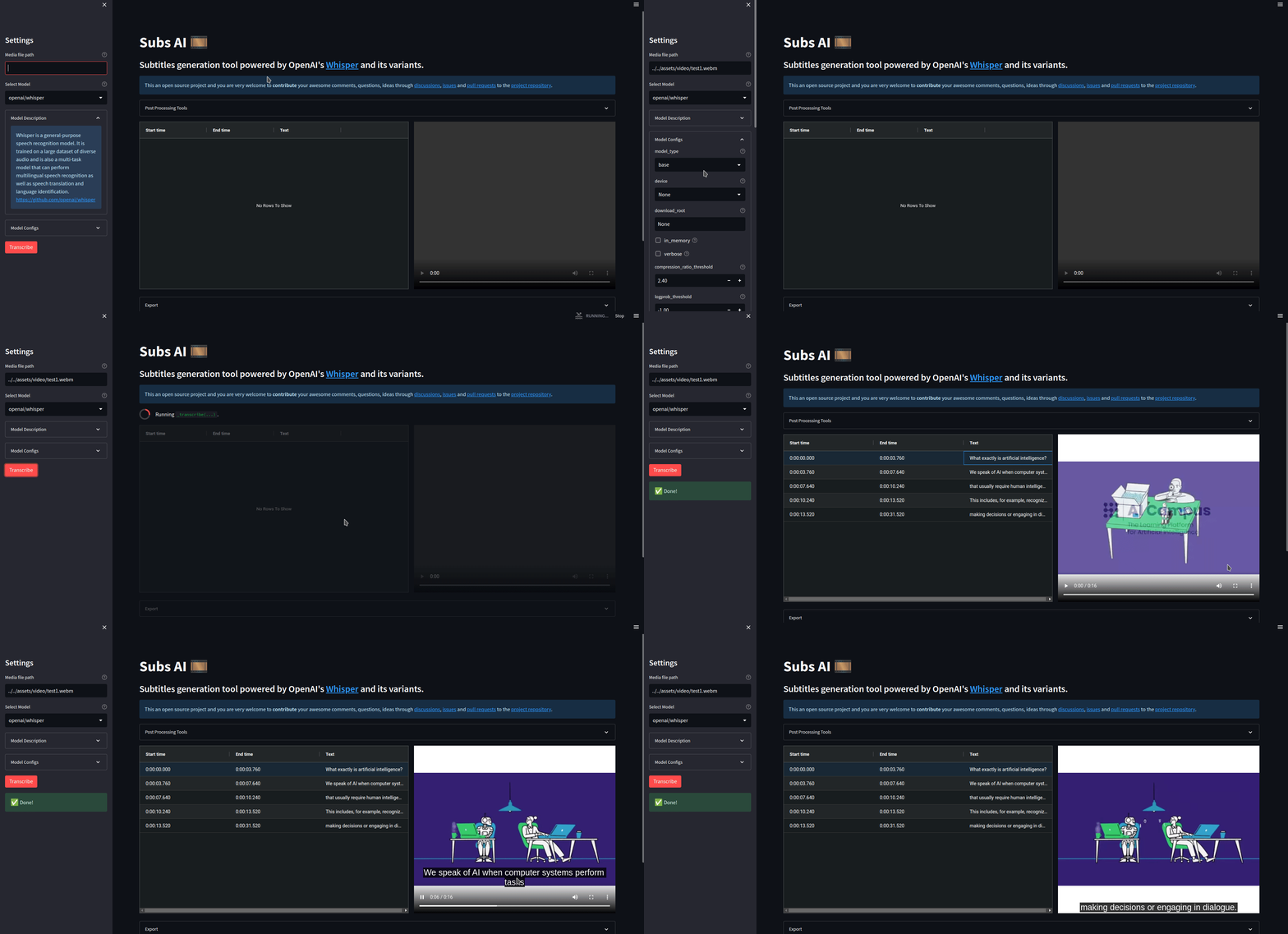
### Web-UI
To use the web-UI, run the following command on the terminal
```shell
subsai-webui
```
And a web page will open on your default browser, otherwise navigate to the links provided by the command
You can also run the Web-UI using [Docker](#docker).
### CLI
```shell
usage: subsai [-h] [--version] [-m MODEL] [-mc MODEL_CONFIGS] [-f FORMAT] [-df DESTINATION_FOLDER] [-tm TRANSLATION_MODEL]
[-tc TRANSLATION_CONFIGS] [-tsl TRANSLATION_SOURCE_LANG] [-ttl TRANSLATION_TARGET_LANG]
media_file [media_file ...]
positional arguments:
media_file The path of the media file, a list of files, or a text file containing paths for batch processing.
options:
-h, --help show this help message and exit
--version show program's version number and exit
-m MODEL, --model MODEL
The transcription AI models. Available models: ['openai/whisper', 'linto-ai/whisper-timestamped']
-mc MODEL_CONFIGS, --model-configs MODEL_CONFIGS
JSON configuration (path to a json file or a direct string)
-f FORMAT, --format FORMAT, --subtitles-format FORMAT
Output subtitles format, available formats ['.srt', '.ass', '.ssa', '.sub', '.json', '.txt', '.vtt']
-df DESTINATION_FOLDER, --destination-folder DESTINATION_FOLDER
The directory where the subtitles will be stored, default to the same folder where the media file(s) is stored.
-tm TRANSLATION_MODEL, --translation-model TRANSLATION_MODEL
Translate subtitles using AI models, available models: ['facebook/m2m100_418M', 'facebook/m2m100_1.2B',
'facebook/mbart-large-50-many-to-many-mmt']
-tc TRANSLATION_CONFIGS, --translation-configs TRANSLATION_CONFIGS
JSON configuration (path to a json file or a direct string)
-tsl TRANSLATION_SOURCE_LANG, --translation-source-lang TRANSLATION_SOURCE_LANG
Source language of the subtitles
-ttl TRANSLATION_TARGET_LANG, --translation-target-lang TRANSLATION_TARGET_LANG
Target language of the subtitles
```
Example of a simple usage
```shell
subsai ./assets/test1.mp4 --model openai/whisper --model-configs '{"model_type": "small"}' --format srt
```
> Note: **For Windows CMD**, You will need to use the following :
> `subsai ./assets/test1.mp4 --model openai/whisper --model-configs "{\"model_type\": \"small\"}" --format srt`
You can also provide a simple text file for batch processing
_(Every line should contain the absolute path to a single media file)_
```shell
subsai media.txt --model openai/whisper --format srt
```
### From Python
To install:
1. `git clone https://github.com/absadiki/subsai`
2. `cd subsai`
3. `uv pip install -e .`
*Note: For minimal installs or if having issues installing dependencies, you can comment the dependencies for backends you won't use in the file `requirements.txt`.*
```python
from subsai import SubsAI
file = './assets/test1.mp4'
subs_ai = SubsAI()
model = subs_ai.create_model('openai/whisper', {'model_type': 'base'})
subs = subs_ai.transcribe(file, model)
subs.save('test1.srt')
```
For more advanced usage, read [the documentation](https://absadiki.github.io/subsai/).
### Examples
Simple examples can be found in the [examples](https://github.com/absadiki/subsai/tree/main/examples) folder
* [VAD example](https://github.com/absadiki/subsai/blob/main/examples/subsai_vad.ipynb): process long audio files using [silero-vad](https://github.com/snakers4/silero-vad).
 * [Translation example](https://github.com/absadiki/subsai/blob/main/examples/subsai_translation.ipynb): translate an already existing subtitles file.
# Docker
* Make sure that you have `docker` installed.
* Prebuilt image
1. ```docker pull absadiki/subsai:main```
2. ```docker run --gpus=all -p 8501:8501 -v /path/to/your/media_files/folder:/media_files absadiki/subsai:main```
* Build the image locally
1. Clone and `cd` to the repository
2. ```docker compose build```
3. ```docker compose run -p 8501:8501 -v /path/to/your/media_files/folder:/media_files subsai-webui # subsai-webui-cpu for cpu only```
* You can access your media files through the mounted `media_files` folder.
# Notes
* If you have an NVIDIA graphics card, you may need to install [cuda](https://docs.nvidia.com/cuda/#installation-guides) to use the GPU capabilities.
* AMD GPUs compatible with Pytorch should be working as well. [#67](https://github.com/absadiki/subsai/issues/67)
* Transcription time is shown on the terminal, keep an eye on it while running the web UI.
* If you didn't like Dark mode web UI, you can switch to Light mode from `settings > Theme > Light`.
# Contributing
If you find a bug, have a suggestion or feedback, please open an issue for discussion.
# License
This project is licensed under the GNU General Licence version 3 or later. You can modify or redistribute it under the conditions
of these licences (See [LICENSE](./LICENSE) for more information).
* [Translation example](https://github.com/absadiki/subsai/blob/main/examples/subsai_translation.ipynb): translate an already existing subtitles file.
# Docker
* Make sure that you have `docker` installed.
* Prebuilt image
1. ```docker pull absadiki/subsai:main```
2. ```docker run --gpus=all -p 8501:8501 -v /path/to/your/media_files/folder:/media_files absadiki/subsai:main```
* Build the image locally
1. Clone and `cd` to the repository
2. ```docker compose build```
3. ```docker compose run -p 8501:8501 -v /path/to/your/media_files/folder:/media_files subsai-webui # subsai-webui-cpu for cpu only```
* You can access your media files through the mounted `media_files` folder.
# Notes
* If you have an NVIDIA graphics card, you may need to install [cuda](https://docs.nvidia.com/cuda/#installation-guides) to use the GPU capabilities.
* AMD GPUs compatible with Pytorch should be working as well. [#67](https://github.com/absadiki/subsai/issues/67)
* Transcription time is shown on the terminal, keep an eye on it while running the web UI.
* If you didn't like Dark mode web UI, you can switch to Light mode from `settings > Theme > Light`.
# Contributing
If you find a bug, have a suggestion or feedback, please open an issue for discussion.
# License
This project is licensed under the GNU General Licence version 3 or later. You can modify or redistribute it under the conditions
of these licences (See [LICENSE](./LICENSE) for more information).