# Tinycast
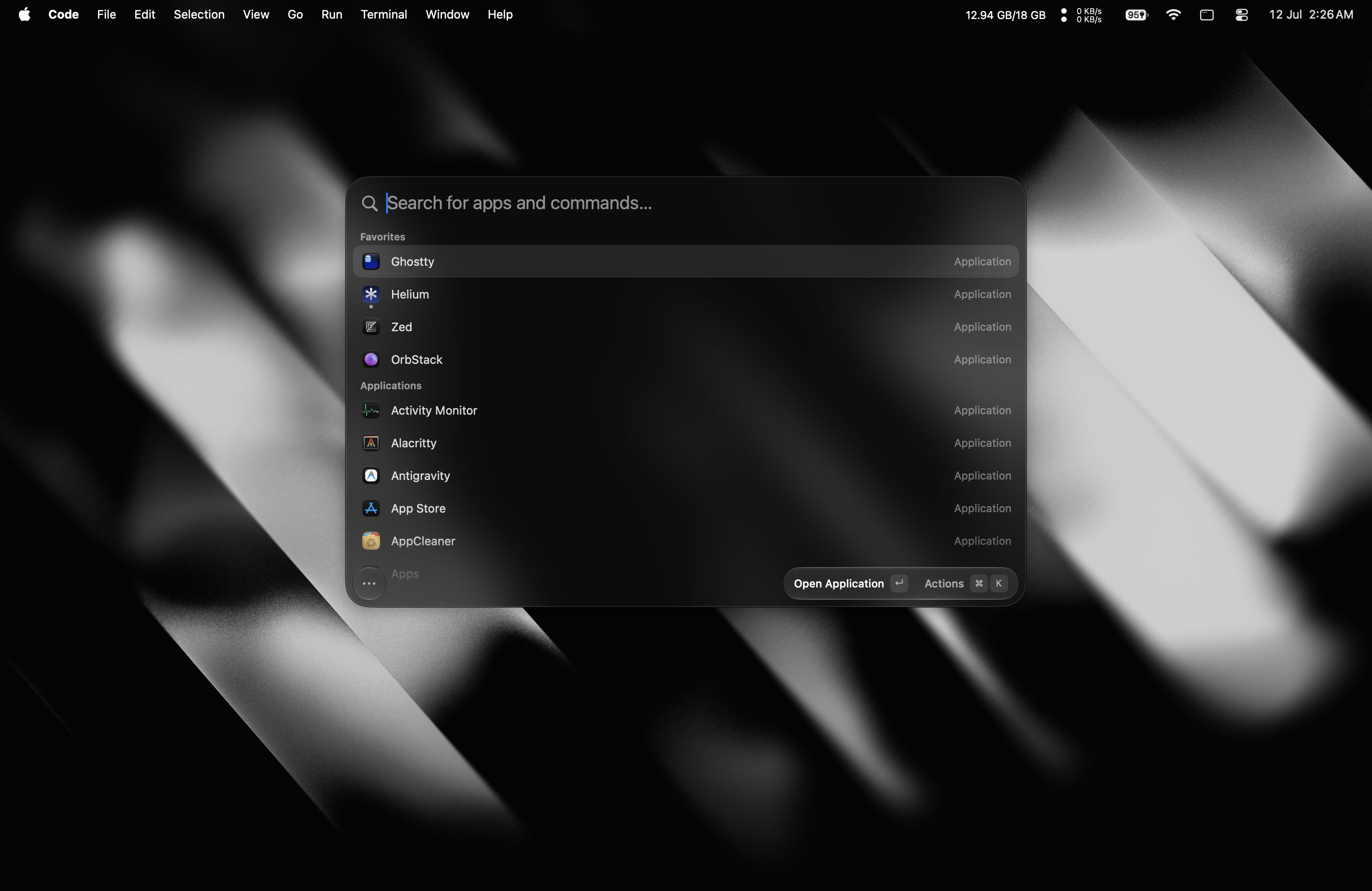
**A tiny, fully native macOS launcher. One hotkey, everything you reach for all day, under 100 MB of
RAM.**
SwiftUI and AppKit, **zero third-party dependencies**, no Electron and no telemetry. It also **runs
real Raycast extensions**, rendered as native SwiftUI. Free, open source, and staying that way.
For anything private, email [iabueammar@gmail.com](mailto:iabueammar@gmail.com).
## Support
Tinycast is **free, and it stays that way**. If you enjoy it, consider buying a wallpaper pack and get a discord role. It would help me a lot.
## Features
- **App launcher** — fuzzy-search and launch anything, pin favorites, see what's running, quit an app
or every app at once.
- **Global hotkey** — one shortcut summons the palette from anywhere.
- **Per-app hotkeys** — bind a key to an app; press it to toggle (focus/hide).
- **Search Files** — open files and folders from the folders you choose, through Spotlight, with no
index of our own.
- **Dictionary** — look a word up with the Define Word command, or define whatever you typed from the
launcher's fallbacks, read from the Mac's own dictionaries.
- **Clipboard history** — text and images, searchable, pasted back into the app you were using.
- **Calculator** — do math, unit, live currency and crypto conversions inline, right in the palette.
- **Quicklinks** — turn a URL, search, file or deeplink into a command, with placeholders for typed
input, the clipboard or the date.
- **Apple Shortcuts** — search and run the shortcuts you built in the Shortcuts app, with aliases and
global hotkeys.
- **Snippets** — reusable Markdown templates with dynamic placeholders, arguments, nested references
and optional keyword expansion.
- **Custom commands** — run named shell commands through fuzzy search or their own global hotkeys.
- **Window management** — 34 Rectangle-style actions: halves, quarters, thirds, sizing, nudging,
display moves, fullscreen and Spaces.
- **System actions** — lock, sleep, restart, empty trash, toggle appearance, Bluetooth, mute, hidden
files, and more.
- **Calendar and meetings** — your next meeting on the empty palette and in the menu bar, one key to
join it, or let it join itself.
- **Notes** — an unlimited collection of plain Markdown files in one floating editor, searchable from
the palette and rendered as you write.
- **Emoji picker** — a searchable emoji grid, one keystroke away.
- **AI chat** — use your own key or an installed AI account: ask Quick AI from the palette, or keep
longer conversations in the AI Chat window, with a searchable, pinnable history. Off out of the box,
like every AI feature.
- **Quick Actions** — fix grammar, rewrite, translate or summarize the selected text in any app.
- **Raycast extensions** — run the ones you already have natively, rendered as SwiftUI.
- **Backup and import** — export your settings to a file, or import your setup from Raycast.
## Install
First, add the tap:
```sh
brew trust --tap abue-ammar/tinycast # required for third-party taps
brew tap abue-ammar/tinycast
```
Then run the one line that matches your Mac:
| Your Mac | Install |
| -------------------------------- | ---------------------------------------- |
| Apple silicon, macOS 26 or newer | `brew install --cask tinycast` |
| Intel, macOS 26 | `brew install --cask tinycast-universal` |
Not sure which you have? **Apple menu → About This Mac.** Homebrew checks too, and refuses the
wrong one.
Want early builds? `brew install --cask tinycast@beta` puts `Tinycast Beta.app` beside the stable
app, with its own settings and permissions. Apple silicon, macOS 26+.
Homebrew clears the macOS quarantine flag on every install and update, so there is nothing else to
run. Downloading a DMG from [Releases](https://github.com/abue-ammar/tinycast/releases) instead?
Tinycast is self-signed, so clear the flag once:
`xattr -dr com.apple.quarantine "/Applications/Tinycast.app"`.
## Permissions
**Accessibility** — needed when Tinycast pastes or expands text into another app, and the only
permission snippet keyword expansion needs. You're prompted when you first use a feature that needs
it; grant access in **System Settings → Privacy & Security → Accessibility**. Snippets ship
disabled, and keystrokes are matched locally, never stored and never sent anywhere.
## Using it
1. Open **Settings → General** and record a global shortcut to summon Tinycast.
2. Press it anywhere → the palette floats in. Type to filter, **↵** to launch.
3. **Tab** switches between Apps and Clipboard; **↑/↓** move, **Esc** dismisses.
4. **Settings → Shortcuts** — search an app or custom command and record a global shortcut.
5. **Settings → Snippets** — enable the feature, then create templates with expansion keywords.
## Building from source
See **[docs/development.md](docs/development.md)** for the toolchain, build, packaging, release and
website workflows. **[docs/](docs/README.md)** indexes everything else — architecture, engineering
standards, the design system and one document per feature.
## Contributing
> [!IMPORTANT]
> **Open an issue before you write code — this is mandatory.** Get the bug or the feature agreed on
> first; discussing it in the issue (or on [Discord](https://discord.gg/v2Eeb4QQy3)) is strongly
> encouraged. A PR that doesn't close an issue marked `approved` is closed automatically however good
> the patch is, and the work is wasted. Docs-only fixes are the one exception.
>
> Tinycast's feature set is deliberately closed, and "another launcher has it" is not a reason on its
> own. Ask whether a feature is wanted before you ask for it.
Read **[CONTRIBUTING.md](CONTRIBUTING.md)** first — it covers the memory budget every PR is held to,
the before/after video requirement for visual changes, and why features get declined. Every PR fills
in the **[pull request template](.github/PULL_REQUEST_TEMPLATE.md)**. Security issues go through
[SECURITY.md](SECURITY.md), not the issue tracker.
Questions, ideas, or just want to follow along? **[Join the Discord](https://discord.gg/v2Eeb4QQy3)**.
## Star History
## Shoutout
Big thanks to **[Rueya Supply](https://rueya.supply)**, which makes wallpapers and graphics for your
desktop. Go check them out.
## License
[AGPL-3.0](LICENSE)