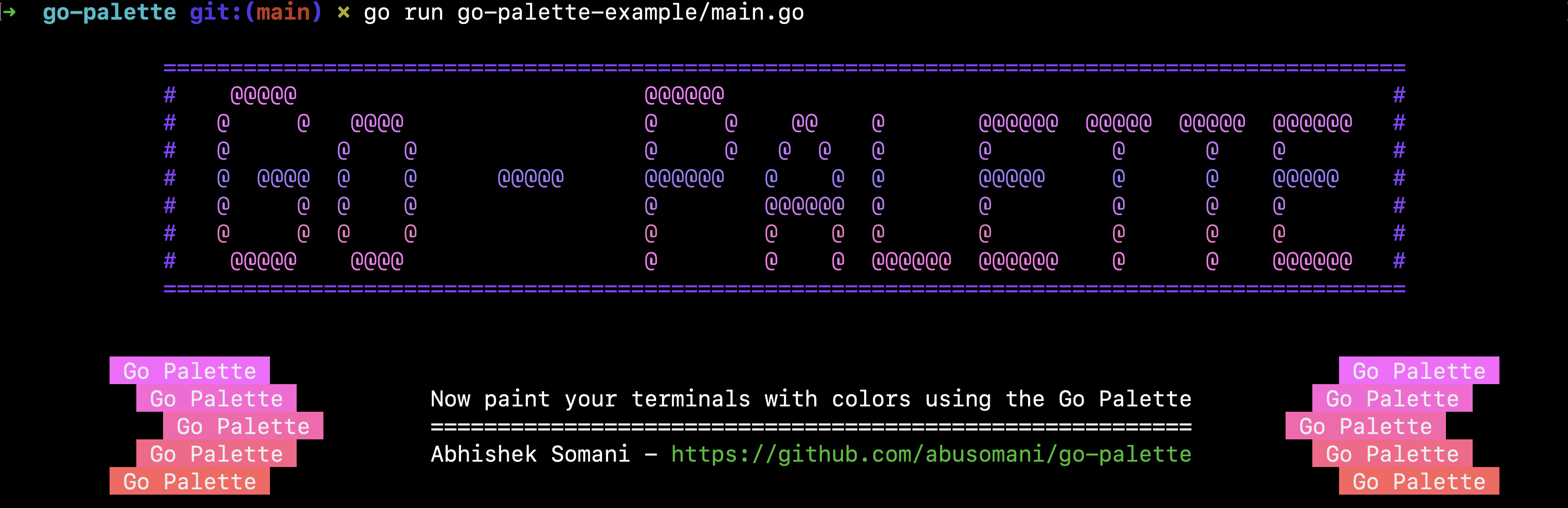
Go-Palette 🎨
[](https://github.com/abusomani/go-palette/actions)
[](https://img.shields.io/github/languages/top/abusomani/go-palette)
[](https://img.shields.io/github/languages/count/abusomani/go-palette)
[](https://github.com/abusomani/go-palette/blob/main/LICENSE)
[](https://goreportcard.com/report/github.com/abusomani/go-palette)
[](https://pkg.go.dev/github.com/abusomani/go-palette)
[](https://coveralls.io/github/abusomani/go-palette?branch=main)
[](https://github.com/avelino/awesome-go#advanced-console-uis)
Elegant and convenient style definitions using ANSI colors.
Fully compatible and wraps the `fmt` [library](https://pkg.go.dev/fmt) for nice terminal layouts.
## Supported Colors & Formats
### Standard colors

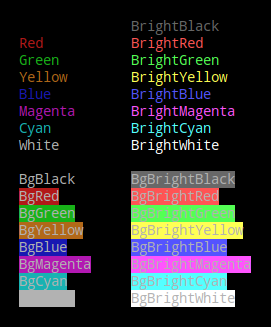
The following colors are supported to be used by their names for both foreground and background as shown in [Example using color names](#example-using-color-names)
| Color Name | Color Code |
| :--- | :----: |
| Black | 0 |
| Red | 1 |
| Green | 2 |
| Yellow | 3 |
| Blue | 4 |
| Magenta | 5 |
| Cyan | 6 |
| White | 7 |
| BrightBlack | 8 |
| BrightRed | 9 |
| BrightGreen | 10 |
| BrightYellow | 11 |
| BrightBlue | 12 |
| BrightMagenta | 13 |
| BrightCyan | 14 |
| BrightWhite | 15 |
#### Standard colors used as foreground as well as background
### Supported Foreground Palette
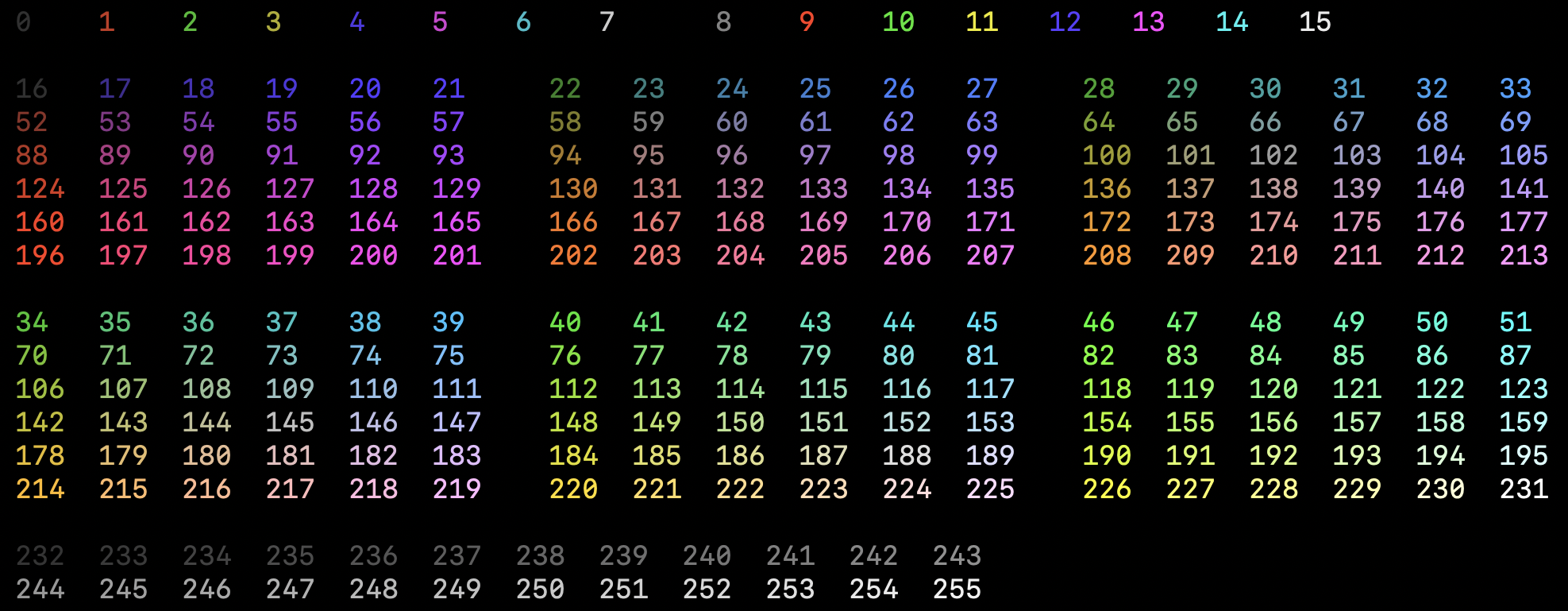
The following palette is supported as foreground/text colors. The numbers represent the color-codes which can be used as shown in [Example using color codes](#example-using-color-codes).
### Supported Background Palette
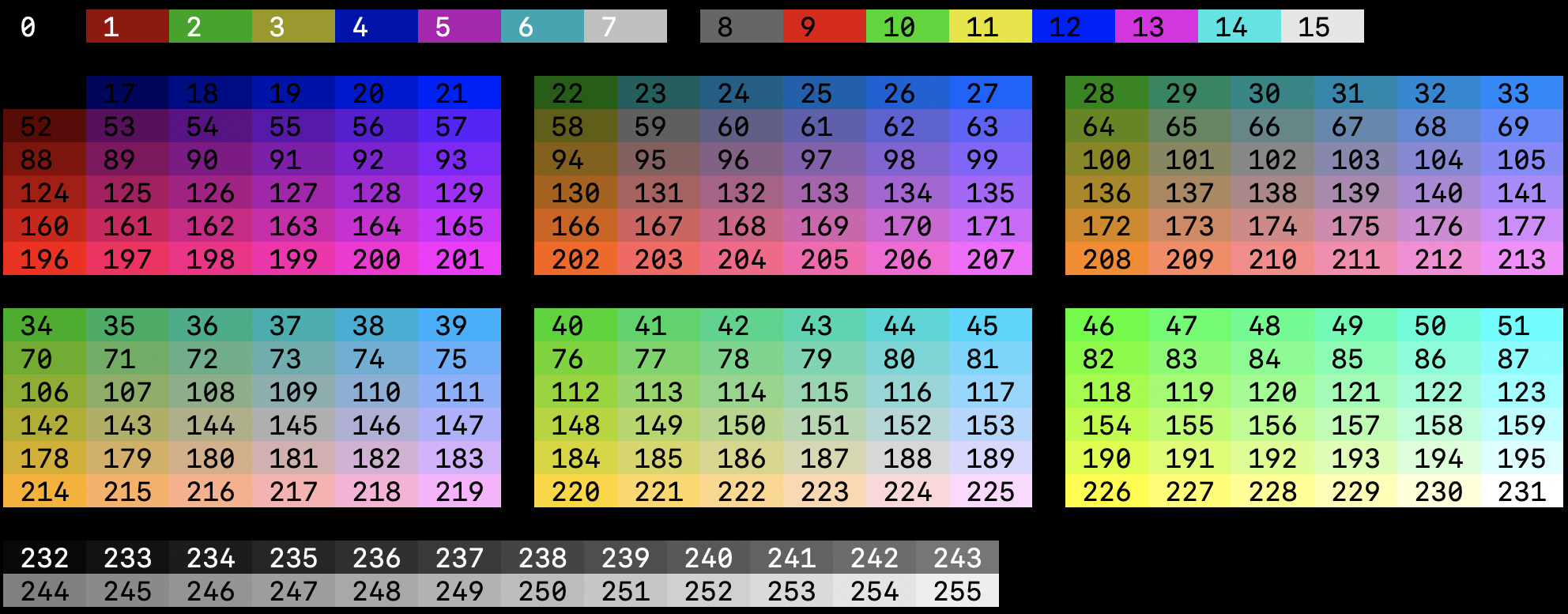
The following palette is supported as background colors. The numbers represent the color-codes which can be used as shown in [Example using color codes](#example-using-color-codes).
### Supported Text Formats
The following text formats are supported.
- Reset
- Bold
- Dim
- Italic
- Underline
- SlowBlink
- Hidden
- Strikethrough

## Prerequisites
A go module where you want to integrate go-palette. To create one, follow this [guide](https://go.dev/doc/tutorial/create-module).
## Installation
```
go get github.com/abusomani/go-palette
```
## Usage
After installing the `go-palette` package, we start using it the following way.
### Import
A very useful feature of Go’s import statement are aliases. A common use case for import aliases is to provide a shorter alternative to a library’s package name.
In this example, we save ourselves having to type `palette` everytime we want to call one of the library’s functions, we just use `pal` instead.
```go
import (
pal "github.com/abusomani/go-palette/palette"
)
```
#### Example using Color names
```go
package main
import (
pal "github.com/abusomani/go-palette/palette"
)
func main() {
p := pal.New()
p.Println("This text is going to be in default color.")
p.SetOptions(pal.WithBackground(pal.Color(pal.BrightYellow)), pal.WithForeground(pal.Black))
p.Println("This text is going to be in black color with a yellow background.")
}
```
**Output**

#### Example using Color codes
```go
package main
import (
pal "github.com/abusomani/go-palette/palette"
)
func main() {
p := pal.New()
p.Println("This text is going to be in default color.")
// We can use color codes from the palette to set as foreground and background colors
p.SetOptions(pal.WithBackground(pal.Color(11)), pal.WithForeground(0))
p.Println("This text is going to be in black color with a yellow background.")
}
```
**Output**

#### Example using Special effects
```go
package main
import (
pal "github.com/abusomani/go-palette/palette"
)
func main() {
p := pal.New(pal.WithSpecialEffects([]pal.Special{pal.Bold}))
p.Println("Bold")
p.SetOptions(pal.WithSpecialEffects([]pal.Special{pal.Dim}))
p.Println("Dim")
p.SetOptions(pal.WithSpecialEffects([]pal.Special{pal.Italic}))
p.Println("Italic")
p.SetOptions(pal.WithSpecialEffects([]pal.Special{pal.Underline}))
p.Println("Underline")
p.SetOptions(pal.WithSpecialEffects([]pal.Special{pal.SlowBlink}))
p.Println("SlowBlink")
p.SetOptions(pal.WithSpecialEffects([]pal.Special{pal.Hidden}))
p.Print("Hidden")
p.SetOptions(pal.WithDefaults())
p.Println("<-Hidden")
p.SetOptions(pal.WithSpecialEffects([]pal.Special{pal.Strikethrough}))
p.Println("Strikethrough")
}
```
### Flush
Flush resets the Palette options with default values and disables the Palette.
```go
package main
import (
pal "github.com/abusomani/go-palette/palette"
)
func main() {
p := pal.New()
p.Println("This text is going to be in default color.")
// We can use color codes from the palette to set as foreground and background colors
p.SetOptions(pal.WithBackground(pal.BrightMagenta), pal.WithForeground(pal.Black))
p.Println("This text is going to be in black color with a bright magenta background.")
p.Flush()
p.Println("This text is going to be in default color.")
}
```
**Output**

## Limitations
### Windows
Go-Palette provides ANSI colors only. Windows does not support ANSI out of the box. To toggle the ANSI color support follow the steps listed in this [superuser thread](https://superuser.com/questions/413073/windows-console-with-ansi-colors-handling).
### Different behaviours in special effects
Go-Palette provides styled support using ANSI Color codes through escape sequences. This varies between different Terminals based on its setting. Refer [ANSI Escape Codes](https://en.wikipedia.org/wiki/ANSI_escape_code) for more details.
## License
Licensed under [MIT](./LICENSE)