English | 中文 | 日本語 | 한국어 | Русский | Español | Türkçe | العربية | Bahasa Indonesia | தமிழ் | हिन्दी


-0ea5e9?style=flat-square)
-0ea5e9?style=flat-square)

-0ea5e9?style=flat-square)
-0ea5e9?style=flat-square)
-0ea5e9?style=flat-square)

# Coworker™ - Open Source AI Desktop Agent
Coworker is an open source AI desktop agent that automates file management, document creation, and browser tasks locally on your machine. Bring your own API keys (OpenAI, Anthropic, Google, xAI) or run local models via Ollama.
Runs locally on your machine. Bring your own API keys or local models. MIT licensed.
Download for Mac (Apple Silicon)
·
Download for Mac (Intel)
·
Download for Windows 11
·
Download for Linux (ARM64)
·
Download for Linux (x64)
·
Download for Linux (.deb x64)
·
Coworker releases
---
## What makes it different
|
### 🖥️ It runs locally
- Your files stay on your machine
- You decide which folders it can touch
- Nothing gets sent to Coworker (or anyone else)
|
### 🔑 You bring your own AI
- Use your own API key (OpenAI, Anthropic, etc.)
- Or run with [Ollama](https://ollama.com) (no API key needed)
- No subscription, no upsell
- It's a tool—not a service
|
|
### 📖 It's open source
- Every line of code is on GitHub
- MIT licensed
- Change it, fork it, break it, fix it
|
### ⚡ It acts, not just chats
- File management
- Document creation
- Custom automations
- Skill learning
|
---
## What it actually does
| | | |
| :----------------------------------------------------------------- | :------------------------------------------------------------------- | :---------------------------------------------------------------------- |
| **📁 File Management** | **✍️ Document Writing** | **🔗 Tool Connections** |
| Sort, rename, and move files based on content or rules you give it | Prompt it to write, summarize, or rewrite documents | Works with Notion, Google Drive, Dropbox, and more (through local APIs) |
| | | |
| **⚙️ Custom Skills** | **🛡️ Full Control** | |
| Define repeatable workflows, save them as skills | You approve every action. You can see logs. You can stop it anytime. | |
## Use cases
- Clean up messy folders by project, file type, or date
- Draft, summarize, and rewrite docs, reports, and meeting notes
- Automate browser workflows like research and form entry
- Generate weekly updates from files and notes
- Prepare meeting materials from docs and calendars
## Supported models and providers
- Anthropic (Claude)
- OpenAI (GPT)
- Google AI (Gemini)
- xAI (Grok)
- DeepSeek
- Moonshot AI (Kimi)
- Z.AI (GLM)
- MiniMax
- Venice.ai
- Amazon Bedrock
- Azure Foundry
- OpenRouter
- LiteLLM
- Ollama (local models)
- LM Studio (local models)
## Privacy and local-first
Coworker runs locally on your machine. Your files stay on your device, and you choose which folders it can access.
## System requirements
- macOS (Apple Silicon)
- macOS (Intel)
- Windows 11
- Ubuntu (ARM64)
- Ubuntu (x64)
---
## How to use it
> **Takes 2 minutes to set up.**
| Step | Action | Details |
| :---: | ------------------- | ----------------------------------------------------------------------------------------------------------------- |
| **1** | **Install the App** | Download the DMG and drag it into Applications |
| **2** | **Connect Your AI** | Use your own Google, OpenAI, Anthropic (or other) API key — or sign in with ChatGPT (Plus/Pro). No subscriptions. |
| **3** | **Give It Access** | Choose which folders it can see. You stay in control. |
| **4** | **Start Working** | Ask it to summarize a doc, clean a folder, or create a report. You approve everything. |
[**Download for Mac (Apple Silicon)**](https://downloads.coworker.ai/downloads/0.5.17/macos/Coworker-0.5.17-mac-arm64.dmg) · [**Download for Mac (Intel)**](https://downloads.coworker.ai/downloads/0.5.17/macos/Coworker-0.5.17-mac-x64.dmg) · [**Download for Windows 11**](https://downloads.coworker.ai/downloads/0.5.17/windows/Coworker-0.5.17-win-x64.exe) · [**Download for Linux (ARM64)**](https://downloads.coworker.ai/downloads/0.5.17/linux/Coworker-0.5.17-linux-arm64.AppImage) · [**Download for Linux (x64)**](https://downloads.coworker.ai/downloads/0.5.17/linux/Coworker-0.5.17-linux-x86_64.AppImage) · [**Download for Linux (.deb x64)**](https://downloads.coworker.ai/downloads/0.5.17/linux/Coworker-0.5.17-linux-amd64.deb)
---
## Screenshots and Demo
A quick look at Coworker on macOS, plus a short demo video.
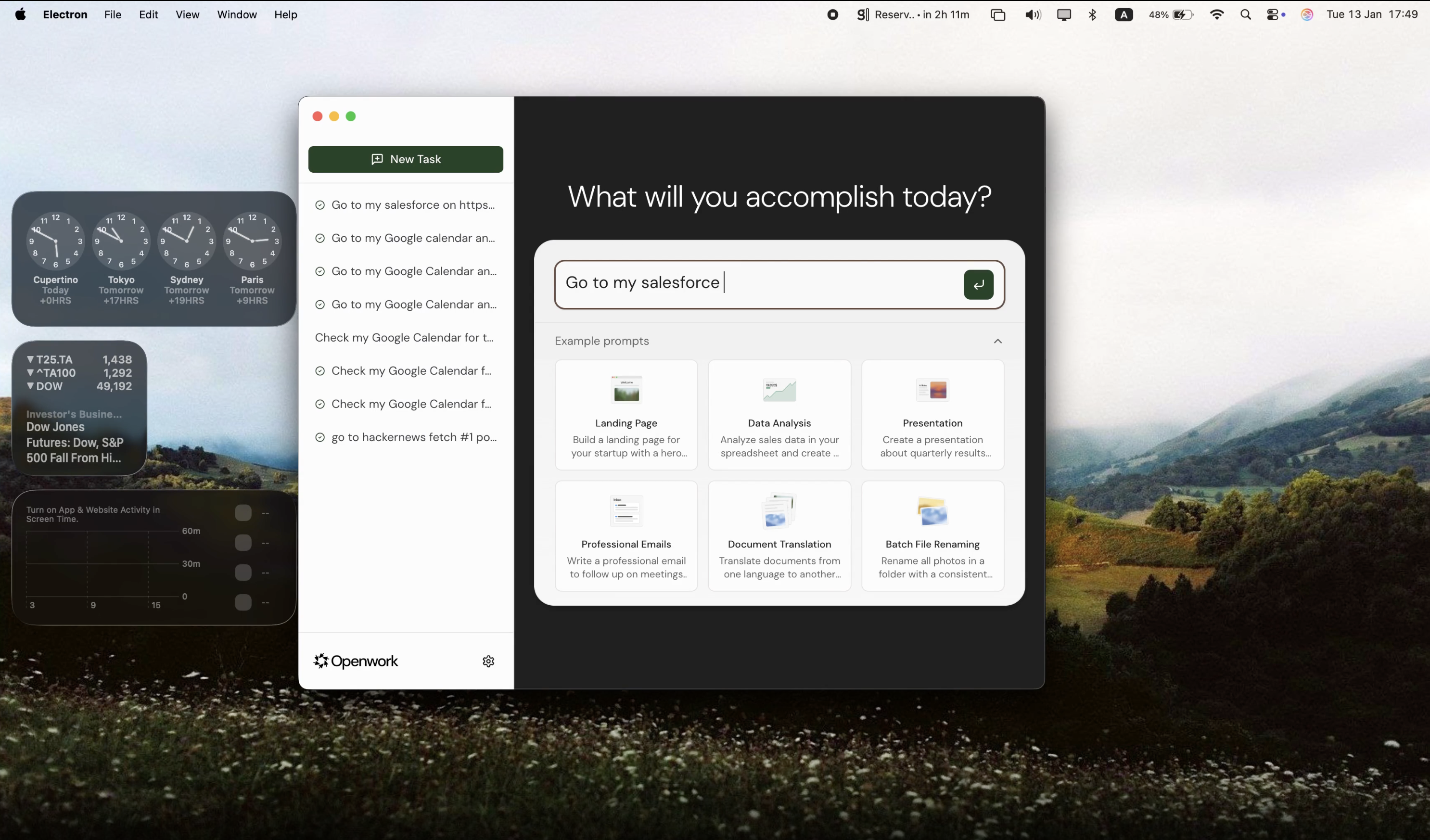
Watch the demo →
## FAQ
**Does Coworker run locally?**
Yes. Coworker runs locally on your machine and you control which folders it can access.
**Do I need an API key?**
You can use your own API keys (OpenAI, Anthropic, Google, xAI, etc.) or run local models via Ollama.
**Is Coworker free?**
Yes. Coworker is open source and MIT licensed.
**Which platforms are supported?**
macOS (Apple Silicon), macOS (Intel), Windows 11, Ubuntu ARM64, and Ubuntu x64 are supported.
---
## Development
```bash
pnpm install
pnpm dev
```
That's it.
Prerequisites
- Node.js 20+
- pnpm 9+
All Commands
| Command | Description |
| ----------------------------------------- | -------------------------------------- |
| `pnpm dev` | Run desktop app in dev mode |
| `pnpm dev:clean` | Dev mode with clean start |
| `pnpm build` | Build all workspaces |
| `pnpm build:desktop` | Build desktop app only |
| `pnpm -F @coworker/desktop package:win` | Build Windows installer (x64) |
| `pnpm -F @coworker/desktop package:linux` | Build Linux artifacts (AppImage + deb) |
| `pnpm lint` | TypeScript checks |
| `pnpm typecheck` | Type validation |
| `pnpm -F @coworker/desktop test:e2e` | Playwright E2E tests |
Environment Variables
| Variable | Description |
| ----------------- | ---------------------------------- |
| `CLEAN_START=1` | Clear all stored data on app start |
| `E2E_SKIP_AUTH=1` | Skip onboarding flow (for testing) |
Architecture
```
apps/
desktop/ # Electron app (main + preload + renderer)
packages/
shared/ # Shared TypeScript types
```
The desktop app uses Electron with a React UI bundled via Vite. A long-lived `apps/daemon` background process owns task execution — it spawns [OpenCode](https://github.com/sst/opencode) `opencode serve` children and talks to them via `@opencode-ai/sdk`. API keys are stored securely in the OS keychain.
See [CLAUDE.md](CLAUDE.md) for detailed architecture documentation.
---
## Contributing
Contributions welcome! Feel free to open a PR.
```bash
# Fork → Clone → Branch → Commit → Push → PR
git checkout -b feature/amazing-feature
git commit -m 'Add amazing feature'
git push origin feature/amazing-feature
```
---
**[Coworker releases](https://github.com/coworker-ai/coworker/releases)** · **[Issues](https://github.com/coworker-ai/coworker/issues)** · **[Twitter](https://x.com/Coworker_ai)**
MIT License
**Keywords:** AI agent, AI desktop agent, desktop automation, file management, document creation, browser automation, local-first, macOS, linux, ubuntu, privacy-first, open source, Electron, computer use, AI assistant, workflow automation, OpenAI, Anthropic, Google, xAI, Claude, GPT-4, Ollama