## Unfortunately, the development of a new PiGro version is taking longer than expected. The porting to GTK4 is very time-consuming. Due to the latest change in PiOS regarding sudo-less-password, it will likely take even longer. I am truly sorry.
# :bento: All Settings In One Place!
:heavy_check_mark: System Monitoring :heavy_check_mark: System Configuration :heavy_check_mark: Autostarts :heavy_check_mark: Process Monitor & Killer
:heavy_check_mark: Update & Upgrade GUI :heavy_check_mark:Multi Install GUI :heavy_check_mark: Change & Customize DE :heavy_check_mark: Overclocking
:heavy_check_mark: Link Collection






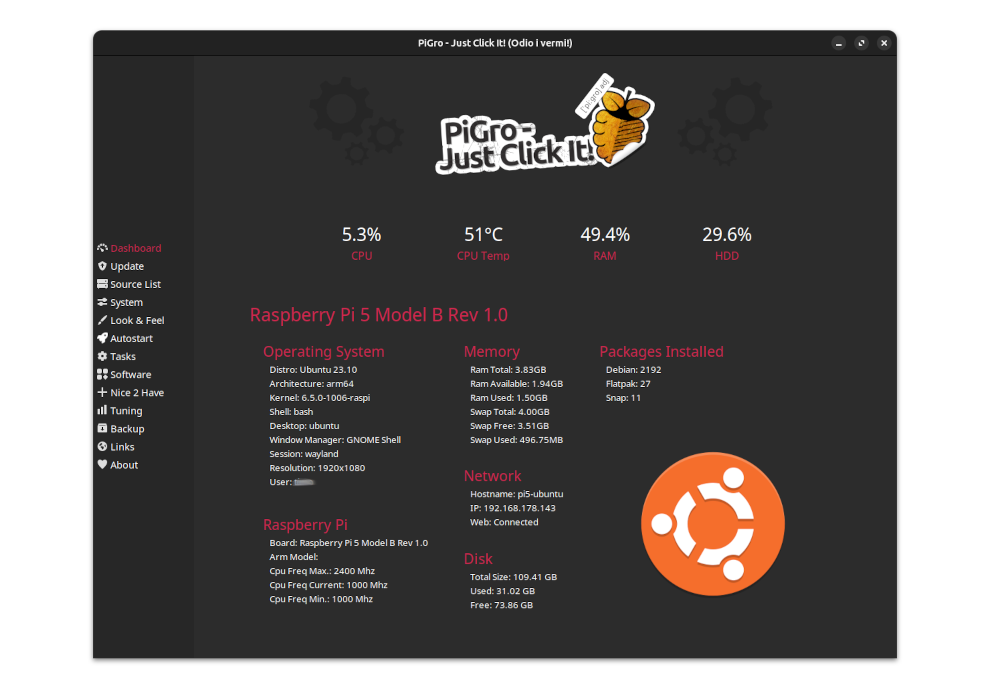
### PiGro - Just Click it! brings the normal desktop functionalities back to Pixel!
PiGro - Just Click it! is an all-inclusive graphical user interface (GUI) software that streamlines the process of managing all your Raspberry Pi settings from one convenient location. With PiGro, you can easily keep your software up-to-date, oversee the APT installer, Pi-Apps App Store, and Flatpak, configure autostarts, overclock your Pi, monitor the system's performance, back up your applications, install desktop environments, and customize your OS theme.
Designed with user-friendliness in mind, PiGro is easily accessible to users of all levels of expertise. Its intuitive interface and straightforward controls make it effortless to access and modify any settings you require.
### **_Special thanks to the entire [Pi-Apps-Team](https://github.com/Botspot/pi-apps)_**
**Users on Pi-Apps**
[]()
**Since Version 23.04**
[]()
## 
---
# Reviews
> [](https://github.com//thibmaek/awesome-raspberry-pi?tab=readme-ov-file)
> [Blog by **https://jhmulder.nl**](https://jhmulder.nl/zwitsers-zakmes-pigro/): "Swiss Knife For The Pi."
---
# :floppy_disk: Installation
### App Center:
[](https://github.com/Botspot/pi-apps)
### As DEBIAN Package:
Download [latest](https://github.com/actionschnitzel/PiGro-Aid-/releases).
If you have already installed Pigro via the script, remove: `~/-PiGro-Aid-` and `~/.local/Share/Applications/Pigro.Desktop`. Then Install the Debian Package.
---
### Supported Systems:
#### Raspberry Pi 4 & 5  :
- [**Raspberry Pi OS**](https://www.raspberrypi.com/software/operating-systems/) (Bullseye/Bookworm): fully supported
-
:
- [**Raspberry Pi OS**](https://www.raspberrypi.com/software/operating-systems/) (Bullseye/Bookworm): fully supported
-  [**Ubuntu**](https://ubuntu.com/download/raspberry-pi): fully supported
-
[**Ubuntu**](https://ubuntu.com/download/raspberry-pi): fully supported
-  [**Ubuntu MATE**](https://ubuntu-mate.org/download/): fully supported
-
[**Ubuntu MATE**](https://ubuntu-mate.org/download/): fully supported
-  [**Rhino Linux**](https://rhinolinux.org/): fully supported (Scroll to Important)(Ricing via xfce-setting)
-
[**Rhino Linux**](https://rhinolinux.org/): fully supported (Scroll to Important)(Ricing via xfce-setting)
-  [**MX Linux**](https://mxlinux.org/): fully supported
#### Desktops:
-
[**MX Linux**](https://mxlinux.org/): fully supported
#### Desktops:
-  **XFCE4**: fully supported
-
**XFCE4**: fully supported
-  **Gnome**: fully supported
-
**Gnome**: fully supported
-  **Mate**: fully supported
- **pi-lxde-wayland**: fully supported
#### :exclamation: Installation Process & Updates
- If you have installed PiGro via Pi-Apps, you will automatically receive an update notification.
- If you have installed PiGro via Package you can check for updates in the About TAB.
---
# :exclamation: Important
- [If PiGro does not start after switching from Wayland to X11](https://github.com/actionschnitzel/PiGro-Aid-/issues/84)
- Buster is NOT supported anymore!
- XWayland Window Decorations wouldn't work when you change the Pixel Theme or Icon Theme [PiXnoir is an exception].
- Overclocking at your own risk.
---
# :hamburger: Latest Changes
[Changelog](https://github.com/actionschnitzel/PiGro-Aid-/wiki/Change-Log)
---
# :doughnut: Showcase

---
### :two_hearts: You want support me?
PiGro is completely free. I put up to three hours into improvements and updates every day. Not to forget the countless hours I spend reading manuals and reference books. If you like my work, you can support me
[](https://www.paypal.com/paypalme/actionschnitzel)
**Mate**: fully supported
- **pi-lxde-wayland**: fully supported
#### :exclamation: Installation Process & Updates
- If you have installed PiGro via Pi-Apps, you will automatically receive an update notification.
- If you have installed PiGro via Package you can check for updates in the About TAB.
---
# :exclamation: Important
- [If PiGro does not start after switching from Wayland to X11](https://github.com/actionschnitzel/PiGro-Aid-/issues/84)
- Buster is NOT supported anymore!
- XWayland Window Decorations wouldn't work when you change the Pixel Theme or Icon Theme [PiXnoir is an exception].
- Overclocking at your own risk.
---
# :hamburger: Latest Changes
[Changelog](https://github.com/actionschnitzel/PiGro-Aid-/wiki/Change-Log)
---
# :doughnut: Showcase

---
### :two_hearts: You want support me?
PiGro is completely free. I put up to three hours into improvements and updates every day. Not to forget the countless hours I spend reading manuals and reference books. If you like my work, you can support me
[](https://www.paypal.com/paypalme/actionschnitzel)
