Install 1,000 skills and 1,000 MCP tools locally — and never worry about context flooding.
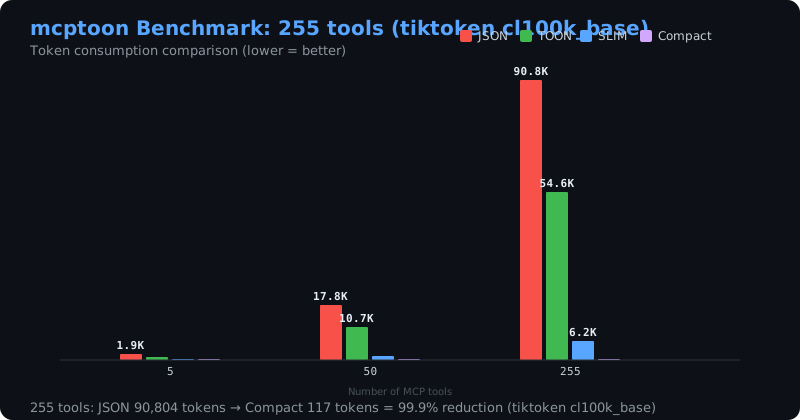
Cuts tool context by ~90% (99.2% on 255 tools) with zero config across 103+ desktop and CLI agents.
🌐 Official Website · 🧮 30s Token Tax Calculator · 🇨🇳 中文文档 · 📖 Developer Docs
|
① 💥 Tools, skills & docs eating your context — afraid to add more? Add as many as you like. Tool schemas 72k → 581 tokens. Tools −99.2% · Skills −99.99% · Docs 40k→17k per question |
② 🧩 Several agents — JSON configs and skills both a chore? It's a native CLI: any agent that can run a shell command gets every feature — no MCP server, no config. sync covers the GUI clients too (103+).No JSON editing, no restart |
③ 🔍 Know there are 17,000+ — but not which one fits? It first picks up the servers you already have (nothing to reinstall), then finds the rest by plain words — install and call on the spot. mcptoon discover → search → call
|
Also: OpenAPI / GraphQL passthrough · OAuth · MCP resources & prompts · saved connections · code sandbox — see All commands.
pip install mcptoon && mcptoon quickstart — 534KB, zero dependencies, zero config.
🤖 Modern Way: Just Talk to Your Agent (Zero Memorization)When installed, mcptoon **automatically injects its own official skill (`/mcptoon`) into your agents**. You never need to memorize terminal commands — just ask directly in **Cursor, Claude Code, Windsurf, or DSH**: ```markdown # Ask the built-in skill anytime: "Load /mcptoon skill and check what MCP tools I currently have." "Help me find an MCP tool that converts HTML to PDF and call it." "The tool output was truncated, retrieve the full original copy." "How many tokens did mcptoon save for me today?" "Doctor self-check: are all my MCP servers connected properly?" ``` *Your agent loads `/mcptoon` and drives everything behind the scenes!* |
⚡ Terminal Way: 30-Second Setup```bash # 1. Install (zero dependencies, 534KB) pip install mcptoon # 2. One command: detect MCP servers & auto-configure agents # (Also self-installs `/mcptoon` skill into all detected agents) mcptoon quickstart # 3. View compact tool catalog (-99.2% tokens) mcptoon manifest # 4. Route tasks to skills or doc chapters (<5ms) mcptoon skills resolve "write git commit message" mcptoon docs resolve "how does release gating work" ``` |
🧑💻 I just use AI toolsInstall once, and every AI you have — **Claude Desktop, Claude Code, Codex, Cursor, Windsurf, Cline, VS Code Copilot, Gemini CLI, Qwen Code, Zed, Crush, opencode and any other agent** — shares all the tools and skills you already have. You write nothing in any agent's config. **[→ Install and go](#30-seconds-up-and-running)** |
🔧 I build with MCP / agentsScript it. `mcptoon` is a plain CLI with stable JSON output and an `mcptoon serve` MCP endpoint — wire it into your own agent, CI, or app. **[→ Commands and formats](#all-commands)** |





