mcptoon

One Place for All Your Agents' MCP Tools and Skills.

Tools and skills configured in any single agent just work across Cursor, Claude Code, Codex, and 103+ desktop & terminal agents.
Pioneering on-demand schema retrieval out of the box — no more stuffing context windows, saving 99% context tokens.
Zero dependencies, pure local, offline-first.

PyPI version GitHub Stars CI Build Tests Zero Dependencies License

MCP Spec AllMCPs MCPVault mcpservers.org

🌐 Official Website · 🧮 30s Token Tax Calculator · 🇨🇳 中文文档 · 📖 Developer Docs
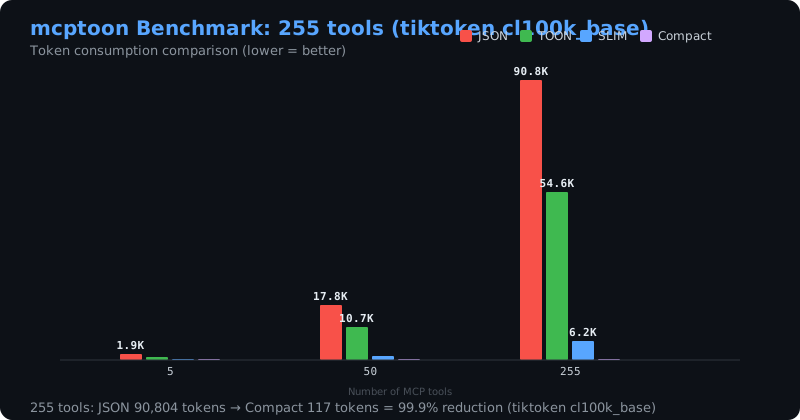
mcptoon Benchmark: 71,929 to 581 tokens (-99.2%)

Skeptical of a synthetic 255-tool sample? Here are 7 real public MCP servers (209 tools) measured on a real machine → — 640,606 → 905 tokens (−99.86%). Or run mcptoon bench on your own catalog.

https://github.com/user-attachments/assets/0272d3a8-c74f-428d-8559-fbf804ce0685

① 💥 Tools, skills & docs eating your context — afraid to add more?

Add as many as you like. Tool schemas 72k → 581 tokens.
Tools −99.2% · Skills −99.99% · Docs 40k→17k per question

② 🧩 Several agents — JSON configs and skills both a chore?

It's a native CLI: any agent that can run a shell command gets every feature — no MCP server, no config. sync covers the GUI clients too (103+).
No JSON editing, no restart

③ 🔍 Overwhelmed by thousands of MCP tools across the web?

No more hunting for install docs. It first scans and takes over the tools you already have, then finds the rest by plain language — install and call on the spot.
mcptoon discover (scan installed) → search (find online) → call (run directly)

Also: OpenAPI / GraphQL passthrough · OAuth · MCP resources & prompts · saved connections · code sandbox — see All commands.

pip install mcptoon && mcptoon quickstart — 565KB, zero dependencies, zero config.

Stays current on its own: it tells you when a newer version is out, and mcptoon upgrade updates in one command.

🔍 Common Pain Points & Solutions at a Glance (Click to expand)
Your Pain Point / Search IntentVanilla MCP Behaviormcptoon's Solution
Context Window Bloat
Adding 10+ tools quickly hits context limits
Sends full JSON Schema of every tool every turn (70k+ tokens)Compact Name Index: ~2.2 tokens/tool on idle, schemas fetched on demand (99.2% token saving)
Multi-Agent Sync Hell
Rewriting mcpServers JSON for Cursor, Claude Code, Windsurf
Manual copy-pasting into each client's config fileOne-Command Takeover: mcptoon sync --takeover automatically discovers and configures 103+ clients
Headless CLI Execution
Need to call/test MCP tools directly in terminal/scripts
Requires spinning up full desktop agents or writing client codeNative Standard Library CLI: mcptoon call <server> <tool> with zero dependencies
Model Confusion & Hallucination
Too many candidate tools dilute model attention
Floods model with dozens of complex schemas simultaneouslyTwo-Stage Selection: mcptoon select "<task>" pre-filters to the top 3 tools offline
Agent Skills Fragmentation
Prompt instructions & skills can't be shared across agents
Manually duplicated across folders, drifting out of syncSymlink-based Single-Source Hub: mcptoon skills sync, 39-token pointer, zero duplication
--- ### 🚀 Quick Start (Choose Your Way)

🤖 Modern Way: Just Talk to Your Agent (Zero Memorization)

When installed, mcptoon **automatically injects its own official skill (`/mcptoon`) into your agents**. You never need to memorize terminal commands — just ask directly in **Cursor, Claude Code, Windsurf, or DSH**: ```markdown # Ask the built-in skill anytime: "Load /mcptoon skill and check what MCP tools I currently have." "Help me find an MCP tool that converts HTML to PDF and call it." "The tool output was truncated, retrieve the full original copy." "How many tokens did mcptoon save for me today?" "Doctor self-check: are all my MCP servers connected properly?" ``` *Your agent loads `/mcptoon` and drives everything behind the scenes!*

⚡ Terminal Way: 30-Second Setup

```bash # 1. Install (zero dependencies, 565KB) pip install mcptoon # 2. One command: detect MCP servers & auto-configure agents # (Also self-installs `/mcptoon` skill into all detected agents) mcptoon quickstart # 3. View compact tool catalog (-99.2% tokens) mcptoon manifest # 4. Route tasks to skills or doc chapters (<5ms) mcptoon skills resolve "write git commit message" mcptoon docs resolve "how does release gating work" ```
**Is it actually saving you anything?** After a fresh install mcptoon can sit in **direct** mode — installed but not wired into the agent — and save nothing. See [Which mode is cheapest?](#which-mode-is-cheapest), or just run `mcptoon mode`. ### ⚡ Core Capabilities at a Glance | 💥 Save context (why ①) | 🧩 One config, every agent (why ②) | | :--- | :--- | | • ✅ **Compact name index (−99.2%)**: 255 tools → **581 tokens**, full schema fetched on demand
• ✅ **Lossless result compression**: reversible, `retrieve` the original behind any handle
• ✅ **Session dedup**: byte-identical output in one turn becomes a reference
• ✅ **Skills the same way**: one 39-token pointer + one lookup replaces every `SKILL.md`
• ✅ **Docs too**: `docs` feeds 1 chapter, not 19 — **40k → 17k tokens per question**
• ✅ **Honest numbers**: real `tiktoken` accounting via `mcptoon bench` | • ✅ **Native CLI**: any shell-capable agent runs `mcptoon` and gets **every feature** — no MCP server, no config
• ✅ **GUI clients too**: `sync` writes the JSON for Claude, Cursor, Cline, Windsurf, VS Code, Claude Code — **6 here, 103+ supported**
• ✅ **Verified list**: 42 clients run the CLI directly, 61 mount one `mcptoon serve` entry
• ✅ **Skills too**: one catalog distributed to every agent's folder (`skills sync`)
• ✅ **Import what you have**: pull servers from Claude / Cursor / Cline / Windsurf
• ✅ **One-command setup**: `quickstart` = discover + configure + show tools
• ✅ **Fine control**: `toggle` on/off, `policy` sets each tool's output tier, `--version-gate` / `--tombstone` for skills | | 🔍 Find & call (why ③) | 🔌 Drive any API, not just MCP | | :--- | :--- | | • ✅ **Cross-registry search**: plain-language `search` across 17,000+ MCP servers
• ✅ **Discover what's already installed**: `discover` scans existing client configs — **nothing to reinstall**
• ✅ **Call anything**: `call` headless, or `call --auto` to auto-find the server
• ✅ **On-demand schema**: `inspect` only when a tool is actually used
• ✅ **Pick for a task**: `select ""` returns just the top few
• ✅ **Export anywhere**: `manifest --format openai\|openapi\|mcp` | • ✅ **OpenAPI / Swagger**: any REST API as commands (`openapi list\|call`)
• ✅ **GraphQL**: any endpoint as commands (`graphql list\|call`)
• ✅ **OAuth built in**: PKCE login, client-credentials, Dynamic Client Registration
• ✅ **MCP resources & prompts**: `resources`, `prompts`, `complete`
• ✅ **Saved connections**: `bake` — secrets by reference only (`env:` / `file:`)
• ✅ **Code sandbox**: `exec` — only stdout enters context | | 🛡️ Safe, small, private | 📚 Docs & doctor | | :--- | :--- | | • ✅ **Zero dependencies**: pure standard library, `pyproject.toml` clean
• ✅ **565KB, installs in 2s**
• ✅ **100% local & private**: no cloud, no telemetry, air-gap ready
• ✅ **Guards**: destructive-op + prompt-injection + credential-leak checks on every call
• ✅ **XDG compliant**: sandbox-friendly `--dir` isolation | • ✅ **Docs router**: `docs` indexes a Markdown tree, feeds 1 chapter instead of 19 (40k → 17k tokens)
• ✅ **Search inside docs**: `kb` returns passages, not whole files (95KB → 3 snippets)
• ✅ **Self-heal**: `doctor` repairs stdio pipes & environments; `health` probes every server
• ✅ **Live proof**: `bench` / `demo` show the real numbers on your machine
• ✅ **Transparent footer**: `footer-facts` prints live savings after each turn | Every command, with flags, is in [All commands](#all-commands). --- ## Why mcptoon: Solving Context Window Bloat & Multi-Agent Config Fragmentation **mcptoon is a zero-dependency local tool gateway and skill manager for LLM agents.** In vanilla MCP architecture, every agent (Claude Code, Cursor, Windsurf, Codex, etc.) must inject the full JSON Schema definitions of all installed tools into its context window, resending them on every single turn. According to our real-machine benchmark data: mounting just 255 common MCP tools consumes **71,929 tokens** in descriptions alone, eating over half of a standard 128K context window before the first user prompt is processed. This not only inflates token costs unnecessarily, but also dilutes the model's attention, causing severe tool confusion and parameter hallucinations. mcptoon compresses these 71,929 tokens down to **581 tokens (−99.2%)** using a compact name index, fetching schemas on demand only when a tool is actually called. ## How Token Optimization Works: On-Demand Tool Retrieval & Dynamic Schemas mcptoon keeps those descriptions **on disk, not in context**, and hands the agent a compact view instead: - **A name index, not full schemas.** Picking a tool only needs its name — 255 tools become **581 tokens (−99.2%)**. The full schema is fetched on demand with `mcptoon inspect`, only when a tool is actually called. - **Skills the same way.** One resident pointer (**39 tokens**) plus one lookup (**791 tokens**) replaces loading every `SKILL.md` in full — **1,572,330 → 39 + 791 (−99.99%)**. - **Results too.** `--toon` re-encodes a tool's *result* as standard TOON. Measured **5.7%** smaller on a mixed result sample, ranging **1.8%-48.6%** by result shape — a list of records barely shrinks, a single record halves. Not a flat 34%: see `assets/benchmark_results.json`. Nothing is lost: the full schema and the full skill text stay one command away. Only the context window is spared. mcptoon is a **565KB, zero-dependency native CLI** that manages every MCP tool and agent skill on your computer — and shares them across all your agents with no config written by you. ## This isn't just us talking Those numbers are ours — but "loading every tool schema into context is expensive" is not a claim only we make: - **[Anthropic's engineering write-up](https://www.anthropic.com/engineering/code-execution-with-mcp)** — tool schemas flooding the context window is a real cost; one example drops from 150,000 tokens to 2,000 - **[Firecrawl's benchmark](https://firecrawl.dev/blog/mcp-vs-cli)** — the same task cost 1,365 tokens via CLI vs 44,026 via MCP (32×) - **[Scalekit's benchmark](https://scalekit.com/blog/mcp-vs-cli-use)** — CLI 10–32× cheaper, 100% reliable vs MCP's 72% - **[MCP-Zero (arXiv:2506.01056)](https://arxiv.org/abs/2506.01056)** — on-demand tool retrieval, near-constant cost regardless of tool count mcptoon is the one you can use today: it covers any agent that can run a shell, and writes a single hookup line into the mainstream GUI clients it knows. --- ## Two ways in

🧑‍💻 I just use AI tools

Install once, and every AI you have — **Claude Desktop, Claude Code, Codex, Cursor, Windsurf, Cline, VS Code Copilot, Gemini CLI, Qwen Code, Zed, Crush, opencode and any other agent** — shares all the tools and skills you already have. You write nothing in any agent's config. **[→ Install and go](#30-seconds-up-and-running)**

🔧 I build with MCP / agents

Script it. `mcptoon` is a plain CLI with stable JSON output and an `mcptoon serve` MCP endpoint — wire it into your own agent, CI, or app. **[→ Commands and formats](#all-commands)**
Measure *your* numbers: `pip install mcptoon && mcptoon bench` — it reports your own catalog, not the fixed 255-tool sample below (that sample's method is in [docs/tiktoken-benchmarks.md](https://github.com/activeing123/mcptoon/blob/main/docs/tiktoken-benchmarks.md)). | | Without mcptoon | With mcptoon | |---|---|---| | **Descriptions in context** | full description of every tool + skill, re-sent every turn | a compact view — **581 tokens** for 255 tools (−99.2%, lossless) | | **Adding a tool or skill** | hand-write JSON in every agent | one command — no agent config touched | | **Which agents get it** | only the ones you configured | every agent on the machine — they just run `mcptoon` | | **Finding tools & skills** | hunt GitHub by hand | `install --search` (**17,000+ MCP servers**) + `skills search` | | **Starting from scratch** | wire tools one by one | 4 built-in starter packs — one command to a working set | Skills work the same way: **1,572,330 tokens** of `SKILL.md` text → **39** resident + **791** per lookup (−99.99%). Call results shrink a further **~6%** with `--toon` (shape-dependent). --- ## Path 1 · I just use AI tools You have a desktop AI — Claude, Codex, Cursor, Windsurf, Cline, VS Code Copilot, and **97 more** ([full list of 103 →](#works-with-every-ai-agent)). Today, adding a tool or a skill means hand-editing that agent's JSON. mcptoon removes that step: 1. **Install once.** ```bash pip install mcptoon && mcptoon quickstart ``` `quickstart` finds your MCP servers, writes your config, and registers mcptoon in every agent it detects. (Skip `quickstart` and the first command you run still self-heals: it installs mcptoon's own skill into each agent and builds the skill index, once per machine.) 2. **Add tools and skills in one place** — here, not in each agent. ```bash mcptoon install --search github # find and install any MCP server mcptoon skills search "make a PDF" # find a skill by what it does ``` 3. **Use them from any agent.** Your agent runs `mcptoon` like any other command — no config, no restart. See [Works with every AI agent](#works-with-every-ai-agent). **Want a head start?** Four built-in starter packs — `essentials`, `web-research`, `code-review`, `docs` — stand up a working toolset in one command: ```bash mcptoon install --pack essentials ``` --- ## Path 2 · I build with MCP / agents mcptoon is a plain CLI with scriptable output, plus an MCP endpoint when you want one. ```bash mcptoon manifest --format json # machine-readable tool index mcptoon call '{}' # call any tool, JSON or --toon output mcptoon serve # expose every configured server behind one MCP endpoint ``` - **Stable output** — JSON by default, `--toon` for smaller results (shape-dependent, 5.7% on a mixed sample), `--format mcp` to export standard MCP JSON. - **`mcptoon serve`** — stdio or HTTP, connection pooling, per-agent keys, for clients that insist on a proxy. - **Zero dependencies** — pure Python standard library, so it drops into any environment (CI, containers, air-gapped). Full reference: [DEVELOPERS.md](https://github.com/activeing123/mcptoon/blob/main/DEVELOPERS.md) and [All commands](#all-commands). --- ## Contents - [Why mcptoon](#why-mcptoon) - [How the token saving works](#how-the-token-saving-works) - [This isn't just us talking](#this-isnt-just-us-talking) - [Two ways in](#two-ways-in) - [Path 1 · I just use AI tools](#path-1--i-just-use-ai-tools) - [Path 2 · I build with MCP / agents](#path-2--i-build-with-mcp--agents) - [30 seconds up and running](#30-seconds-up-and-running) - [What it does](#what-it-does) - [Where the tools come from](#where-the-tools-come-from--search-17000-install-with-one-command) - [The three bills](#the-three-bills-and-why-you-must-not-mix-them) - [Install](#install) - [Works with every AI agent](#works-with-every-ai-agent) — **103 clients** (42 CLI · 61 serve) - [Why a CLI, not a proxy](#why-a-cli-not-a-proxy) - [Which mode is cheapest?](#which-mode-is-cheapest) - [All commands](#all-commands) - [Trust and safety](#trust-and-safety) - [Credits and references](#credits-and-references) - [Contributing](#contributing) - [Troubleshooting & FAQ](https://github.com/activeing123/mcptoon/blob/main/docs/faq.md) - [License](#license) --- ## 30 seconds up and running ```bash pip install mcptoon # pure stdlib, 565KB, zero dependencies # One command: find your MCP servers, write your config, register the gateway # in every agent you have, and show you what it found: mcptoon quickstart # See every tool available (names-only by default; 255 tools cost 581 tokens): mcptoon manifest # Call a tool (JSON output by default; add --toon to save more). # `everything` is only present if you already had it; otherwise add the built-in # zero-dependency demo server first (no Node, no network) and call that: mcptoon add demo --stdio python -m mcptoon demo-server mcptoon call demo echo_message '{"message":"hi"}' ``` `quickstart` is also what makes mcptoon *visible*: it writes `mcptoon serve` into each agent's config as the reserved server `mcptoon`, so your agent can see mcptoon itself. Already synced? Re-register with `mcptoon sync --self` (plain `mcptoon sync` only writes your servers); check the state any time with `mcptoon status`. **Two ways in — and you don't pick one.** mcptoon is **a CLI first**: a shell-capable agent runs `mcptoon` commands, and that is the cheapest path — the schemas never enter context. `quickstart` also registers mcptoon's own MCP entry (`mcptoon serve`) with each agent that takes one, so a client that can only see MCP servers still reaches your tools. The MCP entry ships in `compact` mode: it keeps your upstream tool list out of the model's context and sends it to `mcptoon_manifest → inspect → call` instead. `mcptoon status` shows both ledgers. **And it is fully reversible.** The install registers the gateway, and by default quickstart also *takes over* — it routes your existing servers through the gateway and removes their direct entries (without that step your agent sees the same tools twice, once direct and once through the gateway, which costs *more*, not less). It is a listed, confirmed step, and it is undoable: **`mcptoon restore` drops the gateway entry and puts your servers back exactly where they were.** Anything you added to a config afterwards is left untouched. `mcptoon off` is the lighter switch — it removes only the gateway entry and leaves your servers where they are. Preview either with `--dry`, and preview the complete removal plan with `mcptoon uninstall --dry` (it prints exactly what it will remove first). Don't want to install yet? Watch it work instead (needs Node): ```bash uvx mcptoon demo --quick ``` It boots the official "everything" reference server, calls one tool, and prints the token math on your screen — no API key, none of your servers, nothing written to disk. --- ## What it does ### Tools: schema on demand The full schema is compressed to a name index. When you need one, `mcptoon inspect` fetches its real parameters, then `call` runs it. You pay for a listing, not for every turn. ### Skills: one resident pointer No more loading the whole catalog. A single pointer line stays resident (39 tokens) and one lookup returns the most relevant skills (791 tokens). Views are **links** (a junction on Windows, no admin needed), so one edit at the source is live everywhere and there is no second copy to drift. ### Install once, share everywhere Install mcptoon once and every AI on the machine gets all your tools and skills. Add more later and it is live immediately — no agent restart, no per-agent JSON. ### Add tools your way ```bash mcptoon install brave-search --npm @modelcontextprotocol/server-brave-search mcptoon install my-tool --pip mcp-my-tool mcptoon install remote-api --url https://example.com/mcp mcptoon add my-server --stdio npx -y @any/mcp-package mcptoon install --list # see what's installed mcptoon install --remove brave-search # uninstall one ``` One command per server, from npm / pip / HTTP. Or let mcptoon scan what you already have: `mcptoon discover`. A remote server that needs a token reads it from the environment, so no credential is ever written to disk: ```bash mcptoon install remote-api --url https://example.com/mcp \ --header 'Authorization: Bearer ${BAIZHI_TOKEN}' # BAIZHI_TOKEN set in your environment ``` `${NAME}` is resolved at request time, so the config, the generated handler and every log keep the template — rotate the variable and the next call uses the new value, with no reinstall. A missing or empty variable fails loudly, naming it, never as an empty header. --- ## Where tools come from — search across 17,000+ MCP servers with one command On a new machine the first question isn't "how do I save tokens", it's "which tools do I even want". The old answer is to hunt GitHub for `mcpServers` snippets and hand-copy them into JSON. mcptoon **ships no tools and bundles no catalog**. It queries the upstream registries, so you search for exactly what you need: ```bash mcptoon install --search github # search, list only — nothing installed mcptoon install --search postgres mcptoon install github # search and install ``` Results carry a `✓` (registry-verified), a type tag (`npm` / `pypi` / `hosted` / `remote`) and a call count. Data comes from two upstreams, queried live and never stored: | Source | What it is | Scale | |---|---|---| | [Smithery](https://smithery.ai) | the largest MCP registry | **17,000+** entries | | [Official MCP Registry](https://registry.modelcontextprotocol.io) | the official meta-registry | installable npm / pypi packages | **Why nothing is bundled:** a built-in list would need a release to update and would pull someone else's source into your supply chain. mcptoon stores only a **pointer** — the search writes one line into your own `~/.mcptoon/config.json`; third-party source never lands inside mcptoon. Then distribute to every agent: ```bash mcptoon sync # push the new tools to every detected agent mcptoon manifest # see every tool (name index, the cheapest view) ``` **How to read a result:** the index mixes official `@modelcontextprotocol/*` servers with packages individuals publish. A `✓` means the registry verified the entry — your cue to read the source before you hand it credentials. **The skills half:** `skills search ` queries the open skills index (skills.sh) — find a skill by what it does, then install it with `skills add `. mcptoon installs the repos **you point it at** — the catalog is the open ecosystem itself. **Starter packs:** if you'd rather not pick tool-by-tool, four built-in packs — `essentials`, `web-research`, `code-review`, `docs` — each bundle a few tools plus a ready-made prompt. `mcptoon install --packs` lists them; `mcptoon install --pack essentials` installs one. The two research packs need no API key. --- ## The three bills, and why you must not mix them mcptoon saves tokens in three separate places. Comparing the numbers across them is meaningless. The figures below come from catalogs of three different sizes — a **255-tool synthetic sample** (the fixed headline benchmark), a **1,109-tool** machine, and whatever your own machine has. Do not compare a percentage from one against a token count from another; each table states which catalog it measures. There are two ways to read "how much does this save?", and they answer different questions. **The gateway figure** — full schemas versus what the agent actually loads under the default `compact` exposure — is what installing mcptoon buys, and it is the honest headline (it scales with catalog size: the more tools you have, the larger it gets). **The slim-schema figure** (same tools, terser descriptions) is the smaller, secondary claim (88.5%), and it is what `manifest --slim` buys. `mcptoon status` prints both, side by side, from one measurement, so the two can never drift apart. ### Bill 1 · Tool discovery (`manifest`): 99.2% smaller by default `mcptoon manifest` with no flags is this tier. Want more? `--slim` (names plus param types, 8,282 tokens, −88.5%) or `--full` (the complete schema). ### Bill 2 · Call results (`call`): optional, `--toon` saves ~6% This bill comes due *after* a tool returns. `mcptoon call` prints JSON by default and **saves nothing by default**. Add `--toon` to shrink the result. ### Bill 3 · Skill catalog (`skills`): 1,572,330 → 39 resident + 791 per lookup ```bash mcptoon skills manifest # 39 tokens, resident mcptoon skills resolve "make a PDF" --k 5 # 791 tokens, the 5 most relevant ``` **One table, all three, on the machine this README was written on:** | Path | What the agent loads | Tokens | vs native | |---|---|---:|---:| | Tool schemas (212) | every full schema | 640,787 | — | | | `manifest` (name index) | 914 | 99.85% | | | `manifest --slim` | 3,056 | 99.52% | | Skill files (480) | every `SKILL.md`, full text | 1,572,330 | — | | | `skills manifest` (pointer) | 39 | 99.99% | | | `skills resolve --k 5` | 791 | 99.94% | The fixed headline benchmark — a **synthetic sample** of 255 tools across 50 servers, `tiktoken cl100k_base`. It is not your catalog; run `mcptoon status` to see your own numbers: | Format | Tokens | Savings | |---|---:|---:| | JSON | 71,929 | — | | TOON | 47,438 | 34% | | SLIM | 8,282 | 88.5% | | Compact | 581 | 99.2% | Measure your own catalog with `mcptoon bench` (it reports *your* tools, not this fixed sample). The exact three-format table above is reproducible too — no clone needed: ```bash mcptoon manifest # populate the schema cache python -m mcptoon.bench_tokens # the same JSON / --slim / --compact counts, your tools ``` Method and caliber: [docs/tiktoken-benchmarks.md](https://github.com/activeing123/mcptoon/blob/main/docs/tiktoken-benchmarks.md). --- ## Install ```bash pip install mcptoon ``` > **Linux (Debian/Ubuntu 23.04+, and any distro that follows PEP 668), and > Homebrew Python on macOS.** A plain `pip install` into the *system* Python is > refused there with `error: externally-managed-environment`. That is the distro > protecting itself, not a problem with mcptoon. Install it the clean way instead: > > ```bash > pipx install mcptoon # isolates the CLI; recommended > # or, into a virtualenv you control: > python3 -m venv ~/.mcptoon-venv && ~/.mcptoon-venv/bin/pip install mcptoon > ``` > > `pip install --break-system-packages mcptoon` also works, but it writes into the > system Python — prefer `pipx` or a venv. On Windows, `pip install mcptoon` just works.
Other ways to install ```bash # Run without installing (needs Node) uvx mcptoon demo --quick # Isolated CLI install (avoids the PEP 668 error on Linux / Homebrew Python) pipx install mcptoon # From source (for development) git clone https://github.com/activeing123/mcptoon.git cd mcptoon pip install -e . --no-build-isolation # Claude Code plugin /plugin marketplace add activeing123/mcptoon ```
### Nix Packaged by [numtide/llm-agents.nix](https://github.com/numtide/llm-agents.nix) — a bot follows every PyPI release, so the flake is never a version behind by hand: ```bash # Run straight from the flake, no install step nix run github:numtide/llm-agents.nix#mcptoon -- --help ``` The plugin and the skill are both surfaced through [sudosubin/agents.nix](https://github.com/sudosubin/agents.nix) as `pkgs.agent-plugins.github.activeing123.mcptoon.` and `pkgs.agent-skills.github.activeing123.mcptoon.`. --- ## Cross-Agent Support: Works with Cursor, Claude Code, Windsurf & 103+ Clients mcptoon reaches an agent one of two ways, and every client below falls into one of them. You don't pick — `quickstart` registers both, and each host takes whichever it can: - **CLI leg — the agent runs `mcptoon` itself.** Anything with a shell (a CLI agent, or a coding IDE with a terminal) needs **zero config**: it runs `mcptoon call`, `mcptoon search`, `mcptoon skills resolve`. Nothing is written into it at all. - **serve leg — the client can't run a shell.** A chat app or GUI mounts MCP instead, so it gets **one entry**: `mcptoon serve` as a single MCP server. One line, one place. **The market, covered.** 103 clients, taken from [awesome-mcp-clients](https://github.com/punkpeye/awesome-mcp-clients) plus vendor docs for the coding agents that postdate it; developer *libraries* (mcp-agent, mcp-client-go) are excluded because a user does not run them. Evidence is per client — we name what we verified, not what we assumed. **CLI leg — 42 clients, zero config** (they run `mcptoon` themselves): AdaL · Aider · Amazon Q Developer · auggie · Autohand Code CLI · Claude Code · Claude Code Open · ClaudeMind · Cline · Codex · ContextKit · Continue · Copilot CLI · Copilot-MCP · Crush · Cursor · Dexto · Dolphin-MCP · Enola · Gemini CLI · Goose · JDBCX · Junie · KiloCode · Kiro · McPico · MCPOmni Connect · mistral-vibe · Nerve · Octomind · opencode · OpenHands · PraisonAI · Qwen Code · Roo Code · Slack MCP Client · SwarmClaw · Trae · VS Code GitHub Copilot · Warp · Windsurf · Zed **serve leg — 61 clients, one `mcptoon serve` entry** (no shell, so they mount MCP): 5ire · Agent Bridge · Agent-cli · AgentOne · AIaW · Ano · AnythingLLM · Argo-LocalAI · askit-mcp · AstrBot · BoltAI · BrowseWiz · Canvas MCP Client · CarrotAI · Chainlit · ChatMCP · Cherry Studio · Claude Desktop · console-chat-gpt · DeepChat · DocsGPT · eechat · Enconvo · Fastchat MCP · FLUJO · Glue · HyperChat · kibitz · Klavis AI · LangBot · LibreChat · LobeHub · Lutra · MCP Chatbot · MCP CLI client · MCP Playground · MCP Simple Slackbot · MCP SuperAssistant · MCPCLIHost · MCPHost · Memex · MindPal · NextChat · OpenClaw · oterm · Qordinate · Runbear · SeekChat · Simple AI · Superinterface · Tambo · Taskade · Tester MCP Client · Tiles Notebook · Tome · Vercade · WhatsMCP · Witsy · y-cli · Yume · Zin-MCP-Client **Evidence status** — `sync --self` writes a hookup line into the 12 hosts we have verified against their own docs; every other host above is reached by the CLI or by `mcptoon serve` without a host-specific file, so there is nothing to verify per host. ### What mcptoon writes, host by host mcptoon is a **CLI tool** — a manager, not a resident proxy or service, and not a client library. Your agent never talks to your upstream MCP servers directly: it either runs `mcptoon` commands, or reaches them through mcptoon's own MCP entry (`mcptoon serve`). For the hosts that take a file, this is exactly what lands where: | Agent | How it hooks up | |---|---| | Claude Desktop | `mcptoon sync --self` adds one `mcptoon` entry to `claude_desktop_config.json` | | Claude Code | `mcptoon sync --self` writes its config and a pointer into `~/.claude/CLAUDE.md` | | Codex | `mcptoon sync --self` writes a pointer into `~/.codex/AGENTS.md` | | Gemini CLI | `mcptoon sync --self` writes a pointer into `~/.gemini/GEMINI.md` | | Qwen Code | `mcptoon sync --self` writes a pointer into `~/.qwen/QWEN.md` | | Zed | `mcptoon sync --self` writes a pointer into Zed's `AGENTS.md` | | Crush | `mcptoon sync --self` writes a pointer into `~/.config/crush/CRUSH.md` | | opencode | `mcptoon sync --self` writes a pointer into `~/.config/opencode/AGENTS.md` | | Cursor | `mcptoon sync --self` adds it to Cursor's MCP config; or put it in `AGENTS.md` | | Windsurf | `mcptoon sync --self` writes `mcp_config.json` | | Cline | `mcptoon sync --self` writes Cline's MCP config | | VS Code Copilot | `mcptoon sync --self` writes VS Code's MCP config | | Any agent that can run a shell | call `mcptoon` directly — zero config | ```bash # Agent needs GitHub access mid-task? It just runs: mcptoon add github --url https://api.githubcopilot.com/mcp/ # Done. No JSON editing. No restart. No lost context. ``` `mcptoon serve` is the other direction: run all your configured servers behind one MCP endpoint, with connection pooling and per-agent keys, for clients that insist on a proxy. You don't have to choose between the two — the CLI stays the primary way in, and the bridge is wired alongside it wherever the host can take one. --- ## Why a CLI, not a proxy MCP's premise is that every capability is a *server* your agent must be configured to reach — which is why one new tool means editing per-agent JSON in a different format for each, restarting everything, and re-paying the full schema cost in every agent. A command line is the one interface every agent already has. And the form factor is measurably cheaper on its own, before mcptoon does anything: - [Firecrawl](https://firecrawl.dev/blog/mcp-vs-cli): the same task cost **1,365 tokens via CLI vs 44,026 via MCP — 32×** - [Scalekit](https://scalekit.com/blog/mcp-vs-cli-use): CLI **10–32× cheaper, 100% reliable vs MCP's 72%** The proxy form exists too — `mcptoon serve` puts all configured servers behind one MCP endpoint — and `quickstart` wires it alongside the CLI, so you never have to choose. This section is about the shape mcptoon is built around, not a switch you have to flip. --- ## Which mode is cheapest? There are three ways mcptoon can hand tools to an agent, and they cost very differently. Only one is the cheapest, and it is not the state a fresh install starts in. (The token figures below are from the 255-tool sample; your own catalog differs — `mcptoon mode` prints your numbers.) | Mode | What the agent loads | Fixed cost every turn | When to use | |---|---|---|---| | **CLI** (cheapest) | nothing until it runs a command — then a name index (**581 tokens** for 255 tools) plus the one schema it needs | **0** | any agent that can run a shell | | **serve** | mcptoon's own gateway tools instead of every upstream schema (the gateway figure — scales with catalog size) | small, fixed | a client that can only see MCP servers | | **direct** | every full schema of every tool (**71,929 tokens** on the 255-tool sample) | **largest** | never, once mcptoon is installed | **CLI is cheapest because it is idle at zero.** It costs nothing on a turn that uses no tool, and a few hundred tokens only on the turn it does. `serve` is a close second — a small fixed bill every turn. `direct` is what you pay when mcptoon is installed but not wired into the agent, and it is where a fresh install sits, which is why mcptoon can feel invisible until you run `mcptoon quickstart`. The "99%" in this README is the **definition-side** saving — from not loading every schema. CLI and serve both get it; direct does not. Result compression is a separate, much smaller bill (Bill 2 above) and is never the reason to install. Find out which mode you are in — and what each costs on *your* catalog — with `mcptoon mode`; print a one-line badge with `mcptoon statusline`. --- ## All commands ```bash mcptoon quickstart # one-shot start (discover + configure + register the gateway) mcptoon discover # scan this machine for MCP servers (--write to keep, --health to probe) mcptoon import # import servers from Claude Desktop / Cursor / Cline / Windsurf mcptoon init # create a sample config (--auto to discover and fill it) mcptoon list # show configured servers mcptoon manifest # all tool names (compact by default; 255 tools = 581 tokens) mcptoon manifest --sort alpha|usage|recent # order the list (usage = your most-called first) mcptoon manifest --top 3 --verbose # cap to N tools per server; --verbose adds descriptions mcptoon inspect # inspect one tool's schema mcptoon search # search tools across servers mcptoon select "" # top 3 tools for a task (past ~40 tools, models pick wrong) mcptoon select "" --top 5 # ...or how many you want mcptoon call '{"args":"here"}' # call a tool mcptoon call ... --transport sse|streamable # HTTP transport preference (default auto) mcptoon exec python "print(len(open('big.log').readlines()))" # run code; only stdout enters context mcptoon exec python --file analyze.py # same, from a script file mcptoon exec --langs # what this machine can actually run mcptoon openapi list # any OpenAPI/Swagger REST API as commands mcptoon openapi call pet-id=2 # call one operation (params: name=value) mcptoon openapi call --base-url U # override the server (prod vs staging) mcptoon openapi call --cache-ttl 0 --cache-key v2 # re-fetch the spec; keep versions apart mcptoon graphql list # any GraphQL endpoint as commands mcptoon graphql call --fields "name id" # one query/mutation mcptoon auth login --auth-url U --token-url U --client-id ID # OAuth (PKCE) mcptoon auth creds --token-url U --client-id ID # OAuth client credentials mcptoon auth login ... --register REG_URL --client-name mine # DCR (RFC 7591) — no client-id needed mcptoon openapi call --auth oauth: # use a stored token mcptoon resources list [server] # list a server's MCP resources mcptoon resources read # read one resource by URI mcptoon prompts list [server] # list a server's prompt templates mcptoon prompts get a=1 # render a prompt with arguments mcptoon complete := # ask the server to finish a value mcptoon bake create --openapi # save a connection under a name mcptoon bake create --openapi --auth-header 'K: env:VAR' # secret by reference only (env:/file:) mcptoon bake run ... # reuse a saved connection mcptoon bake install --bin ~/.local/bin # write a launcher that only carries the bake name mcptoon add --stdio|--http # add any MCP server mcptoon remove # remove a server mcptoon install --npm|--pip|--url # install + auto-generate handler mcptoon install --search # search the live registries (nothing installed) mcptoon update # refresh each server's cached tool surface; report what moved mcptoon upgrade # update mcptoon itself to the latest PyPI release mcptoon plugin install # install an Agent Plugins 1.0.0 plugin mcptoon sync # sync native config to every detected agent mcptoon health # health-check every MCP server mcptoon serve # run as an MCP server (stdio/HTTP) mcptoon skills list # list the skill catalog (--usage adds hit counts) mcptoon skills sync # distribute a skill catalog to every agent's folder mcptoon skills resolve "" # BM25 shortlist of skills (offline, no LLM) mcptoon docs index # index a Markdown tree so agents stop reading it whole mcptoon docs resolve "" # best files for a query — returns paths (offline) mcptoon docs list # every indexed document, by slug mcptoon docs doctor # check the docs index against the disk mcptoon kb index # index documents so you can search INSIDE them mcptoon kb fetch # fetch a URL and index it (24h TTL cache) mcptoon kb search "" # ranked passages, not whole files (porter + trigram, RRF) mcptoon kb list # indexed sources with size and age mcptoon kb stats # chunks, DB size, trigram support mcptoon session # what happened this session (catch up after a compaction) mcptoon bench # prove the savings on this machine (tools + skills, one table) mcptoon demo # one command, live demo on your machine mcptoon demo-server # the same proof with zero downloads (11 stdlib tools) mcptoon doctor # self-check: Python, config, connectivity mcptoon status # one screen: what's configured, gateway wired, tokens saved mcptoon stats # token-savings dashboard (vs raw JSON) mcptoon report # the whole savings account: tools + skills + cumulative mcptoon savings # milestones you've crossed (1B? ~12,000 novels?) mcptoon credit # one screen: your mode, what it really saves, one action mcptoon mode # which delivery mode you're in (cli/serve/direct) and what each costs mcptoon statusline # one-line savings badge for a status bar or turn header mcptoon usage # local call statistics mcptoon activity # who used mcptoon, when, on what (last 20 calls) mcptoon footer-facts # one line of savings for a chat footer (never blocks) mcptoon retrieve # get back the original behind any --smart handle mcptoon config # show gateway settings (footer, welcome, lang) mcptoon toggle # enable/disable a single tool (--list to show all) mcptoon policy # per-tool compression policy (raw / toon / slim) mcptoon completion ps # shell completion (bash/zsh/fish/powershell) mcptoon off # remove the gateway entry from your agents (reversible) mcptoon restore # drop the gateway and put your servers back mcptoon uninstall # full cleanup — prints the plan first (--dry to preview) ``` Full reference in [DEVELOPERS.md](https://github.com/activeing123/mcptoon/blob/main/DEVELOPERS.md). ### Format family: four tiers, compact by default All optional; the default is already the leanest tier. | Tier | Output | vs native schema | Origin | |---|---|---|---| | **compact (default)** | names only `search_web` | **99.2% smaller** | common design | | **slim** | name + param types `search_web\|query:s*` | 88.5% smaller | **mcptoon original** | | **full** | full schema with params | baseline | native MCP | | **toon** (results) | reversible structured encoding | 5.7% on a mixed sample (1.8-48.6% by shape) | open TOON standard | **Why compact by default?** Choosing *which* tool to use only needs names (581 tokens for 255 tools); parameter detail matters at call time and is fetched on demand. Defaulting to full schemas would hand the 99.2% right back. **The rule for agents: use `manifest` to choose, `inspect` before you call.** Measured on 41 live tools: an agent guessing arguments from names alone lands ~10% valid calls, while one that runs `inspect` once for the 2–3 tools a turn actually uses hits 100% — identical to injecting every schema, at a fraction of the cost. --- ## Trust and safety **It's just a 565KB native CLI — delete it anytime; keep it, and you never have to configure tools or skills for any agent again.** mcptoon touches your agent configs, so it is built to be transparent — and easy to walk away from. Three guards run on every tool result before your agent sees it: | Guard (on by default) | What it does | |---|---| | **Destructive-action block** | a dangerous call is refused unless you pass `--destructive` | | **Prompt-injection guard** | results are scanned for injection patterns like "ignore previous instructions" and blocked | | **Credential-leak detection** | a result carrying an API key or token is blocked before it enters context | - **Reversible.** `mcptoon restore` undoes a takeover (drops the gateway and returns your servers); `mcptoon off` removes only the gateway entry; `mcptoon uninstall --dry` prints the full removal plan first. Your servers are never deleted unless you ask. - **No telemetry.** No analytics, no crash reports, nothing phoned home. - **Local-first.** Your tools, skills and files stay on your machine. The only thing that leaves is `install --search`, which asks the registries for a catalog listing — it never sends your data. - **No stored credentials.** API keys pass straight from your config or environment. - **No dependencies.** Pure Python standard library — nothing in the supply chain to audit. CI enforces it with `scripts/check_zero_deps.py`. - **No daemon.** Pure CLI — no resident process, no listening port. - **Formats don't break compatibility.** The wire protocol is always standard JSON-RPC; compact/slim/toon only affect mcptoon's output to the agent. If `--toon` decoding ever fails it falls back to JSON, and one `--full` restores the native schema. No lock-in. **Scope, in one line:** mcptoon is an index and a config manager — it points you to each tool's own source, which you can review on its own terms. --- ## Credits and references - **[TOON standard](https://github.com/toon-format/toon)** — v4.1 (MIT), vendored from python-toon and credited in NOTICE - **[ToonDeck](https://github.com/activeing123/toondeck)** — a GUI console for mcptoon (pre-alpha): same engine, point and click instead of typing commands **Who builds this:** mcptoon is an independent third-party project maintained by [@activeing123](https://github.com/activeing123). It is not affiliated with Anthropic. --- ## Contributing ```bash git clone https://github.com/activeing123/mcptoon.git cd mcptoon pip install -e . --no-build-isolation pip install pytest pytest-cov python -m pytest tests/ -v # 3035 passed, 2 skipped ``` Three hard rules: zero dependencies (CI-enforced), new behavior ships with tests, Windows is a first-class target. New here? Start with [CONTRIBUTING.md](https://github.com/activeing123/mcptoon/blob/main/CONTRIBUTING.md) and [DEVELOPERS.md](https://github.com/activeing123/mcptoon/blob/main/DEVELOPERS.md). The codebase: **41,185 lines of Python across 56 modules**, zero third-party dependencies. --- ## Support Hitting an error? [Troubleshooting & FAQ](https://github.com/activeing123/mcptoon/blob/main/docs/faq.md) covers the common ones (`Server 'X' not configured`, the `skills sync` mis-delete gate, unknown command/option exit codes, why a saving reads 99% not 100%, and a stale skills count). mcptoon is a one-person side project and stays free for individuals. If it cut your context bill: - **[Sponsor it on GitHub](https://github.com/sponsors/activeing123)** — one-off or monthly. - **[Star the repo](https://github.com/activeing123/mcptoon)** — that's how other builders find small tools. **Team features are not built yet.** One shared server list synced to every teammate's machine; a log of what got hydrated when. No pricing and no waitlist page — mail [activeing123@gmail.com](mailto:activeing123@gmail.com?subject=mcptoon%20team%20features) and it moves up the list. --- ## License Apache 2.0. See [LICENSE](https://github.com/activeing123/mcptoon/blob/main/LICENSE) and [NOTICE](https://github.com/activeing123/mcptoon/blob/main/NOTICE). ---
*mcptoon is an independent third-party MCP client, not affiliated with Anthropic.* **If mcptoon cut your context bill, star it — that's how other builders find small tools.** [![Star History Chart](https://api.star-history.com/svg?repos=activeing123/mcptoon&type=Date)](https://star-history.com/#activeing123/mcptoon&Date)



