# React Mobile Picker
[](https://www.npmjs.org/package/react-mobile-picker)

[](https://www.npmjs.org/package/react-mobile-picker)



React Mobile Picker is a super simple component like iOS picker for React. It's almost unstyled, so you can easily customize it as you like.
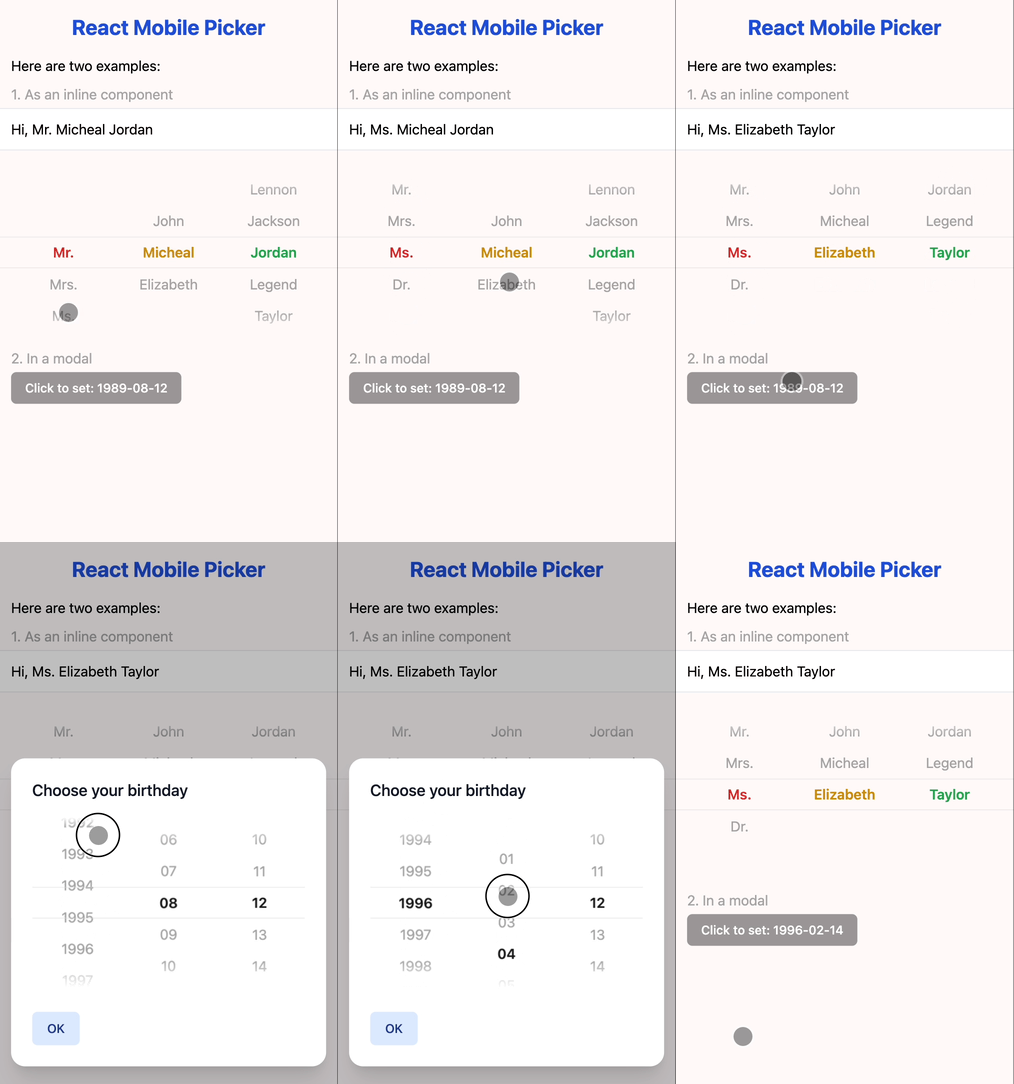 ## Preview

Scan this Qr in you mobile.
Or visit (in mobile or mobile simulator): [https://react-mobile-picker.vercel.app](https://react-mobile-picker.vercel.app)
## Installation
```bash
npm install react-mobile-picker
```
or
```bash
yarn add react-mobile-picker
```
## Basic usage
By design, React Mobile Picker is a [controlled component](https://react.dev/learn/sharing-state-between-components#controlled-and-uncontrolled-components), which means the selected items of the rendered element will always reflect the `value` prop. Every time you want to change the selected items, just modify the `value` prop.
```jsx
import { useState } from 'react'
import Picker from 'react-mobile-picker'
const selections = {
title: ['Mr.', 'Mrs.', 'Ms.', 'Dr.'],
firstName: ['John', 'Micheal', 'Elizabeth'],
lastName: ['Lennon', 'Jackson', 'Jordan', 'Legend', 'Taylor']
}
function MyPicker() {
const [pickerValue, setPickerValue] = useState({
title: 'Mr.',
firstName: 'Micheal',
lastName: 'Jordan'
})
return (
{Object.keys(selections).map(name => (
{selections[name].map(option => (
{option}
))}
))}
)
}
```
## Using render props
Each `Picker.Item` component exposes a `selected` state that can be used to customize the appearance of the item. This is called the [render props](https://legacy.reactjs.org/docs/render-props.html) technique.
```jsx
import { useState } from 'react'
import Picker from 'react-mobile-picker'
function MyPicker() {
const [pickerValue, setPickerValue] = useState({
name1: 'item1',
/* ... */
})
return (
{({ selected }) => (
/* Use the `selected` state to conditionally style the selected item */
## Preview

Scan this Qr in you mobile.
Or visit (in mobile or mobile simulator): [https://react-mobile-picker.vercel.app](https://react-mobile-picker.vercel.app)
## Installation
```bash
npm install react-mobile-picker
```
or
```bash
yarn add react-mobile-picker
```
## Basic usage
By design, React Mobile Picker is a [controlled component](https://react.dev/learn/sharing-state-between-components#controlled-and-uncontrolled-components), which means the selected items of the rendered element will always reflect the `value` prop. Every time you want to change the selected items, just modify the `value` prop.
```jsx
import { useState } from 'react'
import Picker from 'react-mobile-picker'
const selections = {
title: ['Mr.', 'Mrs.', 'Ms.', 'Dr.'],
firstName: ['John', 'Micheal', 'Elizabeth'],
lastName: ['Lennon', 'Jackson', 'Jordan', 'Legend', 'Taylor']
}
function MyPicker() {
const [pickerValue, setPickerValue] = useState({
title: 'Mr.',
firstName: 'Micheal',
lastName: 'Jordan'
})
return (
{Object.keys(selections).map(name => (
{selections[name].map(option => (
{option}
))}
))}
)
}
```
## Using render props
Each `Picker.Item` component exposes a `selected` state that can be used to customize the appearance of the item. This is called the [render props](https://legacy.reactjs.org/docs/render-props.html) technique.
```jsx
import { useState } from 'react'
import Picker from 'react-mobile-picker'
function MyPicker() {
const [pickerValue, setPickerValue] = useState({
name1: 'item1',
/* ... */
})
return (
{({ selected }) => (
/* Use the `selected` state to conditionally style the selected item */
Item 1
)}
{/* ... */}
{/* ... */}
)
}
```
## Support wheel scrolling
React Mobile Picker is designed to be used on mobile devices, but it can also support wheel scrolling on desktop browsers. To enable this feature, you can set the `wheelMode` prop to either `'natural'` or `'normal'`.
```jsx
import { useState } from 'react'
import Picker from 'react-mobile-picker'
function MyPicker() {
const [pickerValue, setPickerValue] = useState({
name1: 'item1',
/* ... */
})
return (
{/* ... */}
)
}
```
## Component API
### Picker
the main Picker container component.
| Prop | Default | Description |
| :---- | :------- | :----------- |
| value | N/A | `{ [name: string]: string }`
Selected value pairs |
| onChange | N/A | `(value: T, key: string) => void`
Callback function when the selected value changes |
| height | 216 | `number`
Height of the picker in `px` |
| itemHeight | 36 | `number`
Height of each item (that is each option) in `px` |
| wheelMode | `'off'` | `'off' \| 'natural' \| 'normal'`
Enable wheel scrolling on desktop browsers |
### Picker.Column
The wrapper component for each column.
| Prop | Default | Description |
| :---- | :------- | :----------- |
| name | N/A | `string`
The name should be one of the keys of the `value` in `Picker` component |
### Picker.Item
The wrapper component for each selectable option.
| Prop | Default | Description |
| :---- | :------- | :----------- |
| value | N/A | `string`
The value of the current option |
| Render Prop | Description |
| :----------- | :----------- |
| selected | `boolean`
Whether or not the current option is selected |
## More examples
You can check out the [examples](./examples) folder for more code samples. Or run this project locally:
```bash
git clone this repo
cd react-mobile-picker
pnpm i
pnpm run dev
point your browser to http://localhost:5173
```
## Author
Adcent Lei ([@adcentlei](https://twitter.com/adcentlei))
## License
MIT.