# OmniWalk
**An offline AI white cane for blind and low-vision pedestrians.** A camera and an AI accelerator on the cane name 152 kinds of object with their direction and distance. Two time-of-flight sensors catch obstacles and drop-offs, and a vibration motor alerts within a second of power-on, whether the computer has booted or not.
Working prototype built for the KSCDR Hackathon, tested indoors and on the bench. Walking needs no phone, no internet and no subscription. Only the optional AI assistant uses the internet, and it falls back to on-cane text reading without it.
[](https://adeliusa486.github.io/OmniWalk/live.html)
[](https://adeliusa486.github.io/OmniWalk/)
**Website:** https://adeliusa486.github.io/OmniWalk/ · **Live video:** https://adeliusa486.github.io/OmniWalk/live.html (the cane's camera with real-time object boxes whenever it is switched on)
[](https://github.com/adeliusa486/OmniWalk/actions/workflows/ci.yml)
[](https://github.com/adeliusa486/OmniWalk/actions/workflows/pages.yml)




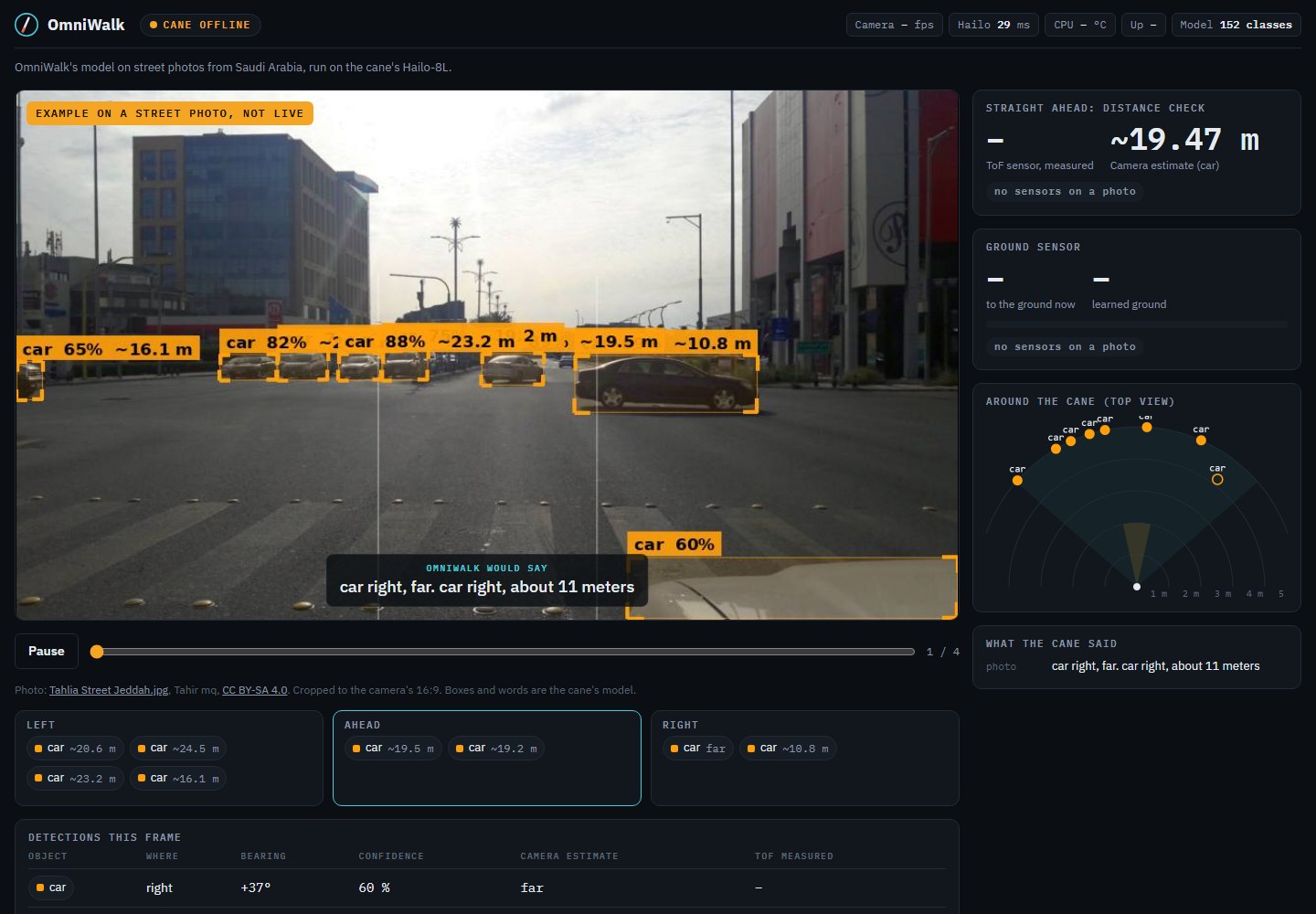
The dashboard with OmniWalk's model on a photo of Tahlia Street, Jeddah, run on the cane's Hailo-8L: every box, confidence and distance is the cane's own output. Photo: Tahir mq, CC BY-SA 4.0. Click to watch the cane live.
## Contents
- [What it does](#what-it-does)
- [Watch the cane live](#watch-the-cane-live)
- [Measured results](#measured-results)
- [System architecture](#system-architecture)
- [The one-button assistant](#the-one-button-assistant)
- [Hardware](#hardware)
- [Objects it recognises](#objects-it-recognises)
- [Model and training data](#model-and-training-data)
- [Operating the prototype](#operating-the-prototype)
- [Repository layout](#repository-layout)
- [Quality: tests and CI/CD](#quality-tests-and-cicd)
- [Troubleshooting](#troubleshooting)
- [Limitations](#limitations)
- [Roadmap](#roadmap)
- [License and data](#license-and-data)
- [Acknowledgements](#acknowledgements)
## What it does
| Feature | How | Status |
|---|---|---|
| Names objects with direction and distance | Camera and YOLO11s on a Hailo-8L: "chair ahead, 1.3 meters", "car left, about 4 meters" | Working |
| Obstacle alert by vibration | Forward ToF sensor on the ESP32. Pulses speed up as you get closer, silent beyond 1.5 m, solid under 0.4 m | Working |
| Drop-off, pothole and kerb alert | Down ToF sensor learns the ground and alarms on a sudden change: one long pulse and "Careful, drop ahead" | Working on the bench, tuning on walks open |
| Works before the computer has booted | The ESP32 safety loop runs on its own, first reading 0.81 s after power-on | Working |
| Anything unknown is still announced | Low-confidence or untrained objects become "obstacle" with direction and distance | Working |
| Describe the scene, answer a question, read text | One button. Gemini online, the cane's own detector and Tesseract OCR offline | Working |
| Says when it is broken | Spoken warnings for a dead camera, a lost sensor link or a ground sensor that cannot see the ground | Working |
| Live video on the website | Switch the cane on and its camera, real boxes, ToF and camera distances and speech log appear on the website by itself, in any browser | Working |
## Watch the cane live
**[adeliusa486.github.io/OmniWalk/live.html](https://adeliusa486.github.io/OmniWalk/live.html)** works in any browser, on any network:
- **Cane on:** about a minute after power-on the page shows the cane's camera live, with its own boxes, each object's bearing and distance, the forward ToF reading next to the camera's estimate, the ground sensor and everything the cane says. Nothing to type: the cane goes online by itself and the page finds it.
- **Cane off:** the page shows the same model on street photos from Saudi Arabia, and switches to live without a reload as soon as the cane comes on. [`live.html?example`](https://adeliusa486.github.io/OmniWalk/live.html?example) shows the examples at any time.
- **Same Wi-Fi as the cane:** `http://smartcane.local:8080` is the cane's own page, at the full camera rate.
- **Owner:** [admin.html](https://adeliusa486.github.io/OmniWalk/admin.html) ("Owner login" on the website). After logging in: the live view, the cane's Wi-Fi (join, forget) and Bluetooth (scan, pair, choose the earbuds). The password is checked on the cane itself. At a new place without Wi-Fi the cane opens its own network, **OmniWalk-Setup**, with the same page at `http://10.42.0.1:8080/admin`.
| | Measured 8 October 2026 |
|---|---|
| Pictures per second, same Wi-Fi | 9.8, every camera frame |
| Pictures per second, over the internet | 7.0 |
| Opening the page to live video | 3.2 s, no settings or token needed |
| A forged address posted to the relay | ignored: the page only follows addresses signed by the cane |
How it works: at boot the cane opens a Cloudflare tunnel (an outgoing connection, so no router setup, and it works on a phone hotspot) and posts the new address, signed with a key that never leaves the cane, to a public relay. The page reads the newest correctly signed address and connects. The camera view is drawn only while someone watches, so an unwatched dashboard costs no battery. Details: [docs/deployment.md](docs/deployment.md).
## Measured results
| Measurement | Result |
|---|---|
| Model accuracy, 27,906 validation images | mAP50 0.535, mAP50-95 0.376 |
| 408 street photos through the cane's camera path | 55 % named, 66 % noticed (40 % and 53 % before the 8 October fixes) |
| Hailo-8L inference per frame | 29 ms. Benchmark 38.7 FPS, the cane runs at 10 fps |
| ESP32 power-on to first sensor reading | 0.81 s |
| Pi boot to `systemd` ready | 5.9 to 9.4 s |
| ToF repeatability on the bench | stdev 1.04 mm and 1.17 mm |
| Live dashboard cost (detect.py) | about 10 % of one CPU core unwatched, 67 % of one core (the Pi 5 has four) while watched at 10 pictures a second |
| Live dashboard frame rate | 9.8 pictures a second on the same Wi-Fi, 7.0 over the internet |
Every number with its date and method: [docs/results.md](docs/results.md). The charts are generated by `docs/charts/make_charts.py`.
## System architecture
```mermaid
flowchart LR
subgraph ESP["ESP32 safety controller, works without the Pi"]
TOF1[ToF forward] --> LOOP[Safety loop]
TOF2[ToF down] --> LOOP
BTN[Button D33] --> LOOP
LOOP --> MOT[Vibration motor]
end
subgraph PI["Raspberry Pi 5 with AI HAT+"]
CAM[Camera IMX708] --> DET["detect.py
YOLO11s on Hailo-8L"]
DET --> SPK["speak_detect.py
what to say and when"]
SPK --> AST["assistant.py
Gemini or Tesseract"]
SPK --> DASH["demo_server.py
live dashboard"]
end
LOOP <-->|"USB serial, 20 Hz"| SPK
SPK --> EAR[Bluetooth earbuds]
DASH -.->|"Cloudflare tunnel, signed address"| WEB["Website live page, any browser"]
```
1. **Reflexes on the ESP32.** Both distance sensors, the motor and the button hang off an ESP32. It vibrates for obstacles and drop-offs on its own, so a slow boot or a crash on the Pi never silences the safety alerts.
2. **Vision on the Pi 5.** Each frame is turned upright, kept in R,G,B order and letterboxed into the model's 640x640 input. The Hailo-8L runs the 152-class detector in about 29 ms. Every object gets a bearing in degrees and a distance estimate from its size.
3. **Speech that respects attention.** A class must appear in 3 reports in a row before it is spoken. Each object has its own repeat timer, speech never queues, and drop-offs come first. The forward ToF supplies the measured distance for whatever is straight ahead.
Details: [docs/software.md](docs/software.md).
## The one-button assistant
One push button on the handle (ESP32 pin D33) runs the assistant. The cane checks the internet on every press and picks the mode by itself.
| Press | Online (Gemini) | Offline |
|---|---|---|
| **Short** | "Looking", then a description of the scene. One buzz, then it listens 5 s on the earbud microphone. Ask anything, for example "read the sign", and it answers from a fresh photo | Says at once what the cane's own detector sees, then reads any text with Tesseract |
| **Hold 1 s** (a short buzz says you can let go) | "Reading", then the text word for word | Tesseract reads the text on the cane |
| **Hold 1 s facing a Wi-Fi QR code** | Saves that Wi-Fi and joins it, then says "Connected to" and its name | The same, no internet needed |
## Hardware
| Part | Model |
|---|---|
| Computer | Raspberry Pi 5, 2 GB, with Active Cooler and 32 GB A2 microSD |
| AI accelerator | Raspberry Pi AI HAT+, Hailo-8L, 13 TOPS |
| Camera | Arducam B0310, Sony IMX708, 120° M12 lens |
| Safety controller | ESP32 DevKit V1 |
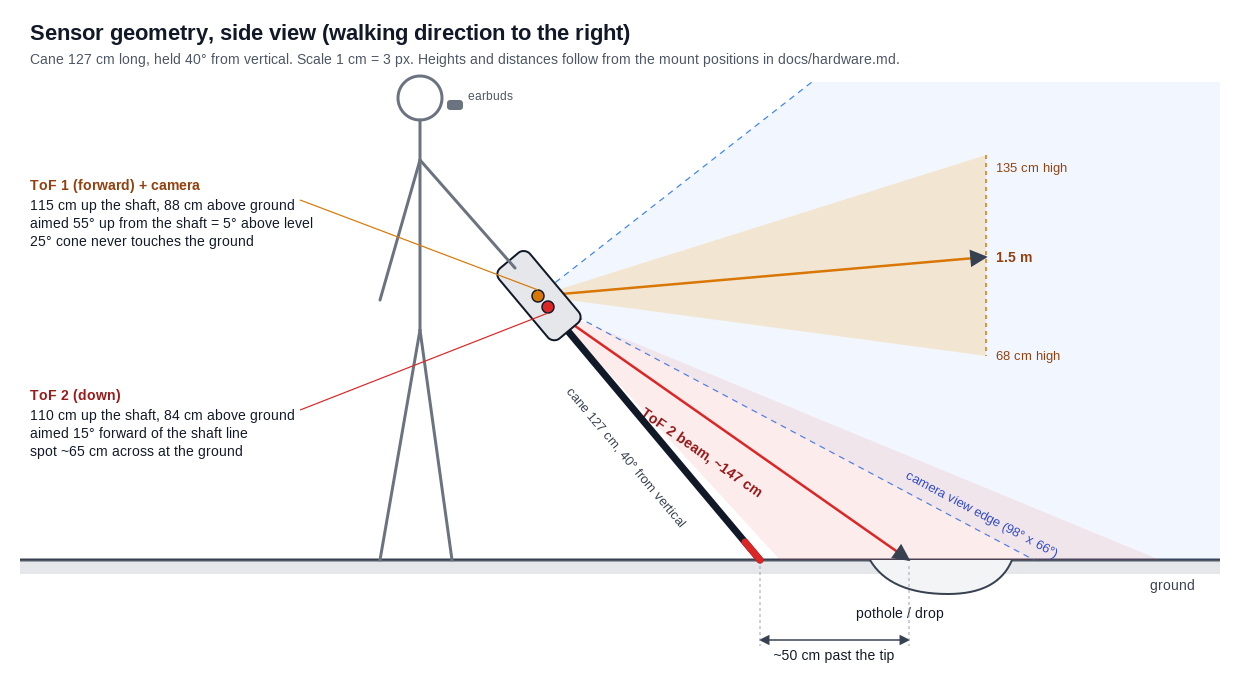
| Distance sensors | 2x ST VL53L0X time-of-flight: forward at 115 cm up the shaft, down at 110 cm |
| Feedback | Coin vibration motor module against the grip, Bluetooth earbuds |
| Control | 1 push button on the handle |
| Power | 10,000 mAh USB-C power bank. It must hold 5 V at 3 A or more ([docs/power.md](docs/power.md)) |
| Body | White cane, 124 to 127 cm |
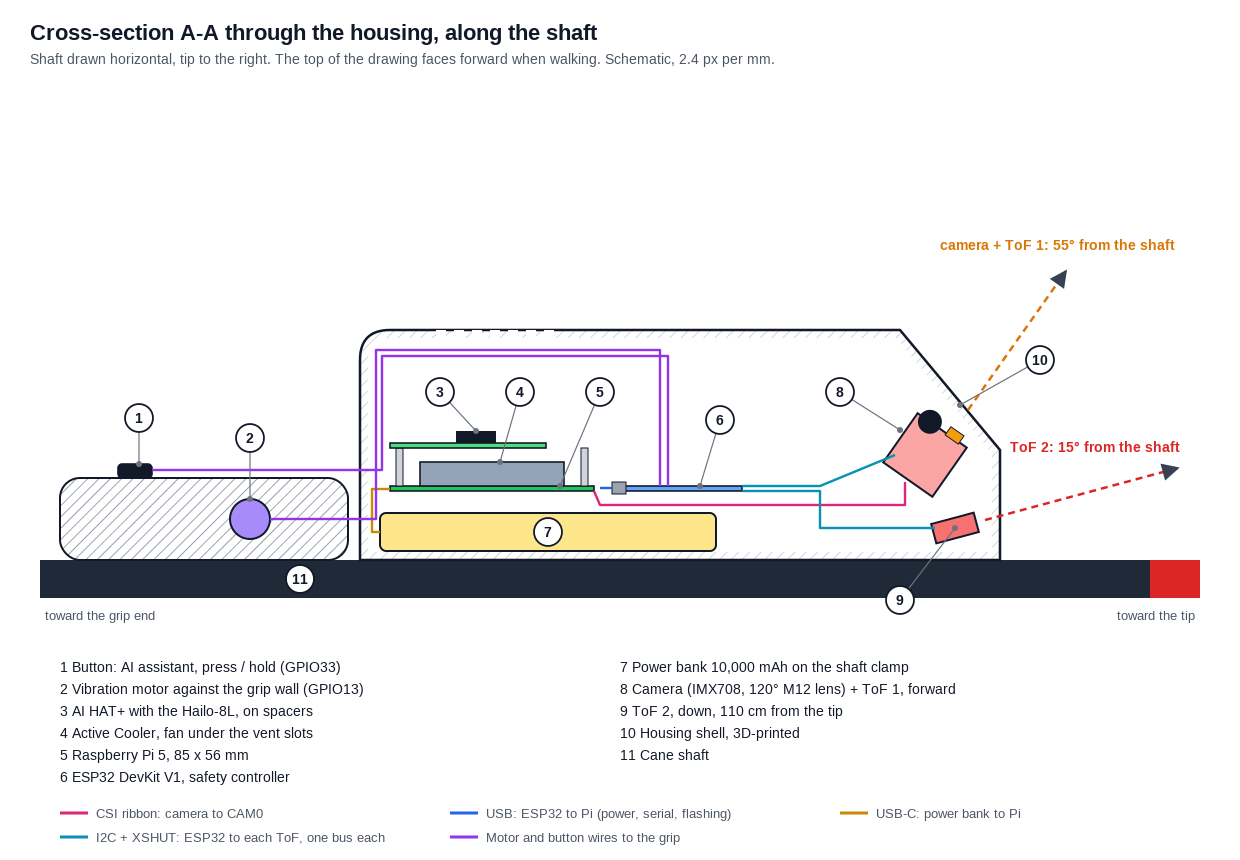
Wiring, mounting angles and bring-up checks: [docs/hardware.md](docs/hardware.md). Power behaviour and the brown-out fix: [docs/power.md](docs/power.md).
## Objects it recognises
The detector names 152 kinds of object, chosen for sidewalks, crossings and indoors. Anything it is unsure of is announced as "obstacle" with its direction and distance.
| Group | Objects |
|---|---|
| People and mobility (6) | **person**, child, cyclist, motorcyclist, **wheelchair**, **stroller** |
| Animals (8) | **dog**, **cat**, bird, **horse**, **cow**, **sheep**, goat, camel |
| Vehicles (14) | **car**, **bus**, truck, van, taxi, ambulance, **motorcycle**, bicycle, **e-scooter**, **skateboard**, **train**, golf cart, shopping cart, trailer |
| Ground hazards and level changes (14) | **open hole**, pothole, manhole, storm drain, stairs, escalator, curb, curb ramp, ramp, **speed bump**, sidewalk crack, rail track, tactile paving, **swimming pool** |
| Crossings, signals and signs (16) | crosswalk, **traffic light**, pedestrian signal, **crosswalk button**, stop sign, traffic sign, yield sign, do not enter sign, one way sign, pedestrian crossing sign, speed limit sign, construction sign, **sidewalk closed sign**, bus stop sign, exit sign, **wet floor sign** |
| Street furniture and obstacles (24) | pole, utility pole, street light, bollard, traffic cone, barrier, fence, barrel, fire hydrant, parking meter, bench, trash can, bike rack, mailbox, utility box, billboard, sidewalk sign, kiosk, fountain, sculpture, pillar, **ladder**, tent, potted plant |
| Buildings and entrances (6) | door, door handle, window, building, **elevator**, atm |
| Trees and plants (3) | tree, palm tree, plant |
| Furniture (20) | chair, stool, couch, **bed**, table, desk, coffee table, nightstand, chest of drawers, wardrobe, cabinet, shelf, bookcase, countertop, mirror, curtain, lamp, **ceiling fan**, pillow, **clock** |
| Bathroom and kitchen (12) | **toilet**, sink, **bathtub**, shower, refrigerator, **microwave**, oven, stove, **washing machine**, kettle, towel, toothbrush |
| Electronics (6) | **tv**, **laptop**, **keyboard**, **mouse**, remote, cell phone |
| Things you carry or find (23) | backpack, handbag, suitcase, umbrella, glasses, book, bottle, cup, can, box, plastic bag, tire, ball, toy, scissors, knife, fork, spoon, **bowl**, plate, banana, apple, orange |
**Bold**: reliable, mAP50 of 0.70 or more on the validation set. Accuracy, training examples and speech urgency for every object: [docs/objects.md](docs/objects.md).
## Model and training data
**smartcane152_v3** is YOLO11s trained on 263,857 images from COCO 2017, Open Images V7, Mapillary Vistas v2, the Mapillary Traffic Sign Dataset and 20 Roboflow Universe projects. Two teacher models added 517,087 pseudo-labels for classes each source never labelled, and two systematic errors were cleaned out before training. The best of 27 epochs (epoch 24) reached mAP50 0.536 on validation. It was compiled with the Hailo Dataflow Compiler 3.34 and runs on HailoRT 4.23.
| File | Use |
|---|---|
| `models/smartcane152_v3/smartcane152_v3_h8l.hef` | The model running on the cane (Hailo-8L), byte-identical to the deployed file |
| `models/smartcane152_v3/smartcane152_v3_best.pt` | PyTorch weights |
| `models/smartcane152_v3/smartcane152_v3.onnx` | ONNX export used for the Hailo compile |
| `data/merged_v2/` | Every final label, the human labels before pseudo-labelling, all added and removed boxes, counts per class and per source |
Dataset, training runs and compile settings: [docs/training.md](docs/training.md).
## Operating the prototype
1. **Power on.** The ESP32 safety loop starts within a second, before the Pi has booted.
2. **Wait for "Omni Walk ready"**, about 20 s after power-on. Speech goes to the paired earbuds.
3. **Walk.** Objects are spoken by urgency, obstacles straight ahead vibrate, drop-offs give one long pulse and a spoken warning.
4. **Press or hold the button** for the assistant (see above).
5. **To show it**, open the [live page](https://adeliusa486.github.io/OmniWalk/live.html) on any phone or laptop. The cane goes online by itself.
Live log on the cane: `sudo journalctl _SYSTEMD_USER_UNIT=smartcane.service -f`. Program details, service settings and maintenance tools: [docs/software.md](docs/software.md).
## Repository layout
```text
code/
detect.py camera -> Hailo-8L -> objects with direction and distance
speak_detect.py what to say and when, ESP32 link, assistant, service entry point
assistant.py one-button assistant: Gemini online, detector and Tesseract offline
esp32_link.py serial link to the ESP32, reopens itself after a stall
demo_server.py live dashboard server (state, frames, optional token)
demo_view.py draws the cane's boxes on the camera frame, only while watched
demo_dashboard.html the dashboard page, also the website's live.html
admin_dashboard.html the owner's page (website admin.html): login, live view, Wi-Fi, Bluetooth
admin_api.py its API on the cane: password, sessions, browser checks
wifi_net.py Wi-Fi through NetworkManager: scan, join, forget, setup hotspot
wifi_qr.py joins a Wi-Fi network from a QR code held up to the camera
wifi_hotspot.py opens the OmniWalk-Setup hotspot when no known Wi-Fi is in reach
bt_admin.py Bluetooth: paired devices, scan, pair, the earbuds the cane speaks through
esp32/cane_safety/ ESP32 firmware: sensors, ground watch, vibration, button
smartcane.service systemd user service that starts the cane at boot
smartcane-live.service puts the dashboard online at every boot (tools/live_tunnel.sh)
smartcane-hotspot.service runs wifi_hotspot.py
10-omniwalk-wifi.rules lets the cane manage Wi-Fi without sudo (polkit)
tests/ 99 simulation tests, no hardware needed
tools/ live_tunnel.sh, photo_demo.py, record_demo.py, probes, evaluation, verified flashing, backups
training/ dataset build, pseudo-labelling, training, validation, label export
models/smartcane152_v3/ HEF for the Hailo-8L, PyTorch weights, ONNX, class names
data/merged_v2/ training labels, counts per class and per source
docs/ hardware, software, deployment, training, objects, results, power, plan
web/ project website source and the street-photo examples (web/replay/)
.github/workflows/ CI (tests, firmware build, website build) and the website deployment
experiments/ test plans and raw results per development step
MEMORY.md engineering log, every session since 19 September 2026
```
## Quality: tests and CI/CD
```bash
cd ~/smartcane && python3 -m unittest tests/test_cane.py # on the cane: 99 tests
python -m pytest code/tests/test_cane.py -q # on a PC: 58 pass, 6 need a Linux pty
```
The tests simulate blind-user scenarios without a camera, Hailo, ESP32 or audio: naming of every safety class, urgency order, the obstacle fallback, distances in metres, the ToF consistency check, picture geometry, the real serial link on a pseudo-terminal, every assistant path and failure, and the dashboard server, including its token, the watch-only drawing, the wait for a new frame and the colour order of the drawn picture.
| Workflow | Runs on | What it does |
|---|---|---|
| [`ci.yml`](.github/workflows/ci.yml) | Every push and pull request | flake8 for syntax errors and undefined names, all 99 tests, the training-pipeline tests, an ESP32 firmware compile with the exact core and library versions on the cane, and a website build |
| [`pages.yml`](.github/workflows/pages.yml) | Every push to `main` that touches the website, docs or dashboard | Builds the website with `web/build.py` and deploys it to GitHub Pages |
## Troubleshooting
| Symptom | Cause and fix |
|---|---|
| It says "person right" when you stand in front of it | Directions are the cane's, not yours. Facing the cane, your left is its right. "Ahead" covers ±15° and anything crossing the centre line |
| It mostly says "person" or "obstacle" | Check the picture is upright with `tools/vision_probe.py --orient` while holding the cane as when walking, and that the room is lit. Below about 20 lux the exposure reaches 66 ms and movement blurs the frame |
| "Warning, distance sensors not responding" | The ESP32 link is silent. The cane reopens the port every few seconds. If it persists, check the USB cable and run `python3 esp32_link.py --send S` |
| The vibration is weak | Mount the motor against the grip wall where the hand presses. Test with `python3 esp32_link.py --send B100,1000` |
| The Pi LED turns red and it switches off | The power bank cannot hold 5 V under load. See [docs/power.md](docs/power.md) |
| No speech | `pactl info \| grep "Default Sink"` shows `auto_null`: the earbuds are disconnected. Run `bluetoothctl connect ` |
| The live page shows the street examples although the cane is on | It is not online yet: allow about 1 minute after power-on (the page goes live by itself), and check it has Wi-Fi with internet. On the cane: `systemctl --user status smartcane-live` |
| It does not join Wi-Fi from a QR code | Hold the code steady, filling more of the view. A code on a laptop screen or printed large reads best. "Code not readable" means it saw a code but could not decode it |
## Limitations
- Indoor-tested prototype, not yet tested by blind users or on a long street walk. Not a medical device, and not a replacement for the white cane technique or orientation and mobility training.
- Weak classes (curb, crosswalk, manhole, pole, desk, cabinet) are often heard as "obstacle". The model also makes false detections, for example a plain wall labelled "bathtub" indoors, or the bollard in the KFUPM footpath example labelled "fire hydrant" at 34 % (spoken as "obstacle", since names need 35 %).
- The VL53L0X reaches about 2 m indoors, much less in sunlight, and does not see glass reliably.
- Without an IMU, swinging the cane changes the ground distance, so the drop-off thresholds still need tuning on real walks.
- Bluetooth audio drops out at times. A wired headset is planned.
- The live video is public while the cane is on: anyone with the page sees what the camera sees, including the room it is in. Over the internet the picture comes at about 7 a second, against 10 on the same Wi-Fi.
## Roadmap
The full plan, with a pass test for each item, is in [docs/implementation-plan.md](docs/implementation-plan.md): a power path that holds 5 V, a motor you feel while walking, ToF calibration, drop-off tuning from recorded walks plus an IMU, wired audio, a recompile with letterboxed calibration images, more data for weak classes, and testing with blind users.
## License and data
Code, firmware, documentation and figures: [MIT](LICENSE), except the street-photo examples (`web/replay/*.jpg` and `docs/figures/live_dashboard.jpg`), which are derived from Wikimedia Commons photos and stay under [CC BY-SA 4.0](https://creativecommons.org/licenses/by-sa/4.0): Tahlia Street Jeddah and Jeddah Corniche 24 by Tahir mq, Sidewalk in KFUPM 1 and 2 by AhmadElq. Training labels in `data/` keep the licences of their source datasets, two of which are non-commercial: see [data/LICENSE.md](data/LICENSE.md).
## Acknowledgements
COCO, Open Images V7, Mapillary Vistas, the Mapillary Traffic Sign Dataset and the Roboflow Universe authors for the training data. Ultralytics for YOLO11. Hailo for HailoRT and the Dataflow Compiler. Raspberry Pi for Picamera2. Pololu for the VL53L0X library. Cloudflare for the tunnel and ntfy.sh for the relay behind the live video. Tahir mq and AhmadElq for the street photos on Wikimedia Commons.


