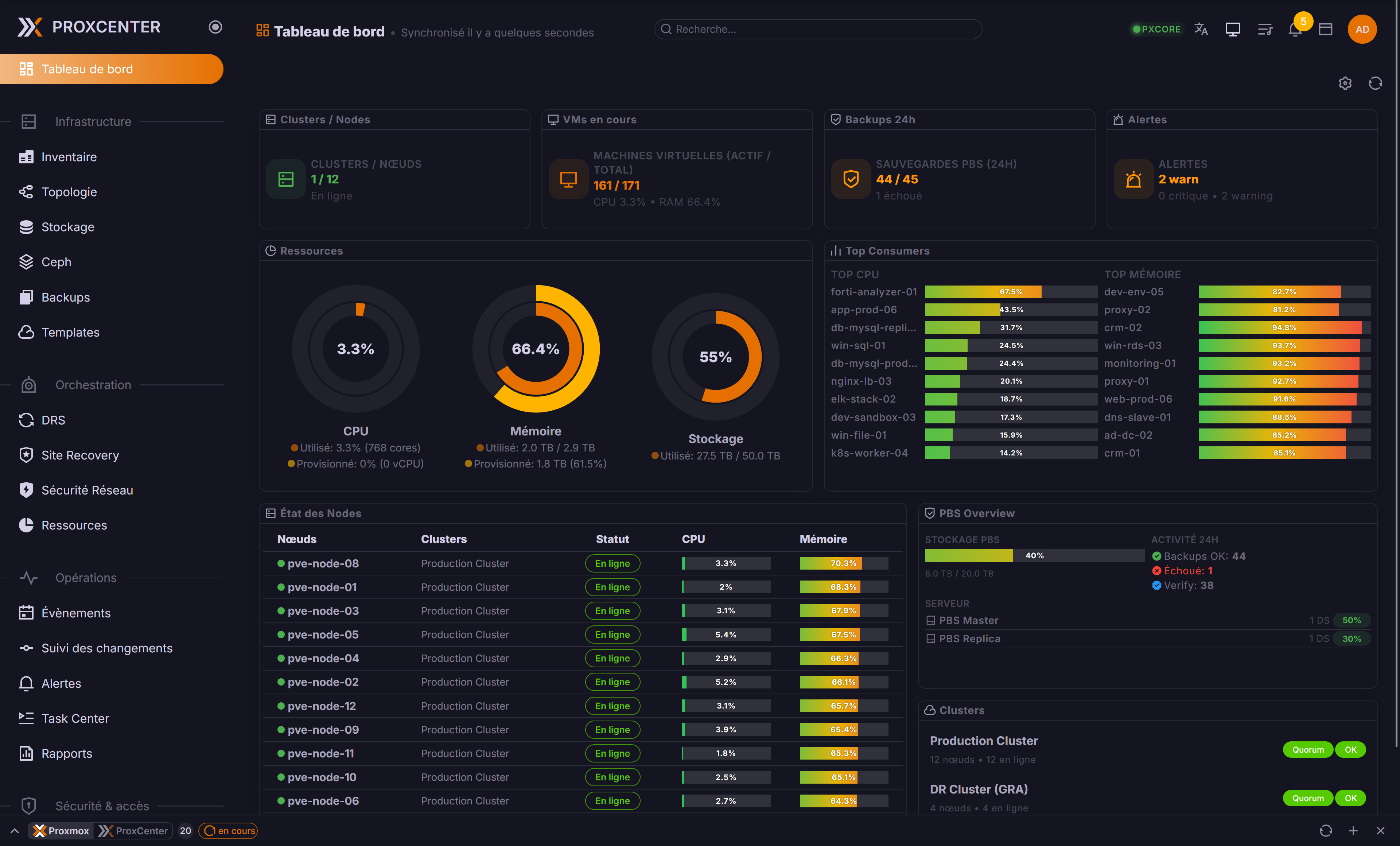
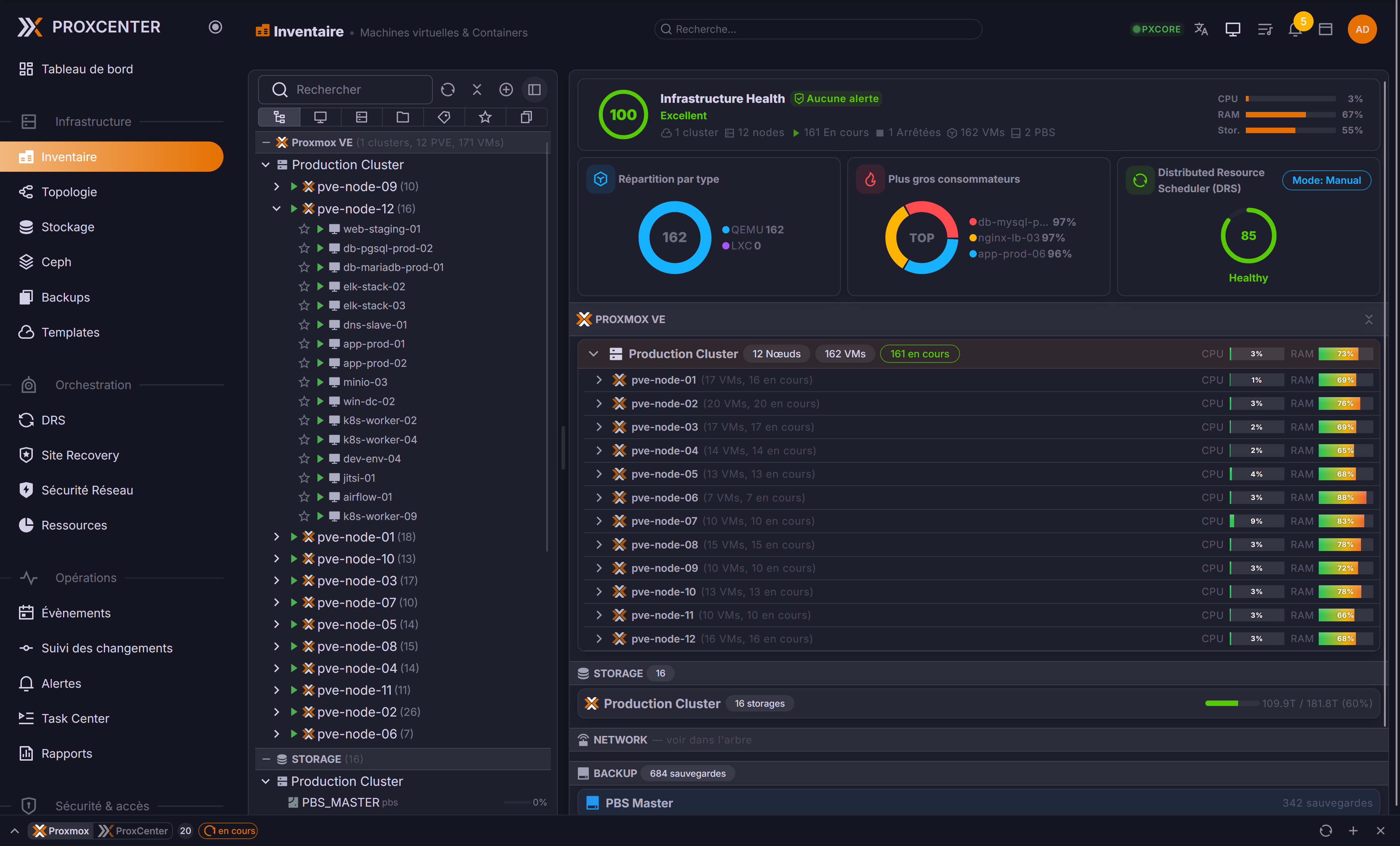
ProxCenter is a modern web interface for monitoring, managing, and optimizing Proxmox VE infrastructure. Multi-cluster management, cross-hypervisor migration, workload balancing, and more, all from a single pane of glass.
---
## Requirements
- **Host**: Linux with Docker Engine 24+ and Docker Compose v2
- **Sizing**: see the matrix below, 2 vCPU, 4 GB RAM and 40 GB disk at minimum
- **Ports**: 3000 inbound, outbound to Proxmox VE 8006 and Proxmox Backup Server 8007
- **Proxmox**: Proxmox VE 8.x or 9.x
### Sizing
One ProxCenter instance (frontend, orchestrator and PostgreSQL on the same host) per infrastructure size:
| Infrastructure | Proxmox nodes | Guests (VMs + CTs) | vCPU | RAM | Disk |
|---|---|---|---|---|---|
| 🏠 Small | up to 50 | up to 1,500 | 2 | 4 GB | 40 GB |
| 🏢 Medium | up to 150 | up to 4,500 | 4 | 8 GB | 80 GB |
| 🏭 Large | up to 300 | up to 9,000 | 8 | 16 GB | 150 GB |
| 🌐 Very large | up to 500 | up to 15,000 | 8 | 16 GB | 250 GB |
- Disk grows with metrics history, about 90 MB per node at the default retention of 14 days.
- Give the host dedicated CPU rather than a heavily shared one: a starved host can miss the first-start health checks.
High availability adds its own sizing and network prerequisites, listed in the [documentation](https://docs.proxcenter.io/operations/ha-prerequisites).
---
## Quick Start
```bash
# Community Edition (Free)
curl -fsSL https://proxcenter.io/install/community | sudo bash
# Enterprise Edition
curl -fsSL https://proxcenter.io/install/enterprise | sudo bash -s -- --token YOUR_TOKEN
```
The installer sets up Docker, the Compose stack, PostgreSQL and the persistent volumes under `/opt/proxcenter`. When it finishes, open `http://your-server:3000` and create the first admin account.
Running behind a reverse proxy? Enable the *"Behind reverse proxy"* toggle in the connection settings, to prevent failover from switching to the internal node IPs.
---
## Features
| Feature | Community | Enterprise |
|---|:---:|:---:|
| Multi-cluster management | ✅ | ✅ |
| Modular dashboard (drag-and-drop widgets) | ✅ | ✅ |
| Advanced VM inventory | ✅ | ✅ |
| Unified storage view | ✅ | ✅ |
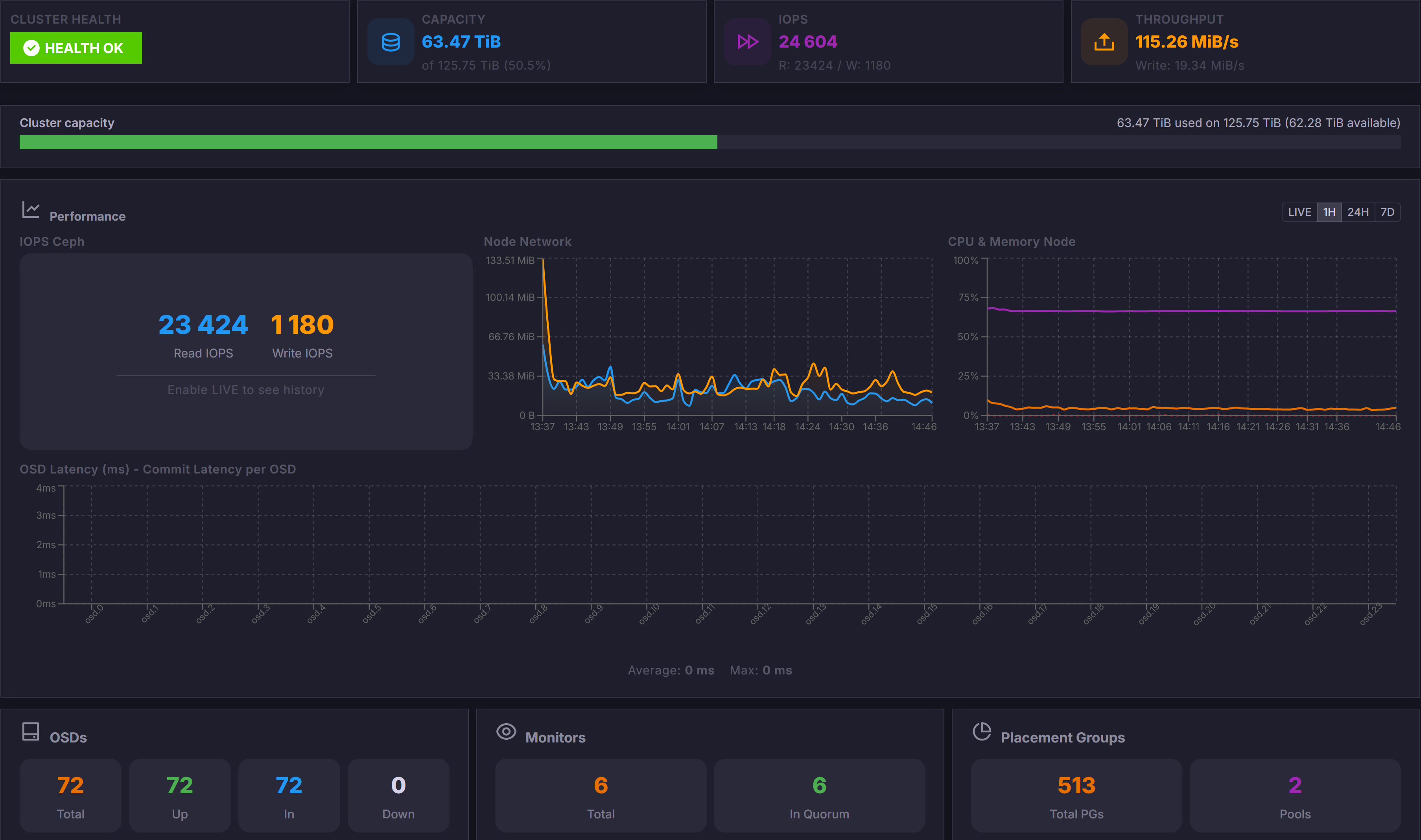
| Real-time Ceph monitoring | ✅ | ✅ |
| PBS multi-server management | ✅ | ✅ |
| In-browser consoles (noVNC, SPICE) | ✅ | ✅ |
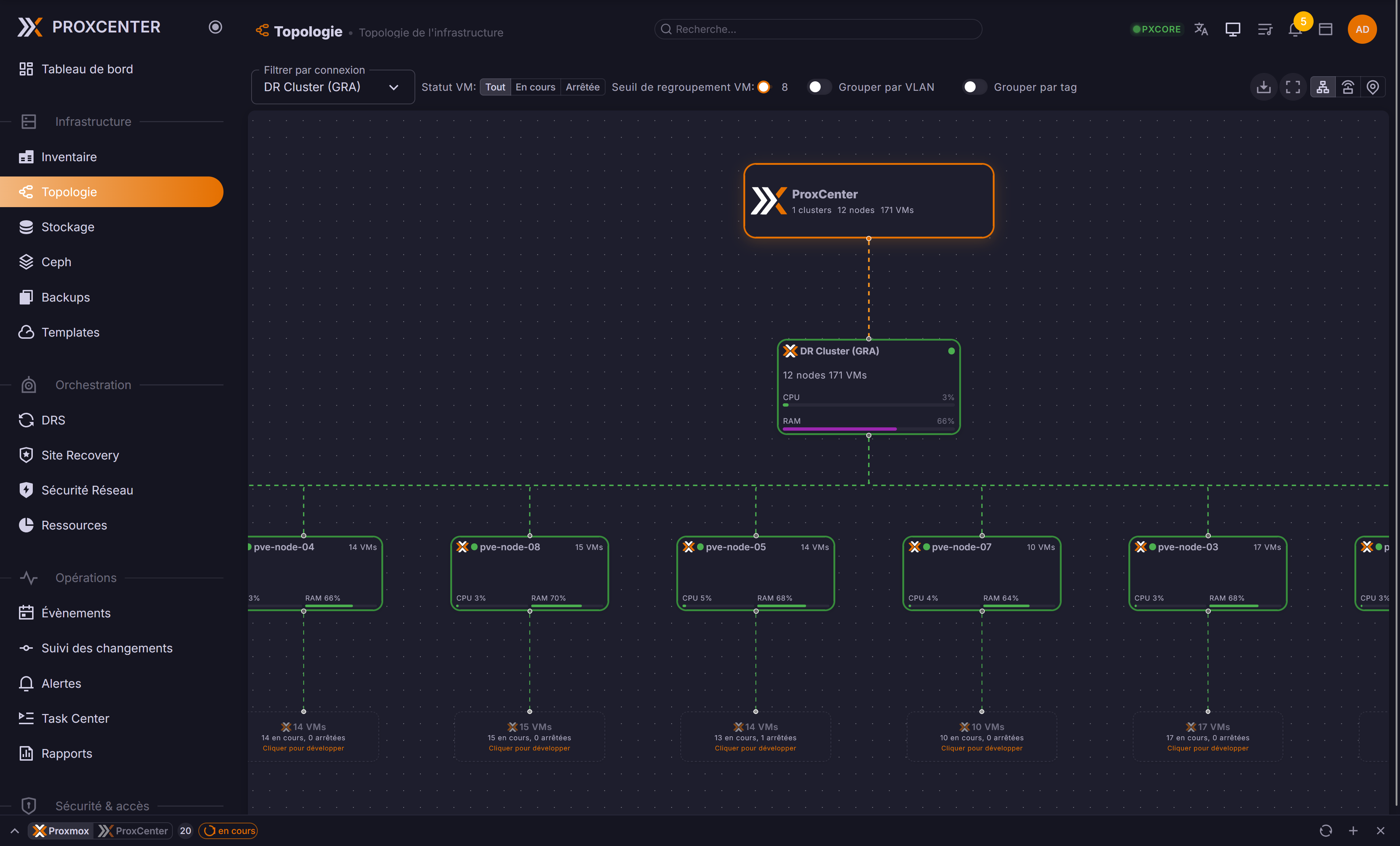
| Network topology map | ✅ | ✅ |
| Cloud-Init templates | ✅ | ✅ |
| Integrated IPAM | ✅ | ✅ |
| Proxmox firewall rules (cluster, node, guest) | ✅ | ✅ |
| Events & audit logs | ✅ | ✅ |
| Self-hosted / on-premise | ✅ | ✅ |
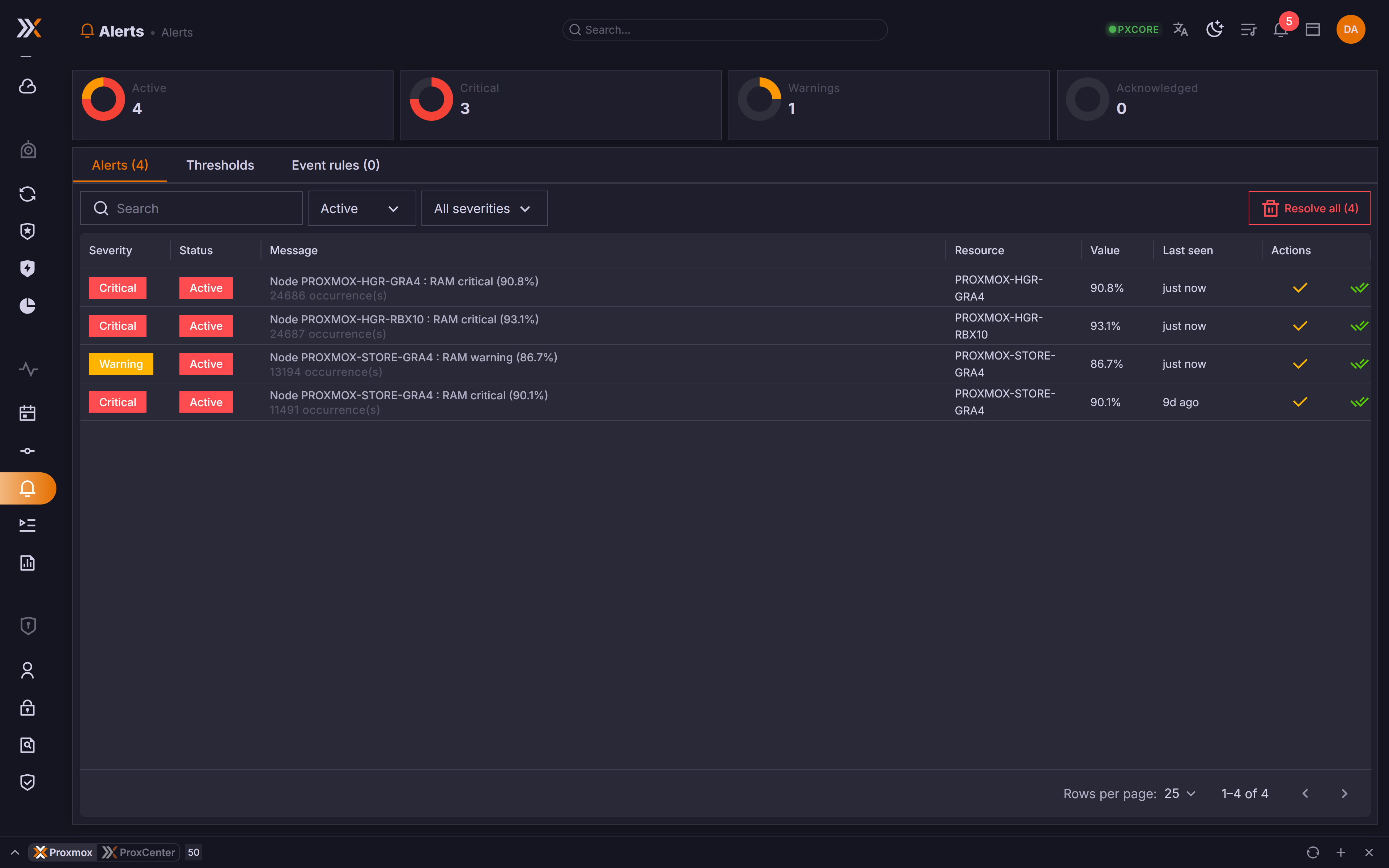
| Alerts (dashboard widgets in Community, rules, routing and notifications in Enterprise) | 🟡 | ✅ |
| Cross-cluster migration | ❌ | ✅ |
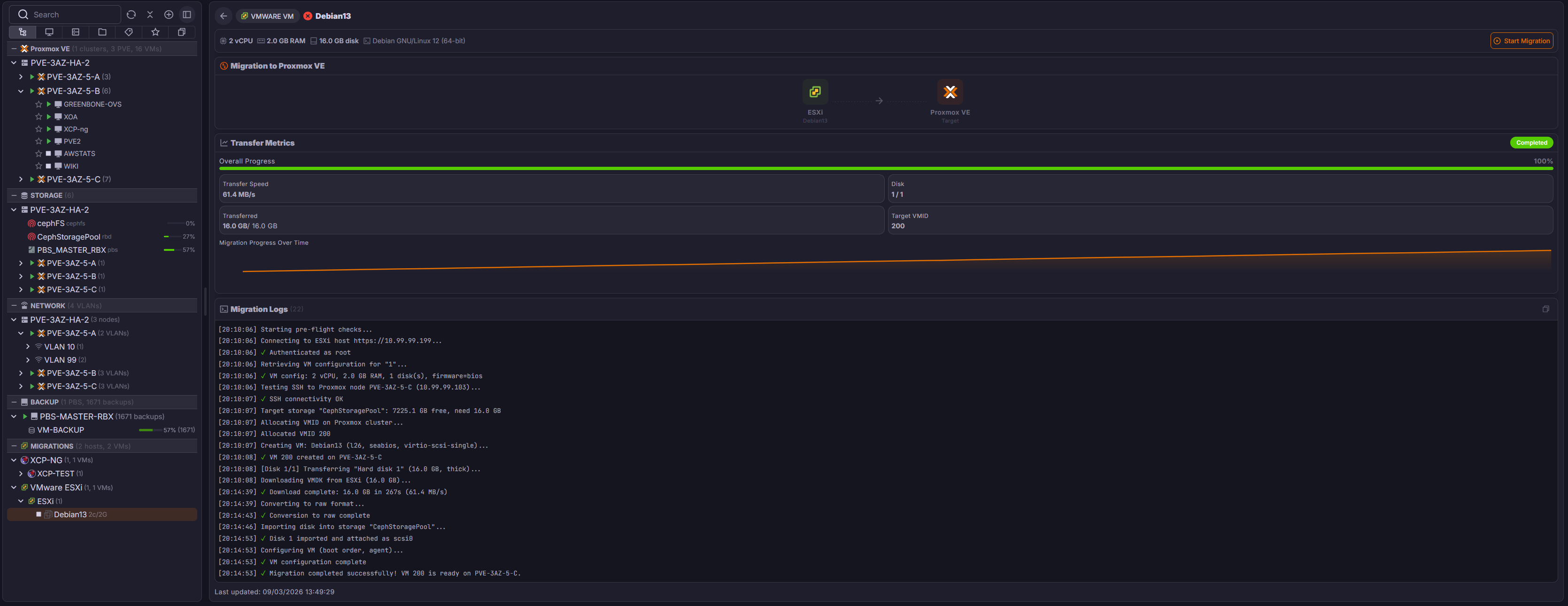
| Hypervisor migration (VMware ESXi, XCP-ng, Nutanix, Hyper-V) | ❌ | ✅ |
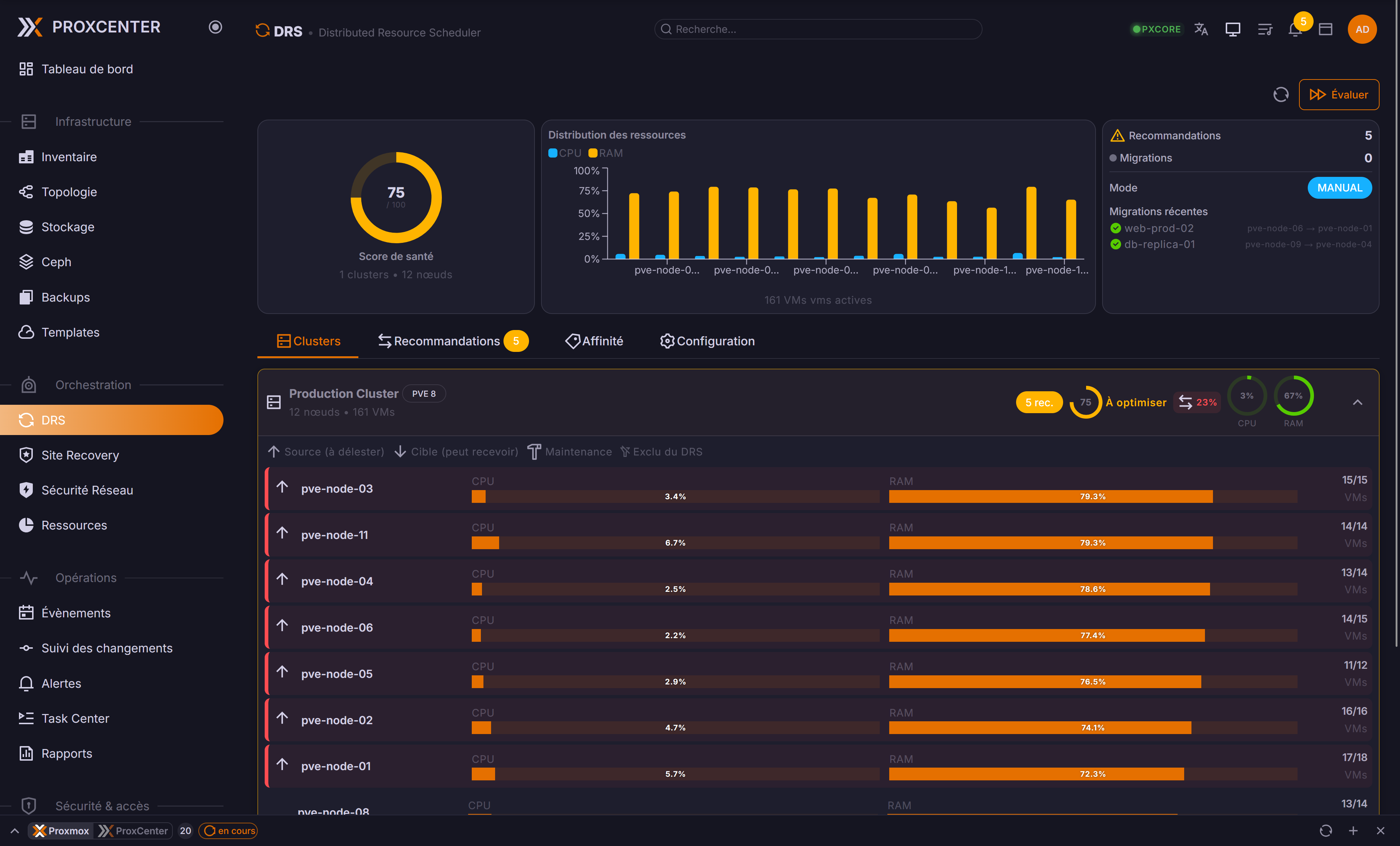
| DRS load balancing | ❌ | ✅ |
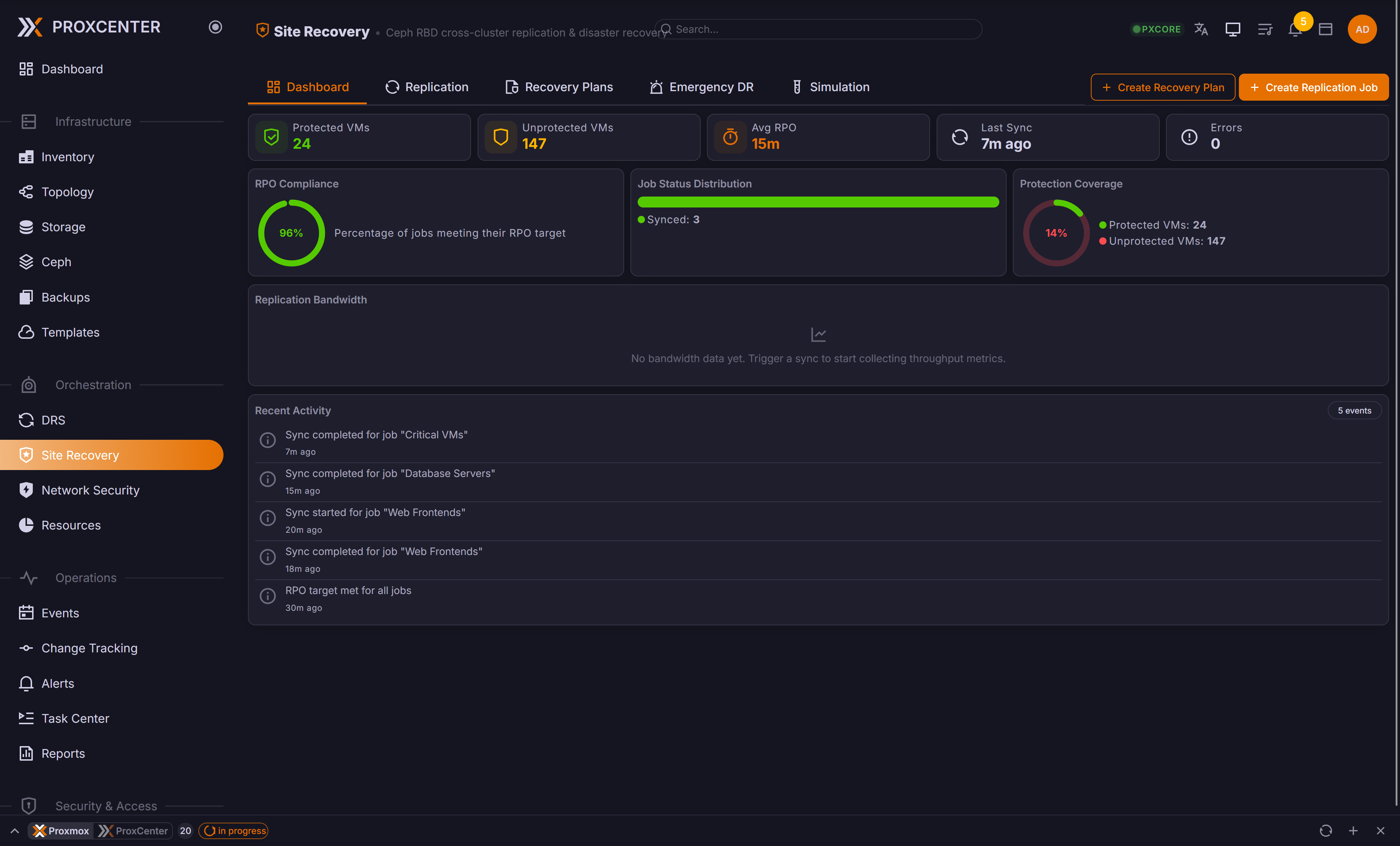
| Site Recovery (Ceph cross-cluster replication) | ❌ | ✅ |
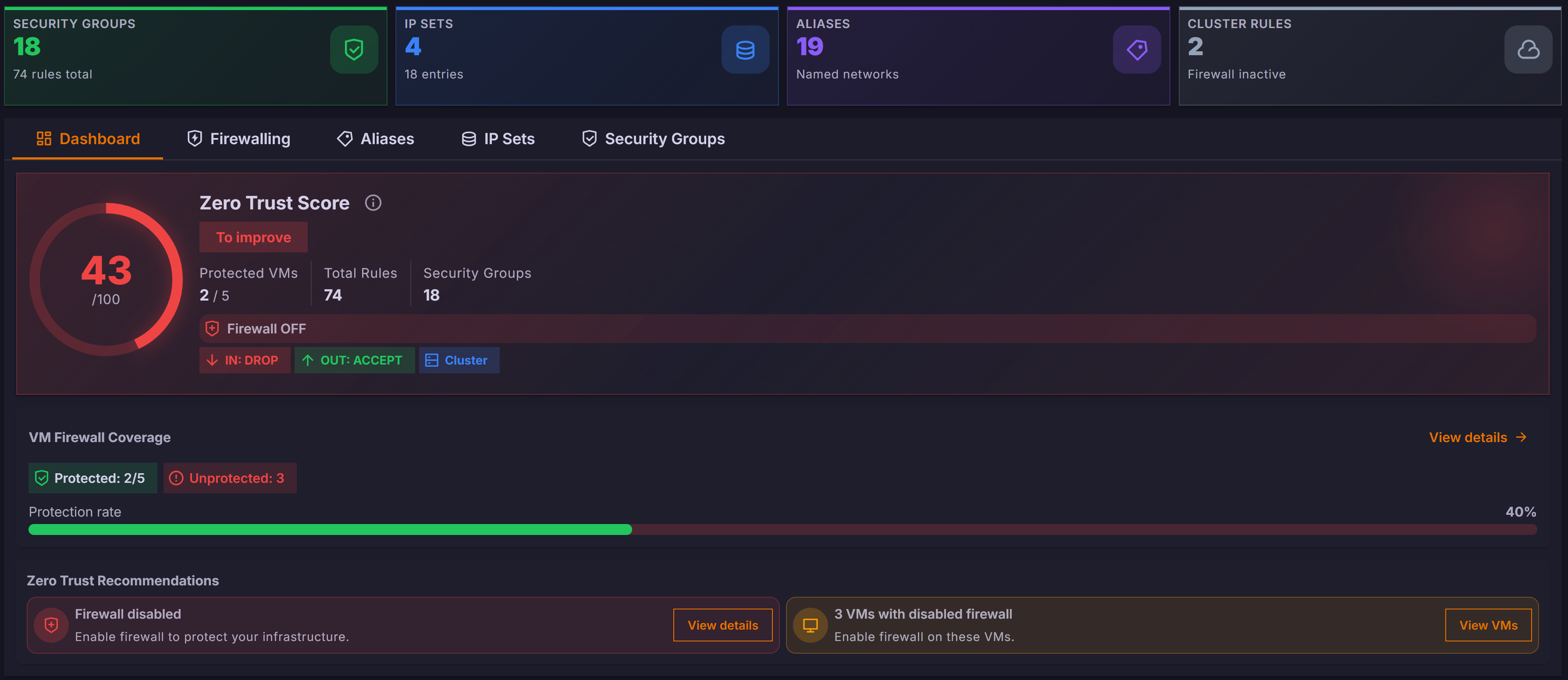
| Micro-segmentation | ❌ | ✅ |
| sFlow network flow analysis | ❌ | ✅ |
| Rolling updates | ❌ | ✅ |
| CVE vulnerability scanning | ❌ | ✅ |
| Compliance auditing | ❌ | ✅ |
| Change tracking & configuration drift | ❌ | ✅ |
| AI analytics & predictions | ❌ | ✅ |
| Green IT metrics | ❌ | ✅ |
| Custom infrastructure reports | ❌ | ✅ |
| Task center | ❌ | ✅ |
| Syslog / SIEM forwarding | ❌ | ✅ |
| RBAC + LDAP / AD | ❌ | ✅ |
| OIDC SSO (Keycloak, Entra ID, Okta, Auth0) | ❌ | ✅ |
| Virtual Data Centers (vDC) & tenant self-service portal | ❌ | ✅ |
| Full white-label (MSP branding) | ❌ | ✅ |
| ProxCenter HA: highly available control plane (3 nodes, VIP failover) | ❌ | ➕ |
| REST API (service-account tokens) | ❌ | ➕ |
✅ included · 🟡 partial · ❌ not included · ➕ paid add-on on top of Enterprise
See the [documentation](https://docs.proxcenter.io/) for the full feature list and the Community vs Enterprise breakdown.
---
## Screenshots
Multi-cluster Inventory
DRS Load Balancing
Hypervisor Migration
Real-Time Ceph Monitoring
Site Recovery
Multi-channel Alerts
Zero Trust Network Security
Network Topology Map
---
## Architecture
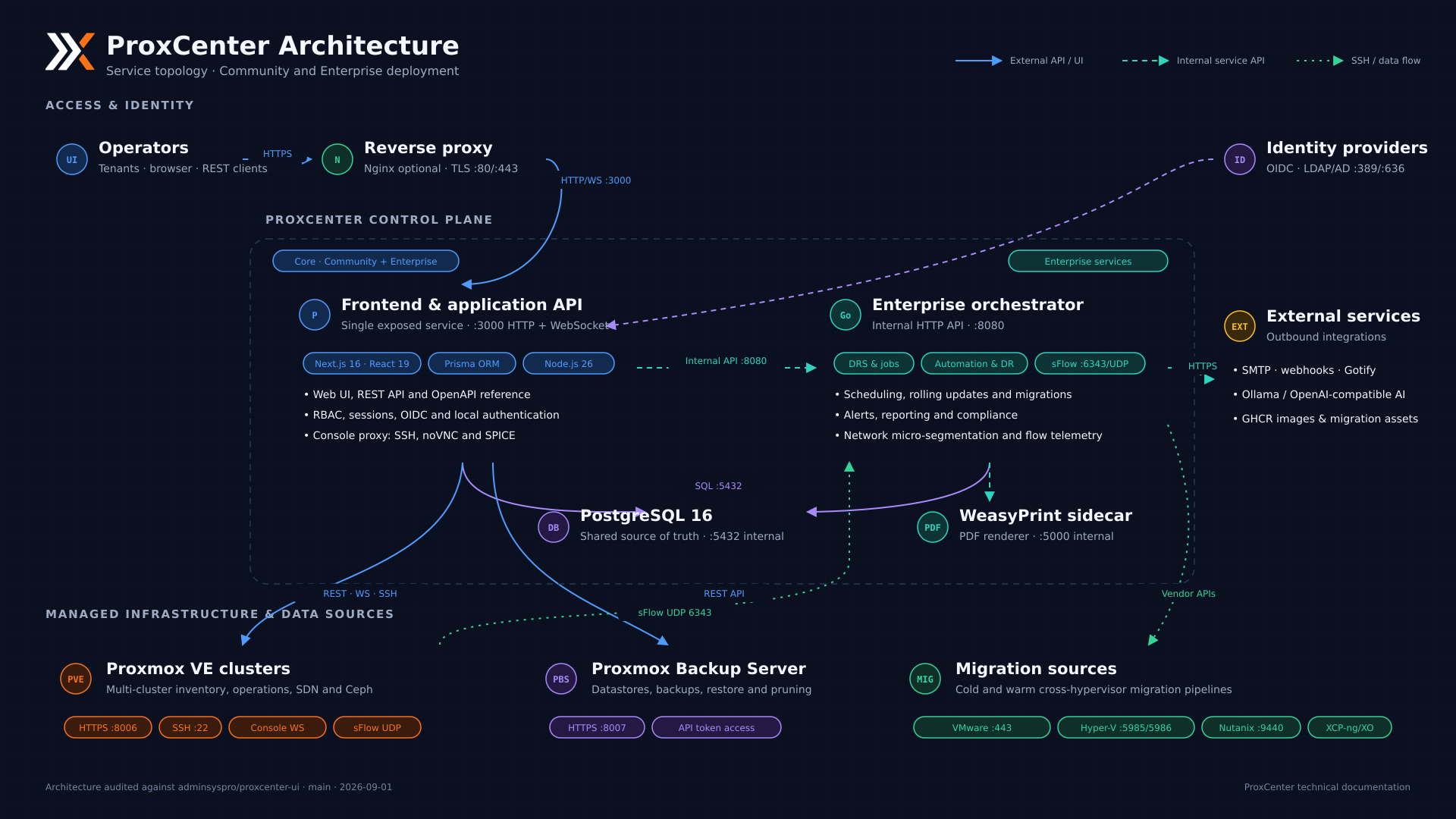
- **Single exposed port** (3000): HTTP and WebSocket served by one process, with Nginx optional in front for TLS
- **PostgreSQL** is the only source of truth, and schema migrations run at startup
- **Enterprise** adds the Go orchestrator (DRS, jobs, alerts, reports, flow telemetry) and the WeasyPrint sidecar for PDF rendering, both kept on the internal network
- Proxmox VE, Proxmox Backup Server, and the migration sources are reached outbound, with no agent to deploy
### High Availability *(Enterprise)*
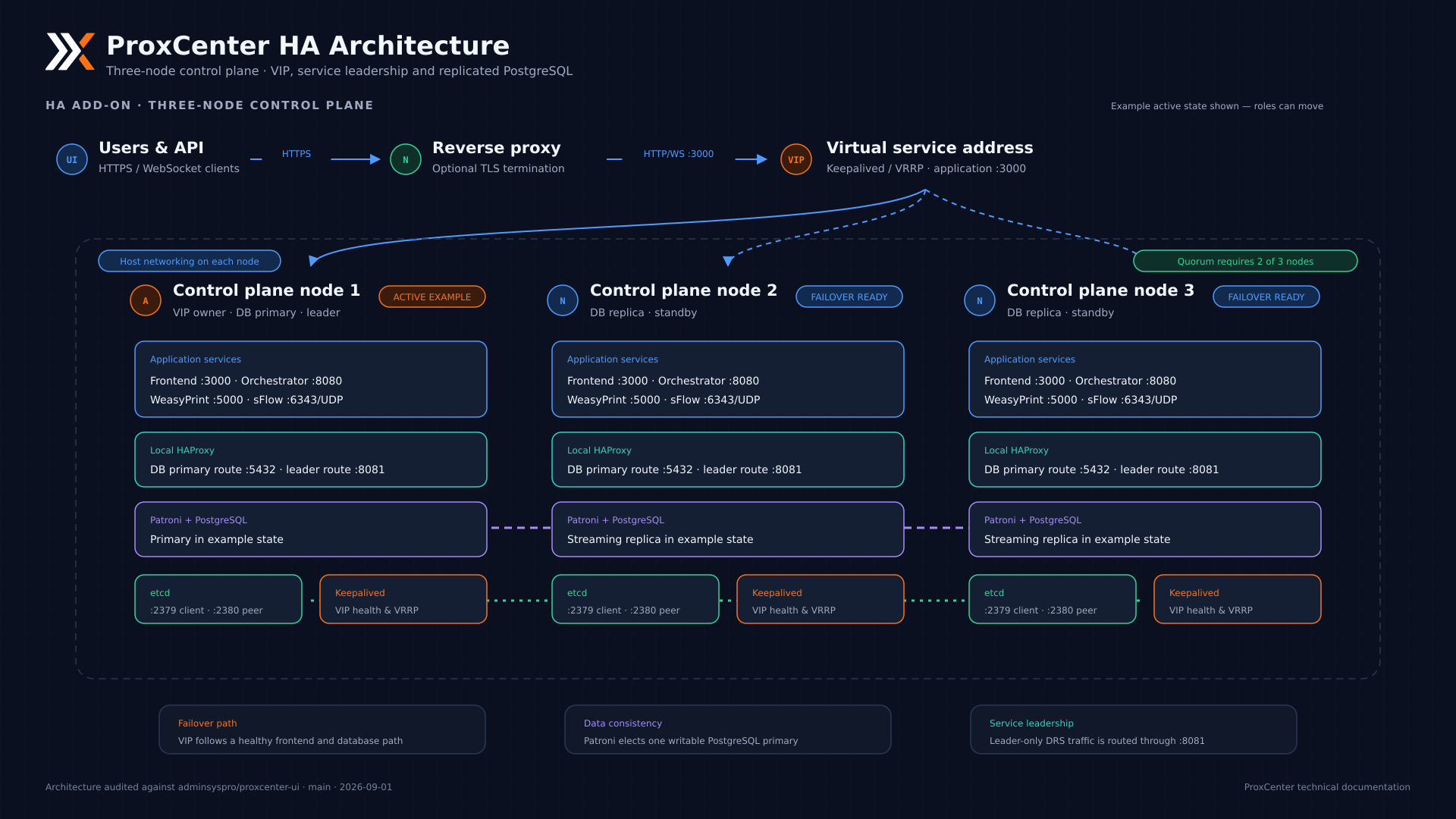
- Three nodes behind a **Keepalived VIP**, with quorum on 2 of the 3 nodes
- PostgreSQL replicated by **Patroni**, which elects the single writable primary through etcd
- A local **HAProxy** on every node routes database traffic to the current primary and leader-only traffic, DRS included, to the elected orchestrator
- Converting an existing single-node install is driven by the wizard in *Settings > High Availability*, see the [HA prerequisites](https://docs.proxcenter.io/operations/ha-prerequisites)
---
## Upgrade
Pull the new images and restart the stack:
```bash
cd /opt/proxcenter
docker compose pull
docker compose up -d
```
Schema migrations run automatically on startup. Nothing else is required for a Community install.
Enterprise: when a release adds a setting
`docker compose pull` refreshes the images, never `docker-compose.yml`, and the shipped Compose files pass their environment through an explicit `environment:` list. A setting introduced by a newer release therefore never reaches the container on a pull-only update, whatever `/opt/proxcenter/.env` holds. Re-run the installer to refresh the Compose file:
```bash
curl -fsSL https://proxcenter.io/install/enterprise | sudo bash -s -- --token YOUR_TOKEN
```
It keeps your secrets, your customised `NEXTAUTH_URL` and `APP_URL`, and your license key, leaves the data untouched, then pulls and recreates only the containers whose environment changed. An install that pinned a version in `.env` has to pass it again with `--version`, since a re-run otherwise resets it to `latest`.
**High availability**: the three nodes run the same Compose file, so the same two commands apply per node. Upgrade one node at a time and keep the version identical across the cluster.
**Coming from v1.3.x or earlier**: SQLite support was removed in v1.4.0 and there is no in-place migration to PostgreSQL. Follow [Upgrade to v1.4](https://docs.proxcenter.io/getting-started/upgrade-v1-4) for the cutover.
Checking the result:
```bash
cd /opt/proxcenter
docker compose ps # Service status
docker compose logs -f # Follow the logs
docker compose restart # Restart the stack
```
---
## Build from source
The Docker install above is the supported path. Building by hand suits hosts without Docker, such as an LXC container, and covers the Community Edition only: the Enterprise features need the closed-source orchestrator.
Build steps
You need Node.js 22.12 or later, PostgreSQL 16 or later with an empty database, and **4 GB of RAM for the build**. The running application needs far less, around 300 MB.
```bash
VERSION=vX.Y.Z # the release to install
mkdir -p /opt/proxcenter && cd /opt/proxcenter
curl -fsSL https://github.com/adminsyspro/proxcenter-ui/archive/refs/tags/$VERSION.tar.gz | tar xz --strip-components=1
cd frontend
npm ci --legacy-peer-deps --ignore-scripts
npm run build:icons
npx prisma generate
PROXCENTER_SKIP_TYPECHECK=1 npm run build
```
`PROXCENTER_SKIP_TYPECHECK=1` skips the TypeScript check of `next build`. That check needs about 3 GB of heap on top of the compiler, and CI has already run it on every released tag. Keep it on when you build modified sources, with about 8 GB of RAM and `NODE_OPTIONS=--max-old-space-size=4096`.
Create the environment file, for example `/opt/proxcenter_data/.env`, readable by root only:
```bash
NODE_ENV=production
DATABASE_URL=postgresql://proxcenter:PASSWORD@localhost:5432/proxcenter?schema=public
APP_SECRET=... # openssl rand -base64 32
NEXTAUTH_SECRET=... # openssl rand -base64 32
NEXTAUTH_URL=http://your-server:3000
APP_URL=http://your-server:3000
```
Apply the schema, seed the default tenant and roles, then start the server from the `frontend` directory:
```bash
set -a && . /opt/proxcenter_data/.env && set +a
npx prisma migrate deploy
npx prisma db seed
node start.js # listens on 0.0.0.0:3000, override with PORT and HOSTNAME
```
Run `node start.js` under a service manager, such as a systemd unit with `WorkingDirectory=/opt/proxcenter/frontend` and `EnvironmentFile=/opt/proxcenter_data/.env`. To upgrade, fetch the new tag, repeat the build, run `npx prisma migrate deploy` and restart the service. The seed is idempotent and safe to run again.
---
## Security
Automated scanning via **CodeQL**, **Trivy**, and **Dependabot**. Report vulnerabilities to [security@proxcenter.io](mailto:security@proxcenter.io).
## Star History
## License
- **Community**: Free for personal and commercial use
- **Enterprise**: Commercial license
## Support
- Community: [GitHub Issues](https://github.com/adminsyspro/proxcenter-ui/issues)
- Enterprise: [support@proxcenter.io](mailto:support@proxcenter.io)