# AetherSDR
**A cross-platform, open-source client for FlexRadio Systems transceivers**
[](https://github.com/aethersdr/AetherSDR/actions/workflows/ci.yml)
[](https://www.gnu.org/licenses/gpl-3.0)
[](https://en.cppreference.com/w/cpp/20)
[](https://www.qt.io/)
[](https://github.com/aethersdr/AetherSDR/commits/main)
AetherSDR brings full FlexRadio operation to Linux, macOS, and Windows — each a native build, no Wine or virtual machines. A native aarch64 build also runs on Raspberry Pi and other embedded ARM devices. Built from the ground up with Qt6 and C++20, it speaks the SmartSDR protocol natively and aims to replicate the full SmartSDR experience.
**Current version: 26.9.2** — CalVer (`YY.M.patch[.hotfix]`). | [Download](https://github.com/aethersdr/AetherSDR/releases/latest) | [Discussions](https://github.com/aethersdr/AetherSDR/discussions) | [What's New](https://github.com/aethersdr/AetherSDR/releases)
> **Native builds for Linux, macOS, and Windows** — Linux AppImage (x86-64 + aarch64), macOS DMG (Apple Silicon + Intel), Windows installer and portable ZIP. Every platform is built, tested in CI, and released together.
Native. Open. Yours.
---
## Highlights
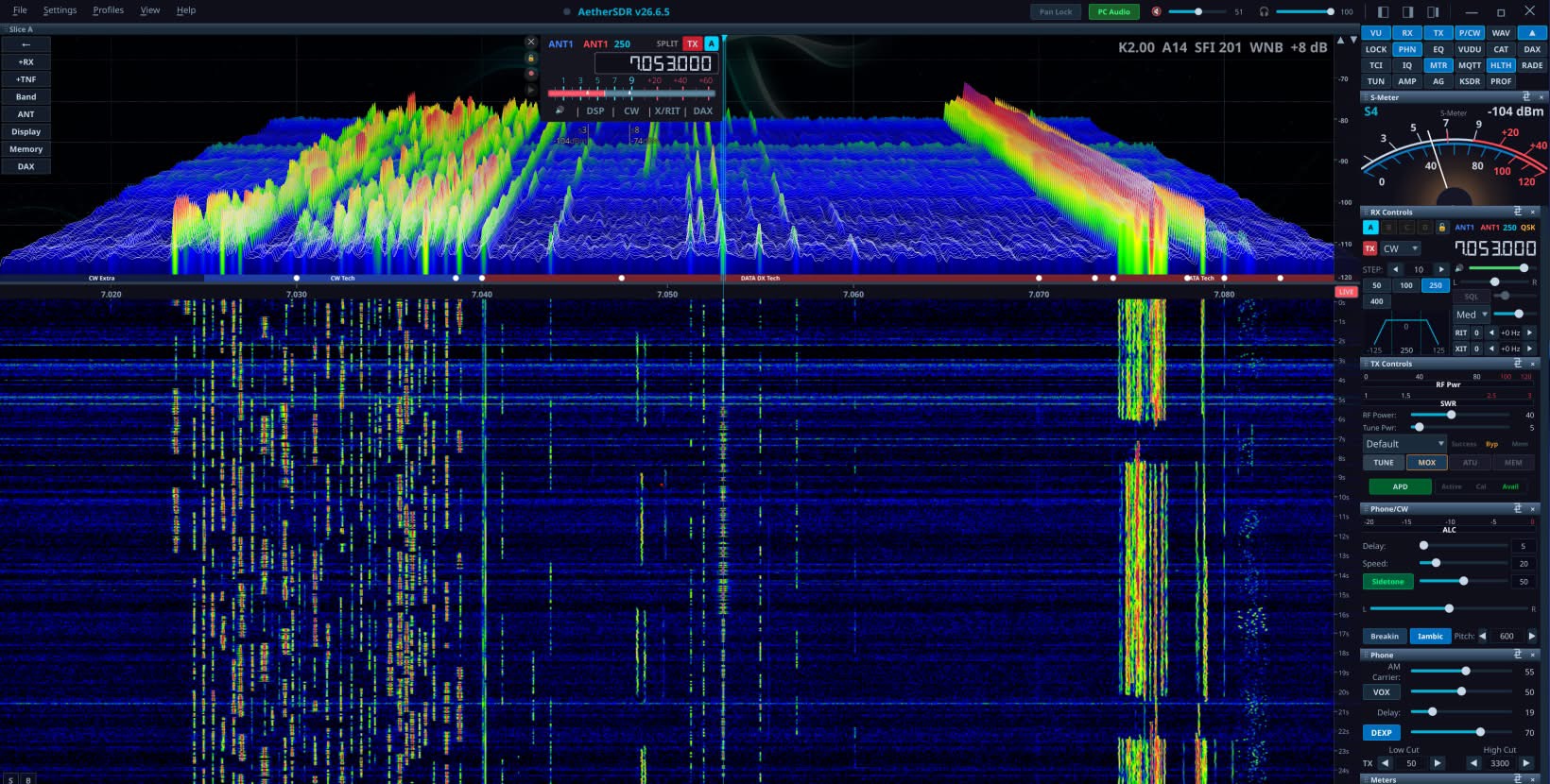
- **GPU-accelerated spectrum & waterfall** — QRhi rendering on the GPU (OpenGL/Metal/D3D11) with a per-pixel FFT trace at up to **60 fps**, an optional **3D stacked-trace** spectrum mode (perspective FFT history, floor-anchored ridges), ~71% CPU reduction over CPU paint, GPU-composited slice flags, and multi-GPU adapter selection
- **Multi-slice & multi-panadapter** — colour-coded VFO overlays, independent TX assignment, diversity/ESC beamforming; up to 8 detachable pans with native VITA-49 waterfall tiles, with selectable S-meter / **SmartMTR** meter views per flag
- **KiwiSDR public-receiver browser** — find and connect to public KiwiSDR receivers worldwide through an API-policy-aware directory (diversity receive with receive-only TX inhibit)
- **Aetherial Audio Channel Strip** — a unified RX **and** TX DSP suite (gate, EQ, compressor, de-esser, tube, AetherVoice exciter, reverb, brickwall limiter) with a preset library and a per-side scope
- **Six client-side noise-reduction engines** — NR2 (spectral), RN2 (RNNoise), NR4 (libspecbleach), DFNR (DeepFilterNet3), BNR (NVIDIA GPU AI — the Maxine denoiser in-process on a local NVIDIA RTX/GeForce GPU, Linux + Windows; see [`docs/nvidia-bnr.md`](docs/nvidia-bnr.md)), and MNR (macOS)
- **DAX virtual audio + IQ** — up to 8 RX audio channels (radio-dependent — 8 on a FLEX-6700, 4 on 6500/6600/8600, 2 on 6300/6400) + 1 TX, and 4 channels of raw I/Q at 24–192 kHz for WSJT-X / fldigi / VARA / JS8Call, plus a per-slice **WFM demodulator** for satellite data
- **AetherModem packet radio** — KISS-over-TCP TNC, connected-mode AX.25 BBS, a personal mailbox, and an **APRS client** (station map, GPS beacon, messaging) with a Direwolf-derived VHF demodulator
- **AetherSweep** — in-panadapter SWR analyzer with log scale, threshold-band shading, and interpolated bandwidth at SWR ≤ 1.5 / 2.0
- **SpotHub** — DX Cluster, RBN, WSJT-X, POTA, FreeDV Reporter, N1MM+/DXLog contest bandmap, the EiBi shortwave broadcast schedule, and the KiwiSDR DX Community database, with auto-mode switch and per-feed spot colouring
- **CW operator suite** — real-time Morse decoder, MIDI/keyboard straight-key & iambic paddles with full QSK, optional Quindar tones
- **Copy Assist (speech-to-text)** — on-device transcription of received voice via whisper.cpp, docked under the waterfall with confidence color-coding; CPU or GPU (Vulkan/Metal, auto-detected), download-on-demand models, and an optional remote OpenAI-compatible endpoint. Not in the Intel macOS build — it would force a macOS 15.5 floor on hardware that mostly cannot reach it (see [`docs/asr-copy-assist.md`](docs/asr-copy-assist.md))
- **FreeDV RADE** — AI digital-voice codec with a client-side neural encoder/decoder
- **PSK Reporter weather radar** — optional NOAA/NWS radar on the 2D map and 3D globe, with original-observation playback and adjustable speed (see [`docs/psk-reporter-weather-radar.md`](docs/psk-reporter-weather-radar.md))
- **PSK Reporter city lights** — optional NASA/GSFC 2016 VIIRS night-light overlay on the 2D map and 3D globe, fading through civil twilight with adjustable brightness, faint-light lift and warmth (see [`docs/psk-reporter-city-lights.md`](docs/psk-reporter-city-lights.md))
- **SmartLink remote + TCI v2.0 server** — Auth0/TLS WAN operation, and CAT + audio + IQ + CW + spots over a single TCI WebSocket
- **Broad hardware control** — rigctld + virtual-serial CAT, MIDI mapping, the FlexControl knob, serial PTT/CW keying, and Multi-Flex operation alongside SmartSDR/Maestro
- **Workspace canvas** — place pans and applets freely as resizable, layered items with edge and grid snapping, across several canvas windows if you want them; named workspaces recall which applets are open as well as where they sit, and can be bound to radio profiles. Off by default; the Classic shell is unchanged until you enable it
- **Built-in demo mode** — a synthetic backend that generates its own RX audio and matching panadapter, with a fault-injection harness, so you can explore the full UI with no radio attached (it cannot transmit)
---
## How AetherSDR Is Built
AetherSDR is developed using an AI-augmented open-source workflow:
- **Project lead (Jeremy KK7GWY) + a core contributor team** working primarily through Claude Code and a mix of AI development tools — every commit goes through the merge gate; nothing reaches `main` without human review
- **[AetherClaude](https://github.com/aethersdr/aetherclaude) orchestrator bot** auto-triages incoming issues, drafts implementation plans, and produces PRs for issues labelled `aetherclaude-eligible`
- **Contributors use a mix of AI tools** (Codex, Copilot, Cursor, Gemini, Aider) — the project's [Constitution](CONSTITUTION.md) (14 principles, structured per [Cisco's Foundry Constitution](https://github.com/CiscoDevNet/foundry-security-spec) spec) codifies the conventions every contributor and every AI tool follows
- **Branch protection enforces signed commits, CI green, and CODEOWNERS review** — every change goes through the same gate regardless of which AI tool (or human) produced it
- **At active pace: ~50 PRs per week, ~15,000–30,000 lifetime downloads, ≥6 distinct AI tools touching the codebase**
See [`AGENTS.md`](AGENTS.md) for the canonical project guide that every AI assistant reads first, and [`CONSTITUTION.md`](CONSTITUTION.md) for the principles that gate the contribution model.
The full list of code contributors is auto-generated from GitHub commit attribution — see the [Contributors graph](https://github.com/aethersdr/AetherSDR/graphs/contributors).
---
## Supported Hardware
Works with any FlexRadio transceiver, including:
- FLEX-6000 series: FLEX-6300, FLEX-6400, FLEX-6400M, FLEX-6500, FLEX-6600, FLEX-6600M, FLEX-6700
- FLEX-8000 series: FLEX-8400, FLEX-8400M, FLEX-8600, FLEX-8600M
- Aurora series: AU-510, AU-510M, AU-520, AU-520M
- ML-, CL-, and RT-series devices
Supported external devices include the 4O3A/FlexRadio PGXL (Power Genius XL)
power amplifier and TGXL (Tuner Genius XL) antenna tuner, and — outside the
radio seam entirely — ACOM S-series and SPE Expert (1.3K-FA / 1.5K-FA / 2K-FA)
amplifiers over serial or ser2net TCP, and VK3AMP (600 W / 1000 W / 2000 W)
amplifiers over TCP control with UDP telemetry.
Active test target is FLEX-8600 firmware 4.2.18 (SmartSDR protocol v1.4.0.0);
earlier 4.x firmware works; v3.x is unsupported.
**Other radio families** ride the vendor-neutral `IRadioBackend` seam. Neither
is a supported family yet, and FlexRadio remains the supported target:
- **Hermes-Lite 2** — **experimental**. Four independent receivers, SSB voice,
CW/RTTY decoding, AX.25 packet, band switching with hardware filters, manual
notch filters, a host-side impulse noise blanker, host frequency calibration
and per-radio state restore (including AGC mode and threshold).
- **Networked Icom** — **early**. CI-V over the RS-BA1 UDP transport, brought up
on the IC-705 (receive, scope, transmit, FT8) and completed against a live
IC-7300MK2 (controls, meters, ATU, WSPR, PC Audio routing and the CW decoder).
The connect path asks the radio for its own CI-V address rather than assuming
one. Only the IC-705 and IC-7300MK2 are verified against their own CI-V guides
— an unrecognised model gets no scope and no transmit rather than optimistic
defaults.
- **RTL-SDR** — **experimental, receive-only**. Discovers supported USB dongles
through `librtlsdr` and provides one panadapter and one host-demodulated slice.
No radio at all? **Demo mode** runs the full UI against a synthetic backend
that generates its own audio and spectrum.
## Tested Controller Devices
AetherSDR supports external station-control hardware through USB serial, USB HID,
MIDI, and generic USB-serial adapters:
- FlexRadio FlexControl USB tuning knob
- Icom RC-28 USB remote encoder
- Griffin PowerMate USB knob
- Contour ShuttleXpress and ShuttlePro v2 jog controllers
- MIDI controllers with learn mode, manual mapping entry, importable/exportable profiles (including vendor-supplied SmartSDR `.map` files), and relative-encoder support
- Elgato Stream Deck+ natively over USB HID (hidapi builds), driving the LCD keys and the four encoder dials
- Other Stream Deck models, on any platform, through the TCI server or the automation bridge using the control-surface software of your choice — AetherSDR provides the protocol, not the button layer
- USB-serial PTT/CW interfaces for foot switches, straight keys, iambic paddles,
amplifier keying lines, and external sequencers
---
## Download
Pre-built binaries are available from [Releases](https://github.com/aethersdr/AetherSDR/releases/latest):
| Platform | Download | Notes |
|----------|----------|-------|
| **Linux x86_64** | `AetherSDR-*-x86_64.AppImage` | Single file, no install needed. `chmod +x` and run. |
| **Linux ARM** | `AetherSDR-*-aarch64.AppImage` | Raspberry Pi, ARM laptops. `chmod +x` and run. |
| **macOS** | `AetherSDR-*-macOS-apple-silicon.dmg` | Apple Silicon (M1+). Intel Macs via Rosetta. Signed & notarized. |
| **Windows Installer** | `AetherSDR-*-Windows-x64-setup.exe` | Setup wizard with Start Menu shortcut and uninstaller. |
| **Windows Portable** | `AetherSDR-*-Windows-x64-portable.zip` | No install needed. Extract and run. |
---
## Building from Source
### Dependencies
Install all dependencies for a full-featured build. Optional packages are noted — the build succeeds without them but the corresponding features are disabled.
**Qt 6.8 or newer is required.** This is the same Qt the release binaries are
built against (6.8.3 LTS), so what CI compiles is what ships. Distro Qt clears
it on Debian Trixie, Ubuntu 25.10+, Fedora 41+ and Arch. It does **not** clear
on **Ubuntu 24.04 LTS**, which ships Qt 6.4.2 — build there against a Qt from
[aqtinstall](https://github.com/miurahr/aqtinstall) or the Qt online installer
and point CMake at it with `-DCMAKE_PREFIX_PATH=/path/to/Qt/6.8.3/gcc_64`.
On **macOS** the Qt does not come from Homebrew at all — see the macOS note
below the install commands.
```bash
# Arch / CachyOS / Manjaro
sudo pacman -S qt6-base qt6-multimedia qt6-websockets qt6-serialport \
qt6-shadertools cmake ninja pkgconf autoconf automake libtool \
fftw rtl-sdr portaudio hidapi qtkeychain-qt6
# Debian Trixie / Ubuntu 25.10+ / Linux Mint 23+
# (Ubuntu 24.04's Qt is 6.4.2 — below the floor; see the note above.)
sudo apt install qt6-base-dev qt6-base-private-dev qt6-multimedia-dev \
qt6-websockets-dev qt6-serialport-dev qt6-shader-baker qt6-shadertools-dev \
cmake ninja-build pkg-config autoconf automake libtool \
libfftw3-dev librtlsdr-dev portaudio19-dev libhidapi-dev qtkeychain-qt6-dev \
libxkbcommon-dev libopengl0 \
gstreamer1.0-pulseaudio gstreamer1.0-plugins-base
# Fedora
sudo dnf install qt6-qtbase-devel qt6-qtbase-private-devel qt6-qtmultimedia-devel \
qt6-qtwebsockets-devel qt6-qtserialport-devel qt6-qtshadertools-devel \
cmake ninja-build autoconf automake libtool \
fftw3-devel rtl-sdr-devel portaudio-devel hidapi-devel qtkeychain-qt6-devel
# macOS (Homebrew) — everything EXCEPT Qt and qtkeychain; see the note below
brew install ninja cmake pkgconf autoconf automake libtool \
fftw librtlsdr portaudio hidapi
```
> **macOS note — Qt and qtkeychain do not come from Homebrew.** Homebrew's `qt`
> formula (aliased `qt6` and `qt@6`) is a *rolling* release — 6.11.1 at the time
> of writing — while the DMG ships 6.8.3 LTS like every other artifact. Building
> against Homebrew's Qt means testing a Qt no release ships. Install the matching
> one and point CMake at it:
>
> ```bash
> # A venv rather than a bare `pip install`: a PEP 668 python3 refuses the latter.
> python3 -m venv ~/.venv/aqt && ~/.venv/aqt/bin/pip install aqtinstall
> ~/.venv/aqt/bin/aqt install-qt mac desktop 6.8.3 clang_64 \
> -m qtmultimedia qtwebsockets qtserialport qtshadertools \
> --outputdir ~/Qt
> cmake -B build -DCMAKE_PREFIX_PATH="$HOME/Qt/6.8.3/macos;$(brew --prefix)"
> ```
>
> `clang_64` is the only macOS desktop build Qt publishes, and it is universal2 —
> there is no separate arm64 archive to pick. `$(brew --prefix)` stays on the
> path for fftw, librtlsdr, portaudio and hidapi.
>
> Homebrew's `qtkeychain` is left out for a related reason: the formula depends
> on `qtbase`, so installing it pulls a second Qt in behind your back. Build it
> against the Qt you just installed instead — or skip it and build without
> SmartLink credential persistence:
>
> ```bash
> CMAKE_PREFIX_PATH="$HOME/Qt/6.8.3/macos" bash scripts/setup/setup-qtkeychain.sh
> ```
>
> **Two Qt installations visible to CMake at once is a real failure, not a
> theoretical one** — it is what #711 and #812 were, and `CMakeLists.txt` puts
> `$(brew --prefix)/include` on the global include path on macOS, so a Homebrew
> Qt is discoverable whether or not you asked for it. If you have one,
> `brew uninstall qt` (plus whatever pulled it in) before building. The release
> workflow asserts this; your machine will not.
What each dependency enables
| Package | Feature |
|---------|---------|
| qt6-base, qt6-multimedia | Core application (required) |
| qt6-base-private-dev | GPU-accelerated spectrum/waterfall (QRhi) |
| qt6-shadertools-dev | GPU shader compilation |
| qt6-websockets-dev | TCI server, FreeDV Reporter spots |
| qt6-serialport-dev | FlexControl, serial PTT/CW, MIDI controllers |
| libfftw3-dev | NR2 spectral noise reduction |
| librtlsdr-dev | RTL-SDR USB receiver backend (optional) |
| portaudio19-dev | PortAudio audio backend |
| libhidapi-dev | USB HID encoders (RC-28, PowerMate, FlexControl) |
| qtkeychain-qt6-dev | SmartLink credential persistence |
| libopengl0 | GLVND-split desktop OpenGL runtime (GPU spectrum/waterfall) |
> **Linux Mint / Ubuntu note:** If PC audio devices show as "Dummy Output",
> install `gstreamer1.0-pulseaudio`. For PipeWire systems, also install `gstreamer1.0-pipewire`.
>
> **Ubuntu 26.04 note:** If AetherSDR fails to start with a missing
> `libOpenGL.so.0` error, install `libopengl0`. 26.04 stopped pulling it in
> by default for the desktop image; the build-deps line above includes it
> explicitly so this only bites users who install just the AppImage.
### Build & Run
```bash
git clone https://github.com/aethersdr/AetherSDR.git
cd AetherSDR
cmake -B build -G Ninja -DCMAKE_BUILD_TYPE=RelWithDebInfo
cmake --build build -j$(nproc)
./build/AetherSDR
```
RADE-enabled builds use a vendored Opus snapshot, so no additional Opus download
is required during configure or build.
### Windows 11
Prerequisites: Visual Studio 2022 (Build Tools, Community, or higher) with the
MSVC C++ workload, CMake 3.25+, Ninja, and Qt 6.8+ (`msvc2022_64`; both CI and
the release binaries use 6.8.3 LTS).
```bat
:: 1. Activate the MSVC environment. Adjust the edition (BuildTools / Community /
:: Professional / Enterprise) to match your install; run "vswhere" if unsure.
"C:\Program Files (x86)\Microsoft Visual Studio\2022\BuildTools\VC\Auxiliary\Build\vcvars64.bat"
:: 2. Point at your Qt kit once, with forward slashes (CMake reads the path
:: literally, so backslashes would be taken as escape sequences). Change the
:: version/edition here to match your install; both steps below reuse it.
:: setup-qtkeychain.ps1 (step 4) reads QT_ROOT_DIR; on CI that variable is
:: exported by install-qt-action, so a local build has to set it explicitly
:: or the script exits with "Qt not found".
set "QT_KIT=C:/Qt/6.8.3/msvc2022_64"
set "QT_ROOT_DIR=%QT_KIT%"
:: 3. Generate the single-precision FFTW import lib (needed by NR4/libspecbleach)
powershell -File scripts\setup\setup-fftw.ps1
:: 4. Build qtkeychain (needed for QRZ/SmartLink credential persistence).
:: Downloads source and builds it against your Qt kit into third_party\qtkeychain\.
:: Skip this step and the build still succeeds, but QRZ/SmartLink passwords
:: won't be saved between runs.
powershell -File scripts\setup\setup-qtkeychain.ps1
:: 5. Configure. Ninja is required: the default Visual Studio generator is
:: multi-config (it ignores CMAKE_BUILD_TYPE) and takes a different
:: manifest-embed path. Point CMAKE_PREFIX_PATH at your Qt kit so
:: find_package(Qt6) resolves.
cmake -B build -G Ninja -DCMAKE_BUILD_TYPE=RelWithDebInfo -DCMAKE_PREFIX_PATH="%QT_KIT%"
:: 6. Build
cmake --build build --target AetherSDR
```
### GPU Spectrum Rendering
GPU-accelerated spectrum/waterfall rendering requires Qt 6.7 or greater (`QRhiWidget`). Since the build now requires Qt 6.8 as a minimum, no build is held back by the Qt version any more — the aarch64 AppImage included. What decides whether a given binary renders via QRhi is the `AETHER_GPU_SPECTRUM` build option, and for a source build whether Qt's private GUI headers are installed: CMake turns the option off with `GPU spectrum rendering disabled — Qt6GuiPrivate not found` when they are missing (install `qt6-base-private-dev` / `qt6-qtbase-private-devel`).
The CPU `QPainter` path is a **build-time alternative, not a runtime fallback**. `AETHER_GPU_SPECTRUM` selects `SpectrumWidget`'s base class — `QRhiWidget` or `QWidget` — and `SpectrumWidget::paintEvent()`, which is what draws the spectrum on the CPU, is compiled only into the `QWidget` build. (A GPU build still uses `QPainter`, but only to rasterise overlays into textures QRhi then composites.) Of the shipped artifacts only the Intel macOS DMG is built the other way, and deliberately: `QRhiWidget` misbehaves on older Metal/OpenGL hardware.
Having no GPU is usually a non-event, because in practice "no GPU" means a software rasterizer rather than nothing. QRhi comes up on whatever the platform provides — llvmpipe or softpipe (Mesa), WARP or Microsoft Basic Render (D3D11), SwiftShader — and the app detects it and says so: **Help ▸ About** shows a `Renderer:` line reading `CPU QRhi (…)` rather than `GPU QRhi (…)`, naming the backend and device. Rendering is correct, just slow.
If QRhi cannot initialise at all — no usable GL/D3D/Metal, as on a headless host, in some VMs, or behind a broken driver — there is nothing to fall back to. The spectrum does not draw, and the failure is reported by Qt rather than by AetherSDR: the log records `QRhiWidget: QRhi is not supported on this platform.` or `QRhiWidget: No QRhi`, and `QRhiWidget::renderFailed()` fires with nothing listening, so there is no notice in the UI. The rest of the app (controls, audio, radio I/O) is unaffected.
`AETHER_NO_GPU=1` forces software OpenGL on an already-built binary, without a rebuild:
```bash
AETHER_NO_GPU=1 ./AetherSDR-*.AppImage
```
That is the escape hatch if a GPU or driver renders the spectrum incorrectly — worth trying first on Raspberry Pi and other systems whose Mesa driver is newer than its hardware.
Trace thickness is the **FFT Line** slider under the spectrum's right-click **Display** panel (Off to 5.0 px, per panadapter).
### Wayland and XWayland
On a Wayland session AetherSDR chooses the Qt platform based on whether a
display is attached:
- **A display is connected** → `wayland;xcb` (native Wayland when the platform
plugin is available, XWayland otherwise). Native Wayland avoids the GLX
`BadAccess` crash that XWayland can produce when opening child dialogs on some
compositors, and renders correctly under fractional scaling instead of being
bitmap-scaled by the compositor.
- **Headless** — no connected display, e.g. a remote Raspberry Pi reached over
VNC — → `xcb;wayland`. With no DRM scanout, native-Wayland hardware GL cannot
allocate a window surface and the spectrum renders black under an
`EGL_BAD_MATCH` error storm; XWayland allocates its buffers through the X
server and works. AetherSDR detects this from the DRM connector status and
flips the order automatically; the chosen platform is recorded at startup in
the log (`Platform: Wayland session, display presence …`).
Setting `QT_QPA_PLATFORM` yourself always wins — override in either direction:
```bash
QT_QPA_PLATFORM=xcb ./AetherSDR-*.AppImage # force XWayland
QT_QPA_PLATFORM='wayland;xcb' ./AetherSDR-*.AppImage # force native Wayland
```
The second form is the way back to native Wayland on a headless session whose
XWayland mishandles child dialogs (the GLX `BadAccess` above) — the automatic
choice there is `xcb;wayland`, so you would otherwise be on XWayland.
On a distribution whose Qt is older than the required 6.8 (notably Ubuntu 24.04 LTS at 6.4.2), install a newer Qt manually:
1. **Option 1: Using a PPA (Ubuntu/Mint)**
The `kubuntu-backports` PPA may provide a newer Qt — verify the version it ships before relying on it.
2. **Option 2: Using the Qt Online Installer**
Install Qt into your home directory (e.g., `~/Qt/6.8.3/gcc_64`). Because CMake otherwise defaults to the system-provided Qt, point it at the newer install with `-DCMAKE_PREFIX_PATH`:
```bash
cmake -B build -G Ninja \
-DCMAKE_PREFIX_PATH="$HOME/Qt/6.8.3/gcc_64" \
-DCMAKE_BUILD_TYPE=RelWithDebInfo
```
Make sure the `qtshadertools` and `qt5compat` (or equivalent) modules are selected in the Qt Online Installer along with `qtbase`.
*Note: GPU rendering also needs the private QtGui headers (`qt6-base-private-dev` on Debian-family, included by default in the Qt Online Installer).*
### Install (optional, Linux)
```bash
sudo cmake --install build
```
---
## Roadmap
Currently in flight:
- **aetherd** — a vendor-neutral `IRadioBackend` seam so radio-family logic
lives behind a stable interface. Four backends ride it today (Flex, HL2,
networked Icom, and the demo simulator); the remaining step is the versioned
protocol that splits a headless engine from thin UI clients.
- **Hermes-Lite 2** — an **experimental** non-Flex backend on that seam, now
running four independent receivers, the SSB voice chain, CW/RTTY decoding,
AX.25 packet, band switching with hardware filters, memory channels, manual
notch filters, a host-side noise blanker, host frequency calibration and
per-radio operating-state restore. Not yet a supported radio family:
remaining work is wider mode coverage, panadapter parity with the Flex path,
and hardening the raw-IQ DSP chain.
- **Networked Icom** — an **early** CI-V/RS-BA1 backend on the same seam,
brought up on the IC-705 and IC-7300, now with a scheduled command plane and a
completed IC-7300MK2 control surface. Remaining work is transmit confirmation
beyond the 705, per-model SET-menu mapping, and audio gain/VOX/break-in.
- **Workspace canvas** — an **experimental** alternative shell where pans and
applets are freely placed items across one or more canvas windows. Off by
default; remaining work is live cross-window drag and field time against the
Classic shell.
- **AppSettings nested-JSON refactor** — the storage layer moved to SQLite with
per-radio versioned feature documents; the remaining work is migrating the
legacy flat keys.
- **TX DSP chain visual rebuild** and the **Flathub submission**.
See [`ROADMAP.md`](ROADMAP.md) for the full picture and the community backlog,
and the [issue tracker](https://github.com/aethersdr/AetherSDR/issues) for
everything else.
---
## Contributing
PRs, bug reports, and feature requests welcome! See [CONTRIBUTING.md](CONTRIBUTING.md) for guidelines.
**Development environment:** AetherSDR is developed using [Claude Code](https://claude.com/claude-code) as the primary development tool. We encourage contributors to use Claude Code for consistency. PRs must follow project conventions, pass CI, and include GPG-signed commits.
**Not a developer?** Click the lightbulb button in AetherSDR's title bar to create an AI-assisted bug report or feature request.
---
## Related projects
- **[Aether-gate](https://github.com/aethersdr/Aether-gate)** — put *any* radio into
AetherSDR. A bridge that presents an Icom/Kenwood/Yaesu/Elecraft CAT rig (via
[Hamlib](https://hamlib.github.io/)), an Icom LAN rig, or a SoapySDR dongle to
AetherSDR as if it were a FlexRadio — live panadapter, waterfall, and
frequency/mode control. Receive + control today (no transmit yet). By Nigel
Fenton (G0JKN); GPL-3.0-or-later. *(`aethersdr/Aether-gate` tracks upstream
[nigelfenton/Aether-gate](https://github.com/nigelfenton/Aether-gate).)*
AetherSDR integrates radios that earn deep native support directly in-engine; the
gate covers the long tail of legacy/CAT radios and dongles. Networked Icoms now
have an in-engine CI-V backend, so for those the gate is the fallback for models
the native backend does not yet cover.
---
## Verifying Downloads
Linux and Windows binaries are GPG-signed. macOS artifacts are Apple notarized. Each release includes `.asc` signatures and `SHA256SUMS.txt`.
```bash
curl -sSL https://raw.githubusercontent.com/aethersdr/AetherSDR/main/docs/RELEASE-SIGNING-KEY.pub.asc | gpg --import
gpg --verify AetherSDR-vX.Y.Z-x86_64.AppImage.asc AetherSDR-vX.Y.Z-x86_64.AppImage
```
See [docs/VERIFYING-RELEASES.md](docs/VERIFYING-RELEASES.md) for full instructions.
---
## License
AetherSDR is free and open-source software licensed under the [GNU General Public License v3](LICENSE).
Bundled third-party libraries retain their own licenses (see each `third_party//LICENSE`), all GPLv3-compatible. Notably, on-device speech-to-text uses **[whisper.cpp](https://github.com/ggml-org/whisper.cpp) and ggml** (MIT) — vendored under `third_party/whisper.cpp/` (Vulkan/Metal GPU backends included); Whisper model weights are downloaded on demand and are MIT-licensed, not redistributed in this repository.
*AetherSDR is an independent project and is not affiliated with or endorsed by FlexRadio Systems.*
*D-STAR is a registered trademark of Icom Inc. AetherSDR is not affiliated with or endorsed by Icom Inc.*