# Recyclical
*recyclical*: an easy-to-use, extensible Kotlin DSL for setting up and manipulating RecyclerViews.
[](https://www.codacy.com/app/drummeraidan_50/recyclical?utm_source=github.com&utm_medium=referral&utm_content=afollestad/recyclical&utm_campaign=Badge_Grade)
[](https://github.com/afollestad/recyclical/actions?query=workflow%3A%22Android+CI%22)
[](https://www.apache.org/licenses/LICENSE-2.0.html)
 ---
This repo is archived as this library is deprecated. I do not wish to maintain a View-based library now that Jetpack Compose is a thing. Prefer `LazyColumn`/`LazyRow`.
# Table of Contents
## Core
1. [Gradle Dependency](#gradle-dependency)
2. [The Basics](#the-basics)
3. [More Options](#more-options)
4. [Child View Clicks](#child-view-clicks)
5. [Multiple Item Types](#multiple-item-types)
6. [DataSource](#datasource)
1. [Construction](#construction)
2. [Manipulation](#manipulation)
4. [Diffing](#diffing)
7. [SelectableDataSource](#selectabledatasource)
1. [Construction](#construction-1)
2. [Manipulation](#manipulation-1)
3. [Use in Binding](#use-in-binding)
8. [Stable IDs](#stable-ids)
## Swipe
1. [Gradle Dependency](#gradle-dependency-1)
2. [The Basics](#the-basics-1)
3. [Long Swipes](#long-swipes)
4. [Customization](#customization)
---
# Core
[  ](https://repo1.maven.org/maven2/com/afollestad/recyclical)
## Gradle Dependency
Add this to your module's `build.gradle` file:
```gradle
dependencies {
implementation 'com.afollestad:recyclical:1.1.1'
}
```
---
## The Basics
**First**, declare an Item class:
```kotlin
data class Person(
var name: String,
var arg: Int
)
```
**Second**, a layout and a View Holder:
```xml
```
```kotlin
class PersonViewHolder(itemView: View) : ViewHolder(itemView) {
val name: TextView = itemView.findViewById(R.id.text_name)
val age: TextView = itemView.findViewById(R.id.text_age)
}
```
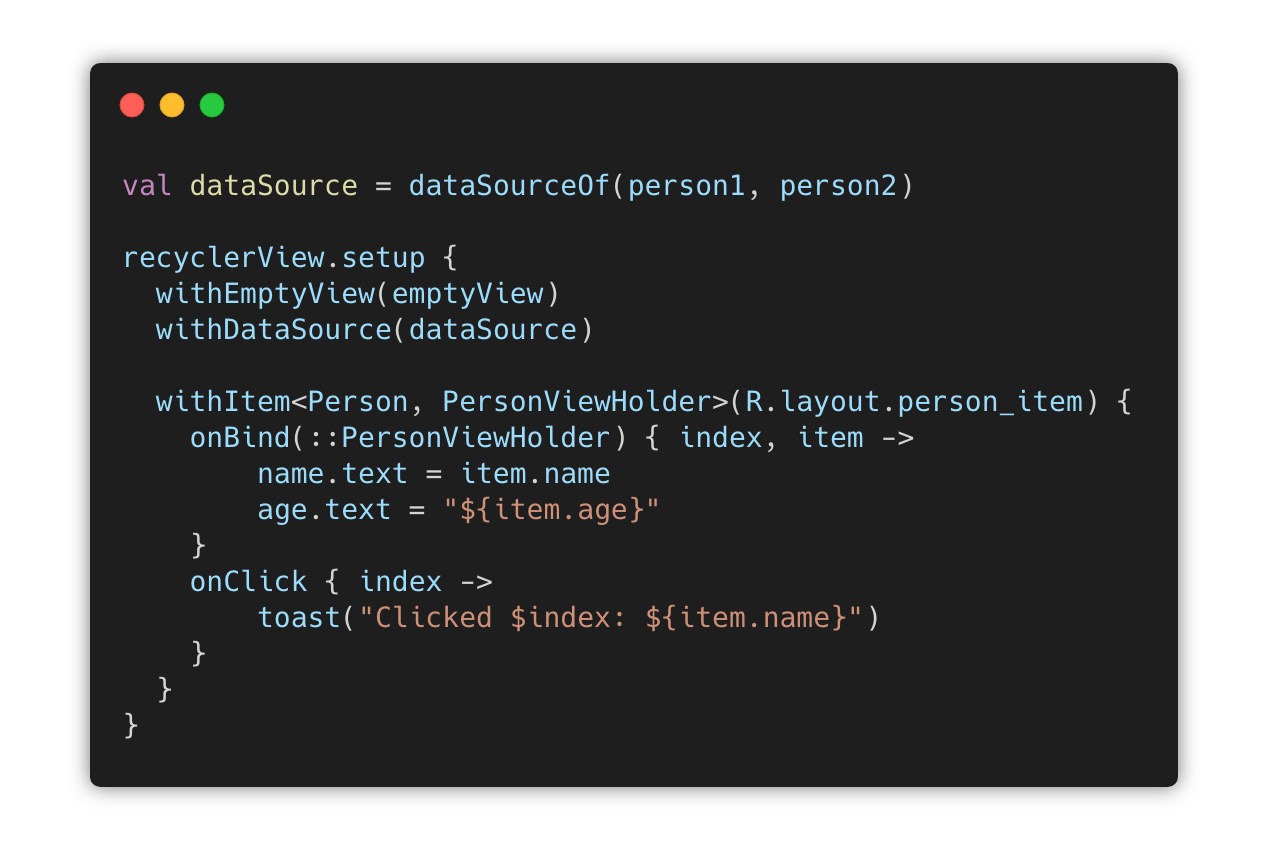
**Finally**, you can begin using the DSL API:
```kotlin
class MainActivity : AppCompatActivity() {
override fun onCreate(savedInstanceState: Bundle?) {
super.onCreate(savedInstanceState)
// dataSourceTypedOf(...) here creates a DataSource
val dataSource = dataSourceTypedOf(
Person("Aidan", 24),
Person("Nina", 24)
)
// setup{} is an extension method on RecyclerView
recyclerView.setup {
withDataSource(dataSource)
withItem(R.layout.person_item_layout) {
onBind(::PersonViewHolder) { index, item ->
// PersonViewHolder is `this` here
name.text = item.name
age.text = "${item.age}"
}
onClick { index ->
// item is a `val` in `this` here
toast("Clicked $index: ${item.name}")
}
onLongClick { index ->
// item is a `val` in `this` here
toast("Long clicked $index: ${item.name}")
}
}
}
}
}
```
---
## More Options
There are other things you can give to the setup extension:
```kotlin
recyclerView.setup {
// Custom layout manager, rather than the default which is a vertical LinearLayoutManager
withLayoutManager(GridLayoutManager(context, 2))
// Assigns a view that is made visible when the data source has no content, else is hidden (gone)
withEmptyView(view)
// Global click listener for any item type. Individual item click listeners are called first.
withClickListener { index, item -> }
// Global long click listener for any item type. Individual item long click listeners are called first.
withLongClickListener { index, item -> }
// Add an animation used to animate the group's children after the first layout.
withLayoutAnimation(R.anim.your_anim, durationRes = android.R.integer.config_animShortTime)
}
```
---
## Child View Clicks
There are many cases in which you'd want to get callbacks for a child view in your list items
getting clicked, such as the sender icon in a list of emails.
```kotlin
class EmailViewHolder(itemView: View) : ViewHolder(itemView) {
val icon = itemView.findViewById(R.id.icon)
}
recyclerView.setup {
withItem(R.layout.email_item_layout) {
...
onChildViewClick(EmailViewHolder::icon) { index, view ->
// `this` includes `item` along with selection-related methods discussed below in SelectableDataSource
// `view` argument here is automatically an `ImageView`
}
}
}
```
---
## Multiple Item Types
You can mix different types of items - but you need to specify view holders and layouts for them too:
```kotlin
// dataSourceOf(...) without "typed" creates a DataSource
val dataSource = dataSourceOf(
Car(2012, "Volkswagen GTI"),
Motorcycle(2018, "Triumph", "Thruxton R"),
Person("Aidan", 24)
)
recyclerView.setup {
withDataSource(dataSource)
withItem(R.layout.person_item_layout) {
onBind(::PersonViewHolder) { index, item ->
name.text = item.name
age.text = "${item.age}"
}
}
withItem(R.layout.motorcycle_item_layout) {
onBind(::MotorcycleViewHolder) { index, item ->
year.text = "${item.year}"
make.text = item.make
model.text = item.model
}
}
withItem(R.layout.car_item_layout) {
onBind(::CarViewHolder) { index, item ->
year.text = "${item.year}"
name.text = item.name
}
}
}
```
---
## DataSource
`DataSource` is an interface which provides data and allows manipulation of the data, to display in a RecyclerView.
Being an interface means you make your own implementations of it, you can mock it in tests, you could even provide it
via Dagger to a presenter and manipulate the RecyclerView outside of your UI layer.
### Construction
The included implementation of data source operates on a List of objects (of any type).
```kotlin
// Empty by default, but can still add, insert, etc.
val dataSource: DataSource = emptyDataSource()
val dataSourceTyped: DataSource = emptyDataSourceTyped()
// Initial data set of items from a vararg list
val dataSource: DataSource = dataSourceOf(item1, item2)
val dataSourceTyped: DataSource = dataSourceTypedOf(item1, item2)
// Initial data set of items from an existing list
// Could also use dataSourceTypedOf(...)
val items = listOf(item1, item2)
val dataSource: DataSource = dataSourceOf(items)
val dataSourceTyped: DataSource = dataSourceTypedOf(items)
```
### Manipulation
```kotlin
val dataSource: DataSource = // ...
// getters
val item: ItemType = dataSource[5]
val contains: Boolean = dataSource.contains(item)
val size: Int = dataSource.size()
val isEmpty: Boolean = dataSource.isEmpty()
val isNotEmpty: Boolean = dataSource.isNotEmpty()
val firstIndex: Int = dataSource.indexOfFirst { }
val lastIndex: Int = dataSource.indexOfLast { }
// mutation
val person = Person("Aidan", 24)
dataSource.add(person)
dataSource.set(listOf(person))
dataSource.insert(1, person)
dataSource.removeAt(1)
dataSource.remove(person)
dataSource.swap(1, 4)
dataSource.move(1, 4)
dataSource.clear()
// iteration
for (item in dataSource) { }
dataSource.forEach { } // emits all items
dataSource.forEachOf { } // only emits items that are a Person
// operators
val item: Any = dataSource[5] // get(5)
val contains: Boolean = item in dataSource // contains(item)
dataSource += person // add(person)
dataSource -= person // remove(person)
```
### Diffing
When performing a `set` on the data set, you can opt to use diff utils:
```kotlin
dataSource.set(
newItems = newItems,
areTheSame = ::areItemsTheSame,
areContentsTheSame = ::areItemContentsTheSame
)
// Return true if items represent the same entity, e.g. by ID or name
private fun areItemsTheSame(left: Any, right: Any): Boolean {
return when (left) {
is Person -> {
right is Person && right.name == left.name
}
else -> false
}
}
// Return true if all contents in the items are equal
private fun areItemContentsTheSame(left: Any, right: Any): Boolean {
return when (left) {
is Person -> {
right is Person &&
right.name == left.name &&
right.age == left.age
}
else -> false
}
}
```
This will automatically coordinate notifying of adds, moves, and insertions so that
update of the data set is pretty and animated by the RecyclerView.
---
## SelectableDataSource
A `SelectableDataSource` is built on top of a regular [DataSource]. It provides additional APIs
to manage the selection state of items in your list.
### Construction
Construction methods for `SelectableDataSource` are the same as the `DataSource` ones, they just
include `selectable` in their names.
```kotlin
// Empty by default, but can still add, insert, etc.
// Could also use emptySelectableDataSourceTyped()
val dataSource: SelectableDataSource = emptySelectableDataSource()
val dataSourceTyped: SelectableDataSource = emptySelectableDataSourceTyped()
// Initial data set of items from a vararg list
// Could also use selectableDataSourceTypedOf(...)
val dataSource: SelectableDataSource = selectableDataSourceOf(item1, item2)
val dataSourceTyped: SelectableDataSource = selectableDataSourceTypedOf(item1, item2)
// Initial data set of items from an existing list
// Could also use selectableDataSourceTypedOf(...)
val items = listOf(item1, item2)
val dataSource: SelectableDataSource = selectableDataSourceOf(items)
val dataSourceTyped: SelectableDataSource = selectableDataSourceTypedOf(items)
```
### Manipulation
There are some additional methods added on top of the `DataSource` methods:
```kotlin
val dataSource: SelectableDataSource = // ...
// Index operations
dataSource.selectAt(1)
dataSource.deselectAt(1)
dataSource.toggleSelectionAt(1)
val selected: Boolean = dataSource.isSelectedAt(1)
// Item operations, uses index operations under the hood
val item: Any = // ...
dataSource.select(item)
dataSource.deselect(item)
dataSource.toggleSelection(item)
val selected: Boolean = dataSource.isSelected(item)
// Mass operations
dataSource.selectAll()
dataSource.deselectAll()
// Misc operations
val count: Int = dataSource.getSelectionCount()
val hasSelection: Boolean = dataSource.hasSelection()
// Set a callback invoked when something is selected or deselected
dataSource.onSelectionChange { dataSource -> }
```
### Use in Binding
During binding of your items, you can access selection states *even if you don't have a direct
reference to your `DataSource`.*
In `onBind` blocks, this is done with extensions in `ViewHolder` which provide functions to check
selection state and select/deselect the current item that is being bound.
In `onClick` and `onLongClick` blocks, this is done using a type that is passed as `this` which provides the same set
of functions.
```kotlin
recyclerView.setup {
withEmptyView(emptyView)
withDataSource(dataSource)
withItem(R.layout.my_list_item) {
onBind(::MyViewHolder) { index, item ->
// Selection-related methods that can be used here:
isSelected()
select()
deselect()
toggleSelection()
hasSelection()
}
onClick { index ->
// Selection-related methods that can be used here:
isSelected()
select()
deselect()
toggleSelection()
hasSelection()
}
onChildViewClick(MyViewHolder::someView) { index, view ->
// The same methods used in onClick can be used here as well
}
onLongClick { index ->
// The same methods used in onClick can be used here as well
}
}
}
```
---
## Stable IDs
Stable IDs are an optimization hint for `RecyclerView`. When using stable IDs, you're telling
the view that each ViewHolder ID is unique and will not change. In Recyclical, to can use stable IDs
by having *all* of your items provide a unique ID for themselves.
```kotlin
data class AnItemWithAnId(
val id: Int,
val name: String
)
recyclerView.setup {
withDataSource(dataSource)
withItem(R.layout.my_item_layout) {
onBind(::MyViewHolder) { index, item -> ... }
// The key is this, which says the `id` field of your item represents a unique ID.
hasStableIds { it.id }
}
}
```
If you have more than one item that your RecyclerView can hold, *all* need to define `hasStableIds`.
---
# Swipe
The swipe module provides extensions to setup swipe actions, like swipe to delete.
[  ](https://repo1.maven.org/maven2/com/afollestad/recyclical-swipe)
## Gradle Dependency
Add this to your module's `build.gradle` file:
```gradle
dependencies {
implementation 'com.afollestad:recyclical-swipe:1.0.1'
}
```
## The Basics
---
This repo is archived as this library is deprecated. I do not wish to maintain a View-based library now that Jetpack Compose is a thing. Prefer `LazyColumn`/`LazyRow`.
# Table of Contents
## Core
1. [Gradle Dependency](#gradle-dependency)
2. [The Basics](#the-basics)
3. [More Options](#more-options)
4. [Child View Clicks](#child-view-clicks)
5. [Multiple Item Types](#multiple-item-types)
6. [DataSource](#datasource)
1. [Construction](#construction)
2. [Manipulation](#manipulation)
4. [Diffing](#diffing)
7. [SelectableDataSource](#selectabledatasource)
1. [Construction](#construction-1)
2. [Manipulation](#manipulation-1)
3. [Use in Binding](#use-in-binding)
8. [Stable IDs](#stable-ids)
## Swipe
1. [Gradle Dependency](#gradle-dependency-1)
2. [The Basics](#the-basics-1)
3. [Long Swipes](#long-swipes)
4. [Customization](#customization)
---
# Core
[  ](https://repo1.maven.org/maven2/com/afollestad/recyclical)
## Gradle Dependency
Add this to your module's `build.gradle` file:
```gradle
dependencies {
implementation 'com.afollestad:recyclical:1.1.1'
}
```
---
## The Basics
**First**, declare an Item class:
```kotlin
data class Person(
var name: String,
var arg: Int
)
```
**Second**, a layout and a View Holder:
```xml
```
```kotlin
class PersonViewHolder(itemView: View) : ViewHolder(itemView) {
val name: TextView = itemView.findViewById(R.id.text_name)
val age: TextView = itemView.findViewById(R.id.text_age)
}
```
**Finally**, you can begin using the DSL API:
```kotlin
class MainActivity : AppCompatActivity() {
override fun onCreate(savedInstanceState: Bundle?) {
super.onCreate(savedInstanceState)
// dataSourceTypedOf(...) here creates a DataSource
val dataSource = dataSourceTypedOf(
Person("Aidan", 24),
Person("Nina", 24)
)
// setup{} is an extension method on RecyclerView
recyclerView.setup {
withDataSource(dataSource)
withItem(R.layout.person_item_layout) {
onBind(::PersonViewHolder) { index, item ->
// PersonViewHolder is `this` here
name.text = item.name
age.text = "${item.age}"
}
onClick { index ->
// item is a `val` in `this` here
toast("Clicked $index: ${item.name}")
}
onLongClick { index ->
// item is a `val` in `this` here
toast("Long clicked $index: ${item.name}")
}
}
}
}
}
```
---
## More Options
There are other things you can give to the setup extension:
```kotlin
recyclerView.setup {
// Custom layout manager, rather than the default which is a vertical LinearLayoutManager
withLayoutManager(GridLayoutManager(context, 2))
// Assigns a view that is made visible when the data source has no content, else is hidden (gone)
withEmptyView(view)
// Global click listener for any item type. Individual item click listeners are called first.
withClickListener { index, item -> }
// Global long click listener for any item type. Individual item long click listeners are called first.
withLongClickListener { index, item -> }
// Add an animation used to animate the group's children after the first layout.
withLayoutAnimation(R.anim.your_anim, durationRes = android.R.integer.config_animShortTime)
}
```
---
## Child View Clicks
There are many cases in which you'd want to get callbacks for a child view in your list items
getting clicked, such as the sender icon in a list of emails.
```kotlin
class EmailViewHolder(itemView: View) : ViewHolder(itemView) {
val icon = itemView.findViewById(R.id.icon)
}
recyclerView.setup {
withItem(R.layout.email_item_layout) {
...
onChildViewClick(EmailViewHolder::icon) { index, view ->
// `this` includes `item` along with selection-related methods discussed below in SelectableDataSource
// `view` argument here is automatically an `ImageView`
}
}
}
```
---
## Multiple Item Types
You can mix different types of items - but you need to specify view holders and layouts for them too:
```kotlin
// dataSourceOf(...) without "typed" creates a DataSource
val dataSource = dataSourceOf(
Car(2012, "Volkswagen GTI"),
Motorcycle(2018, "Triumph", "Thruxton R"),
Person("Aidan", 24)
)
recyclerView.setup {
withDataSource(dataSource)
withItem(R.layout.person_item_layout) {
onBind(::PersonViewHolder) { index, item ->
name.text = item.name
age.text = "${item.age}"
}
}
withItem(R.layout.motorcycle_item_layout) {
onBind(::MotorcycleViewHolder) { index, item ->
year.text = "${item.year}"
make.text = item.make
model.text = item.model
}
}
withItem(R.layout.car_item_layout) {
onBind(::CarViewHolder) { index, item ->
year.text = "${item.year}"
name.text = item.name
}
}
}
```
---
## DataSource
`DataSource` is an interface which provides data and allows manipulation of the data, to display in a RecyclerView.
Being an interface means you make your own implementations of it, you can mock it in tests, you could even provide it
via Dagger to a presenter and manipulate the RecyclerView outside of your UI layer.
### Construction
The included implementation of data source operates on a List of objects (of any type).
```kotlin
// Empty by default, but can still add, insert, etc.
val dataSource: DataSource = emptyDataSource()
val dataSourceTyped: DataSource = emptyDataSourceTyped()
// Initial data set of items from a vararg list
val dataSource: DataSource = dataSourceOf(item1, item2)
val dataSourceTyped: DataSource = dataSourceTypedOf(item1, item2)
// Initial data set of items from an existing list
// Could also use dataSourceTypedOf(...)
val items = listOf(item1, item2)
val dataSource: DataSource = dataSourceOf(items)
val dataSourceTyped: DataSource = dataSourceTypedOf(items)
```
### Manipulation
```kotlin
val dataSource: DataSource = // ...
// getters
val item: ItemType = dataSource[5]
val contains: Boolean = dataSource.contains(item)
val size: Int = dataSource.size()
val isEmpty: Boolean = dataSource.isEmpty()
val isNotEmpty: Boolean = dataSource.isNotEmpty()
val firstIndex: Int = dataSource.indexOfFirst { }
val lastIndex: Int = dataSource.indexOfLast { }
// mutation
val person = Person("Aidan", 24)
dataSource.add(person)
dataSource.set(listOf(person))
dataSource.insert(1, person)
dataSource.removeAt(1)
dataSource.remove(person)
dataSource.swap(1, 4)
dataSource.move(1, 4)
dataSource.clear()
// iteration
for (item in dataSource) { }
dataSource.forEach { } // emits all items
dataSource.forEachOf { } // only emits items that are a Person
// operators
val item: Any = dataSource[5] // get(5)
val contains: Boolean = item in dataSource // contains(item)
dataSource += person // add(person)
dataSource -= person // remove(person)
```
### Diffing
When performing a `set` on the data set, you can opt to use diff utils:
```kotlin
dataSource.set(
newItems = newItems,
areTheSame = ::areItemsTheSame,
areContentsTheSame = ::areItemContentsTheSame
)
// Return true if items represent the same entity, e.g. by ID or name
private fun areItemsTheSame(left: Any, right: Any): Boolean {
return when (left) {
is Person -> {
right is Person && right.name == left.name
}
else -> false
}
}
// Return true if all contents in the items are equal
private fun areItemContentsTheSame(left: Any, right: Any): Boolean {
return when (left) {
is Person -> {
right is Person &&
right.name == left.name &&
right.age == left.age
}
else -> false
}
}
```
This will automatically coordinate notifying of adds, moves, and insertions so that
update of the data set is pretty and animated by the RecyclerView.
---
## SelectableDataSource
A `SelectableDataSource` is built on top of a regular [DataSource]. It provides additional APIs
to manage the selection state of items in your list.
### Construction
Construction methods for `SelectableDataSource` are the same as the `DataSource` ones, they just
include `selectable` in their names.
```kotlin
// Empty by default, but can still add, insert, etc.
// Could also use emptySelectableDataSourceTyped()
val dataSource: SelectableDataSource = emptySelectableDataSource()
val dataSourceTyped: SelectableDataSource = emptySelectableDataSourceTyped()
// Initial data set of items from a vararg list
// Could also use selectableDataSourceTypedOf(...)
val dataSource: SelectableDataSource = selectableDataSourceOf(item1, item2)
val dataSourceTyped: SelectableDataSource = selectableDataSourceTypedOf(item1, item2)
// Initial data set of items from an existing list
// Could also use selectableDataSourceTypedOf(...)
val items = listOf(item1, item2)
val dataSource: SelectableDataSource = selectableDataSourceOf(items)
val dataSourceTyped: SelectableDataSource = selectableDataSourceTypedOf(items)
```
### Manipulation
There are some additional methods added on top of the `DataSource` methods:
```kotlin
val dataSource: SelectableDataSource = // ...
// Index operations
dataSource.selectAt(1)
dataSource.deselectAt(1)
dataSource.toggleSelectionAt(1)
val selected: Boolean = dataSource.isSelectedAt(1)
// Item operations, uses index operations under the hood
val item: Any = // ...
dataSource.select(item)
dataSource.deselect(item)
dataSource.toggleSelection(item)
val selected: Boolean = dataSource.isSelected(item)
// Mass operations
dataSource.selectAll()
dataSource.deselectAll()
// Misc operations
val count: Int = dataSource.getSelectionCount()
val hasSelection: Boolean = dataSource.hasSelection()
// Set a callback invoked when something is selected or deselected
dataSource.onSelectionChange { dataSource -> }
```
### Use in Binding
During binding of your items, you can access selection states *even if you don't have a direct
reference to your `DataSource`.*
In `onBind` blocks, this is done with extensions in `ViewHolder` which provide functions to check
selection state and select/deselect the current item that is being bound.
In `onClick` and `onLongClick` blocks, this is done using a type that is passed as `this` which provides the same set
of functions.
```kotlin
recyclerView.setup {
withEmptyView(emptyView)
withDataSource(dataSource)
withItem(R.layout.my_list_item) {
onBind(::MyViewHolder) { index, item ->
// Selection-related methods that can be used here:
isSelected()
select()
deselect()
toggleSelection()
hasSelection()
}
onClick { index ->
// Selection-related methods that can be used here:
isSelected()
select()
deselect()
toggleSelection()
hasSelection()
}
onChildViewClick(MyViewHolder::someView) { index, view ->
// The same methods used in onClick can be used here as well
}
onLongClick { index ->
// The same methods used in onClick can be used here as well
}
}
}
```
---
## Stable IDs
Stable IDs are an optimization hint for `RecyclerView`. When using stable IDs, you're telling
the view that each ViewHolder ID is unique and will not change. In Recyclical, to can use stable IDs
by having *all* of your items provide a unique ID for themselves.
```kotlin
data class AnItemWithAnId(
val id: Int,
val name: String
)
recyclerView.setup {
withDataSource(dataSource)
withItem(R.layout.my_item_layout) {
onBind(::MyViewHolder) { index, item -> ... }
// The key is this, which says the `id` field of your item represents a unique ID.
hasStableIds { it.id }
}
}
```
If you have more than one item that your RecyclerView can hold, *all* need to define `hasStableIds`.
---
# Swipe
The swipe module provides extensions to setup swipe actions, like swipe to delete.
[  ](https://repo1.maven.org/maven2/com/afollestad/recyclical-swipe)
## Gradle Dependency
Add this to your module's `build.gradle` file:
```gradle
dependencies {
implementation 'com.afollestad:recyclical-swipe:1.0.1'
}
```
## The Basics
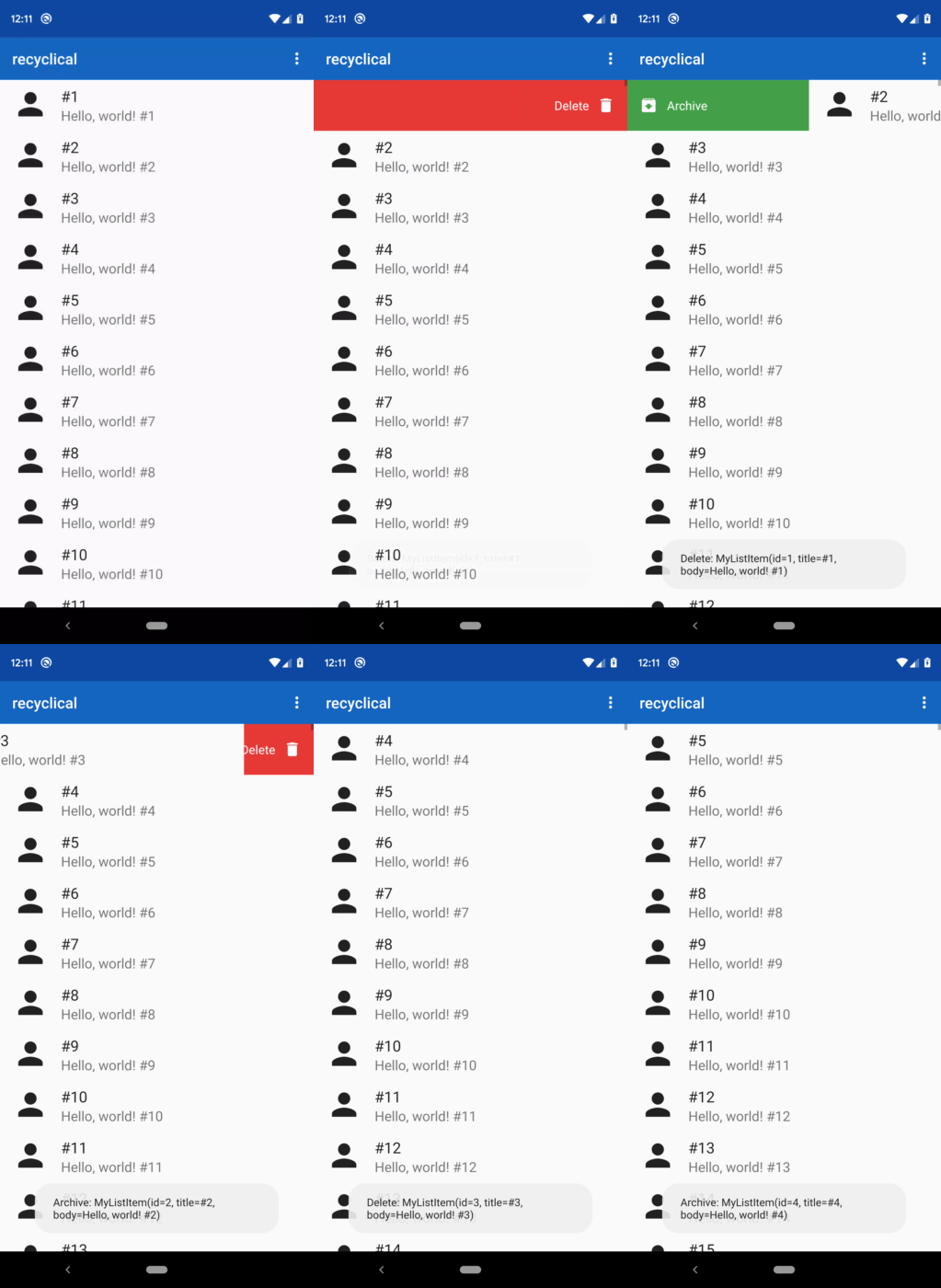 This example below sets up swipe to delete, so that it works if you swipe either right or left.
A delete icon and delete text would be shown over a red gutter. *The callback returning true means
that the item should be removed from the `DataSource` when the action triggers.*
```kotlin
list.setup {
...
withSwipeAction(LEFT, RIGHT) {
icon(R.drawable.ic_delete)
text(R.string.delete)
color(R.color.md_red)
callback { index, item -> true }
}
}
```
You can target specific item types with `withSwipeActionOn`, too:
```kotlin
withSwipeActionOn(LEFT, RIGHT) {
icon(R.drawable.ic_delete)
text(R.string.delete)
color(R.color.md_red)
callback { index, item -> true }
}
```
With `withSwipeActionOn`, `item` in the callback is a `MyItem` instead of `Any` as well.
## Customization
As you saw above, you can use icons, text, and background colors easily. There are more details
you can customize about your swipe actions, mainly around text:
```kotlin
list.setup {
...
withSwipeAction(LEFT, RIGHT) {
text(
res = R.string.delete,
color = R.color.black,
size = R.dimen.small_text_size,
typefaceRes = R.font.roboto_mono
)
}
}
```
This example below sets up swipe to delete, so that it works if you swipe either right or left.
A delete icon and delete text would be shown over a red gutter. *The callback returning true means
that the item should be removed from the `DataSource` when the action triggers.*
```kotlin
list.setup {
...
withSwipeAction(LEFT, RIGHT) {
icon(R.drawable.ic_delete)
text(R.string.delete)
color(R.color.md_red)
callback { index, item -> true }
}
}
```
You can target specific item types with `withSwipeActionOn`, too:
```kotlin
withSwipeActionOn(LEFT, RIGHT) {
icon(R.drawable.ic_delete)
text(R.string.delete)
color(R.color.md_red)
callback { index, item -> true }
}
```
With `withSwipeActionOn`, `item` in the callback is a `MyItem` instead of `Any` as well.
## Customization
As you saw above, you can use icons, text, and background colors easily. There are more details
you can customize about your swipe actions, mainly around text:
```kotlin
list.setup {
...
withSwipeAction(LEFT, RIGHT) {
text(
res = R.string.delete,
color = R.color.black,
size = R.dimen.small_text_size,
typefaceRes = R.font.roboto_mono
)
}
}
```