# LangGraph.js AI Agent Template
> **A production-ready Next.js template for building AI agents with LangGraph.js, featuring Model Context Protocol (MCP) integration, human-in-the-loop tool approval, and persistent memory.**
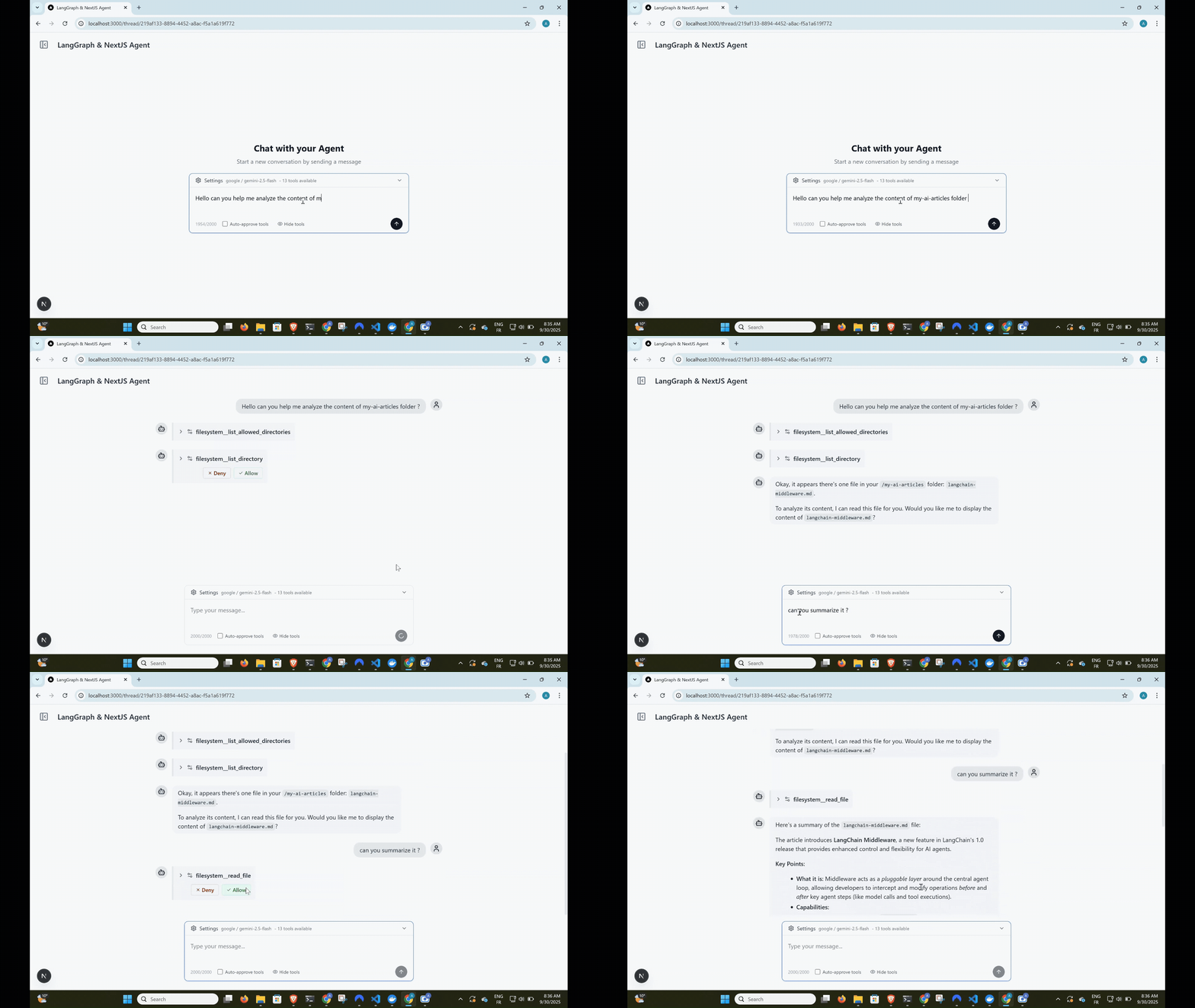
_Complete agent workflow: user input → tool approval → execution → streaming response_
[](https://www.typescriptlang.org/)
[](https://nextjs.org/)
[](https://langchain-ai.github.io/langgraphjs/)
[](https://www.postgresql.org/)
[](https://www.prisma.io/)
---
## Built with this template: Cameron
[**Cameron**](https://github.com/agentailor/cameron) is a personal finance agent that started from this
template and was built in public, one tagged release per article. If you want to see where this scaffold
goes once it becomes a real agent — human-in-the-loop approval on every money-moving action, self-hosted
data, a full LangGraph workflow — read its source as a worked example.
---
## Need help taking this to production?
I help teams design and optimize LangGraph-based AI agents (RAG, memory, latency, architecture).
If you're building something serious on top of this template and want hands-on help:
→ [DM me on LinkedIn](https://www.linkedin.com/in/ali-ibrahim-junior/)
Happy to jump on a short call.
---
## Features
### **Dynamic Tool Loading with MCP**
- **Model Context Protocol** integration for dynamic tool management
- Add tools via web UI - no code changes required
- Support for both stdio and HTTP MCP servers
- Tool name prefixing to prevent conflicts
### **Human-in-the-Loop Tool Approval**
- Interactive tool call approval before execution
- Granular control with approve/deny/modify options
- Optional auto-approval mode for trusted environments
- Real-time streaming with tool execution pauses
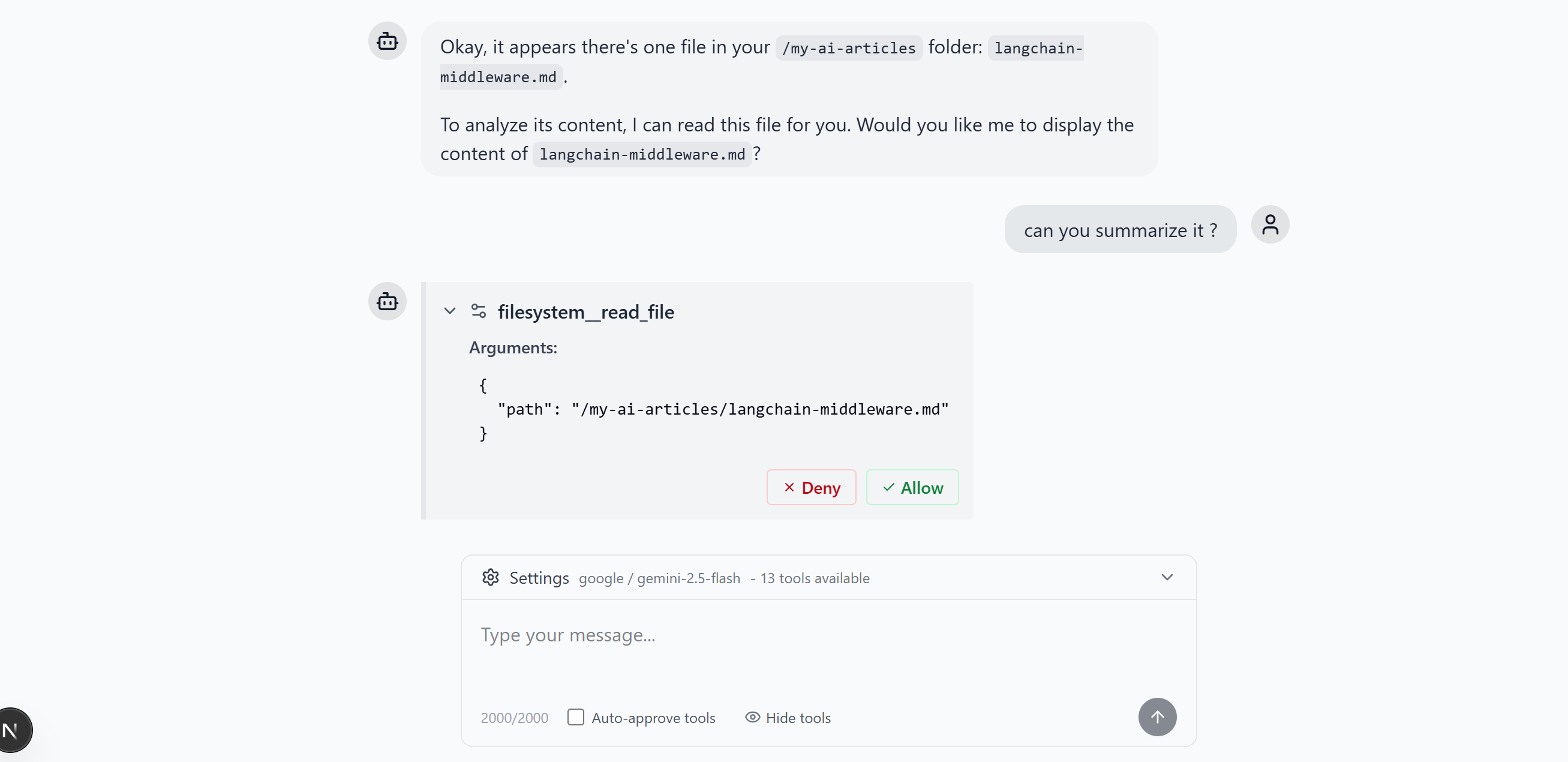
Tool approval dialog with detailed parameter inspection
### **Persistent Conversation Memory**
- LangGraph checkpointer with PostgreSQL backend
- Full conversation history preservation
- Thread-based organization
- Seamless resume across sessions
### **Multimodal File Uploads**
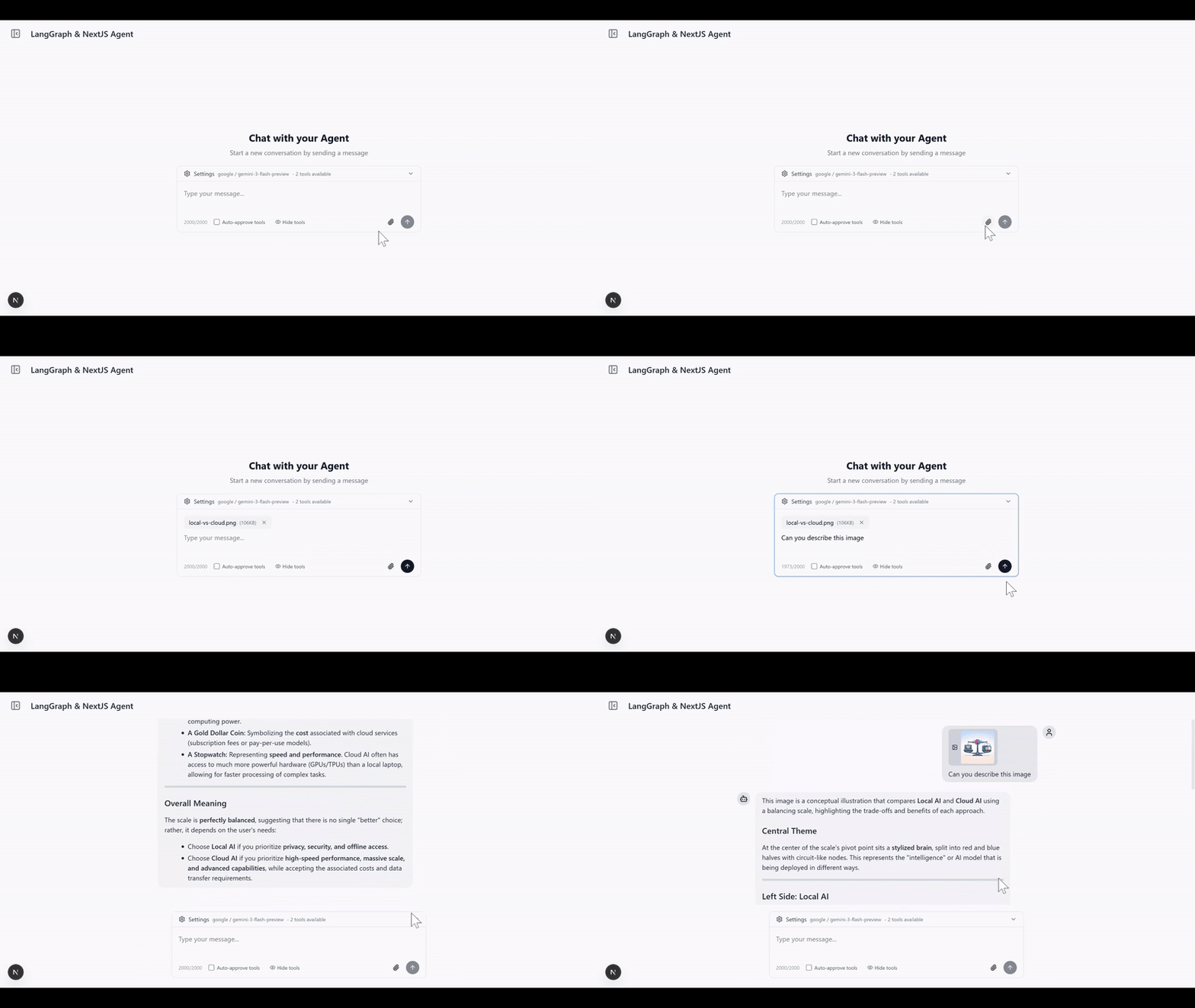
Tool approval dialog with detailed parameter inspection
- Upload images, PDFs, and text files with messages
- S3-compatible storage (MinIO for development)
- Automatic file processing for AI consumption
- Production-ready with AWS S3, Cloudflare R2 support
### **Real-time Streaming Interface**
- Server-Sent Events (SSE) for live responses
- Optimistic UI updates with React Query
- Type-safe message handling
- Error recovery and graceful degradation
### **Persistent Model Settings**
- Provider and model selection saved to `localStorage` automatically
- Settings survive page reloads and thread navigation
- No backend required — zero latency reads on startup
### **LLM Observability with Langfuse**
- End-to-end tracing of agent runs, LLM calls, tool invocations, and token usage
- Works with [Langfuse Cloud](https://cloud.langfuse.com) or a self-hosted instance
- Toggle via `LANGFUSE_ENABLED` env var — zero overhead when disabled
- See [docs/OBSERVABILITY.md](docs/OBSERVABILITY.md) for setup instructions
### **Modern Tech Stack**
- **Frontend**: Next.js 15, React 19, TypeScript, Tailwind CSS
- **Backend**: Node.js, Prisma ORM, PostgreSQL, MinIO/S3
- **AI**: LangGraph.js, OpenAI/Google/Anthropic models
- **UI**: shadcn/ui components, Lucide icons
## Quick Start
### Prerequisites
- Node.js 18+ and pnpm
- Docker (for PostgreSQL and MinIO)
- OpenAI API key, Google AI API key, or Anthropic API key
### 1. Clone and Install
```bash
git clone https://github.com/IBJunior/fullstack-langgraph-nextjs-agent.git
cd fullstack-langgraph-nextjs-agent
pnpm install
```
### 2. Environment Setup
```bash
cp .env.example .env.local
```
Edit `.env.local` with your configuration:
```env
# Database
DATABASE_URL="postgresql://user:password@localhost:5434/agent_db"
# AI Models (choose one or more)
OPENAI_API_KEY="sk-..."
GOOGLE_API_KEY="..."
ANTHROPIC_API_KEY="sk-ant-..."
# Optional: Default model
DEFAULT_MODEL="gpt-4o-mini" # or "gemini-1.5-flash" or "claude-sonnet-4-5"
```
### 3. Start Services
```bash
docker compose up -d # Starts PostgreSQL and MinIO
```
### 4. Database Setup
```bash
pnpm prisma:generate
pnpm prisma:migrate
```
### 5. Run Development Server
```bash
pnpm dev
# Or use custom port
pnpm dev --port=3005
```
Visit [http://localhost:3000](http://localhost:3000) to start chatting with your AI agent!
## Screenshots
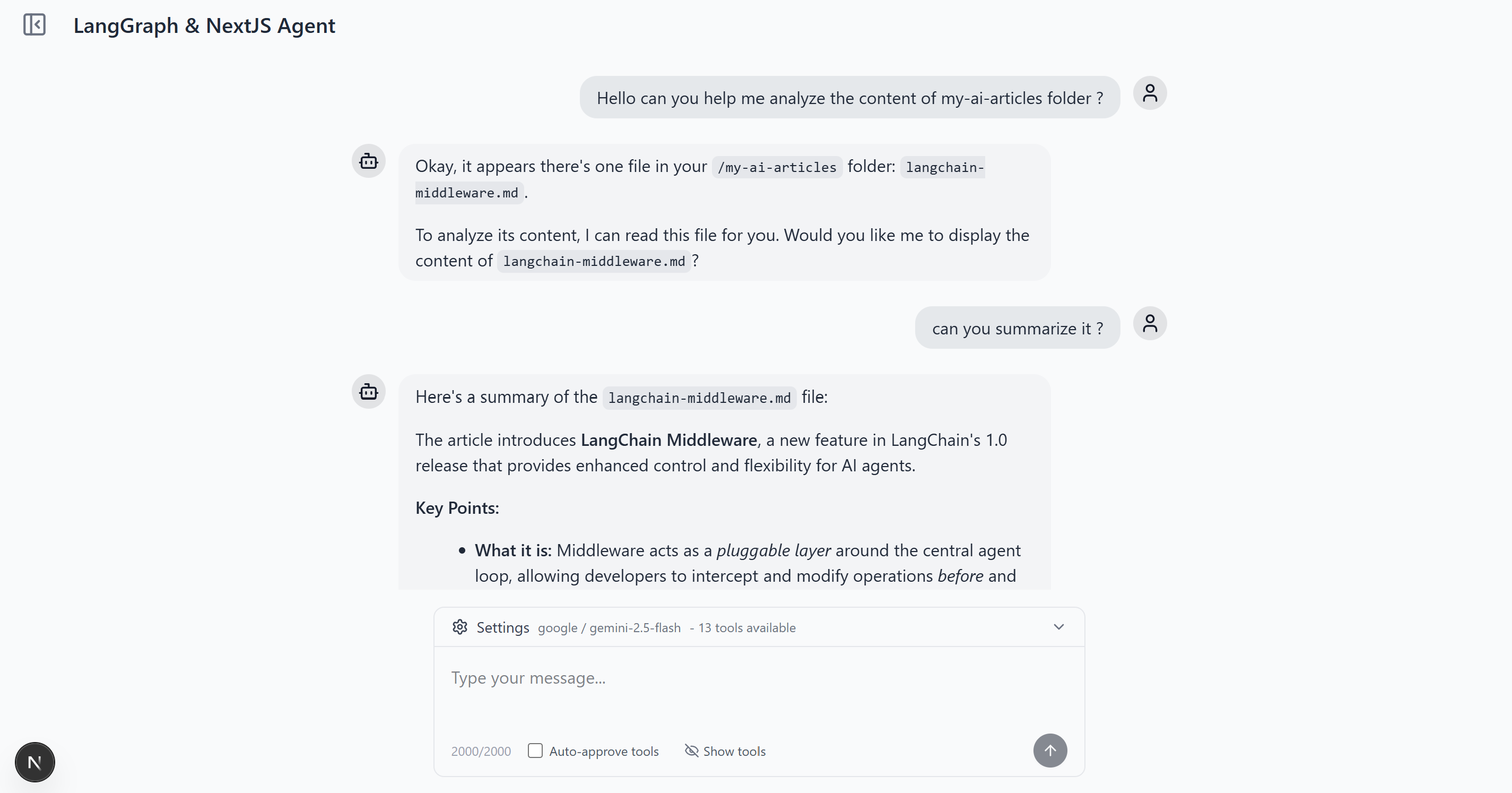
Main Chat Interface
Clean, responsive design with streaming responses
|
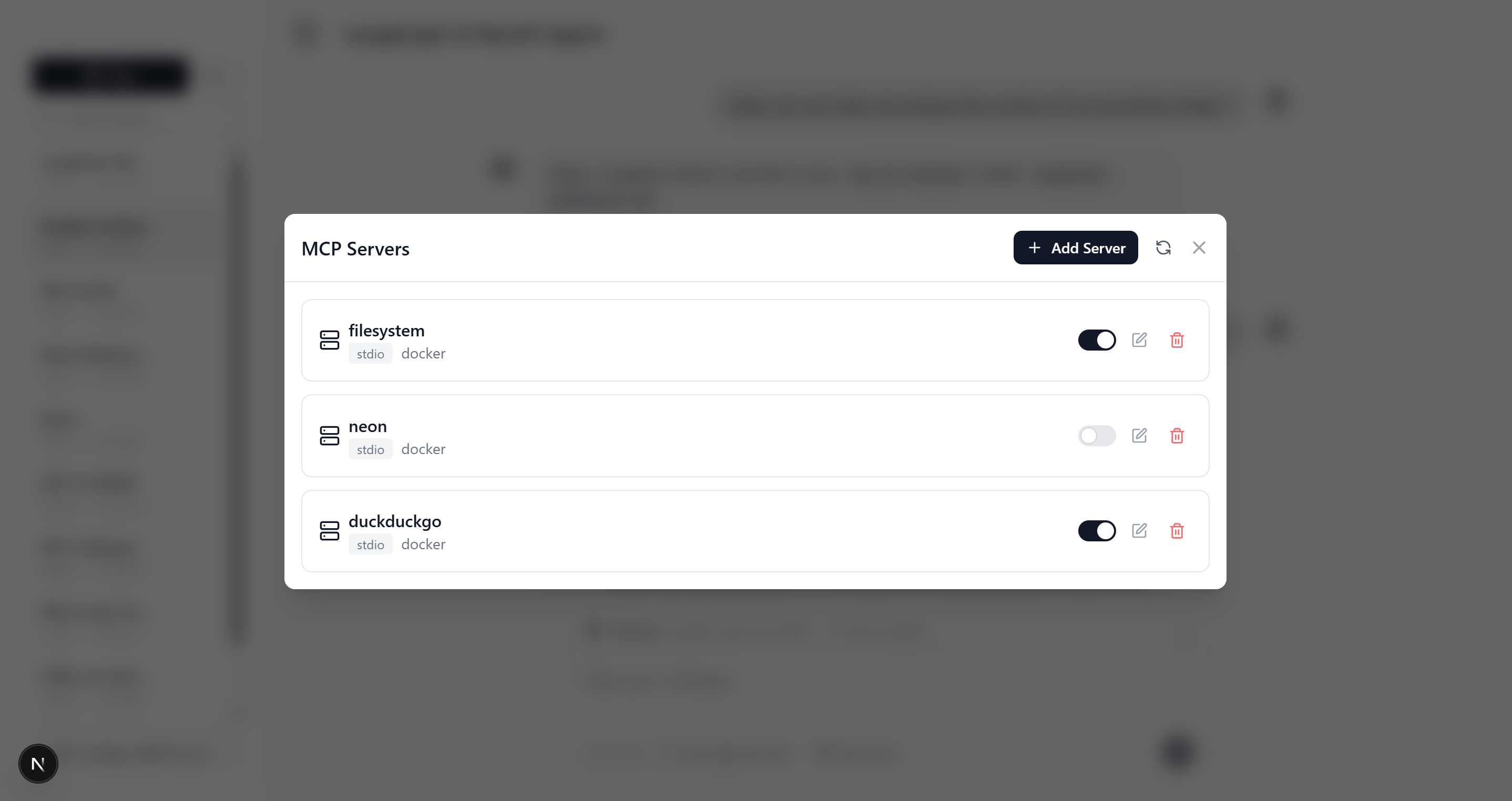
MCP Server Management
Easy setup and configuration of tool servers
|
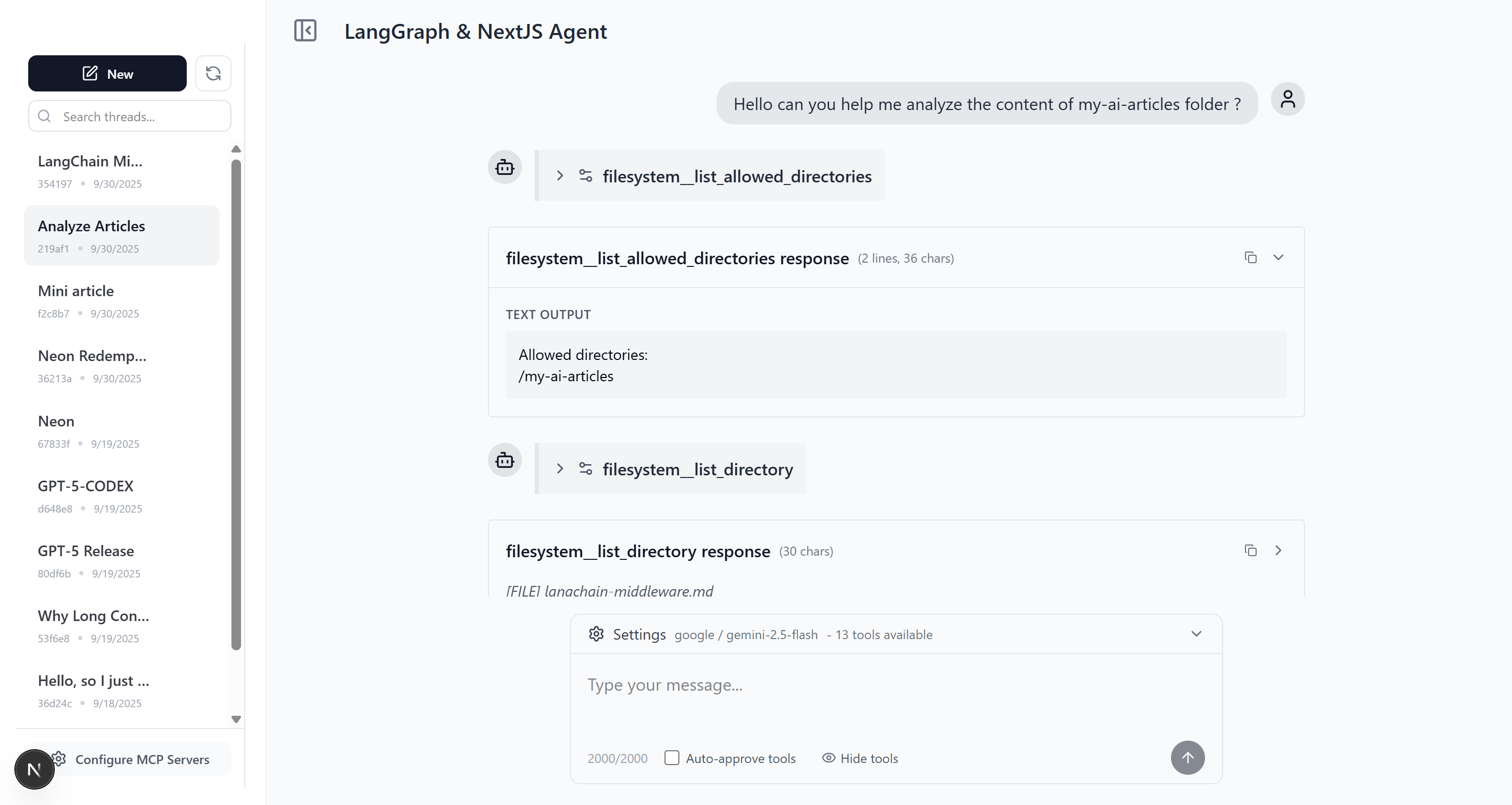
Thread Management
Organize conversations with persistent history
|
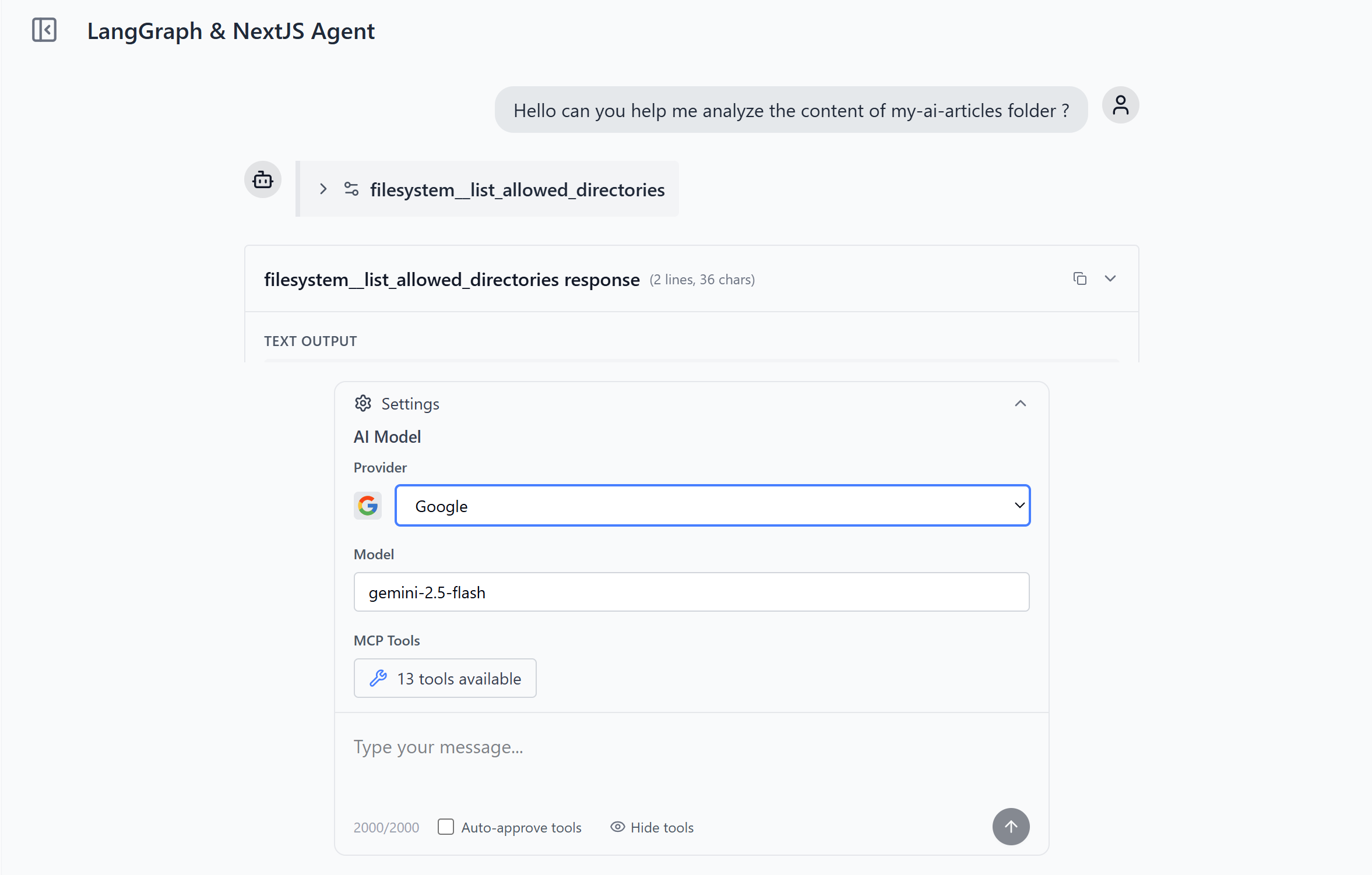
Agent Configurations
Multiple model Providers Support
|
## Usage Guide
### Adding MCP Servers
1. **Navigate to Settings** - Click the gear icon in the sidebar
2. **Add MCP Server** - Click "Add MCP Server" button
3. **Configure Server**:
- **Name**: Unique identifier (e.g., "filesystem")
- **Type**: Choose `stdio` or `http`
- **Command**: For stdio servers (e.g., `npx @modelcontextprotocol/server-filesystem`)
- **Args**: Command arguments (e.g., `["/path/to/allow"]`)
- **URL**: For HTTP servers
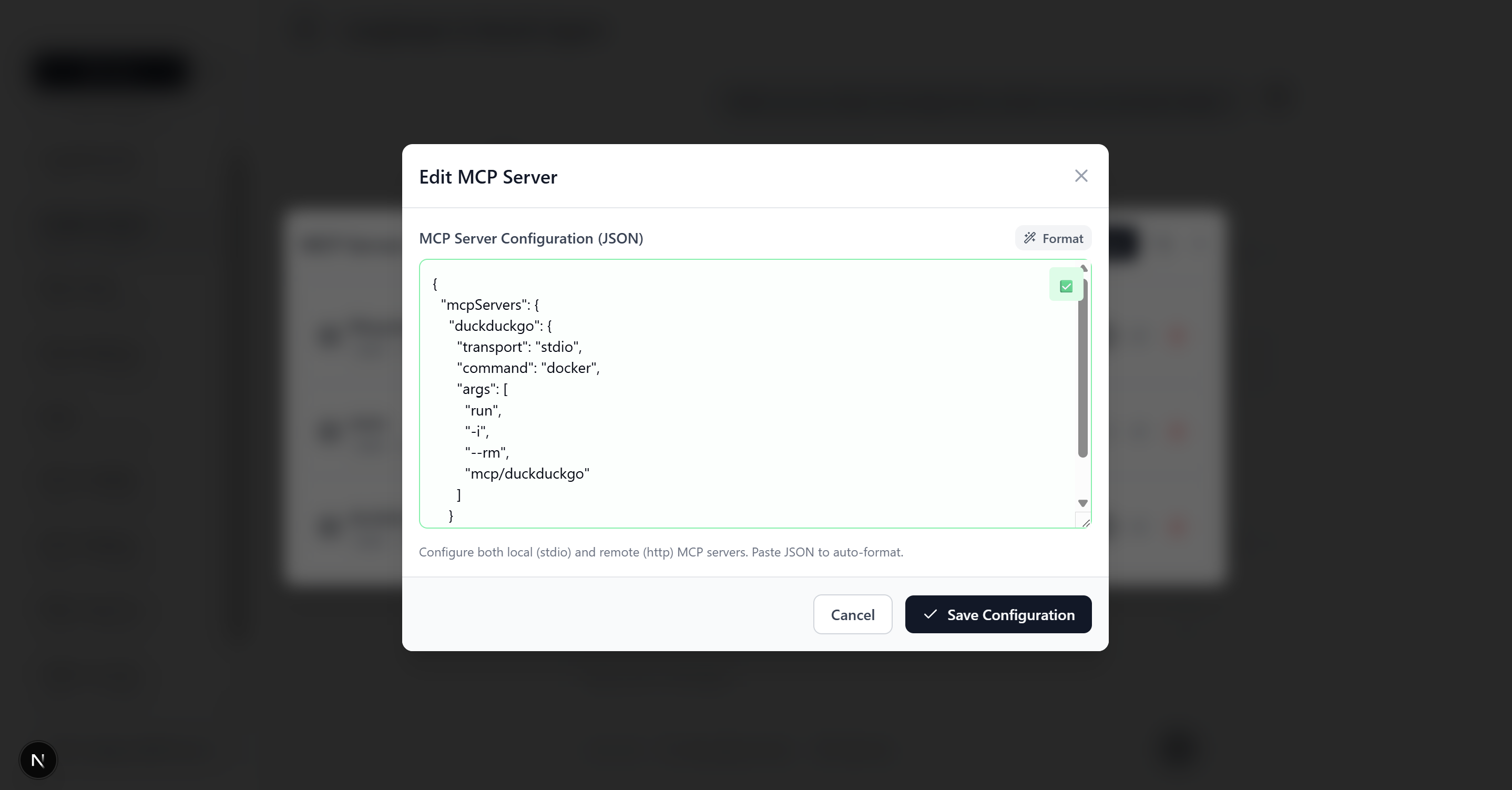
_MCP server configuration form with example filesystem server setup_
> **Want to build your own MCP server?** Check out [create-mcp-server](https://github.com/agentailor/create-mcp-server) - scaffold production-ready MCP servers in seconds with TypeScript, multiple frameworks (MCP SDK or FastMCP), and built-in debugging tools.
### Example MCP Server Configurations
#### Filesystem Server (stdio)
```json
{
"name": "filesystem",
"type": "stdio",
"command": "npx",
"args": ["@modelcontextprotocol/server-filesystem", "/Users/yourname/Documents"]
}
```
#### HTTP API Server
```json
{
"name": "web-api",
"type": "http",
"url": "http://localhost:8080/mcp",
"headers": {
"Authorization": "Bearer your-token"
}
}
```
> **Note**: Some HTTP MCP servers require OAuth 2.0 authentication. See [OAuth Documentation](docs/OAUTH.md) for details.
### Tool Approval Workflow
1. **Agent Requests Tool** - AI suggests using a tool
2. **Approval Prompt** - Interface shows tool details and asks for approval
3. **User Decision**:
- ✅ **Allow**: Execute tool as requested
- ❌ **Deny**: Skip tool execution
- ✏️ **Modify**: Edit tool parameters before execution
4. **Continue Conversation** - Agent responds with tool results
## Architecture
### High-Level Overview
```
┌─────────────────┐ ┌──────────────────┐ ┌─────────────────┐
│ Next.js UI │◄──►│ Agent Service │◄──►│ LangGraph.js │
│ (React 19) │ │ (SSE Streaming) │ │ Agent │
└─────────────────┘ └──────────────────┘ └─────────────────┘
│ │ │
▼ ▼ ▼
┌─────────────────┐ ┌──────────────────┐ ┌─────────────────┐
│ React Query │ │ Prisma │ │ MCP Clients │
│ (State Mgmt) │ │ (Database) │ │ (Tools) │
└─────────────────┘ └──────────────────┘ └─────────────────┘
│
▼
┌──────────────────────────────┐
│ PostgreSQL │ MinIO/S3 │
│ (Persistence)│ (File Store) │
└──────────────────────────────┘
```
### Core Components
#### Agent Builder (`src/lib/agent/builder.ts`)
- Creates StateGraph with agent→tool_approval→tools flow
- Handles tool approval interrupts
- Manages model binding and system prompts
#### MCP Integration (`src/lib/agent/mcp.ts`)
- Dynamic tool loading from database-stored MCP servers
- Support for stdio and HTTP transports
- Tool name prefixing for conflict prevention
#### Streaming Service (`src/services/agentService.ts`)
- Server-Sent Events for real-time responses
- Message processing and chunk aggregation
- Tool approval workflow handling
#### Chat Hook (`src/hooks/useChatThread.ts`)
- React Query integration for optimistic UI
- Stream management and error handling
- Tool approval user interface
#### File Storage (`src/lib/storage/`)
- S3-compatible storage with MinIO (development) or AWS S3 (production)
- File validation, upload, and content processing for AI
- Multimodal message building with base64 conversion
For detailed architecture documentation, see [docs/ARCHITECTURE.md](docs/ARCHITECTURE.md).
## API Documentation
The app serves an interactive OpenAPI 3.1 explorer at **`/api-docs`** and the raw spec at
**`/api/openapi`** — generated from per-route Zod schemas. See [docs/API.md](docs/API.md) for how
it works and how to document new routes.
## Development
### Available Scripts
```bash
pnpm dev # Start development server with Turbopack
pnpm build # Production build
pnpm start # Start production server
pnpm lint # Run ESLint
pnpm format # Format with Prettier
pnpm format:check # Check formatting
# Database
pnpm prisma:generate # Generate Prisma client (after schema changes)
pnpm prisma:migrate # Create and apply migrations
pnpm prisma:studio # Open Prisma Studio (database UI)
```
### Agent Skills
This repo ships [Agent Skills](https://github.com/agentailor/skills) in [.agents/skills/](.agents/skills/),
pinned by `skills-lock.json`. They give any skill-aware coding agent (Claude Code and friends) the
conventions for working on an agent codebase like this one:
| Skill | Use it when |
| ------------------------------------------------------------------------------ | ------------------------------------------------------------------ |
| [`agent-prompt-engineering`](.agents/skills/agent-prompt-engineering/SKILL.md) | Writing or auditing the agent’s system prompt |
| [`tool-design`](.agents/skills/tool-design/SKILL.md) | Adding or reviewing a tool / MCP server the agent calls |
| [`agent-eval-cases`](.agents/skills/agent-eval-cases/SKILL.md) | Deciding what agent behavior deserves an eval case, and writing it |
Agent guidance for this repo lives in [AGENTS.md](AGENTS.md) (with [CLAUDE.md](CLAUDE.md) pointing to it).
### Project Structure
```
src/
├── app/ # Next.js App Router
│ ├── api/ # API routes (stream, upload, mcp-servers)
│ └── thread/ # Thread-specific pages
├── components/ # React components
├── hooks/ # Custom React hooks
├── lib/ # Core utilities
│ ├── agent/ # Agent-related logic
│ └── storage/ # File upload & S3 utilities
├── services/ # Business logic
└── types/ # TypeScript definitions
prisma/
├── schema.prisma # Database schema
└── migrations/ # Database migrations
```
### Key Files
- **Agent Configuration**: `src/lib/agent/builder.ts`, `src/lib/agent/mcp.ts`
- **API Endpoints**: `src/app/api/agent/stream/route.ts`, `src/app/api/agent/upload/route.ts`
- **File Storage**: `src/lib/storage/` (validation, upload, content processing)
- **Database Models**: `prisma/schema.prisma`
- **Main Chat Interface**: `src/components/Thread.tsx`, `src/components/MessageInput.tsx`
- **Streaming Logic**: `src/hooks/useChatThread.ts`
## Contributing
We welcome contributions! This project is designed to be a community resource for LangGraph.js development.
### Getting Started
1. Fork the repository
2. Create a feature branch: `git checkout -b feature/amazing-feature`
3. Make your changes and add tests
4. Commit: `git commit -m 'Add amazing feature'`
5. Push: `git push origin feature/amazing-feature`
6. Open a Pull Request
### Development Guidelines
- Follow TypeScript strict mode
- Use Prettier for formatting
- Add JSDoc comments for public APIs
- Test MCP server integrations thoroughly
- Update documentation for new features
## Learning Resources
### LangGraph.js
- [LangGraph.js Documentation](https://langchain-ai.github.io/langgraphjs/)
- [StateGraph API Reference](https://langchain-ai.github.io/langgraphjs/reference/modules/langgraph.html)
- [Checkpointer Guide](https://langchain-ai.github.io/langgraphjs/how-tos/persistence-postgres)
### Model Context Protocol (MCP)
- [MCP Specification](https://spec.modelcontextprotocol.io/)
- [MCP Servers Repository](https://github.com/modelcontextprotocol/servers)
- [Building MCP Servers](https://modelcontextprotocol.io/docs/building-servers)
- [Docker MCP Catalog](https://blog.agentailor.com/posts/docker-mcp-catalog-and-toolkit?utm_source=github_fullstack_repo)
### Next.js & React
- [Next.js 15 Documentation](https://nextjs.org/docs)
- [React 19 Release Notes](https://react.dev/blog/2024/12/05/react-19)
- [React Query (TanStack Query)](https://tanstack.com/query/latest)
## License
This project is licensed under the MIT License - see the [LICENSE](LICENSE) file for details.
## Acknowledgments
- [LangChain](https://github.com/langchain-ai) for the incredible AI framework
- [Model Context Protocol](https://modelcontextprotocol.io/) for the tool integration standard
- [Next.js](https://nextjs.org/) team for the amazing React framework
---
**Ready to build your next AI agent?**
[Get Started](#quick-start)
---
If this repo helped you and you’d like guidance implementing it in production, feel free to reach out on [LinkedIn](https://www.linkedin.com/in/ali-ibrahim-junior/).