# agentgg
**Agentic SAST. White box. CI ready.**
`agentgg` is an agentic SAST scanner. Its agents read your code and reason about it — they follow imports, check the call graph, and confirm a finding before they report it, instead of pattern-matching the way traditional SAST does. Run it over a whole repository, or over a git diff for pull request review. Every scan opens with a fast recon pass that briefs the agents on what the project is, and an interrupted scan resumes on re-run.
**[Documentation](https://docs.agentgg.dev/cli/overview)** · [agentgg.dev](https://agentgg.dev) · [Platform](https://app.agentgg.dev) · [Agents catalog](https://github.com/agentgg-dev/agentgg-agents) · [Report a bug](https://github.com/agentgg-dev/agentgg/issues/new/choose) · [Report a security issue](https://github.com/agentgg-dev/agentgg/security)
Help us grow and [star us on GitHub](https://github.com/agentgg-dev/agentgg)! ⭐️
> **agentgg is in beta.** Things will move and edges will be rough. Bug reports and feedback are very welcome. [Open an issue](https://github.com/agentgg-dev/agentgg/issues/new/choose).
## Install
> Don't want to run it locally? [app.agentgg.dev](https://app.agentgg.dev) runs the same scanner as a hosted service: upload a repo, no install, no provider key of your own.
```bash
npm install -g agentgg
```
Requires Node.js 20+. You also need an account with one model provider — Anthropic, OpenAI, AWS Bedrock, Google Vertex AI, OpenRouter, or a local Ollama. See [Providers](https://docs.agentgg.dev/cli/providers) for setup, and [CONTRIBUTING.md](CONTRIBUTING.md) to build from source.
Live validation (`--live-validate`) also needs Docker. If Docker is missing or stopped, agentgg offers to install or start it when the command begins.
## Quick start
```bash
agentgg init # one-time: pick a provider, paste a key
agentgg scan ./src -o ./out # scan everything
agentgg scan ./src --diff origin/main...HEAD -o ./out # PR-style: scan only what changed
agentgg status ./out # what got found and validated
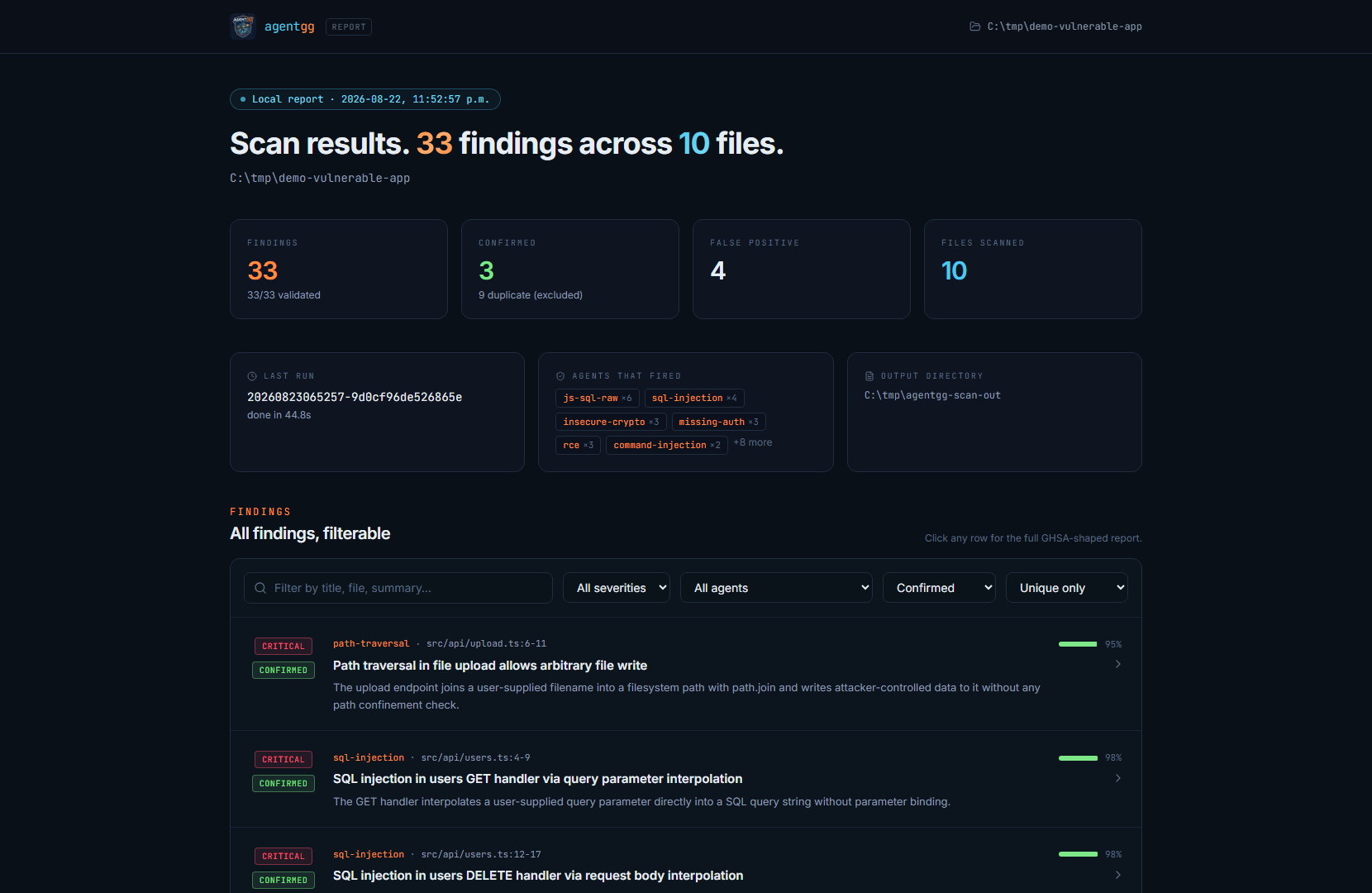
agentgg view ./out # browse findings in a local web UI
```
A scan writes `summary.md` and one markdown file per finding into `./out/`, plus a `state/` directory that makes resume, `status`, and `revalidate` work. Re-run with the same `-o` and unchanged files are skipped; a different `-o` starts fresh.
Walkthrough: [Quickstart](https://docs.agentgg.dev/cli/quickstart).
## Documentation
Browse the full documentation at **[docs.agentgg.dev](https://docs.agentgg.dev)**.
- [Quickstart](https://docs.agentgg.dev/cli/quickstart): your first scan
- [How a scan runs](https://docs.agentgg.dev/cli/how-a-scan-runs): the phases, and the defaults
- [Providers](https://docs.agentgg.dev/cli/providers): set up your model provider
- [Scan flags](https://docs.agentgg.dev/cli/reference/scan-flags): the full flag reference
- [Troubleshooting](https://docs.agentgg.dev/cli/troubleshooting): when something goes wrong
## Agents
An agent is one markdown file: YAML frontmatter that declares **where** to look and an optional **precondition** that decides whether the agent is worth running on this repo, plus a markdown body that is the prompt. An agent that declares neither `extensions` nor `filePatterns` in its `where` has no file scope: it gets no pre-selected files and searches the whole repository with its own tools instead. The catalog auto-downloads on first scan from [agentgg-dev/agentgg-agents](https://github.com/agentgg-dev/agentgg-agents), and `agentgg create` turns a past incident report into a reusable agent.
Write your own: [Agent anatomy](https://docs.agentgg.dev/agents/anatomy) · [Targeting](https://docs.agentgg.dev/agents/targeting) · [Create from reports](https://docs.agentgg.dev/agents/create-from-reports)
## Contributing
Bug reports, agents, and pull requests are all welcome. See [CONTRIBUTING.md](CONTRIBUTING.md) for the dev workflow, [CODE_OF_CONDUCT.md](CODE_OF_CONDUCT.md) for community expectations, and [SECURITY.md](SECURITY.md) to report a vulnerability privately.
## License
agentgg is licensed under the Apache License, Version 2.0. See [LICENSE](LICENSE) for the full text and [NOTICE](NOTICE) for attribution.