 Memora
"You never truly know the value of a moment until it becomes a memory."
Give your AI agents persistent collective memory
An MCP memory layer for agents: structured storage, semantic retrieval, graph relations, and source-backed cross-session context.




Absorb agent work into durable graph memory, then use memory_digest(topic) to retrieve relevant memories, TODOs/issues, related edges, and source IDs.
Features · Preview · Install · Usage · Config · Multi-DB · Containers · Live Graph · Cloud Graph · Chat · Semantic Search · Documents · LLM Dedup · Linking · Neovim
## Features
**Core Storage**
- 💾 **Persistent Storage** - SQLite with optional cloud sync (S3, R2, D1)
- 🗄️ **Multi-database routing** - One process serves many stores; a workspace reaches its own at `/mcp/` (see [Multi-database routing](#multi-database-routing))
- 📂 **Hierarchical Organization** - Section/subsection structure with auto-hierarchy assignment
- 📦 **Export/Import** - Backup and restore with merge strategies
**Absorb & Lineage**
- 🧬 **Absorb** - Feed facts in; an LLM classifies each against the store (duplicate / update / contradiction / related / new), skips duplicates, links relations, and consolidates related facts — with `dry_run` preview
- 🌱 **Supersession Lineage** - Updates supersede old knowledge instead of deleting it; retrieval follows the chain to the current version by default (`follow` modes: `active`, `latest`, `full_history`)
- 🗞️ **Topic Digest** - `memory_digest(topic)` bundles relevant memories, open TODOs/issues, related edges, and source IDs into one retrieval
**Search & Intelligence**
- 🔍 **Semantic Search** - Vector embeddings (TF-IDF, sentence-transformers, OpenAI)
- 🎯 **Advanced Queries** - Full-text, date ranges, tag filters (AND/OR/NOT), hybrid search
- 🔀 **Cross-references** - Auto-linked related memories based on similarity
- 🤖 **LLM Deduplication** - Find and merge duplicates with AI-powered comparison
- 🔗 **Memory Linking** - Typed edges, importance boosting, and cluster detection
**Document Storage**
- 📄 **Structured Documents** - Store markdown documents as searchable fragment trees (claims, plan items, references, risks)
- 🔒 **Fragment Integrity** - Guards against accidental delete/merge/absorb of document fragments
- 🔍 **Granular Search** - Individual claims and findings are semantically searchable while the full document remains retrievable as a unit
**Tools & Visualization**
- ⚡ **Memory Automation** - Structured tools for TODOs, issues, and sections
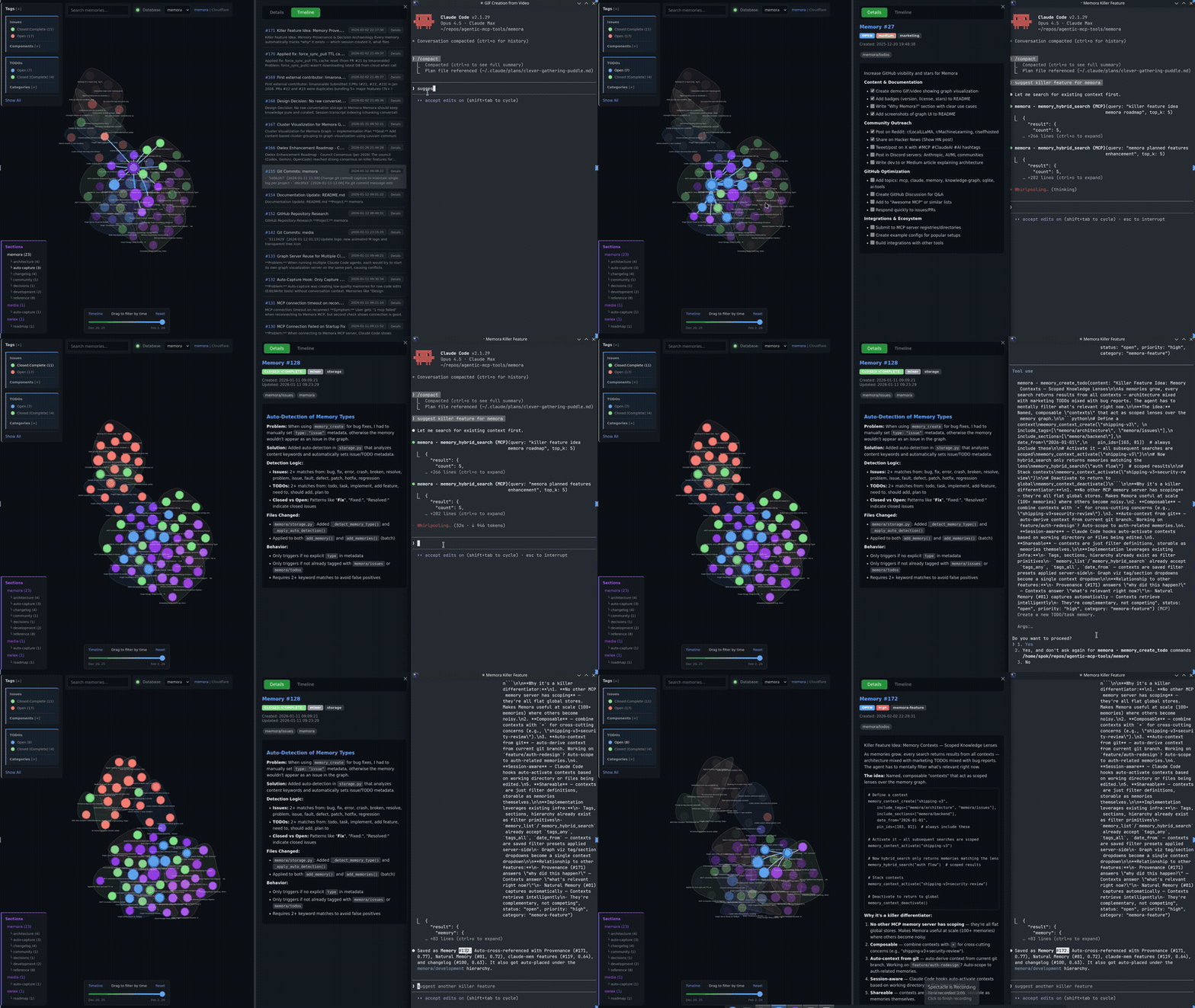
- 🕸️ **Knowledge Graph** - Interactive visualization with Mermaid rendering and cluster overlays
- 🌐 **Live Graph Server** - Built-in HTTP server with cloud-hosted option (D1/Pages)
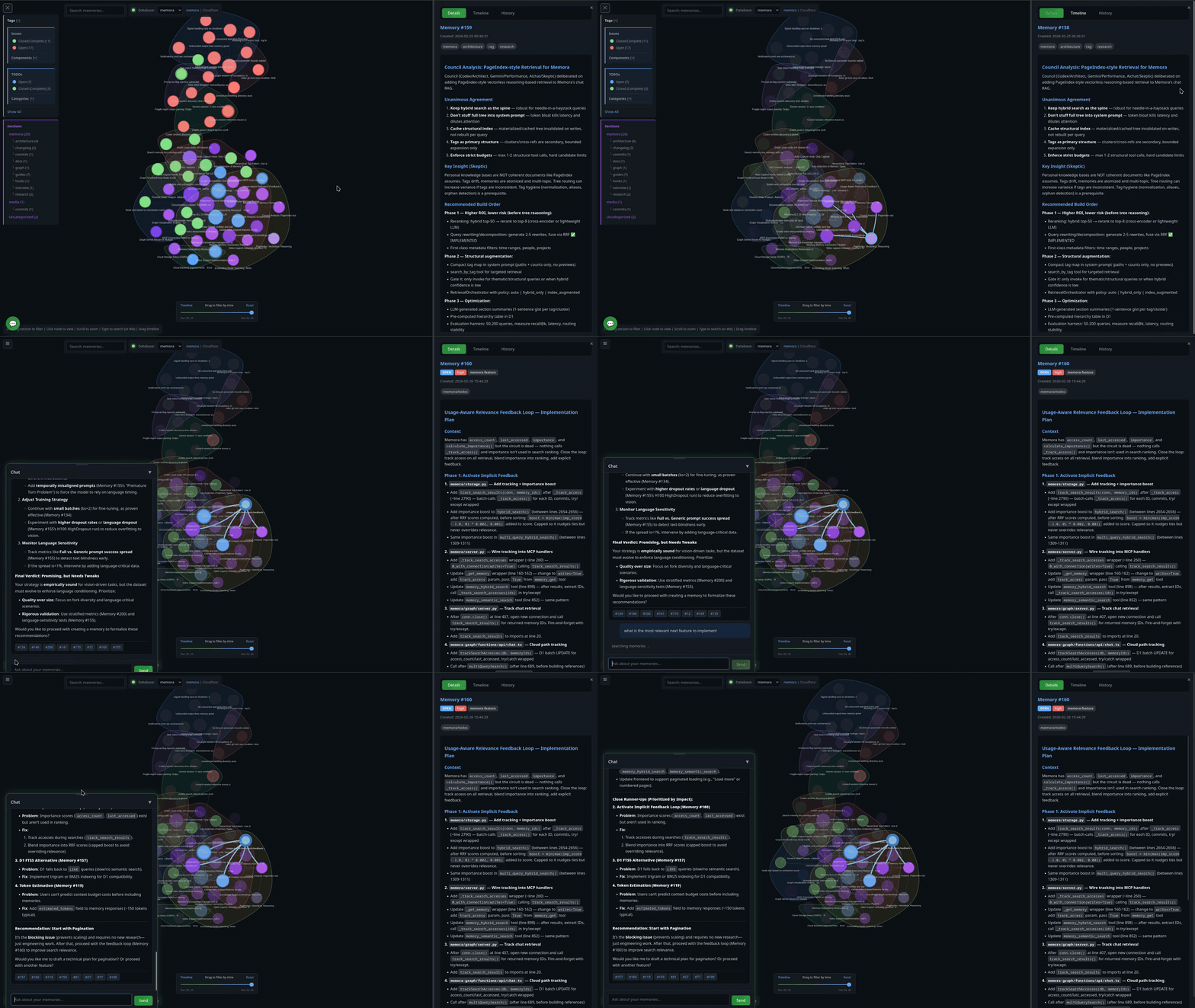
- 💬 **Chat with Memories** - RAG-powered chat panel with LLM tool calling to search, create, update, and delete memories via streaming chat
- 📡 **Event Notifications** - Poll-based system for inter-agent communication
- 📊 **Statistics & Analytics** - Tag usage, trends, and connection insights
- 🧠 **Memory Insights** - Activity summary, stale detection, consolidation suggestions, and LLM-powered pattern analysis
- 📜 **Action History** - Track all memory operations (create, update, delete, merge, boost, link) with grouped timeline view
## Preview
## Install
Two paths. **pip** is a local stdio child the client spawns. A **container** is a detached HTTP service you start with `up`; with `MEMORA_DATABASES` it serves multiple stores from one process. The LaunchAgent supervises the **proxy**, not the container — after a host restart the listener can come back while its upstream is still stopped. If you are running memora as a service, the container path *is* the install.
### pip (local / stdio)
```bash
pip install memora-mcp
```
The PyPI package is **`memora-mcp`** (bare `memora` on PyPI is an unrelated project). Includes cloud storage (S3/R2) and OpenAI embeddings out of the box.
```bash
# Optional: local embeddings (offline, ~2GB for PyTorch)
pip install "memora-mcp[local]"
# Latest development version straight from git
pip install "git+https://github.com/agentic-box/memora.git"
```
Then spawn it from `.mcp.json` with `"command": "memora-server"` (see [Configuration](#configuration)).
### Container (HTTP service)
Default runtime is Apple's [`container`](https://github.com/apple/container) CLI. Every container operation `scripts/memora-instance.sh` performs (`build`, `up`, `status`, `logs`, `down`) uses `$MEMORA_CONTAINER_BIN` (default `container`). The generated proxy process does not; it hardcodes `container list`.
**Before the first `build`:**
1. Install Apple's `container` CLI (signed pkg from its GitHub releases). It needs a Mac with Apple silicon **running macOS 26** — Apple does not support older macOS versions for `container`.
2. Start the runtime — Apple's documented first command, which also installs a kernel if none is configured:
```bash
container system start
```
3. Clone this repo and `cd` into it:
```bash
git clone https://github.com/agentic-box/memora.git
cd memora
```
4. Copy the instance template. It ships with `INSTANCE=myinstance` so the later `build`/`up`/`proxy` lines match without renaming. Edit `PORT` and a backend (`STORAGE_URI`, `VOLUME`, or `MEMORA_DATABASES`):
```bash
cp instances/example.env instances/myinstance.env
```
5. Create the credential file and install the proxy the LaunchAgent will run. `cred_args()` requires a `.mcp.json` whose `mcpServers.memora.env` holds `CLOUDFLARE_API_TOKEN` (D1 access) and the embedding/LLM keys — `up` dies if that file is missing. The script looks for `~/.config/memora/credentials.mcp.json` **if that file exists**, otherwise `~/repos/agentic-box/.mcp.json`. Set `CRED_SOURCE` in the instance file to pick a path. Separately, `proxy` renders a plist whose executable is `$MEMORA_PROXY_BIN` (default `~/.local/libexec/memora/memora_proxy.py`) and whose logs live in `$MEMORA_LOG_DIR` (default `~/.local/var/log`) — nothing creates either on a fresh clone.
```bash
mkdir -p ~/.config/memora ~/.local/libexec/memora ~/.local/var/log
cp scripts/memora_proxy.py ~/.local/libexec/memora/
# real values; any key is fine, an absent file is not
# the default umask is permissive -- chmod 600 keeps other local accounts out
cat > ~/.config/memora/credentials.mcp.json <<'JSON'
{"mcpServers":{"memora":{"env":{"CLOUDFLARE_API_TOKEN":"REPLACE","OPENAI_API_KEY":"REPLACE"}}}}
JSON
chmod 600 ~/.config/memora/credentials.mcp.json
```
That JSON is the minimal correct config: both the LLM and embeddings use the
default OpenAI host with a real OpenAI key. Do **not** add
`OPENAI_BASE_URL` pointing at OpenRouter without the embedding pair from
[Embeddings](#semantic-search--embeddings) — OpenRouter has no embeddings
endpoint, every embed call 404s, and memora silently falls back to TF-IDF
keyword bags while looking healthy.
Then:
```bash
./scripts/memora-instance.sh build myinstance # tags IMAGE from myinstance.env (memora-pilot if IMAGE is unset)
./scripts/memora-instance.sh up myinstance # runs that same IMAGE
./scripts/memora-instance.sh proxy myinstance # render the LaunchAgent; run the printed launchctl
```
`up` does **not** publish a host port. The listener the workspace connects to is the proxy. `proxy` only *renders* a macOS LaunchAgent and prints the `launchctl` commands — it does not load the service. Run those printed commands.
The printed workspace URL is always `http://127.0.0.1:/mcp` (the registry default). For a non-default store, append `/` yourself — a bare `/mcp` on a registry silently binds `MEMORA_DEFAULT_DB`:
```json
{"mcpServers": {"memora": {"type": "http", "url": "http://127.0.0.1:/mcp/"}}}
```
Proxy rationale, credentials, instance files, and `MEMORA_CONTAINER_BIN`: [Container Deployment](#container-deployment).
Usage
The server runs automatically when configured in Claude Code. Manual invocation:
```bash
# Default (stdio mode for MCP)
memora-server
# With graph visualization server
memora-server --graph-port 8765
# HTTP transport (alternative to stdio)
memora-server --transport streamable-http --host 127.0.0.1 --port 8080
```
Configuration
### Claude Code
Add to `.mcp.json` in your project root:
**Local DB:**
```json
{
"mcpServers": {
"memora": {
"command": "memora-server",
"args": [],
"env": {
"MEMORA_DB_PATH": "~/.local/share/memora/memories.db",
"MEMORA_ALLOW_ANY_TAG": "1",
"MEMORA_GRAPH_PORT": "8765"
}
}
}
}
```
**Cloud DB (Cloudflare D1) - Recommended:**
```json
{
"mcpServers": {
"memora": {
"command": "memora-server",
"args": ["--no-graph"],
"env": {
"MEMORA_STORAGE_URI": "d1:///",
"CLOUDFLARE_API_TOKEN": "",
"MEMORA_ALLOW_ANY_TAG": "1"
}
}
}
}
```
With D1, use `--no-graph` to disable the local visualization server. Instead, use the hosted graph at your Cloudflare Pages URL (see [Cloud Graph](#cloud-graph)).
**Cloud DB (S3/R2) - Sync mode:**
```json
{
"mcpServers": {
"memora": {
"command": "memora-server",
"args": [],
"env": {
"AWS_PROFILE": "memora",
"AWS_ENDPOINT_URL": "https://.r2.cloudflarestorage.com",
"MEMORA_STORAGE_URI": "s3://memories/memories.db",
"MEMORA_CLOUD_ENCRYPT": "true",
"MEMORA_ALLOW_ANY_TAG": "1",
"MEMORA_GRAPH_PORT": "8765"
}
}
}
}
```
### Codex CLI
Add to `~/.codex/config.toml`:
```toml
[mcp_servers.memora]
command = "memora-server" # or full path: /path/to/bin/memora-server
args = ["--no-graph"]
env = {
AWS_PROFILE = "memora",
AWS_ENDPOINT_URL = "https://.r2.cloudflarestorage.com",
MEMORA_STORAGE_URI = "s3://memories/memories.db",
MEMORA_CLOUD_ENCRYPT = "true",
MEMORA_ALLOW_ANY_TAG = "1",
}
```
Environment Variables
| Variable | Description |
|------------------------|-----------------------------------------------------------------------------|
| `MEMORA_DB_PATH` | Local SQLite database path (default: `~/.local/share/memora/memories.db`) |
| `MEMORA_STORAGE_URI` | Storage URI: `d1:///` (D1) or `s3://bucket/memories.db` (S3/R2). Used when `MEMORA_DATABASES` is unset. |
| `MEMORA_DATABASES` | JSON object `{name: uri}` mapping each store this process serves. Names are one URL path segment (`/mcp/`): letters, digits, `-`, `_`, `.` only. Duplicate keys, empty values, unsafe names, or non-objects refuse to start rather than silently picking a store. Unset = single-store (legacy). See [Multi-database routing](#multi-database-routing). |
| `MEMORA_DEFAULT_DB` | Registry name a bare `/mcp` uses. Required when the registry has more than one database; with exactly one name, that name is the default. A value not in the registry refuses to start. |
| `CLOUDFLARE_API_TOKEN` | API token for D1 (`d1://` URI). `CF_API_TOKEN` is accepted as an alias. |
| `MEMORA_CLOUD_ENCRYPT` | Encrypt the local file before uploading to S3/R2. Unset/`false` = off; `1`/`true`/`yes` = on. |
| `MEMORA_CLOUD_COMPRESS`| Compress the local file before uploading to S3/R2. Unset/`false` = off; `1`/`true`/`yes` = on. |
| `MEMORA_CACHE_DIR` | Local cache directory for an S3/R2-synced database. Unset: the backend picks a cache path. |
| `MEMORA_ALLOW_ANY_TAG` | Allow any tag without validation against allowlist (`1` to enable) |
| `MEMORA_TAG_FILE` | Path to a JSON file containing an array of allowed tags, e.g. `["plan", "memora/issues"]` |
| `MEMORA_TAGS` | Comma-separated list of allowed tags |
| `MEMORA_HOST` | Bind address for HTTP transports (default `127.0.0.1`). Overridable with `--host`. |
| `MEMORA_PORT` | Bind port for HTTP transports (default `8000`). Overridable with `--port`. |
| `MEMORA_GRAPH_PORT` | Port for the knowledge graph visualization server (default: `8765`) |
| `MEMORA_TRANSPORT` | `stdio` (default), `sse`, or `streamable-http`. An unknown **env** value falls back to `stdio`; `--transport` still rejects unknown values. Multi-database routing and the session guard run only on `streamable-http`. |
| `MEMORA_TOOL_PROFILE` | Tool subset exposed to clients: `full` (default, all 44), `leader` (19), `agent` (12). Unset/empty = `full`; an unknown value refuses to start. See [Tool Profiles](#tool-profiles). |
| `MEMORA_MAX_SESSIONS` | Hard ceiling on concurrent MCP sessions (default `128`). `0` disables. A creation rate plus an idle timeout is not a bound — a client that keeps session ids alive can grow without limit at the creation rate. Invalid values refuse to start. Streamable-HTTP only. |
| `MEMORA_MAX_INIT_PER_MIN` | New sessions admitted per minute (default `120`). `0` disables. Invalid values refuse to start. Streamable-HTTP only. |
| `MEMORA_MAX_INIT_BODY_BYTES` | Maximum initialize request body accepted/buffered (default `65536`, minimum `1024`). Larger requests receive `413`. Invalid values refuse to start. Streamable-HTTP only. |
| `MEMORA_SESSION_IDLE_TIMEOUT` | Seconds before an abandoned valid session is reaped (default `1800`). `0` disables. Invalid values refuse to start. Streamable-HTTP only. |
| `MEMORA_HEALTH_TOKEN` | Bearer token for detailed `/health/db` bodies (names, counts, error text). Unset: only a loopback peer sees detail; everyone else gets aggregate status. FastMCP `custom_route()` is unauthenticated even when MCP auth is configured. HTTP transports only (`memora.health` is imported for SSE/streamable-http, not stdio). |
| `MEMORA_HEALTH_TTL` | Seconds a readiness snapshot may be served before a refresh is due (default `10`, cap `3600`). Must be `> 0`. Invalid values refuse to start. HTTP transports only — a malformed value does not abort stdio. |
| `MEMORA_HEALTH_TIMEOUT`| Bound on one refresh pass and on each store probe (default `15`, cap `300`). Must be `> 0`. HTTP transports only. |
| `MEMORA_HEALTH_REFRESH_INTERVAL` | How often the server refreshes readiness on its own (default `15`, cap `3600`). `0` = poll-only. Without this, a proxy deployment has no loopback caller and the alert surface stays `unknown` while every database is fine. When periodic refresh is enabled, `interval + timeout` must be `< MEMORA_HEALTH_MAX_STALE`. HTTP transports only. |
| `MEMORA_HEALTH_MAX_STALE` | Age after which a cached per-database result may no longer be reported ready (default `60`, cap `3600`). Must be `>= MEMORA_HEALTH_TTL`. HTTP transports only. |
| `MEMORA_STALE_DAYS` | Two consumers, two defaults, same name: `memory_insights` treats an open TODO/issue as stale after **14** days; the graph UI greys closed items after **30** days. Set the variable to override both. |
| `MEMORA_EMBEDDING_MODEL` | Embedding backend: `openai` (default), `sentence-transformers`, or `tfidf` |
| `SENTENCE_TRANSFORMERS_MODEL` | Model for sentence-transformers (default: `all-MiniLM-L6-v2`) |
| `MEMORA_EMBEDDING_API_KEY` | Embedding provider API key (atomic with base URL — see below) |
| `MEMORA_EMBEDDING_BASE_URL` | Embedding provider base URL (atomic with API key — see below) |
| `MEMORA_EMBEDDING_STRICT` | **Recommend `1`.** Fail hard on embedding errors instead of silent TF-IDF. Without it a broken endpoint keeps answering while every vector becomes a keyword bag (how 756 memories degraded unnoticed). |
| `OPENAI_API_KEY` | **LLM only** (dedup/chat) when `MEMORA_EMBEDDING_*` is set. Embeddings fall back to this key only if **both** `MEMORA_EMBEDDING_API_KEY` and `MEMORA_EMBEDDING_BASE_URL` are unset |
| `OPENAI_BASE_URL` | **LLM** base URL (OpenRouter, Azure, etc.). Same atomic fallback rule as the key — not an embeddings URL when you use a split config |
| `OPENAI_EMBEDDING_MODEL` | Model id for the openai embedding backend. Must exist on the **embedding** host (default `text-embedding-3-small` is OpenAI-only; Cloudflare needs e.g. `@cf/baai/bge-m3`) |
| `MEMORA_LLM_ENABLED` | Enable LLM-powered deduplication comparison (`true`/`1`/`yes`; default: `true`) |
| `MEMORA_LLM_MODEL` | Model for deduplication comparison and, if unset, for query rewrite and local chat (default: `gpt-4o-mini`). Pick a plain chat/instruct model, not a reasoning model — a reasoning model was measured at 12-17s per absorb classification call (1000-1700 reasoning tokens it does not let OpenRouter's `reasoning.effort`/`reasoning.max_tokens` bound), vs 3-4s for `gpt-4o-mini` on the same calls. |
| `MEMORA_ABSORB_CONCURRENCY` | Worker count for `memory_absorb`'s concurrent classify phase (default `4`; non-numeric or `<1` falls back to `4`; `1` disables the thread pool and classifies sequentially). Only the per-fact LLM classification call is parallelized — embeds and searches stay sequential (cheap, and `conn` isn't safe to touch from worker threads: sqlite3 connections are thread-affine by default and `D1Connection` carries mutable session-token state). |
| `MEMORA_LLM_TIMEOUT` | Seconds the OpenAI client waits (default `60`, floored at `1`). A non-numeric value falls back to `60`. |
| `MEMORA_REWRITE_MODEL` | Model for RAG query rewriting in the graph chat panel. Unset/empty uses `MEMORA_LLM_MODEL`. |
| `MEMORA_VECTOR_SCAN_PAGE_SIZE` | Rows per page when loading embeddings from D1 (default `1000`; non-numeric or `<1` falls back to `1000`; hard ceiling `10000`). At the default, a store under 1000 rows returns the **entire corpus plus every embedding in one D1 response**, which raced Cloudflare's 30s per-request ceiling and made `memory_absorb` fail outright. **Use `100` on D1** (the instance script already injects that). Paging is a mitigation, not the fix: absorb reads the corpus once per call and reuses a process-local cache keyed on the DB's monotonic `embedding_change_epoch`. |
| `MEMORA_REBUILD_CHUNK_SIZE` | Rows per batch in `memory_rebuild_embeddings` (default `32`; non-numeric or `<1` falls back to `32`). Each batch is one `compute_embeddings_batch` call and one `conn.commit()`, instead of one embed call and one commit per row — on D1 this collapses the lease-heartbeat round trips from two per row to two per batch, which dominated wall time far more than the per-row commits did (D1's `commit()` is already a no-op). |
| `CHAT_MODEL` | Model for the local graph chat panel. Unset/empty falls back to `MEMORA_LLM_MODEL`. (The `deepseek/deepseek-chat` default is Cloudflare Pages `wrangler.toml`, not this process.) |
| `MEMORA_CLOUD_GRAPH_ENABLED` | `true`/`1`/`yes` to notify the hosted graph of writes (default off). |
| `MEMORA_CLOUD_GRAPH_WORKER_URL` | Worker base URL for those broadcasts (`POST /broadcast`). Unset: broadcasts are skipped. |
| `MEMORA_CLOUD_GRAPH_DEBOUNCE` | Seconds to batch rapid writes before broadcasting (default `1.0`). |
| `MEMORA_CLOUD_GRAPH_SYNC_SCRIPT` | Path captured at startup (default: `memora-graph/scripts/sync.sh` if that file exists). The current write path does **not** execute this script — D1 is the source of truth and only the worker broadcast runs. |
| `AWS_PROFILE` | AWS credentials profile from `~/.aws/credentials` (useful for R2) |
| `AWS_ENDPOINT_URL` | S3-compatible endpoint for R2/MinIO |
| `R2_PUBLIC_DOMAIN` | Public domain for R2 image URLs |
Tool Profiles (MEMORA_TOOL_PROFILE)
All 44 MCP tools register unconditionally, so every agent session is injected with the full ~12,700-token tool schema even when most tools are never called. `MEMORA_TOOL_PROFILE` exposes a subset per deployment so a gated tool is **genuinely absent** — missing from `tools/list` AND undispatchable (`call_tool` returns `unknown-tool`, not a hidden execution). The profile is applied and attested at startup; the active profile and exposed tool count are logged to stderr.
| Value | Tools | Use |
|-------|-------|-----|
| `full` (default) | all 44 | Direct stdio use; every existing deployment is byte-for-byte unchanged |
| `leader` | 19 | The agent set plus `memory_create_section`, `memory_store_document`, `memory_get_document`, `memory_tags`, `memory_delete`, `memory_digest`, `memory_list` |
| `agent` | 12 | The read/create surface a worker agent needs: `memory_absorb`, `memory_semantic_search`, `memory_hybrid_search`, `memory_list_compact`, `memory_get`, `memory_related`, `memory_link`, `memory_stats`, `memory_create`, `memory_create_issue`, `memory_create_todo`, `memory_update` |
- **Unset / empty = `full`.** No existing deployment changes behaviour.
- **An unknown value aborts startup** with a message naming the valid values. It never silently falls back to `full` — a typo must not re-expose destructive maintenance tools (`memory_rebuild_embeddings`, `memory_delete_batch`) to every worker. Fail closed.
- `memory_list` is in `leader` but not `agent`. It was excluded from both while it cost 163-174s on a D1 store against `memory_list_compact`'s 0.22s; #973 fixed that (now ~1.1s). It stays out of `agent` because a worker's read surface is deliberately narrow, not for speed.
- The leader/agent boundary is **data** in `memora/tool_profile.py` (two frozensets). Editing it is one line, not a sweep of 44 decorators.
- The prune deletes from FastMCP's private `_tool_manager._tools` dict, so `memora` pins `mcp>=1.27,<1.28` (the audited minor) and runs a startup **attestation** through the low-level registered MCP request handlers (`_mcp_server.request_handlers[ListToolsRequest]` / `[CallToolRequest]` — the actual dispatch callable real client requests use, not the `FastMCP.list_tools` / `call_tool` Python helpers) that refuses to start if the installed SDK routes listing/dispatch elsewhere (private-implementation drift). The pin is the static guard; the attestation is the runtime backstop. Bumping the upper bound requires re-running `tests/test_tool_profile.py`.
- Under [container deployment](#container-deployment) the profile is per *container* while roles are per *agent*. One container serving a workspace's leader and its workers needs the **leader** superset; `agent` would strip `create_section`/`store_document`/`delete`/`digest`/`tags` from the leader.
- `memora-server` (i.e. `memora.server.main()`) is the sole supported **profiled** serving path. A direct embedder that imports `memora.server.mcp` and calls `mcp.run()` themselves bypasses profiling entirely (the global `mcp` still holds all 44 tools); embedders who want profiling must call `apply_tool_profile` themselves or use `main()`.
```bash
# Leader deployment — exposes 19 tools
MEMORA_TOOL_PROFILE=leader memora-server
# Agent worker — exposes 12 tools
MEMORA_TOOL_PROFILE=agent memora-server
# Full (default) — all 44 tools, existing behaviour
memora-server
# Typo refuses to start:
# MEMORA_TOOL_PROFILE=agnt memora-server
# Error: unknown MEMORA_TOOL_PROFILE='agnt'; valid values: full, leader, agent
```
Multi-database routing
One memora process can serve every workspace. `MEMORA_DATABASES` is a JSON
registry of `{name: storage URI}`; a client reaches its store at `/mcp/`.
The selector is the URL already in `.mcp.json`, not a tool argument — an optional
`db` on every tool is 44 chances to forget one, and every miss would write into
someone else's store.
**Unset `MEMORA_DATABASES` is the old shape:** one backend from `MEMORA_STORAGE_URI`
/ `MEMORA_DB_PATH`, one `/mcp`. Existing stdio deployments do not change.
**Routing (streamable-http only):**
| URL | Resolves to |
|-----|-------------|
| `/mcp/` | That registry entry. Unknown names return `404 {"error":"unknown database"}` — the body does not list the other names. |
| `/mcp` | `MEMORA_DEFAULT_DB`. Required when the registry has more than one database; a single-name registry uses that name. |
The binding is **sticky per MCP session**, not per request. A session opened on
`/mcp/alpha` and reused against `/mcp/beta` still resolves to `alpha`. A client
cannot half-switch databases mid-conversation.
Malformed configuration **refuses to start** (it does not fall through to the
legacy database): bad JSON, a non-object, duplicate keys, an empty URI, a name
that is not one URL path segment, or `MEMORA_DEFAULT_DB` missing/unknown when
more than one database is listed.
**Worked pair — run this, connect to this.** A streamable-HTTP listener, not
an MCP `command` entry (that would spawn a stdio child that never speaks MCP
on stdio). Credentials live on the server process.
```bash
MEMORA_DATABASES='{"memora":"d1:///","ob1":"d1:///"}' \
MEMORA_DEFAULT_DB=memora \
CLOUDFLARE_API_TOKEN='' \
MEMORA_VECTOR_SCAN_PAGE_SIZE=100 \
memora-server --transport streamable-http --host 127.0.0.1 --port 8000 --no-graph
```
```json
{
"mcpServers": {
"memora": {
"type": "http",
"url": "http://127.0.0.1:8000/mcp/ob1"
}
}
}
```
**Container / proxy variant** (this host's usual launcher, not the command
above): `scripts/memora-instance.sh up myinstance` starts the same HTTP server
inside a container and puts `scripts/memora_proxy.py` on `127.0.0.1:`
(8910 for the `memora` instance). The workspace URL is then
`http://127.0.0.1:8910/mcp/ob1`. See [Container Deployment](#container-deployment).
A registry may mix `d1://`, `s3://`, and local paths; `parse_backend_uri`
dispatches on the scheme.
**`memory_stats` reports the bound database.** It returns `database` (the name
this session actually resolved) and `database_source` (`path`,
`registry_default`, or `unconfigured`). A valid-but-wrong name in `.mcp.json`
is otherwise undetectable: every tool works, reads succeed, and writes land
silently in another project's store. Call `memory_stats` and check `database`
against the workspace you meant.
Health of a multi-database process: `GET /health` is liveness (no database I/O
— the only signal a supervisor may restart on). `GET /health/db` is an alert
surface (always HTTP 200; `status` is `ok`, `degraded`, `unknown` — no
snapshot yet, a refresh timed out, or evidence older than max staleness — or
`error` if the registry itself is unusable). `GET /health/db/{name}` is the
workspace-specific probe (200 or 503). Withdrawing the whole process because
one store is degraded takes the healthy ones down with it.
Container Deployment
With `MEMORA_DATABASES` unset, a process still binds **one** database for its
lifetime (`MEMORA_STORAGE_URI` / `MEMORA_DB_PATH`). That is the original
one-store-one-container-one-port shape.
With `MEMORA_DATABASES` set, **one container serves every workspace** and
clients select a store by URL path (`/mcp/`). See
[Multi-database routing](#multi-database-routing). `scripts/memora-instance.sh`
wants one of `STORAGE_URI`, `VOLUME`, or `MEMORA_DATABASES` per instance file
(`load()` requires at least one). If more than one is set, `cmd_up` uses
`MEMORA_DATABASES`, then `STORAGE_URI`, then `VOLUME`.
`Dockerfile` builds a credential-free image; `scripts/memora-instance.sh` deploys one
instance from `instances/myinstance.env` (or another named file). The script's runtime CLI is
`$MEMORA_CONTAINER_BIN` (default `container` — Apple's CLI). Every container
operation the script performs honours that override (`build`, `up`, `status`,
`logs`, `down`). The generated `memora_proxy.py` process hardcodes
`container list`, which is also why the proxy exists: that runtime reassigns
the container's IP on every start.
```bash
./scripts/memora-instance.sh build myinstance # build the image
./scripts/memora-instance.sh up myinstance # run the container
./scripts/memora-instance.sh proxy myinstance # render a LaunchAgent + print install commands
./scripts/memora-instance.sh status # every instance at a glance
```
Then point the workspace at it — the whole client config, with no secrets in it.
A registry instance needs the store in the path (`/mcp/`); bare `/mcp` is
the registry default:
```json
{"mcpServers": {"memora": {"type": "http", "url": "http://127.0.0.1:8910/mcp/ob1"}}}
```
**Credentials never enter the image, the instance file, or the workspace's HTTP
config.** They are read at run time from a separate credential config
(`$CRED_SOURCE` — itself a `.mcp.json` holding only the `mcpServers.memora.env`
block) and injected with `-e`. If the instance file does not set
`CRED_SOURCE`, the script uses `~/.config/memora/credentials.mcp.json` **when that
file exists**, otherwise `~/repos/agentic-box/.mcp.json`. Pass through *every*
variable that file defines, not a hand-picked few: a container started with only
the embedding keys silently loses `memory_absorb`'s LLM consolidation instead of
failing loudly.
**Why the proxy exists — read this before deciding you do not need it.** The
default runtime (Apple's `container`) reassigns a container's IP on *every start*, not just on recreate.
An MCP client reads its config once at startup, so a moved address does not produce an
error: it produces a permanent silent hang. `scripts/memora_proxy.py` holds a stable
`127.0.0.1:` in front of the moving address and re-resolves per connection.
Two failure modes it distinguishes, which cost an outage to learn:
- The lookup **ran** and the container is not listed → it really is gone. Refuse.
- The lookup **could not run** (timeout under host memory pressure) → nothing new is
known. Keep serving the last known good address, bounded by `MEMORA_PROXY_STALE_GRACE`
(300s). Conflating the two took every workspace offline while the containers were
answering normally on unchanged addresses.
Set `MEMORA_TOOL_PROFILE` per instance (see **Tool Profiles**). Note the profile is
per *container* while roles are per *agent*: if one container serves a workspace's
leader and its workers, it needs the leader superset.
Deploy-time script variable (not a memora-server env var — it never reaches
the process inside the container):
| Variable | Meaning |
|----------|---------|
| `MEMORA_CONTAINER_BIN` | CLI every `memora-instance.sh` container operation uses (`build`, `up`, `status`, `logs`, `down`; default `container`). The generated `memora_proxy.py` process does not honour this; it hardcodes `container list`. |
`instances/README.md` covers the config fields and `launchd/README.md` the supervised
proxy. `REVERT.md` documents restoring a workspace to the direct stdio server.
Semantic Search & Embeddings
Memora supports three embedding backends:
| Backend | Install | Quality | Speed |
|---------|---------|---------|-------|
| `openai` (default) | Included | High quality | API latency |
| `sentence-transformers` | `pip install memora[local]` | Good, runs offline | Medium |
| `tfidf` | Included | Basic keyword matching | Fast |
**Embeddings and the LLM are configured separately.**
| Role | Variables |
|------|-----------|
| LLM (dedup, chat) | `OPENAI_API_KEY` + `OPENAI_BASE_URL` |
| Embeddings | `MEMORA_EMBEDDING_API_KEY` + `MEMORA_EMBEDDING_BASE_URL` (**both or neither** — atomic pair) |
| Fallback | If **both** `MEMORA_EMBEDDING_*` are unset, embeddings use the full `OPENAI_*` pair |
A partial split (only one `MEMORA_EMBEDDING_*` set) is **rejected** so one provider’s secret is never sent to another host.
**Trap — OpenRouter has no embeddings endpoint.** OpenRouter’s catalogue is chat/multimodal only (no embedding models). Do **not** point the embedding path at OpenRouter via `OPENAI_BASE_URL` (or a MEMORA base URL). That combination 404s every embed call; without `MEMORA_EMBEDDING_STRICT=1` Memora falls back to TF-IDF and keeps answering, so the store fills with keyword bags while looking healthy. OpenRouter remains fine for the **LLM** only.
**Worked example (LLM via OpenRouter, embeddings via Cloudflare Workers AI):**
`@cf/baai/bge-m3` is 1024-dimensional. Token needs Workers AI permission. Endpoint shape:
`https://api.cloudflare.com/client/v4/accounts//ai/v1`
```json
{
"env": {
"MEMORA_EMBEDDING_MODEL": "openai",
"OPENAI_API_KEY": "",
"OPENAI_BASE_URL": "https://openrouter.ai/api/v1",
"MEMORA_LLM_MODEL": "deepseek/deepseek-chat",
"MEMORA_EMBEDDING_API_KEY": "",
"MEMORA_EMBEDDING_BASE_URL": "https://api.cloudflare.com/client/v4/accounts//ai/v1",
"OPENAI_EMBEDDING_MODEL": "@cf/baai/bge-m3",
"MEMORA_EMBEDDING_STRICT": "1"
}
}
```
What this fix does (no oversell): embeddings and LLM can use different providers; a partial split is rejected; strict mode turns silent degradation into a hard, named failure.
**Automatic:** Embeddings and cross-references are computed automatically when you `memory_create`, `memory_update`, or `memory_create_batch`.
**Manual rebuild required** when the store fingerprint changes — not only `MEMORA_EMBEDDING_MODEL`, but also:
- Embedding **endpoint** (`MEMORA_EMBEDDING_BASE_URL` / host)
- Actual model id (`OPENAI_EMBEDDING_MODEL`, e.g. switching to `@cf/baai/bge-m3`)
- Vector **kind or dimensions** (word-key TF-IDF bags vs dense 1024-d; or 384 vs 1024)
- Mixed store (some rows dense, some sparse) — cosine similarity only shares keys, so mixed kinds yield **0.0** recall for old rows
Fingerprint form: `backend|model|repr` (e.g. `openai|@cf/baai/bge-m3|dense:1024`). Legacy meta value `openai` alone is treated as a mismatch.
```bash
# After changing embedding model/endpoint, rebuild all embeddings
memory_rebuild_embeddings
# Then rebuild cross-references to update the knowledge graph
memory_rebuild_crossrefs
```
Live Graph Server
A built-in HTTP server starts automatically with the MCP server, serving an interactive knowledge graph visualization.
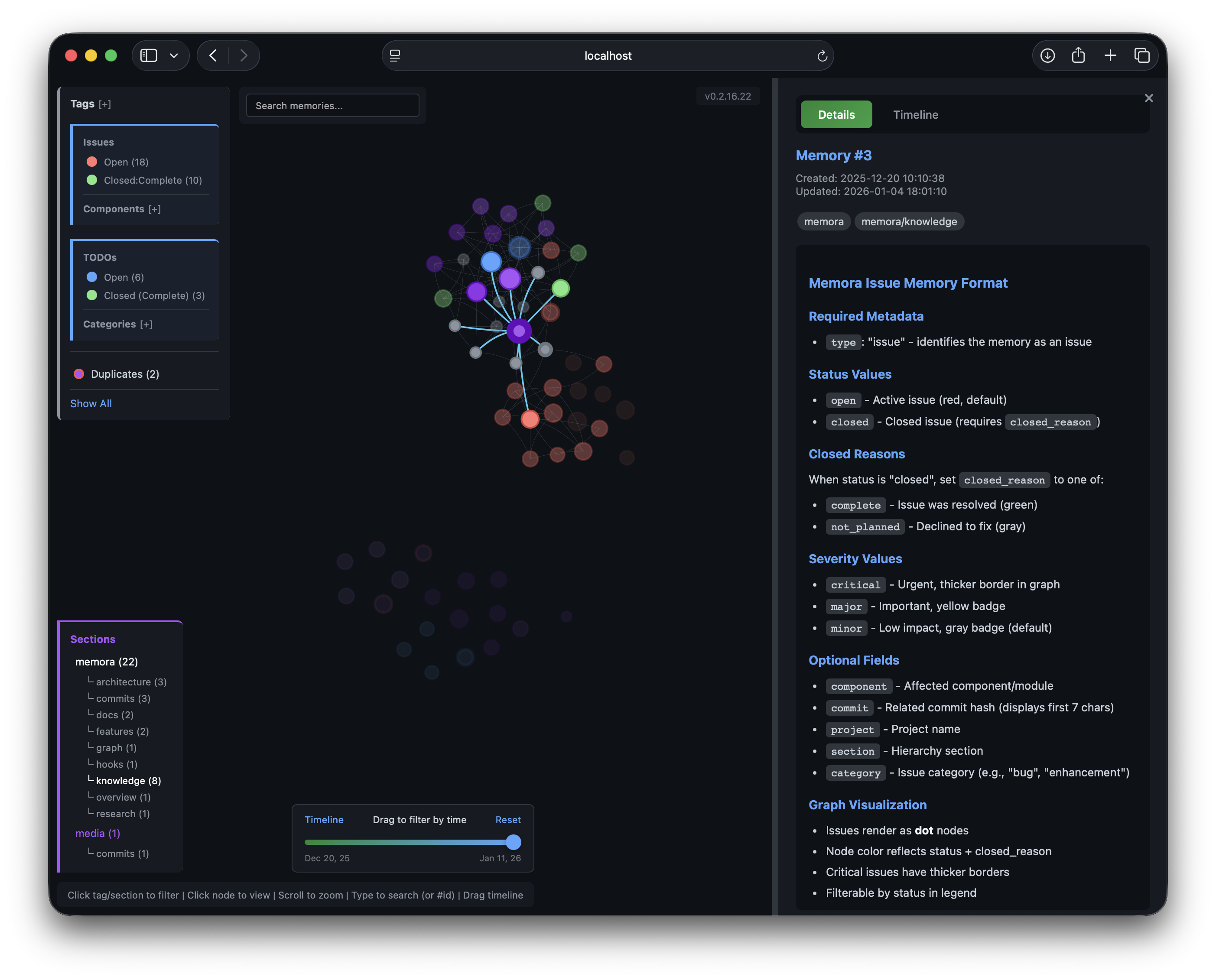
Details Panel |
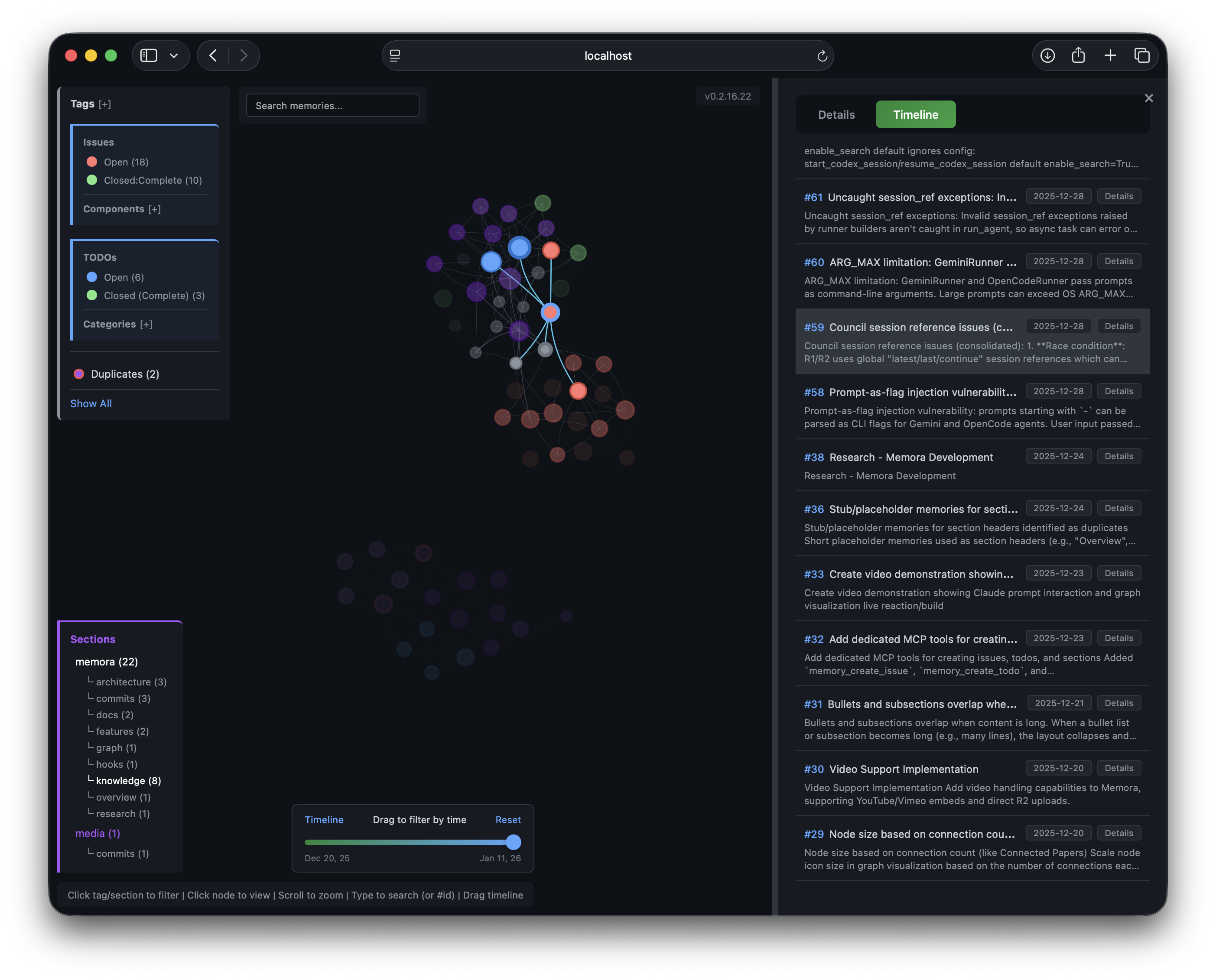
Timeline Panel |
**Access locally:**
```
http://localhost:8765/graph
```
**Remote access via SSH:**
```bash
ssh -L 8765:localhost:8765 user@remote
# Then open http://localhost:8765/graph in your browser
```
**Configuration:**
```json
{
"env": {
"MEMORA_GRAPH_PORT": "8765"
}
}
```
To disable: add `"--no-graph"` to args in your MCP config.
### Graph UI Features
- **Details Panel** - View memory content, metadata, tags, and related memories
- **Timeline Panel** - Browse memories chronologically, click to highlight in graph
- **History Panel** - Action log of all operations with grouped consecutive entries and clickable memory references (deleted memories shown as strikethrough)
- **Chat Panel** - Ask questions about your memories using RAG-powered LLM chat with streaming responses and clickable `[Memory #ID]` references
- **Time Slider** - Filter memories by date range, drag to explore history
- **Real-time Updates** - Graph, timeline, and history update via SSE when memories change
- **Filters** - Tag/section dropdowns, zoom controls
- **Mermaid Rendering** - Code blocks render as diagrams
### Node Colors
- 🟣 **Tags** - Purple shades by tag
- 🔴 **Issues** - Red (open), Orange (in progress), Green (resolved), Gray (won't fix)
- 🔵 **TODOs** - Blue (open), Orange (in progress), Green (completed), Red (blocked)
Node size reflects connection count.
Cloud Graph (Recommended for D1)
When using Cloudflare D1 as your database, the graph visualization is hosted on Cloudflare Pages - no local server needed.
**Benefits:**
- Access from anywhere (no SSH tunneling)
- Real-time updates via WebSocket
- Multi-database support via `?db=` parameter
- Secure access with Cloudflare Zero Trust
**Setup:**
1. **Create D1 database:**
```bash
npx wrangler d1 create memora-graph
npx wrangler d1 execute memora-graph --file=memora-graph/schema.sql
```
2. **Deploy Pages:**
```bash
cd memora-graph
npx wrangler pages deploy ./public --project-name=memora-graph
```
3. **Configure bindings** in Cloudflare Dashboard:
- Pages → memora-graph → Settings → Bindings
- Add D1: `DB_MEMORA` → your database
- Add R2: `R2_MEMORA` → your bucket (for images)
4. **Configure MCP** with D1 URI:
```json
{
"env": {
"MEMORA_STORAGE_URI": "d1:///",
"CLOUDFLARE_API_TOKEN": ""
}
}
```
**Access:** `https://memora-graph.pages.dev`
**Secure with Zero Trust:**
1. Cloudflare Dashboard → Zero Trust → Access → Applications
2. Add application for `memora-graph.pages.dev`
3. Create policy with allowed emails
4. Pages → Settings → Enable Access Policy
See [`memora-graph/`](memora-graph/) for detailed setup and multi-database configuration.
Chat with Memories
Ask questions about your knowledge base directly from the graph UI. The chat panel uses RAG (Retrieval-Augmented Generation) to search relevant memories and stream LLM responses with tool calling support.
- **Toggle** via the floating chat icon at bottom-right
- **Semantic search** finds the most relevant memories as context
- **Streaming responses** with clickable `[Memory #ID]` references that focus the graph node
- **Tool calling** — the LLM can create, update, and delete memories directly from chat (e.g., "save this as a memory", "delete memory #42", "update memory #10 with...")
- Works on both the local server and Cloudflare Pages deployment
**Configure the chat model:**
| Backend | Variable | Default |
|---------|----------|---------|
| Local server | `CHAT_MODEL` env var | Falls back to `MEMORA_LLM_MODEL` |
| Cloudflare Pages | `CHAT_MODEL` in `wrangler.toml` | `deepseek/deepseek-chat` |
Requires an OpenAI-compatible API (`OPENAI_API_KEY` + `OPENAI_BASE_URL` for local, `OPENROUTER_API_KEY` secret for Cloudflare). The chat model must support tool use (function calling).
LLM Deduplication
Find and merge duplicate memories using AI-powered semantic comparison:
```python
# Find potential duplicates (uses cross-refs + optional LLM analysis)
memory_find_duplicates(min_similarity=0.7, max_similarity=0.95, limit=10, use_llm=True)
# Merge duplicates (append, prepend, or replace strategies)
memory_merge(source_id=123, target_id=456, merge_strategy="append")
```
**LLM Comparison** analyzes memory pairs and returns:
- `verdict`: "duplicate", "similar", or "different"
- `confidence`: 0.0-1.0 score
- `reasoning`: Brief explanation
- `suggested_action`: "merge", "keep_both", or "review"
Works with any OpenAI-compatible **chat** API (OpenAI, OpenRouter, Azure, etc.) via `OPENAI_BASE_URL`. OpenRouter is fine for this LLM path; it does **not** provide embeddings — configure embeddings separately (see Semantic Search & Embeddings).
Document Storage
Store structured documents (research reports, architecture decisions, post-mortems) as searchable fragment trees:
```python
# Store a markdown document — auto-parsed into typed fragments
memory_store_document(
content="# Research Report\n\n## Evidence Table\n| Claim | Confidence |\n...",
document_key="research/memora-enhancements-2026-04-08",
tags=["memora/research"]
)
# Returns: {root_id: 230, fragment_count: 100, node_map: {claim: [...], plan_item: [...], ...}}
# Retrieve the full document or specific fragment types
memory_get_document(document_key="research/memora-enhancements-2026-04-08")
memory_get_document(document_key="...", node_kinds=["claim"], content_mode="full")
# Delete a document and all its fragments
memory_delete_document(document_key="research/memora-enhancements-2026-04-08")
```
**How it works:** The parser splits markdown by structure — tables become individual claims, numbered lists become plan items, URL lists become references, and risk sections become risk fragments. Each fragment is independently searchable via `memory_semantic_search` while the full document is retrievable as a unit.
**Fragment types:** `claim`, `plan_item`, `reference`, `section_chunk`, `risk`
**Integrity guards:** Document fragments are protected from accidental modification:
- `memory_delete` requires `force=True` for fragments
- `memory_merge` refuses to merge fragments
- `memory_absorb` excludes fragments from similarity matching
- `memory_find_duplicates` and `memory_detect_supersessions` skip fragments
- Graph UI hides fragments, shows only the document root node
Memory Automation Tools
Structured tools for common memory types:
```python
# Create a TODO with status and priority
memory_create_todo(content="Implement feature X", status="open", priority="high", category="backend")
# Create an issue with severity
memory_create_issue(content="Bug in login flow", status="open", severity="major", component="auth")
# Create a section placeholder (hidden from graph)
memory_create_section(content="Architecture", section="docs", subsection="api")
```
Memory Insights
Analyze stored memories and surface actionable insights:
```python
# Full analysis with LLM-powered pattern detection
memory_insights(period="7d", include_llm_analysis=True)
# Quick summary without LLM (faster, no API key needed)
memory_insights(period="1m", include_llm_analysis=False)
```
Returns:
- **Activity summary** — memories created in the period, grouped by type and tag
- **Open items** — open TODOs and issues with stale detection (configurable via `MEMORA_STALE_DAYS`; `memory_insights` default 14, graph UI default 30 — same variable, two consumers)
- **Consolidation candidates** — similar memory pairs that could be merged
- **LLM analysis** — themes, focus areas, knowledge gaps, and a summary (requires `OPENAI_API_KEY`)
Memory Linking
Manage relationships between memories:
```python
# Create typed edges between memories
memory_link(from_id=1, to_id=2, edge_type="implements", bidirectional=True)
# Edge types: references, implements, supersedes, extends, contradicts, related_to
# Remove links
memory_unlink(from_id=1, to_id=2)
# Boost memory importance for ranking
memory_boost(memory_id=42, boost_amount=0.5)
# Detect clusters of related memories
memory_clusters(min_cluster_size=2, min_score=0.3)
```
Knowledge Graph Export (Optional)
For offline viewing, export memories as a static HTML file:
```python
memory_export_graph(output_path="~/memories_graph.html", min_score=0.25)
```
This is optional - the Live Graph Server provides the same visualization with real-time updates.
Neovim Integration
Browse memories directly in Neovim with Telescope. Copy the plugin to your config:
```bash
# For kickstart.nvim / lazy.nvim
cp nvim/memora.lua ~/.config/nvim/lua/kickstart/plugins/
```
**Usage:** Press `sm` to open the memory browser with fuzzy search and preview.
Requires: `telescope.nvim`, `plenary.nvim`, and `memora` installed in your Python environment.